
How to set up DMARC/DKIM/SPF for OCN Mail

OCN manages SPF, DKIM and DMARC for standard OCN-provided email addresses. You do not publish those records yourself. I start by confirming the mailbox and its sending connection, then test a delivered message to check authentication.
OCN's support FAQ assigns sender-policy compliance to OCN, and its settings guide says customers cannot edit OCN Mail's SPF record. These steps cover personal OCN Mail, not a separate business hosting contract. DNS examples below apply only to a domain you own.
Confirm your OCN mailbox
There is no custom-domain onboarding step in the documented personal OCN Mail workflow. Verify access to the OCN address issued with your account instead.
- Open webmail: Enter mail.ocn.jp in your browser and display the OCN Mail login screen.
- Sign in: Enter your full OCN email address in メールアドレス and your mail password in パスワード, then click ログイン.
- Confirm access: Check that your mailbox opens and note the exact domain after @ in your sending address.
OCN's desktop login instructions use these Japanese field labels. The mail password is separate from the password for the internet connection.
I keep the assigned OCN address as the sender while testing. Changing a display name or a From address does not authorize a different domain.
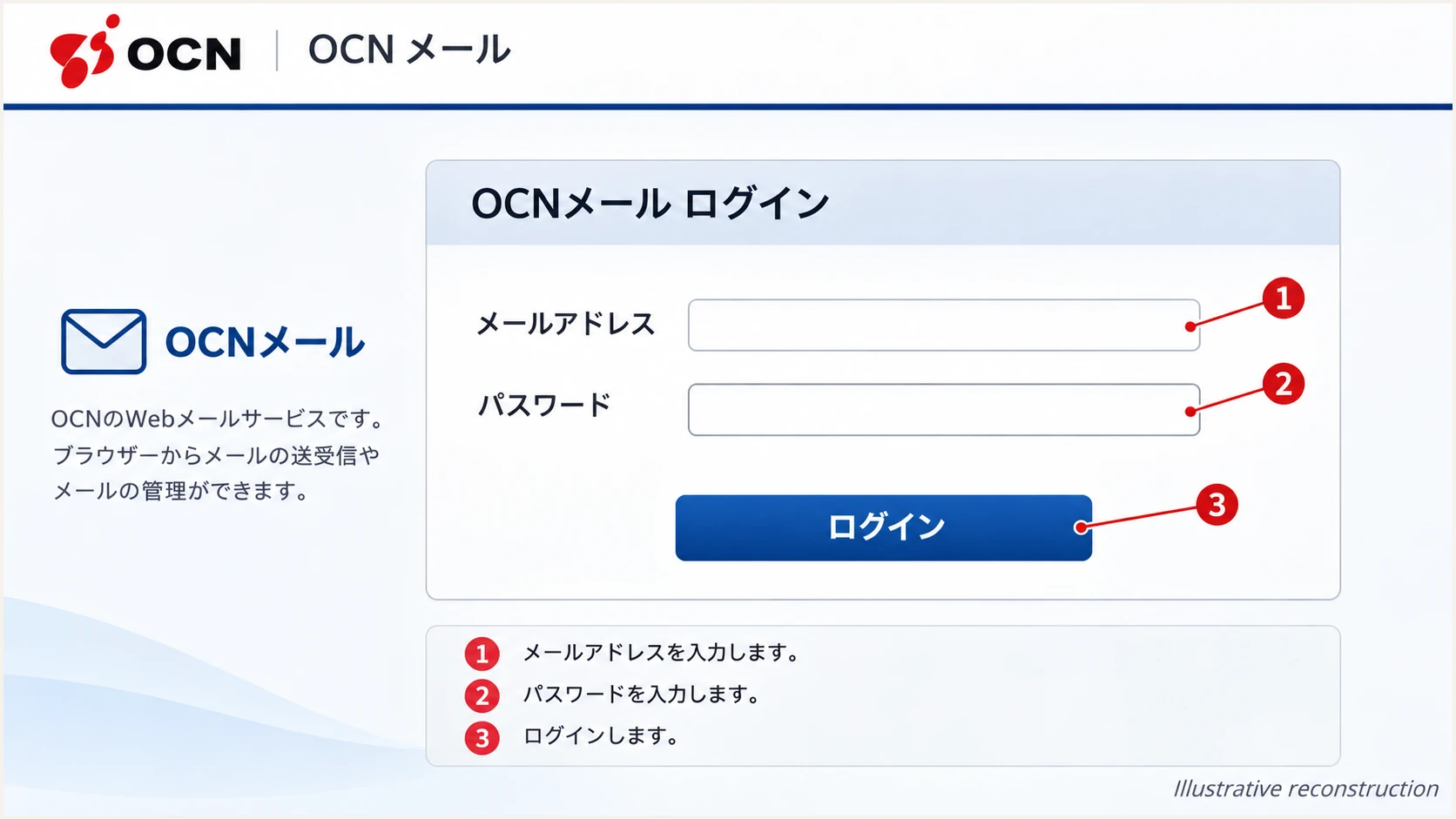
OCN Mail login fields and button, illustrative reconstruction.
Successful login confirms mailbox access. It does not establish that an external recipient will accept your outgoing message.
Next, check the sending route used by each device or application that sends with this address.
Set up SPF
OCN publishes the SPF authorization for its mailbox domains. There is no customer SPF include value to copy into an unrelated domain's DNS.
- Use OCN SMTP: For a mail application, set the outgoing server to smtp.ocn.ne.jp, port 465, with SSL/TLS and SMTP authentication enabled. Use your full OCN address and mail password.
- Check the envelope sender: In a delivered test, inspect Return-Path and the receiver's smtp.mailfrom result. SPF checks this envelope domain, not the visible From address.
- Compare domains: For SPF to satisfy DMARC, SPF must pass and its authenticated domain must match the From domain under DMARC's matching rules.
OCN's 'OCNメールの設定値と基本仕様' documents the SMTP settings above and explicitly says customers cannot configure or change its SPF record.
Enter the domain after @ in the address being checked. If the delivered Return-Path uses a different domain, inspect that domain separately.
SPF checker
Find SPF syntax issues, lookup limits, and weak records.
?/16tests passed
A DNS lookup checks the published SPF policy. A delivered-message test establishes whether the actual sending IP passes it.
Native OCN sending can satisfy SPF domain matching without a customer Return-Path setting. For a separate domain, confirm contractual support first. A mismatch still permits DMARC to pass through valid DKIM with a matching signing domain.
Set up DKIM
OCN handles signing for its standard mailbox service. I verify the signature on delivered mail rather than generate a key that OCN's sending servers do not use.
- Send through OCN: Use OCN webmail or the authenticated SMTP connection above, with the assigned OCN address as From.
- Inspect the signature: Find DKIM-Signature in the received message source. Record d=, the signing domain, and s=, the selector.
- Check the receiver result: Require dkim=pass for a signature whose d= domain matches the visible From domain under DMARC's matching rules.
- Escalate failures: If a direct webmail test has no usable signature, save its full headers and contact OCN. Do not publish a guessed selector or replacement key.
The selector identifies the public key at selector._domainkey.signing-domain. Read its actual value from the message; selector names change during key rotation.
SPF and DKIM provide separate ways to satisfy DMARC. A passing result alone is insufficient when its authenticated domain does not match the From domain.
SPF route
The sending IP must be authorized for the envelope sender domain. That domain must also satisfy DMARC's From-domain matching rules.
Forwarding commonly changes the connecting IP and breaks SPF.
DKIM route
The message signature must validate. Its d= domain must also satisfy DMARC's From-domain matching rules.
DKIM survives forwarding when the signed content remains intact.
An SPF matching error is acceptable for DMARC when a valid DKIM signature provides the required domain match. Fixing SPF is still useful when you control the sending configuration.
A footer signature configured in webmail is unrelated to DKIM. Editing that footer does not enable cryptographic signing.
Set up DMARC
OCN controls DMARC policy for OCN-owned domains. Its March 24, 2026 notice describes a staged change to quarantine and then reject. Check the current policy for your exact address domain.
- Check existing policy: Look up the visible From domain. Keep an existing quarantine or reject policy; do not weaken it to none.
- Confirm DNS ownership: Skip DNS publication for an OCN-provided address. For a separate domain you own, first confirm every legitimate sender can pass DMARC.
- Start reporting: For your own domain without DMARC, create one TXT record at _dmarc.example.com using the starter value below. Replace the example domain and reporting mailbox.
The checker inspects DNS. It cannot establish whether an individual OCN message passes authentication.
Use the precise From domain rather than the SMTP server hostname. A policy for your separate domain does not change OCN's policy.
DMARC checker
Look up a domain's DMARC record and catch policy issues.
?/7tests passed
For a domain you control, the DMARC record generator builds the record. Publish it at your DNS provider, not in OCN Mail.
Use this monitoring policy only when introducing DMARC on your own domain. It requests aggregate reports without requesting quarantine or rejection.
Starter DMARC TXT value for a domain you owntext
v=DMARC1; p=none; rua=mailto:dmarc@example.com
Replace dmarc@example.com with a working reporting destination before publishing. If a reporting service supplies an address, use its exact value and complete any external-report authorization it requires.
Keep one DMARC record at that name. Multiple DMARC records cause a discovery error; a second record does not extend the first.
Verify and troubleshoot
I test the actual OCN sending route first. A correct DNS record does not prove that a device uses OCN's authenticated SMTP service.
- Compose a test: In desktop OCN Mail, click メール作成. Enter the test recipient in 宛先, enter a subject in 件名, add a short body, then click 送信.
- Repeat each route: Send a fresh test through every mail application or device using the address. Compare each with the webmail result.
- Read trusted results: Use Authentication-Results added by the receiving system. Check spf=, dkim= and dmarc= together with their evaluated domains.
- Save evidence: Keep the full headers, sending time and exact bounce response. If webmail passes but one device fails, inspect that device's outgoing configuration first.
OCN's 'メールの作成と送信' instructions document the compose and send controls. Its sent-message confirmation confirms submission, not final delivery.
Use a new message without forwarding or content rewriting for the initial test. This helps isolate OCN's original authentication results.
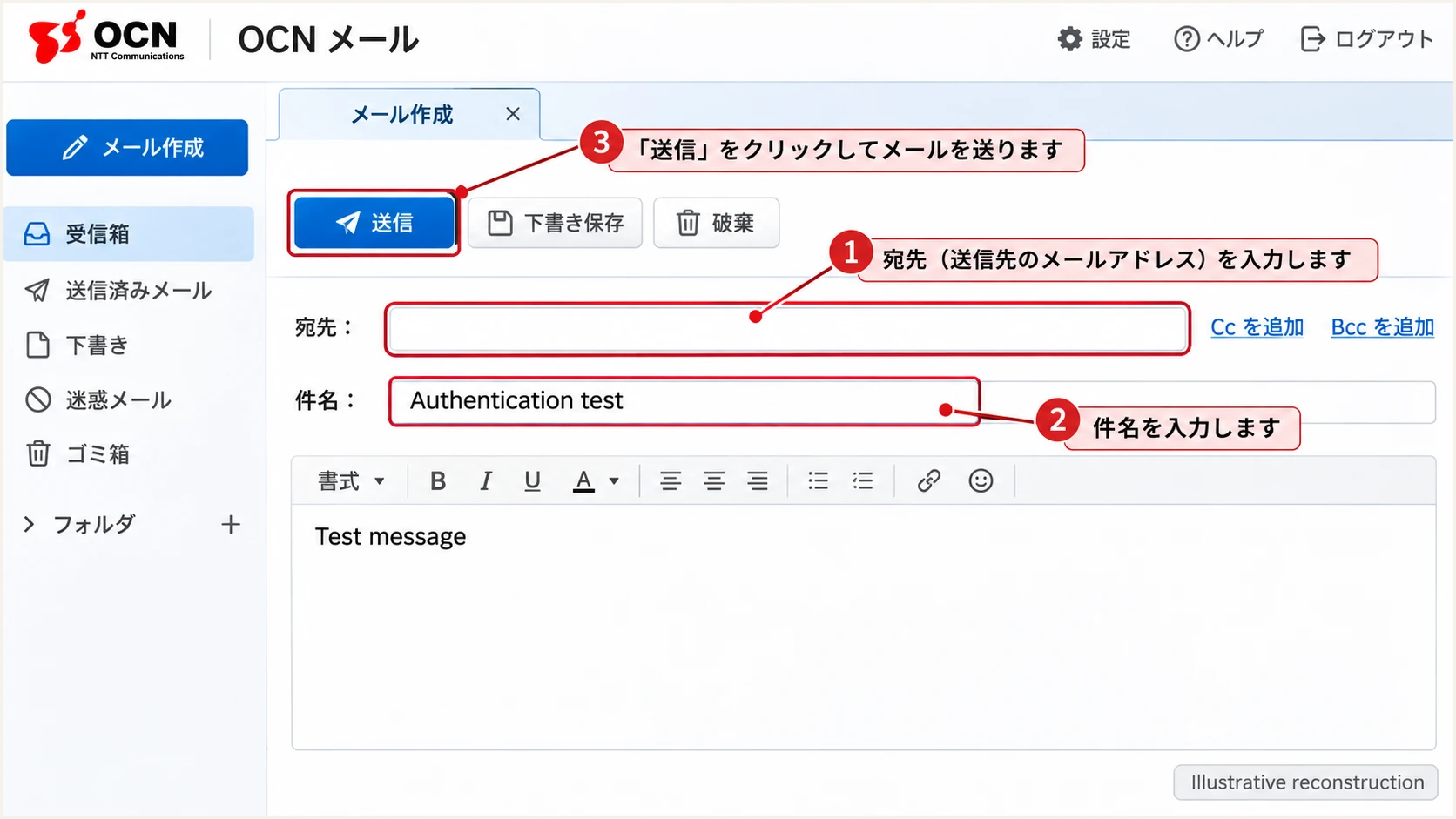
OCN Mail compose controls for a test message, illustrative reconstruction.
The email tester below is the quickest check: send a message to the address it displays and open the resulting diagnosis.
Send through OCN directly. The result checks that message's authentication and also reports other delivery-related checks.
Email tester
Send a real email to this address. Suped shows a results button when the test is ready.
?/43tests passed
A useful result identifies both the pass or fail status and the domain involved. SPF and DKIM passes for unrelated domains do not establish DMARC success.
For a failure, compare the webmail test with the affected device. Use these results to choose the next action.
|
|
|
|---|---|---|
SPF fail | Sending route | Check OCN SMTP |
DKIM fail | Signature integrity | Test direct webmail |
DMARC fail | Domain matching | Compare From domains |
DMARC pass | Other delivery issues | Read bounce response |
Authentication results and the next diagnostic step.
In OCN webmail, このメールの認証情報 displays authentication information for a received message. Those results describe that received message, not every message you send.
If direct OCN sending fails consistently, give OCN support the saved headers and bounce. OCN must resolve faults in its shared DNS or signing infrastructure.
Get alerted when it breaks
For domains your team controls, our Suped platform connects aggregate-report monitoring with detected issues and notifications. This is the practical way to track authentication after an initial test.
- Enable notifications: In Suped's notification settings, enable Issues detected and Sending sources need verification. Enable DMARC summary emails for regular review.
- Review the source: When an issue arrives, inspect the affected source and its SPF, DKIM and DMARC results. Verify that the source is authorized before changing DNS.
- Confirm recovery: Follow the issue's fix steps, retest the sending application and check later aggregate reports for continuing failures.
Suped's DMARC monitoring keeps source investigation and issue follow-up in one workflow. DNS history helps identify changes associated with a failure.
An OCN-provided mailbox gives you no authority to redirect reports for its shared domain. Use message tests and OCN support for that mailbox.
Reports arrive after delivery
Suped notifications depend on the data received. Aggregate DMARC reports arrive on reporting schedules, so they do not provide an immediate alert for every failed message. Retest directly after a configuration change.
Keep your existing OCN sending setup while investigating. Adding a reporting platform does not grant control over OCN's authentication records.
For a domain you own, review every authorized source before increasing DMARC enforcement.
Secure your domain with p=reject
Only the domain owner can change its DMARC enforcement policy. OCN handles this for OCN-provided addresses. The following sequence applies to your own domain.
- Inventory senders: Use Suped's source table to identify legitimate mail, including low-volume systems and scheduled jobs. Verify ownership of unfamiliar sources.
- Fix domain matching: Confirm each legitimate source passes DMARC through SPF or DKIM with the required From-domain match. A different From domain sent through personal OCN Mail needs a supported sending arrangement.
- Stage enforcement: Review a representative sending cycle, then move a new monitoring policy to quarantine. Investigate legitimate failures before changing to reject.
- Verify the change: Use our Hosted DMARC policy controls when configured for your domain, or edit its existing DNS TXT record. Check the effective policy and test critical senders again.
Suped's issue diagnostics and source-level records provide the evidence for each policy change. Keep reporting enabled after enforcement so new sending systems are visible.
There is no universal waiting period. Include infrequent legitimate senders in the review, and check subdomain policy before enforcing it.
Keep existing enforcement
If your domain already uses quarantine or reject, retain that policy while fixing individual senders. Do not replace an OCN-managed record or downgrade an enforced policy to the starter none example.
A reject policy requests rejection of messages that fail DMARC. Receivers apply their own handling rules, and passing DMARC does not guarantee inbox placement.
After the change, send another OCN test wherever OCN is an authorized source, then inspect the next reports for legitimate failures.
Frequency asked questions
No. For a standard OCN-provided address, OCN manages the domain's authentication. Verify your mailbox and outgoing connection, then test delivered mail. A separately owned domain or business hosting contract requires its own supported setup.
OCN does not provide a customer SPF include in its personal Mail setup documentation. Do not invent include:ocn.ne.jp or authorize a single shared sending IP. Use OCN's authenticated SMTP route for the OCN address.
Yes. DMARC passes when a valid DKIM signature has a signing domain that satisfies the required match with From. An SPF mismatch alone does not cause DMARC failure when DKIM supplies that match.
Changing From does not establish authentication support for your domain. Confirm custom-domain signing and envelope sender support for your exact contract before using it. Personal OCN Mail instructions cover OCN-issued addresses.
These domains are associated with OCN, so OCN Mail is a candidate source to investigate. OCN also operates network services. Verify the actual connecting IP, its reverse and forward DNS, and the receiver's authentication results before attributing a message to OCN Mail.
DMARC verifies domain authentication; recipient filtering also considers other factors. Read the exact rejection response and test a direct OCN webmail message. Give OCN support the full headers, timestamp and bounce if the rejection persists.




