
How to set up DMARC/DKIM/SPF for NMI

To authenticate NMI email, add include:_spf.safewebservices.com to your existing SPF record, publish NMI's gps1, gps2 and gps3 DKIM CNAMEs, and publish a DMARC TXT record for your sending domain. Set your sender address in NMI's Account Information and verify a real receipt or invoice.
I check the visible From address and the receiving server's authentication results before treating the setup as complete. A passing SPF or DKIM check must also have domain alignment with the visible From address for DMARC to pass.
Add your domain
NMI validates the domain in your configured email address through DNS. I start with an address on a domain whose DNS I control.
- Open merchant settings. Sign in to the NMI Merchant Portal. Go to Options > Settings > General Options > Account Information.
- Set the sender. Enter receipts@example.com in Receipts "From" Address, replacing the example with your address. Save the page.
- Check the fallback. If Receipts "From" Address is blank, NMI uses Email Address for customer receipts and invoices. Changing Reply-to does not change the authenticated sender.
- Use the partner route. For partner notifications, open Settings > Account Information > Edit and update the relevant contact email, commonly Support Contact.
- Complete validation. Publish the SPF and DKIM records below, then return to the email field and check for DOMAIN VALIDATED or the green OK status.
Merchant users need Access Administrative Options to reach these settings. Partner sub-users need Administrative user permission.
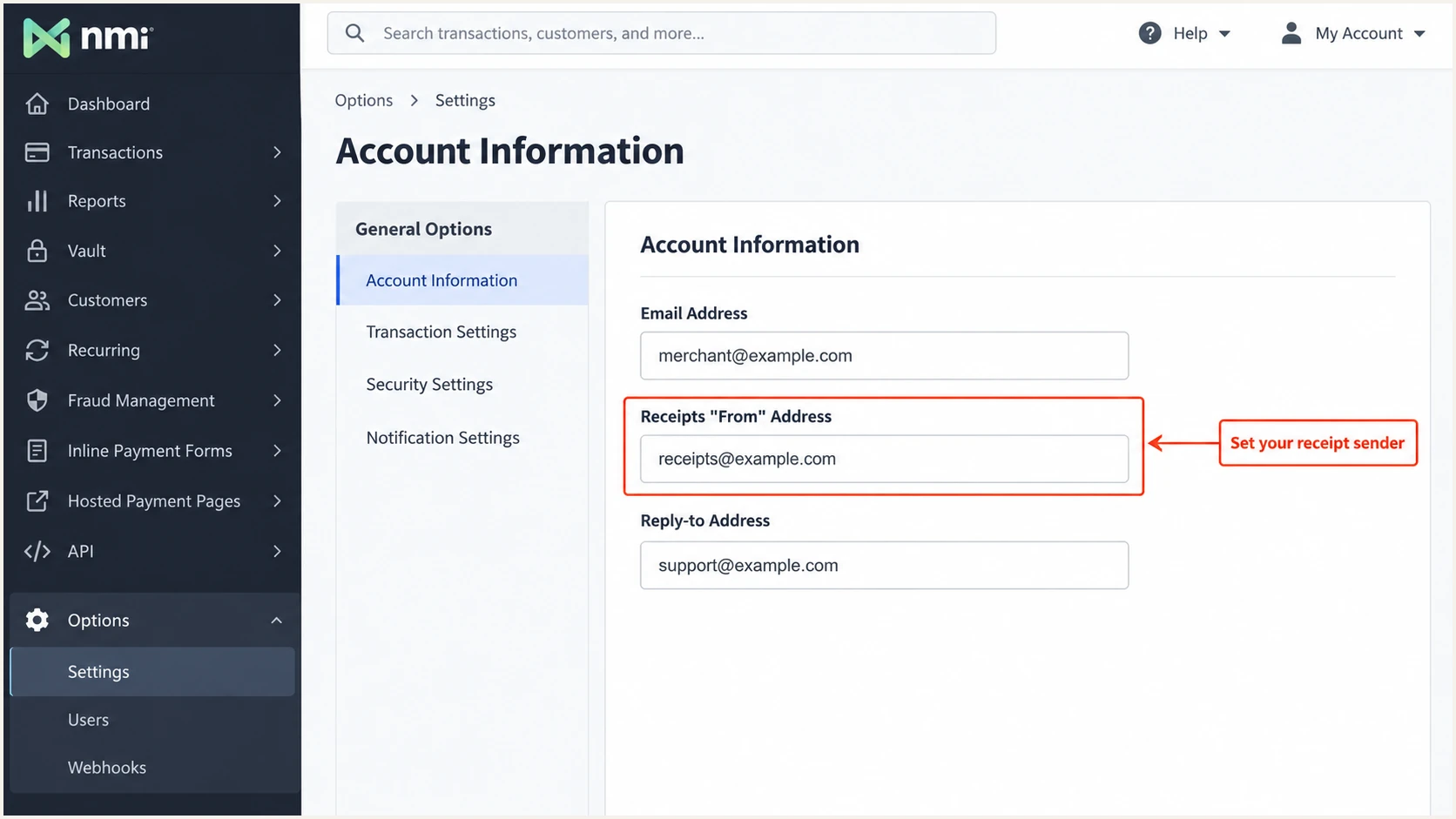
Set the receipt sender in NMI's Account Information page.
Repeat the DNS setup for each distinct sending domain. For receipts@billing.example.com, publish the sender's records under billing.example.com.
Avoid a sender address on a public mailbox domain you do not control. You cannot publish the DNS records needed to authorize NMI for that domain.
Set up SPF
NMI's published SPF include is _spf.safewebservices.com. Add it to the existing SPF TXT value for the sending domain.
- Find the record. Locate the TXT record beginning v=spf1. Use @ for the root domain, or the appropriate subdomain label.
- Merge the include. Insert include:_spf.safewebservices.com before the final all mechanism. Preserve every other authorized sender and your existing final mechanism.
- Keep one record. Publish one SPF record per hostname. Multiple SPF records produce an SPF error.
- Check the limit. Stay within the 10 DNS-querying-term limit during evaluation, including nested includes. NMI's portal does not support SPF macros.
SPF TXT value when NMI is the only authorized sendertext
v=spf1 include:_spf.safewebservices.com ~all
Use that complete example only for a domain that sends exclusively through NMI. For an existing domain, merge the include into its current record.
Enter your sending domain in the SPF checker below. Check the domain carrying your SPF record, rather than the include hostname.
SPF checker
Find SPF syntax issues, lookup limits, and weak records.
?/16tests passed
Confirm that the include is present, the record has valid syntax, and the full evaluation stays within the lookup limit. Remove obsolete senders before considering a maintained flattening setup.
SPF checks the envelope sender, shown in the delivered Return-Path. Adding an include to your visible From domain does not by itself change that Return-Path.
SPF passes
The receiving server confirms that the sending IP is authorized for the envelope sender's domain. That domain can still differ from the visible From domain.
SPF supports DMARC
The SPF result passes and the envelope sender's domain has the required relationship to the visible From domain. With relaxed alignment, a subdomain under the same organizational domain works.
Check NMI's actual envelope sender in a test message. If it still uses safewebservices.com, ask NMI support for your account's custom Return-Path activation and DNS instructions.
Keep the documented SPF include for NMI's branded-domain validation. A passing DKIM signature with domain alignment also allows DMARC to pass while you resolve the envelope sender.
Set up DKIM
Publish these CNAME records for the exact domain used in your NMI From address. NMI manages the signing keys behind the aliases.
- Choose the domain. Replace example.com in each record name with your sending domain. Keep the safewebservices.com targets unchanged.
- Create CNAMEs. Add gps1._domainkey, gps2._domainkey and gps3._domainkey. Use CNAME records, not TXT records.
- Avoid duplicate suffixes. If your DNS editor appends the domain, enter only the selector label. Keep the records as ordinary DNS aliases.
- Preserve existing selectors. Keep unrelated DKIM records used by your other senders. A CNAME cannot share its exact name with another record.
NMI DKIM records in DNS zone formatdns
gps1._domainkey.example.com. IN CNAME gps1._default.dkim.safewebservices.com.
gps2._domainkey.example.com. IN CNAME gps2._default.dkim.safewebservices.com.
gps3._domainkey.example.com. IN CNAME gps3._default.dkim.safewebservices.com.
The trailing dots indicate complete names in zone-file syntax. In a DNS control panel, enter the Name and Target values in their separate fields.
Do not generate a replacement private key for this setup. These aliases delegate public-key publication to NMI.
Keep every rotation selector
NMI reserves selectors for key rotation, and an unused target is sometimes blank. Keep all three CNAMEs. Judge live signing by the selector in the delivered message's DKIM-Signature header.
I check that the delivered message has dkim=pass and that its signing domain, the d= value, has domain alignment with the From address. DNS publication alone does not prove that NMI signed the message correctly.
Set up DMARC
DMARC is published in your DNS, separately from NMI's sender settings. Keep an existing quarantine or reject policy while adding NMI.
- Inspect existing policy. Look up TXT at _dmarc.example.com, replacing example.com with your domain. Update an existing policy instead of creating a second DMARC record.
- Start monitoring. For a domain without DMARC, create a TXT record at _dmarc using the initial value below.
- Set the report destination. Replace dmarc@example.com with a working mailbox or your report processor's assigned address. Confirm external reporting authorization when required.
- Keep relaxed defaults. Leave aspf and adkim unset unless your organization requires strict matching. Their default is relaxed domain alignment.
Initial DMARC TXT value at _dmarc.example.comtext
v=DMARC1; p=none; rua=mailto:dmarc@example.com
Use the DMARC record generator to build the value with your actual reporting address. Keep the same reporting destination when you later change policy.
After publishing, check the exact From domain below. If it is a subdomain, also inspect the parent policy and any explicit subdomain policy.
DMARC checker
Look up a domain's DMARC record and catch policy issues.
?/7tests passed
Confirm that the lookup finds a valid policy and your intended reporting destination. The initial p=none policy requests reports without requesting quarantine or rejection.
I keep reporting enabled throughout enforcement. Receiver reports reveal other legitimate senders sharing the domain, including systems unrelated to NMI.
Verify and troubleshoot
I verify both NMI's DNS status and a newly delivered NMI message. The live message shows whether the gateway is using the intended sender and signing domain.
- Recheck the portal. Return to Account Information. In the Partner Portal, use "Click here to recheck your domain" when available and inspect the resulting record table.
- Allow status refresh. NMI checks records daily. Its merchant documentation allows 24-48 hours for DNS changes and the displayed status to update.
- Open the instructions. For UNABLE TO VALIDATE, open "Instructions are available" and compare the DNS Settings Guide with your published records.
- Send through NMI. Use a receipt resend or invoice addressed to a mailbox you control. A message sent manually from your regular mailbox does not test NMI.
- Inspect the result. Confirm the intended From address, a passing DKIM signature with domain alignment, and dmarc=pass. Check SPF against the actual Return-Path.
A green OK indicates NMI's DNS validation succeeded. It does not prove the authentication result of every message type.
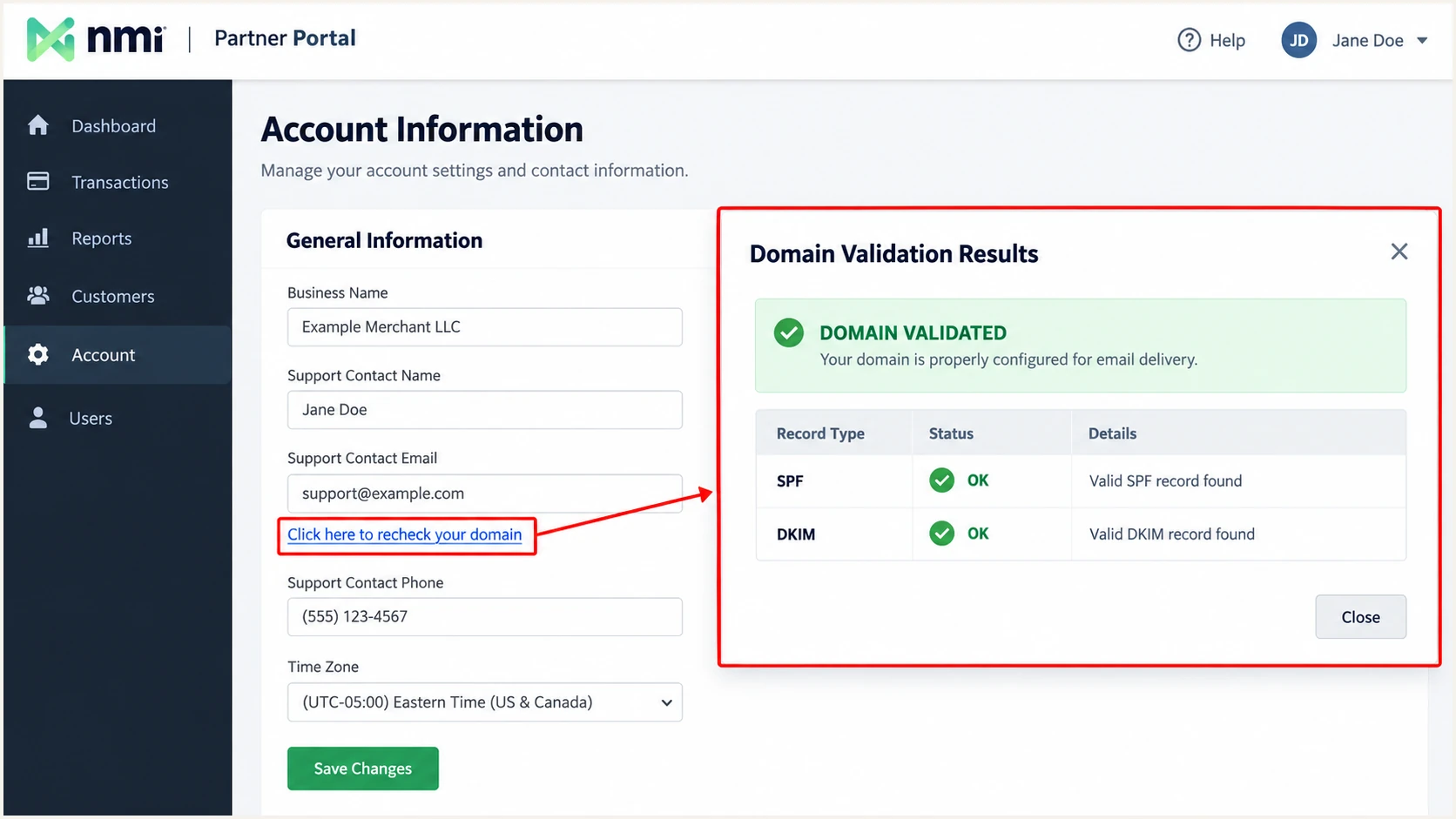
Recheck SPF and DKIM records in NMI's Partner Portal.
For a quick live diagnosis, start the email tester below and copy its generated recipient address. Direct a new NMI receipt or invoice to that address.
Send the message directly through NMI so the test receives the gateway's original headers. Forwarding an old receipt changes the delivery path and produces a different test.
Email tester
Send a real email to this address. Suped shows a results button when the test is ready.
?/43tests passed
Inspect the receiver's Authentication-Results alongside From, Return-Path and DKIM-Signature. If SPF passes for safewebservices.com while From uses your domain, SPF has no domain alignment; a passing DKIM signature for your domain still satisfies DMARC.
If NMI rewrites From to outgoing@safewebservices.com, fix the branded-domain validation first. Save the test headers and send time when asking NMI support to investigate.
|
|
|---|---|
Portal warning | SPF and CNAMEs |
SPF permerror | Duplicates or lookups |
DKIM failure | Active selector |
DMARC failure | From versus domains |
Wrong From | NMI fallback |
Use the observed failure to choose the next check.
Fix the specific failing check, then send another NMI message. Test each distinct notification workflow you depend on before tightening policy.
Get alerted when it breaks
Suped is our DMARC platform for ongoing DMARC monitoring. It combines source-level authentication diagnostics with failure alerts, so a broken NMI configuration has an investigation workflow.
- Enable alerts. For a domain already reporting to Suped, open Settings > Notifications and enable DMARC failure alerts.
- Enable summaries. Turn on summary report emails so routine reviews continue when no alert fires.
- Inspect the source. When an alert arrives, filter records to the affected NMI traffic and compare SPF and DKIM domains with the visible From domain.
- Resolve and retest. Use the detected issue's fix steps, verify the DNS change, and repeat a live NMI email test.
I investigate a change in legitimate NMI traffic separately from unrelated unauthorized traffic using the domain. Check the failed records before changing SPF or lowering policy.
Compare DNS history with the first failing report period when a previously working setup breaks. This helps identify a deleted selector or an altered SPF record.
Reports have delivery delay
DMARC alerts depend on receiver reports, which arrive after the mail was processed. They do not provide an instant result for each receipt. Use the email tester immediately after DNS changes.
Keep a named owner for authentication alerts. Payment receipts need prompt investigation when a legitimate sending workflow starts failing.
Secure your domain with p=reject
I move to enforcement after legitimate sending workflows consistently pass DMARC. A successful NMI test is one part of that decision; the domain's other senders also need checking.
- Review source coverage. Use Suped's source table to identify authorized senders and investigate unrecognized traffic. Include infrequent settlement reports and other periodic notifications.
- Require working DKIM. Keep NMI's rotation aliases intact and confirm passing signatures with domain alignment. SPF alone is fragile when mail is forwarded.
- Observe a full cycle. Review enough reports to include your least frequent legitimate sends. Do not use a high overall pass rate to dismiss a failing low-volume workflow.
- Stage enforcement. For a domain starting at none, move to quarantine, review results, then reject. Keep quarantine or reject if already deployed.
- Check inherited policy. Review subdomains and any sp policy before enforcing the parent domain. Explicit child policies need their own review.
- Continue monitoring. After each policy change, inspect fresh reports and retest NMI. Correct the failing sender when legitimate traffic breaks.
Suped's Hosted DMARC lets teams manage policy changes in the dashboard after its DNS delegation is configured. Combined with source diagnostics and alerts, this keeps the enforcement decision tied to observed traffic.
For a directly managed TXT record, change the existing value to the appropriate stage below. Publish one value at a time and retain your real reporting address.
DMARC enforcement stagestext
; Quarantine stage
v=DMARC1; p=quarantine; rua=mailto:dmarc@example.com

; Reject stage
v=DMARC1; p=reject; rua=mailto:dmarc@example.com
The reject policy requests rejection of mail that fails DMARC. Receivers apply their own handling rules, and a DMARC pass does not guarantee inbox placement.
Retest after NMI account changes or DNS migrations. Keep all DKIM rotation aliases and the reporting destination in place.
FAQ
NMI documents safewebservices.com as its gateway email domain. I treat a matching rDNS suffix as an identification clue and confirm the sending IP against NMI's published SPF authorization and the actual message headers. The hostname alone does not prove that a message is authorized.
NMI's gateway documentation specifies include:_spf.safewebservices.com for branded sending domains. Add it only when NMI is authorized to send for your domain. Do not copy unrelated includes found inside a provider's own SPF record.
NMI reserves selectors for key rotation, so an unused selector sometimes has no active public key. Keep gps1, gps2 and gps3 CNAME records. Check the selector named in a real message's DKIM-Signature header when diagnosing a signing failure.
NMI uses this fallback sender when a custom domain's SPF and DKIM validation is incomplete. Correct the DNS records, recheck Account Information, and test the resulting From address. Changing Reply-to does not complete domain authentication.
Yes. A passing DKIM signature with domain alignment is enough for DMARC to pass. SPF still needs to be configured for NMI's branded-domain validation. For SPF to contribute to DMARC, the actual envelope sender must also have domain alignment with the visible From address.
No. DMARC policy applies to a domain, rather than an individual sending platform. Update the domain's existing DMARC record and retain its reporting destinations. A sending subdomain needs a review of its own policy and the policy it inherits.