How to set up DMARC/DKIM/SPF for NearlyFreeSpeech.NET

For email sent by a NearlyFreeSpeech.NET website, authorize include:sites.nearlyfreespeech.net in SPF, use an envelope sender in your domain, sign outgoing messages with DKIM in your application, and publish a DMARC TXT record at _dmarc.yourdomain.
NearlyFreeSpeech.NET documents PHP mail() and /usr/bin/sendmail for website sending, but no hosted DKIM setup for member-site mail. I treat DKIM signing as an application task and verify a delivered message before tightening DMARC. Existing quarantine or reject policies should stay in place.
Add your domain
Use a domain you control for the visible From address. I first confirm where its live DNS is hosted; adding a domain to a hosting account does not change DNS authority.
- Find the domain. In the NearlyFreeSpeech.NET member interface, open Domains. If an existing domain is missing, choose Use an Existing Domain in Actions and complete the form.
- Check DNS hosting. Choose Manage in the domain's DNS column. If DNS is hosted elsewhere, publish authentication records there instead. A registrar transfer is unnecessary.
- Enable DNS if needed. To use NearlyFreeSpeech.NET DNS, choose Add in the DNS column, preserve your existing zone records, and set the registrar delegation to the authoritative nameservers shown for this domain.
- Attach the website. Open Sites, select the site's Short Name, and use Add a New Alias under Site Names & Aliases if the website hostname is missing. A website alias is separate from email authentication.
- Verify authority. Compare the public NS response with the DNS Information panel. NearlyFreeSpeech.NET does not document a separate sender-domain verification wizard for native site mail.
If the website already works and DNS is hosted elsewhere, leave delegation in place. Only the authoritative DNS provider can publish the records receivers will read.
The DNS Information panel is the entry point for adding TXT records. The same route is used below for SPF and DMARC.
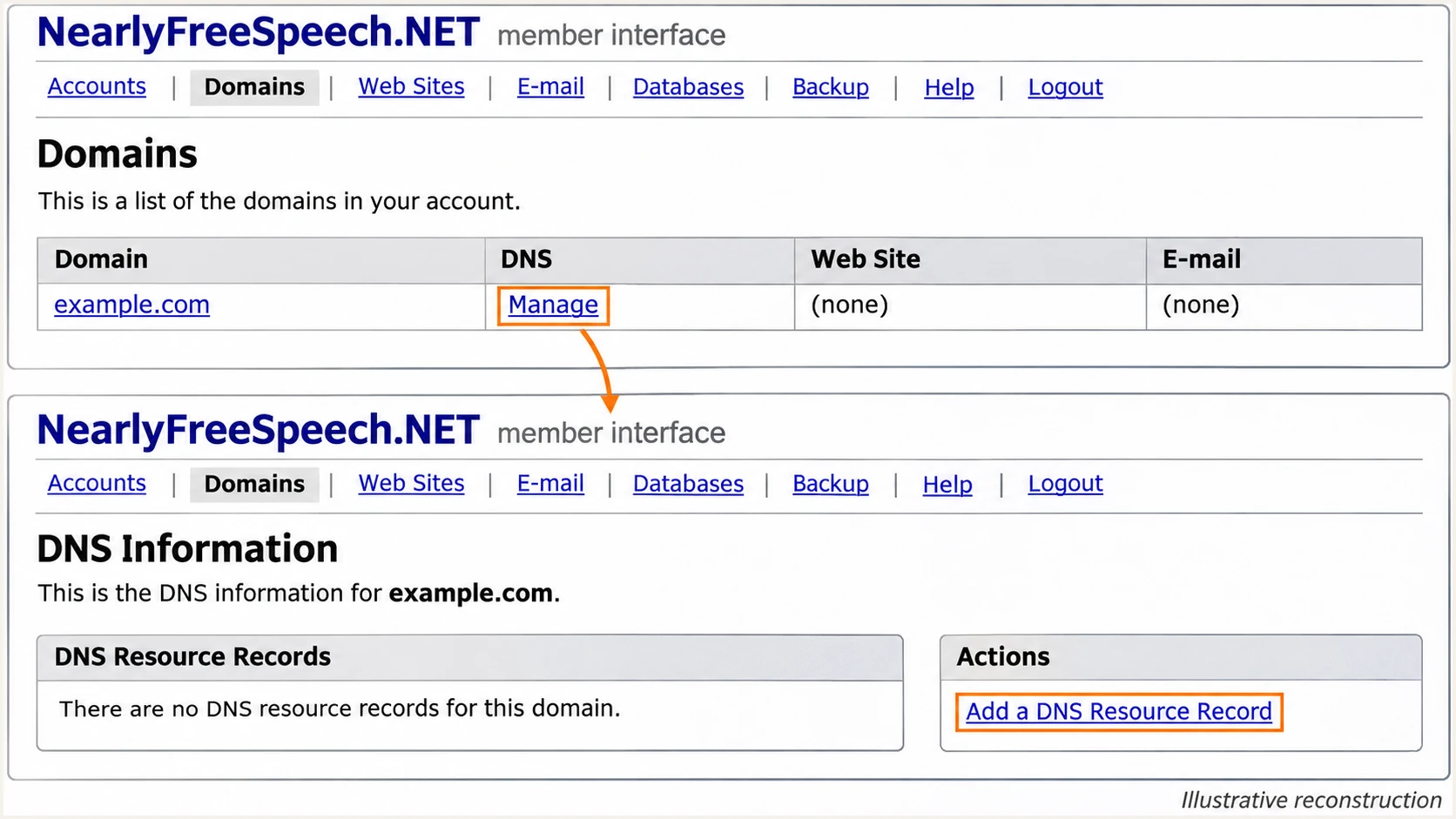
NearlyFreeSpeech.NET Domains and DNS Information navigation.
For a DNS check, run dig +short NS example.com on your own computer. Replace example.com with your domain throughout the examples.
Keep your inbound MX records unchanged during this setup. Website sending and mailbox delivery are separate configurations.
Set up SPF
The NearlyFreeSpeech.NET email FAQ specifies include:sites.nearlyfreespeech.net for mail originating from hosted websites. I add that mechanism to the existing SPF record for the actual envelope-sender domain.
- Inspect the envelope. Send a website message and inspect its Return-Path. Set the application's envelope sender to an address you control, such as bounces@example.com; the PHP example below sets this through PHPMailer's Sender property.
- Open TXT settings. In Domains, choose DNS Manage, then Actions > Add a DNS Resource Record. For example.com, leave Name blank and select TXT. Use the envelope subdomain as Name instead if you send with a subdomain Return-Path.
- Merge authorization. Add include:sites.nearlyfreespeech.net before the existing final all mechanism. Retain other legitimate senders and publish only one record beginning v=spf1 per name.
- Avoid the wrong pool. Do not use include:nearlyfreespeech.net or copy your website's IP address. Service notifications, forwarding, and member-site sending use different server pools.
- Check the result. Save the TXT record with Add Record, then check the envelope-sender domain below. Keep SPF evaluation within the 10 DNS-lookup limit, including nested includes.
This example authorizes only NearlyFreeSpeech.NET website mail. Use it as the complete policy only when that is your sole sender; otherwise merge its include into your existing policy.
For a root-domain envelope sender, the record name is example.com. For bounces@mail.example.com, publish SPF at mail.example.com because SPF records are not inherited.
SPF TXT value for NearlyFreeSpeech.NET-only sendingtext
v=spf1 include:sites.nearlyfreespeech.net ~all
A passing SPF check contributes to DMARC only when its authenticated envelope domain matches the visible From domain under the configured SPF alignment mode. With relaxed mode, subdomains of the same organizational domain qualify.
Do not enable SPF Email Protection for a sending domain. NearlyFreeSpeech.NET documents that option for domains that do not send email, so replace that automatic policy through its service controls before publishing a custom sending policy.
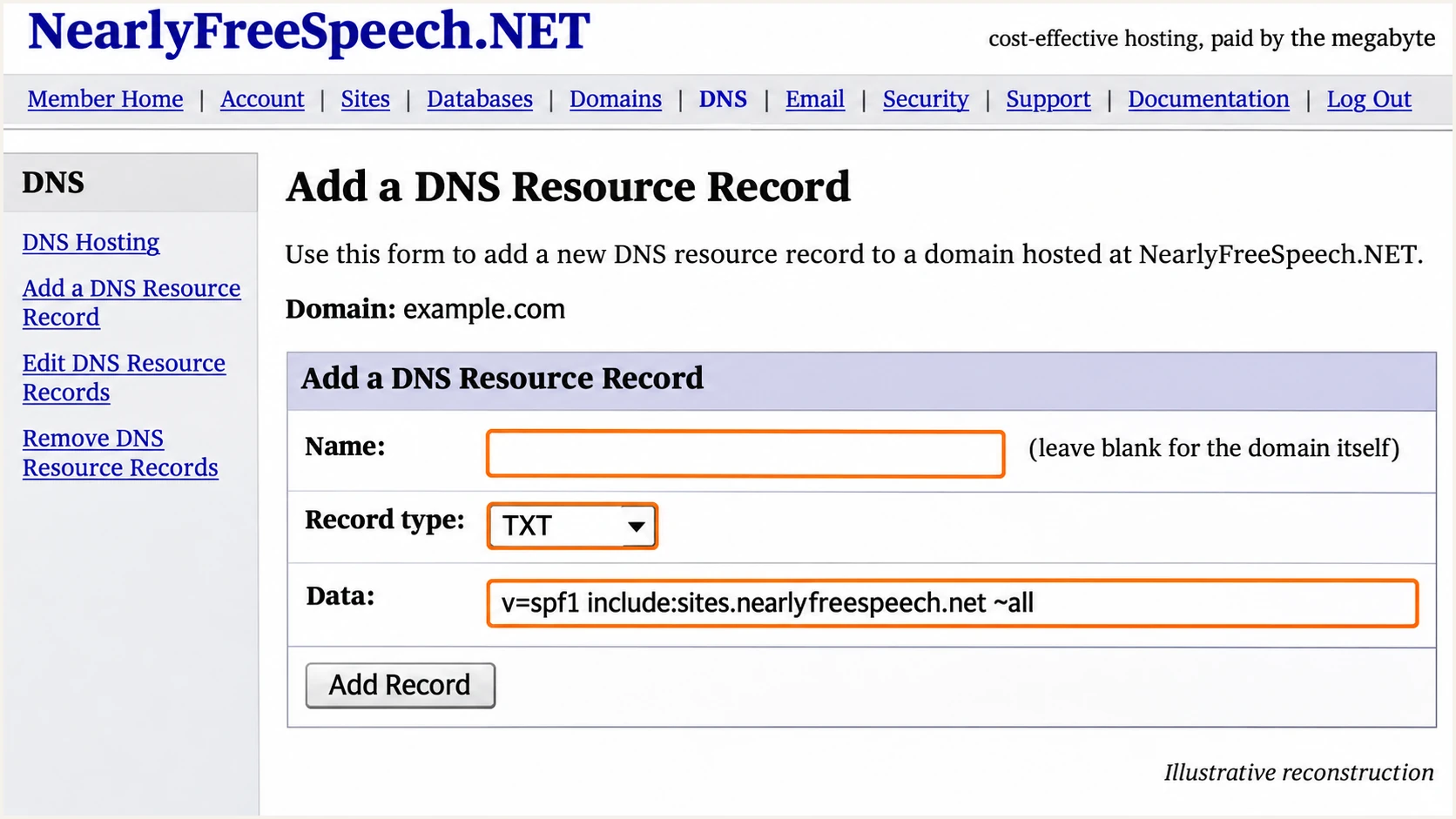
NearlyFreeSpeech.NET SPF TXT record with a blank root Name field.
Enter the Return-Path domain in the SPF checker. Checking the visible From domain alone misses a separate envelope subdomain.
A valid DNS record confirms syntax and authorization. The delivered message test later confirms which sending IP and envelope domain the application actually used.
SPF checker
Find SPF syntax issues, lookup limits, and weak records.
?/16tests passed
If SPF passes for a provider-owned Return-Path, your domain's SPF record cannot fix the resulting SPF alignment failure. Correct the envelope sender or rely on passing DKIM with a matching domain.
NearlyFreeSpeech.NET permits the custom-envelope sending approach used here. Confirm the final Return-Path in received mail instead of assuming that a From header sets it.
Set up DKIM
There is no public NearlyFreeSpeech.NET procedure for enabling automatic DKIM signing of member-site mail. For a PHP application, I use PHPMailer to sign the message before handing it to PHP mail(), the provider's supported PHP sending route.
- Prepare access. In Sites, open your site and read SSH/SFTP Information for the correct login details. Confirm PHP has the OpenSSL extension enabled.
- Create a key. Install PHPMailer in /home/protected/mail-auth and generate a unique 2048-bit RSA key using the commands below. If Composer is unavailable on the host, install the dependency locally for the host's PHP version and deploy its vendor directory.
- Publish the public key. In the DNS resource-record form, choose TXT and set Name to nfsn2026._domainkey. Prefix the single-line base64 public-key output with v=DKIM1; k=rsa; p= without a space after p=. Save it as one logical TXT record.
- Enable application signing. Use example.com as DKIM_domain, nfsn2026 as DKIM_selector, and the private-key path as DKIM_private. Replace example addresses and use an existing bounce mailbox in your domain.
- Cover every mail path. Apply this configuration to all website messages, including password resets and scheduled jobs. For another language, use its DKIM signing library before submission through /usr/bin/sendmail.
The protected directory is accessible to application scripts without being directly downloadable over HTTP. Keep the private key there, outside public and outside version control.
The final command prints the public key only. Copy its complete output, without PEM headers or inserted whitespace, into the p= value of the DKIM TXT record.
Install the signing library and generate your own DKIM keybash
mkdir -p /home/protected/mail-auth
cd /home/protected/mail-auth
composer require phpmailer/phpmailer
umask 077
openssl genpkey -algorithm RSA -pkeyopt rsa_keygen_bits:2048 \
  -out nfsn2026.private.pem
openssl pkey -in nfsn2026.private.pem -pubout \
  -out nfsn2026.public.pem
openssl pkey -in nfsn2026.private.pem -pubout -outform DER |
  openssl base64 -A
The restrictive key permissions created by umask require the PHP runtime to have read access. If it uses a different user, grant only that runtime the necessary directory traversal and key read permissions; do not make the key public.
For web requests, NFSN_SITE_ROOT identifies the site root. The example loads the protected dependency directory and fails if OpenSSL or the private key is unavailable. For scheduled CLI scripts, supply the corresponding site-root path explicitly.
Sign a PHP website message and set its envelope senderphp
<?php
use PHPMailer\PHPMailer\PHPMailer;

$siteRoot = rtrim($_SERVER['NFSN_SITE_ROOT'], '/');
$authDir = $siteRoot . '/protected/mail-auth';
require $authDir . '/vendor/autoload.php';

$privateKey = $authDir . '/nfsn2026.private.pem';
if (!extension_loaded('openssl') || !is_readable($privateKey)) {
    throw new RuntimeException('DKIM prerequisites are missing');
}

$mail = new PHPMailer(true);
$mail->isMail();
$mail->setFrom('notifications@example.com', 'Website');
$mail->Sender = 'bounces@example.com';
$mail->DKIM_domain = 'example.com';
$mail->DKIM_selector = 'nfsn2026';
$mail->DKIM_private = $privateKey;
$mail->DKIM_identity = $mail->From;
$mail->addAddress('recipient@example.net');
$mail->Subject = 'Website authentication test';
$mail->Body = 'Testing the production website mail path.';
$mail->send();
Integrate this code into the application's existing mail routine and replace recipient@example.net with your test destination. Keep the test routine private and use fixed sender addresses, not unvalidated form input.
A TXT record can contain multiple character strings that concatenate into one key. Follow the DNS form's TXT formatting instructions if it requires splitting a long key; do not create multiple separate DKIM records at the same selector.
Publishing the key
The public key goes in DNS at nfsn2026._domainkey.example.com. It lets receivers verify signatures but does not create them.
Signing each message
The application uses the private key before submission. Check received mail for DKIM-Signature with d=example.com and s=nfsn2026, plus dkim=pass.
If the application cannot sign mail, it cannot gain DKIM merely through DNS changes. Use a sending path that supports DKIM for your domain, or retain the documented native path with its SPF limitations understood.
External SMTP ports 25 and 465 are blocked by NearlyFreeSpeech.NET. Authenticated submission on port 587 is outside its support scope, so check compatibility before changing an application to that route.
Set up DMARC
Publish DMARC for the domain in the visible From address. For a domain without an existing enforcement policy, I start with p=none while checking legitimate website traffic.
- Read the current policy. Query _dmarc.example.com first. If p=quarantine or p=reject is already working, retain that policy and update reporting as needed.
- Create the record. Open the authoritative DNS editor, select TXT, and use _dmarc as Name in the example.com zone. Enter the value below, then choose Add Record.
- Set a real report destination. Replace dmarc@example.com with a mailbox or report-processing address you control. The example address is not a working collection destination.
- Validate publication. Check for exactly one DMARC policy record at the lookup name. If reports go to another domain, complete the destination's external reporting authorization.
Build the policy with the DMARC record generator. Keep the reporting destination while moving between policies.
The following is the starting TXT value, shown exactly. Change the reporting address before publication, and do not downgrade an existing enforcement policy to this example.
Initial DMARC TXT value at _dmarc.example.comtext
v=DMARC1; p=none; rua=mailto:dmarc@example.com
A p=none policy requests reporting without requesting quarantine or rejection for DMARC failures. It does not prevent receiving systems from applying their own spam rules.
DMARC passes when at least one mechanism passes authentication and its domain matches the From domain under the relevant alignment mode. An SPF pass alone is insufficient when those domains differ.
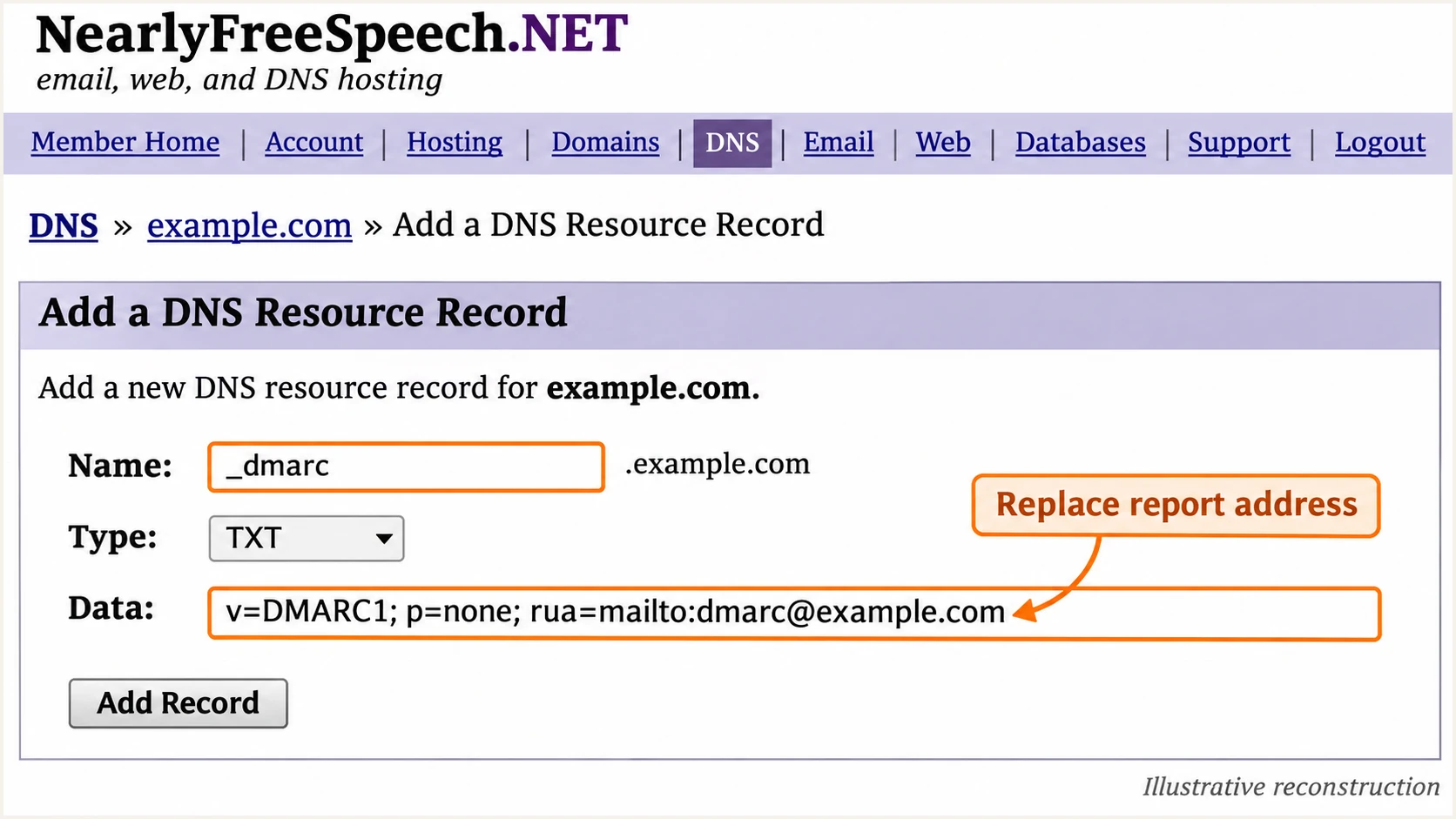
NearlyFreeSpeech.NET DMARC TXT form with _dmarc as the Name.
Enter the visible From domain in the DMARC checker below. It checks DNS publication, rather than whether a particular website message passed DMARC.
If an old value remains visible, query an authoritative nameserver and compare it with recursive DNS responses. Cached answers persist until their TTL expires.
DMARC checker
Look up a domain's DMARC record and catch policy issues.
?/7tests passed
Aggregate reports normally arrive after receivers finish a reporting interval, often a day. Allow 24-48 hours for the first data after sending real mail; not every receiver provides reports.
No reports does not prove that authentication works. Confirm report routing separately from the live-message test in the next step.
Preserve existing enforcement
Keep a working p=quarantine or p=reject policy. Fix the website's SPF or DKIM configuration rather than weakening protection for the entire domain.
Verify and troubleshoot
I test the actual website workflow after DNS is visible. A message sent by an unrelated mailbox does not exercise NearlyFreeSpeech.NET's website sending path.
- Send a real test. Use the email tester destination below as the recipient of a message generated by the website. For reset flows, use a controlled test account.
- Check SPF identity. Read the receiver's Authentication-Results and Return-Path. Confirm spf=pass for the envelope domain and compare that domain with the visible From domain.
- Check DKIM identity. Confirm dkim=pass, the expected signing domain, and selector nfsn2026. Missing signatures require an application fix; a missing public key requires a DNS fix.
- Check DMARC. Confirm dmarc=pass for the visible From domain. Repeat with a password reset, a form notification, and a scheduled message if the site uses different sending routines.
- Read failures. For application errors, inspect /home/logs/error_log and the mail routine's exception log. For rejected delivery, read the bounce message rather than treating mail() returning true as proof of delivery.
The email tester prompts you to send a message and returns a diagnosis of the received email. It is the quickest check that DNS and the actual sending configuration agree.
Use the widget's generated recipient in the application test. It must receive the original website message so that the authentication results describe this sending route.
Email tester
Send a real email to this address. Suped shows a results button when the test is ready.
?/43tests passed
Read the authentication result issued by the receiving system. A copied or sender-supplied Authentication-Results field is not trustworthy evidence.
These checks identify the configuration to change. I correct the failing identity or signing routine before editing the domain's enforcement policy.
|
|
|
|---|---|---|
SPF fail | Envelope SPF | Merge correct include |
SPF mismatch | Return-Path | Set own domain |
DKIM missing | Application | Enable signing |
DKIM key absent | Selector DNS | Publish public key |
DKIM body fail | Message changes | Sign final content |
DMARC fail | Domain match | Fix SPF or DKIM |
Common authentication failures for NearlyFreeSpeech.NET website mail.
A forwarded message often loses its original SPF pass because the connecting IP changes. A valid DKIM signature with a matching domain can keep DMARC passing if the signed content survives forwarding.
If authentication passes but delivery fails, investigate the SMTP rejection and sending-IP reputation. A blocklist (blacklist) listing is a separate problem from DMARC authentication.
Expected test result
Look for spf=pass for your envelope domain, dkim=pass for your signing domain, and dmarc=pass for the visible From domain. Check every production mail routine.
Get alerted when it breaks
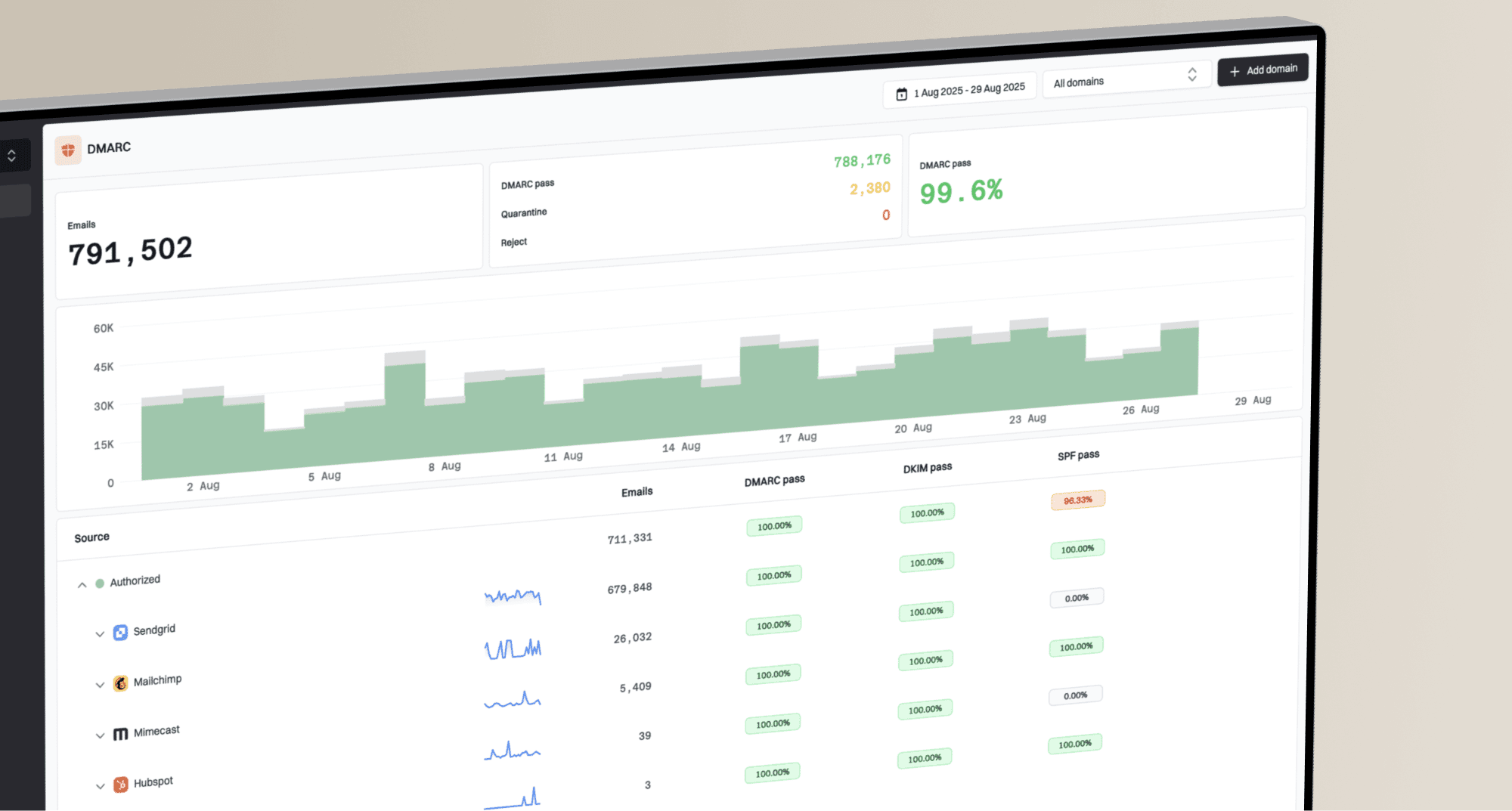
Suped is our DMARC platform for tracking this sending source after setup. Its issue detection and source diagnostics help catch a deployment that drops DKIM or changes the envelope sender.
- Enable issue notifications. In Suped notification settings, enable Issues detected and Sending sources need verification. Enable summary emails for ongoing review.
- Verify the source. Review NearlyFreeSpeech.NET traffic in the source table. Mark it as verified only after matching the sending evidence to a website or application you operate.
- Inspect a failure. Open the affected source and a record's detail view. Compare SPF and DKIM domains with the From domain, and use the issue's Steps to fix.
- Confirm recovery. Apply the application or DNS correction, send another test, and check subsequent reports for restored DMARC passes before closing the issue.
Use Suped's DMARC monitoring to review volume and pass rates by source, then drill into the failing records. DNS history helps compare record changes around the time a failure started.
Keep application error and bounce monitoring alongside DMARC notifications. Receiver reports arrive in batches, so report-based alerts are not an immediate per-message delivery signal.
Retest after deployment
A new mail library, a changed sender address, or a lost private-key file can break authentication without any DNS edit. Run a website-message test after those changes and review Suped's next source-level results.
If the site starts using a different sending route, check that route's authentication before authorizing it. An unfamiliar source needs investigation, even when it uses the same From address.
Use blocklist monitoring in Suped for a separate reputation signal when investigating delivery errors. A blacklist alert does not establish an SPF or DKIM failure.
Secure your domain with p=reject
Move to p=reject when every legitimate sending workflow has a dependable DMARC pass. I use Suped's source-level results to decide readiness rather than relying on one successful test.
- Cover the sending cycle. Review reports across normal operations, including infrequent website jobs and other authorized senders. One quiet day is insufficient evidence.
- Resolve legitimate failures. Fix missing DKIM signatures, unmatched envelope domains, and broken DNS. Do not add unknown senders to SPF just to improve the overall pass rate.
- Stage enforcement. Change the single _dmarc TXT policy to p=quarantine, retain reporting, and review new reports and bounces. Move to p=reject after legitimate traffic continues to pass.
- Keep monitoring. Use Suped's issue detection and source-verification workflow after each change. With Suped Hosted DMARC already configured, policy changes can be managed in its dashboard instead of editing DNS.
For direct DNS management in NearlyFreeSpeech.NET, update the existing DMARC record rather than adding a second one. Retain your actual reporting destination; the address below is an example.
Prioritize DKIM before enforcing rejection. It gives legitimate mail a DMARC pass when SPF is disrupted by forwarding, provided the signed message remains intact.
Final DMARC TXT value at _dmarc.example.comtext
v=DMARC1; p=reject; rua=mailto:dmarc@example.com
Check the published policy and run another website test after the change. Continue checking less frequent senders through a complete operating cycle.
A p=reject policy requests rejection of mail that fails DMARC for your domain. Receiving systems still apply their own handling rules, and the policy does not guarantee inbox placement.
Frequency asked questions
Use include:sites.nearlyfreespeech.net for email originating from hosted websites. Merge it into the envelope domain's existing SPF record. Do not substitute include:nearlyfreespeech.net or authorize a website IP as a replacement.
Its public website-mail documentation does not provide a hosted DKIM activation process. For the PHP method above, PHPMailer signs each message using your private key before PHP mail() submits it. Publishing a public key alone does not enable signing.
Yes. A passing DKIM signature whose signing domain matches the visible From domain under the applicable alignment mode is sufficient for DMARC. Correct SPF remains useful, but both mechanisms are not required to pass DMARC on each message.
A reverse-DNS hostname under nearlyfreespeech.net, including its sites.nearlyfreespeech.net namespace, points to NearlyFreeSpeech.NET infrastructure. The suffix alone does not identify a customer or prove authorization. Compare the connecting IP, message headers, and the current website-sending SPF include; forwarding uses a different server pool.
No. MX records route inbound email. SPF, DKIM, and DMARC for website sending use separate DNS records and application settings. Keep the existing MX configuration unless you are also changing how inbound mail is handled.
A successful return value means the local sending system accepted the message, not that the destination delivered it. Check the bounce destination, application errors, and the receiver's rejection response. Confirm delivery using a test through the same website routine.