How to set up DMARC/DKIM/SPF for MOBLE

To authenticate MOBLE emails, configure SPF for the active sending route, enable DKIM for your sending domain, and publish a DMARC TXT record. MOBLE's native sending instructions specify include:spf.moble.com. Its documented custom-domain connection uses Postmark, where DKIM and a custom Return-Path authenticate your domain.
I check which route sends the actual notification before changing DNS. MOBLE's 'How to Go Live: Delegate your Domain Name' instructions cover native SPF; its 'Send Email from Your Domain' help covers the custom-domain connection. Adding a website domain alone does not verify an email sender.
Add your domain
I separate the website's Primary Domain setting from email domain verification. The custom-domain connection requires verification in the connected sending account.
- Website domain. Open MOBLE's top-left menu, select Global Settings, and enter your website domain in Primary Domain without a protocol or www prefix. Press SAVE.
- Email domain. For the documented Postmark connection, create a Server in the connected account. In Sender Signatures, add the domain used by your From address. Open DNS Settings, publish its generated DKIM TXT record, and use Verify. Complete the Return-Path check below as well.
- Connect sending. Copy that Server's API Token. In MOBLE, open Global Settings, scroll to INTEGRATIONS, and populate Postmark Server Token and Postmark From Email with the token and an address on the verified domain. Press SAVE.
- Native sending. If you use MOBLE's native shared-server route, apply its documented SPF instructions below. Ask MOBLE support for your route's DKIM records and custom Return-Path configuration before claiming full authentication.
The Postmark fields also appear on MOBLE's AI Integrations screen and control the same connection. Complete them once. Keep the Server API Token private.
Finish DNS verification using the SPF and DKIM steps below, then submit a real MOBLE form. I use the received headers to confirm the connection actually sends with the expected From domain.
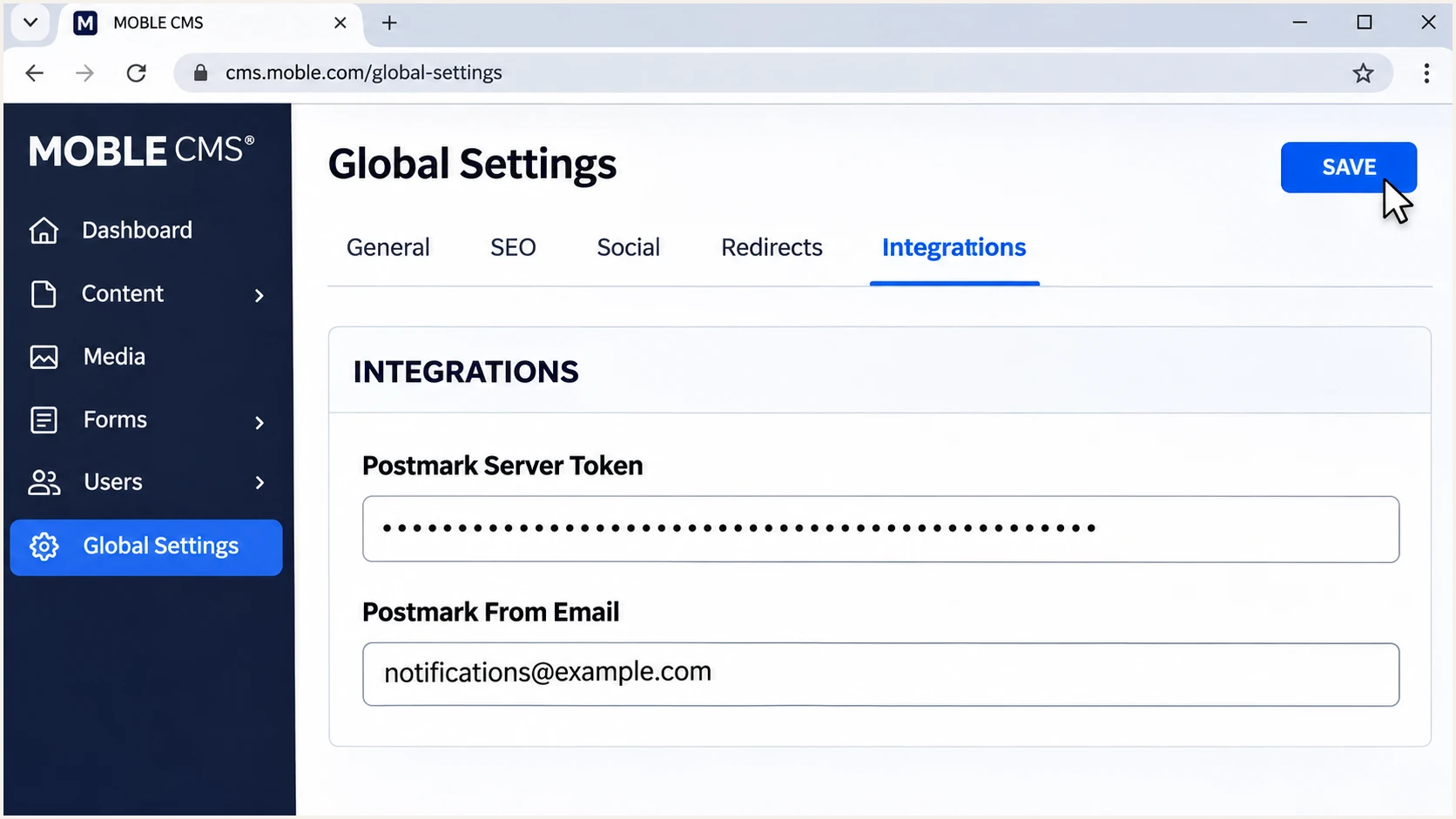
MOBLE Global Settings showing its email connection fields and SAVE button.
Set up SPF
MOBLE's native route and its custom-domain connection use different SPF setup. I inspect the received Return-Path first because SPF checks the envelope sender domain, not the visible From address.
- Native route. At your DNS host, find the existing SPF TXT record for the sending domain. Add include:spf.moble.com before its final all mechanism. If no SPF record exists and MOBLE is the only sender, use the native example below.
- Keep one record. Merge authorization into the existing SPF record. Preserve other legitimate senders and the current all mechanism; do not create a second SPF record at the same hostname.
- Custom-domain route. In the connected Postmark account, open Sender Signatures, select your domain's DNS Settings, and copy its Return-Path hostname. Publish the supplied CNAME pointing to pm.mtasv.net, then use Verify.
- Check limits. Keep SPF evaluation within the 10 DNS-lookup limit, including nested includes. Do not add a TXT record at a hostname that already has the Return-Path CNAME.
Native MOBLE SPF, only when MOBLE is the sole sendertext
v=spf1 include:spf.moble.com ~all
Use the Return-Path hostname displayed in your account. The CNAME example is for the documented Postmark connection, not a replacement for native MOBLE SPF. Postmark's 'How do I set up SPF for Postmark?' support article explains that its Return-Path CNAME handles SPF without an extra root-domain include.
Run the SPF check for the domain after the @ in the actual Return-Path. For native sending, also check the domain where you edited the SPF TXT record. A valid root record alone does not establish SPF alignment.
SPF checker
Find SPF syntax issues, lookup limits, and weak records.
?/16tests passed
For a From address at example.com, a Return-Path at pm-bounces.example.com satisfies relaxed SPF alignment when SPF passes. Relaxed alignment is the DMARC default. Strict SPF alignment requires an exact domain match.
If the Return-Path remains on a provider-owned domain, SPF authentication still passes when that provider authorizes its sending IP, but SPF alignment fails. DMARC still passes through a valid DKIM signature whose signing domain matches your From domain.
Native MOBLE route
Use the documented include:spf.moble.com mechanism in the appropriate SPF record.
Confirm the envelope domain in a received message. Obtain account-specific DKIM and Return-Path instructions from MOBLE.
Custom-domain connection
Use the connected account's verified Return-Path CNAME and DKIM TXT record.
Adding an SPF include at the root does not change a provider-owned Return-Path or fix its alignment.
Custom-domain route, illustrative Return-Path CNAMEtext
pm-bounces.example.com. 3600 IN CNAME pm.mtasv.net.
Set up DKIM
For MOBLE's documented custom-domain connection, DKIM is configured in the connected Postmark account. I use the generated selector and public key, never a guessed MOBLE selector.
- Get the key. Open Sender Signatures, find the exact sending domain, and select DNS Settings or Add a DKIM DNS record. Copy the displayed TXT hostname and full value.
- Publish DNS. Create that TXT record at your authoritative DNS host. Check whether the DNS editor automatically appends your domain so the hostname is not duplicated.
- Verify signing. Use Verify in the connected account and wait for DKIM to show verified. The service starts signing for your domain after verification.
- Confirm a message. Trigger a fresh MOBLE notification. In the received DKIM-Signature header, record d= and s=. Check that the receiver reports dkim=pass and the signing domain satisfies DMARC alignment.
MOBLE's native launch instructions publish an SPF include but do not supply a universal DKIM selector or public key. If your native messages lack a passing signature for your domain, obtain supported DKIM setup from MOBLE or use its documented custom-domain connection.
With relaxed DKIM alignment, the signing domain and visible From domain share the same organizational domain. A policy with adkim=s requires an exact domain match.
A DNS key lookup confirms publication. Only a newly received message confirms that the sending route uses the key and produces a valid signature.
Publish the sending service's public key
Creating an unrelated DKIM key in DNS does not enable signing in MOBLE. Keep private keys and API tokens out of DNS. Leave existing selectors for other senders in place.
Set up DMARC
DMARC belongs in your domain's DNS, at _dmarc followed by the domain in the visible From address. I start a new deployment in monitoring mode while testing every legitimate sending source.
- Check the policy. Check the effective DMARC policy, including an inherited organizational-domain policy for subdomain senders. If it is already p=quarantine or p=reject, keep that protection while fixing MOBLE's authentication.
- Create monitoring. For a domain without DMARC, create one TXT record at _dmarc.example.com using the value below. Replace example.com with your domain and dmarc@example.com with a working report destination.
- Preserve reporting. When editing an existing record, retain its approved reporting destinations and other intentional settings. A second DMARC record at the same hostname causes a policy discovery error.
- Use relaxed SPF. The custom Return-Path subdomain works with relaxed SPF alignment. If an existing policy uses aspf=s, SPF needs an exact match; a passing DKIM signature with suitable domain alignment can still satisfy DMARC.
Initial DMARC TXT value at _dmarc.example.comtext
v=DMARC1; p=none; rua=mailto:dmarc@example.com
The example mailbox is a placeholder, not a Suped reporting address. Use the report destination issued by your chosen reporting service, and complete external reporting authorization when it is required.
Use the DMARC record generator to build the record, then check the domain below. Enter the domain itself rather than the _dmarc hostname.
DMARC checker
Look up a domain's DMARC record and catch policy issues.
?/7tests passed
A successful DNS check confirms that receivers can discover the policy. It does not prove that MOBLE notifications pass DMARC.
DMARC passes when SPF or DKIM both authenticates successfully and has the required domain alignment. I aim for both on the custom-domain route so authentication is less dependent on either one.
Verify and troubleshoot
I test the real MOBLE workflow after DNS verification. A message sent manually through a different mailbox does not test the website's sending connection.
- Enable the form. Open Forms, select the relevant form's settings, and set Send Notification to Yes. Review Customer Notification Email and the Admin Notification Email recipient, then save.
- Trigger delivery. Submit the live form with a recipient mailbox you control. Repeat for enabled customer confirmations and admin notifications, then test the chatbot or automation workflows you actually use.
- Check identity. Confirm the received From address is the intended company address. Use a company-controlled sender for notifications rather than a visitor's email address.
- Read results. Inspect the receiving mailbox's Authentication-Results for spf=pass, dkim=pass, and dmarc=pass. Compare smtp.mailfrom with header.from and the DKIM signing domain.
- Resolve failures. For SPF errors, inspect the actual Return-Path and lookup count. For DKIM errors, compare the message's selector with DNS. For missing messages, confirm MOBLE's connection was saved and the form notification is enabled.
MOBLE's 'Form Send Email Notification' help confirms that Send Notification controls customer notification delivery. Its customer email settings choose the address customers see; DNS authentication must still be configured for the actual sender.
For a temporary test, use only addresses you control and restore any production notification recipients afterward. Keep customer confirmations and internal notifications as separate test cases.
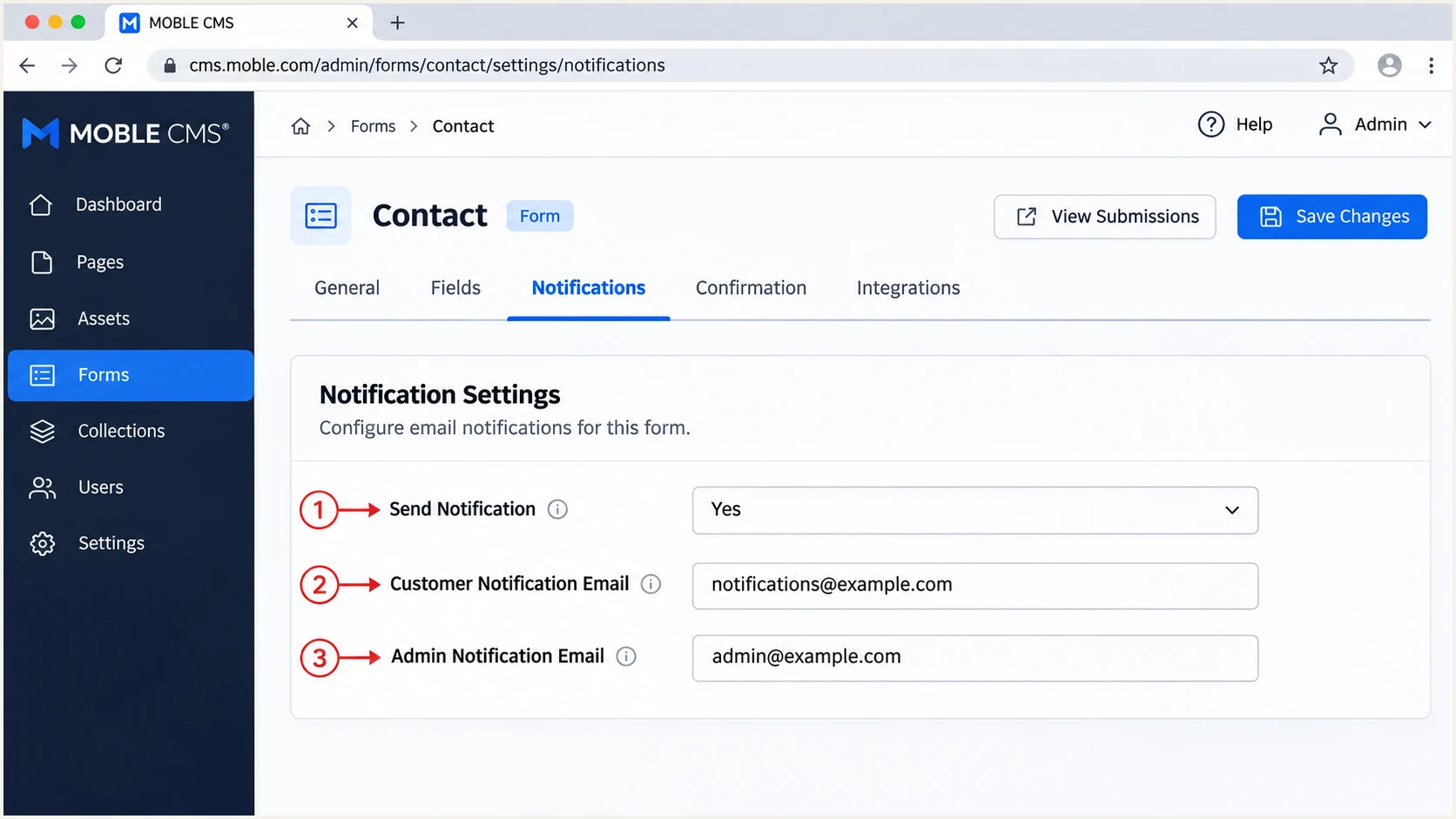
MOBLE form notification settings with Send Notification enabled.
Use the email tester below for a quicker message-level diagnosis. It gives you a test recipient address; send a fresh notification to that address through the MOBLE form or workflow being checked.
If the workflow only sends confirmations to the form submitter, enter the test address in that form's email field. If it sends an admin notification, temporarily route that notification to the test address. The resulting diagnosis checks the message that MOBLE actually sent.
Email tester
Send a real email to this address. Suped shows a results button when the test is ready.
?/43tests passed
A DNS change does not alter messages already received. Trigger a new notification after records have propagated and the connected account has verified them.
I use the results below to choose the next fix. Authentication success does not guarantee inbox placement, so investigate delivery errors separately when all authentication checks pass.
|
|
|
|---|---|---|
SPF permerror | Duplicate SPF or lookups | Single record; lookup count |
SPF mismatch | Provider Return-Path | Custom bounce domain |
DKIM missing | Signing inactive | Domain verification |
DKIM fail | Wrong selector or key | Message selector; DNS key |
DMARC fail | No matching pass | From and auth domains |
Common results after testing MOBLE notifications
Get alerted when it breaks
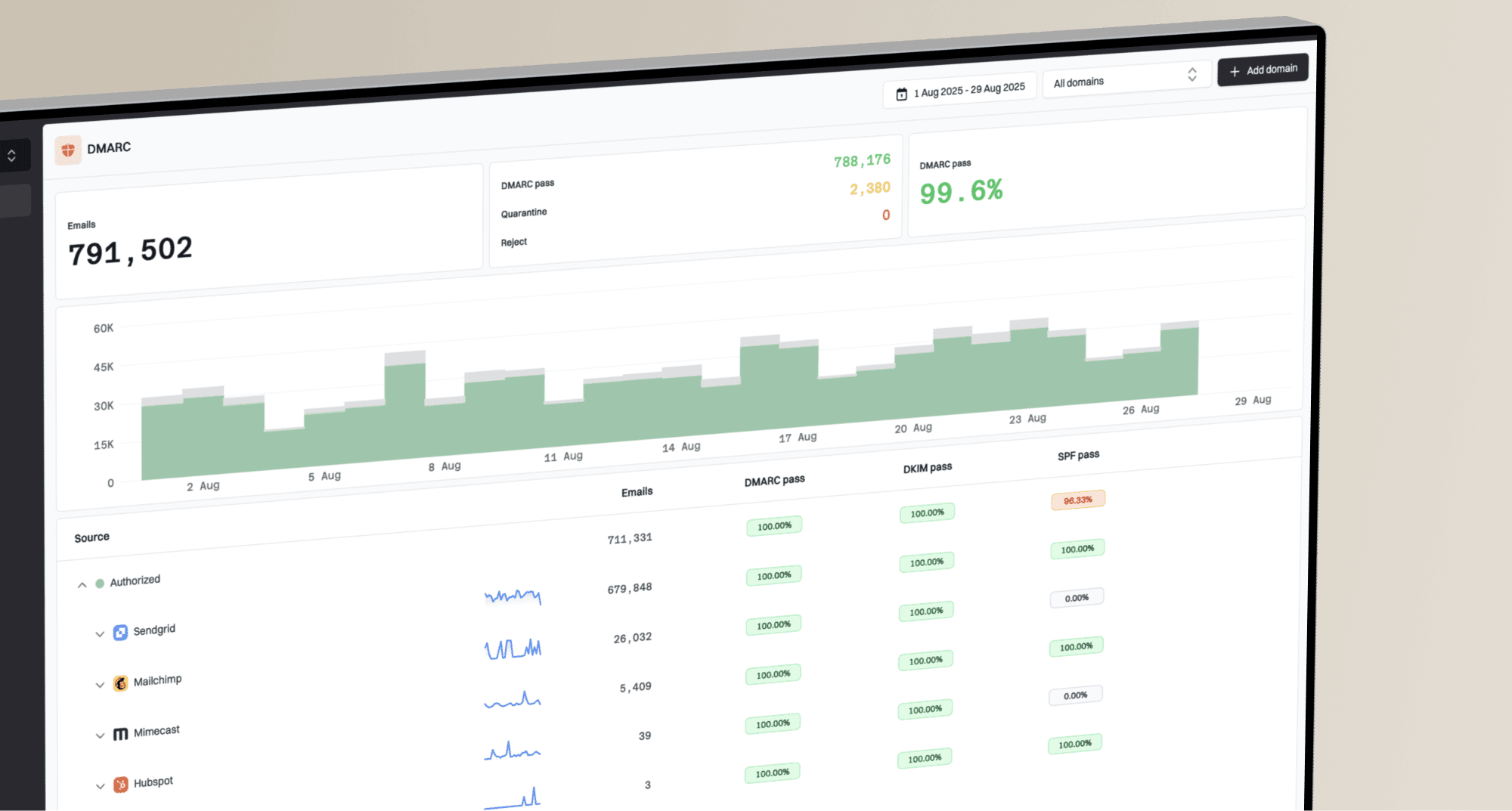
For ongoing checks, Suped's DMARC monitoring is our product for finding authentication failures after setup. It combines report analysis with issue detection and steps to fix, so a broken MOBLE sender has a specific investigation path.
- Confirm reports. Keep a working aggregate reporting destination in the DMARC record. Confirm reports are arriving before relying on report-based alerts.
- Identify MOBLE. In Suped's source table, inspect the source's IP addresses and authentication results against your MOBLE test message. Mark a source as verified only after confirming it is an authorized sender.
- Enable notifications. In Notifications, enable Issues detected and Sending sources need verification. Enable DMARC summaries for a regular view of the domain's authentication health.
- Investigate changes. Open the affected record's detail view for SPF and DKIM diagnostics. Use DNS history to compare changed records, apply the relevant fix, and repeat the MOBLE test.
DMARC aggregate reports arrive after the receiving provider processes them, commonly the following day. Suped alerts on the data it receives; aggregate reporting is not an instant notification for every sent message.
I retest after a MOBLE sender change, a DNS migration, or a key rotation. Suped's issue notifications help catch changes outside that planned work without repeatedly checking DNS by hand.
Secure your domain with p=reject
I move to p=reject when legitimate email passes DMARC across a representative sending cycle. MOBLE passing once is insufficient if other systems also send using the domain.
- Inventory senders. Use Suped's source view to identify every legitimate sender. Review unfamiliar sources before authorizing them; unknown traffic alone is not a reason to weaken the policy.
- Fix legitimate failures. Verify MOBLE's customer and admin notifications, plus other active workflows. Require a passing DKIM or SPF result with the correct domain relationship for every authorized source.
- Stage enforcement. For a new deployment, move from p=none to p=quarantine after the source review. Inspect new reports for legitimate failures, fix them, and then publish p=reject.
- Keep visibility. Retain reporting while enforcing the policy. Review inherited subdomain policy and any explicit subdomain records before changing organizational-domain settings.
- Maintain protection. If quarantine or reject already works, keep it during onboarding. Fix a new MOBLE sending route before putting that route into production.
Suped's source diagnostics and issue verification give the evidence for each policy change. Our Hosted DMARC product manages the policy through the dashboard after its DNS delegation is configured, making staged changes easier to review.
The final record below is an example for a domain whose legitimate senders are ready. Replace the reporting mailbox and preserve any other required settings in your existing record.
Example enforced DMARC TXT valuetext
v=DMARC1; p=reject; rua=mailto:dmarc@example.com
A reject policy requests rejection of messages that fail DMARC; receiving systems retain their local policy decisions. Continue investigating legitimate failures in Suped and retesting the affected MOBLE workflow after each fix.
Keep the working DKIM selector and Return-Path records in place after enforcement. Recheck them when the connected sending account changes.
Frequency asked questions
MOBLE documents include:spf.moble.com for its native website notification route. Add it only when that route is in use. MOBLE's custom-domain Postmark connection uses a different SPF setup based on its Return-Path CNAME.
An rDNS hostname alone does not establish that a message came through MOBLE. I confirm the sending IP against a real MOBLE test, the Return-Path, and the DKIM signing domain. The MOBLE setup documentation does not provide a definitive rDNS suffix list.
For MOBLE's documented Postmark connection, its verified custom Return-Path CNAME handles SPF. An additional root-domain include is not required for that connection and does not repair Return-Path alignment. Preserve SPF authorization needed by your other senders.
SPF authenticates the envelope sender domain. If that domain belongs to the provider rather than your From domain, SPF alignment fails even when authentication passes. A valid DKIM signature with the correct domain relationship still passes DMARC. Use the supported custom Return-Path to obtain SPF alignment.
No. Primary Domain controls the website address. For MOBLE's documented custom-domain connection, publish and verify the DKIM TXT record in the connected sending account. For native sending, request the supported DKIM configuration from MOBLE.
Keep an existing p=reject or p=quarantine policy. Configure and test the new sending route before production use. Start with p=none only for a new DMARC deployment, then use authentication reports to decide when enforcement is ready.