
How to set up DMARC/DKIM/SPF for Menlo Security

For a Menlo Security outbound relay, authorize its assigned sending servers in SPF, enable DKIM with your own signing domain, and publish DMARC in your domain's DNS. I check the mail route first: Menlo email isolation alone does not establish that Menlo sends your outbound email.
Menlo's Email Security data sheet describes integration with existing mail infrastructure. Its NCA framework mapping separates email isolation from SPF, DKIM and DMARC validation. Configure authentication on the system that actually sends and signs your messages; obtain Menlo-specific relay values through your customer documentation or support contact.
Add your domain
I confirm domain provisioning with the Menlo administrator before changing DNS. Menlo's public Customer Support page identifies its configuration guides as login-required, so use the onboarding instructions for your tenant rather than assumed menu names.
- Confirm the route. Identify whether Menlo handles inbound isolation, outbound relaying, or both. Record the visible From domain and the outbound SMTP service.
- Provision the domain. Give your Menlo administrator or support contact each domain that will use the mail integration. Obtain the tenant's routing instructions and, for outbound relaying, authorized egress details.
- Verify ownership. If onboarding issues a DNS ownership challenge, publish its exact name, type and value. Complete the documented verification step or obtain confirmation from support; an SPF record alone is not an ownership challenge.
- Pilot delivery. Apply the routing configuration to a test mailbox or group first. Trace a message through the expected connectors before applying it across the domain.
If Menlo only isolates received links or attachments, complete its mail integration without adding Menlo to your outbound SPF. Keep outbound authentication configured at your existing sender.
Use values issued for your deployment
The public sources reviewed do not establish a universal Menlo SPF include, DKIM selector, or domain-verification token. Request these values when your deployment needs them. Do not copy Menlo's corporate DNS records into your domain.
Set up SPF
SPF authorizes the server connecting to the receiving mail system. I configure the domain in SMTP MAIL FROM, usually visible in Return-Path, rather than assuming SPF belongs on the visible From domain.
- Read the envelope. Send a pilot message externally and inspect Return-Path and the trusted receiver's Authentication-Results. Identify the smtp.mailfrom domain and connecting IP.
- Set the custom domain. For a Menlo outbound route, obtain the supported custom Return-Path configuration and confirm that the resulting envelope domain is yours. A subdomain such as bounce.example.com works with default relaxed SPF alignment.
- Edit one policy. At that envelope domain, merge the Menlo-issued include or IP mechanisms into the existing SPF TXT value before its final all mechanism. Preserve other authorized senders; never publish a second v=spf1 record at the same name.
- Check expansion. Keep DNS-lookup-causing SPF terms within the limit of 10, including nested includes. Confirm all production egress addresses are authorized, including any separate IPv6 route.
Do not infer an SPF include from a relay hostname or authorize an entire hosting network. Obtain the exact mechanism from the configuration guide or Menlo support. Changing an MX record does not authorize outbound mail.
Enter the actual envelope domain below. A valid DNS record is only part of the check; the external message must also show SPF passing for the IP that delivered it.
SPF checker
Find SPF syntax issues, lookup limits, and weak records.
?/16tests passed
If the delivered Return-Path remains on a provider-owned domain, adding Menlo to example.com's SPF will not fix SPF alignment. Confirm the custom Return-Path setup with Menlo before changing additional DNS records.
When a particular sending route cannot use your envelope domain, SPF alignment failures are expected. DMARC still passes when DKIM passes with a signing domain that matches your From domain under your DMARC alignment mode.
Inspect the From domain and custom envelope domainbash
dig +short TXT example.com
dig +short TXT bounce.example.com
Set up DKIM
DKIM must pass at the external recipient after the complete mail route. I identify the actual signer before publishing a key: Menlo isolation does not automatically supply a customer DKIM signing service.
- Identify the signer. Inspect DKIM-Signature in a delivered message. The d= value is the signing domain; s= is the selector. If the message is unsigned, enable custom-domain DKIM at the outbound sending platform.
- Obtain the records. Copy every selector record issued by the signing platform. If Menlo signs your outbound route, obtain its tenant-specific records and signing instructions from Menlo.
- Publish precisely. Create the supplied TXT or CNAME records at the supplied selector names. Avoid a duplicated domain suffix, preserve the full public key, and keep private keys off public DNS.
- Enable and retest. Complete DNS validation and activate signing at the signing platform. Send through Menlo again and confirm dkim=pass for your From domain or an eligible subdomain.
URL rewriting and attachment replacement can invalidate a signature when they change signed content. For outbound mail, arrange custom-domain signing after those changes or use a supported configuration that preserves the signature.
These outcomes distinguish a usable DKIM signature from an unrelated passing signature. Default relaxed alignment permits a signing subdomain of the same organizational domain; strict alignment requires an exact domain match.
Usable for DMARC
The external receiver reports dkim=pass, and the d= domain matches the visible From domain under the configured alignment mode.
- Example. From uses example.com; DKIM uses example.com. This satisfies relaxed and strict DKIM alignment.
Needs repair
DKIM passes only for an unrelated provider domain, or the domain is correct but the signature fails after message modification.
- Action. Enable custom-domain signing or fix the signing order, then test the full route again.
Use the actual selector from the issued records or message headers. The selector1 value below is an example, not a documented Menlo default.
For a CNAME-based setup, inspect the alias and the public key it resolves to. Successful DNS publication does not prove signing is enabled.
Look up the selector issued by the signing platformbash
dig +short CNAME selector1._domainkey.example.com
dig +short TXT selector1._domainkey.example.com
Set up DMARC
DMARC passes when SPF passes with an eligible envelope domain, or DKIM passes with an eligible signing domain. Both paths are useful, but one passing path with the required domain match is sufficient.
- Inspect the policy. Look up the existing TXT record at _dmarc.example.com. Keep an existing p=quarantine or p=reject policy; do not weaken it to add Menlo.
- Start monitoring. If there is no enforcement policy, publish the p=none example below at _dmarc.example.com. Use one DMARC TXT record at that name.
- Set reporting. Replace dmarc@example.com with a working aggregate-report destination you control or your reporting service's assigned address. A destination on another domain needs external-report authorization at that destination.
- Preserve settings. Retain existing reporting destinations and deliberate alignment settings. Make the DNS change, then check the published result.
Initial DMARC TXT value at _dmarc.example.comtext
v=DMARC1; p=none; rua=mailto:dmarc@example.com
Use the DMARC record generator to build the value for your domain. Replace the example domain and mailbox before publication.
Check the visible From domain below. The checker validates DNS configuration; use a real delivered message to establish that the Menlo route passes DMARC.
DMARC checker
Look up a domain's DMARC record and catch policy issues.
?/7tests passed
A p=none policy requests reporting without requesting quarantine or rejection for DMARC failures. It does not stop domain spoofing through DMARC enforcement.
There is no separate DMARC record for Menlo when it sends using the same From domain as your other services. Review any explicit subdomain policy before introducing a new From subdomain.
Verify and troubleshoot
I test the complete production route, including content changes and the final outbound relay. A direct test that bypasses Menlo does not verify a Menlo mail route.
- Send representative mail. Test a plain message and a message with a harmless link or attachment. Use an external recipient and the same routing rules as production.
- Read trusted results. Use Authentication-Results added by the receiving service. Compare smtp.mailfrom and header.d with header.from; do not rely on a copied header supplied by the sender.
- Correlate processing. In the Menlo Admin Portal's Logs area, use Email Logs where available. Correlate the test time and user with your mail platform's trace; inspect receiver headers for authentication results.
- Retest changes. After updating DNS, allow cached answers to expire and send a new message. Reopening an old message will not rerun its delivery-time authentication.
The email tester below is the quickest check of a delivered test message. It provides a destination address so you can send through your real configuration and receive an authentication diagnosis.
Send using the domain and route being configured. Review the individual authentication results alongside the overall score, because an SPF alignment warning does not automatically mean DMARC failed.
Email tester
Send a real email to this address. Suped shows a results button when the test is ready.
?/43tests passed
A passing message should show dmarc=pass for the visible From domain. If DKIM provides the passing domain match, a separate SPF alignment warning does not invalidate that DMARC pass.
Use the failed check to choose the repair. These labels refer to the receiver's evaluation, not merely to the presence of DNS records.
|
|
|
|---|---|---|
SPF fail | Final egress IP | Authorize relay |
SPF permerror | Policy or lookups | Fix SPF |
DKIM fail | Key or content | Fix signing |
DMARC fail | Domain matches | Fix one pass path |
No reports | rua destination | Verify reporting |
Diagnose authentication at the external receiver.
If SPF passes but DMARC fails, compare the envelope domain with the From domain. If DKIM fails only after isolation processing, compare message samples before and after the content change.
The classic Menlo interface documents Logs with separate Web Logs and Email Logs tabs. Tenant versions differ; use your customer guide if navigation has changed. The illustration highlights where to look, without implying that this screen validates SPF or DKIM.
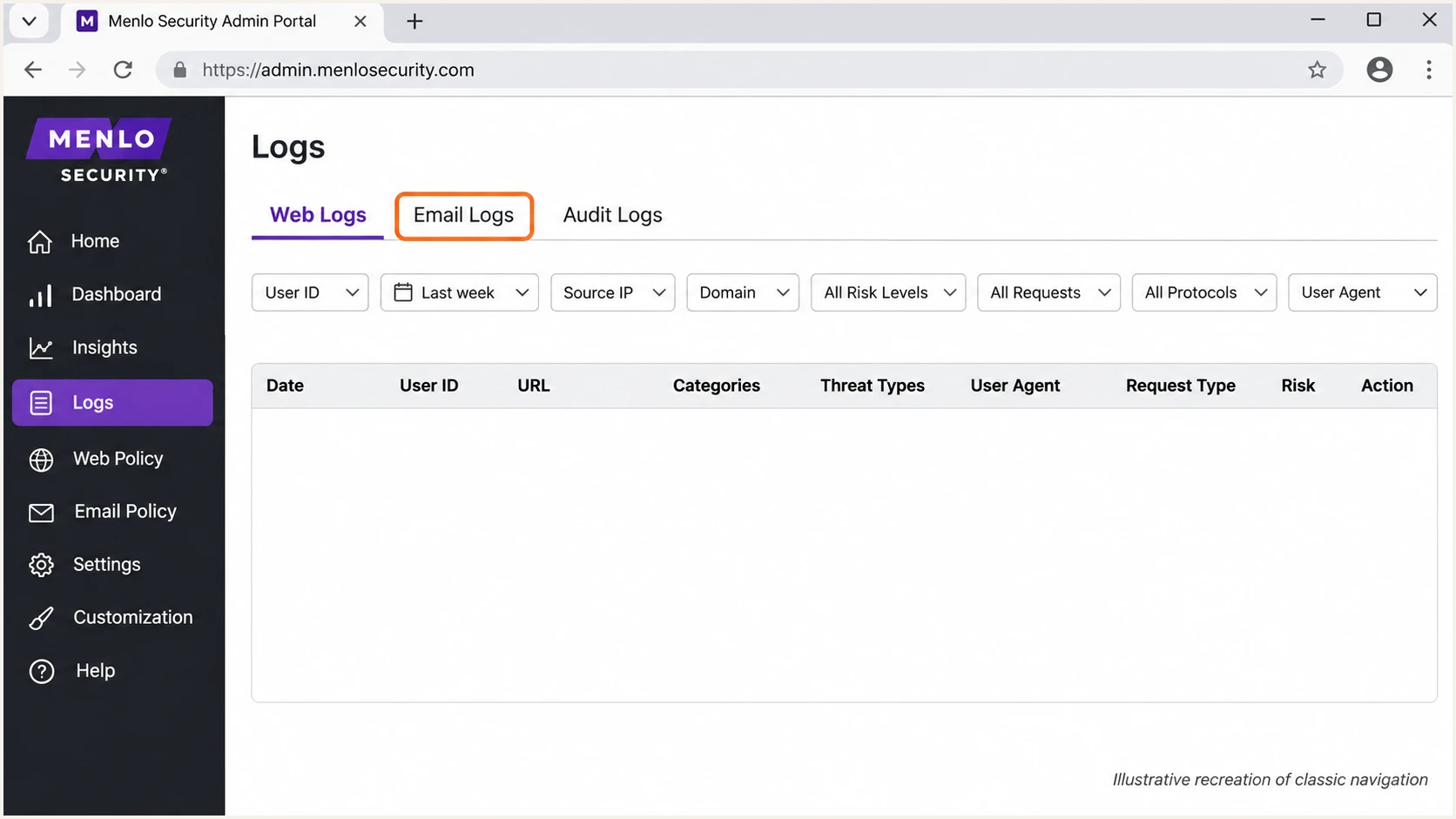
Illustrative recreation of Menlo Security's classic Logs screen, with Email Logs highlighted.
Save a successful external message as a baseline. Keep its full headers with the routing configuration so future failures can be compared against a known working delivery.
The following is an illustrative receiver result for default relaxed alignment. bounce.example.com and example.com share the same organizational domain.
Expected external authentication resultstext
Authentication-Results: receiver.example;
 spf=pass smtp.mailfrom=bounce.example.com;
 dkim=pass header.d=example.com;
 dmarc=pass header.from=example.com
Get alerted when it breaks
Our Suped platform connects ongoing DMARC monitoring with issue diagnosis. I recommend it for this workflow because a working Menlo configuration still needs checks after routing changes or DKIM key rotation.
- Enable notifications. In Suped's Notifications settings, enable Issues detected and Sending sources need verification. Enable DMARC summary emails for regular review.
- Verify the source. Confirm Menlo-related traffic against approved mail routes before marking a sending source verified. A provider label or rDNS name alone is insufficient.
- Investigate the failure. Open the affected source and detail view. Compare reported SPF and DKIM domains with the From domain, then inspect the issue's steps to fix.
- Close with evidence. Apply the fix in Menlo, the signing platform, or DNS as appropriate. Send another test and confirm recovery in subsequent reports.
Suped combines authentication diagnostics with DNS history, which helps investigate a failure that follows a record change. Keep Menlo message traces alongside that evidence when a routing change is involved.
Issue notifications depend on the data available to Suped. DMARC aggregate reporting is delayed and does not provide an immediate event for every message.
Test immediately after a mail change
Use the email tester after changing connectors, Return-Path settings or signing keys. Use Suped notifications to detect issues in ongoing reported traffic; do not wait for an aggregate report to validate a planned change.
Secure your domain with p=reject
I advance enforcement only after every legitimate sending route has a dependable DMARC pass path. Our Suped platform provides source-level diagnostics and Hosted DMARC policy management for that process, while Menlo continues handling its configured mail route.
- Inventory all senders. Review every source using the From domain, including low-volume application mail. Investigate unknown sources before treating them as legitimate.
- Repair legitimate failures. Confirm passing custom-domain DKIM after Menlo processing and correct SPF for outbound envelope domains. Test forwarding separately because it changes the SPF connecting IP.
- Observe representative traffic. Review reports covering a complete sending cycle, including infrequent jobs. Judge failures by source and business impact rather than a single overall pass-rate target.
- Stage enforcement. Move an existing p=none policy to p=quarantine once legitimate routes are ready. Use Suped's source and detail views to investigate failures before requesting rejection.
- Request rejection. Change the single DMARC policy to p=reject after resolving legitimate failures. With Suped Hosted DMARC already configured, manage the policy in its dashboard; otherwise update the existing DNS record.
Keep aggregate reporting enabled during enforcement. If the domain already uses quarantine or reject, retain that policy while fixing the Menlo route.
Review subdomains and any explicit sp= setting before the change. Replace the report address below with your working destination, and preserve existing settings that still apply.
Final DMARC TXT value after validationtext
v=DMARC1; p=reject; rua=mailto:dmarc@example.com
p=reject requests rejection of messages that fail DMARC, subject to receiver policy. It does not guarantee inbox placement or stop impersonation using a different domain.
Frequency asked questions
Use the include or IP mechanisms supplied for your outbound Menlo deployment. The public documentation reviewed does not establish a universal customer SPF include. If Menlo only handles inbound isolation, do not add it to your outbound SPF solely because it processes received mail.
Do not assume that isolation enables custom-domain signing. Identify the signer in delivered message headers and enable DKIM at that system. If Menlo signs your outbound route, obtain its issued selectors and DNS records through your tenant documentation or support contact.
Yes. DKIM must pass with a signing domain that matches the visible From domain under the configured alignment mode. A provider-owned Return-Path can produce an SPF alignment warning while DMARC passes through DKIM. Keep the sender's SPF authentication working where you control it.
If a sending IP's PTR hostname ends in menlosecurity.com, investigate Menlo Security as the relay. This is a conditional identification clue, not a documented universal SMTP suffix or proof of authorized mail. Confirm the IP with Menlo's tenant egress information, trusted Received headers and your routing records before approving the source.
Keep an existing p=reject or p=quarantine policy. Pilot the new route and establish passing DKIM or SPF with the required domain match before applying it broadly. Use p=none as the starting policy only when the domain is not already enforcing DMARC.
Changes to signed message content, including URL rewriting or attachment replacement, invalidate the signature. Compare messages before and after processing. For outbound mail, arrange signing after the last content change or use a supported configuration that preserves the original signature, then retest at an external recipient.




