
How to set up DMARC/DKIM/SPF for MailChannels

To authenticate MailChannels email, add include:relay.mailchannels.net to your existing SPF record, enable DKIM signing with your sending domain, and publish a DMARC TXT record at _dmarc.yourdomain. For the Email API, authorize your account with Domain Lockdown before sending.
I first distinguish MailChannels Email API from Outbound Filtering. The API supports managed DKIM keys and an envelope sender on your domain. Outbound Filtering relays mail signed by your own server or hosting provider. Replace example.com and account placeholders below with your actual values.
Add your domain
I authorize the sending domain through DNS. A domain entry in a dashboard alone does not authorize MailChannels to send for it.
- Identify the account: For Email API, sign in to the MailChannels dashboard and copy your account ID from the panel footer. With hosting-based Outbound Filtering, ask your host for its MailChannels account ID or your permitted sender ID.
- Create API access: For Email API, open Account > API Keys > Create API Key, add a label, select the api scope, and store the key in a server-side secret. Use the key belonging to the account or sub-account you authorize.
- Publish Domain Lockdown: Create a TXT record named _mailchannels for example.com using the value below. Replace YOUR_ACCOUNT_ID, and retain any existing authorized identities. Repeat for each sending subdomain, such as _mailchannels.news.example.com.
- Check domain DNS: Ensure the sending domain has a valid A or MX record. Open the MailChannels domain-health tool and check that exact domain. Recheck authentication after completing SPF and DKIM.
Domain Lockdown is mandatory for Email API sending and strongly recommended for Outbound Filtering. A parent domain's lockdown record does not authorize sending subdomains.
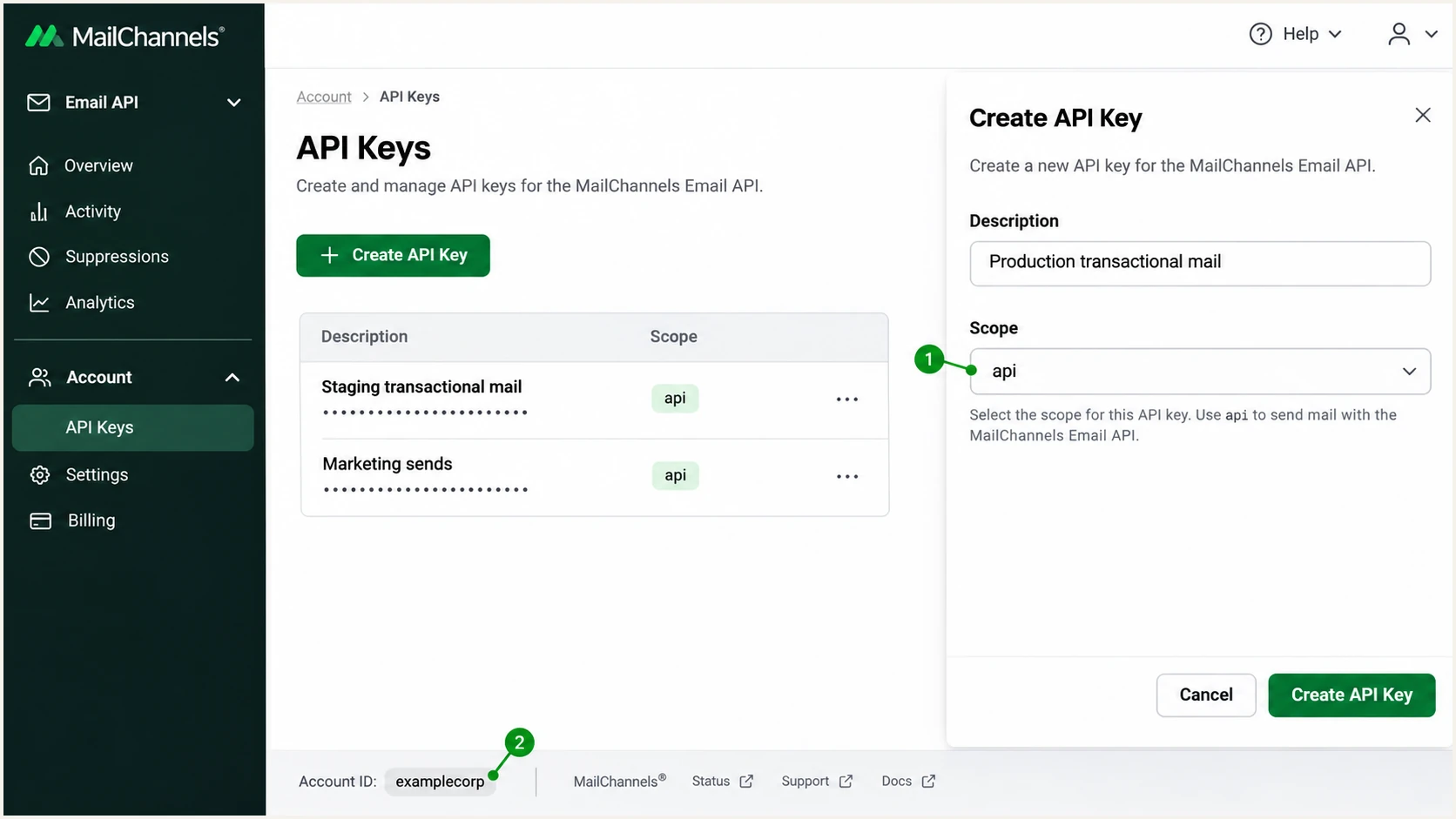
MailChannels API key setup and the account ID used for Domain Lockdown.
Use an account-wide auth field only when every sender under that account should be authorized. On shared hosting, ask the host for a narrower senderid restriction where available.
The record below is a template. Its account ID is not your domain name or email address.
Domain Lockdown TXT record, replace YOUR_ACCOUNT_IDtext
Name: _mailchannels.example.com
Type: TXT
Value: v=mc1 auth=YOUR_ACCOUNT_ID
Avoid obsolete authorization records
MailChannels retired cfid-based Domain Lockdown on August 31, 2024. Use the current auth, senderid, or sidw method. A record containing only v=mc1 authorizes nobody.
Set up SPF
I configure SPF for the actual SMTP envelope sender domain, which appears in the delivered Return-Path. Publishing SPF only on an unrelated visible From domain cannot fix that check.
- Find the envelope sender: For Email API, the envelope sender defaults to from.email. To choose another address you control, set envelope_from.email in the send request and use an address that receives bounces. For Outbound Filtering, check the MAIL FROM address used by your server or host.
- Edit one SPF record: In authoritative DNS, find the TXT value beginning v=spf1. Add include:relay.mailchannels.net before its final all mechanism. Keep existing authorized senders and preserve an existing -all policy.
- Cover subdomains: If the envelope sender uses a subdomain, publish SPF there too. An apex SPF record is not inherited. Authorize that domain with Domain Lockdown as well.
- Check lookup limits: Keep evaluation within SPF's 10 DNS-lookup-causing terms, including nested includes. Do not copy shared relay IPs into DNS as a permanent replacement for MailChannels' maintained include.
SPF for a domain using only MailChannelstext
Name: example.com
Type: TXT
Value: v=spf1 include:relay.mailchannels.net ~all
Use that example only when no SPF record exists and MailChannels is the only sender. For a domain with existing senders, merge the include into the current record instead of replacing it.
Enter the envelope sender domain below. Inspect the complete include chain and fix duplicate SPF records or a lookup-limit error before testing delivery.
SPF checker
Find SPF syntax issues, lookup limits, and weak records.
?/16tests passed
An SPF pass contributes to DMARC only when its authenticated domain matches the visible From domain under your DMARC alignment mode. With default relaxed alignment, a subdomain of the same organizational domain qualifies.
If your hosting integration uses a provider-owned Return-Path, ask the host to use your domain. If it cannot, expect SPF alignment failures and rely on passing DKIM with your From domain. Adding the relay include to unrelated DNS does not repair that mismatch.
Set up DKIM
I enable a DKIM signature using the visible From domain even when SPF already passes. Choose the configuration path that matches how you send through MailChannels.
- Create the API key pair: For Email API, use the Create DKIM Key Pair endpoint below with your sending domain. Select a unique selector, such as mc1, and a 2048-bit RSA key.
- Publish the returned public record: Copy the exact name, type, and value in dkim_dns_records into authoritative DNS. With selector mc1 and domain example.com, the name is mc1._domainkey.example.com. Publish the full public value without truncation.
- Enable the matching signer: MailChannels automatically signs API mail with the stored key. Set dkim_selector to mc1 to select it explicitly. For Outbound Filtering, configure DKIM on your originating server instead.
- Verify the identity: Send a real message and check for dkim=pass with header.d=example.com. A valid signature using an unrelated provider domain does not satisfy DMARC for your domain.
Create a MailChannels-managed DKIM key, set MC_API_KEY firstbash
MC_DOMAIN=example.com
: "${MC_API_KEY:?Set MC_API_KEY in your shell}"
curl --fail-with-body --silent --show-error \
  --request POST \
  "https://api.mailchannels.net/tx/v1/domains/${MC_DOMAIN}/dkim-keys" \
  --header "X-Api-Key: ${MC_API_KEY}" \
  --header 'Content-Type: application/json' \
  --data '{"selector":"mc1","algorithm":"rsa","key_length":2048}'
The API response supplies your actual public key. Keep the private key out of DNS. If your DNS provider splits a long TXT value into quoted strings, those strings must remain parts of one TXT record.
Email API
Managed keys stay with MailChannels. Publish the returned TXT record and use its selector in your application.
With self-managed keys, supply dkim_domain, dkim_selector, and the Base64-encoded private key as documented in the send request. Store the private key in your secret manager.
Outbound Filtering
Keep DKIM signing on your mail server. In WHM, open Service Configuration > Exim Configuration Manager > Advanced Editor and inspect the mailchannels_smtp transport under TRANSPORTSTART.
For Exim 4.94 and later, MailChannels documents the settings below. Back up the configuration, confirm the domain's key exists and its public record is published, save, and restart Exim. Hosting customers should ask their host to apply this.
DKIM additions to the existing Exim transporttext
dkim_domain = ${perl{get_dkim_domain}}
dkim_selector = default
dkim_canon = relaxed
dkim_private_key = "/var/cpanel/domain_keys/private/${dkim_domain}"
For an API test, POST the payload below to /tx/v1/send at api.mailchannels.net with your X-Api-Key and Content-Type: application/json headers. Replace the recipient with your test mailbox, and use addresses on your authorized domain. The envelope sender and visible From use the same domain here.
Email API test payload using the managed mc1 selectorjson
{
  "from": {
    "email": "notifications@example.com"
  },
  "envelope_from": {
    "email": "bounces@example.com"
  },
  "dkim_selector": "mc1",
  "personalizations": [
    {
      "to": [
        {
          "email": "recipient@example.net"
        }
      ]
    }
  ],
  "subject": "MailChannels authentication test",
  "content": [
    {
      "type": "text/plain",
      "value": "Authentication test."
    }
  ]
}
Set up DMARC
I publish DMARC for the domain in the visible From address. DMARC passes when at least one successful SPF or DKIM check also meets the domain alignment requirement.
- Inspect the existing policy: Look up _dmarc.example.com before changing anything. If you already use p=quarantine or p=reject, keep that policy and repair the MailChannels authentication configuration.
- Start new policies in monitoring: If no DMARC policy exists, add the TXT record below at _dmarc. Use one DMARC record at that name.
- Configure report delivery: Replace dmarc@example.com with a real mailbox or report-processing address you control. For a destination on another domain, ensure external reporting authorization is configured.
- Validate the result: Query the public record, confirm the policy and reporting address, then send another MailChannels test message. A syntactically valid record does not prove your message passes DMARC.
Starting DMARC TXT record for a new deploymenttext
Name: _dmarc.example.com
Type: TXT
Value: v=DMARC1; p=none; rua=mailto:dmarc@example.com
The p=none policy requests reporting without requesting quarantine or rejection for DMARC failures. Receivers still apply their own filtering rules.
Use the DMARC record generator to build the record, then check the published domain below. Keep existing reporting destinations and any deliberate subdomain policy when editing an established record.
DMARC checker
Look up a domain's DMARC record and catch policy issues.
?/7tests passed
A From address on a subdomain needs its own policy review. Check for a DMARC record on that subdomain and for inherited policy before assuming the apex settings apply.
Keep the default relaxed SPF and DKIM alignment modes unless a documented requirement calls for strict matching. Strict SPF alignment requires an exact domain match, so a bounce subdomain no longer matches an apex From domain.
Verify and troubleshoot
I verify both the published DNS and a message sent through the production application. A domain-health check cannot show whether that application actually selected the intended sender or DKIM key.
- Run MailChannels checks: Open the MailChannels dashboard's domain-health tool and enter the sending domain. Inspect SPF, DKIM, Domain Lockdown, and sender-domain DNS results. If the envelope domain differs, include it in the API check using envelope_from_domain.
- Send through production: Use the real application or SMTP route. Test each From domain and sending subdomain. Until a payment method is added, Email API delivery is restricted to verified account users, so remove that restriction before sending to an external tester.
- Read receiver results: Inspect the receiving system's Authentication-Results header. Expect spf=pass for your envelope domain, dkim=pass for your signing domain, and dmarc=pass for the visible From domain.
- Retest after changes: Wait for cached DNS records to expire, rerun the checks, and send a new message. Old messages retain their original authentication results.
Check your published authentication recordsbash
dig +short TXT example.com
dig +short TXT _mailchannels.example.com
dig +short TXT mc1._domainkey.example.com
dig +short TXT _dmarc.example.com
In the MailChannels domain-health tool, inspect each result rather than treating a successful HTTP response as proof that every check passed.
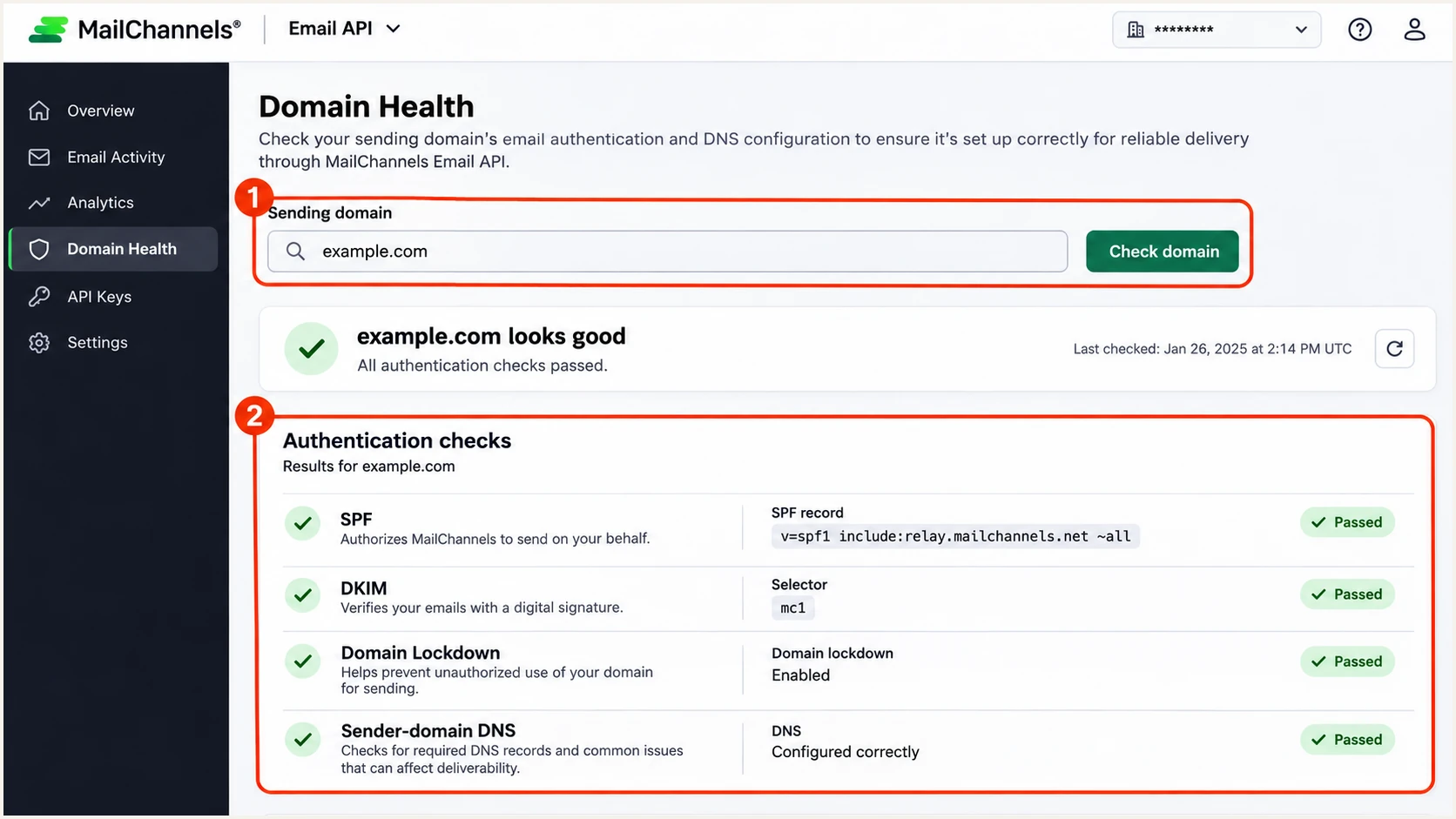
MailChannels domain-health checks for SPF, DKIM, and Domain Lockdown.
The email tester below is the quickest end-to-end check: copy its destination address, send a message through your MailChannels integration, and inspect the diagnosis. Use a fresh send rather than forwarding an existing message.
The report checks message authentication and highlights the domain identities behind each result. Compare those identities with the visible From address before changing DNS.
Email tester
Send a real email to this address. Suped shows a results button when the test is ready.
?/43tests passed
Use the receiving server's results as evidence of what happened to that message. SPF failure after forwarding is expected in some routes; a surviving DKIM signature with your From domain can still produce a DMARC pass.
For a failed send, match its timestamp and message ID to MailChannels delivery data. Fix the specific error below, then repeat the same test.
|
|
|
|---|---|---|
Not authorized | Lockdown ID | Correct account |
SDNF | Sender DNS | Restore A or MX |
SPF permerror | Duplicate / limit | Repair SPF |
DKIM failure | Selector / key | Publish exact key |
DMARC failure | Domain mismatch | Fix sender domain |
Common MailChannels authentication failures and next checks.
Check Message-ID when DKIM breaks unexpectedly
MailChannels documents a failure where the originating server signs an absent Message-ID header and a relay adds it afterward. Generate Message-ID before signing, and inspect the signed-header list when DNS and keys are correct.
Get alerted when it breaks
I keep authentication under observation after the first passing test. Suped is our DMARC platform; its DMARC monitoring combines receiver reports with detected authentication issues and steps to fix them.
- Enable issue notifications: Turn on Suped's Issues detected notifications so the team receives detected SPF, DKIM, and DMARC problems instead of relying on occasional manual checks.
- Review source changes: Enable Sending sources need verification notifications. Confirm that MailChannels traffic belongs to an approved application before marking the source verified.
- Investigate failures: Filter DMARC data by MailChannels, reporter, or sending IP. Open failing records to compare the envelope sender, DKIM domain, and visible From domain, then follow the issue's fix steps.
- Check DNS changes: Use Suped's DNS history to compare records around an incident. Look for removed SPF includes or DKIM selector changes, and review summary emails for recurring failures.
Suped is the practical place to run that ongoing workflow because source verification, authentication diagnosis, and notifications are in one platform. Keep MailChannels delivery logs for individual sending errors alongside the receiver-report evidence.
Reports have a delivery delay
DMARC aggregate reports arrive on the receiving provider's schedule, often daily. Notifications based on those reports follow that schedule. A MailChannels test message gives faster confirmation after a configuration change.
Secure your domain with p=reject
I move to p=reject after legitimate MailChannels traffic and every other approved sender pass DMARC consistently. A single successful test is insufficient evidence for changing the policy for the whole domain.
- Inventory real senders: Review Suped's source table across a full sending cycle, including infrequent scheduled mail. Verify approved sources and investigate unknown traffic without authorizing it solely because it appears in reports.
- Repair legitimate failures: Use Suped's issue details to correct missing signatures and domain mismatches. Test transactional messages and any other production message types separately, including forwarded delivery where relevant.
- Stage enforcement: Move a new deployment to p=quarantine, inspect receiver reports for legitimate failures, then move to p=reject when those failures are resolved. Keep an existing enforcement policy while fixing a new MailChannels route.
- Maintain visibility: Retain rua reporting and notifications after enforcement. With Suped's Hosted DMARC, manage policy changes in the dashboard after completing its DNS delegation; retain your other required DMARC settings.
Enforcement examples, retain your real reporting destinationtext
Monitoring:
v=DMARC1; p=none; rua=mailto:dmarc@example.com

Quarantine:
v=DMARC1; p=quarantine; rua=mailto:dmarc@example.com

Reject:
v=DMARC1; p=reject; rua=mailto:dmarc@example.com
Use Suped's source verification and failure diagnostics to decide when the next policy is justified. Hosted DMARC makes the policy change manageable without repeated DNS edits after initial setup.
The p=reject policy asks receivers to reject messages that fail DMARC. It protects the domain in the visible From address, but it does not authenticate lookalike domains or guarantee inbox placement.
Frequency asked questions
MailChannels uses relay.mailchannels.net hostnames for relay infrastructure. A matching rDNS suffix helps identify the delivery service, including when a hosting provider uses it behind the scenes. It does not prove that a message was authorized by your domain; check SPF, DKIM, and DMARC results too.
MailChannels documents include:relay.mailchannels.net for authorizing its sending infrastructure. It also appears inside some hosting providers' SPF includes. Check the existing include chain before adding it again, and publish it at the actual envelope sender domain.
Yes. The current Email API defaults the envelope sender to from.email and supports an envelope_from address on your domain. With Outbound Filtering, the outcome depends on the SMTP envelope sender your mail server or host supplies. Confirm the delivered Return-Path rather than assuming every integration behaves identically.
SPF can pass for an envelope sender domain that does not match your visible From domain. If no passing DKIM signature also meets DMARC's domain matching requirement, DMARC fails. Configure an envelope sender on your domain or enable DKIM signing with your From domain, then retest.
No. Domain Lockdown tells MailChannels which accounts or sender identities are authorized to send for your domain through its infrastructure. DMARC gives receiving systems a domain authentication policy and reporting destination. Configure both, using _mailchannels for Domain Lockdown and _dmarc for DMARC.
Keep your existing p=reject or p=quarantine policy. Authorize MailChannels, publish the correct SPF and DKIM records, and verify a real send before enabling production traffic. The p=none starting record is for domains without an existing DMARC enforcement policy.




