
How to set up DMARC/DKIM/SPF for Mail Baby

Mail Baby needs include:spf-c.mailbaby.net in SPF, DKIM signing on your originating server, and a DMARC TXT record for your visible From domain. I authorize the domain first, configure those records, then send a real message through Mail Baby to verify the results.
Mail Baby is an outbound relay. Its transport DKIM signature does not authenticate your own From domain for DMARC. Your server must add that signature. For SPF alignment, configure an envelope sender under your own domain and verify the delivered Return-Path.
Add your domain
Mail Baby's documented SMTP setup authorizes domains through DNS. I start with the exact domain used for sending.
- Get credentials: Open your active Mail Baby service in the InterServer customer portal. Under Connection Information, copy your SMTP username, such as mb12345.
- Configure the relay: Set your originating server's smart host to relay.mailbaby.net. Use your Mail Baby SMTP credentials with required STARTTLS on port 587, or implicit TLS on port 465.
- Authorize SMTP: Create a TXT record at _mailbaby.example.com with the value v=1 user=mb12345. Replace the example domain and username with yours.
- Choose the alternative: Instead of the _mailbaby TXT record, authorize your connecting server's public IP in SPF. Use the matching SPF example for that authorization method.
- Authorize API sending: For the Send API, publish a separate TXT record at _mb.example.com containing your Mail Baby username. This API record is different from the SMTP ownership record.
Domain authorization examples, replace the domain and usernamedns
; SMTP ownership option
_mailbaby.example.com. 3600 IN TXT "v=1 user=mb12345"

; Send API authorization
_mb.example.com. 3600 IN TXT "mb12345"
These records authorize use of your Mail Baby account. They do not replace the SPF record that receiving servers check, and they do not enable DKIM signing.
The username comes from your active Mail Baby service. Use that service's credentials when configuring the relay on your sending server.
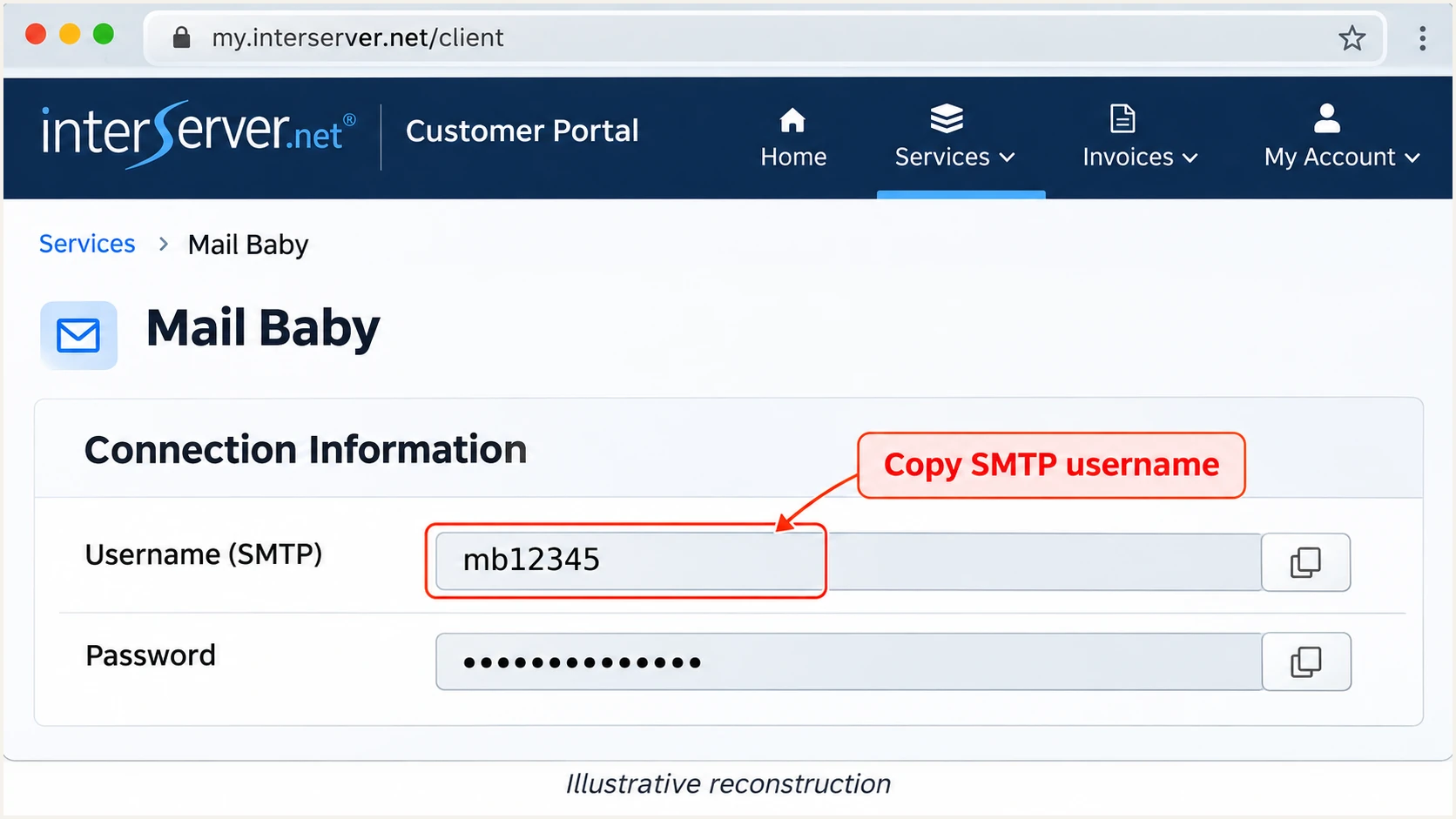
Illustrative Mail Baby Connection Information view showing the SMTP username.
If your DNS editor automatically appends the domain, enter only _mailbaby or _mb in its host field. A doubled domain name puts the record in the wrong place.
For a sending subdomain, publish authorization records relative to that subdomain. Complete SPF before testing delivery; Mail Baby checks domain authorization during sending.
Verify the authorization record for your sending methodbash
dig +short TXT _mailbaby.example.com
# For API authorization:
dig +short TXT _mb.example.com
The lookup should return your account username in the required format. If it is missing, check the authoritative DNS zone, the host name, and cached TTLs before retrying delivery.
Set up SPF
I use include:spf-c.mailbaby.net for new Mail Baby setups. SPF is checked against the SMTP MAIL FROM domain, which appears in the delivered Return-Path.
- Read existing DNS: Look up TXT records for your envelope sender domain. Edit its existing v=spf1 record, or create one if none exists.
- Merge senders: Keep all legitimate sending services in one SPF record. Never publish a second v=spf1 record at the same DNS name.
- Choose origin proof: With _mailbaby authorization, the relay-only example below needs no origin IP. Otherwise, include the public IP of the server connecting to Mail Baby.
- Set the envelope sender: Configure your application or mail server to use a return address such as bounces@example.com. Adding a Return-Path header manually does not set SMTP MAIL FROM.
- Check lookup limits: Keep SPF within ten DNS-querying terms during evaluation, including nested includes. Remove unnecessary a and mx mechanisms.
SPF TXT values, choose one and preserve other authorized sendersdns
; With _mailbaby TXT authorization
v=spf1 include:spf-c.mailbaby.net ~all

; Alternative with origin IP authorization, replace 203.0.113.10
v=spf1 ip4:203.0.113.10 include:spf-c.mailbaby.net ~all
Publish the selected value at example.com when that is your envelope sender domain. The DNS host is usually @. These are new-record examples; preserve the final qualifier of an existing, working SPF policy.
If the envelope sender uses bounce.example.com, publish SPF there too. SPF records are not inherited by subdomains. Under relaxed DMARC alignment, that subdomain can match a From address at example.com.
SPF checker
Find SPF syntax issues, lookup limits, and weak records.
?/16tests passed
Check the exact domain found in the Return-Path. A valid SPF record at the root domain does not prove that a different bounce domain passes.
This lookup validates DNS. A delivered-message test confirms that Mail Baby's actual outbound IP passes SPF for your configured envelope sender.
Set up DKIM
Mail Baby preserves DKIM signatures created upstream and adds a transport signature for its own domain. I configure my sending server to sign with the domain in the visible From address.
- Open domain settings: For cPanel, go to Email > Email Deliverability, find your domain, and click Manage. Other servers need their own DKIM signing configuration.
- Create the key: Use Generate Local DKIM Key if no key exists. Prefer a 2048-bit RSA key where supported, then copy the Suggested DKIM TXT Record name and public value.
- Publish public DNS: Add that TXT record at your authoritative DNS provider. Use the selector supplied by your server; default is only an example.
- Enable transport signing: Make sure the SMTP transport that relays to Mail Baby performs DKIM signing. With a custom Exim transport, retain its dkim_domain, dkim_selector, and dkim_private_key settings.
- Preserve API signatures: For an API application that signs its own messages, submit the complete signed RFC 822 message with POST /mail/rawsend. Mail Baby documents this endpoint as preserving the message bytes; other send endpoints can alter signed headers.
- Test the signature: Send through the real application. Confirm dkim=pass for your domain, not only for mailbaby.net, and check that header.d matches your From domain.
Check a public key, replace default with your actual selectorbash
dig +short TXT default._domainkey.example.com
A public key in DNS is only half the setup. The sending server needs the matching private key and must sign the final message before relaying it.
Use the s= value from your message's DKIM-Signature header when looking up the selector. The d= value supplies the signing domain.
Your domain signature
A passing signature with d=example.com matches From: billing@example.com. This signature can satisfy DMARC's DKIM requirement.
Mail Baby's transport signature
A passing signature with d=mailbaby.net authenticates the relay's domain. It does not satisfy DKIM alignment for From: billing@example.com.
If DKIM fails, compare the selector and public key with the active signing configuration. Check for message changes after signing, including added footers. Keep the private key on the signing server.
Set up DMARC
DMARC checks your visible From domain against a passing SPF identity or DKIM signing domain. At least one must match under the configured alignment mode.
- Keep enforcement: If your domain already uses p=quarantine or p=reject, keep that policy while adding Mail Baby. Do not reset it to p=none.
- Publish one record: For a domain without DMARC, create a TXT record at _dmarc.example.com. In a DNS editor that appends your domain, enter _dmarc as the host.
- Start with reporting: Use the p=none example for a new deployment. Replace dmarc@example.com with a working address that receives aggregate reports.
- Generate the value: Use the DMARC record generator to configure your reporting destination. Leave relaxed alignment defaults unless you have a specific requirement for strict matching.
Initial DMARC TXT value at _dmarc.example.comdns
v=DMARC1; p=none; rua=mailto:dmarc@example.com
The p=none policy requests monitoring without DMARC quarantine or rejection. It is a starting point while you identify legitimate senders and correct authentication failures.
The example reporting address is a placeholder. For a reporting service, use its assigned destination and complete any required external-report authorization. A mailbox alone does not turn XML reports into monitoring.
DMARC checker
Look up a domain's DMARC record and catch policy issues.
?/7tests passed
Look up the visible From domain and confirm the policy and reporting address. Keep a single DMARC record at each policy name.
Allow DNS caches to expire before retesting. For a sending subdomain, check which DMARC policy is discovered instead of assuming that the root policy always applies.
Verify and troubleshoot
I send a test through the same application and SMTP transport used in production. A DNS check cannot prove that the server signs mail or uses the intended envelope sender.
- Send a real message: Use your normal From address and the configured Mail Baby route. Repeat for each application and sending subdomain.
- Inspect received headers: Read the receiving server's Authentication-Results. Check spf=pass, dkim=pass for your domain, and dmarc=pass.
- Check identity matching: Compare smtp.mailfrom and header.d with header.from. Passing SPF and DKIM for unrelated domains still fail DMARC.
- Separate relay errors: If delivery stops before the recipient, check credentials, required TLS, origin authorization, and the Mail Baby bounce details. For forwarding, use SRS as required by Mail Baby.
|
|
|
|---|---|---|
SPF permerror | Duplicate SPF | Merge TXT |
SPF mismatch | MAIL FROM | Use own domain |
DKIM missing | SMTP transport | Enable signing |
DKIM fail | Selector/key | Match active key |
DMARC fail | From domain | Fix identity match |
Relay rejection | Origin proof | Check TXT or IP |
Start with the identity or setting associated with the failure.
The email tester is the quickest end-to-end check: it prompts you to send a message to a test address and returns an authentication diagnosis with other delivery checks.
Send that message through Mail Baby using your production sending path. A test sent through another account checks a different configuration.
Email tester
Send a real email to this address. Suped shows a results button when the test is ready.
?/43tests passed
I expect the receiving server to report a passing signature for my domain. This example shows a matching root-domain envelope sender and DKIM identity.
If SPF alignment fails but DKIM passes with a matching domain, DMARC still passes. Mail Baby still requires its SPF setup; investigate the envelope sender rather than removing the include.
Confirm the complete route
Save a successful test after setup. Repeat it after DNS migrations, DKIM key changes, or SMTP transport edits. A DMARC pass does not guarantee inbox placement.
Illustrative received headers after successful configurationtext
From: Billing <billing@example.com>
Return-Path: <bounces@example.com>
Authentication-Results: receiver.example;
 spf=pass smtp.mailfrom=example.com;
 dkim=pass header.d=example.com header.s=default;
 dmarc=pass header.from=example.com
Get alerted when it breaks
Suped is our DMARC platform. I use our DMARC monitoring to track Mail Baby authentication after setup, with source diagnostics and notifications when issues appear.
- Collect reports: Ensure your existing DMARC reporting configuration delivers aggregate reports into Suped. Preserve the current enforcement policy.
- Verify the source: Correlate Mail Baby's source IPs with your sending logs before marking the source verified. An rDNS suffix alone is insufficient.
- Enable notifications: In Suped's notification settings, enable Issues detected and Sending sources need verification. Enable DMARC summary emails for ongoing review.
- Resolve failures: Open the affected record's detail view to inspect SPF, DKIM, DMARC, and rDNS checks. Compare DNS history, follow the issue's fix steps, and retest the sending application.
This connects the report failure to the record or sending configuration that needs attention. It also helps distinguish an authorized Mail Baby stream from an unfamiliar sender using your domain.
Report timing affects alerts
DMARC aggregate reports arrive after receiving providers process mail, commonly on a daily schedule. Authentication alerts based on those reports follow report arrival. Use a fresh email test for immediate post-change verification.
Secure your domain with p=reject
I move to p=reject after every legitimate sending stream has a reliable DMARC pass. Mail Baby is only one source; a domain policy also affects other systems using the same From domain.
- Inventory senders: Review reports across a full business sending cycle. Include infrequent invoices, password resets, and scheduled application mail.
- Fix legitimate failures: Require a passing signature with a matching domain for Mail Baby traffic. Correct SPF and the envelope sender too; do not judge readiness only by the overall pass rate.
- Stage enforcement: For a new deployment, move to p=quarantine, review reports and bounces, then move to p=reject once legitimate failures are resolved. Keep an existing stronger policy.
- Preserve reporting: Change the policy value in your current record. Keep its working rua destination and other intentional settings, then retest every legitimate sender.
Check subdomain policy
Review sp= and any explicit subdomain DMARC records before enforcement. The effective policy on a sending subdomain is not always the policy shown at the root.
Enforced DMARC example, retain your real reporting destinationdns
v=DMARC1; p=reject; rua=mailto:dmarc@example.com
Our hosted DMARC in Suped lets teams manage policy after DNS delegation without editing DNS for every change. Use its policy controls alongside report diagnostics to check readiness and monitor the effect of enforcement.
A p=reject policy requests rejection of messages that fail DMARC; receivers retain their own handling decisions. Keep monitoring legitimate traffic and repeat the Mail Baby test after future DNS or signing changes.
Frequency asked questions
Mail Baby adds a transport signature for its own domain and preserves signatures created upstream. Generate your domain's key on your sending server, publish its public DNS record, and enable DKIM signing on the transport that relays to Mail Baby.
Use include:spf-c.mailbaby.net for new configurations. Mail Baby's SPF documentation also says existing include:relay.mailbaby.net configurations remain supported. Keep only one SPF record at each sender domain and check the complete DNS lookup count.
For SMTP, _mailbaby with v=1 user=mb12345 is an alternative to authorizing the origin server's IP in SPF. Mail Baby's Send API documentation separately requires _mb containing your username. Use the records for your sending method; neither replaces the receiving-side SPF include.
Mail Baby, operated by InterServer, uses mailbaby.net relay hostnames, including relay2-l.mailbaby.net. I confirm attribution against the message's source IP and sending logs. The rDNS name identifies infrastructure; it does not prove that your domain passed SPF or DKIM.
Yes. A passing DKIM signature whose signing domain matches the visible From domain can satisfy DMARC even when SPF alignment fails. Mail Baby still requires SPF authorization. Configure your own envelope sender where possible and confirm the final Return-Path in a delivered message.
No. Configuring Mail Baby as an outbound relay does not require moving your incoming mail. Publish the required authorization, SPF, DKIM, and DMARC TXT records while keeping your existing receiving-mail configuration. Avoid adding an mx SPF mechanism unless those servers also send mail.




