
How to set up DMARC/DKIM/SPF for KPN

Published 21 Nov 2026
Updated 21 Nov 2026
11 min read
Summarize with
For a custom domain on legacy KPN email, add include:spf.ews.kpnxchange.com to your existing SPF record and publish a DMARC TXT record at _dmarc. KPN manages DKIM, but its documented legacy signing domain is kpnmail.nl rather than your custom domain. I verify the received message before relying on SPF alone for DMARC.
KPN Mail en Cloud does not support hosting a custom email domain. KPN confirmed this distinction on October 27, 2026. The domain setup below applies to eligible legacy KPN email accounts. For an address ending in @kpnmail.nl, KPN controls the authentication records; you cannot edit them yourself.
Add your domain
I first check which KPN service the mailbox uses. KPN's support article "Alles over e-mail" excludes customers who have migrated to KPN Mail en Cloud and customers who joined after October 26, 2026.
For an existing legacy account, use the steps below to maintain or verify its custom-domain configuration. KPN advises against starting a new custom-domain deployment on the legacy service because this capability is unavailable after migration.
- Open email management: Sign in to MijnKPN. Open Producten, select Internet, find Makkelijk aanpassen, and choose KPN e-mailinstellingen.
- Add the domain: Open Eigen domeinen. Select the blue plus control and enter your domain, such as example.com.
- Publish verification: Copy the DNS names and values shown by KPN into the authoritative DNS zone at your domain provider. Use the account-specific verification value.
- Confirm ownership: After the records resolve publicly, click Verifiëren. Once KPN confirms verification, click Bevestigen.
- Create the address: Click Terug, select the mailbox, and click its blue plus control. Enter the address, choose the domain, confirm with the green check, and click Opslaan.
Keep the verification record KPN provides. Ownership verification does not prove that outgoing messages pass SPF, DKIM, or DMARC.
Change MX records only when you intend to move incoming mail to KPN, using the values KPN supplies. SPF and DMARC changes alone do not require moving incoming mail.
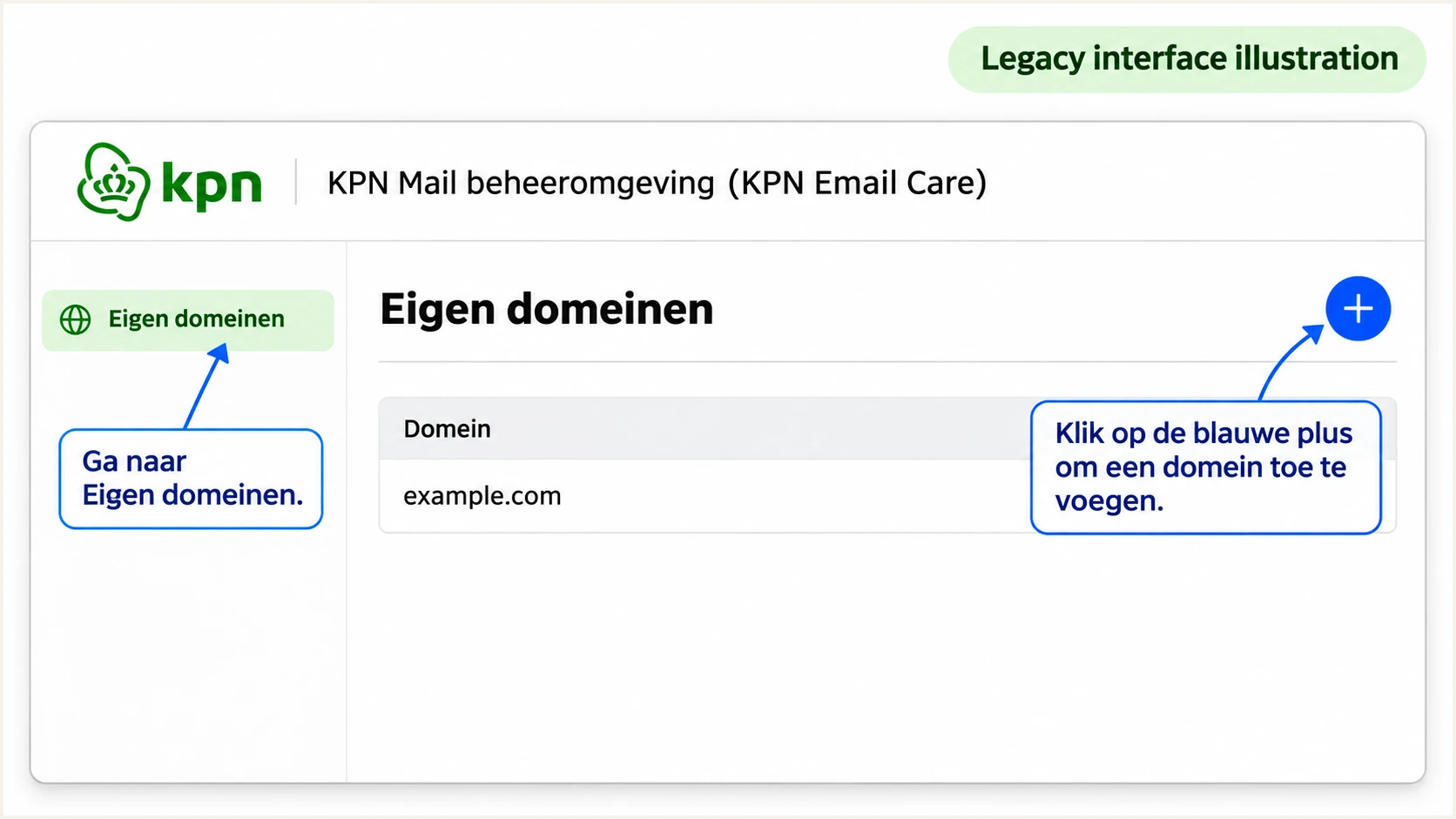
Illustrative legacy KPN Eigen domeinen screen and add-domain control.
Set up SPF
KPN's published legacy SPF authorization is include:spf.ews.kpnxchange.com. I merge this mechanism into the existing SPF policy instead of creating another SPF record.
SPF checks the SMTP envelope sender, normally visible as Return-Path and smtp.mailfrom in received headers. For SPF to satisfy DMARC, that domain must match the visible From domain under your DMARC alignment mode.
- Inspect the current record: At your DNS provider, find the TXT record beginning v=spf1 at the domain used for the envelope sender. Preserve other authorized senders.
- Authorize KPN: Add include:spf.ews.kpnxchange.com before the final all mechanism. Use the standalone example below only when KPN is the only sender for that domain.
- Keep one policy: Publish one SPF record per DNS name. Keep a single final all mechanism and stay within the 10 DNS lookup limit, including nested lookups.
- Check the actual domain: Send using the custom address and inspect smtp.mailfrom. A KPN-owned envelope domain does not gain DMARC alignment when you edit SPF at example.com.
Legacy KPN only: TXT value at @ for example.comtext
v=spf1 include:spf.ews.kpnxchange.com ~all
The ~all ending marks unauthorized sources as SPF softfail. Do not replace an existing, deliberately configured ending without reviewing your other senders.
After saving DNS, enter the envelope-sender domain in the SPF checker. Confirm that the record resolves and that its includes stay within the lookup limit.
SPF checker
Find SPF syntax issues, lookup limits, and weak records.
?/16tests passed
A valid SPF record is only the DNS part of the test. I also require spf=pass on a message received through the normal KPN sending route.
If smtp.mailfrom uses your custom domain, SPF can provide the domain match DMARC needs. If it uses a KPN-owned domain, investigate the mailbox or sender configuration with KPN; adding more includes to your own domain will not change that envelope identity.
Set up DKIM
Legacy KPN email does not provide a documented customer-controlled DKIM setup for custom domains. KPN's Abuse team explained that its signature uses kpnmail.nl. I treat that as provider signing, rather than proof that a custom From domain passes DMARC through DKIM.
DKIM needs both a DNS public key and a sending server that signs with the matching private key. Publishing a key or pointing a selector at KPN cannot change the signing domain inside an existing signature.
- Inspect a sent message: Open the received message source. Find DKIM-Signature and read d= for the signing domain and s= for the selector.
- Read the receiver result: Check Authentication-Results for dkim=pass. Then compare the signing domain with the visible From domain; a valid signature alone is insufficient for DMARC.
- Avoid copied selectors: Do not add a guessed selector, copy KPN's public key into your domain, or generate a key that KPN has not installed on its sender.
- Resolve missing domain signing: Ask KPN whether your exact email service supports signing with your domain. If it does, publish only its supplied records and retest. If it does not, use a sending route that supports custom-domain DKIM before depending on DKIM for enforcement.
A signature with d=kpnmail.nl and a From address at example.com has different domains. Copying the same public key into example.com does not repair that difference.
The practical distinction is the domain covered by the signature. A cryptographic pass and a DMARC domain match are separate checks.
KPN-managed signing
A passing signature with d=kpnmail.nl authenticates KPN's signing domain. A custom From address still needs a passing SPF result with the required domain match.
Custom-domain signing
A passing signature with d=example.com can satisfy DMARC for a From address at example.com. The sending server must actually support and apply that signature.
Set up DMARC
Publish DMARC in your own domain's DNS, rather than inside KPN Webmail. I start a domain without an enforcement policy at p=none while checking all legitimate sending routes.
If your domain already uses p=quarantine or p=reject, keep that policy. Add reporting or correct the sending configuration without reducing protection just to follow a setup example.
- Create one record: Add a TXT record at _dmarc.example.com. In a DNS editor that appends example.com automatically, enter only _dmarc as the host.
- Start with monitoring: For a domain without an existing enforcement policy, use the p=none example below. Replace its reporting address before publishing.
- Use a working destination: Replace dmarc@example.com with a mailbox or aggregate-report destination you control. External report destinations require the receiving service's authorization setup.
- Keep domain matching practical: Leave aspf and adkim unset for their relaxed defaults unless you have a tested requirement for strict matching. Verify every active From domain and subdomain.
Starting DMARC TXT value at _dmarc.example.comtext
v=DMARC1; p=none; rua=mailto:dmarc@example.com
Use the DMARC record generator to prepare the policy and reporting settings. Replace an existing DMARC record when editing it; do not publish a second policy at the same name.
The p=none policy requests reporting without requesting rejection or quarantine. Receivers still apply their own filtering. Check the published domain below after the DNS change is visible.
DMARC checker
Look up a domain's DMARC record and catch policy issues.
?/7tests passed
A successful DNS check confirms the published policy, not the authentication of a particular message. Send a fresh KPN message after changing DNS and inspect the receiver's results.
Aggregate reports commonly arrive after 24-48 hours, and some receivers do not send them. An empty report view immediately after setup is not evidence of a broken DNS record.
Verify and troubleshoot
I test the exact address and sending route used in production. A test from a KPN-owned address does not validate a custom-domain address in the same mailbox.
In legacy KPN Webmail, open the gear icon, choose E-mail, then Nieuw bericht. Set Standaardadres verzender to your custom-domain address and send a new message.
- Test every route: Send through KPN Webmail and each configured mail client. For legacy SMTP submission, KPN documents smtp.kpnmail.nl, port 587, TLS/STARTTLS, and mailbox authentication.
- Inspect trusted results: Read Authentication-Results added by the final receiving server. Check spf, dkim, and dmarc together with their evaluated domains.
- Separate SPF from alignment: An SPF pass with an unrelated envelope domain does not satisfy DMARC. Correct the envelope identity or establish passing custom-domain DKIM.
- Investigate forwarded mail: Forwarding often changes the connecting server and breaks SPF. Test a real forwarded delivery and confirm whether a passing custom-domain DKIM signature survives.
|
|
|
|---|---|---|
SPF permerror | Policy error | Check duplicates and lookups |
SPF pass, domain mismatch | No SPF alignment | Check envelope sender |
DKIM pass, domain mismatch | No DKIM alignment | Check signing support |
DMARC fail | Neither path qualifies | Fix the sending route |
DMARC pass | One path qualifies | Test remaining routes |
Use received-message results to identify the next action.
The email tester is the quickest message-level check. It provides a destination address; send a message to it using the custom address in KPN, then review the authentication diagnosis.
Use a fresh message after each correction. Keep its visible From address and envelope domain consistent with normal production mail so the result tests the real configuration.
Email tester
Send a real email to this address. Suped shows a results button when the test is ready.
?/43tests passed
A passing result for direct delivery does not prove that forwarding works. I keep the direct test and a forwarded test as separate evidence before tightening policy.
If the wrong From address appears, correct KPN's default sender and repeat the test. Changing display names or Reply-To does not change the domain DMARC evaluates.
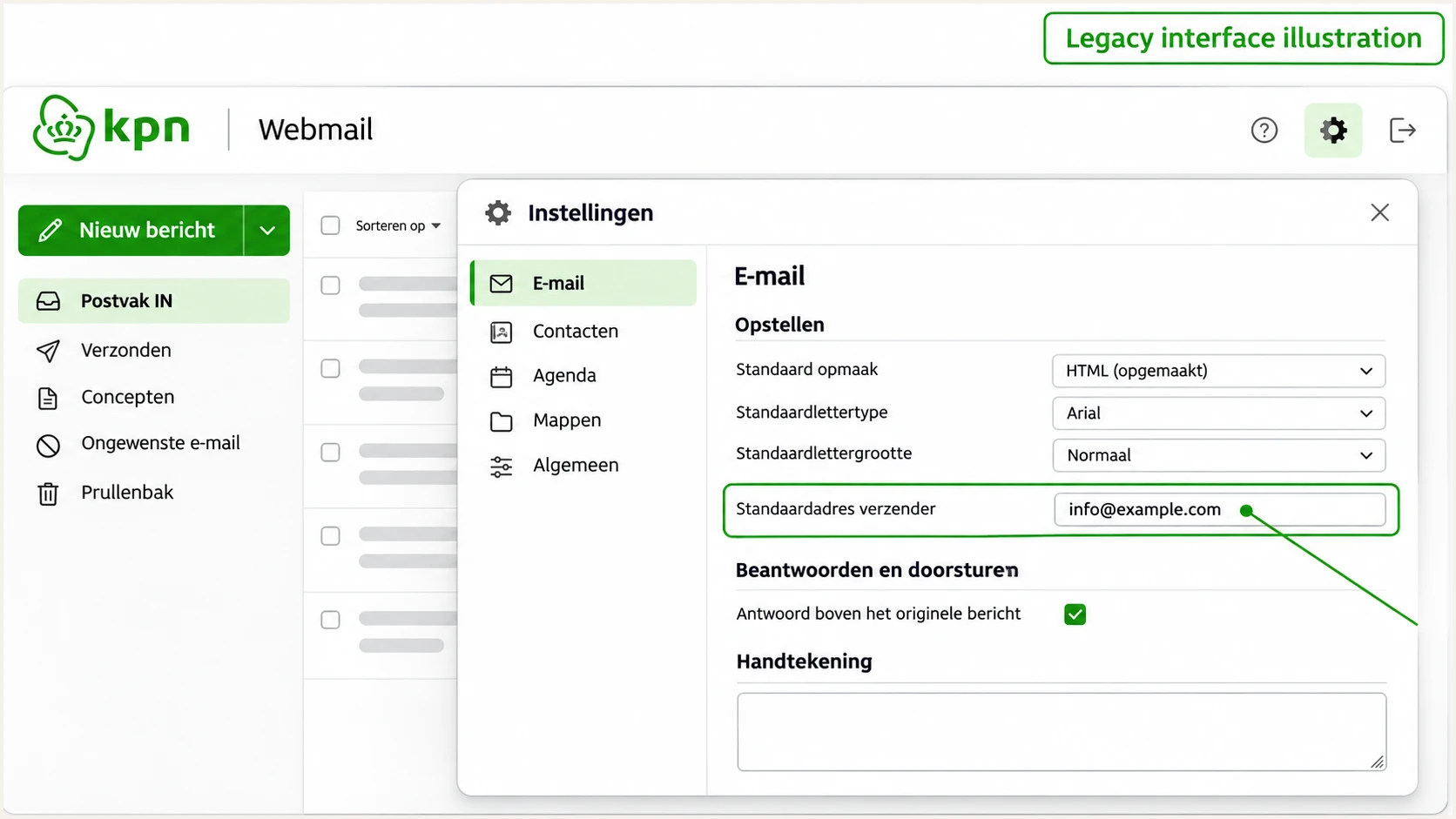
Illustrative legacy KPN Webmail default-sender setting for a custom address.
Get alerted when it breaks
I keep message testing for immediate diagnosis and use aggregate reporting for ongoing coverage. One successful test does not expose failures caused by a later DNS change or a newly configured sender.
Our DMARC monitoring in Suped connects authentication failures with source details and steps to fix them. This is the practical workflow for tracking KPN traffic alongside your other authorized senders.
- Enable issue notifications: In Suped notification settings, enable Issues detected and Sending sources need verification. Enable DMARC summary emails for routine review.
- Verify known sources: Review KPN traffic against your expected mail flow before marking the source as verified. A familiar provider name alone does not establish authorization.
- Inspect failed records: Use the data view to filter by source, reporting receiver, or IP address. Open detail view to compare SPF and DKIM authentication with DMARC results.
- Confirm the correction: Follow the issue's fix steps, compare DNS history when records changed, then verify the fix and send another message-level test.
Suped keeps the failed records and remediation steps in the same investigation. That makes it easier to distinguish a DNS mistake from a KPN signing limitation that a DNS edit cannot fix.
Keep the reporting destination active throughout enforcement. Reporting gaps require investigation too, particularly after changing the rua value or moving DNS.
Alerts depend on incoming evidence
Suped notifies you when it detects issues in available data. Aggregate DMARC reporting is delayed and does not provide an instant alert for every failed message. Use the email tester immediately after configuration changes.
Secure your domain with p=reject
I move to p=reject only after legitimate traffic consistently passes DMARC and normal forwarding routes have been tested. Passing SPF alone is sufficient for DMARC, but it leaves a forwarding risk when custom-domain DKIM is unavailable.
Use Suped to review failures by sending source and receiver before changing enforcement. Our Hosted DMARC controls support policy changes through the dashboard after the initial DNS setup, so the reporting and policy review stay in one workflow.
- Review a full sending cycle: Include routine mailbox mail and less frequent automated messages. Inspect failures for every legitimate source rather than relying on a single overall pass rate.
- Resolve the DKIM limitation: For forwarding resilience, establish a passing signature using your domain on a supported sending route. Monitoring cannot make KPN sign with a domain it does not support.
- Stage enforcement: Once legitimate traffic is understood, move a monitoring-only domain to p=quarantine. Review delivery and reports before changing to p=reject.
- Check subdomains: Review inherited policy and explicit subdomain records. Confirm that every active subdomain has a working authentication path before tightening the parent policy.
- Keep reviewing: Maintain issue alerts and reporting after enforcement. Investigate new failures before authorizing additional senders or changing DNS.
Final DMARC example after validation, with your reporting addresstext
v=DMARC1; p=reject; rua=mailto:dmarc@example.com
Replace dmarc@example.com with your working report destination. A reject policy asks receivers to reject messages that fail DMARC; it does not guarantee inbox placement for messages that pass.
For a legacy KPN custom domain without matching DKIM, do not assume a clean direct-delivery test eliminates forwarding failures. Resolve the sending-route limitation before treating p=reject as a dependable production configuration.
Frequency asked questions
KPN says custom-domain hosting is unavailable in KPN Mail en Cloud. The Eigen domeinen steps apply to eligible legacy accounts. If your mailbox has migrated or your account does not offer that capability, DNS changes will not enable it.
KPN's published legacy include is include:spf.ews.kpnxchange.com. Merge it into the existing SPF record for the actual envelope-sender domain. Confirm the value with KPN for a different business email service rather than assuming all KPN products use the same infrastructure.
A valid signature for a KPN-owned domain does not satisfy DKIM alignment for an unrelated custom From domain. DMARC fails if SPF also lacks a passing result with the required domain match. Compare both authenticated domains with the visible From domain.
Yes. A passing DKIM signature with the required domain match is sufficient even when SPF alignment fails. Verify that your sending route actually provides that signature. A signature for kpnmail.nl does not provide it for example.com.
ewsoutbound.kpnmail.nl is associated with KPN's outbound email infrastructure. Confirm the connecting IP and its reverse DNS, then compare the message headers and authentication results. An rDNS hostname identifies infrastructure; it does not prove that a sender was authorized to use your domain.
Keep an existing quarantine or reject policy while fixing the sender. The p=none example is for a domain starting without enforcement. If KPN cannot provide a dependable authentication path for your custom domain, correct the sending route instead of weakening the policy to accommodate it.




