
How to set up DMARC/DKIM/SPF for Kajabi

Published 21 Nov 2026
Updated 21 Nov 2026
12 min read
Summarize with
Set up Kajabi email authentication in Settings > Marketing settings > Email Settings. Connect a Custom Email Domain, publish the SPF and DKIM records Kajabi generates, and add DMARC for the sending domain. Kajabi currently requires a kjbm sending subdomain, such as kjbm.example.com, with DMARC at _dmarc.kjbm.example.com.
I verify a real Kajabi message before enforcing rejection. This setup covers custom marketing email, including Email Broadcasts and Email Sequences. Connecting your website domain alone does not authenticate those messages.
Add your domain
Start in Kajabi, with an active paid subscription and access to the authoritative DNS zone. A custom email domain is separate from the domain connected to your course website.
- Open settings: Go to Settings > Marketing settings > Email Settings > Custom Email Domain.
- Set identity: Enter your From name, sender alias, and a working Reply-to address. Use your business domain; Kajabi adds the required kjbm subdomain.
- Generate records: Click Setup Custom Email Domain. Keep the Custom Email Domain Setup page open while copying its account-specific DNS records.
- Publish records: Add missing generated records at their exact hosts. Kajabi documents three TXT records, two MX records, and one CNAME, plus DMARC. If Kajabi has already published a record, verify it rather than duplicating it.
- Confirm setup: Return to Email Settings after publishing the records. Check for confirmation of your custom email sending domain, rather than relying on the website connection status.
If Settings > Domain has DNS Settings, edit records there through + Custom Record. Otherwise, use the DNS provider responsible for your existing nameservers. Keep the website and business mailbox records intact.
Kajabi allows up to 48 hours for verification and sends through its shared domain while setup is pending. I keep a copy of every generated host and value so a failed check can be compared against authoritative DNS.
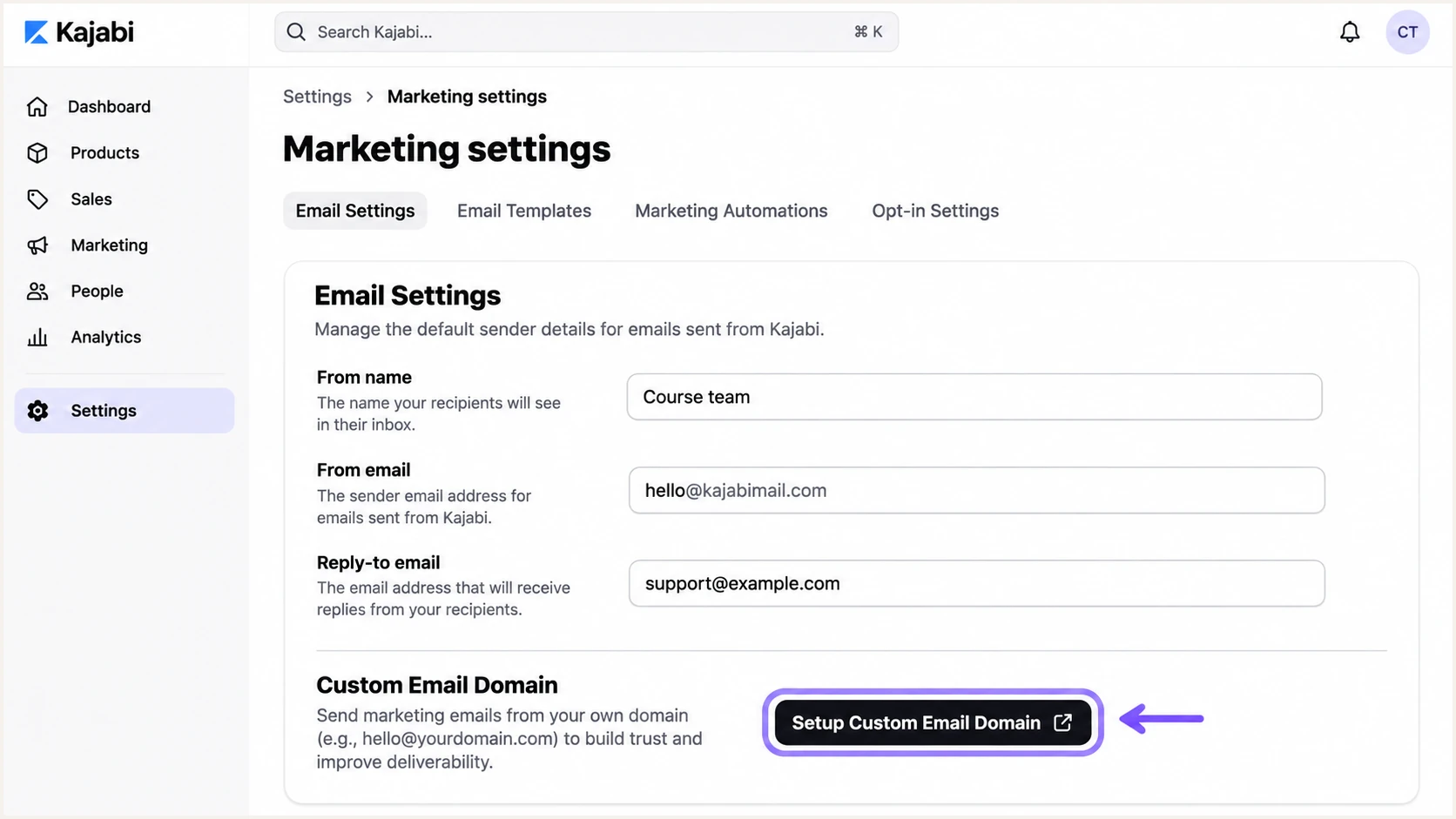
Kajabi Email Settings and the Setup Custom Email Domain action.
Set up SPF
Kajabi supports a custom Return-Path for SPF alignment. Publish SPF at the exact host Kajabi supplies, typically under kjbm, rather than adding a guessed Kajabi include to your root domain.
- Copy SPF: Find the generated TXT value beginning v=spf1. Add its exact Host and Value in DNS; keep the default TTL unless your DNS provider requires another value.
- Keep one record: Allow only one v=spf1 record at each hostname. If that exact host already has SPF, reconcile the authorized senders into one record instead of adding another.
- Publish dependencies: Add both generated MX records at their specified subdomain hosts. Use the displayed priorities; Kajabi documents 10 and 20. Also add its generated CNAME.
- Check limits: Keep SPF within the 10 DNS lookup limit, including nested includes. Do not replace your business mailbox SPF or root MX records.
Enter the SPF host from Kajabi into the checker below. For a TXT record published at kjbm.example.com, check kjbm.example.com, not just example.com.
This lookup checks the published SPF policy. A received message is still needed to establish which Return-Path Kajabi actually uses and whether it matches the visible From domain.
SPF checker
Find SPF syntax issues, lookup limits, and weak records.
?/16tests passed
SPF passes when the sending IP is authorized by the Return-Path domain. SPF alignment additionally requires that domain to match the visible From domain, either exactly or through their shared organizational domain under relaxed matching.
A passing SPF result for a provider-owned Return-Path does not establish SPF alignment. Because Kajabi supports a custom Return-Path, check the generated records and retest if that path is unexpectedly missing.
Set up DKIM
I use the DKIM selector and public key generated by Kajabi. A key created elsewhere will not match the private key Kajabi uses to sign your campaigns.
- Locate selectors: On Custom Email Domain Setup, identify each DKIM host containing _domainkey. Use the full host and record type shown in your account.
- Publish the key: For a TXT record, copy the entire public key value, including its p= portion. If Kajabi provides a CNAME selector, publish that CNAME target instead.
- Check host expansion: In an example.com DNS zone, a host ending _domainkey.kjbm is relative to that zone. Avoid accidentally creating a name ending example.com.example.com.
- Verify signing: After verification, send a campaign test. Require dkim=pass and a signing domain that matches the visible From domain for DMARC. Leave other services' selectors in place.
The received DKIM-Signature header identifies the signing domain in d= and selector in s=. Query the TXT record at the selector followed by ._domainkey. and that signing domain.
If a selector is a CNAME, the public key is at its target. Never publish a private key in DNS or shorten a public key to fit an editor field.
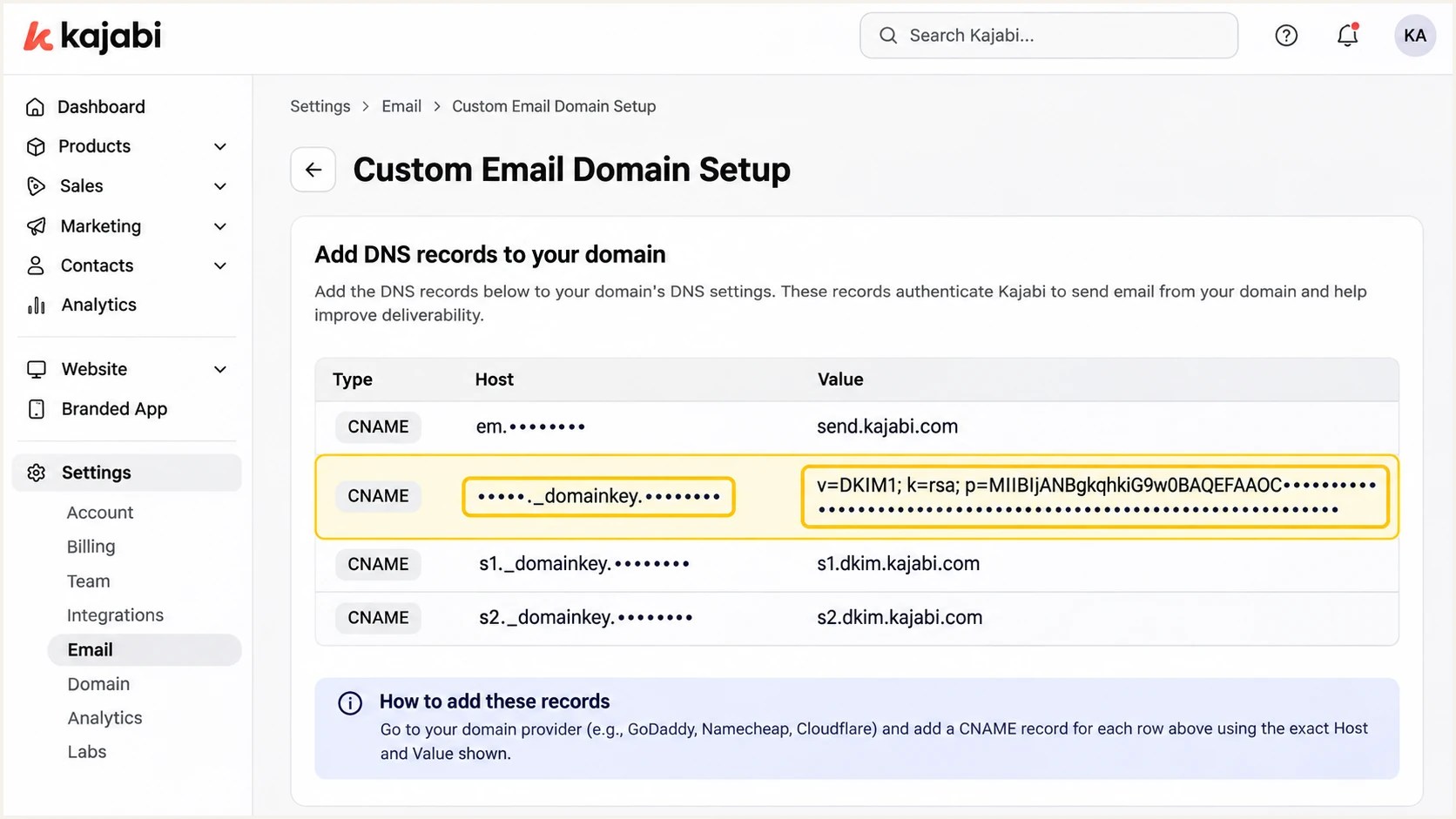
Kajabi custom email DNS records with the DKIM host and public value highlighted.
Set up DMARC
For a domain without DMARC, I start with p=none to collect reports before enforcement. If it already uses p=quarantine or p=reject, keep that policy while adding Kajabi.
Use the DMARC record generator to create a monitoring record. For Kajabi's kjbm sending domain, publish it at _dmarc.kjbm, relative to your root DNS zone. Keep any existing root _dmarc record.
- Select the host: For a visible From address at kjbm.example.com, the full DMARC hostname is _dmarc.kjbm.example.com. An explicit record there takes precedence over inherited root policy.
- Keep one policy: Publish one DMARC TXT record per host. When Kajabi supplies a longer value, preserve its required tags and reporting recipients; add your reporting recipient to the same rua list.
- Use a real inbox: Replace dmarc@example.com below with an address that accepts aggregate reports. An external reporting domain also needs DMARC report authorization.
- Enable verification: Save the record. Existing externally managed setups with Enable Strict DMARC must return to Settings > Marketing settings > Email Settings and select that action to verify propagation.
Minimal monitoring value, replace the report addresstext
v=DMARC1; p=none; rua=mailto:dmarc@example.com
The value above is a starter for a new monitoring policy, not a replacement for an existing enforcement policy. If Kajabi generates additional reporting addresses or tags, retain them in the single record at the correct host.
Check kjbm.example.com below to inspect the policy for that sending domain. Check example.com separately to inspect your root policy; entering the root alone does not verify the dedicated kjbm record.
DMARC checker
Look up a domain's DMARC record and catch policy issues.
?/7tests passed
A valid DNS result establishes that receivers can discover the record. DMARC passes on a message when either SPF or DKIM passes with the required domain match. Both mechanisms do not have to pass for DMARC.
Kajabi-managed DNS handles its required subdomain changes automatically. For external DNS, confirm the dedicated record and Kajabi's verification status after propagation.
Check what "Strict DMARC" actually means
Kajabi uses "Strict DMARC" as a setup label. Inspect the published p= value separately; the label does not prove p=reject. Do not add aspf=s or adkim=s solely because the interface says "Strict".
Verify and troubleshoot
I test a message sent by Kajabi after DNS verification. A forwarded copy changes the delivery path and can produce misleading SPF failures.
The email tester below provides a receiving address. Send a Kajabi test to that address to get a diagnosis of authentication and other delivery checks, without assembling the headers manually.
Email tester
Send a real email to this address. Suped shows a results button when the test is ready.
?/43tests passed
In Marketing > Email Campaigns, open an Email Broadcast, select Edit content, then Send Test Email. Enter the tester address and click Send Preview. Repeat with an Email Sequence if both are in use.
Also trigger a controlled subscriber workflow to test the actual automated delivery path. Course enrollment receipts and other transactional messages need their own checks because marketing-domain settings do not automatically change their sending identity.
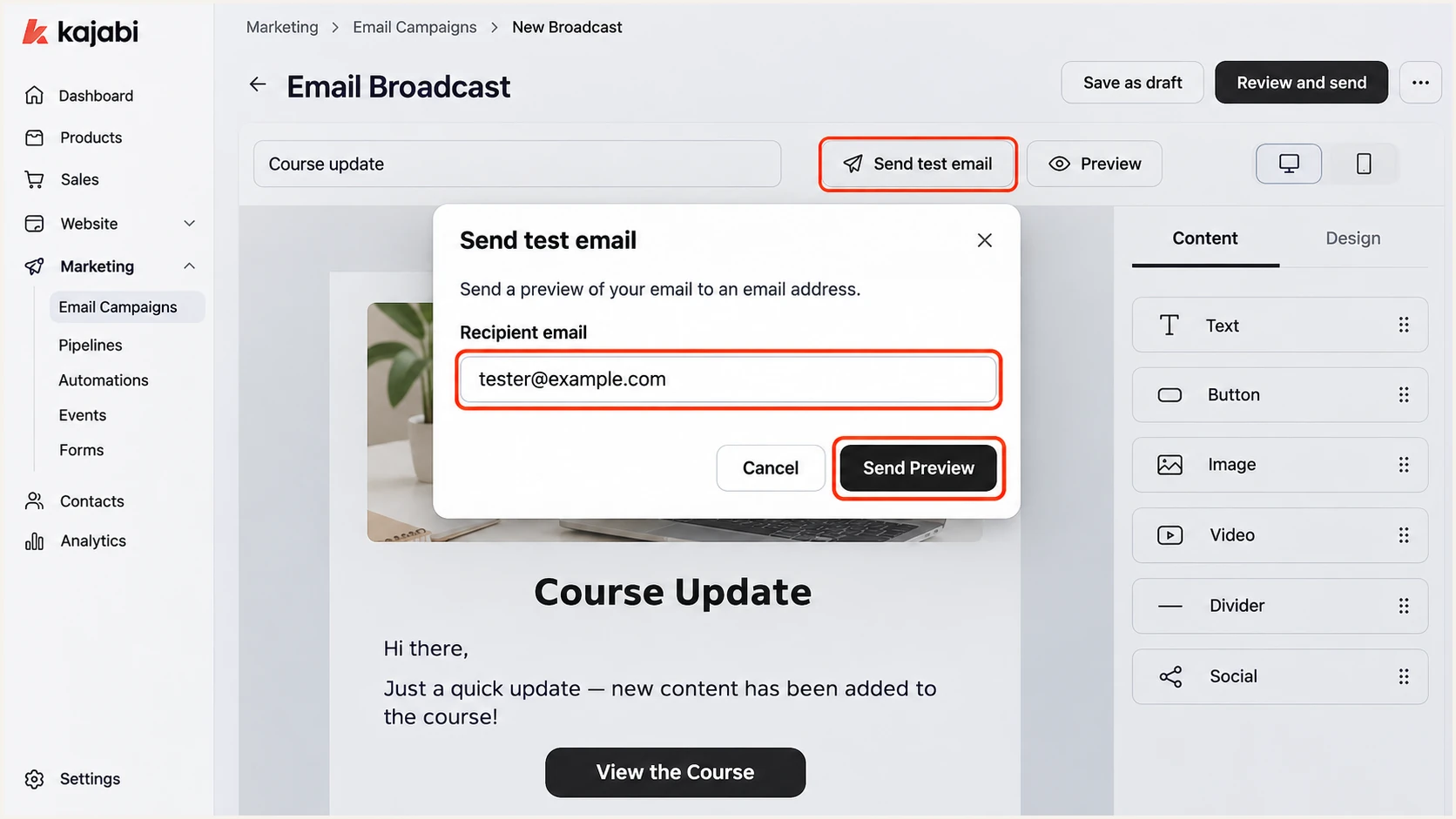
Kajabi Send Test Email dialog with the recipient field and Send Preview action.
Use the receiving server's results, not an authentication header inserted by the original sender. Record the From domain and Return-Path for the specific test you just sent.
If a preview uses a different sending identity, use a controlled live broadcast or subscriber workflow before deciding whether the production configuration is correct.
- Inspect headers: Check the receiving server's Authentication-Results for spf=pass, dkim=pass, and dmarc=pass. Compare smtp.mailfrom and header.d with the visible header.from domain.
- Fix DNS names: Check the exact generated hosts for missing kjbm, duplicated domain suffixes, duplicate SPF or DMARC records, and truncated DKIM keys.
- Escalate verification: If authoritative DNS matches Kajabi but verification still fails after 48 hours, give Kajabi Support the domain, record values, and error details. Avoid repeatedly removing the custom domain.
- Separate delivery issues: If authentication passes but mail reaches spam, investigate complaint rates and recipient engagement. DMARC does not guarantee inbox placement.
These commands query the example kjbm host. Replace SELECTOR with the s= value and use the actual d= domain from DKIM-Signature if it differs.
A DNS provider can split a long DKIM TXT value into several quoted character strings within one record. Those strings concatenate; that differs from publishing several separate key records.
Query the example sending-domain recordsbash
dig +short TXT kjbm.example.com
dig +short MX kjbm.example.com
dig +short TXT SELECTOR._domainkey.kjbm.example.com
dig +short TXT _dmarc.kjbm.example.com
Read the result combinations below against the actual From domain. A policy of p=none changes the requested treatment of failures, not the authentication result.
If SPF is not matching the From domain but DKIM passes with the correct domain match, DMARC still passes. Keep fixing unexpected Kajabi Return-Path problems, but do not treat SPF alignment alone as a DMARC failure.
|
|
|
|
|---|---|---|---|
Pass + match | Pass + match | Pass | Monitor |
No match | Pass + match | Pass | Review Return-Path |
Pass + match | Fail | Pass | Repair DKIM |
No match | No match | Fail | Repair authentication |
DMARC depends on a passing mechanism with the required domain match.
Get alerted when it breaks
A successful setup test covers one message at one moment. Our DMARC monitoring in Suped tracks authentication results reported by participating receivers so later DNS changes and failing senders become visible.
I keep Kajabi's required reporting recipients and add the Suped reporting destination to the same rua list. Monitor the actual kjbm sending domain as well as the root when both send mail; keep the Kajabi setup itself in Kajabi.
- Enable notifications: In Suped Notifications, enable Issues detected, Sending sources need verification, and DMARC summary emails for the appropriate recipients.
- Confirm the source: Verify Kajabi as an authorized source after matching a controlled campaign to its authentication data. Do not approve an unfamiliar source solely by its IP or rDNS.
- Diagnose failures: Open affected records in Data view and Detail view to compare SPF and DKIM results. Use the issue's fix steps to correct the corresponding Kajabi-generated DNS record.
- Trace changes: Use DNS history to compare old and new values after a failure appears. Retest through Kajabi after fixing DNS, then confirm recovery in subsequent reports.
Suped brings the reports, detected issues, and record diagnostics into one workflow. This is useful when Kajabi remains configured but a later DNS edit removes a selector or changes the effective DMARC policy.
Aggregate reports arrive after receivers generate them, commonly on a daily schedule. Suped alerts depend on incoming data and detected issues; an alert is not an immediate notification for every individual message.
Keep monitoring after verification
Use Suped issue notifications for ongoing failures and summaries for trends. Keep a fresh Kajabi test message as a reference when a new failure needs investigation.
Secure your domain with p=reject
Move to p=reject once every legitimate sender using that From domain has a reliable DMARC pass path. I use Suped reports to check normal campaign cycles and low-volume sending before changing policy.
Treat the root domain and kjbm as separate policy scopes when each has its own record. Root p=reject does not override an explicit p=none record at _dmarc.kjbm.
Monitor with p=none
Collect reports while diagnosing legitimate failures. Receivers get no quarantine or rejection request from this policy.
Enforce with p=reject
Request rejection of messages failing DMARC. Keep reporting enabled to detect legitimate traffic affected by later changes.
Review the failing traffic by source instead of pursuing a perfect overall pass rate. Unauthorized messages are expected to fail; legitimate messages need a working SPF or DKIM domain match.
Suped's source verification and detailed authentication results help distinguish those cases. Hosted DMARC also lets teams manage policy changes in our dashboard after its DNS configuration is complete.
- Inventory senders: Check Kajabi broadcasts and sequences, plus every other service using the same From domain. Observe a complete business sending cycle, including infrequent legitimate messages.
- Repair legitimate mail: Resolve DKIM failures and unexpected Return-Path mismatches. Keep relaxed matching unless an exact-domain requirement has been tested across all authorized senders.
- Stage enforcement: Change p=none to p=quarantine, review subsequent reports and delivery tests, then change to p=reject. Keep any existing quarantine or reject policy during Kajabi onboarding.
- Keep watching: Preserve rua recipients and Suped issue notifications. After enforcement, repeat Kajabi tests and investigate new legitimate failures before making further policy changes.
Edit the existing record at the intended host; never create a second DMARC policy beside it. If retaining Kajabi-supplied tags, change only the policy value needed for this stage.
p=reject requests receiver rejection of messages that fail DMARC. It does not stop lookalike-domain email or guarantee placement for authenticated campaigns.
Frequency asked questions
Use the exact SPF host Kajabi generates, normally under kjbm. Its dedicated sending records coexist with your root business-email records. Adding an include at the root does not fix SPF for a different Return-Path domain.
Yes. DKIM passing with the required From-domain match is sufficient for DMARC. Kajabi supports a custom Return-Path, so investigate unexpected SPF alignment failures without treating them as proof that DMARC failed.
No. Check the actual TXT record at _dmarc.kjbm for its p= value. Kajabi's setup status and the receiver policy are separate checks. Keep an existing quarantine or reject policy rather than replacing it with none.
Kajabi's custom email domain setup applies to marketing email. Do not assume it changes enrollment receipts or other transactional messages. Trigger each workflow and inspect its actual From domain and authentication results separately.
Check that the records are at the authoritative DNS provider and match Kajabi's exact hosts and values. Verification takes up to 48 hours. If public DNS matches after that window, contact Kajabi Support with the record details and the displayed error.
No. A mailgun.net suffix identifies sending infrastructure, not Kajabi uniquely. I identify a Kajabi source by correlating a controlled campaign with its source IP and authenticated DKIM signing domain. Never authorize a sender by rDNS alone.




