
How to set up DMARC/DKIM/SPF for ISCorp

Published 22 Nov 2026
Updated 22 Nov 2026
12 min read
Summarize with
Set up ISCorp email authentication by confirming its outbound sending settings, authorizing the actual Return-Path domain with SPF, enabling DKIM with your domain where supported, and publishing DMARC for the visible From domain. ISCorp supports Return-Path alignment, so correctly configured SPF can satisfy DMARC.
I start with the hosted application's actual email route. ISCorp's public support articles document how to request configuration changes, but do not publish a universal customer SPF include or DKIM selector. Obtain those values for your deployment before editing DNS. All example domains and IP addresses below are placeholders.
Add your domain
Have ISCorp authorize your sending domain for the hosted application. I use the portal workflow documented in ISCorp's 'Help Desk Registration' and 'Create a New Incident' support articles.
- Sign in: Open Client support on ISCorp's website. New users select 'create your own account', complete their profile, save, and wait for the account approval email.
- Open a request: Choose 'Create an Incident'. Enter a summary such as 'Authorize example.com for outbound email', select the appropriate Category, and choose Urgency 'Request' for planned setup.
- Specify the sender: In Description, identify your customer account, hosted application, From address and desired Return-Path domain. Request the required SPF values, DKIM availability and any ownership verification record. Save the incident.
- Verify ownership: Publish any verification record ISCorp supplies, then ask support to confirm authorization and activate the requested Return-Path. Retain the DNS names, record types and values in the incident.
For example, the visible sender can be alerts@example.com while the Return-Path uses bounce.example.com. Confirm that ISCorp will use that envelope domain on outgoing mail; changing the Reply-To address does not change it.
The portal form below illustrates the documented request workflow. The domain and addresses are examples, and the image is an illustrative reconstruction of the ISCorp support portal.
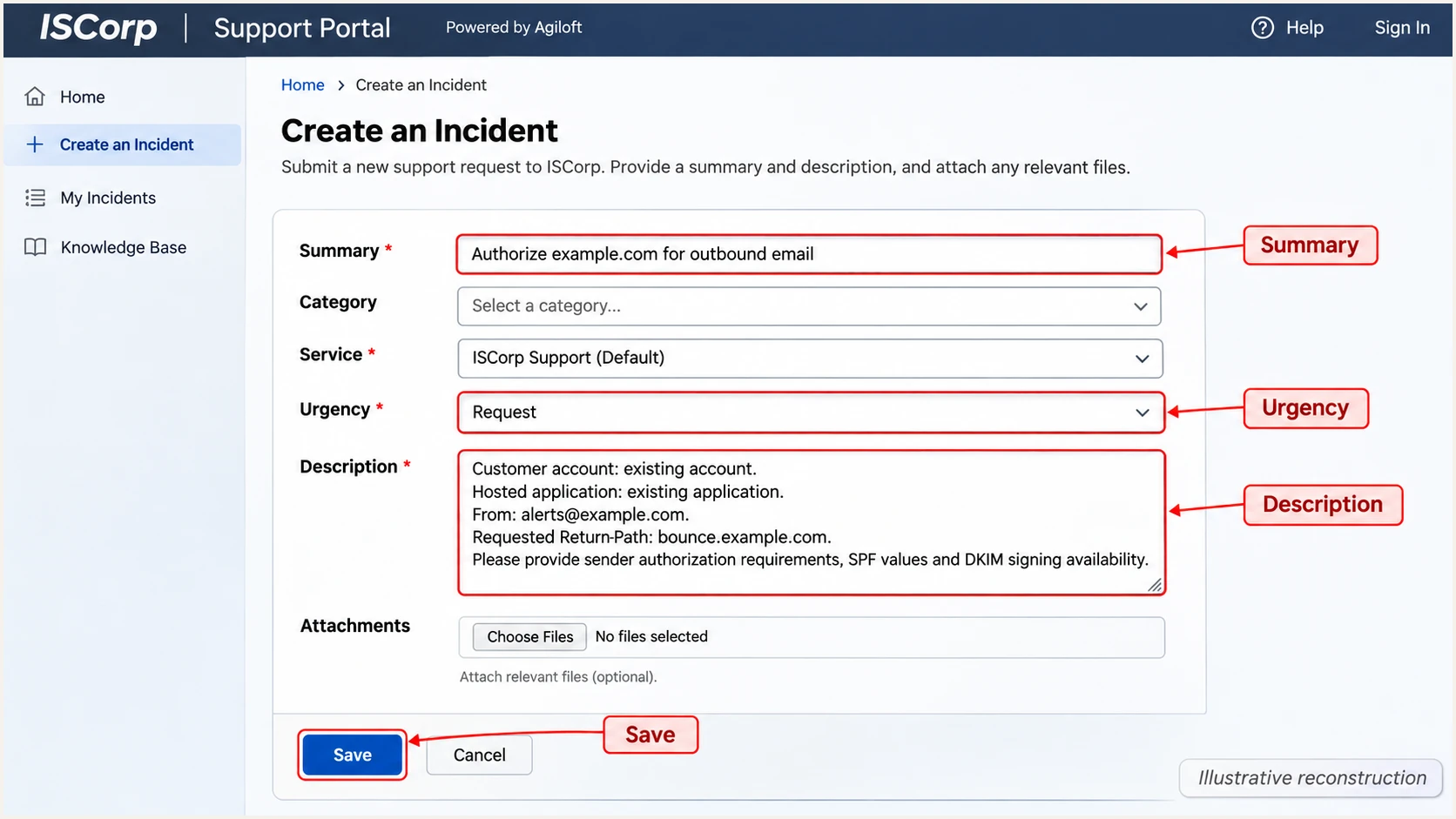
Illustrative ISCorp support incident requesting sending-domain authorization.
Ask whether mail leaves through ISCorp's relay or another relay configured for your application. The final sending route determines the SPF authorization and which system must apply DKIM.
Set up SPF
Publish SPF at the domain used in SMTP MAIL FROM, normally visible in the received Return-Path. I check that domain before editing the root domain's SPF record.
- Confirm the domain: Send an application email and inspect Return-Path. If it uses bounce.example.com, check SPF there. If it uses example.com, update the existing SPF record at example.com.
- Authorize the route: Add only the outbound IP addresses or include value confirmed by ISCorp. Merge authorization into the existing SPF record before its final all mechanism, preserving other legitimate senders.
- Check matching: Under relaxed SPF alignment, bounce.example.com matches a From domain of example.com. With aspf=s, the envelope domain must exactly match the From domain.
- Check limits: Keep one SPF record per hostname and stay within the 10 DNS lookup limit, including nested includes. Multiple SPF records or exceeding the limit produces permerror.
Illustrative SPF at bounce.example.com, not an ISCorp production valuetext
bounce.example.com. IN TXT "v=spf1 ip4:192.0.2.10 -all"
192.0.2.10 is reserved for documentation. Replace it with confirmed authorization before publishing. This example assumes that the specified server is the only sender using that envelope domain. Do not copy ISCorp's corporate SPF record or authorize its entire network.
Enter the actual Return-Path domain in the SPF checker. If ISCorp supplies a CNAME delegation for that hostname, follow its exact instructions; a CNAME cannot coexist with a TXT record at the same name.
SPF checker
Find SPF syntax issues, lookup limits, and weak records.
?/16tests passed
After DNS caches expire, send another application email. The receiving server should report spf=pass for the expected smtp.mailfrom domain. A valid DNS record alone does not prove that the application used that domain.
If your configured route retains a provider-owned Return-Path, adding SPF at your From domain will not fix SPF alignment. Expect that alignment failure and rely on passing DKIM with your domain. If neither method matches your From domain, have ISCorp change the sending route before enforcing DMARC.
Set up DKIM
Ask ISCorp whether your specific application or outbound relay supports DKIM signing with your domain. I confirm this separately because custom Return-Path support does not establish DKIM support.
- Request signing details: Ask for the signing domain, selector, DNS record type and complete public value. Request a 2048-bit RSA key where RSA signing is supported.
- Publish the record: Create the supplied TXT or CNAME at the exact selector hostname. Preserve the entire public key or CNAME target. Keep private keys out of DNS and support attachments.
- Activate signing: Ask ISCorp or the application administrator to enable signing on the actual outbound route after DNS resolves. Publishing a public key alone does not sign messages.
- Test a message: Inspect DKIM-Signature for d= and s=. Confirm that the receiving server reports dkim=pass and that d= matches the From domain under your DMARC alignment mode.
I take the selector from ISCorp's configuration or a real message. Common selector names found on ISCorp's corporate domain do not establish the selector for your hosted application.
Under relaxed DKIM alignment, a signing subdomain under example.com can match a From domain of example.com. With adkim=s, the domains must match exactly.
Custom-domain DKIM available
Publish the supplied selector record and activate signing. Aim for passing SPF and DKIM with matching domains. An intact DKIM signature also provides a DMARC path when forwarding breaks SPF.
Custom-domain DKIM unavailable
Use passing SPF with a matching Return-Path for DMARC. Ask ISCorp about a signing-capable outbound route if DKIM is required. DMARC passing through SPF alone does not satisfy a recipient's separate DKIM requirement.
During DKIM key rotation, publish and activate the new selector before retiring the old one. Keep the old public key available until previously signed messages have cleared delivery and retry queues.
Set up DMARC
Publish one DMARC TXT record for your visible From domain. I inspect the existing policy first and preserve p=quarantine or p=reject when either is already deployed.
- Check the current record: Look up _dmarc.example.com. Edit the existing DMARC record instead of adding a second one. Coordinate changes with whoever owns the domain's email policy.
- Generate the policy: Use the DMARC record generator to create a monitoring record if DMARC is absent. Keep an existing quarantine or reject policy.
- Publish the TXT: For example.com, use host _dmarc or the full _dmarc.example.com name as required by your DNS host. Use the monitoring value below only for a new monitoring setup.
- Set reporting: Replace the example address with a working aggregate-report destination you control. For a reporting service, use its assigned address and required external reporting authorization.
Initial DMARC monitoring value for a domain without enforcementtext
v=DMARC1; p=none; rua=mailto:dmarc@example.com
The example address dmarc@example.com must be replaced before production use. A mailbox receives aggregate XML reports; a report-processing platform turns those reports into source and authentication data.
Check your From domain below after saving DNS. Confirm that one valid DMARC record is returned and that its policy and reporting destination match the intended setup.
DMARC checker
Look up a domain's DMARC record and catch policy issues.
?/7tests passed
A valid policy record does not prove that ISCorp mail passes DMARC. DMARC requires a passing SPF result with a matching envelope domain, or a passing DKIM signature with a matching signing domain.
p=none requests monitoring without DMARC enforcement. Receivers still apply their own filtering. Aggregate reports commonly arrive daily, so confirm message authentication directly while waiting for reporting data.
Verify and troubleshoot
I verify a new message generated by the hosted application after each change. Use the receiving server's Authentication-Results, together with the original message headers.
- Exercise the real route: Trigger an application notification and repeat for other jobs that use a separate sending route. A test sent through an employee's mailbox does not validate application mail.
- Inspect identifiers: Record the From domain, Return-Path, DKIM d= and selector. Check spf=pass, dkim=pass where supported, and dmarc=pass. A passing method must also match the From domain.
- Check DNS: Query the actual envelope domain, DKIM selector and From domain. Check for duplicate SPF records, an incomplete key or a hostname entered twice by the DNS interface.
- Capture failures: Keep the sending time, message ID and exact delivery error. Attach redacted headers and DNS results to the ISCorp incident so support can trace the outbound route.
The email tester is the quickest check of a delivered sample. It provides a test recipient and diagnoses the message received at that address.
Send to that recipient directly through the ISCorp-hosted application. Review the authentication results and domain matching, then repeat the same test after fixing a failure.
Email tester
Send a real email to this address. Suped shows a results button when the test is ready.
?/43tests passed
If the message never arrives, inspect the application's delivery logs and rejection response. DNS changes do not resolve a disabled relay account or an incorrect SMTP configuration.
Use these results to choose the next change. DKIM passing with a provider-owned signing domain still needs a matching SPF pass or a custom-domain DKIM signature for DMARC.
|
|
|
|---|---|---|
SPF permerror | Duplicate or limit | SPF evaluation |
SPF fail | Unauthorized IP | Outbound route |
DKIM none | Signing inactive | Relay signing |
DKIM fail | Key or message changes | Selector and relay |
DMARC fail | No matching pass | Authenticated domains |
Common authentication failures and the next check.
Query both TXT and CNAME for the DKIM selector because the record type depends on the settings ISCorp supplies. Replace selector with the actual s= value and use the signing domain from d=.
The SPF query targets the envelope domain, while the DMARC query targets the From domain. These commands inspect DNS configuration; the received message establishes whether authentication passes.
DNS checks using example names, replace the selector and domainsbash
dig +short TXT bounce.example.com
dig +short TXT selector._domainkey.example.com
dig +short CNAME selector._domainkey.example.com
dig +short TXT _dmarc.example.com
For an existing open incident, select 'View My Incidents', open the relevant request, add the results in 'Additional Notes', and save. ISCorp asks customers to keep updates in their incident.
The illustrated follow-up below requests a trace of the sending IP and signer. Include real diagnostic values in your own incident, with sensitive content removed.
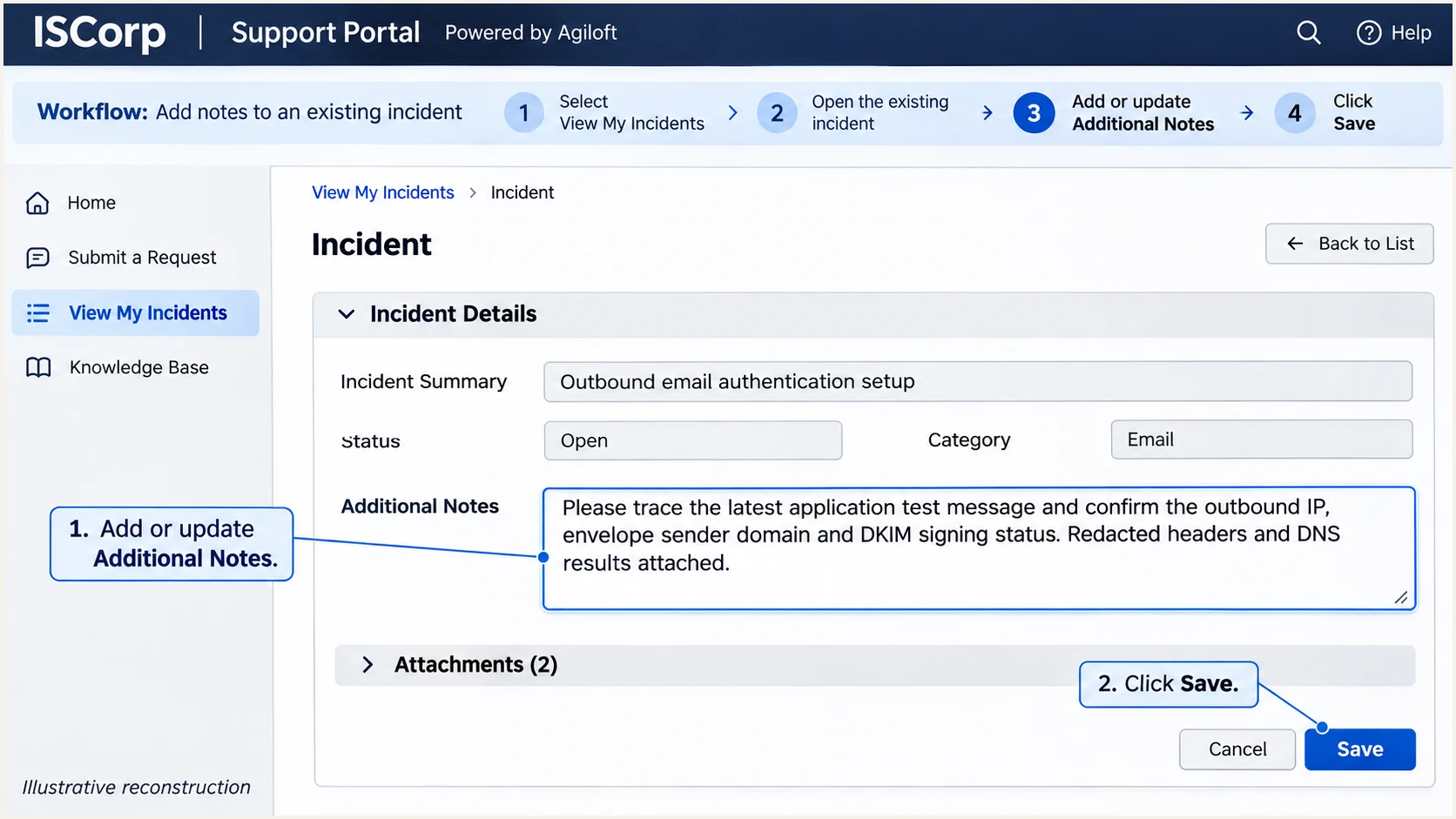
Illustrative ISCorp incident update with authentication diagnostics.
If a receiving server reports a reverse DNS problem, ask ISCorp to check the sending IP's PTR and corresponding forward DNS. Reverse DNS is separate from SPF and DKIM; changing your DMARC policy does not repair it.
Get alerted when it breaks
Suped is our DMARC platform for monitoring ISCorp mail after setup. Its DMARC monitoring connects aggregate-report failures to sending sources and provides issue-specific fix steps.
- Enable notifications: In Suped's notification settings, enable 'Issues detected' and 'Sending sources need verification'. Enable DMARC summary emails for routine review.
- Verify sources: Mark a source as verified only after matching its sending IPs and message evidence to an authorized application. An ISCorp-looking hostname alone is insufficient.
- Investigate changes: Open the affected source and inspect detailed SPF, DKIM and DMARC results. Compare DNS history when failures begin after a record change.
- Resolve and retest: Follow the detected issue's fix steps, coordinate relay changes through the ISCorp incident, and send a new test. Check subsequent aggregate data for recovery.
I keep the application owner responsible for relay changes and the DNS owner responsible for record changes. Suped's source verification and diagnostic detail give both owners the evidence needed to make those changes.
Keep application delivery monitoring active as well. Aggregate reports provide domain-wide evidence, while a delivery log identifies an individual rejected or queued message.
Report-based alerts follow report arrival
DMARC aggregate reports arrive on receiving providers' schedules, commonly daily. Suped's report-based notifications depend on that data arriving; they are not a live feed of every sent message. Use the email tester and ISCorp delivery logs for immediate checks.
Secure your domain with p=reject
Move to p=reject after every legitimate sending route passes DMARC consistently. I check all services using the From domain, including low-volume and scheduled application mail, before tightening a domain-wide policy.
- Inventory senders: Review Suped's source table over a period covering normal sending activity. Verify known sources and investigate unknown sources before deciding whether they are authorized.
- Fix legitimate failures: Resolve SPF authorization and domain matching. Enable matching DKIM where supported. Test every ISCorp application route and review forwarding behavior.
- Stage enforcement: For a domain starting at p=none, move to p=quarantine and review new reports and delivery errors before p=reject. Preserve existing enforcement during sender setup.
- Review subdomains: Check sp= and any separate subdomain DMARC records before changing the parent policy. Retain reporting and recheck all legitimate sources after enforcement.
Suped's Hosted DMARC lets your team manage policy changes in the dashboard after the initial DNS delegation. Pair those controls with verified sources and issue diagnostics to decide when each enforcement step is ready.
For a directly managed TXT record, the final example below requests rejection of messages that fail DMARC. Replace the reporting address, retain other intentional policy tags, and validate the published result.
Final enforcement example for a directly managed DMARC TXT recordtext
v=DMARC1; p=reject; rua=mailto:dmarc@example.com
Continue reviewing Suped notifications after enforcement, especially when ISCorp changes sending IPs or rotates DKIM keys. p=reject requests handling for DMARC failures; receiving servers retain final delivery discretion.
Retain the previous DNS values in the change record so the DNS owner can reverse an accidental edit while ISCorp investigates an affected relay.
Frequency asked questions
Obtain the outbound IP addresses or SPF include from ISCorp for your specific hosted application. Its public support instructions do not publish a universal customer include. Add the confirmed authorization at the actual Return-Path domain and preserve existing legitimate senders.
Confirm custom-domain DKIM with ISCorp for your application and relay. Return-Path alignment support does not guarantee DKIM signing support. If custom DKIM is unavailable, passing SPF with a matching envelope domain can satisfy DMARC, though separate recipient DKIM requirements still apply.
An SPF pass authenticates the envelope sender domain. If that domain does not match the visible From domain under your DMARC settings, it does not satisfy DMARC. Configure the custom Return-Path or obtain a passing DKIM signature with a matching signing domain.
The .iscorp.com suffix points to ISCorp infrastructure. An application hosted by ISCorp, including Skyward deployments, can be behind that sending source. Confirm the complete PTR hostname and connecting IP with ISCorp and your application logs. The suffix alone does not identify the customer or prove that the message is authorized.
DNS visibility depends on the previous record's TTL and resolver caching. Once the records resolve and the sending configuration is active, a newly received application message provides an immediate authentication check. Aggregate DMARC reports commonly arrive daily, so allow a full reporting cycle before judging report-based results.