
How to set up DMARC/DKIM/SPF for Higher Logic Informz


Authenticate your From domain with Higher Logic Informz's generated DKIM CNAME records, complete its authentication test, and publish a DMARC TXT record. SPF is already configured for the default informz.net Return-Path. With that default, your domain passes DMARC through a passing DKIM signature whose signing domain matches your From domain.
I check the actual Return-Path before editing SPF. A branded Return-Path requires account-specific provisioning instructions; adding an include to your From domain does not change the envelope sender. These steps apply to Thrive Marketing Professional, formerly Informz.
Add your domain
Use a From address on a domain you control, such as newsletter@example.com. Have access to its authoritative DNS zone before starting.
- Open authentication: In the Admin interface, go to Settings > Setup > Email Authentication.
- Request records: Enter your From domain and click GET INSTRUCTIONS.
- Save the output: Give the generated DNS instructions to your DNS administrator.
- Complete verification: After publishing the records, return and click TEST; require a successful result.
Register the domain used after the @ in the campaign's From address. Reply-To is a separate identity and does not determine DMARC authentication.
I keep the generated instructions with the DNS change request so the administrator can compare the published values against the requested values.
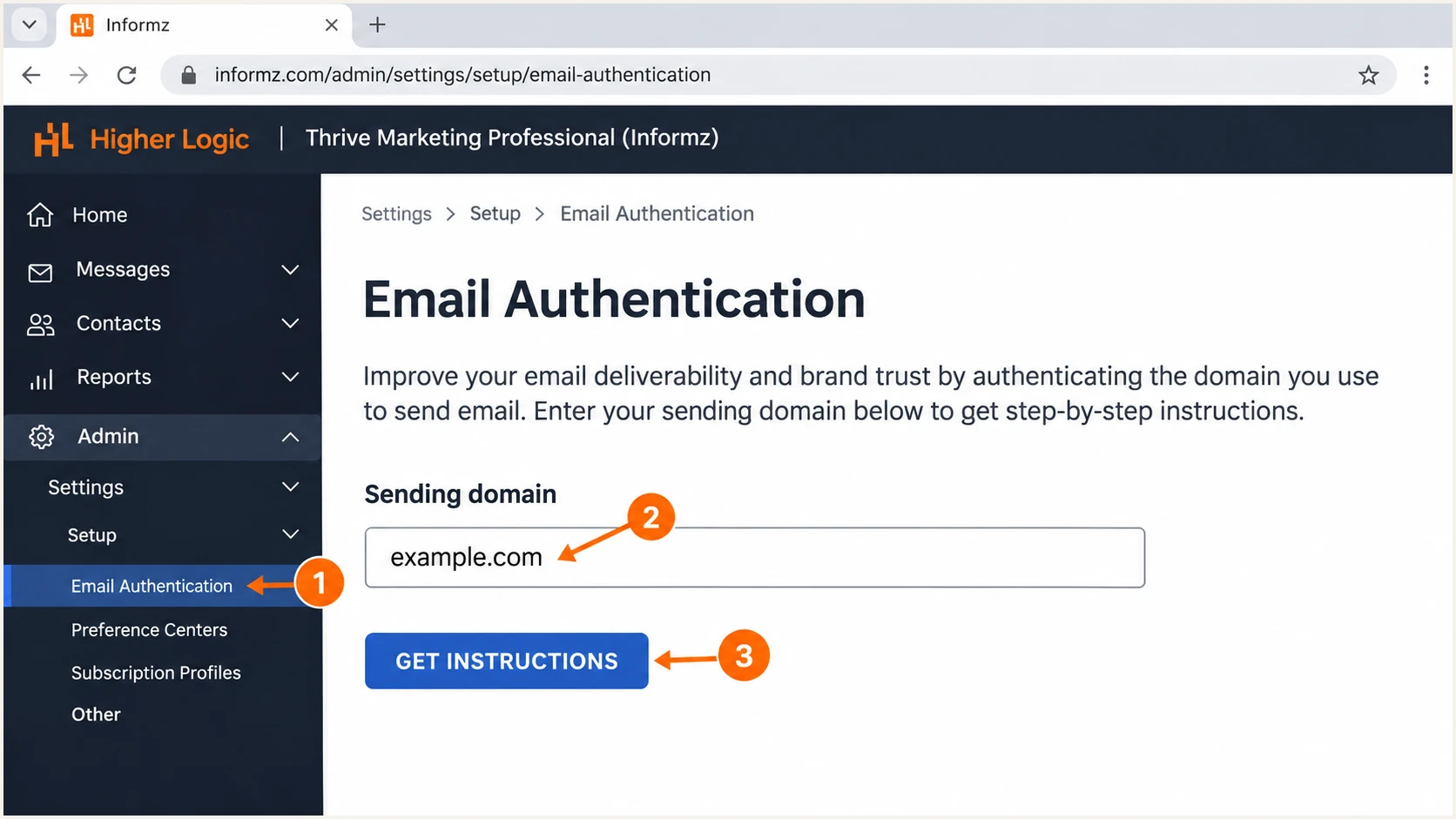
Illustration of requesting domain authentication instructions in Higher Logic Informz.
Treat the screenshot as an instructional illustration. The generated records in your account are the values to publish.
Repeat the setup for any additional From domain used by scheduled campaigns. A different subdomain is a different signing identity to check.
Set up SPF
SPF checks the SMTP envelope domain, usually visible in Return-Path. I use a delivered campaign message to identify that domain before deciding which DNS zone needs attention.
- Inspect the envelope: Read smtp.mailfrom in the receiving server's Authentication-Results header and compare it with the visible From domain.
- Keep the default: For informz.net, leave provider-managed SPF in place. Customer-domain SPF changes are unnecessary for this route.
- Request branded routing: If you need SPF alignment, ask Higher Logic to confirm a custom Return-Path for your account and supply its exact DNS records. Test the provisioned route before relying on it.
- Validate changes: For any SPF record you manage, preserve existing senders, publish one SPF policy per DNS name, and stay within 10 evaluated DNS-lookup-causing terms, including nested dependencies.
Provider Return-Path
SPF authenticates the provider's envelope domain. A passing result does not establish SPF alignment with example.com.
A passing customer-domain DKIM signature supplies the DMARC authentication path.
Branded Return-Path
A provisioned envelope such as bounce.example.com shares the organizational domain with example.com under relaxed SPF alignment.
Require both SPF pass and the matching domain relationship in a delivered message. DNS publication alone is insufficient.
Higher Logic documents include:informz.net under legacy Sender ID guidance. I do not add it merely to clear a DMARC SPF alignment warning.
Use the SPF checker on the actual envelope domain. Checking only the visible From domain answers a different question when those domains differ.
SPF checker
Find SPF syntax issues, lookup limits, and weak records.
?/16tests passed
Resolve duplicate SPF policies and lookup-limit errors before sending. Never replace an established SPF policy with a provider-only example.
With the default provider envelope, expect SPF alignment to fail against your own From domain. This is acceptable for DMARC when DKIM passes with the required domain match.
Set up DKIM
I treat a live-message DKIM pass as the acceptance test. A DNS record that exists but is not used by the sending system does not authenticate a campaign.
- Publish both records: Create the generated CNAME pair. Keep the second selector available for key rotation.
- Check DNS names: Avoid appending your domain twice. Publish each CNAME at its exact requested owner name without conflicting records there.
- Inspect the signature: In a delivered message, find d= and s= in DKIM-Signature. Query the selector under that signing domain.
- Check the result: Require dkim=pass from the receiving server and a signing domain that satisfies your DMARC alignment mode.
Illustrative CNAME pair; use your account-generated valuestext
s01a._domainkey.example.com. CNAME s01a.informz.net.
s01b._domainkey.example.com. CNAME s01b.informz.net.
These selector names are examples, not a universal record set. Publish the values supplied for your domain and account.
For a first deployment, retain relaxed DKIM alignment. If adkim=s already applies, the passing signature's d= must exactly equal the From domain.
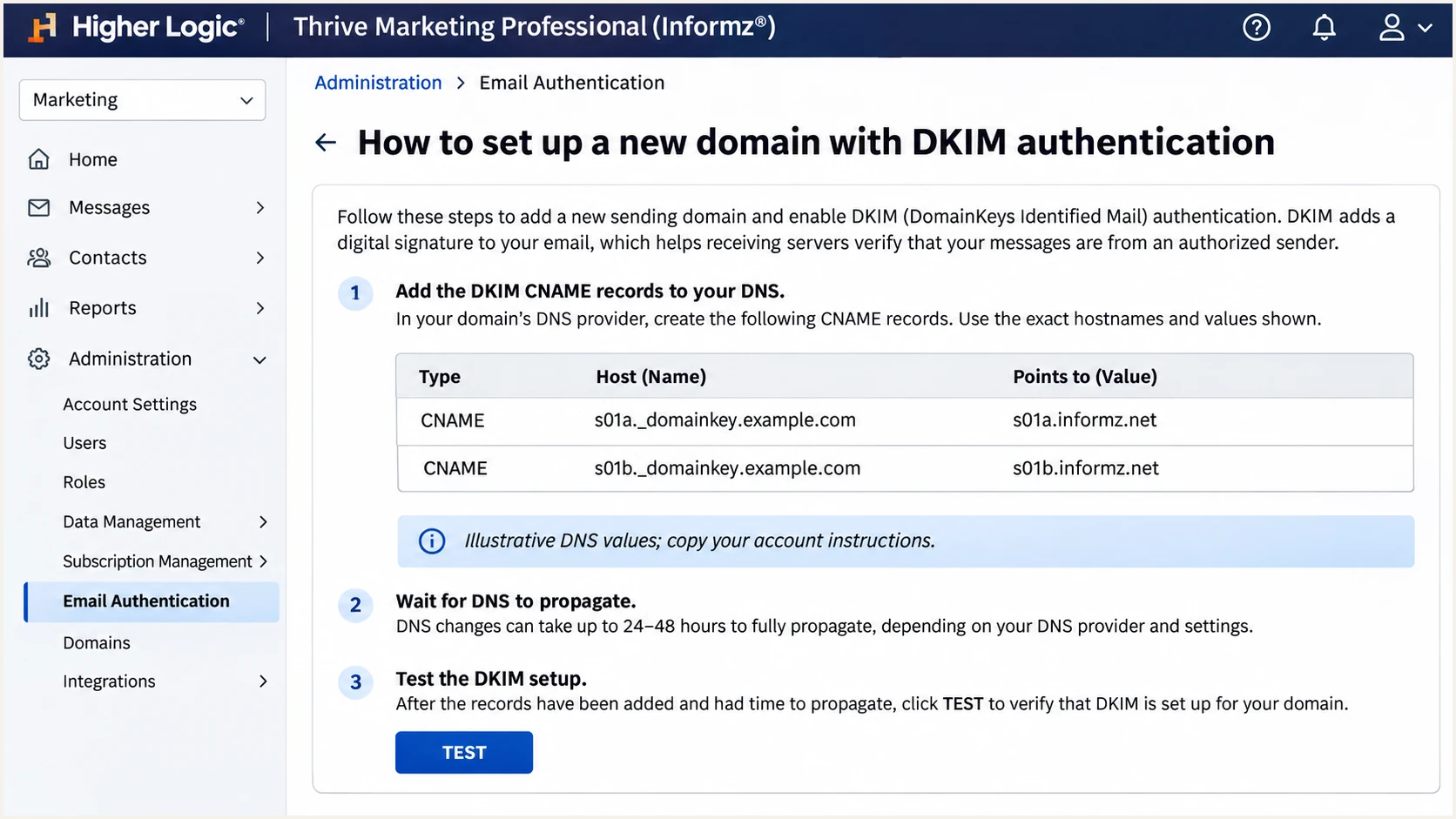
Illustration of the DKIM CNAME pair and TEST action in Higher Logic Informz.
If verification fails, query the authoritative DNS servers and check the complete CNAME destination. An incorrect relative hostname often puts a valid-looking record at the wrong name.
Allow cached responses to expire according to TTL, then retest. If DNS resolves correctly but the message lacks the expected signature, send Higher Logic Support the raw headers and the generated instructions.
Set up DMARC
Publish DMARC at the From domain. For newsletter@example.com, the DNS name is _dmarc.example.com; do not publish your policy under informz.net.
- Check existing policy: Look for an existing DMARC TXT record and any applicable parent-domain policy before creating a new record.
- Start with monitoring: For a new deployment, use p=none. If quarantine or reject is already deployed, keep that policy and fix authentication before sending.
- Set reporting: Replace the example reporting address with a working aggregate-report destination. Keep existing reporting recipients when editing a record.
- Publish once: Create one DMARC policy at the intended DNS name, then verify the public lookup and a delivered message.
New deployment: TXT value at _dmarc.example.comtext
v=DMARC1; p=none; rua=mailto:dmarc@example.com
The record above is an example. Replace example.com in the DNS name and report address with your domain and reporting destination. A normal mailbox receives XML reports; it does not analyze them.
Use the DMARC record generator to build the value. Then check the published record below. A DNS check validates publication; the live email test verifies the sending route.
DMARC checker
Look up a domain's DMARC record and catch policy issues.
?/7tests passed
A report destination outside your domain needs the reporting service's external authorization records. Use its supplied instructions rather than inventing an address.
The p=none policy requests no DMARC-based enforcement against failing messages. It does not exempt mail from spam filtering or guarantee delivery.
Verify and troubleshoot
I test both the preview route and a small production mailing. Higher Logic lists separate Main IP and Test Mailing IP values in System Settings, so a successful preview is insufficient evidence for production.
- Use the real sender: Send with the exact From address and campaign configuration you intend to publish.
- Read trusted results: Inspect the receiving mailbox's Authentication-Results. Require dmarc=pass and a passing DKIM signature with the correct domain relationship.
- Trace the selector: Query the signature's s= value under d=, then follow its CNAME to the public DKIM key.
- Separate delivery issues: If authentication passes but mail is filtered, investigate bounce responses and recipient complaints. A blocklist (blacklist) listing requires a separate reputation investigation.
|
|
|---|---|
DKIM missing | Check sending route |
DKIM fails | Check selector DNS |
SPF mismatch | Check envelope domain |
DMARC fails | Check domain matching |
Preview only passes | Test production send |
DNS checks for the illustrative recordsbash
dig +short CNAME s01a._domainkey.example.com
dig +short CNAME s01b._domainkey.example.com
dig +short TXT s01a.informz.net
dig +short TXT _dmarc.example.com
Use the email tester below for a quicker diagnosis. It supplies a recipient address; send a message to that address directly through Informz using the configuration being checked.
Publish a small production mailing to the test address as well as running your usual preview. Avoid forwarding an existing message, because forwarding changes the delivery path.
Email tester
Send a real email to this address. Suped shows a results button when the test is ready.
?/43tests passed
Read the authentication results and the reported envelope and signing domains. A passing SPF result on a provider domain does not replace the required DMARC domain match.
Save the raw message and diagnosis with your DNS change. Check new mail after each fix; an older message retains the original results.
DNS success is only one check
An authentication test confirms the records it checks. Verify the actual campaign signature and DMARC result before publishing broadly. Never bypass receiver authentication checks to make a test pass.
Get alerted when it breaks
A one-time test cannot detect a later DNS deletion or a campaign switched to an unauthenticated From domain. Suped is our DMARC platform for monitoring these failures and investigating the affected sending source.
- Enable reporting: Keep aggregate reports flowing to your designated reporting service. Suped analyzes reports to identify sources and authentication failures.
- Configure notifications: In Suped, enable Issues detected and Sending sources need verification notifications. Assign the emails to the person responsible for DNS and campaign sending.
- Investigate the source: Review the Higher Logic source, affected IPs, and DKIM results. Compare DNS history with the time failures began.
- Close with evidence: Follow the issue's fix instructions, send a new Informz test, and confirm subsequent aggregate reports show recovery.
Suped's DMARC monitoring combines source identification with issue diagnostics. For this setup, the useful alert is lost customer-domain DKIM authentication or a changed sending identity, rather than the expected provider-envelope SPF mismatch.
Aggregate reports usually arrive on daily reporting cycles. Notifications follow the data Suped receives; they are not a synchronous check of every campaign message.
Keep an actionable incident record
Record the failing From domain, selector, sending IP, and first affected campaign. Use Suped's record detail and DNS history to give the DNS administrator or Higher Logic Support a specific failure to resolve.
Secure your domain with p=reject
Move to p=reject after every legitimate sending route consistently passes DMARC. I base that decision on source-level reports covering a complete sending cycle, including infrequent campaigns.
- Inventory all senders: Review every source using the domain, including employee mail and automated applications. Informz authentication does not authorize the other sources.
- Fix legitimate failures: Use Suped's source and detail views to resolve failures. Confirm DKIM domain matching for the Informz production route.
- Stage enforcement: For a new rollout, observe p=none, then p=quarantine, then p=reject. Advance when legitimate-source failures are resolved, rather than after an arbitrary number of days.
- Review subdomains: Check explicit subdomain DMARC records and any sp policy. Test the exact domain used by each campaign.
- Continue monitoring: Keep reporting and Suped issue notifications enabled after enforcement. Require a new live test when changing From domains or DNS.
Enforcement example; retain your real reporting destinationtext
v=DMARC1; p=reject; rua=mailto:dmarc@example.com
Enforcement readiness
The production route passes DMARC, legitimate sources are accounted for, and reporting remains active. A reject policy asks receivers to reject messages failing DMARC; receiver policy still determines final handling.
Edit the existing record when advancing policy; do not publish a second one. Preserve other intentional tags and reporting recipients during the change.
Suped's Hosted DMARC supports dashboard policy management once configured. Use it with source diagnostics to review legitimate traffic before each policy change and keep the evidence for that decision.
Frequency asked questions
The default envelope uses provider-managed SPF. A From-domain include does not establish SPF alignment. Only make an account-specific SPF change when Higher Logic supplies a requirement for the actual sending route.
include:informz.net is associated with Higher Logic Informz. Its documentation mentions this include for legacy Sender ID. That association is not a reason to add it to your SPF record, and it does not change your Return-Path.
The .informz.net suffix is associated with Higher Logic Informz sending infrastructure. I use rDNS as a source-identification clue, then confirm the sending IP against account information and inspect the message authentication results. The suffix alone does not prove that a message is authorized.
Yes. DMARC passes when at least one authentication mechanism passes with the required domain match. A passing DKIM signature whose d= matches your From domain satisfies DMARC even when the envelope domain is unrelated. SPF must still authenticate correctly for the provider envelope.
Keep an existing quarantine or reject policy. Complete authentication and prove the new sending route with a controlled live test before publishing campaigns. Resolve the source-specific failure instead of weakening protection for the whole domain.