
How to set up DMARC/DKIM/SPF for HENNGE

HENNGE Email DLP needs include:spf.mta.hdems.com in your SPF policy, an activated HENNGE DKIM selector for your sending domain, and a DMARC TXT record at _dmarc. I verify the message received after HENNGE processing, because published DNS records alone do not prove that outgoing email passes DMARC.
These steps cover HENNGE One's Email DLP outbound route for Microsoft 365 or Google Workspace. DMARC passes when SPF or DKIM passes and its authenticated domain matches the visible From domain under your DMARC alignment settings.
Add your domain
I first check that every sending domain is registered with HENNGE One. Skip the addition request for domains already marked Configured.
- Open the tenant: Sign in to HENNGE One Customer Portal, select your tenant panel, and open the Domain tab.
- Request registration: Click Add, enter each domain on a separate line, click Confirm, review the request, and click Next.
- Verify the domain: Click Upload, then attach a domain capture through File. Use evidence from Microsoft 365 or Google Workspace showing the domain registered in your organization.
- Check completion: Allow approximately five business days after uploading the capture. Confirm the domain is Configured and the request is Completed before activating DKIM. Register sending subdomains too.
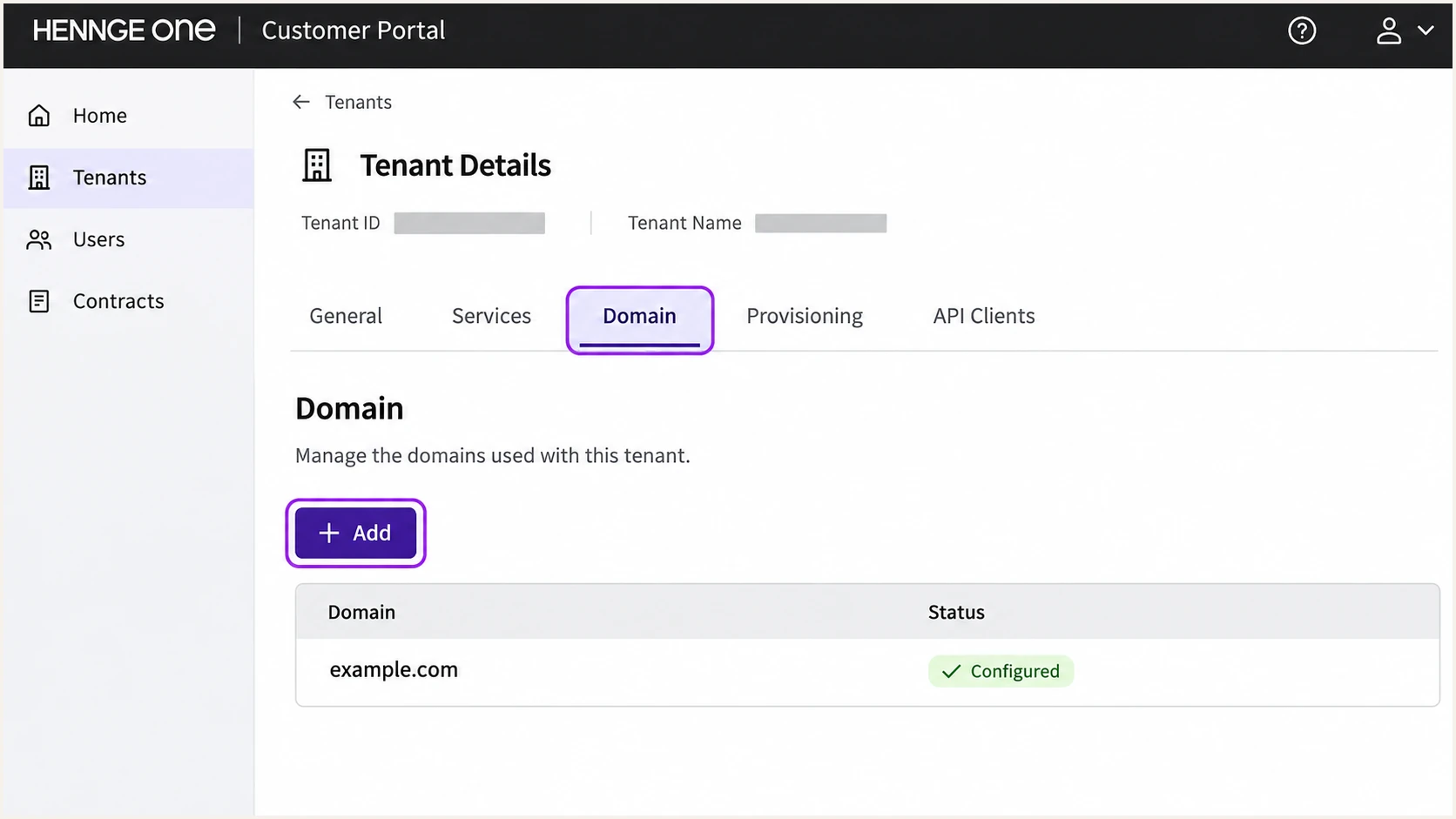
Illustrative HENNGE One Customer Portal view for checking domain registration.
Keep DNS administrator access available. Registration in HENNGE does not publish authentication records in your DNS zone, and HENNGE cannot edit those records for you.
Set up SPF
I update SPF before switching outbound traffic to Email DLP. HENNGE supports Return-Path alignment, so authorize its relay for the envelope sender domain used by your route.
- Find the policy: Locate the existing TXT record beginning v=spf1 for each custom sending domain. Check the actual SMTP MAIL FROM domain if your route uses a separate envelope domain.
- Authorize HENNGE: Insert include:spf.mta.hdems.com before the final all mechanism. Preserve existing senders and your current ~all or -all ending.
- Keep one record: Merge the authorization into the existing SPF record. Publishing a second SPF record at the same name causes an SPF error.
- Check the budget: Keep evaluation within the limit of 10 DNS-querying SPF terms, counting nested includes.
- Check special routing: If Email DLP routes through another external mail server, HENNGE also recommends include:spf-outbound.mo.hdems.com. Authorize the final sending server in the applicable SPF policy too.
SPF examples, choose your mailbox servicetext
# Microsoft 365 with HENNGE
v=spf1 include:spf.protection.outlook.com include:spf.mta.hdems.com ~all

# Google Workspace with HENNGE
v=spf1 include:_spf.google.com include:spf.mta.hdems.com ~all
These are complete example values, not additional TXT records. Retain any other legitimate senders already authorized in your domain.
In Email DLP, open Tenant Settings > DMARC Coverage Dashboard, select the domain, and check that SPF is Activated. Use the checker below to inspect syntax and lookup usage.
SPF checker
Find SPF syntax issues, lookup limits, and weak records.
?/16tests passed
A valid SPF policy still needs a live delivery test. The receiving server evaluates the connecting IP against the SMTP MAIL FROM domain, usually visible in Return-Path.
For relaxed SPF alignment, the envelope domain and visible From domain must share an organizational domain. Strict alignment requires the domains to match exactly. Adding an SPF include does not change the Return-Path.
Set up DKIM
I enable DKIM in HENNGE even when Microsoft 365 or Google Workspace already signs. ZIP encryption or Secure Download processing changes message content and can invalidate an upstream signature.
- Open DKIM: In Email DLP, select Tenant Settings > DKIM Setup > + Add new selector.
- Create the selector: Choose a unique name such as hennge2026 and a 2048-bit key. HENNGE allows one active selector per tenant.
- Publish the key: Clear Include Test Mode tag (t=y;) before copying. Publish the generated TXT name and value for each sending domain.
- Activate signing: After DNS resolves, click Activate, enter the domains one per line, and click Activate again.
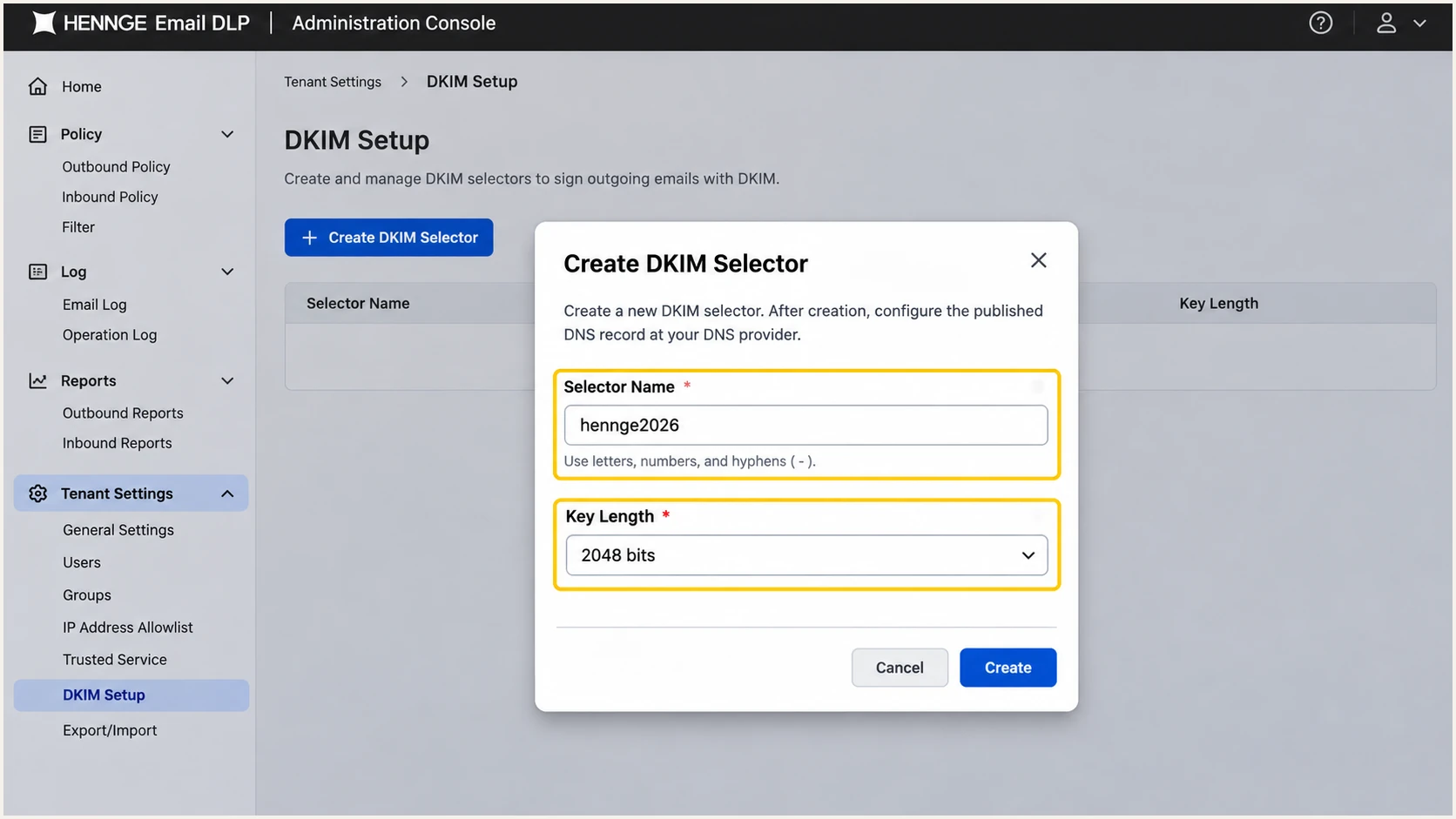
Illustrative HENNGE DKIM selector creation with a 2048-bit key.
Use the public key generated by your tenant. A selector name is not a public key, and publishing a TXT record does not activate signing.
For an existing active selector, open Setup, publish its displayed record for the new domain, add that domain to the list, and click Apply. Retain the existing domains.
Check the published selector, replacing the example valuesbash
dig +short TXT hennge2026._domainkey.example.com
Compare the returned key with the HENNGE value. DNS providers that split long TXT values must keep the chunks within one TXT record; do not create separate records for the chunks.
Keep upstream DKIM enabled under its own selector. HENNGE signing should authenticate the final processed message with a domain that satisfies DMARC alignment.
Remove DKIM test mode
Check the actual published TXT value for t=y; and remove it for production. Changing a displayed sample in HENNGE does not change DNS. Retest after the cached DNS value expires.
Set up DMARC
I publish DMARC at the visible From domain. For a domain without an existing enforcement policy, start with p=none and collect aggregate reports.
- Inspect existing DNS: Look up the TXT record at _dmarc.example.com. Keep an existing p=quarantine or p=reject policy; do not weaken it for this setup.
- Publish one policy: Add a TXT record with host _dmarc in the example.com zone. The monitoring record below is a template.
- Set reporting: Replace dmarc@example.com with a mailbox or reporting destination you control. Confirm it can receive aggregate XML reports.
- Generate the value: Use the DMARC record generator to build the policy with your reporting address.
The policy covers all mail using this From domain, including senders outside HENNGE. Keep those senders in your authentication checks.
Monitoring template, TXT at _dmarc.example.comtext
v=DMARC1; p=none; rua=mailto:dmarc@example.com
Replace the example domain and reporting address before publishing. If a reporting service supplies a destination outside your domain, follow its external reporting authorization instructions.
The p=none policy requests no DMARC enforcement. It does not exempt messages from recipient spam filtering. Run the checker against your own domain after DNS updates.
DMARC checker
Look up a domain's DMARC record and catch policy issues.
?/7tests passed
Confirm the lookup returns one valid policy with the intended reporting destination. Inspect the applied policy for sending subdomains rather than assuming every subdomain uses the same record.
In HENNGE, open Tenant Settings > DMARC Coverage Dashboard and select the domain. Inspect the DMARC, DKIM, and SPF entries individually; successful DNS checks still need a received-message test.
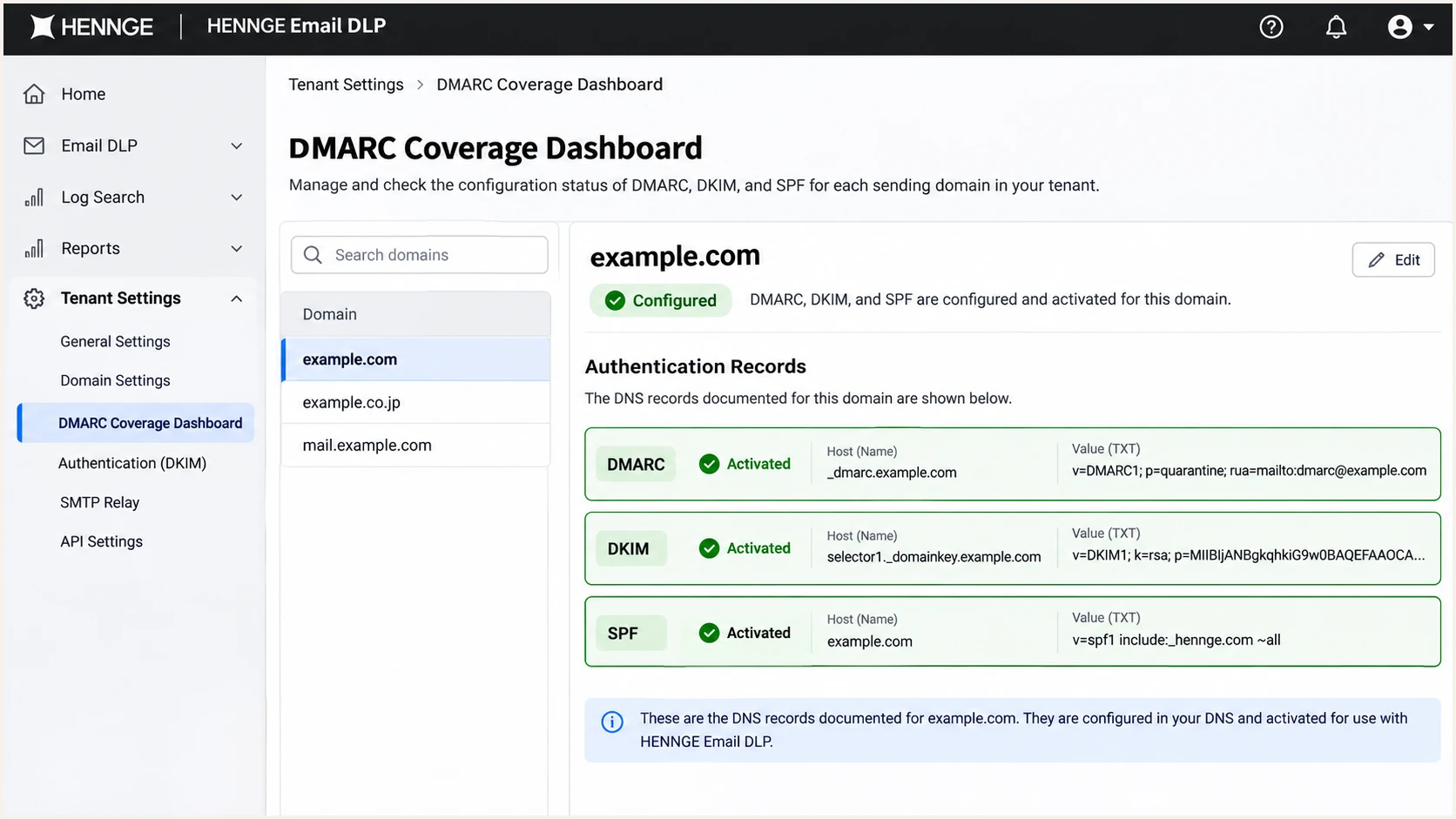
Illustrative HENNGE DMARC Coverage Dashboard with authentication settings activated.
Verify and troubleshoot
I test a plain message and a message with an attachment through the actual outbound route. The attachment test checks that HENNGE signs after any content transformation.
- Confirm the route: Send to an external recipient and find the message in Email DLP under History > History. Open its details and check the intended rules and actions.
- Check received headers: Inspect the final receiver's Authentication-Results for spf=pass, dkim=pass, and dmarc=pass. Confirm which authenticated domains produced the results.
- Check the signature: Compare the DKIM signing domain d= and selector s= with your domain and activated HENNGE selector. Inspect Return-Path separately for SPF alignment.
- Repeat by domain: Test every sending domain and subdomain, including aliases and routes that bypass HENNGE. Recheck after DNS caches expire.
For route diagnostics, use Mail flow > Message trace in Exchange admin center or Reporting > Email Log Search in Google Admin. Confirm the external test used the HENNGE connector or matched routing rule.
|
|
|---|---|
SPF permerror | Duplicates; lookup budget |
SPF failure | Sending IP; envelope domain |
DKIM failure | Key; selector; content changes |
DMARC failure | From domain; alignment |
DNS enabled only | Live outbound signature |
Common results and the next check.
An SPF alignment error does not cause DMARC failure when a passing DKIM signature has the required alignment. For a route using an unrelated Return-Path, fix or confirm DKIM rather than adding SPF records to unrelated domains.
The email tester below is the quickest configuration check. Send a message to its generated test address through HENNGE, then review the authentication diagnosis and the other delivery checks.
Email tester
Send a real email to this address. Suped shows a results button when the test is ready.
?/43tests passed
Use the results to correct the reported identity or DNS record, then send another message. A test sent directly from a different route does not validate HENNGE processing.
Keep the final headers and test time when escalating to HENNGE support. If authentication passes but delivery fails, investigate the SMTP rejection and recipient filtering separately.
Get alerted when it breaks
I keep ongoing monitoring after the initial test. Suped, our DMARC platform, detects authentication issues in incoming reports and provides steps to fix them.
- Enable notifications: In Suped notification settings, enable Issues detected and Sending sources need verification. Enable DMARC summaries for routine review.
- Investigate HENNGE failures: Filter report data by source, sending IP, and reporter. Open record details to inspect SPF, DKIM, and DMARC results.
- Check DNS changes: Use DNS history to compare old and new record values when authentication changes after a DNS edit or key update.
- Check delivery signals: Review blocklist (blacklist) and deliverability information alongside authentication failures when diagnosing delivery problems.
Suped's DMARC monitoring connects report failures with source details and actionable fixes, giving the team a repeatable workflow when HENNGE authentication changes.
Aggregate reports arrive on the receiving provider's schedule. Alerts based on those reports follow report processing, so investigate urgent delivery failures with message headers and HENNGE logs too.
Keep monitoring after a successful test
A passing test covers that message and route. New senders, DNS edits, and changes to message processing require fresh checks. Assign an owner to investigate authentication notifications.
Secure your domain with p=reject
I increase enforcement after legitimate senders consistently pass DMARC across a representative sending cycle, including infrequent billing and notification messages.
- Inventory senders: Use report data to identify HENNGE and every other legitimate source. Confirm unfamiliar sources before authorizing them.
- Fix legitimate failures: Check HENNGE DKIM after attachment processing and confirm SPF alignment on direct outbound routes. Do not weaken the policy to accommodate unidentified traffic.
- Stage enforcement: Move a new p=none policy to p=quarantine, monitor legitimate delivery, and investigate failures before increasing enforcement. Retain an existing stronger policy.
- Apply rejection: Change the policy to p=reject when legitimate routes are ready. Keep aggregate reporting enabled and review the policy inherited by subdomains.
Suped's Hosted DMARC lets the team manage policy changes in our dashboard after its DNS setup. Pair policy staging with source verification and issue resolution rather than choosing an enforcement date without report evidence.
I judge readiness by the legitimate routes, not a domain-wide pass percentage alone. Unauthorized traffic can fail correctly while every authorized sender works.
Ready to enforce
Known sending routes pass with the required domain alignment. Attachment processing, aliases, and infrequent senders have been tested.
Keep investigating
Legitimate messages still fail, an active sender is unidentified, or only an upstream DKIM signature passes before HENNGE processes the message.
Once those checks pass, the enforcement template below requests rejection of messages that fail DMARC. Replace the reporting address and preserve any other intentional policy tags.
DMARC enforcement protects use of your domain in the visible From address. Receiving systems retain their own delivery policies, and DMARC does not stop display-name impersonation or lookalike domains.
Enforcement template, TXT at _dmarc.example.comtext
v=DMARC1; p=reject; rua=mailto:dmarc@example.com
After publishing, check the public DMARC value and send another HENNGE test message. Confirm the receiver reports dmarc=pass.
Review incoming reports after the policy change and investigate legitimate failures by sending source before changing DNS again.
Frequency asked questions
Use include:spf.mta.hdems.com in the existing SPF policy. HENNGE also recommends include:spf-outbound.mo.hdems.com for its external mail server routing configuration. Keep one SPF record at each applicable domain.
Yes. HENNGE processing can change the message and invalidate an upstream signature. Enable signing in Email DLP and verify the final received message. Different services can use different selectors on the same domain.
Yes. A passing DKIM signature with the required alignment is sufficient for DMARC. I still investigate unexpected SPF failures on a HENNGE route that should preserve an aligned Return-Path.
No. Retain p=reject, or p=quarantine if that is your current policy. Configure and test HENNGE before moving production traffic through it. The p=none template is for a domain beginning monitoring without an existing enforcement policy.
Activation and DNS checks do not prove that a particular delivered message has a valid signature. Check the actual route, the signing domain, the selector, and any later message changes. Confirm the published key matches HENNGE and t=y; is absent.
HENNGE One uses hdems.com email infrastructure, including mta.hdems.com and mta2.hdems.com. Those suffixes are a HENNGE identification clue. Confirm the source with the sending IP, current SPF authorization, and received headers; an rDNS suffix alone does not establish that a message is authorized.




