
How to set up DMARC/DKIM/SPF for GVTC

For an @gvtc.com address, GVTC controls the domain's SPF, DKIM, and DMARC records. For a domain you own, request GVTC's sending authorization and DKIM records, publish them in your authoritative DNS, then publish a DMARC policy at _dmarc.example.com. DMARC passes when SPF or DKIM passes with domain alignment to the visible From address.
I check domain ownership first. GVTC's public customer pages describe its email service, but I found no published universal SPF include or custom-domain DKIM setup procedure. Get those values for your account rather than copying GVTC's own DNS records.
Add your domain
For an existing @gvtc.com mailbox, skip custom-domain provisioning and ask GVTC support about authentication failures. You cannot change gvtc.com's DNS through your mailbox settings.
For your own domain, I confirm that the GVTC service on the account supports sending with that domain before touching DNS. GVTC's public pages do not establish a self-service Add domain screen or a universal ownership-verification record.
- Open your account: On the GVTC website, open My Account. Choose Email to access the mailbox, or use Support to reach customer assistance.
- Request provisioning: Give GVTC support your domain and account details. Ask them to confirm custom-domain sending and the ownership-verification steps for your service.
- Collect records: Request the SPF authorization, return-path configuration, and DKIM selector with its exact TXT value or CNAME target. Do not infer these values from an SMTP hostname.
- Verify ownership: If GVTC supplies a DNS verification record, publish that exact name, type, and value at your DNS host. Have GVTC confirm the domain is provisioned before testing.
The GVTC website lists Email under My Account. That is the documented mailbox entry point; custom-domain provisioning needs confirmation from support.
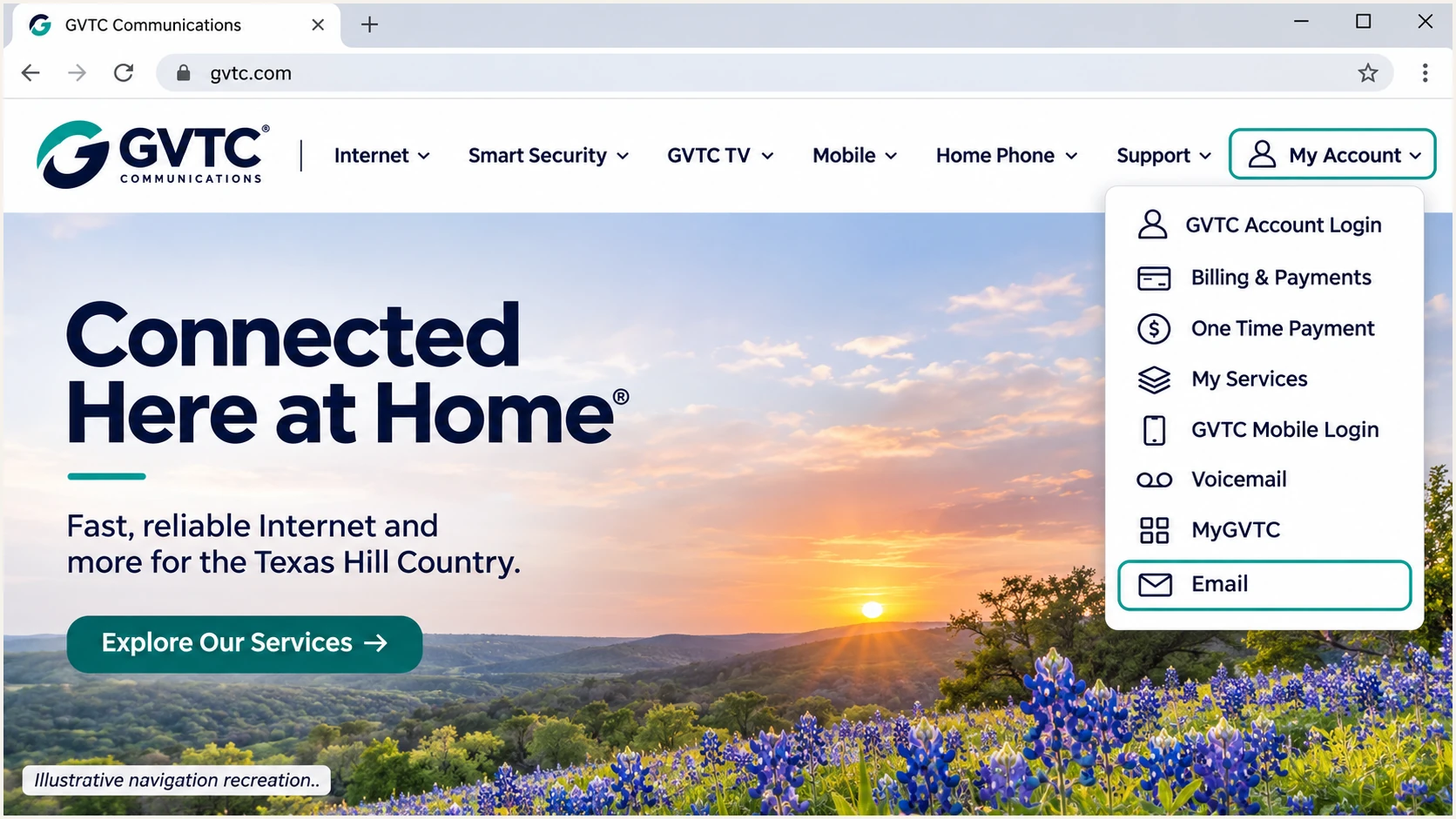
GVTC My Account navigation with Email highlighted, illustrative recreation.
Keep a copy of the records GVTC supplies. The DNS editor belongs to whoever hosts the domain's authoritative nameservers, which is not necessarily the company that registered the domain or supplies internet access.
Set up SPF
SPF authorizes the sending server for the envelope sender domain, usually visible in the delivered Return-Path. It does not authenticate the visible From address by itself.
Use GVTC's return-path alignment support by requesting an envelope sender under your own domain, such as bounce.example.com. Confirm that this configuration is enabled for your account and obtain the required DNS records.
- Inspect existing DNS: Look up TXT records at the exact envelope sender domain. Find the record beginning v=spf1 before adding anything.
- Merge authorization: Add only GVTC's confirmed include mechanism or outbound IP ranges to the existing SPF record, before its final all mechanism. Preserve other approved senders.
- Keep one record: Publish one SPF record per hostname. Multiple records beginning v=spf1 at the same name cause an SPF permerror.
- Check limits: Keep SPF evaluation within the 10 DNS-lookup-causing-term limit, including nested includes. Do not authorize your home router's IP for mail sent through GVTC's relay.
Inspect the sender domains, replacing these example namesbash
dig +short TXT example.com
dig +short TXT bounce.example.com
Publish SPF at the hostname GVTC actually uses for the envelope sender. Adding an SPF record at example.com does not authorize a different Return-Path domain automatically.
Enter that exact domain below to check syntax and lookup limits. A valid DNS record still needs a delivered-message test to confirm which server and envelope sender GVTC used.
SPF checker
Find SPF syntax issues, lookup limits, and weak records.
?/16tests passed
After DNS caches expire, send a fresh message and inspect the receiver's SPF result. An SPF pass for an unrelated GVTC-owned return-path domain does not supply SPF alignment for your own From domain.
If your particular service cannot use your domain in the Return-Path, adding GVTC to your root SPF will not fix that mismatch. That sending route needs DKIM that passes with domain alignment for DMARC; an SPF alignment error is then expected.
Set up DKIM
GVTC must sign outgoing mail before a published DKIM key can authenticate it. I ask support to confirm the signing domain and selector, then test a message sent through the actual production route.
- Request signing: Ask GVTC to enable DKIM for your custom From domain. Obtain the selector and the exact TXT public key or CNAME delegation they require.
- Publish precisely: Create the record at selector._domainkey.example.com, replacing selector with GVTC's actual value. Use the supplied record type and avoid a duplicated domain suffix in the DNS editor.
- Protect the key: Publish only the public DNS material. GVTC's sending service needs the private key; putting a private key in DNS exposes it.
- Confirm activation: Have GVTC confirm signing is active. Send a new message, then check DKIM-Signature for d= and s= and the receiver's Authentication-Results for dkim=pass.
The d= value must match the From domain under your DMARC alignment mode. Relaxed mode allows the same organizational domain; strict mode requires an exact domain match.
DKIM supplies a DMARC pass
From uses example.com, DKIM verifies with d=example.com, and the receiver reports dkim=pass. DKIM supplies the required domain alignment even if SPF does not.
DKIM passes for another domain
From uses example.com, but the only valid DKIM signature uses d=gvtc.com. That signature does not supply DKIM alignment for example.com. SPF must independently pass with domain alignment for DMARC to pass.
A DNS key alone does not prove GVTC is signing. A missing signature needs a sending-service fix, while a signature that fails verification needs its selector, public key, and message integrity checked.
Use the actual s= and d= values in a DNS lookup. Do not assume a selector such as default exists, and do not create a replacement key that GVTC's service does not use.
Look up the selector observed in the delivered messagebash
selector='replace-with-s-value'
domain='replace-with-d-value'
dig +short TXT "$selector._domainkey.$domain"
dig +short CNAME "$selector._domainkey.$domain"
Set up DMARC
Publish DMARC for a From domain you control after identifying its legitimate senders. I start a new policy with p=none to collect reports while fixing authentication.
Retain existing enforcement
If the domain already uses p=quarantine or p=reject, retain that policy and repair GVTC's configuration. Do not weaken an existing enforcement policy just to add another sending source.
- Check existing policy: Look up TXT at _dmarc.example.com. Update the existing DMARC record rather than creating a second one.
- Set the DNS name: For example.com, create a TXT record at _dmarc, or _dmarc.example.com if your DNS editor requires the full hostname.
- Choose reports: Replace dmarc@example.com with a working aggregate-report destination you control. If the destination uses another domain, complete its external reporting authorization requirements.
- Publish and verify: Save the record, wait for the previous DNS TTL to expire, then query DNS and test a newly sent GVTC message.
Initial monitoring policy, TXT at _dmarc.example.comtext
v=DMARC1; p=none; rua=mailto:dmarc@example.com
Use the DMARC record generator to construct the value. The address above is an example; it does not automatically deliver reports to Suped or another report processor.
Check the public record below after saving it. A p=none policy requests reports and makes no quarantine or rejection request for failing messages; receivers still apply their own filtering.
DMARC checker
Look up a domain's DMARC record and catch policy issues.
?/7tests passed
Confirm the lookup returns one DMARC record with the intended policy and reporting destination. If it returns nothing, check the authoritative DNS host and look for a duplicated domain suffix.
Aggregate reports commonly arrive daily, with initial data often taking 24-48 hours. Report availability depends on participating receivers and successful delivery to the reporting destination.
Verify and troubleshoot
I verify a fresh message rather than relying only on DNS checks. Test GVTC webmail and every other production sending route separately, because different routes can use different signing settings.
- Send a test: Use the email tester below, copy its destination, and send a new message through GVTC with your real From domain. Review its authentication diagnosis.
- Read receiver results: Check the receiving system's Authentication-Results. Confirm dmarc=pass and identify whether SPF or DKIM supplied domain alignment.
- Check failures: For SPF, compare the sending IP and envelope sender with the published authorization. For DKIM, compare the signature's selector and signing domain with DNS.
- Escalate precisely: If GVTC needs to change signing or the return path, provide the delivery timestamp, full message headers, and exact failure. Keep account passwords and private keys out of the ticket.
The tester asks you to send a message and returns a full diagnosis of that delivery. This is the quickest check of the actual sending configuration after a DNS change.
Email tester
Send a real email to this address. Suped shows a results button when the test is ready.
?/43tests passed
The following header is illustrative, not a captured GVTC result. It shows SPF using a return-path subdomain and DKIM using the From domain, with relaxed SPF alignment.
Trust the authentication result added by the receiving service. Old messages retain old results, so always send another message after changing DNS or enabling signing.
Illustrative successful custom-domain deliverytext
From: sender@example.com
Return-Path: <bounce@bounce.example.com>
Authentication-Results: receiver.example;
    spf=pass smtp.mailfrom=bounce.example.com;
    dkim=pass header.d=example.com;
    dmarc=pass header.from=example.com
|
|
|
|---|---|---|
SPF permerror | Duplicate or over limit | Merge; check lookups |
SPF mismatch | Other return-path domain | Request custom return path |
DKIM absent | Signing inactive | Contact GVTC |
DKIM failure | Key or message issue | Check selector and key |
DMARC failure | Neither path qualifies | Fix domain alignment |
Use the failing check to choose the next action.
Get alerted when it breaks
Our DMARC platform, Suped, detects authentication issues in incoming reports and provides steps to fix them. For a domain you own, DMARC monitoring makes changes to GVTC traffic visible after the initial setup.
I use verified sources to distinguish approved GVTC traffic from unfamiliar senders, then investigate the failing records. Alerts depend on data arrival; aggregate reporting does not provide an instant event for every message.
- Enable issue emails: In Suped's notification settings, enable Issues detected and configure the recipients who will act on authentication problems.
- Review new sources: Enable Sending sources need verification. Verify a source only after confirming that the business authorizes that sending route.
- Investigate records: Use Data view to filter by source or IP, then open Detail view for SPF, DKIM, DMARC, and rDNS diagnostics. Follow the issue's fix steps and verify the repair.
- Keep a summary: Enable DMARC summary emails and review DNS history when failures follow a record change. Compare the old and new values before editing again.
Suped connects these authentication checks with deliverability and blocklist (blacklist) monitoring. A DMARC pass does not guarantee inbox placement, so investigate reputation and delivery errors separately when authentication is already correct.
Keep the alert actionable
Assign a person to review new-source and authentication alerts. Record the affected From domain, sending route, and first failing report period so GVTC support can investigate the same traffic.
Secure your domain with p=reject
Move a domain you control to p=reject after every legitimate sending route consistently passes DMARC. I assess approved sources individually; a high overall pass rate can conceal a broken low-volume sender.
Suped's source table and record diagnostics make that review practical. Our Hosted DMARC lets customers manage the published policy in the dashboard after the initial DNS configuration, including staging enforcement changes.
- Cover real traffic: Review enough reporting periods to include infrequent business mail, automated notifications, and each GVTC sending route. Resolve failures in approved traffic before enforcement.
- Preserve DKIM: Confirm DKIM passes with domain alignment, especially for mail that is forwarded. Forwarding frequently breaks SPF because the forwarding server becomes the connecting sender.
- Stage enforcement: Change the existing policy to p=quarantine, review fresh reports and delivery failures, then move to p=reject when approved mail remains healthy. Use Suped to investigate failures at each stage.
- Check subdomains: Review inherited policies and any explicit subdomain DMARC records. Keep reporting enabled and continue checking new sources after reaching reject.
Replace the current DMARC value with the enforcement value below, retaining your real reporting destination. Publish one policy record, and keep any other tags you have deliberately configured.
Enforcement policy, TXT at _dmarc.example.comtext
v=DMARC1; p=reject; rua=mailto:dmarc@example.com
A reject policy asks receivers to reject messages that fail DMARC; final handling remains the receiver's decision. It protects use of the domain in the From address, but does not stop display-name impersonation or messages sent with lookalike domains.
If approved traffic starts failing after enforcement, inspect its source records in Suped and test a fresh delivery. Give the owner of that sending service the failing domain and authentication result so they can repair the affected route.
Frequency asked questions
No. GVTC controls DNS for gvtc.com. I send GVTC support a fresh message's full headers and the receiver's authentication failure. Publishing records in a different domain does not change authentication for an @gvtc.com From address.
GVTC's public customer pages do not publish universal custom-domain values. Request the authorized SPF mechanism and DKIM selector with its TXT value or CNAME target for your account. Do not guess an include from smtp.gvtc.com or assume a selector named default.
Yes. DKIM must verify successfully with a signing domain that satisfies your DMARC alignment mode. An SPF pass for a GVTC-owned domain does not supply SPF alignment for your own From domain. I still configure both authentication methods wherever the service supports them.
The sending service also needs to sign with the matching private key and selector. Check the delivered message's d= and s= values, public DNS, and cache expiry. If the message has no DKIM signature, ask GVTC to confirm signing is enabled for that sending route.
GVTC is the first provider I investigate when a sending IP's verified PTR hostname ends in .gvtc.com. That suffix alone does not identify a particular mailbox or prove the traffic used GVTC's email service; customer internet connections also use provider networks. Match the IP and full headers with the account's confirmed sending configuration.




