
How to set up DMARC/DKIM/SPF for freenet.de

For a custom domain using freenet email hosting, configure SPF in your domain's DNS, obtain freenet's DKIM signing settings for your package, and publish a DMARC TXT record at _dmarc. For an address ending in @freenet.de, freenet manages these records; mailbox users cannot change them.
I start by checking the actual sending service. freenet Mail and freenet Domain/Webhosting have different administration paths. A working mailbox does not prove that custom-domain DKIM is available, and adding a public key to DNS does not turn on signing.
Add your domain
Use this section for a domain you own. An existing freenet Domain/Webhosting customer should open the domain already attached to the contract. A standard @freenet.de mailbox does not require an add-domain or DNS-verification step.
- Activate hosting: Register or transfer your domain through the freenet domain service if it is not already attached to your contract. Confirm that the package includes email hosting and access to the domain's DNS settings.
- Open administration: Sign in to freenet, then select the Domainverwaltung tile in the Cockpit. Open the relevant hosting package and confirm that your domain appears in its domain list.
- Create a mailbox: Open E-Mails > E-Mail-Adressen. Click E-Mail-Adresse erstellen, enter the mailbox name and a secure password, then click E-Mail-Adresse erstellen to save.
- Read connection details: Use Aktionen beside the mailbox to retrieve its connection settings. Configure your email application with those settings and the complete mailbox address as the username.
- Verify operation: Send a message to an external mailbox and reply to it. Confirm that the visible From address uses your domain. This checks mailbox operation; authentication requires the later header tests.
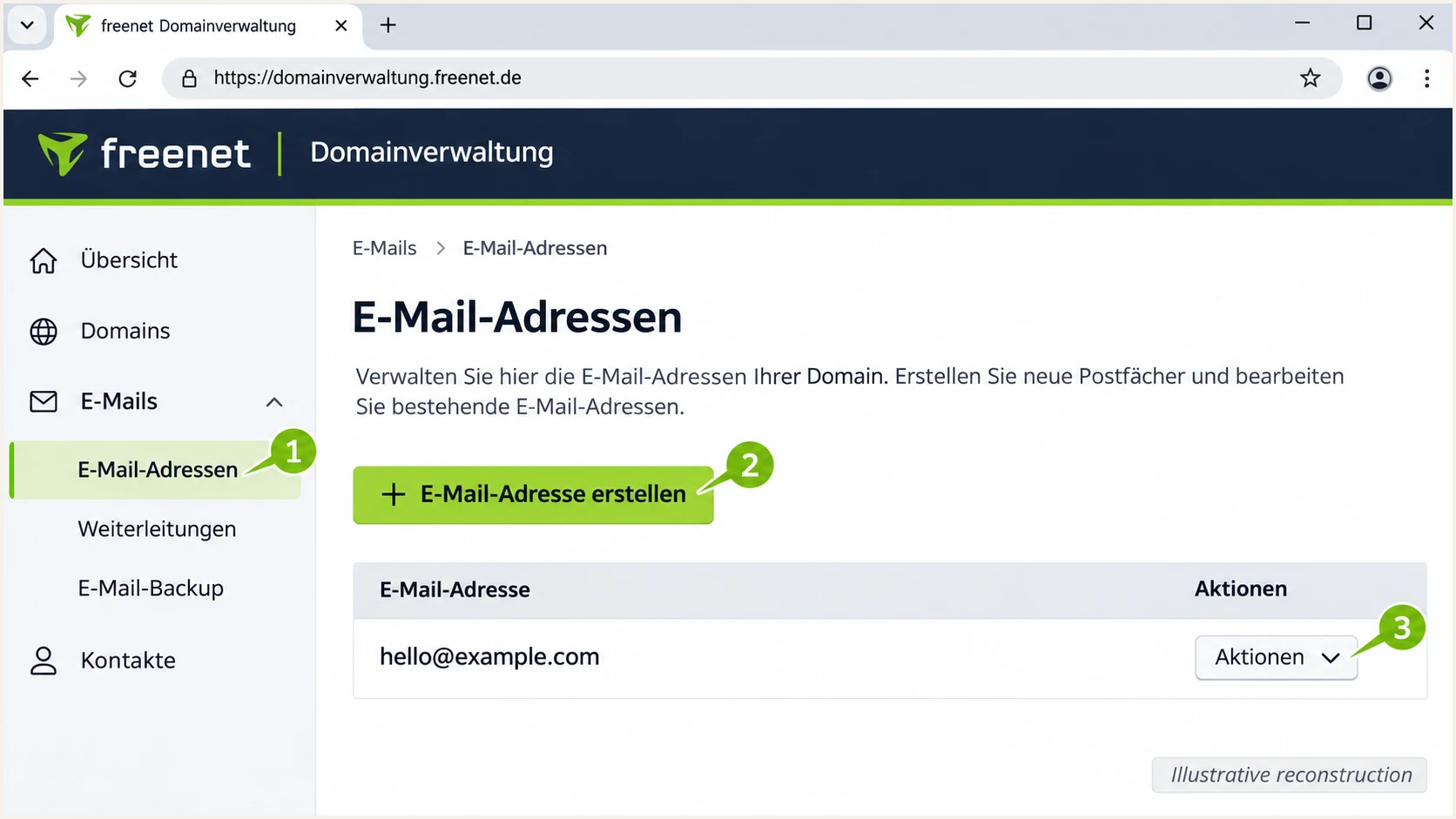
Illustrative freenet domain mailbox screen with creation and connection controls.
These mailbox steps follow freenet's public help articles 'Login: Anmeldung bei der Domain-Verwaltung' and 'Domain E-Mail-Adressen anlegen und verwalten'. The available controls depend on your hosting package.
Before editing authentication records, identify the authoritative DNS host for your domain. Publish changes there, even when the domain registration is with freenet. If your package has no TXT-record editor, ask freenet support to publish the records or explain the supported DNS-management route.
Set up SPF
SPF authorizes the servers sending for the envelope sender domain, which appears in the delivered Return-Path. freenet supports Return-Path alignment, but I verify the domain on a real message before choosing where to publish SPF.
- Inspect the sender: Send through the freenet mailbox, then inspect Return-Path and the receiving server's Authentication-Results. Identify the domain shown as smtp.mailfrom. Compare it with your visible From domain.
- Get the approved rule: Ask freenet for the SPF include or record applicable to your exact email package. Confirm whether _spf.freenet.de is the correct authorization target for your route; do not infer a webhosting record from the freenet brand alone.
- Edit one TXT record: At the envelope sender domain, edit the existing v=spf1 TXT record. Add the approved authorization before its final all mechanism. Preserve other legitimate senders, and keep a single SPF record at each name.
- Check domain matching: Under relaxed DMARC settings, a Return-Path at your domain or its subdomain satisfies the domain-matching requirement. Under strict SPF alignment, the envelope sender and From domains must match exactly.
If freenet confirms _spf.freenet.de for your package, and freenet is your only sender, the following is an SPF example for example.com. It is conditional on that confirmation, not a universal freenet Webhosting setting.
Conditional SPF example for a freenet-only custom domaintext
Name: @
Type: TXT
Value: v=spf1 include:_spf.freenet.de ~all
Replace the example with the exact authorization freenet supplies. If you already have SPF, merge the approved include into that record rather than replacing other senders. Preserve an existing -all ending when its authorization list is correct.
Run the SPF checker against the actual envelope sender domain. Check syntax and the recursive DNS-lookup count. An SPF evaluation permits at most 10 DNS-querying terms, including those inside nested includes.
SPF checker
Find SPF syntax issues, lookup limits, and weak records.
?/16tests passed
Then send another message and confirm spf=pass in the recipient's Authentication-Results. A valid DNS record alone does not establish that the actual outgoing server is authorized.
If a particular route uses a freenet-owned Return-Path instead, changing SPF at your visible From domain will not fix SPF alignment. That route needs passing DKIM with a matching signing domain to pass DMARC. An SPF alignment warning is acceptable when that DKIM result passes.
Set up DKIM
DKIM requires freenet's outgoing server to sign messages and publish the corresponding public key. I found no public, package-specific freenet walkthrough that establishes a universal DKIM toggle or selector for custom domains.
- Check a sent message: Find DKIM-Signature in a freshly delivered message. Read d= for the signing domain and s= for the selector. If no signature exists, there is no selector to recover from that message.
- Request signing support: Ask freenet whether your exact package signs outbound mail with your custom domain. Request the enablement procedure and the complete DNS name, record type, and public value or CNAME target.
- Publish the supplied record: If freenet requires a DNS change, copy its TXT value or CNAME target exactly at the supplied selector name. If freenet manages the key automatically, leave that record under its management.
- Prove DKIM passes: Send again. Require dkim=pass and a d= domain matching your visible From domain under your DMARC alignment settings. A signature using only freenet.de does not authenticate an unrelated custom From domain for DMARC.
To inspect the key, replace both values below with the s= and d= values in the actual signature. Check for a CNAME as well as TXT because a provider can delegate the selector.
Look up the selector taken from a real messagebash
selector='selector-from-message'
signing_domain='example.com'
dig +short TXT "$selector._domainkey.$signing_domain"
dig +short CNAME "$selector._domainkey.$signing_domain"
Publishing a key generated elsewhere cannot make freenet sign with its matching private key. Only configure a key when the sending service has the corresponding signing configuration.
If freenet confirms that your package lacks custom-domain DKIM, use passing SPF with a matching envelope sender for DMARC on direct delivery. For reliable forwarding, arrange an outbound sending route that supports DKIM for your domain before enforcing a strict DMARC policy.
A DNS key does not enable signing
Treat DKIM setup as incomplete until a delivered message has dkim=pass for your domain. A published TXT record, a successful SMTP login, or TLS encryption does not establish that result.
Set up DMARC
Publish DMARC for the domain in the visible From address, not automatically for the freenet SMTP server's domain. For a new deployment, I start with p=none so the reports expose legitimate failures before enforcement.
- Check the current policy: Look up TXT records at _dmarc.example.com. If quarantine or reject is already deployed, keep that policy and repair authentication without downgrading it to none.
- Create the record: If DMARC is absent, add one TXT record with host _dmarc. Use the full _dmarc.example.com name only when the DNS editor requires it instead of a relative host name.
- Set a report destination: Replace dmarc@example.com with a real address or report-processing destination you control. Ordinary mailbox storage does not turn aggregate XML into monitoring or alerts.
- Save and query: Save the record, wait for existing DNS caches to expire, then query _dmarc.example.com again. There must be one valid DMARC policy record at that name.
Starting DMARC record for a domain without a policytext
Name: _dmarc
Type: TXT
Value: v=DMARC1; p=none; rua=mailto:dmarc@example.com
Use the DMARC record generator to prepare the TXT value with your reporting address. The example above uses the default relaxed SPF and DKIM alignment settings.
Run the DMARC checker for your own domain after saving. It validates the published policy; the message test in the next section checks whether actual freenet mail passes that policy.
DMARC checker
Look up a domain's DMARC record and catch policy issues.
?/7tests passed
A p=none policy requests reporting without asking receivers to quarantine or reject failing mail. It is a starting point for diagnosis, not an enforcement policy.
If the rua destination is on a different domain, its operator must provide any required external-reporting authorization. Use the destination's supplied address and instructions. Not every receiver sends aggregate reports, and reports commonly arrive on a daily schedule.
Verify and troubleshoot
The quickest end-to-end check is the email tester. Generate a test address, send a new message to it through the freenet mailbox you configured, and open the resulting diagnosis.
Use the same From address and sending application as normal traffic. Forwarding an old message to the test address checks the forwarding path, which changes the authentication evidence.
Email tester
Send a real email to this address. Suped shows a results button when the test is ready.
?/43tests passed
I check the recipient's authentication results against the message identities. DMARC passes when at least one authentication method passes with a domain that matches the visible From domain under the configured rules.
The following is an illustrative result for a custom domain. It is not a claim about the defaults or DKIM availability of every freenet package.
Illustrative recipient authentication resultstext
Authentication-Results: receiver.example;
  spf=pass smtp.mailfrom=example.com;
  dkim=pass header.d=example.com;
  dmarc=pass header.from=example.com
Use these compact checks when reading the results. A match means the authenticated domain satisfies the configured DMARC domain-matching rule for the visible From address.
|
|
|---|---|
SPF pass + match | Pass |
DKIM pass + match | Pass |
No passing match | Fail |
DMARC requires a passing method with a matching domain.
Investigate failures against the specific route that produced the message. A different mailbox or application often has a different envelope sender or DKIM signing domain.
- SPF permerror: Remove duplicate SPF records and reduce excessive recursive lookups. Recheck the actual MAIL FROM domain rather than only the visible From address.
- SPF mismatch: Compare smtp.mailfrom with the From domain. Adding another include cannot change the envelope sender domain chosen by the sending service.
- DKIM failure: Use the actual s= selector. Check the complete DNS name, key or CNAME target, and whether message content changed after signing. Send a fresh test after fixing it.
- SMTP failure: For standard freenet Mail, enable client access in Einstellungen > POP3/IMAP/SMTP > Einrichtung POP3/IMAP. Select POP3, IMAP und SMTP aktivieren. Resolve any separate SMTP activation prompt before testing.
- Wrong server: Standard freenet Mail documents mx.freenet.de with authenticated SMTP on port 587 using STARTTLS, or port 465 using implicit TLS. For Domain/Webhosting mailboxes, use the connection details supplied under Aktionen.
The SMTP values above come from freenet's public 'Einstellungen (Serverdaten) fuer alle E-Mail-Programme' help. The client-access path comes from 'POP3, IMAP und SMTP aktivieren'. A disabled SMTP service is a submission problem, not a DMARC DNS problem.
For a standard freenet Mail account, the illustrated setting below enables email-application access. It does not configure DKIM or transfer control of freenet.de's DNS to the mailbox owner.
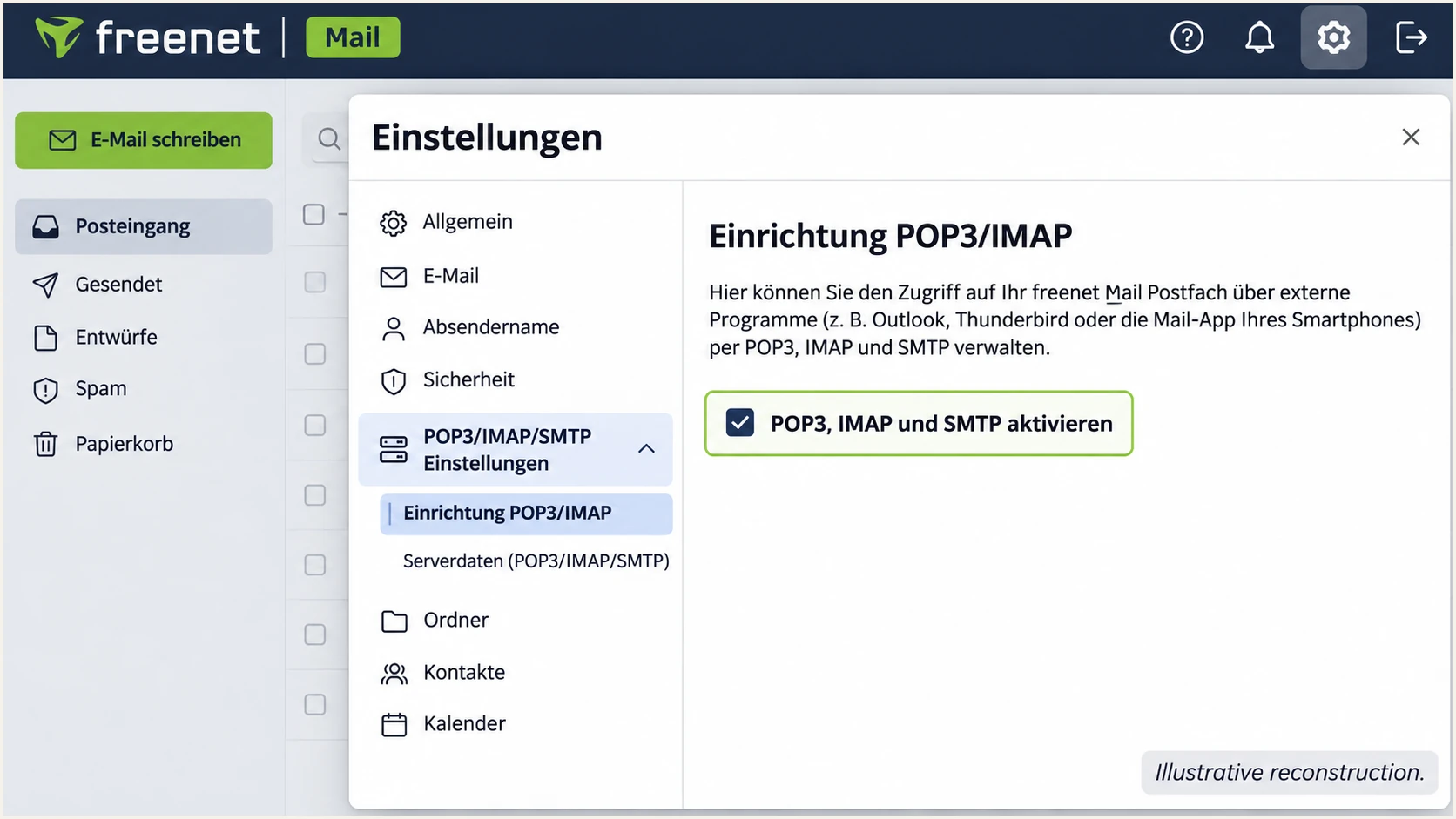
Illustrative freenet Mail setting for enabling POP3, IMAP and SMTP access.
For DNS confirmation, run the commands below with your own domain. If the results differ from your saved settings, check the domain's nameservers and the authoritative DNS zone before editing again.
Confirm the public DNS namesbash
dig +short NS example.com
dig +short TXT example.com
dig +short TXT _dmarc.example.com
Authentication does not guarantee inbox placement. Keep the exact SMTP rejection response when delivery still fails, and send freenet support the timestamp and message ID together with the relevant headers.
Get alerted when it breaks
Suped is our DMARC platform for monitoring this setup after the test message passes. Its DMARC monitoring turns aggregate reports into source-level results and detected issues, so a broken sending route has an investigation path.
- Route reports: Use your assigned Suped aggregate-report destination in the existing DMARC record's rua tag. Preserve the current policy. Verify that recent reports are arriving before relying on report-based alerts.
- Enable notifications: In Suped's notification settings, enable Issues detected and Sending sources need verification. Enable DMARC summary emails for a regular review of the domain's sending activity.
- Confirm sources: Review the source table and verify recognized sending sources only after checking they belong to your organization. Investigate unfamiliar sources instead of automatically authorizing them in SPF.
- Diagnose the change: Open an affected record in Detail view to inspect SPF, DKIM and DMARC results. Check DNS history when failures begin after a record change, then retest mail through freenet after the repair.
I use the report timeline to separate a widespread DNS change from a failure limited to one application or alias. Suped's issue details and fix steps make that comparison practical without manually reviewing each XML attachment.
Report-based alerts depend on when receivers deliver their reports. They do not provide an immediate receipt for every message. Use a fresh email test for an immediate check of the route you are changing.
One message test
Confirms the authentication of one delivered message on one route. Run it after changing a mailbox, DNS record, or sending application.
It does not establish that every authorized sender or infrequent workflow is passing.
Ongoing Suped monitoring
Collects reported results across sending sources and time periods. Use issue notifications and source verification to investigate new failures.
Coverage depends on reporting receivers and report arrival times. Combine it with message tests for changes that need immediate validation.
Secure your domain with p=reject
Move a domain you own to p=reject after every legitimate sending route passes DMARC. A standard @freenet.de mailbox user cannot change freenet.de's policy. I judge readiness by the legitimate sending workflows in the reports, not by the overall pass percentage alone.
- Review a full cycle: Use Suped's source table and Data view to cover routine mail and infrequent sends such as monthly invoices. Confirm every legitimate source, including web forms and applications outside freenet.
- Repair legitimate failures: Resolve failing SPF or DKIM and domain-matching problems before enforcement. Prioritize passing DKIM for forwarded mail, because a forwarder normally changes the connecting IP used by SPF.
- Stage enforcement: If starting at none, use quarantine as an intermediate policy, then retest and review newly reported failures. Keep an existing quarantine or reject policy while repairing specific senders.
- Enforce and monitor: Switch to reject when legitimate routes are verified, keep aggregate reporting enabled, and review the effective policy for sending subdomains. Keep a copy of the previous valid record for a controlled rollback if legitimate delivery breaks.
Suped's source verification and record diagnostics provide the evidence for this move. If you manage the policy through our Hosted DMARC product, use its policy controls to stage enforcement after completing the required DNS delegation.
For a policy managed directly in DNS, update the existing record rather than creating another one. Preserve your real reporting destination and any intentional subdomain or alignment settings. This example shows the final policy for example.com.
Final DMARC policy example after validating legitimate senderstext
Name: _dmarc
Type: TXT
Value: v=DMARC1; p=reject; rua=mailto:dmarc@example.com
A reject policy asks receivers to reject mail that fails DMARC. Receivers retain local handling discretion. A message with passing SPF and a matching envelope sender still passes DMARC even without DKIM, but forwarding makes that setup less resilient.
Keep monitoring after enforcement and repeat the message test whenever a sender or DNS record changes. DMARC protects use of your domain in the visible From address; it does not prevent impersonation through a different domain or display name.
Frequency asked questions
No. freenet controls DNS and outbound signing for freenet.de. You can use its supported SMTP settings and test messages, but you cannot publish authentication records for that shared domain. DNS setup applies to a custom domain you control.
Use the SPF authorization supplied for your exact freenet email package. Have freenet confirm whether _spf.freenet.de applies before using the conditional example. Preserve other authorized senders in one SPF record, and test the actual outgoing IP against the envelope sender domain.
Read s= in a real DKIM-Signature header, or obtain the selector and DNS instructions directly from freenet. The public help reviewed does not establish a universal custom-domain DKIM selector or enablement control. A message without a signature requires confirmation of signing support, not a guessed selector.
Yes. Passing DKIM with a signing domain that matches the visible From domain under the configured DMARC rules is sufficient. SPF passing for a freenet-owned Return-Path does not provide SPF alignment for an unrelated custom From domain.
Confirm that one valid DMARC record is publicly visible, the rua address accepts reports, and external reporting authorization is present when required. Send real traffic to reporting receivers and allow for their reporting schedule, commonly daily. Use a message test for immediate authentication results.
mout.freenet.de is associated with freenet's outbound email infrastructure. A freenet.de reverse-DNS suffix helps identify the network, but it does not prove that a specific message is authorized. Confirm the connecting IP, trusted Received headers, and the receiving server's SPF and DKIM results before verifying the source.




