
How to set up DMARC/DKIM/SPF for Freedomain

For Freedomain email sent through DNSExit Mail Relay, add include:dnsexit.com to your SPF record, create a CNAME at relay._domainkey pointing to dkim.dnsexit.com, and verify both records under Mail Relay > Sender Domains. Then publish a DMARC TXT record at _dmarc for your sending domain and test a message sent through the same application.
I first confirm which server actually sends the email. Registering a domain or hosting a website with Freedomain does not automatically authenticate messages sent directly by an application or a different SMTP service. The relay records below apply when the application sends through Freedomain's DNSExit relay.
Add your domain
Freedomain provides DNS control and domain email services through DNSExit. Keep your actual sending domain, such as example.com, consistent throughout the setup.
Use the domain in the visible From address. If it is already listed in Sender Domains, open that entry instead of adding it again.
- Open the account. Sign in to the Freedomain/DNSExit dashboard and open Mail Relay > Sender Domains.
- Add the sender domain. Enter your sending domain in the Sender Domains list. Record the SPF and DKIM requirements shown for that entry.
- Find authoritative DNS. Check the domain's NS records. For DNS hosted with Freedomain/DNSExit, use Domain List > Edit DNS. Otherwise, publish the records at the DNS host named by those NS records.
- Complete verification. After publishing SPF and DKIM in the following steps, return to Sender Domains and verify both records. This verification enables the relay to add DKIM signatures.
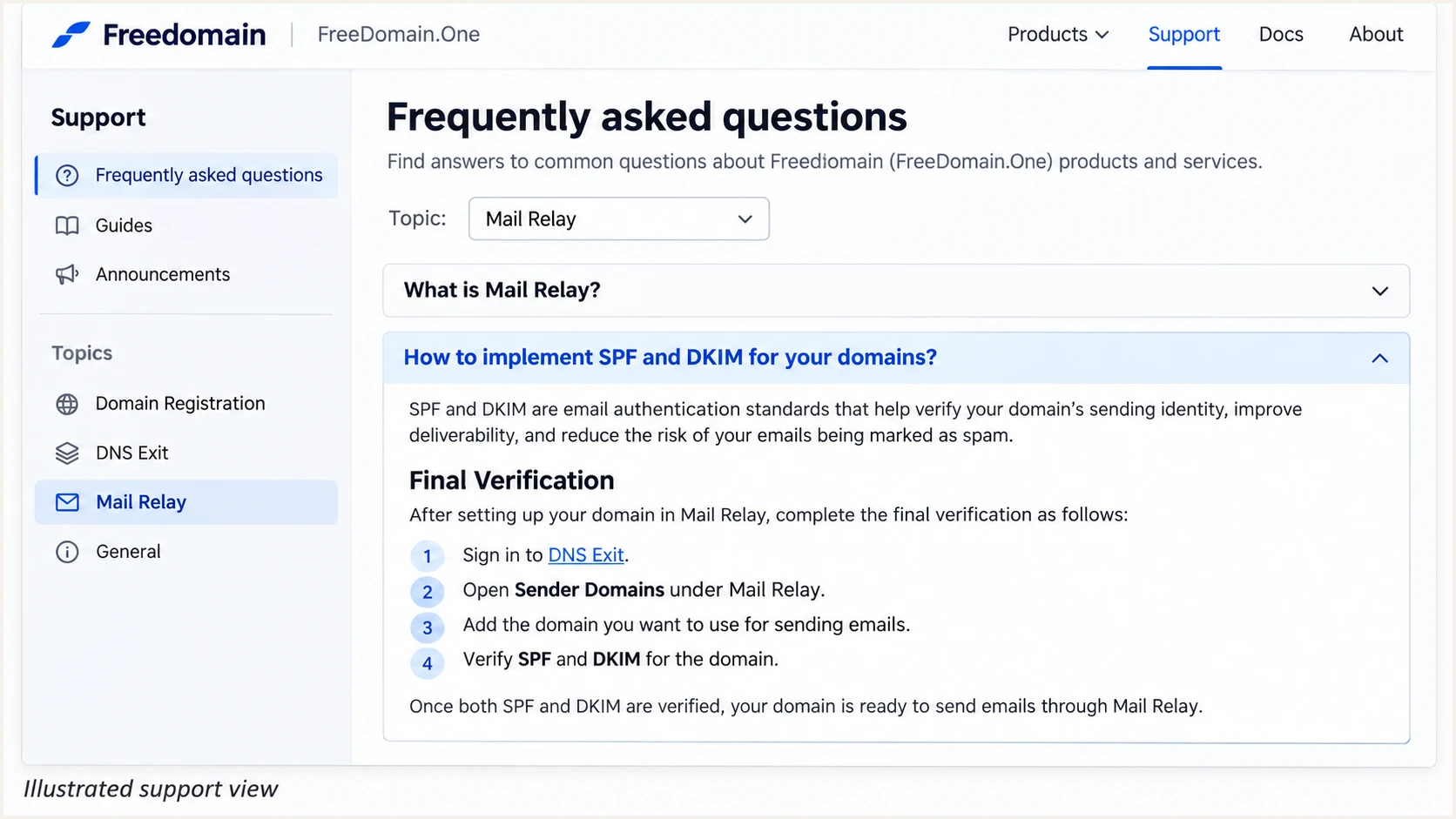
Freedomain FAQ instructions for adding and verifying a Mail Relay sender domain.
Set up SPF
For DNSExit Mail Relay, the documented SPF authorization is include:dnsexit.com. Publish it on the domain used by the SMTP envelope sender, commonly exposed as Return-Path after delivery.
The SPF example below assumes DNSExit is the domain's only authorized sender. Preserve other legitimate senders when editing an existing policy.
- Inspect the record. Look up TXT records for your sending domain and find the entry beginning v=spf1.
- Update one policy. Add include:dnsexit.com before the final all mechanism. If no SPF record exists and DNSExit is the only sender, use the example below.
- Save the TXT record. Use your DNS editor's root-domain field for example.com. Enter the SPF value as TXT data, rather than creating a separate record of type SPF.
- Check the envelope sender. Configure the application's SMTP MAIL FROM or envelope sender to use your domain. Changing the visible From address or adding a Return-Path header manually does not set the SMTP envelope sender.
SPF example for a domain sending only through DNSExitdns
example.com. 3600 IN TXT "v=spf1 include:dnsexit.com -all"
Keep exactly one SPF policy per hostname. If the envelope sender uses a subdomain, publish the required SPF policy there; SPF is not inherited automatically from the parent domain.
Check the complete SPF evaluation, including nested includes, against the 10 DNS lookup limit. An over-limit policy produces permerror even when the DNSExit include is present.
SPF checker
Find SPF syntax issues, lookup limits, and weak records.
?/16tests passed
Run the SPF check for the actual envelope-sender domain. A valid record confirms DNS publication and policy syntax; it does not prove that a particular message used an authorized IP.
Freedomain supports return-path alignment, but I verify the delivered Return-Path rather than assuming the application set it correctly. A passing SPF result for an unrelated provider domain does not satisfy DMARC's SPF alignment check.
Set up DKIM
The published Mail Relay selector is relay. Its DNS entry is a CNAME to the provider-managed DKIM key, so there is no private key to generate or upload for this workflow.
Use the selector and target shown in your account if they differ from the public relay instructions. Business Email mailbox settings and direct server sending require their own confirmed signing configuration.
- Create the CNAME. Set the owner to relay._domainkey.example.com and the target to dkim.dnsexit.com. Use relay._domainkey if your DNS editor automatically appends example.com.
- Avoid a record conflict. Keep the selector as a CNAME. Remove a conflicting record only after confirming it is obsolete; a CNAME cannot coexist with other record data at the same name.
- Enable signing. Return to Mail Relay > Sender Domains and verify SPF and DKIM for the domain. Publishing the CNAME alone does not complete the documented activation process.
- Check a message. Send through the configured relay and confirm dkim=pass with a signing domain matching your From domain. For this relay setup, check for selector s=relay.
DNSExit Mail Relay DKIM aliasdns
relay._domainkey.example.com. 3600 IN CNAME dkim.dnsexit.com.
Query the full selector name after saving. A duplicated domain suffix, a TXT record used instead of CNAME, or publication at an inactive DNS host prevents the relay's verification from finding the alias.
I require a passing signature on a delivered message before considering DKIM complete. A DMARC pass through SPF alone does not prove that the relay is signing correctly.
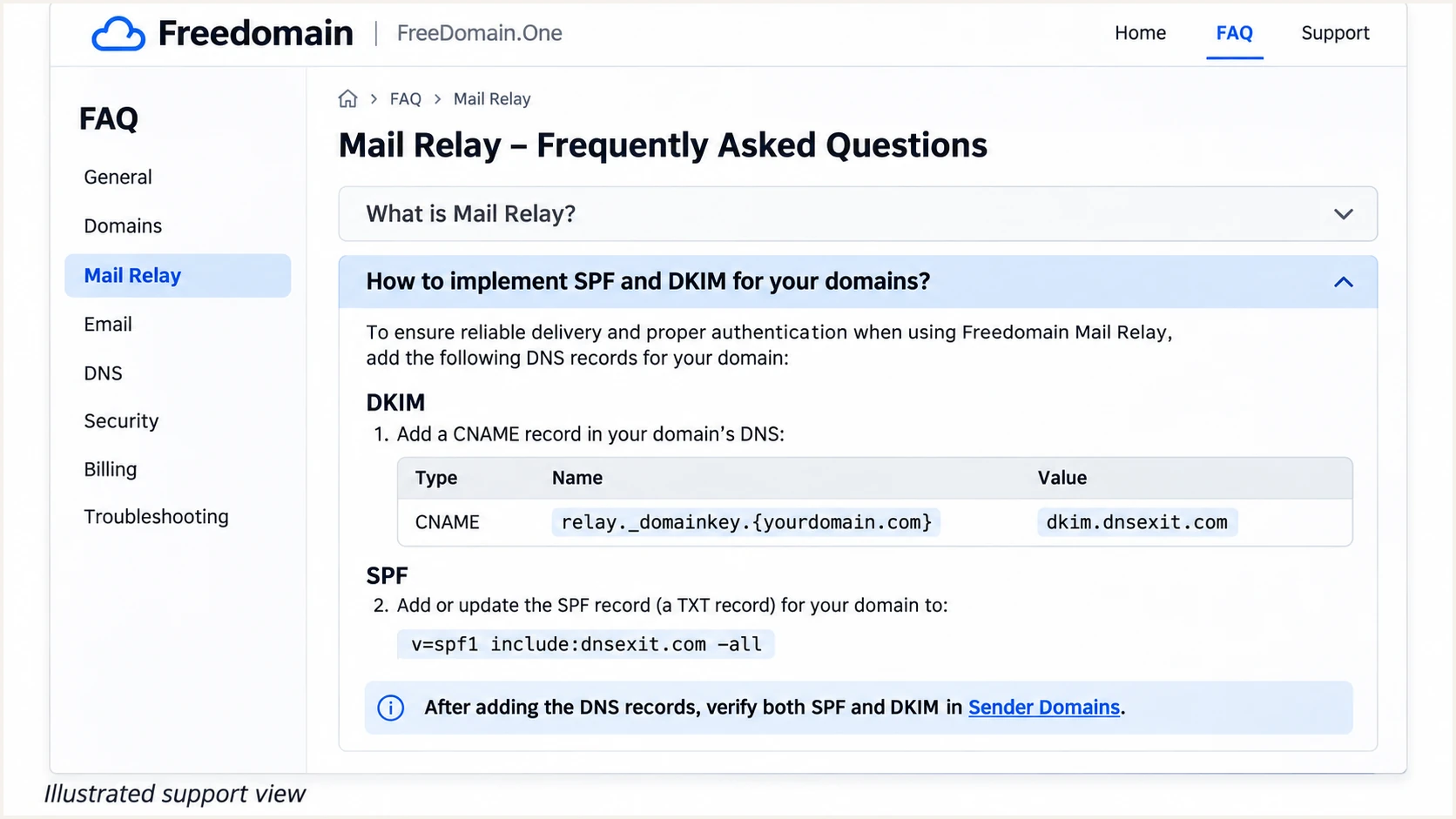
Freedomain public support instructions showing the relay DKIM CNAME.
Set up DMARC
DMARC is a TXT policy on the domain in the visible From address. For a new deployment, start with p=none and a working aggregate-report destination.
Use the DMARC record generator to construct the policy, then publish it at the domain's authoritative DNS host.
Keep existing enforcement
If your domain already has p=quarantine or p=reject, keep that policy. Add reporting or correct the existing record without downgrading enforcement to p=none.
The example address dmarc@example.com is a placeholder. Replace it with a mailbox you control that can receive aggregate reports, or your assigned reporting destination.
A new monitoring policy requests reports without requesting quarantine or rejection. Other receiver checks still apply.
- Check the current policy. Query TXT at _dmarc.example.com before editing. Update the existing DMARC record instead of creating a second one.
- Set the hostname. Create a TXT record at _dmarc.example.com. Use _dmarc in editors that append the domain automatically.
- Set the value. For a domain without existing enforcement, use v=DMARC1; p=none; rua=mailto:dmarc@example.com after replacing the example reporting address.
- Verify publication. Save the change, allow cached DNS answers to expire, and check the full _dmarc hostname. Keep reporting enabled as the policy changes.
Initial DMARC policy, replace the example domain and reporting addressdns
_dmarc.example.com. 3600 IN TXT (
  "v=DMARC1; p=none; rua=mailto:dmarc@example.com"
)
DMARC passes when SPF or DKIM both authenticates and meets the relevant domain alignment requirement. Google's DMARC guidance explains these checks; passing both methods gives your mail better resilience.
For a reporting address outside your domain, ensure the destination authorizes external reports as required. DNS validation cannot establish that reports are actually reaching the destination.
DMARC checker
Look up a domain's DMARC record and catch policy issues.
?/7tests passed
Check the domain used in your From address and confirm the expected policy and reporting destination. One published DMARC record is sufficient; do not create a separate policy for each sending service.
Allow time for participating receivers to send aggregate reports, commonly a day or more. Use a delivered test message for an immediate authentication check.
Verify and troubleshoot
Send a new message through the actual website form, application or mailbox that uses Freedomain. A message sent through another SMTP account tests a different route.
Our email tester below provides the quickest configuration check: send a message to its generated address and inspect the authentication diagnosis. I use the received results alongside the provider's verification status.
- Test the real route. Use the production From address and envelope sender. Trigger the same application action that sends customer email.
- Inspect receiver results. Read Authentication-Results added by the destination receiver. Confirm spf=pass, dkim=pass and dmarc=pass, and inspect the domains associated with those results.
- Confirm signing. Require a passing DKIM signature for your domain, not just for a provider domain. Check that the relay selector matches the DNS entry you published.
- Trace failed delivery. In the Freedomain/DNSExit Mail Relay area, open Check Usage and use the message's Trace link. The provider says activity logs can take up to eight minutes to appear.
Email tester
Send a real email to this address. Suped shows a results button when the test is ready.
?/43tests passed
If SPF passes for an unrelated return-path domain while DKIM passes for your From domain, DMARC still passes through DKIM. Treat that SPF alignment error separately from an SPF authentication failure.
If the intended route is DNSExit Mail Relay, confirm the application uses relay.dnsexit.com with relay-account authentication. Business Email mailboxes instead use out.dnsexit.com with mailbox credentials; verify the settings for the service you actually enabled.
|
|
|
|---|---|---|
SPF fail | Unauthorized IP | Sending route |
SPF permerror | Invalid policy | Duplicates or lookups |
DKIM absent | Signing inactive | Sender Domains |
DKIM fail | Key or message issue | Selector and signature |
DMARC fail | No matching pass | Identity domains |
Use delivered-message results to choose the next check.
Get alerted when it breaks
Suped is our DMARC platform for tracking authentication after setup. Its DMARC monitoring turns aggregate reports into source-level results and detected issues, so a broken sender does not depend on someone remembering to run another test.
Use Suped's automated issue detection and notifications to watch the Freedomain sending source alongside other authorized senders. Keep the actual SPF and DKIM corrections in Freedomain and authoritative DNS.
- Verify the source. In Suped's Sources view, confirm the reported IPs and authentication domains belong to your authorized Freedomain sending route before marking the source verified.
- Enable notifications. Open Suped's Notifications settings and enable Issues detected and Sending sources need verification. Enable DMARC summary emails for routine review.
- Investigate the failure. Open the affected DMARC record in Detail view. Compare the SPF domain, DKIM signing domain and From domain, then follow the issue's steps to fix.
- Confirm the repair. Correct the provider or DNS configuration, send another test message, and confirm subsequent aggregate records show the expected authentication results.
Account for report timing
Suped detects issues in the data it receives. Aggregate DMARC reports are delayed receiver feedback, not a live stream of every sent message. Use the email tester immediately after a change and report-based alerts for ongoing coverage.
Review DNS history when a previously working sender stops passing. A removed include or changed selector can explain the timing of the failure.
A failed delivery with passing authentication needs separate investigation. Use the provider's delivery trace and, where relevant, Suped's blocklist (blacklist) and deliverability insights.
Secure your domain with p=reject
Move to p=reject after every legitimate sending route has a reliable DMARC pass, including a working DKIM signature for your domain. Do not treat an overall pass percentage as proof that a low-volume application is configured.
Suped groups failures by source so you can distinguish an overlooked legitimate sender from unauthorized traffic. Its Hosted DMARC controls also support policy changes in the dashboard after the hosted DNS setup is complete.
p=quarantine
Requests suspicious handling for messages that fail DMARC, commonly placement in spam.
Use this stage to find legitimate failures before requesting rejection.
p=reject
Requests rejection of messages that fail DMARC. Receiving systems retain their own handling decisions.
Use this policy after resolving legitimate failures and validating the sending routes.
I keep reporting enabled throughout enforcement changes and review a representative sending cycle, including scheduled jobs and infrequent business messages.
Forwarding often breaks SPF. Preserve working DKIM on legitimate messages and test any forwarding or message-modifying routes you depend on before tightening policy.
- Inventory senders. Use Suped's source table to review Freedomain and every other service sending with your From domain. Investigate unknown sources before authorizing them.
- Resolve legitimate failures. Fix missing DKIM, incorrect envelope senders and DNS errors. Re-test each application and confirm its results in subsequent reports.
- Stage enforcement. Change the existing p=none policy to p=quarantine, observe legitimate traffic, then change it to p=reject. Retain your reporting destination.
- Review subdomains. Check subdomains with separate sending routes or DMARC records. Understand their effective policy before applying enforcement to the parent domain.
Policy values for staged enforcement, use one at a timetext
v=DMARC1; p=quarantine; rua=mailto:dmarc@example.com

v=DMARC1; p=reject; rua=mailto:dmarc@example.com
These are replacement values for the same TXT record, not additional DMARC records. Replace the example reporting address and preserve any other intentional tags in your existing policy.
After each change, repeat the application test and review Suped's detected issues. Keep enforcement in place when new unauthorized traffic appears; investigate legitimate failures at the sending source.
Frequency asked questions
The documented DNSExit Mail Relay include is include:dnsexit.com. For a domain sending only through that relay, the complete value is v=spf1 include:dnsexit.com -all. Merge the include into an existing SPF policy instead of publishing a second policy.
The public Mail Relay instructions use selector relay. Publish relay._domainkey.yourdomain as a CNAME to dkim.dnsexit.com, then verify SPF and DKIM under Mail Relay > Sender Domains. Confirm a delivered message has a passing signature for your domain.
SPF authenticates the envelope-sender domain. If that domain differs from the visible From domain under the applicable alignment rules, SPF does not provide the DMARC pass. A passing DKIM signature with the required domain match still satisfies DMARC. For the supported Freedomain route, check the application's envelope-sender configuration.
Freedomain's relay troubleshooting example includes box20.911domain.com in a historical SMTP greeting associated with DNSExit. A greeting is not a verified current PTR record, and that example does not establish every hostname with this suffix as a Freedomain sender. Check the sending IP's PTR result, your relay logs and the message's authentication domains before attributing the source.
No. The SMTP route determines which server needs SPF authorization and which system signs DKIM. The DNSExit relay records apply to mail sent through that relay. If a hosted application delivers directly or uses another SMTP service, configure authentication for that actual sender.
Keep an existing p=reject or p=quarantine policy. Add or repair the Freedomain sending configuration, test a real message, and investigate failures without removing the domain's existing enforcement.




