
How to set up DMARC/DKIM/SPF for Flowmailer

Published 20 Nov 2026
Updated 20 Nov 2026
12 min read
Summarize with
To set up DMARC, DKIM and SPF for Flowmailer, add your sending domain in Setup > Domains, publish its generated return-path and DKIM DNS records, and publish a DMARC TXT policy. Flowmailer is now Spotler SendPro, so current screens and documentation use that name.
I verify a real message after DNS validation. The standard setup uses one return-path CNAME and two DKIM CNAMEs. A separate SPF TXT record on your visible From domain is optional; SPF authentication depends on the domain actually used in the return path.
Add your domain
Start with the domain after the @ in your intended From address. For billing@example.com, the sender domain is example.com. Have access to its authoritative DNS before making changes.
- Open domains. Sign in to Flowmailer or Spotler SendPro and open Setup > Domains. Select an existing sender domain, or click Add new sender domain.
- Enter the sender. Add example.com without an email address or URL prefix. Register mail.example.com separately if you also send using that subdomain.
- Choose the return path. Use an unused subdomain such as e.example.com. The setup wizard suggests e for bounce handling and tracking. Keep the return-path and web domain the same for the standard setup.
- Publish and validate. Copy the generated DNS names and targets, publish the essential records described below, then return to the domain and click Validate. Save any intended domain configuration changes after reviewing the required DNS records.
I keep the generated DNS screen open while editing DNS. SendPro builds the targets using your account and domain, so another customer's CNAME values are unsuitable. Publishing these records gives SendPro the DNS delegation it needs for your sender.
Spotler's 'Domains' documentation distinguishes Validate, which checks the entered configuration, from Save, which applies changes. On an existing production domain, preview the required records with Validate before saving a different return path.
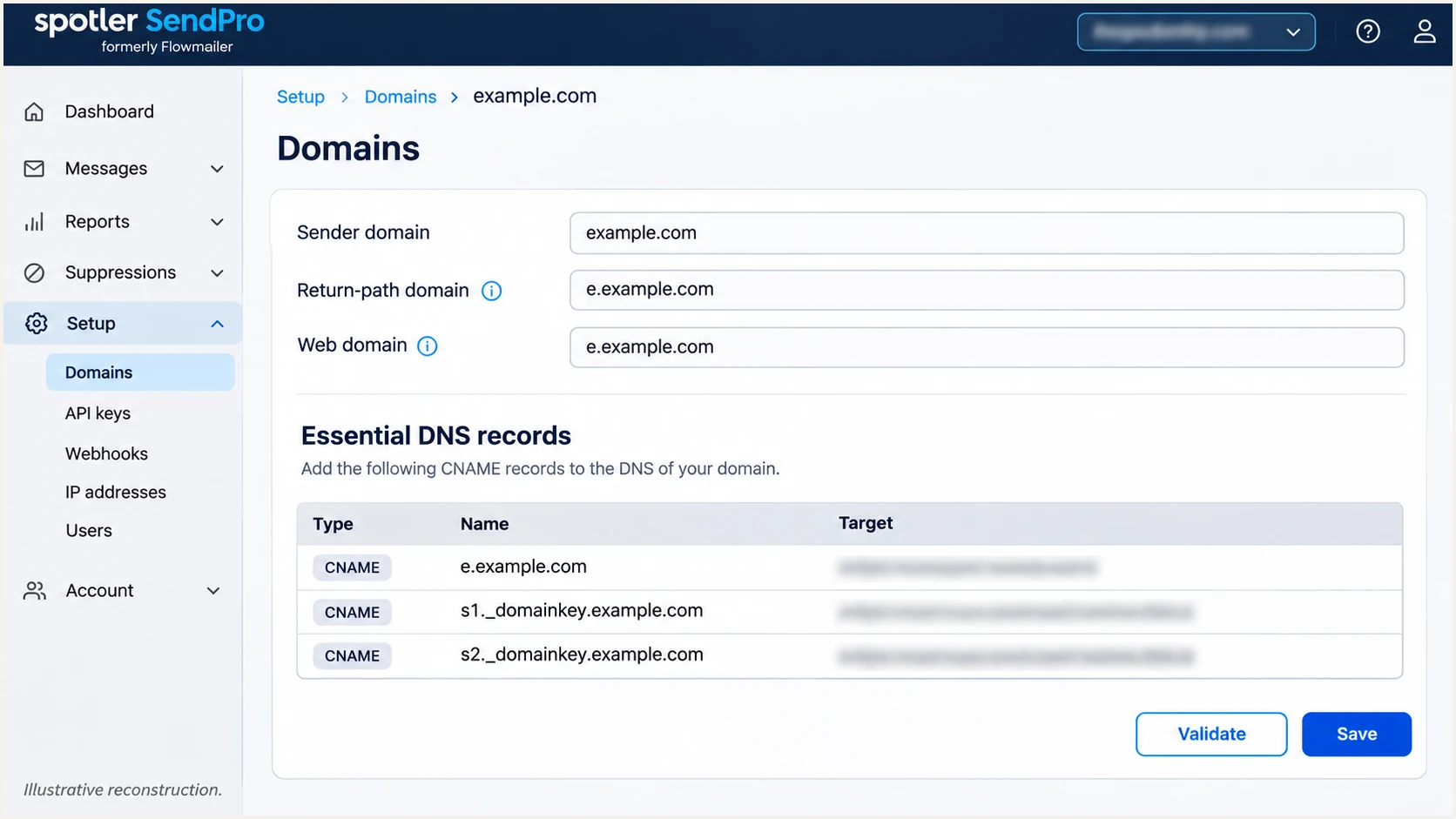
Illustrative SendPro domain setup showing sender, return-path and web domains, with Validate highlighted.
An existing website or mail host must not already occupy your chosen CNAME name. Choose another unused subdomain instead of replacing records that handle production traffic.
Set up SPF
Flowmailer supports return-path alignment. SPF checks the SMTP MAIL FROM domain, normally shown in the delivered Return-Path header, rather than the visible From address. I configure that return path before changing the sender domain's SPF record.
- Use the generated records. For the standard shared return-path and web domain, publish SendPro's generated CNAME at e.example.com. Keep it DNS-only if your DNS provider offers a web proxy.
- Handle separate domains. If the return-path and web domain differ, publish the generated MX and SPF TXT records at the return-path name, plus the separate web-domain CNAME.
- Merge optional SPF. Spotler's setup documentation specifies include:spf.flowmailer.net for its optional sender-domain SPF check. Add it before the existing all mechanism only when needed, preserving other authorized senders. Never create a second SPF record at the same name.
- Check the lookup limit. SPF permits at most 10 DNS-querying terms during evaluation, including nested includes. This is not permission to add 10 top-level includes; exceeding the limit produces permerror.
Standalone SPF value, only where SendPro requests an SPF TXT recordtext
v=spf1 include:spf.flowmailer.net ~all
Use that standalone example only at a name that needs a new SPF TXT record. For an existing record, merge the include into the current value. A CNAME cannot coexist with SPF TXT or MX records at the same name, so do not add TXT beside the standard return-path CNAME.
For a From domain of example.com and return path of e.example.com, relaxed SPF alignment normally works. Keep aspf=r, which is the default. With aspf=s, those domains are different, so SPF cannot supply the DMARC pass even when SPF authentication succeeds.
SPF checker
Find SPF syntax issues, lookup limits, and weak records.
?/16tests passed
Check the actual return-path domain with the SPF checker. Its DNS resolution matters for authentication. Checking only example.com does not establish whether SPF passes for e.example.com.
An orange optional sender-domain SPF status does not stop sending according to Spotler's setup documentation. I confirm the return-path SPF result on a received message before treating that warning as an authentication failure.
Standard return-path delegation
Return-path and web domain share a name. Publish the generated CNAME; SendPro manages the DNS behind its target.
Do not add a separate SPF TXT record at that CNAME name.
Separate return-path and web domain
Publish the return-path MX and SPF TXT records generated by SendPro. Publish the web-domain CNAME separately.
Check SPF at the return-path domain, using the exact account values.
Set up DKIM
SendPro supplies managed DKIM selectors for your sender domain. I publish both generated DKIM CNAMEs, then check that an actual message has a valid signature for that domain.
- Copy both selectors. In Setup > Domains, open the sender domain and locate both essential CNAME rows containing _domainkey. Copy each full name and its corresponding target.
- Publish exact CNAMEs. Create each record in authoritative DNS. If the DNS editor appends example.com automatically, enter only the relative host portion so the domain is not duplicated.
- Keep both records. Leave both selectors published for managed key rotation. Use SendPro's supplied records rather than generating an unrelated DKIM key or replacing an existing selector used by another sender.
- Validate signing. Click Validate in SendPro, then inspect a delivered message. Check dkim=pass and the DKIM-Signature d= domain against your visible From domain.
A green DNS status confirms record availability. It does not prove that every application flow sends with the expected From address or signing domain. Test each sender domain used by your application.
With relaxed DKIM alignment, the signing domain and visible From domain need the same organizational domain. With adkim=s, they must match exactly. Check the message's s= selector when troubleshooting a missing or incorrect key.
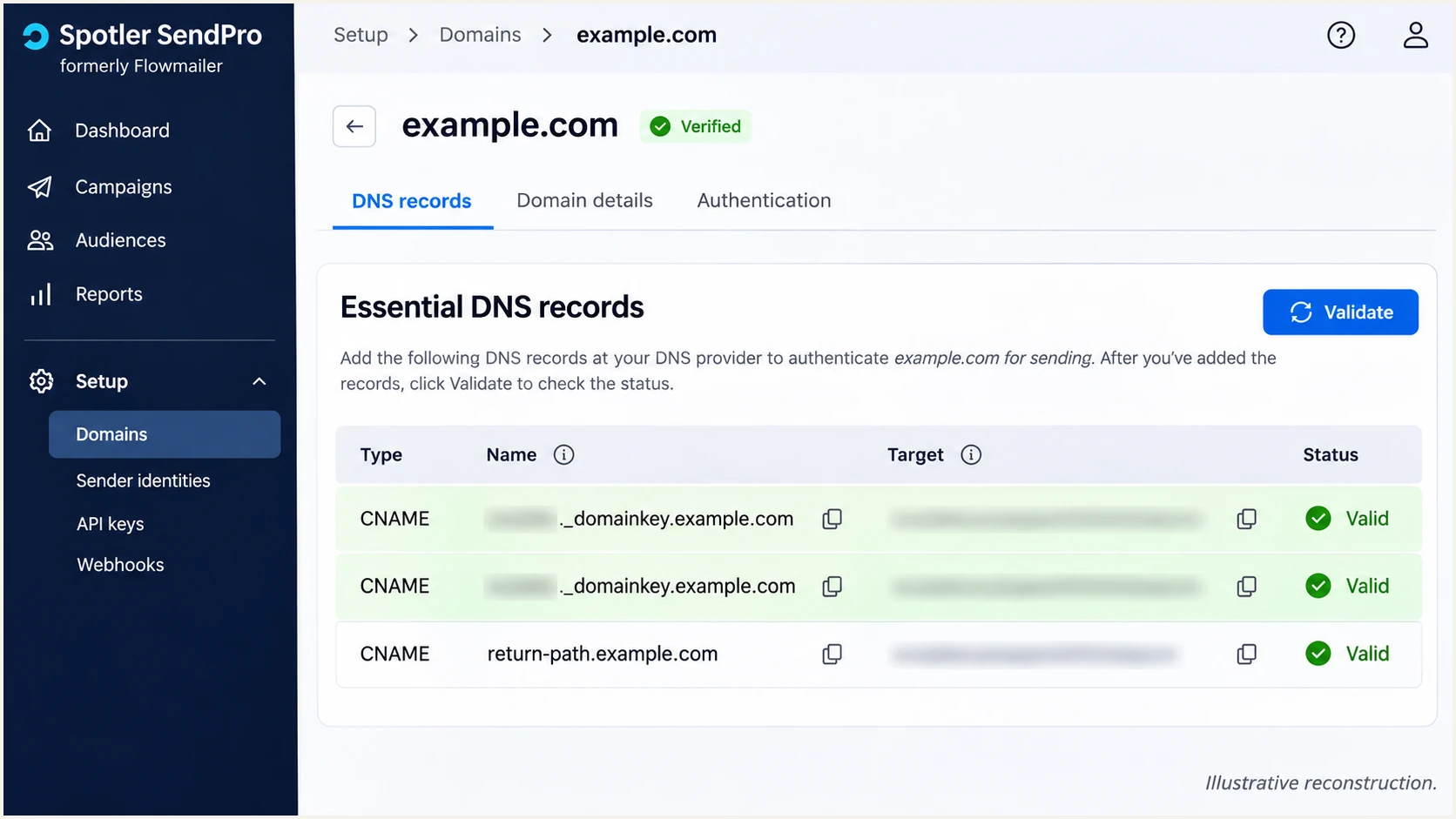
Illustrative SendPro DNS view highlighting the two managed DKIM CNAME records.
If validation still fails, compare each CNAME target character for character with SendPro. Remove a conflicting TXT record only after confirming it belongs to the same selector and is obsolete.
Set up DMARC
Publish DMARC for the visible From domain. For a new deployment, I start with p=none to collect reports while checking legitimate senders. If the domain already has p=quarantine or p=reject, keep that policy.
- Inspect the current policy. Look up TXT records at _dmarc.example.com. Edit the existing DMARC record if one is present; do not publish a second policy at the same name.
- Add one TXT record. For From addresses at example.com, use _dmarc.example.com as the DNS name, or _dmarc in a DNS editor that appends the zone. Use the monitoring value below for a new policy.
- Choose a working destination. Replace dmarc@example.com with an address that receives and processes aggregate reports. Keep existing report recipients when updating a policy.
- Check the result. Confirm the published TXT value with the DMARC checker, then click Validate on the SendPro sender domain. Repeat for every sending domain and check any inherited subdomain policy.
Initial DMARC TXT value at _dmarc.example.comtext
v=DMARC1; p=none; rua=mailto:dmarc@example.com
That exact record is a template, not a working reporting destination for your organization. A report mailbox receives aggregate XML files; someone or a reporting platform must process them. Reporting to a different domain also requires the report destination's authorization.
Use the DMARC record generator to build the TXT value with your actual reporting address. Keep relaxed alignment unless you have a tested requirement for strict matching.
DMARC checker
Look up a domain's DMARC record and catch policy issues.
?/7tests passed
DMARC passes when either SPF or DKIM passes authentication with the required domain alignment. I aim for both on direct Flowmailer delivery, especially because DKIM is the useful fallback when forwarding breaks SPF.
SendPro's warning that rua does not contain its report address is separate from an invalid DMARC policy. Spotler's compliance documentation says an otherwise valid policy is sufficient. Keep your chosen report destination rather than replacing it just to remove that warning.
Verify and troubleshoot
I verify DNS first, then send through the same SMTP or API source used for production. A message sent through a different system does not test your Flowmailer configuration.
- Revalidate DNS. Open Setup > Domains, select the sender, and click Validate. Resolve failed essential CNAME checks and confirm that DMARC is valid.
- Query the exact names. Use the commands below, replacing SELECTOR with one supplied by SendPro. Check both DKIM selectors, not just the one shown in a single message.
- Send a real transaction. Trigger a receipt or another representative application message to the tester's generated address. Keep the normal From address and production flow.
- Check authentication. Look for spf=pass, dkim=pass and dmarc=pass in the receiving system's results. Compare smtp.mailfrom and header.d with header.from to check domain alignment.
Inspect published DNS, substituting your domain and DKIM selectorbash
dig +short CNAME e.example.com
dig +short TXT e.example.com
dig +short TXT _dmarc.example.com
dig +short CNAME SELECTOR._domainkey.example.com
The CNAME target must match your account's generated value. When the return-path name uses explicit MX and TXT records instead of a CNAME, also query its MX record. A missing CNAME is expected in that separate-domain configuration.
The email tester below provides the quickest message-level check: send to its generated address and read the full diagnosis. It checks the delivered message rather than inferring success only from published DNS.
Email tester
Send a real email to this address. Suped shows a results button when the test is ready.
?/43tests passed
Check the actual return path, signing domain and visible From domain in the result. If SPF passes but SPF alignment fails, valid DKIM with the required domain alignment still gives a DMARC pass. Flowmailer supports a custom return path, so investigate unexpected mismatch on direct delivery.
DNS caches retain previous answers until their TTL expires. Spotler's compliance documentation allows up to 24 hours for changes to appear. If the failure remains, check duplicated zone names, conflicting records and incorrect targets before changing the authentication policy.
|
|
|
|---|---|---|
DKIM missing | Selector CNAME | Fix name or target |
SPF permerror | Lookup budget | Reduce DNS terms |
SPF mismatch | Return-path domain | Check delegation |
DMARC invalid | Policy TXT | Keep one valid policy |
rua warning | Report destination | Keep chosen recipient |
Use the failed check to choose the next action.
Get alerted when it breaks
Suped is our DMARC platform for ongoing authentication monitoring. It detects issues and provides steps to fix them, so the workflow continues after SendPro's domain validation succeeds.
- Enable issue notifications. In Suped's notification settings, enable Issues detected emails so authentication problems reach the people responsible for DNS and sending configuration.
- Review source notifications. Enable Sending sources need verification. Confirm that each source is authorized before marking it verified; an unfamiliar source needs investigation.
- Diagnose the failed identity. Use the record detail view to inspect SPF, DKIM and DMARC results. Compare the affected domain and selector with SendPro's current generated records.
- Track recurring failures. Enable DMARC summary emails and compare changes in legitimate volume with authentication failures. Use DNS history to investigate when a record changed.
Suped's DMARC monitoring groups reported sending sources and exposes their authentication results. That makes it practical to distinguish Flowmailer configuration failures from unauthorized sending before changing DNS.
I use source-level evidence for that decision. A successful test message covers one delivery path; aggregate reports show what participating receivers observe across the domain's reported traffic.
Understand report timing
DMARC aggregate reports arrive in batches, commonly daily. Suped can alert on issues detected in received data, but aggregate reporting does not provide an immediate event for every failed message. Use a live test when validating a change.
Secure your domain with p=reject
Move to p=reject after validating all legitimate sending sources, including systems outside Flowmailer. I require working DKIM for production flows and investigate SPF failures before increasing enforcement.
- Inventory legitimate senders. Use Suped's source table to identify every authorized sender. Investigate unknown traffic without adding it to SPF merely because it appears in a report.
- Fix production flows. Resolve legitimate DMARC failures and test each From domain. Include infrequent billing runs and other transactional flows that a single test does not cover.
- Stage enforcement. After a representative sending cycle shows legitimate mail passing, change p=none to p=quarantine. Review subsequent reports and delivery errors, then move to p=reject when remaining legitimate failures are resolved.
- Keep monitoring. Preserve report recipients and Suped notifications after enforcement. Recheck authentication when changing application senders, DNS or domain configuration.
Suped's hosted DMARC lets our customers manage policy in the dashboard after the hosted record is configured. Pair policy changes with source verification and issue diagnostics so each increase in enforcement has evidence behind it.
Strict SPF alignment is not required for p=reject. Keep relaxed SPF matching for a return-path subdomain unless an exact-domain design has been verified. Preserve any other reviewed policy tags when updating the record.
Final DMARC TXT example after legitimate senders passtext
v=DMARC1; p=reject; rua=mailto:dmarc@example.com
Replace the example reporting address with your existing working destination. The reject policy asks receivers to reject mail that fails DMARC; receivers retain their own handling decisions. Keep testing valid DKIM, rather than relying solely on SPF for an enforced domain.
Frequency asked questions
include:spf.flowmailer.net is documented for Flowmailer, now Spotler SendPro. Use the DNS records generated for your account. Its optional sender-domain SPF check is separate from the SPF configuration at the actual return-path domain; do not add an include solely because it appears in a report.
flowmailer.net is used by Flowmailer's infrastructure, now Spotler SendPro. An rDNS hostname under that domain is an infrastructure clue, not proof that a message is authorized to use your From domain. Confirm the source IP and the message's SPF, DKIM and DMARC results before trusting the source.
The standard custom return-path CNAME setup does not require a separate Flowmailer SPF include at the root domain for that traffic. SPF is checked at the actual MAIL FROM domain. Spotler lists sender-domain SPF as optional. If your configuration uses separate return-path and web domains, publish the return-path MX and SPF TXT records that SendPro generates.
Yes. A valid DKIM signature with the required domain alignment gives a DMARC pass even when SPF alignment fails. Confirm dkim=pass and the signing domain against the visible From domain. For direct Flowmailer delivery, also investigate the custom return-path setup because the platform supports SPF alignment.
No. Spotler's compliance documentation says an otherwise valid policy is sufficient when its reporting address is absent. That warning concerns sending reports to SendPro. Keep your chosen reporting destination and existing quarantine or reject policy; neither needs replacement just to clear the warning.
Yes. SendPro treats example.com and mail.example.com as separate sender domains for configuration, including DKIM. Add and validate each domain used in a visible From address. Check the effective DMARC policy for each one, including inheritance; root-domain DKIM configuration alone does not configure the subdomain in SendPro.