
How to set up DMARC/DKIM/SPF for DNSExit

Published 21 Nov 2026
Updated 21 Nov 2026
10 min read
Summarize with
For DNSExit Mail Relay, add include:dnsexit.com to your domain's single SPF record, publish relay._domainkey as a CNAME to dkim.dnsexit.com, then verify both in Mail Relay > Sender Domains. Publish DMARC at _dmarc with p=none if you have no policy, and test a message before increasing enforcement.
DNSExit provides both DNS hosting and outbound email services. I check which service sends the mail first: if DNSExit only hosts your DNS, publish your actual email sender's authentication records instead. The Mail Relay records below apply when DNSExit sends your messages.
Add your domain
I register the sending domain before changing records. DNSExit's public Mail Relay FAQ places sender verification under the dashboard's Mail Relay menu.
- Open Sender Domains. Sign in to DNSExit, find Mail Relay on the dashboard, and open Sender Domains.
- Add the sending domain. Add example.com, or the actual subdomain used in your From address. Enter the domain without an email address or URL prefix.
- Find authoritative DNS. If DNSExit hosts your active DNS zone, open Domain List > Edit DNS beside the domain. Otherwise edit records at the provider named by your domain's nameservers.
- Complete verification. Publish SPF and DKIM using the next steps, return to Sender Domains, and verify both records. DNSExit starts adding DKIM signatures after successful verification.
Adding a sender domain and editing a DNS zone are separate tasks. Keep your existing inbound MX records unless you are also moving mailbox hosting.
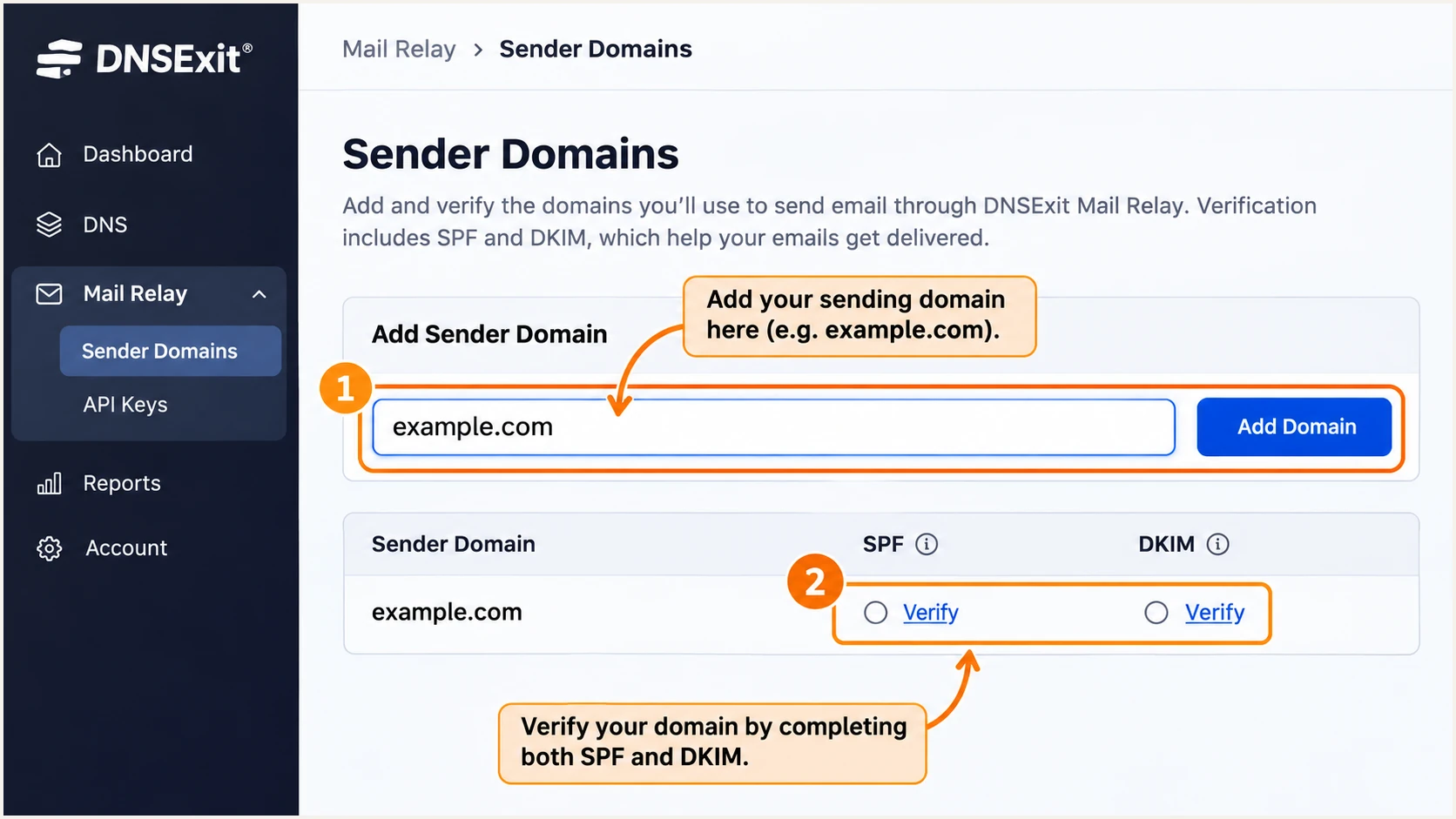
Illustrative DNSExit Sender Domains screen for adding and verifying a domain.
Use your own domain wherever example.com appears below. For a sender such as notices@mail.example.com, the DKIM name becomes relay._domainkey.mail.example.com.
Set up SPF
I update the existing SPF policy rather than publishing another one. A domain can have other TXT records, but it must have only one SPF policy at each name.
- Read the current TXT record. Look up the domain used by the SMTP envelope sender, also shown as the delivered message's Return-Path.
- Authorize DNSExit. Insert include:dnsexit.com before the existing all mechanism. Preserve other authorized senders and the policy's existing ending.
- Match the envelope domain. Set your application's SMTP MAIL FROM to an address on your sending domain. A bounce subdomain needs its own SPF record; the root domain's SPF is not inherited.
- Check the lookup budget. Keep evaluated DNS lookup terms within SPF's limit of 10, including nested includes. Do not replace DNSExit's include with a copied list of current IP addresses.
TXT value at example.com, only when DNSExit is the sole sendertext
v=spf1 include:dnsexit.com -all
Use that complete record only when DNSExit is the only authorized sender. If another SPF record exists, merge DNSExit into it instead of overwriting it.
DNSExit supports Return-Path alignment. Under DMARC's default relaxed SPF alignment, the envelope domain and visible From domain must share the same organizational domain. Set MAIL FROM in the sending application; adding a Return-Path header manually does not configure the SMTP envelope.
SPF checker
Find SPF syntax issues, lookup limits, and weak records.
?/16tests passed
Check the exact envelope domain here after saving DNS. Confirm one SPF policy, a valid DNSExit include and no lookup-limit error.
An SPF pass alone does not prove DMARC passes. If the envelope domain is unrelated to your From domain, SPF does not satisfy DMARC; a passing DKIM signature for your From domain still can.
Set up DKIM
DNSExit's documented Mail Relay selector is relay. I publish its CNAME, then complete DNSExit's verification before testing the signature.
- Create the CNAME. At your authoritative DNS provider, add the record below. In a zone editor that appends example.com, enter only relay._domainkey as the host.
- Check the destination. Point the CNAME to dkim.dnsexit.com. Confirm the saved target has not become dkim.dnsexit.com.example.com.
- Avoid a selector conflict. A CNAME cannot share its name with a TXT record or another record type. Identify any existing relay selector before replacing it.
- Verify in DNSExit. Return to Mail Relay > Sender Domains and verify SPF and DKIM for the domain. Send a fresh message after verification succeeds.
DNSExit DKIM CNAME for example.comtext
relay._domainkey.example.com. CNAME dkim.dnsexit.com.
This is a CNAME delegation, not a public key to generate yourself. DNSExit manages the signing key behind the destination.
In a delivered message, inspect DKIM-Signature for s=relay and a d= domain that matches your From domain under the configured DMARC alignment mode. Use the recipient's authentication result to confirm that the signature passes.
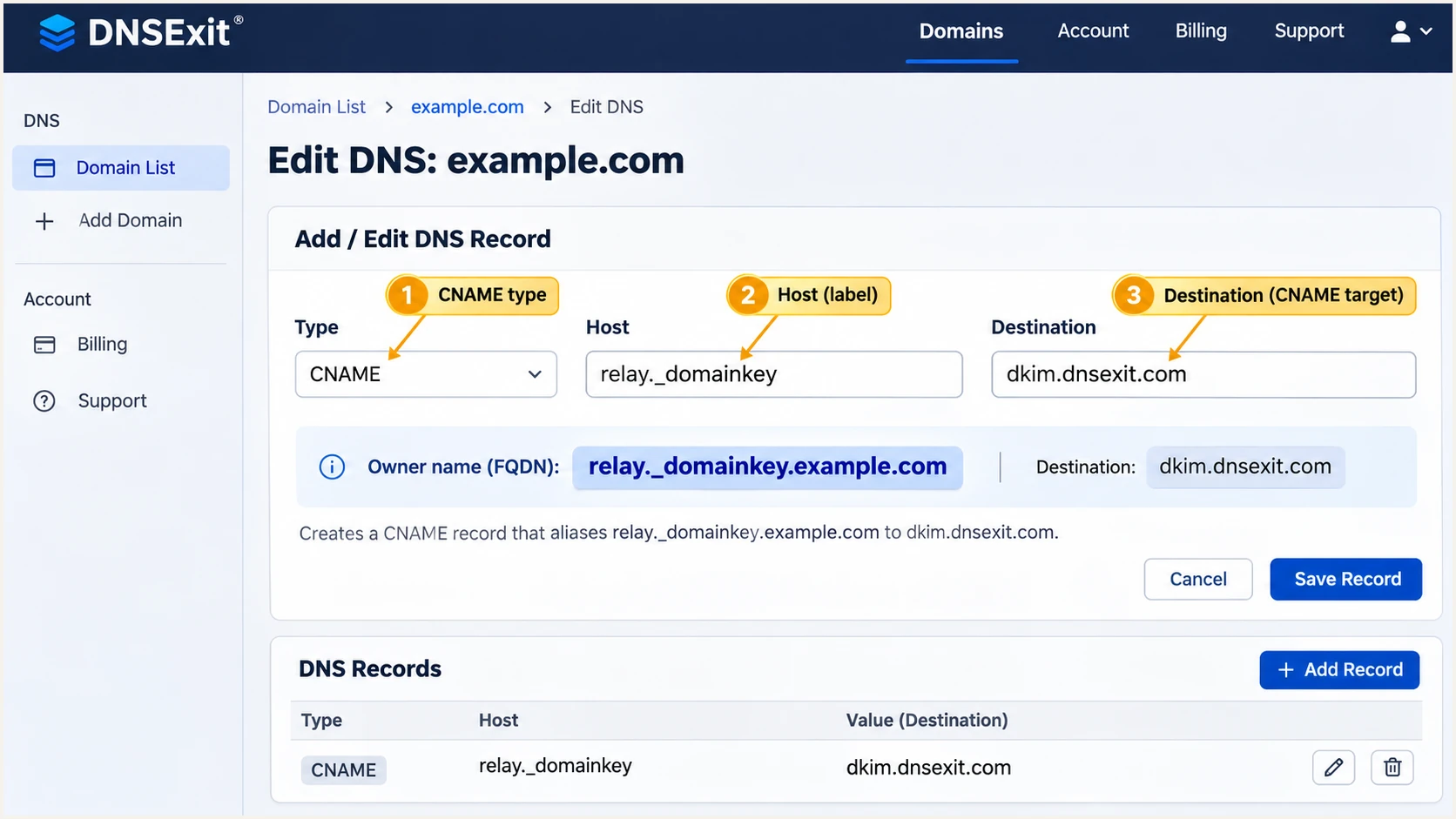
Illustrative DNSExit DNS editor with the relay._domainkey CNAME.
If DNS is hosted elsewhere, create the same CNAME there. Editing an inactive DNSExit zone will not change the public record.
Set up DMARC
I start a new DMARC deployment in monitoring mode. If your domain already uses p=quarantine or p=reject, keep that policy while fixing DNSExit authentication.
- Check the existing policy. Look up TXT at _dmarc.example.com before creating anything. Edit an existing policy instead of publishing a second DMARC record.
- Publish a monitoring policy. For a domain without DMARC, create a TXT record with host _dmarc and the example value below.
- Use a working report destination. Replace dmarc@example.com with a mailbox or aggregate-report address you control. An address outside your organizational domain requires that destination's external reporting authorization.
- Keep relaxed alignment initially. Leave adkim and aspf unset unless you need strict matching. Their default relaxed behavior accepts matching organizational domains.
Initial DMARC TXT value at _dmarc.example.comtext
v=DMARC1; p=none; rua=mailto:dmarc@example.com
Use the DMARC record generator to build the policy with your real reporting address. Publish the resulting value as one TXT record.
The p=none policy requests reports without requesting quarantine or rejection for DMARC failures. It does not make invalid SPF or DKIM pass, and it does not guarantee inbox placement.
DMARC checker
Look up a domain's DMARC record and catch policy issues.
?/7tests passed
Look up the domain in your visible From address. Confirm that a single valid DMARC policy is found and that its report destination is correct.
A successful lookup proves the policy is published. A delivered test and aggregate reports show whether your actual DNSExit traffic passes.
Verify and troubleshoot
I test through the application or mailbox that sends production mail. A test through a different SMTP route does not validate DNSExit.
- Confirm the sending route. Use your DNSExit Mail Relay credentials with relay.dnsexit.com. DNSExit Business Email uses out.dnsexit.com with the full mailbox address and mailbox password.
- Test a real message. Use the email tester below, copy its recipient address, and send from the application through DNSExit. Open the diagnosis for authentication and domain matching.
- Inspect recipient results. Check SPF and its smtp.mailfrom domain, DKIM and its header.d domain, and the final DMARC result. Require at least one passing authentication method with the correct domain match.
- Trace delivery failures. In DNSExit, open Mail Relay > Check Usage, locate the message and select Trace. Its FAQ says activity logs take up to eight minutes to appear.
The tester checks a delivered message, including whether DNSExit actually signed it. This catches problems that DNS lookups alone cannot detect.
For a clean baseline, send directly to the tester without forwarding. Repeat the test after each authentication change.
Email tester
Send a real email to this address. Suped shows a results button when the test is ready.
?/43tests passed
An SPF alignment failure is compatible with a DMARC pass when DKIM passes with the correct signing domain. DNSExit supports matching the Return-Path, so investigate the application's envelope sender before accepting an unexpected mismatch.
If verification stays pending, compare public DNS with the active authoritative zone and allow existing DNS caches to expire. Then rerun verification in Sender Domains.
|
|
|
|---|---|---|
SPF | Pass | Sender authorization |
SPF domain | Same organization | SMTP MAIL FROM |
DKIM | Pass | CNAME and verification |
DKIM domain | Same organization | Signing domain |
DMARC | Pass | Either matching pass |
Checks for a message sent directly through DNSExit
The domain expectations above assume relaxed DMARC alignment. With strict alignment, the authenticated domain must exactly match the visible From domain.
A delivered result in DNSExit's Trace means the next server accepted the message. Check the receiver's authentication results separately; acceptance does not establish a DMARC pass or inbox placement.
If DKIM is absent, check DNSExit verification before regenerating records. If DKIM fails, check selector resolution and whether a downstream system changes signed content. If SPF reports permerror, check duplicate SPF policies and nested DNS lookups.
Get alerted when it breaks
For ongoing checks, I recommend Suped, our DMARC platform. Suped's DMARC monitoring connects DNSExit traffic with authentication issues and steps to fix them.
- Enable issue notifications. In Suped's notification settings, enable Issues detected so authentication problems reach the people responsible for DNS and sending applications.
- Review new sources. Enable Sending sources need verification. Confirm DNSExit traffic against your sending inventory before marking it verified.
- Investigate failures. Filter DMARC data by source, reporter or IP, then open record details to inspect SPF, DKIM and domain matching. Check DNS history when a failure follows a record change.
- Keep summary emails. Enable DMARC summary emails and review legitimate senders that stopped passing, including applications that send infrequently.
Suped alerts act on available data. Aggregate reports arrive on receiving providers' schedules, so they are not an instant notification for every failed message. Retest a changed configuration immediately with the email tester.
Secure your domain with p=reject
I move to rejection after legitimate senders pass consistently across a representative sending cycle, including infrequent billing and account messages. A successful DNSExit test covers one route, not every sender using the domain.
- Review all authorized traffic. Use Suped's source table and record details to identify legitimate failures. Fix them before changing policy; do not expect impersonation traffic to pass.
- Stage enforcement. Move a new deployment to p=quarantine, inspect subsequent reports and delivery failures, then use p=reject when legitimate traffic remains healthy.
- Manage the policy centrally. Suped's Hosted DMARC manages policy changes in the dashboard after its initial DNS configuration. Keep reporting active through each change.
- Check subdomain coverage. Review any sp tag and explicit subdomain DMARC records. A parent p=reject does not override a separate policy published for a subdomain.
Suped keeps the source evidence and policy workflow together, so enforcement decisions can be based on observed legitimate mail. Keep DNSExit verification and message tests in the process whenever an application changes.
Ready for rejection
- Authorized routes. Each known sender has a passing SPF or DKIM result with the required domain match.
- Representative evidence. Reports and tests include scheduled and infrequent mail.
Resolve before rejection
- Known sender failures. DNSExit verification is incomplete, or legitimate traffic fails both matching authentication paths.
- Missing coverage. Some applications or subdomains have not been tested.
For a directly managed DNS policy, update the existing DMARC TXT value rather than adding another record. Keep your real aggregate-report destination in place.
If Hosted DMARC manages the policy, make the change there instead of adding a conflicting TXT record at the same name.
Final DMARC TXT value, after legitimate senders are verifiedtext
v=DMARC1; p=reject; rua=mailto:dmarc@example.com
Recheck public DMARC resolution and send another DNSExit test after enforcement changes. Continue reviewing Suped's issue notifications and source data.
A p=reject policy requests rejection of messages that fail DMARC for the covered domain. Receivers retain local handling discretion, and this policy does not protect unrelated lookalike domains.
Frequency asked questions
No. Add include:dnsexit.com when DNSExit sends your outbound email. If DNSExit only hosts the zone, publish the SPF and DKIM records supplied by the service that actually sends your messages.
DNSExit documents selector relay, with relay._domainkey.yourdomain pointing by CNAME to dkim.dnsexit.com. Verify SPF and DKIM in Mail Relay > Sender Domains after publishing DNS. Then confirm the delivered message has a passing signature with a matching signing domain.
SPF authenticates the SMTP envelope domain. If that domain does not match your visible From domain under your DMARC alignment mode, SPF cannot satisfy DMARC. DMARC fails when no passing DKIM signature has a matching signing domain either. Correct MAIL FROM or fix DNSExit DKIM verification.
DNSExit's public SMTP troubleshooting examples identify a relay as box20.911domain.com. That is a historical SMTP hostname example, not proof that every current PTR under that suffix belongs to DNSExit. Confirm the actual sending IP and authentication domains against your DNSExit delivery trace before attributing traffic.
It depends on DNS caching and the previous record's TTL. Check that the authoritative nameservers return the new SPF and DKIM records, then retry verification in Sender Domains. If public answers remain wrong after caches expire, check the active DNS zone and record names rather than repeatedly adding records.




