
How to set up DMARC/DKIM/SPF for Comcast

Comcast manages SPF, DKIM, and DMARC for @comcast.net addresses; customers cannot edit those DNS records. For a custom domain on Comcast Business Email, publish its documented SPF record, request domain-specific DKIM settings from support, and publish DMARC in your own DNS. Having Comcast internet does not make Comcast your email host.
I check the mailbox platform first. Xfinity is inviting Comcast.net users to Yahoo Mail through 2026, with different client settings after migration. The address stays Comcast.net, and authentication remains provider-managed.
Add your domain
Use these custom-domain steps for an existing Comcast Business Domain and Email subscription. A personal Xfinity mailbox has no domain onboarding or DNS verification workflow.
- Open SiteControl: Sign in to your Comcast business account. Open the application menu and select Websites or Comcast Business Domain and Email.
- Select the domain: Open Manage Email, then Mailboxes. Choose your provisioned domain in Currently Managing.
- Create the mailbox: Select Create Email Address, enter the mailbox name and password, and submit. Confirm the address uses your domain.
- Resolve missing domains: If your domain is absent, ask Comcast Business Email support to confirm provisioning. A Comcast internet subscription alone does not provision custom-domain email.
The mailbox confirms email provisioning. I separately confirm access to the authoritative DNS zone before changing authentication records.
For Comcast-hosted DNS, open Domain Name, select Edit beside your domain, then Advanced DNS Settings. If your public nameservers belong elsewhere, make the changes there.
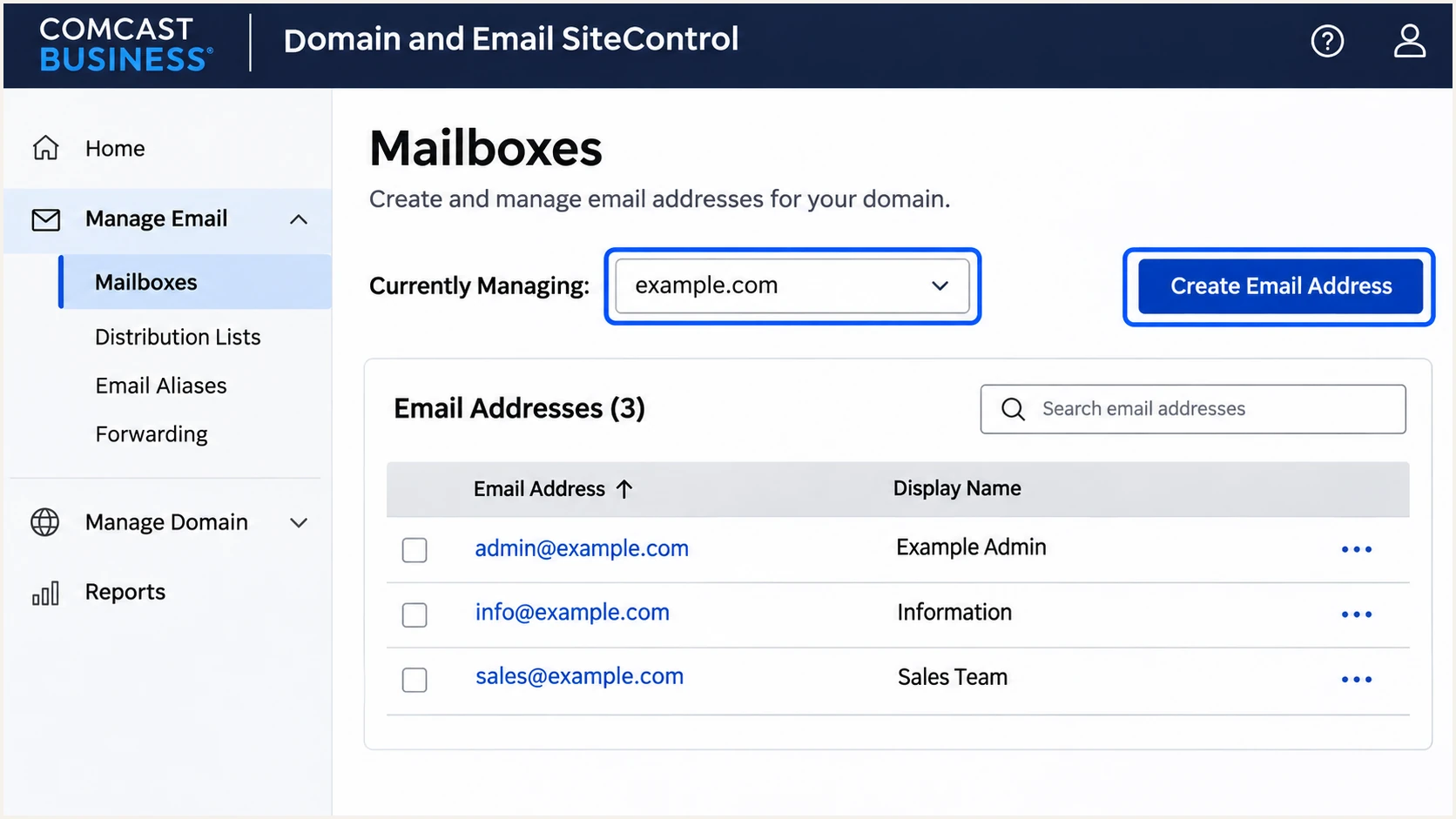
Select the provisioned domain and create a mailbox in Comcast Business SiteControl.
Set up SPF
Comcast Web Hosting's "SPF Record (Gmail Spam Policy)" support article specifies the value below for its Business Email service. Use it only when that service actually sends your domain's email.
Save the existing SPF value before editing. The replacement must continue to authorize every service that uses this envelope sender domain.
- Open DNS: In Advanced DNS Settings, select your domain's zone.
- Edit one TXT record: Use your full domain, such as example.com, in Source. SiteControl does not accept @. Edit an existing SPF TXT record rather than creating a second one.
- Authorize the sender: Add include:mfg.siteprotect.com before the final all mechanism. Preserve other authorized senders and stay within SPF's 10 DNS-lookup-term limit, including nested includes.
- Save the value: Enter the TXT value in Destination. Use Update for an existing record or Add Now for a new record. Choose TXT, even if the interface also offers SPF.
SPF TXT value for a domain sending only through Comcast Business Emailtext
v=spf1 include:mfg.siteprotect.com ~all
This example assumes Comcast Business Email is your only sender. Merge the include into your existing policy when other services send mail, keeping one final all mechanism.
Check your own sending domain below. Sending to Comcast recipients does not require adding Comcast to SPF, and an internet connection is not evidence that this include belongs in your record.
SPF checker
Find SPF syntax issues, lookup limits, and weak records.
?/16tests passed
A valid SPF record verifies DNS configuration. Send a fresh message through the provisioned mailbox to confirm that the actual outbound IP passes SPF.
If MAIL FROM uses a subdomain, check SPF at that exact name. SPF records are not inherited from the parent domain.
Inspect the Return-Path domain too. SPF alignment requires the authenticated MAIL FROM domain to match the visible From domain under your DMARC policy. If the service uses a provider-owned return path, editing your domain's SPF does not fix that mismatch; request a custom return path or use passing DKIM with a matching domain.
Set up DKIM
Comcast's public Business Email setup documentation does not supply a reusable DKIM selector or a documented self-service activation switch. I request settings for the actual mailbox platform rather than guessing a selector.
Confirm custom-domain signing
Treat DKIM as pending until the mailbox operator confirms signing support and supplies your actual DNS values. A signature for the operator's domain does not authenticate your custom From domain.
- Confirm support: Ask Comcast Business Email support whether your subscription supports DKIM signing with your custom domain, and request activation.
- Obtain exact values: Request the selector, full DNS name, TXT or CNAME type, and complete public value. Confirm the intended signing domain.
- Publish the record: Add the supplied record at your authoritative DNS host. Preserve existing selectors used by other senders. Keep private keys out of DNS.
- Confirm signing: After support enables signing, send a new message. Check for dkim=pass and a DKIM signing domain that matches your From domain.
A DNS public key alone does not enable DKIM. Comcast's outbound system must sign with its corresponding private key, and the selector in the message must resolve to the published record.
If custom-domain signing is unavailable, an SPF-based DMARC pass is still possible on direct delivery. Keep investigating a DKIM-capable sending path before enforcing p=reject; forwarding frequently breaks SPF.
Provider-domain signing
A passing signature with d=comcast.net authenticates that signing domain. It does not satisfy DKIM alignment for From: sender@example.com.
Custom-domain signing
A passing signature with d=example.com matches From: sender@example.com and supplies the DKIM path to a DMARC pass.
Set up DMARC
Publish DMARC only for a domain you control. Start with p=none if no enforcement policy exists. Keep an existing p=quarantine or p=reject policy while fixing Comcast authentication.
DMARC belongs under _dmarc at the domain used in your visible From address. It is separate from the SPF record at your envelope sender domain.
- Prepare reporting: Create a working report mailbox. Replace dmarc@example.com in the example with your real reporting destination before publishing.
- Generate the value: Use our DMARC record generator to build the policy and reporting settings.
- Add the TXT record: In SiteControl, set Source to _dmarc.example.com for the example domain, then place the value below in Destination.
- Keep one policy: Save with Add Now, or Update an existing DMARC TXT record. Do not publish multiple DMARC policy records at the same name.
Initial DMARC TXT value at _dmarc.example.comtext
v=DMARC1; p=none; rua=mailto:dmarc@example.com
The p=none policy requests monitoring without requesting quarantine or rejection for DMARC failures. It does not repair SPF or enable DKIM.
Look up your domain below after saving. Check the policy, record syntax, and report address. A DNS check cannot prove that the messages leaving Comcast pass authentication.
DMARC checker
Look up a domain's DMARC record and catch policy issues.
?/7tests passed
Confirm that the public lookup contains your intended policy and reporting address. Cached records remain visible until their previous TTL expires; repeatedly editing DNS does not clear remote caches.
For reports sent to another organization's domain, complete the reporting destination's external authorization requirements. Confirm reports actually arrive before using them to assess enforcement readiness.
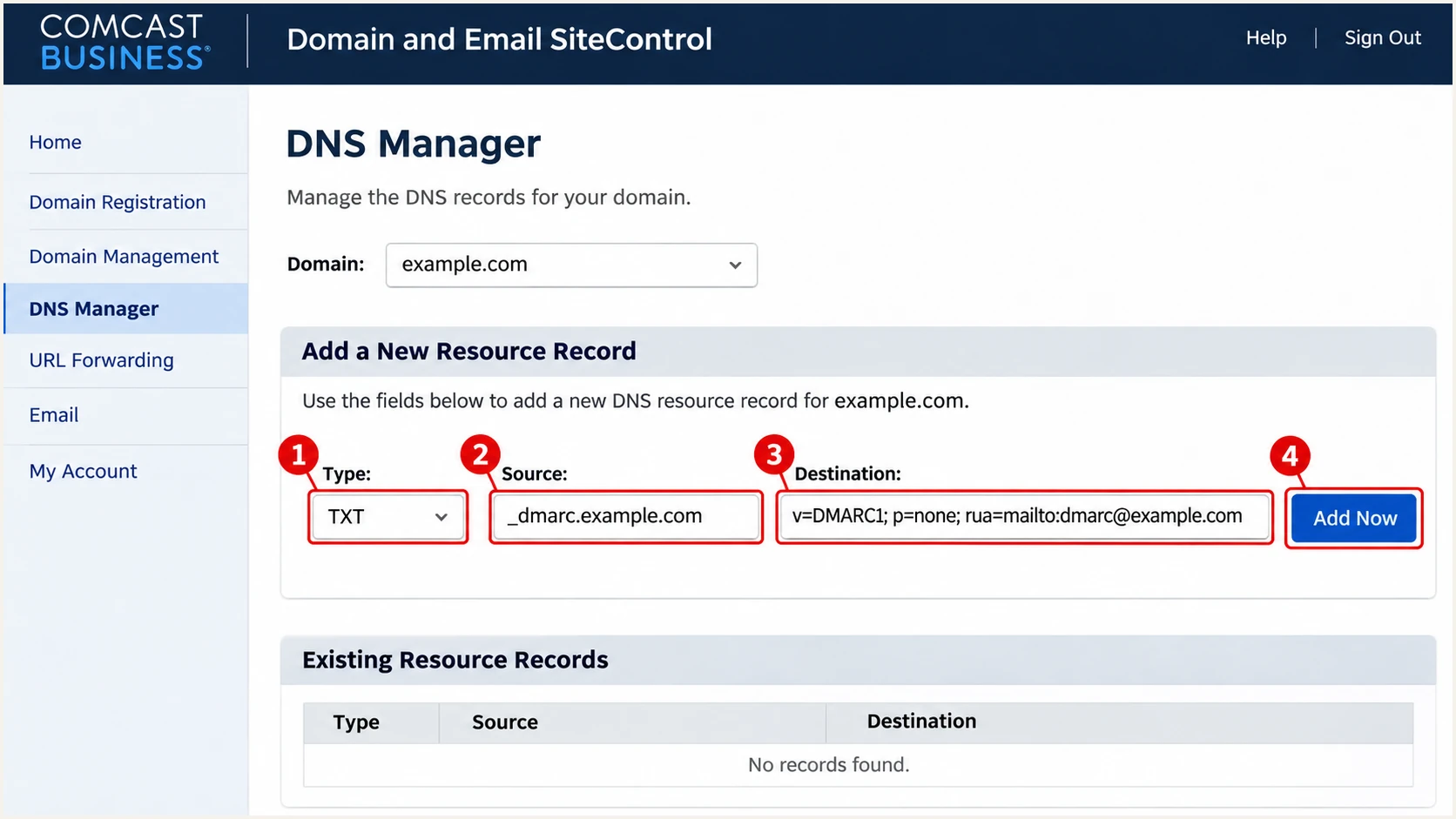
Add a DMARC TXT record for a custom domain in Comcast Business SiteControl.
Verify and troubleshoot
I verify a new message through the same sending path used in production. A message sent through a different relay does not test the Comcast configuration.
- Check submission: For unmigrated personal mailboxes, Xfinity documents smtp.comcast.net on port 587 with TLS and the full email address for authentication. Enable third-party access under Settings, Security when using a mail client.
- Check Business Email: Comcast Web Hosting documents smtp.comcastbiz.net on port 587 with TLS/STARTTLS, or 465 with SSL/TLS. Authenticate with the full mailbox address. Migrated accounts must use their current platform's settings.
- Check message results: Read the receiving system's Authentication-Results, Return-Path, and DKIM-Signature. Compare SPF's MAIL FROM and DKIM's signing domain with the visible From domain.
- Escalate with evidence: For unresolved failures, give support the timestamp, message ID, complete headers, and any SMTP rejection. Keep credentials out of the ticket.
The email tester below gives you a destination address. Send it a message directly through the Comcast mailbox or application you are checking, then open the diagnosis.
Use the result to check message authentication alongside encryption and other delivery checks. After each DNS or signing change, send another message rather than relying on a result generated before the change.
Email tester
Send a real email to this address. Suped shows a results button when the test is ready.
?/43tests passed
For an SPF mismatch, inspect the envelope sender before editing DNS again. For DKIM failure, verify the actual selector and key, then check whether an intermediary modified the signed content.
DMARC passes when either authentication method passes with the required domain match. In this table, Pass means both successful authentication and the required match. A technical pass using an unrelated provider domain counts as Fail here.
|
|
|
|---|---|---|
Pass | Pass | Pass |
Pass | Fail | Pass |
Fail | Pass | Pass |
Fail | Fail | Fail |
DMARC outcomes for messages with a valid applicable policy.
Get alerted when it breaks
For a domain you own, our platform Suped provides ongoing DMARC monitoring with source verification and issue notifications. It connects authentication failures to steps you can take after Comcast or DNS changes.
- Keep reports flowing: Use your assigned Suped reporting address in rua, preserving the current policy. Verify incoming reports before relying on notifications.
- Verify sources: Review Sources and mark Comcast traffic as authorized only after matching it to your actual sending activity. Investigate unfamiliar sources separately.
- Enable notifications: In Settings, Notifications, enable Issues detected and Sending sources need verification. Enable DMARC summary emails for periodic review.
- Investigate the cause: Open the affected source and record details. Review SPF, DKIM, and DMARC diagnostics, follow the issue's fix steps, then verify a fresh test message.
Suped processes receiver reports rather than observing every SMTP transaction. Aggregate reports typically arrive daily, so report-based alerts follow the available data. Retain SMTP logs for immediate submission failures.
I also check DNS history when a previously working sender starts failing. Suped's record comparisons help connect an SPF edit or selector change with the reported failures.
Provider-managed domains stay provider-managed
A Comcast.net mailbox does not give you control of Comcast's DNS or aggregate reporting. Send provider-managed signing failures to the mailbox operator; Suped cannot change that operator's keys or policy.
Secure your domain with p=reject
Move your own domain to p=reject after legitimate sending paths pass DMARC reliably and DKIM works for your domain. An SPF-only direct-delivery pass is insufficient preparation for enforcement.
- Inventory senders: Use Suped's source data across a complete business sending cycle, including infrequent billing and automated messages. Verify every authorized source.
- Fix legitimate failures: Resolve domain mismatches and broken signing. Test forwarding where it matters, since a valid DKIM signature can survive forwarding that breaks SPF.
- Stage enforcement: After monitoring, apply p=quarantine and review legitimate traffic before choosing p=reject. Keep existing stronger policies while repairing individual sources.
- Apply reject: Change the policy in the existing DMARC record and retain reporting. Review subdomain policy inheritance and explicit subdomain records before the change.
- Watch the result: Use Suped's issue notifications and source details to catch regressions after enforcement. Retest after Comcast changes the sending infrastructure or signing keys.
Use the example below only after replacing its report address. For a domain already using a reporting service, retain that service's assigned destination instead.
DMARC TXT value after enforcement readiness is confirmedtext
v=DMARC1; p=reject; rua=mailto:dmarc@example.com
I assess legitimate traffic separately from unauthorized attempts. Continuing failures from unknown senders are not a reason to leave the domain at p=none.
Our Hosted DMARC lets teams manage policy changes in Suped after the required DNS setup. Use the source results and issue diagnostics to decide when each policy change is ready.
Receivers apply their own handling rules. The p=reject policy requests rejection of failing mail; it does not guarantee inbox placement for mail that passes.
Frequency asked questions
No. The mailbox operator controls comcast.net DNS and signing. You can configure authentication records only for a domain whose DNS you control, such as a custom domain provisioned on Comcast Business Email.
Comcast Web Hosting documents include:mfg.siteprotect.com as the authorization for its Business Email service. Merge it into an existing SPF TXT record if other senders are authorized. Do not copy it just because Comcast provides your internet connection.
There is no customer-independent selector to copy for a custom domain. Obtain the selector and public DNS value from support for your actual mailbox platform, then verify signing on a newly sent message.
DMARC can pass despite SPF alignment failure when DKIM passes with a signing domain that matches the visible From domain under the policy. A DKIM pass using an unrelated provider domain does not meet that condition.
The sys.comcast.net suffix belongs to Comcast infrastructure. Comcast's postmaster information lists outbound hosts with names beginning resqmta-. A suffix identifies infrastructure, not authorization for your domain. Confirm the connecting IP, message authentication, and your sending activity before approving the source.
No. SPF authorizes systems sending mail for your envelope sender domain. Receiving mail at Comcast does not authorize Comcast as your outbound sender.




