
How to set up DMARC/DKIM/SPF for Combell

Published 21 Nov 2026
Updated 21 Nov 2026
13 min read
Summarize with
To set up DMARC/DKIM/SPF for Combell, publish the SPF record for your mail plan, activate DKIM on a supported sending service, and publish a DMARC TXT record at your domain's _dmarc hostname. Combell's standard mailboxes do not support DKIM, so those messages need passing SPF with Return-Path alignment to pass DMARC.
I check the actual sending route first. A website using authenticated Combell SMTP needs different attention than a dedicated mailserver, and publishing DNS records alone does not prove that the application's messages pass authentication.
Add your domain
Use the domain already attached to your Combell package. If you are adding an extra domain to an existing website, complete the hosting association and any ownership check first; an existing domain does not need to be added again.
- Add an extra domain: Open "My products" > "Web hosting" > "Manage hosting" > "Websites & SSL". Open the "Manage website" dropdown, choose "+ Add a domain name", enter the domain, and confirm.
- Verify ownership: If Combell requests a TXT record, publish the exact supplied name and value at your authoritative DNS provider. Retry adding the domain after 15-30 minutes. Use Combell's token, not an invented verification value.
- Create the sender: Open "My products" > "E-mail hosting" > "Manage email" for the domain. Select "Mailboxes" > "Add", enter the address and password, and confirm. If no mailbox capacity is available, provision a mailbox first.
- Authenticate website mail: For Basic mailbox SMTP, configure smtp-auth.mailprotect.be with the full mailbox address and its password. Use port 465 with implicit TLS or port 587 with STARTTLS. Avoid PHP mail() and outbound port 25 for this route.
Set the website's From address to an address on your domain. For a contact form, put the visitor's address in Reply-To so the website does not attempt to authenticate mail as the visitor's domain.
Adding a website alias does not create an email mailbox. I verify the mailbox separately and send a message through the application's configured SMTP connection.
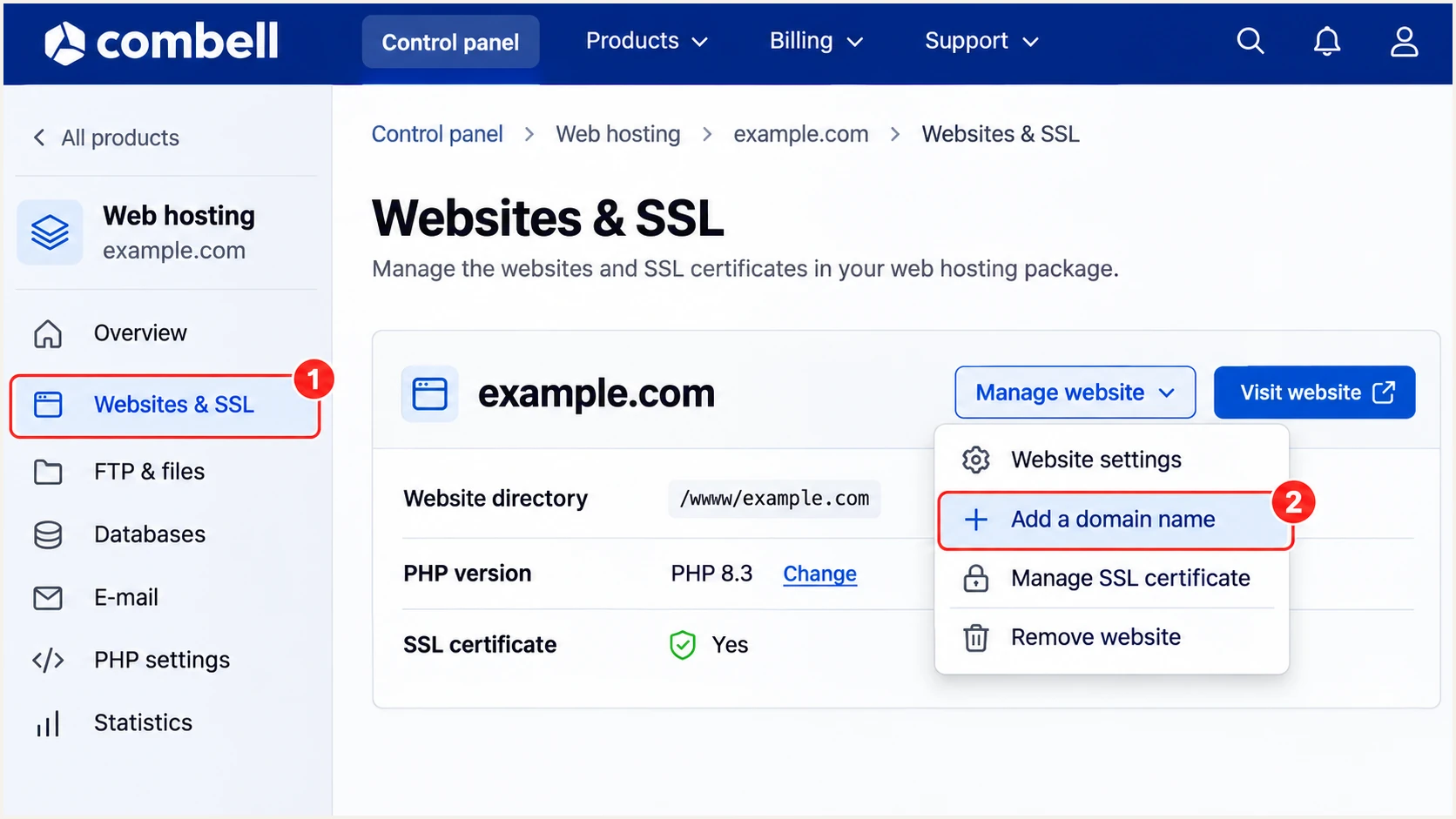
Illustrated Combell menu path for adding an extra website domain.
Edit authentication records wherever the domain's authoritative nameservers are hosted. Combell's DNS editor changes Combell-hosted DNS; it does not update a zone hosted elsewhere.
Keep existing MX records when configuring outbound authentication. If another provider receives your mail, Combell instructs you to create the SMTP account's mailbox address there too.
Set up SPF
Combell documents include:_spf.relay.mailprotect.be for Basic mailboxes and authenticated website SMTP, and include:_spf.powermail.be for its Exchange mailboxes. Choose the record for the service actually sending your messages.
- Open DNS: Go to "My products" > "DNS & forwarding management" > "Manage DNS" beside the domain, then select "TXT records". Use your external DNS provider instead if it hosts the authoritative zone.
- Edit one SPF record: Find the TXT value beginning with "v=spf1". Merge the required Combell include into it before the final all mechanism. If none exists, use the appropriate standalone example below. Leave the hostname blank for the domain root in Combell.
- Keep other senders: Preserve mechanisms for every authorized service. Publish only one SPF record per hostname, and keep evaluation within SPF's limit of 10 DNS-querying terms, including nested includes.
- Save and check: Save the TXT change. Combell documents a usual DNS update window of 1-4 hours; check public DNS and the actual message after caches refresh.
These are standalone values for domains using only the indicated Combell service. Do not publish both as separate SPF records, and do not replace a shared record without preserving its other authorized senders.
Choose the SPF value for your Combell mail plantext
Basic mailbox or authenticated website SMTP:
v=spf1 include:_spf.relay.mailprotect.be -all

Exchange mailbox:
v=spf1 include:_spf.powermail.be -all
The -all ending produces SPF fail for unauthorized IP addresses. It does not itself configure DMARC rejection, and it should follow an accurate inventory of your senders.
A dedicated Combell mailserver needs the SPF authorization supplied for that server's sending IP addresses. Do not assume a shared-mailbox include authorizes every dedicated server.
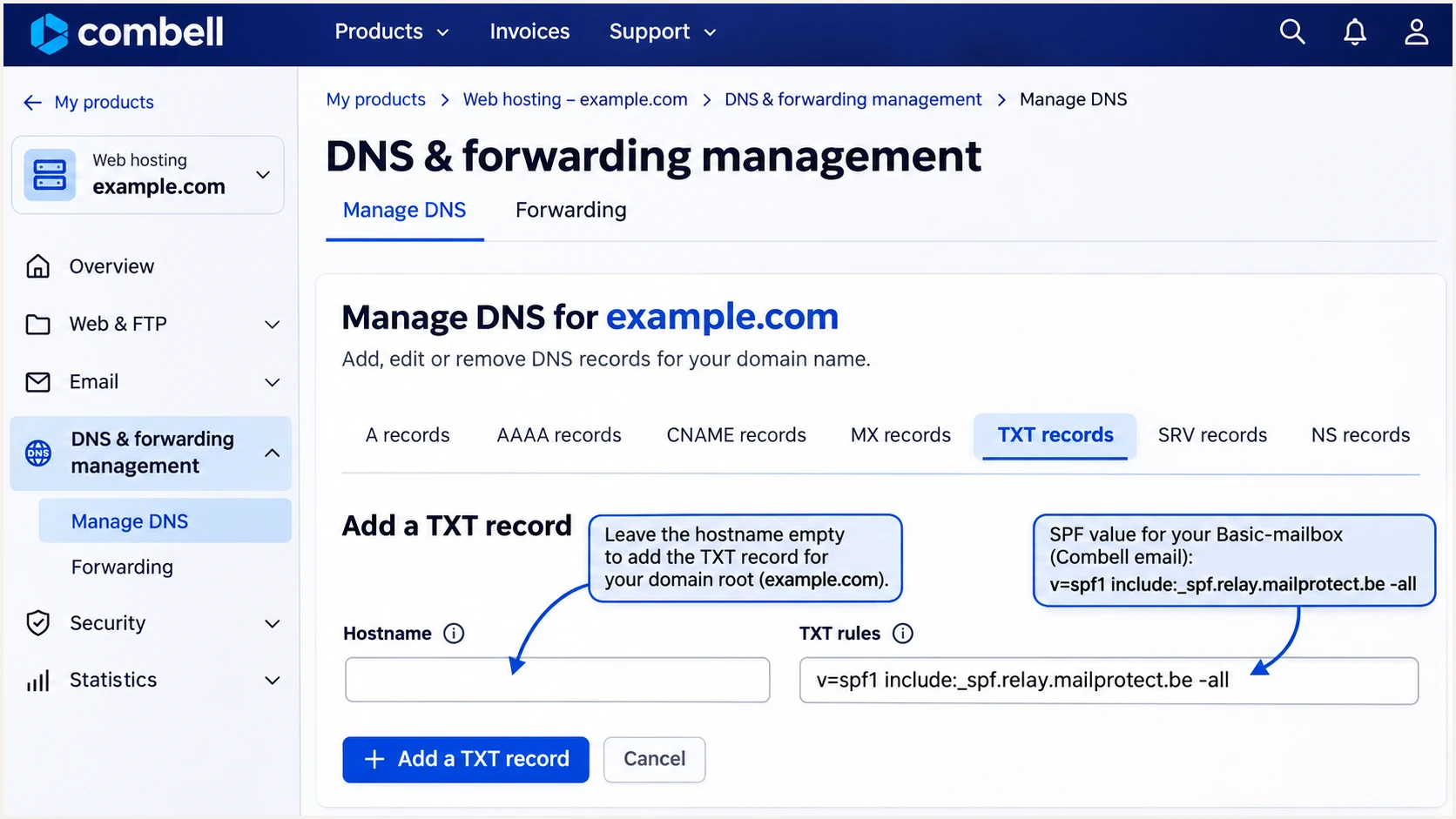
Illustrated Combell TXT form for a Basic mailbox SPF record.
Use the SPF check below to inspect the record that public DNS returns. Check the entire evaluated record, rather than counting only the includes visible in your editor.
If a lookup limit or duplicate-record error appears, correct it before testing delivery. Adding another SPF TXT record makes a duplicate-record problem worse.
SPF checker
Find SPF syntax issues, lookup limits, and weak records.
?/16tests passed
Combell supports Return-Path alignment. Set the application's envelope sender to your domain where configurable, then inspect the received Return-Path and smtp.mailfrom result. Changing a Return-Path header manually does not change the SMTP envelope.
An SPF pass for a provider-owned domain does not count toward your domain's DMARC pass. If that happens, fix the envelope sender or use passing DKIM with your domain on a supported service.
Set up DKIM
Combell states in "Better e-mail delivery with DMARC" that DKIM is unavailable on standard mailboxes. Its support team can install DKIM on a Combell Mailserver. I confirm the exact service before requesting any selector records.
- Confirm plan support: For a Basic mailbox, continue with SPF-based DMARC. For a Combell Mailserver, request DKIM activation from support. For Combell Exchange, ask support whether your specific service supports custom-domain signing.
- Request actual records: Ask for the signing domain, selector, DNS record type, hostname, and public value. There is no universal Combell selector or DKIM key to copy into every account.
- Publish the supplied key: Add the TXT or CNAME record exactly as instructed at the authoritative DNS host. If the editor appends your domain, enter only the relative selector hostname. Have support complete server-side signing.
- Verify a fresh message: Check for a DKIM-Signature header and a receiver result of dkim=pass. Confirm its d= domain matches your From domain under your DMARC alignment settings.
A public DKIM record alone does not sign email. The sending server must hold the matching private key and apply the signature to outgoing messages.
Keep the private key on the sending system. Publish only the public DNS value supplied for that system, and use the selector in a real message when checking the record.
Standard Combell mailbox
DKIM is unavailable. Direct delivery can pass DMARC through matching SPF, but forwarding commonly breaks SPF and leaves no DKIM fallback.
Combell Mailserver
Support can configure DKIM signing. Verify the supplied selector and a signed message before relying on it for DMARC.
An SPF alignment error does not cause DMARC failure when DKIM passes with a matching signing domain. On an unsigned Basic-mailbox message, however, matching SPF is essential.
Set up DMARC
For a domain without an existing enforcement policy, start with p=none and collect reports. If you already use p=quarantine or p=reject, keep that policy while configuring Combell.
- Check the existing record: Look for a DMARC TXT record at _dmarc on your sending domain. Edit that record instead of creating a second DMARC record at the same hostname.
- Generate the value: Use the DMARC record generator and select a monitoring policy for a new deployment. Keep existing enforcement and reporting destinations when updating an established record.
- Publish the TXT record: In Combell, open "Manage DNS" > "TXT records" > "+Add". Enter _dmarc as the hostname and the value below under "TXT rules", then save. Confirm the resulting name is _dmarc.example.com, not a doubled domain.
- Set a working recipient: Replace dmarc@example.com with a report mailbox you control or your assigned report-processing address. A reporting address on another domain needs the receiver's external-report authorization in DNS.
The example below is the exact monitoring record format. Replace the example recipient before publishing it on your own domain.
DMARC TXT value at _dmarc.example.comtext
v=DMARC1; p=none; rua=mailto:dmarc@example.com
A monitoring policy requests reports without asking receivers to quarantine or reject messages because of DMARC failure. It does not turn an authentication failure into a pass.
Leave aspf and adkim unset unless you need strict matching. Their default relaxed mode permits matching organizational domains, including appropriate subdomains.
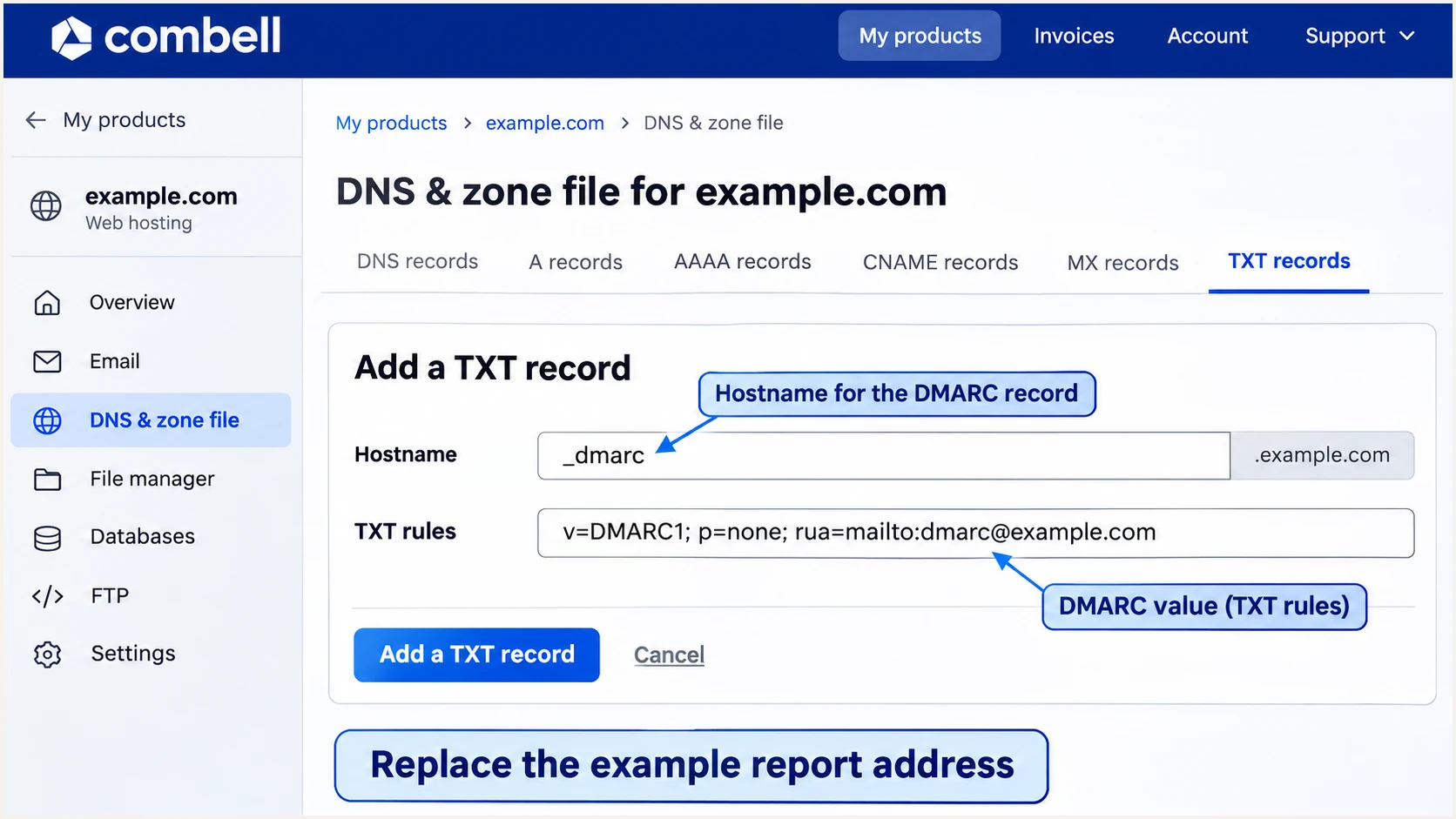
Illustrated Combell TXT form for publishing a monitoring DMARC record.
Check the public record after saving. A screenshot of the DNS editor confirms what was entered, while a public lookup confirms what receivers can retrieve.
Run the DMARC check below against the domain in your visible From address. A website sending as a subdomain needs its effective policy checked too.
DMARC checker
Look up a domain's DMARC record and catch policy issues.
?/7tests passed
The checker validates DNS configuration. A real-message test is still necessary because DMARC evaluates the domains actually used for SPF and DKIM.
Aggregate reports commonly arrive daily. Allow at least a reporting cycle after real traffic has been sent, and remember that not every receiving system sends reports.
Verify and troubleshoot
I test the same application and SMTP route that sends production messages. A successful mailbox test does not validate a contact form that still uses a different relay.
- Trigger real traffic: Send a contact-form submission, an order notification, or the actual message type you are configuring. Use your domain in From and a valid envelope sender.
- Inspect receiver results: Read the trusted recipient server's Authentication-Results header. Check smtp.mailfrom for SPF, header.d or the signature's d= value for DKIM, and header.from for DMARC.
- Confirm the domain match: DMARC needs at least one passing authentication method with the required domain match. SPF pass or DKIM pass by itself does not establish that match.
- Retest after changes: Send a new message after DNS caches refresh. If mail bounces, keep the SMTP response and message headers so Combell support can identify the failing route.
Use the email tester below for the quickest message-level diagnosis. Send a message from your Combell mailbox or website to the address the widget provides.
Read its authentication results and domain-match findings before changing more DNS records. This tests the delivered message rather than only the published configuration.
Email tester
Send a real email to this address. Suped shows a results button when the test is ready.
?/43tests passed
For an unsigned standard mailbox, a valid result can be spf=pass, dkim=none, and dmarc=pass. The SPF-authenticated envelope domain must satisfy the match with the visible From domain.
Use these checks to distinguish a missing signature expected on a Basic mailbox from a broken signature on a DKIM-enabled server.
|
|
|
|---|---|---|
SPF permerror | Duplicates; lookup count | Repair SPF |
SPF mismatch | Envelope domain | Correct sender |
DKIM none | Mailbox plan | Verify SPF |
DKIM fail | Selector; signing | Contact support |
DMARC fail | Domain matching | Inspect headers |
Troubleshooting checks for Combell messages.
For a DKIM-enabled server, check that the selector resolves publicly and that a new message has a matching signature. Do not troubleshoot an old message signed before the change as though it were a fresh test.
For a website, recheck its SMTP transport first. Combell documents that PHP mail() uses relay.webhosting.be, which is a different route than authenticated submission through smtp-auth.mailprotect.be.
Get alerted when it breaks
Suped is our DMARC and email authentication platform. I keep Combell authentication under ongoing review there so a DNS change or a new website sender produces an issue to investigate instead of remaining hidden until delivery fails.
- Review known senders: Compare Combell source entries with actual application owners and message headers. Mark a source as verified only after confirming it is authorized; a familiar provider name alone is insufficient.
- Enable notifications: Enable "Issues detected" and "Sending sources need verification" notifications, and configure DMARC summary emails. Route them to the person responsible for the domain and its sending applications.
- Investigate failures: Use Suped's source and detail views to inspect SPF, DKIM, and DMARC results. Compare DNS history when failures start after a record edit, then follow the detected issue's steps to fix.
- Confirm the repair: Repeat the real-message test and check later reports for the affected source. Verifying a source in the dashboard does not change its DNS authorization or authentication results.
Suped's DMARC monitoring groups authentication results by sending source and retains the detail needed to investigate failures. This is especially useful when several applications send through Combell.
DMARC-based alerts depend on reports reaching the platform. I use message testing for immediate checks and aggregate reporting to detect changes across ongoing traffic.
Reporting is not an SMTP event feed
An alert based on aggregate data follows the receiver's reporting schedule. Keep application SMTP errors available for immediate delivery troubleshooting.
When an unfamiliar source appears, check its owner before adding an SPF include. A report containing your From domain is evidence of domain use, not permission to send.
Secure your domain with p=reject
Move to p=reject when every authorized sending route has demonstrated a DMARC pass over a complete business sending cycle. I judge readiness by legitimate sources, rather than an overall pass rate that also contains unauthorized traffic.
- Complete the inventory: Check infrequent applications as well as everyday mail. Include monthly billing runs and password resets before deciding a quiet report period proves the domain is ready.
- Resolve fragile routes: Standard Combell mailboxes rely on SPF, so assess forwarding before enforcement. If an important workflow needs DKIM resilience, arrange a supported signing service such as a Combell Mailserver and test it.
- Stage the policy: Use Suped to identify remaining failures and follow their remediation steps. After legitimate sources pass, change p=none to p=quarantine, inspect subsequent traffic, and then change to p=reject.
- Check policy scope: Review sending subdomains and any separate DMARC records before enforcing the parent domain. Keep the working reporting address when changing the policy.
- Validate enforcement: Send fresh messages through every approved route after each change. Keep monitoring in Suped so new sources and authentication failures receive attention after enforcement.
Suped's hosted DMARC manages policy changes in the dashboard after its initial DNS configuration. The monitoring and issue history let the person changing the policy review the evidence for each stage.
For a directly managed TXT record, edit the existing _dmarc value at the authoritative DNS host. The final example below retains reporting; replace the recipient with your working destination.
Final DMARC TXT value after verificationtext
v=DMARC1; p=reject; rua=mailto:dmarc@example.com
p=reject requests rejection of messages that fail DMARC; receivers retain control of handling. Keep testing delivery and reading reports after changing the policy.
Keep a dated copy of each policy change and the message headers used to verify it. Recheck the affected sending route whenever its SMTP configuration changes.
Frequency asked questions
Those suffixes are consistent with Combell's mail infrastructure. Combell documents smtp-auth.mailprotect.be for authenticated submission and relay.webhosting.be for website PHP mail(). I confirm the sending IP and message headers before approving a source because shared infrastructure also carries other customers' mail.
Combell says DKIM is unavailable on standard mailboxes. They can pass DMARC through SPF when the envelope domain matches the From domain under the domain's policy. Combell support can configure DKIM on a Combell Mailserver.
Combell documents include:_spf.powermail.be for its Exchange mailboxes. Basic mailboxes and authenticated Basic SMTP use include:_spf.relay.mailprotect.be. Merge the required include into one SPF record rather than publishing another SPF record.
SPF can pass for an envelope domain that does not match your visible From domain. Inspect Return-Path and smtp.mailfrom, then correct the application's envelope sender or use passing DKIM with a matching signing domain.
Combell documents 1-4 hours for TXT and SPF changes. Existing cache lifetimes affect when a receiver sees the update. Retest with a fresh message after public DNS returns the new value; DMARC aggregate reports follow a separate reporting schedule.
Keep an existing p=reject or p=quarantine policy. Configure and test Combell's SPF and supported DKIM before using the new route for production mail. Use p=none as the starting policy for a new monitoring deployment.




