
How to set up DMARC/DKIM/SPF for Cloudflare Email Routing

To configure Cloudflare Email Routing, enable routing for your domain, publish SPF with include:_spf.mx.cloudflare.net, keep Cloudflare's generated routing DKIM record, and add a DMARC TXT record at _dmarc. I then test forwarding separately from mail sent with the domain in the visible From address.
Email Routing forwards incoming messages to verified destinations. It does not give an ordinary mailbox the ability to send as your custom address. Cloudflare Email Sending is a separate service; another outbound provider also needs its own authentication configuration.
Add your domain
I start with an active domain using Cloudflare DNS and a destination inbox that already receives mail. Confirm both before changing inbound routing.
- Check DNS. Add the domain to your Cloudflare account if needed, complete the nameserver setup, and wait for the zone to become active.
- Verify the destination. Open Compute > Email Service > Email Routing > Destination Addresses. Enter the inbox address, submit it, then open Cloudflare's verification email and select Verify email address.
- Onboard the domain. Open Email Routing, select Onboard Domain, choose your domain, review the proposed routing records, and select Done.
- Create the address. Select the domain > Routing Rules > Create routing rule. Set Email pattern to support, Action to Send to an email, and Destination to the verified inbox. Select Save.
- Confirm the records. Open the domain's Email Routing > Settings. Check the MX, SPF and DKIM entries against DNS > Records. Keep the MX targets and priorities assigned to your domain.
If another provider currently receives your mail, plan the MX change first. Email Routing requires its own MX records at the routed domain; adding unrelated MX servers does not split mailboxes between services.
Verify the destination before the switch and create the routing rules immediately afterward. Keep the old inbox available while cached MX records expire.
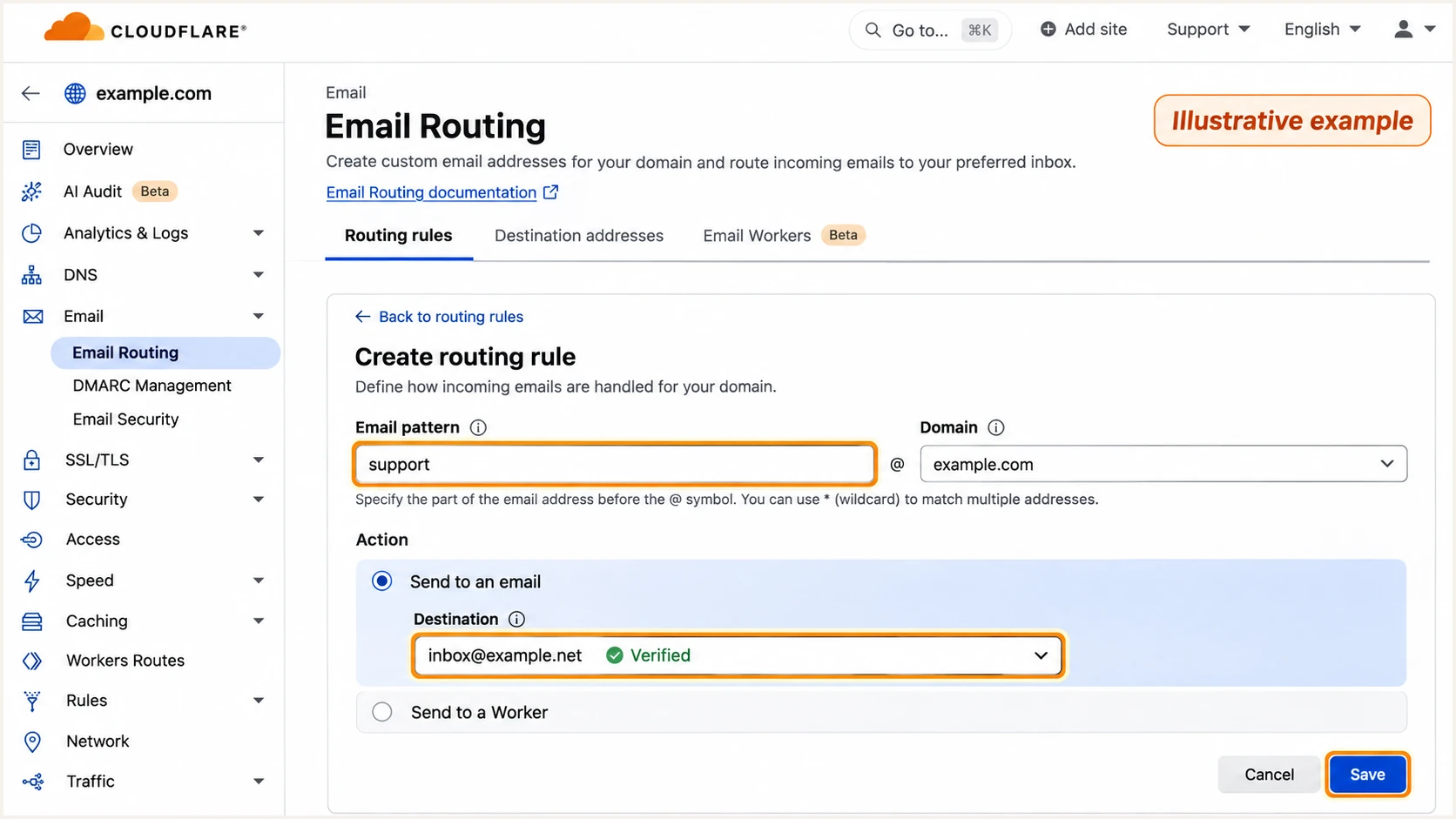
Illustrative Cloudflare routing rule forwarding support@example.com to a verified destination.
A verified destination proves access to that inbox. It does not prove that messages sent as example.com pass DMARC.
I leave existing outbound DKIM selectors in place. Changing where a domain receives mail does not remove the authentication requirements of services that still send its mail.
Set up SPF
Cloudflare Email Routing uses the SPF include below at the routed domain. SPF authenticates the SMTP envelope sender, which is distinct from the visible From address.
- Inspect the existing record. In DNS > Records, find the TXT record starting with v=spf1 at @. There must be only one SPF record at that name.
- Add Cloudflare. If no SPF record exists, use the value below. Otherwise insert include:_spf.mx.cloudflare.net before the existing final all mechanism, preserving the other authorized senders.
- Unlock only if needed. For a locked routing SPF record, open Email Routing > your domain > Settings and select Unlock beside that record before editing it in DNS > Records.
- Validate lookups. Check the finished record with the SPF checker. Stay within the 10 DNS-lookup limit, including nested includes. Do not replace Cloudflare's include with a copied list of IP addresses.
SPF TXT value at @ when Cloudflare is the only authorized servicetext
v=spf1 include:_spf.mx.cloudflare.net ~all
Keep an existing -all ending when merging into a deliberately maintained SPF policy. Adding a second v=spf1 TXT record produces an SPF error instead of combining permissions.
Enter the routed domain in the checker after saving. Validate the published value rather than relying on the DNS editor's saved state.
SPF checker
Find SPF syntax issues, lookup limits, and weak records.
?/16tests passed
A valid SPF record is one part of the test. I also compare the received message's Return-Path domain with its visible From domain.
Cloudflare manages Sender Rewriting Scheme (SRS) for forwarded mail; there is no separate customer Return-Path setup step for forwarding. The rewritten envelope sender can pass SPF without providing SPF alignment for the original sender's visible From domain.
SPF pass does not guarantee DMARC pass
Do not treat a forwarded message's SPF alignment failure as a reason to authorize Cloudflare in the original sender's DNS. DMARC still passes when the original sender's valid DKIM signature has the required domain match. Cloudflare's ARC chain records earlier authentication results, but acceptance depends on the destination's handling of ARC.
Set up DKIM
Cloudflare generates the routing DKIM key. The documented routing selector is cf2024-1; use the selector and public key shown for your domain if Cloudflare supplies a different one.
- Find the routing key. Open Email Routing > your domain > Settings and locate the DKIM TXT record. The current name is cf2024-1._domainkey.
- Restore the exact value. If the record is missing, restore the complete Cloudflare-provided public key at that name in DNS > Records. Use TTL Auto. Do not publish an example key or generate an unrelated private key.
- Check DNS. Run the lookup below and confirm a nonempty p= value. Long TXT answers split into quoted chunks are normal when the chunks belong to the same record.
- Check an actual message. In a forwarded message's source, inspect DKIM-Signature and the final receiver's Authentication-Results. Match the signing domain and selector to the corresponding DNS key.
Look up the current routing DKIM selectorbash
dig +short TXT cf2024-1._domainkey.example.com
Cloudflare's routing signature authenticates the forwarding service's role. A signature for your routed domain does not satisfy DMARC for a different domain in the original sender's From address.
I check that distinction before changing DKIM. A correct key in DNS is necessary, but the received signature must also validate.
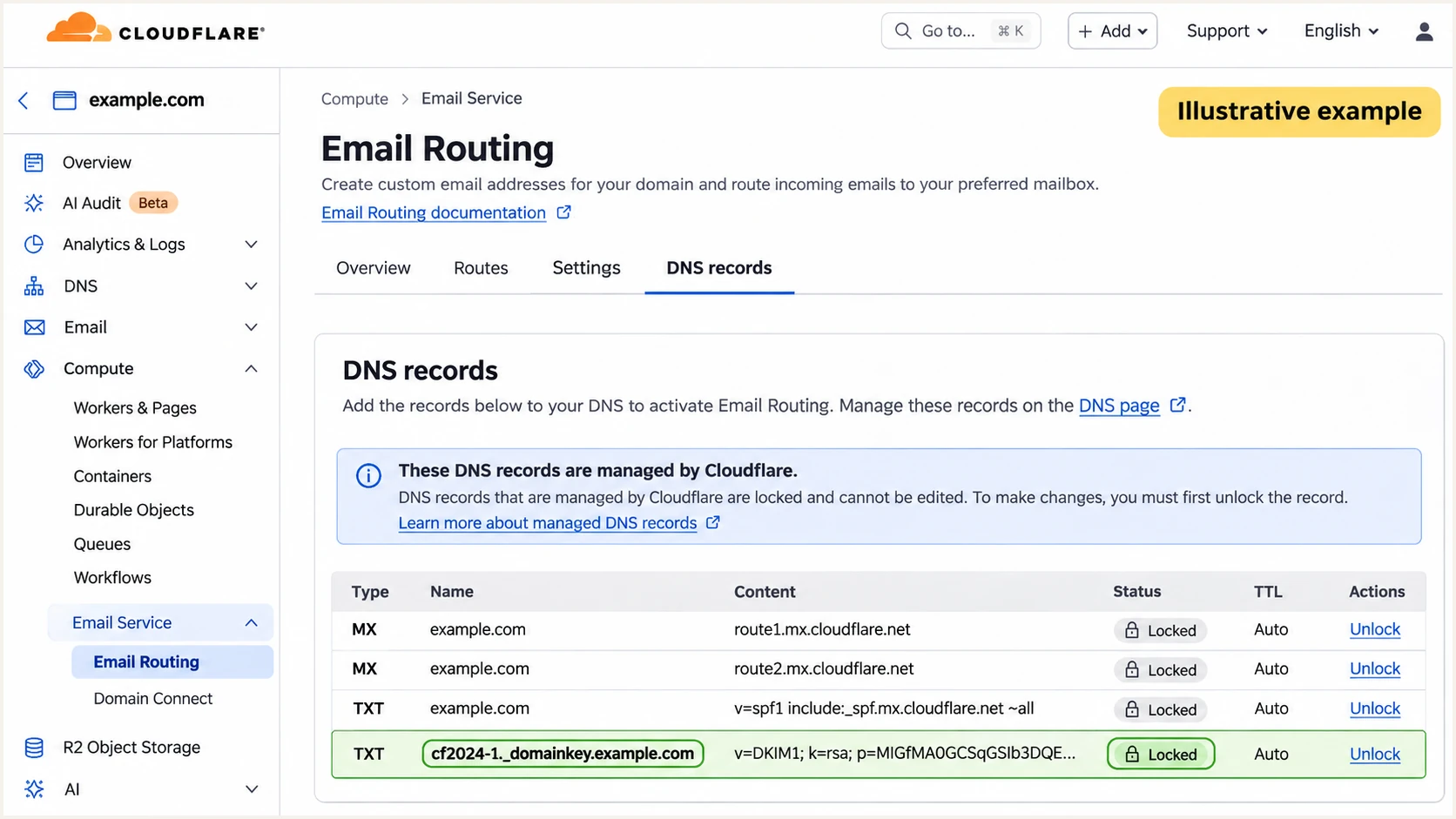
Illustrative Cloudflare Email Routing settings showing SPF and routing DKIM records.
For mail authored as your own domain, configure DKIM in the service that actually sends it. Publish that service's supplied TXT or CNAME records in Cloudflare DNS, then enable signing there.
Keep its selectors separate from Cloudflare's routing selector. Creating a DNS key alone does not make an outbound service sign messages.
Forwarded incoming mail
The visible From domain belongs to the original sender. Its surviving DKIM signature is the dependable DMARC path when SRS changes the envelope sender.
Cloudflare adds forwarding authentication and ARC information. Those additions do not transfer ownership of the original sender's domain.
Mail sent as your domain
The outbound service must sign with a DKIM domain that meets DMARC alignment for your visible From address.
If that service lacks a custom Return-Path, SPF alignment failures are expected. Passing DKIM with the required domain match is sufficient for DMARC.
Set up DMARC
I start a new DMARC deployment with p=none so reports expose legitimate sending sources before enforcement. If your domain already uses p=quarantine or p=reject, keep that policy.
- Check for an existing policy. In DNS > Records, search for _dmarc. Edit the existing DMARC record rather than publishing a second policy at the same name.
- Create the TXT record. For a new setup, select Add record, choose TXT, set Name to _dmarc and TTL to Auto, then enter the monitoring value below.
- Set a real report address. Replace dmarc@example.com with a working mailbox or reporting destination you control. A destination on another domain needs external report authorization published by its operator.
- Validate publication. Save the record, then query the domain with the DMARC checker. Confirm one valid policy and the intended reporting address.
Starting DMARC TXT value at _dmarctext
v=DMARC1; p=none; rua=mailto:dmarc@example.com
The example address must be replaced before publication. If reports will arrive through an Email Routing alias, create that address and verify its destination first.
Use the DMARC record generator to build the policy. Default relaxed alignment permits the appropriate organizational-domain match without requiring identical subdomains.
DMARC checker
Look up a domain's DMARC record and catch policy issues.
?/7tests passed
A successful DNS check confirms publication. It does not prove every sender is authenticated or that aggregate reports have arrived.
This policy governs messages claiming your domain in the visible From address. It does not set the DMARC policy for unrelated people sending messages to your routed addresses.
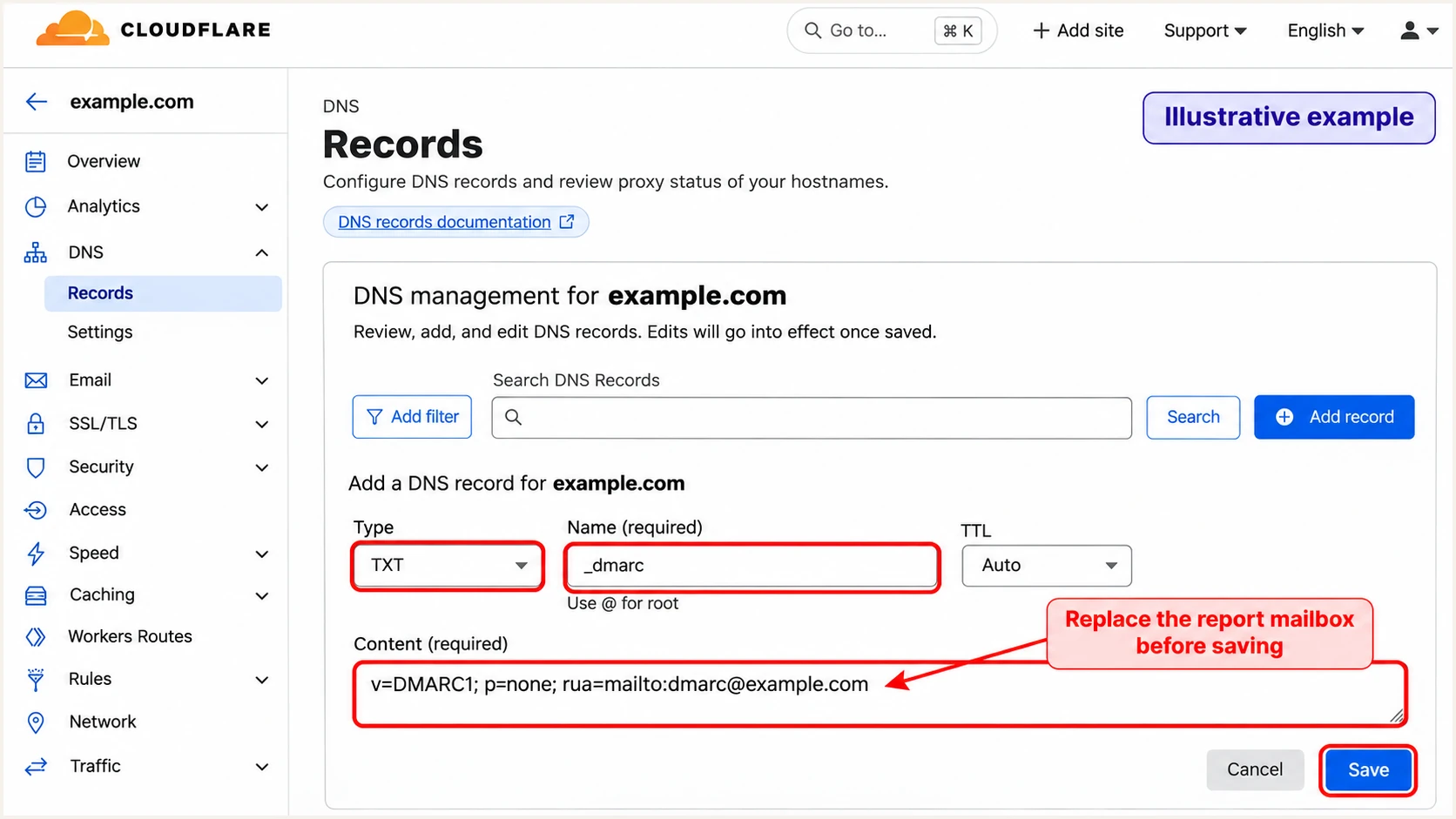
Illustrative Cloudflare DNS editor for a monitoring DMARC TXT record.
Verify and troubleshoot
I test DNS publication, forwarding, and outbound authentication separately. Each test checks a different part of the mail path.
- Query public DNS. Run the lookups below. Confirm Cloudflare's assigned MX records, one SPF record, the routing DKIM key, and one DMARC policy.
- Test forwarding. Send to support@example.com from an account different from the destination inbox. Confirm delivery, then inspect the final mailbox's full message source.
- Read the right results. Use the final receiver's Authentication-Results. Compare smtp.mailfrom for SPF, header.d for DKIM, and header.from for DMARC. A forwarding signature alone does not prove the original From domain passed.
- Trace failed delivery. Check Email Routing's activity log, the rule status, destination verification, and any SMTP rejection. An accepted message can still be placed in the destination's spam folder.
Check the published routing and authentication recordsbash
dig +short MX example.com
dig +short TXT example.com
dig +short TXT cf2024-1._domainkey.example.com
dig +short TXT _dmarc.example.com
Cloudflare's authentication requirement requires incoming mail to pass SPF or DKIM before forwarding. Cloudflare also honors the original sender's DMARC policy. If authentication fails, fix the original sending service; changing the receiving domain's SPF does not repair that sender.
For a quick diagnosis of messages sent as your domain, send a fresh message through your actual outbound provider to the address generated by the email tester. Email Routing alone cannot originate this test.
Email tester
Send a real email to this address. Suped shows a results button when the test is ready.
?/43tests passed
Review the tester's authentication diagnosis and correct the identified sender configuration. Send another fresh message after the DNS change is visible.
For the forwarding path, retain the destination mailbox test above. A successful outbound test does not verify that the routing rule delivers incoming messages.
|
|
|
|---|---|---|
SPF error | Duplicate records | Merge SPF values |
DKIM failure | Selector and key | Restore supplied key |
SPF pass, DMARC fail | From domain match | Inspect original DKIM |
No forwarded mail | Rule and destination | Verify and activate |
DNS value missing | Name and caching | Correct and requery |
Get alerted when it breaks
Suped is our platform for monitoring authentication after setup. Its DMARC monitoring connects reported failures to sending sources and provides issue-specific fix steps, so a broken sender does not depend on someone remembering to run a DNS check.
- Enable notifications. In Suped, open Settings > Notifications. Enable Issues detected and Sending sources need verification, and enable DMARC summary emails for regular review.
- Investigate the source. Open the reported issue and inspect its SPF, DKIM and DMARC results. Verify unfamiliar sources against your authorized services before marking them as legitimate.
- Apply and verify. Follow the issue's Steps to fix, make the required change in Cloudflare DNS or the outbound service, and verify the fix with a fresh message.
- Watch DNS changes. Use Suped's DNS history to compare old and new records when failures begin after an edit.
I use message tests for immediate checks and aggregate reports for ongoing coverage. Aggregate reporting commonly has a daily cycle; authentication alerts depend on when the evidence reaches the platform.
Suped does not receive every message that Cloudflare forwards. Keep Cloudflare's routing activity log available for missing incoming mail and destination delivery failures.
Monitor the domain that matters
DMARC reports for your domain describe messages using it in the visible From address. They are not a complete log of unrelated senders whose messages arrive at your Email Routing addresses.
Secure your domain with p=reject
I move to p=reject after every legitimate sender passes DMARC across a representative sending cycle. Suped provides the source inventory and failure detail needed to make that decision without relying on one successful test.
- Audit legitimate senders. Review Suped's sources and individual failures. Include infrequent systems such as monthly invoices before treating the inventory as complete.
- Fix domain matching. Require passing DKIM with the correct signing domain on every outbound service. Add SPF alignment where the actual sending service supports a custom envelope domain.
- Stage enforcement. Move a new deployment to p=quarantine, review legitimate failures, then change to p=reject. Keep existing enforcement when it is already working.
- Publish and monitor. Edit the existing _dmarc TXT record in Cloudflare DNS, or use Suped's Hosted DMARC policy controls if already configured. Preserve the working rua destination and keep issue notifications enabled.
Enforced policy after legitimate senders are verifiedtext
v=DMARC1; p=reject; rua=mailto:dmarc@example.com
A receiving-only domain can use p=reject after confirming that no legitimate service sends with that domain in From. Keep the records Cloudflare needs for routing.
Your p=reject policy protects your domain against unauthorized use in From. Delivery of other domains' forwarded mail still depends on their authentication and the destination's forwarding handling.
Frequency asked questions
Those suffixes identify Cloudflare Email Service infrastructure, including Email Routing. For example, a-h.cloudflare-email.net is a documented outbound hostname. Check the sending IP and Received headers as well; rDNS alone does not prove that a message is authorized or passes DMARC.
Email Routing provides inbound forwarding. Configure a separate outbound service to send as your domain, then publish that service's authentication records. Cloudflare Email Sending is separate from Email Routing.
SRS changes the envelope sender used by SPF while preserving the visible From address. The domains can differ even when SPF passes. DMARC passes if a valid original DKIM signature has the required domain match; trusted ARC handling also helps receivers assess forwarded messages.
The documented routing selector is cf2024-1, published at cf2024-1._domainkey.example.com for the example domain. Use the selector shown in your settings and message signature. The cf-bounce selector belongs to Cloudflare Email Sending and is separate.
Your policy applies to messages claiming your domain in the visible From address. It does not reject unrelated senders merely because they email your domain. Messages claiming your domain must pass DMARC, so audit legitimate senders before enforcement.




