
How to set up DMARC/DKIM/SPF for BullPhish ID

To configure BullPhish ID, add your sending domain, publish its generated authentication CNAMEs, verify the domain, and select it in a Sending Profile. Then publish a DMARC TXT record for the visible From domain and test a campaign email.
I check the received message before changing enforcement. DMARC passes when SPF passes with domain alignment, or a valid DKIM signature has domain alignment. A successful DNS check alone does not establish either result.
Add your domain
Use a domain you control and a BullPhish ID account with permission to manage sending domains. Have access to its authoritative DNS zone.
- Open the form. Go to Settings > Sending Domains > + Add Sending Domain.
- Choose the scope. Enter the sending domain, select the Associated Organization, and click Next. The parent organization shares the domain with its clients.
- Publish the records. Copy every generated CNAME into DNS. Complete the SPF and DKIM checks below before verification.
- Verify ownership. Select "Yes, I've added these records", click Verify, and confirm Verified status.
I choose the exact domain intended for the From address. For a separate training subdomain, keep its DNS changes and sending identity distinct from everyday business email.
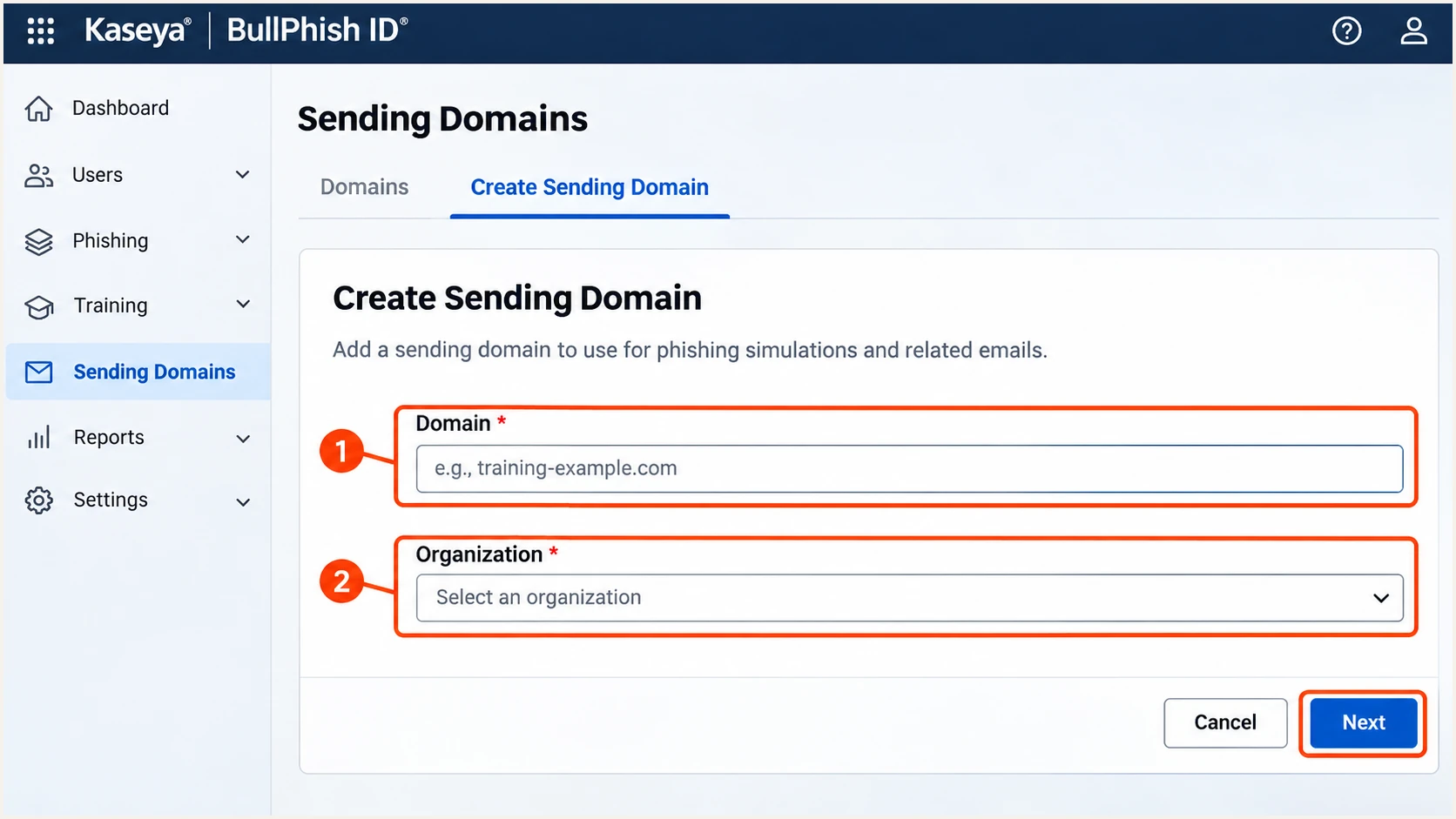
BullPhish ID sending-domain creation and organization selection.
Keep the generated DNS values available for the following checks. Account-specific targets belong to this setup; copying another organization's records does not authorize your domain.
Set up SPF
BullPhish ID supports custom Return-Path alignment. SPF checks the envelope sender domain, which is shown in the Return-Path, rather than the visible From address.
- Configure the bounce host. Publish the generated Return-Path CNAME. The documented hostname example is bpid beneath your sending domain; use the hostname actually issued to your account.
- Preserve existing SPF. Keep your business domain's existing SPF TXT record. Do not add a guessed BullPhish ID include or publish a second SPF record at the same name.
- Avoid conflicting records. A CNAME owner cannot also have an SPF TXT record. Follow the CNAME to the provider-managed DNS instead.
- Check the envelope domain. After a test send, look up the domain shown by smtp.mailfrom. Confirm SPF passes and that domain has the required relationship to the From domain.
Enter the actual Return-Path domain in the SPF checker below. For a message using bpid.example.com, checking only example.com examines a different SPF identity.
SPF checker
Find SPF syntax issues, lookup limits, and weak records.
?/16tests passed
With default relaxed SPF alignment, bpid.example.com and example.com share the required organizational domain. With strict SPF alignment, the domains must match exactly.
If a received message still uses a provider-owned Return-Path, changing your root SPF record cannot fix that alignment failure. Check the custom bounce configuration; passing DKIM with domain alignment still satisfies DMARC.
Set up DKIM
Publish BullPhish ID's generated DKIM CNAME. The sending platform holds the matching private key; generating an unrelated key does not configure its signatures.
- Copy the selector. Use the issued DKIM hostname and destination. Kaseya documents bpid as an example selector, giving bpid._domainkey.example.com for example.com.
- Publish the CNAME. Preserve the underscore in _domainkey. Enter the hostname in the format your DNS host expects, without duplicating the domain suffix.
- Verify the domain. Return to BullPhish ID and run domain verification after all generated records resolve.
- Inspect a signature. On a received message, compare the DKIM s= selector and d= signing domain with your DNS setup. Require a passing signature with domain alignment.
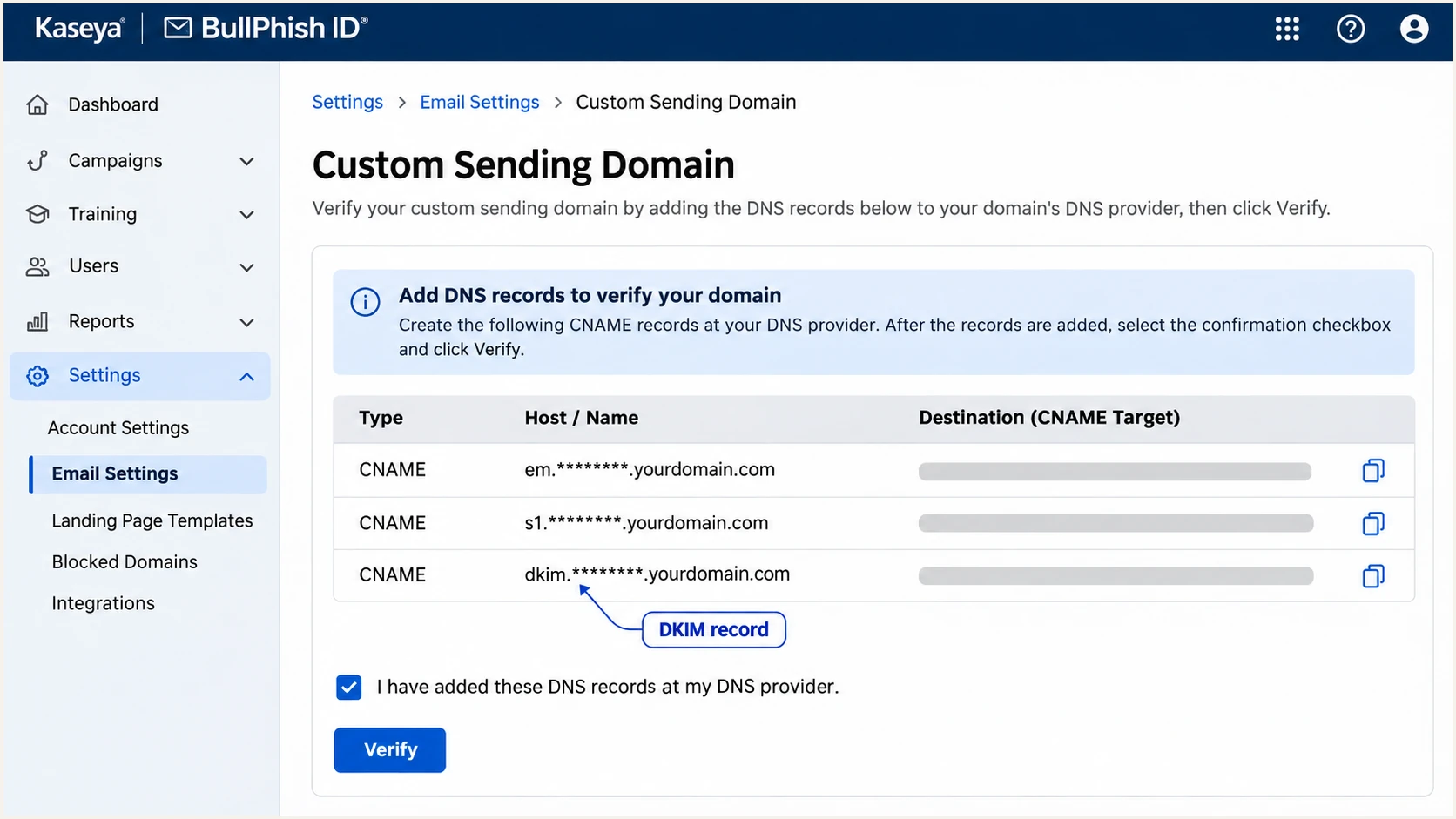
BullPhish ID CNAME records and domain verification action.
The queries below use Kaseya's example hostnames. Replace example.com and, if different, the selector or bounce hostname with the values issued for your sending domain.
Query CNAME to inspect delegation and TXT to inspect the resulting SPF policy or DKIM public key. Compare the destination with the portal, including its full suffix.
Inspect authentication DNSbash
dig +short CNAME bpid.example.com
dig +short TXT bpid.example.com
dig +short CNAME bpid._domainkey.example.com
dig +short TXT bpid._domainkey.example.com
A published DKIM key proves that the DNS record is accessible. Only a received message establishes that BullPhish ID used the matching selector and that the signature survived delivery.
I inspect all signatures when a message has several. A passing signature for an unrelated provider domain does not satisfy DMARC for your From domain.
Set up DMARC
DMARC is a DNS policy on the visible From domain. BullPhish ID's domain verification does not create that policy or replace an existing one.
- Inspect the policy. Query TXT at _dmarc.example.com, replacing example.com with the From domain. For a subdomain, also check whether an inherited policy already applies.
- Keep enforcement. If your effective policy is already p=quarantine or p=reject, keep it. Authenticate BullPhish ID without weakening the policy.
- Start new monitoring. For a domain without an effective enforcement policy, publish the monitoring example below at its _dmarc hostname.
- Preserve reporting. Use one DMARC record at that hostname. Retain existing report destinations when updating it.
Initial DMARC TXT valuetext
v=DMARC1; p=none; rua=mailto:dmarc@example.com
The value above is an example. Replace dmarc@example.com with a working aggregate-report destination. A destination on another domain requires that destination's external reporting authorization.
Use the DMARC record generator to prepare the record. The checker below verifies the published policy and reporting syntax; it does not send an email.
DMARC checker
Look up a domain's DMARC record and catch policy issues.
?/7tests passed
A p=none policy requests reports without requesting DMARC-based quarantine or rejection. Keep it only while you identify authorized sources and fix their authentication.
Verify and troubleshoot
I test the same sender and delivery route that the campaign will use. A message sent by another application does not validate BullPhish ID.
- Create the sender. Open Settings > Sending Profiles > + Create New Profile. Choose the Associated Organization, enter Display Name and Profile Address, select the verified Profile Domain, and click Create.
- Select the profile. Choose that sending profile for the test campaign or its kit. Confirm the received From address uses your intended domain.
- Send a controlled test. Send through BullPhish ID to an authorized test recipient. Use the email tester's generated address where the campaign permits that recipient.
- Read receiver results. Inspect the receiving system's trusted Authentication-Results header. Check SPF and DKIM identities as well as dmarc=pass.
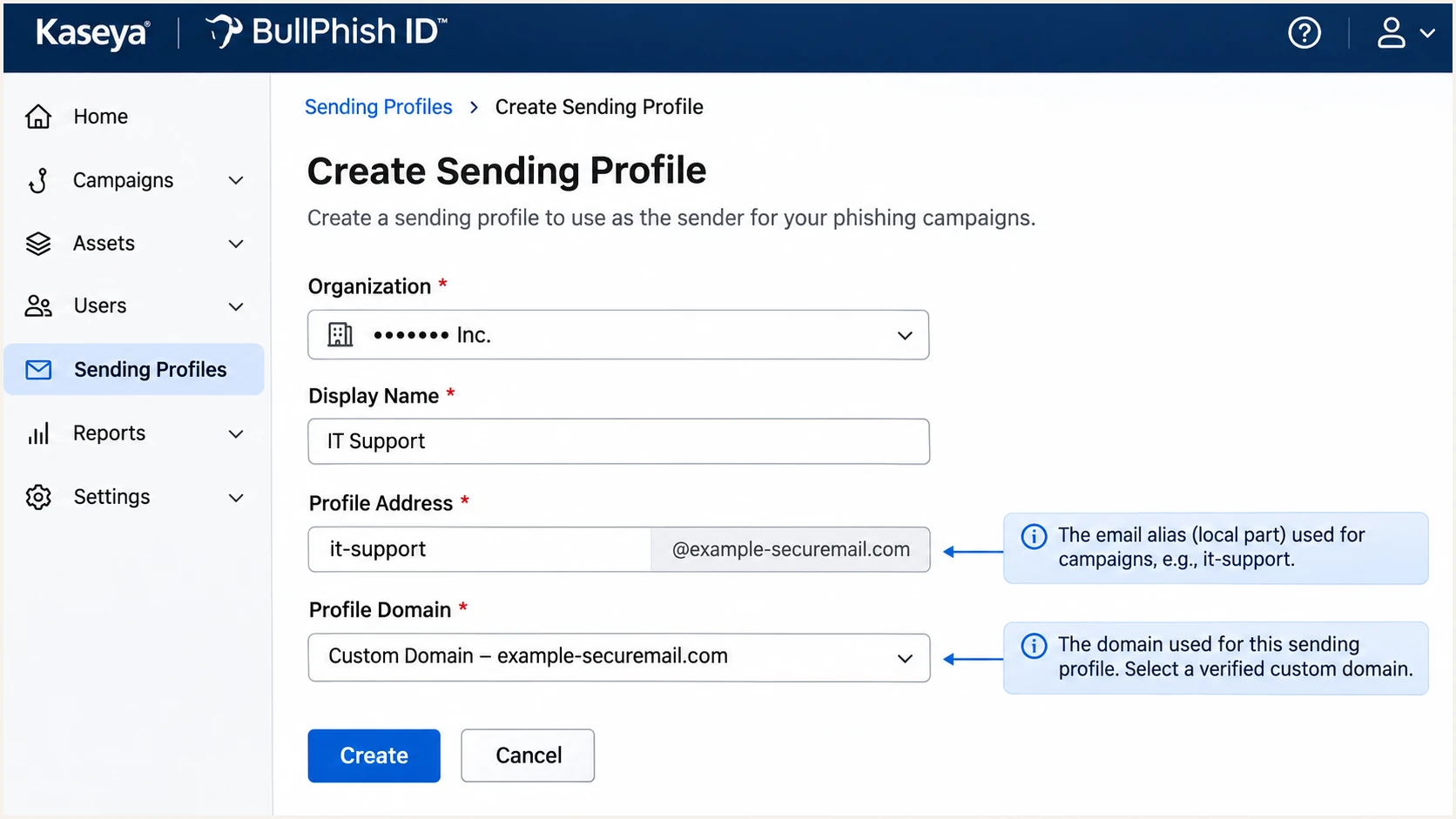
BullPhish ID Sending Profile controls for the From address.
Use an SMTP-delivered test to inspect internet email authentication. Direct mailbox delivery does not exercise the same SPF checks; validate any SMTP fallback path separately.
The email tester below gives a quicker end-to-end diagnosis. Send a BullPhish ID message to its generated address and inspect the authentication results, including domain alignment.
Email tester
Send a real email to this address. Suped shows a results button when the test is ready.
?/43tests passed
Send the original message directly to the test address. Manually forwarding a message changes the delivery path and can change SPF results.
Use the following results to distinguish authentication failures from domain alignment problems. A basic SPF or DKIM pass is insufficient when its domain is unrelated to the From domain.
|
|
|
|---|---|---|
Pass + alignment | Fail | Pass |
Fail | Pass + alignment | Pass |
Pass, unrelated domain | Pass, unrelated domain | Fail |
Fail | Fail | Fail |
DMARC outcomes for a received message.
For DNS failures, check the exact owner name and record type before waiting. Check for duplicated domain suffixes, conflicting TXT records at a CNAME owner, and proxying of authentication CNAMEs.
For message failures, inspect the campaign's actual From identity and delivery path. Forwarding changes the connecting IP, while message modifications can invalidate DKIM.
Delivery does not prove authentication
An authorized simulation exception can deliver a message that fails DMARC. Keep receiver-side simulation handling separate from SPF and DKIM validation. Do not disable domain enforcement to make a test arrive.
If the portal still rejects records that resolve correctly, collect the DNS responses and domain-verification result for Kaseya support. Include a received message's headers when investigating signing failures.
Get alerted when it breaks
Our platform, Suped, provides DMARC monitoring with source-level authentication results and issue-specific fix steps. It keeps BullPhish ID failures visible after the initial test succeeds.
- Route the reports. Keep Suped's assigned aggregate-report destination in the existing DMARC rua value. Preserve any other destinations you need.
- Enable notifications. In Suped notifications, enable Issues detected and Sending sources need verification. Enable DMARC summary emails for ongoing review.
- Verify the source. Match BullPhish ID traffic to the approved sending identity and campaigns before marking the source verified. A familiar reverse DNS name alone is insufficient.
- Investigate changes. Open the issue's steps to fix, inspect its detailed SPF and DKIM results, and compare DNS history. Correct the configuration and send another test.
I keep an owner for the sending profile and another for DNS changes. Notifications need a recipient who can investigate the affected campaign and coordinate a fix.
Source verification records that a sender is authorized. It does not repair DNS, grant the sender permission to bypass authentication, or change a receiver's decision.
Account for reporting delay
DMARC aggregate reports arrive after mail is processed, commonly on a daily schedule. Suped notifications depend on received reports and detected issues. Use a new test email for immediate validation after a change.
Review failures by sending source and receiving organization. A failure isolated to one delivery route needs a different investigation from a missing DNS record affecting every recipient.
Secure your domain with p=reject
I move to rejection after authorized senders pass DMARC across representative sending cycles. Review the entire From domain, including business mail outside BullPhish ID.
- Inventory legitimate mail. Use Suped's source table to identify authorized senders and investigate unknown traffic. Include infrequent senders before changing enforcement.
- Fix authorized failures. Require passing DKIM with domain alignment for BullPhish ID and verify its custom Return-Path. Retest after any signing or delivery-route change.
- Stage enforcement. For a new rollout, move through p=quarantine before p=reject, reviewing legitimate failures at each stage. Keep an already enforced policy in place.
- Update one record. Change the existing policy, retain reporting, and review subdomain policy inheritance. Keep monitoring after rejection is enabled.
Enforced DMARC TXT valuetext
v=DMARC1; p=reject; rua=mailto:dmarc@example.com
Replace the example report address with your actual destination. Rejection requests apply to messages that fail DMARC; receivers retain their own handling decisions.
Do not require both SPF and DKIM to pass before recognizing a DMARC pass. Either mechanism is sufficient when it passes with domain alignment, although configuring both improves resilience.
Ready to enforce
Authorized sources are identified, representative messages pass DMARC, and remaining failures have been investigated.
BullPhish ID uses the intended profile, with a working DKIM signature for your sending domain.
Resolve before advancing
Legitimate campaign messages still fail, an authorized source is missing, or a delivery route has not been tested.
Fix that source while retaining the strongest policy already operating successfully.
For domains already configured with our Hosted DMARC, Suped lets you manage the policy in its dashboard. Use the source evidence to decide when to advance enforcement.
Keep alerts enabled and retest after DNS changes or profile replacement. Authorized training that deliberately uses a different identity needs scoped receiver-side simulation handling, while your domain's rejection policy stays in place.
Frequency asked questions
Use the authentication records generated for your domain. With a delegated custom Return-Path, SPF is checked at that envelope domain. Keep the existing root SPF record for other authorized senders; do not invent an include or add a duplicate record.
SPF can pass for a provider-owned envelope domain without domain alignment to your visible From address. DMARC then needs a passing DKIM signature with domain alignment. Check both identities on the received BullPhish ID message.
Kaseya documents bpid as an example selector. Use the selector issued in your account and confirm it against the s= value in a received DKIM-Signature. Do not assume a documented example is the value used by every message.
I treat a hostname such as mx1.bullphish.com as a clue to investigate BullPhish ID. Confirm attribution with the connecting IP, authenticated signing domain, and approved campaign activity. Reverse DNS alone does not prove sender authorization or a DMARC pass.
Kaseya allows up to 48 hours for DNS changes to become visible. If verification fails, first check the exact CNAME names and destinations. Waiting does not correct a record entered under the wrong hostname.
Keep an existing reject policy. Configure BullPhish ID authentication and verify the actual sending profile. If an authorized simulation intentionally uses another identity, handle that through scoped simulation settings at the recipient system instead of weakening domain-wide DMARC enforcement.




