How to set up DMARC/DKIM/SPF for Broker Buddha

Updated on 8 Oct 2026: We updated the Broker Buddha setup steps with account-specific authentication checks, domain-matching examples, and current DMARC enforcement guidance.
To authenticate Broker Buddha email, request the account-specific sending domain records, publish the supplied authentication records, then add DMARC at the visible From domain. Confirm whether Broker Buddha supports custom DKIM signing and a custom MAIL FROM (Return-Path or bounce domain) for your account. Its public materials do not establish a universal customer SPF include, DKIM selector, return-path hostname, or rDNS suffix. Those values must come from Broker Buddha for the specific agency account. Guessing them can break existing mail.
- Target result: Broker Buddha messages pass DMARC when SPF or DKIM passes and its authenticated domain matches the visible From domain under the configured DMARC mode.
- Safe sequence: Verify the sending domain first, test authentication, monitor normal traffic, then move DMARC to enforcement.
Request your sending domain records
If Broker Buddha confirms custom return-path support, use a dedicated subdomain such as bbmail.example.com while keeping the visible From address on example.com. An account administrator should contact Broker Buddha through the support route provided for the account and ask which email authentication options are available. The public White Label description lists branded email templates, but it does not document custom DKIM or MAIL FROM configuration; template branding alone is insufficient evidence of either capability.
- Choose the domain: State the visible From domain and propose a dedicated return-path subdomain that your team controls.
- Request the bundle: Ask for every verification, DKIM, return-path, and SPF record, including each host, record type, value, and verification step. Include any required MX records for bounce handling, and confirm which message types use this configuration.
- Publish literally: Add the records at your DNS provider without adding the root domain twice or changing supplied dots, selectors, or targets.
- Trigger verification: Reply to the support case after authoritative DNS and a public recursive resolver return the supplied records. Cached answers persist until their TTL expires, so propagation has no fixed 48-hour deadline. Request confirmation that authentication is active for the correct Broker Buddha account.
- Protect production: Keep the current From identity until Broker Buddha confirms verification, then send a controlled reminder or application email.
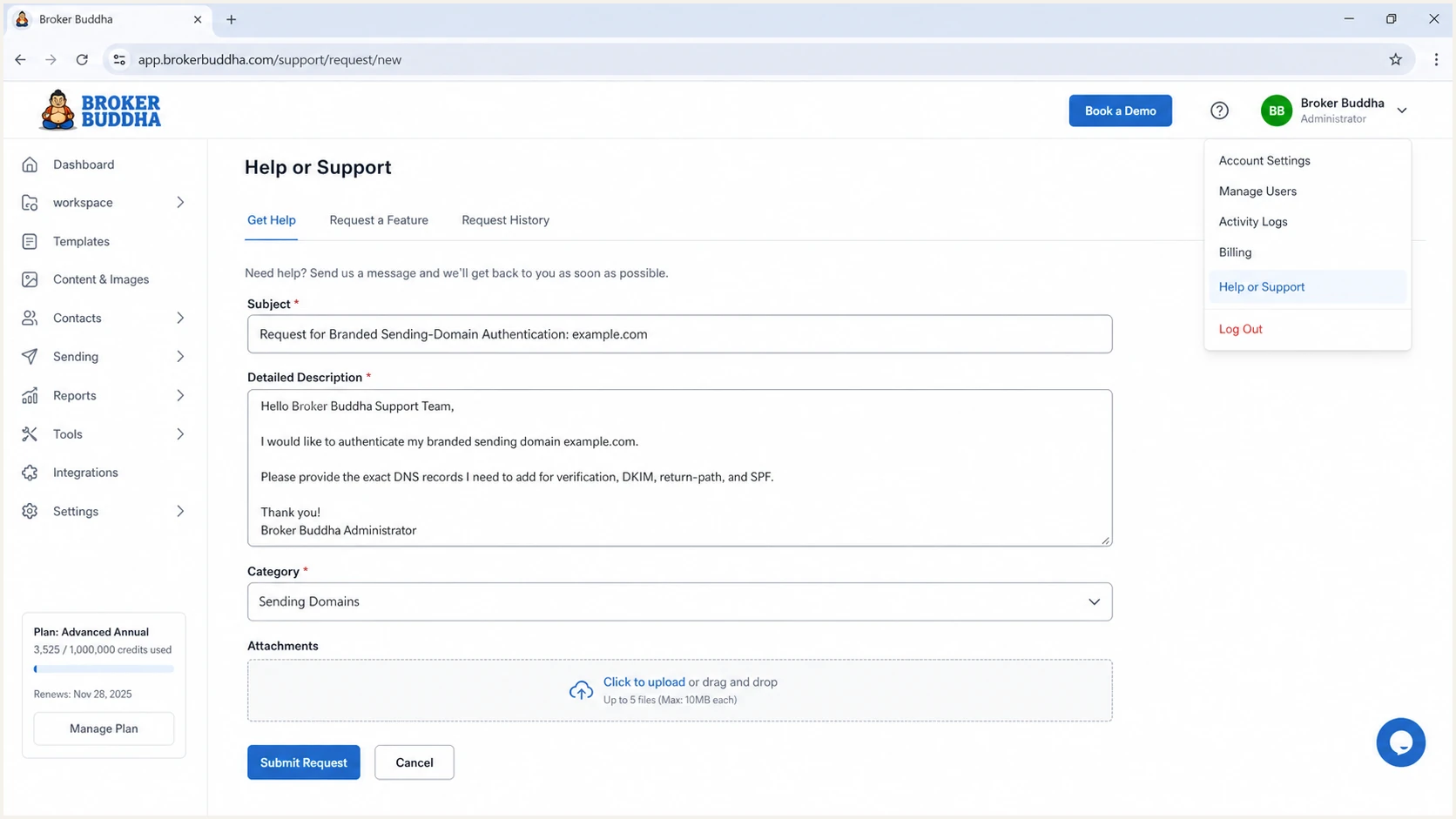
Broker Buddha administrator requesting branded sending-domain DNS records
Do not copy DNS values used by another Broker Buddha customer. DKIM keys and verification tokens are account-specific. The current public Broker Buddha documentation does not provide a universal record set, so the support response is the source of truth.
Set up SPF
SPF (Sender Policy Framework) authenticates the SMTP MAIL FROM domain, normally shown in the delivered message's Return-Path. If Broker Buddha supports a custom return path for your account, request a subdomain under the same organizational domain as the visible From address. Publish the exact CNAME or TXT records supplied for that hostname, plus any required MX record when the setup uses separate TXT and MX records.
- Check the host: Confirm whether Broker Buddha wants a new return-path subdomain or an update to an existing SPF TXT record.
- Keep one SPF record: If an SPF TXT record already exists at the exact requested hostname, merge only the authorized mechanism into it before the final all mechanism. Keep one v=spf1 record and preserve the other legitimate senders.
- Respect CNAME rules: If Broker Buddha supplies a CNAME for the return path, do not add TXT or other records at that same hostname.
- Count lookups: Keep the evaluated SPF path within the ten DNS-lookup limit, including nested include and redirect mechanisms.
- Confirm the match: Send through Broker Buddha and verify that the authenticated Return-Path domain meets the selected aspf mode: the same organizational domain in relaxed mode, or an exact domain match in strict mode.
Run the checker against the exact hostname that carries the SPF policy. Checking only the root domain can miss a problem on the branded return-path subdomain.
SPF checker
Find SPF syntax issues, lookup limits, and weak records.
?/16tests passed
A syntactically valid SPF record does not prove that SPF satisfies DMARC. The decisive evidence is a Broker Buddha test message with SPF pass for a domain that meets the selected aspf mode. Adding Broker Buddha to the root domain's SPF record has no effect when the message uses an unrelated Return-Path domain.
SPF pass
The sending IP is authorized by the SPF record for the Return-Path domain.
- Checks: Envelope sender and sending IP
- Can still fail DMARC: Yes, when domains do not match
SPF domain match
The authenticated Return-Path domain matches the visible From domain under the selected DMARC domain mode.
- Checks: Domain relationship
- Can satisfy DMARC: Yes, when SPF also passes
Set up DKIM
DKIM (DomainKeys Identified Mail) is a useful authentication path for Broker Buddha because its signature normally survives forwarding when the signed content is not modified. Publish every selector supplied by Broker Buddha and verify both the DNS key and the signing domain on a message generated inside Broker Buddha.
- Copy each selector: Use the exact selector host and CNAME target or TXT public key from the Broker Buddha support bundle.
- Avoid proxying: Publish mail-authentication CNAME records as ordinary DNS records if your DNS provider offers traffic proxying.
- Remove accidental quotes: Let the DNS control panel handle TXT quoting unless Broker Buddha explicitly includes split strings.
- Verify resolution: Query the full selector hostname and confirm it returns the supplied key or target without loops.
- Verify signing: Send a Broker Buddha application or reminder and check that DKIM passes with a signing domain that meets the selected adkim mode for the visible From domain.
Check the supplied DKIM selectorBASH
dig TXT bb1._domainkey.example.com +short
dig CNAME bb1._domainkey.example.com +short
The selector bb1 is only a query example. Replace it with the selector Broker Buddha supplies. A DKIM record can resolve correctly while Broker Buddha still signs with a different domain, so a real sent message is required for final verification.
Set up DMARC
DMARC (Domain-based Message Authentication, Reporting, and Conformance) belongs at _dmarc.example.com when the visible From address uses example.com. If the visible From address instead uses an agency subdomain, publish at _dmarc.<that-subdomain> or verify the inherited parent policy. A return-path subdomain does not need its own DMARC record merely because SPF uses it. Begin with monitoring only when no enforcement policy exists. If the domain already uses p=quarantine or p=reject, keep that stronger policy and fix Broker Buddha without downgrading it.
Initial DMARC TXT recordDNS
v=DMARC1; p=none; rua=mailto:dmarc@example.com
- Replace the mailbox: Use a dedicated mailbox that accepts aggregate XML attachments, or Suped's account-specific reporting destination. For a destination under another organizational domain, confirm that its operator publishes the required external-report authorization TXT record.
- Keep one record: Publish one DMARC TXT record at the _dmarc host. Multiple records make DMARC invalid.
- Start relaxed: Leave adkim and aspf at their default relaxed mode until every legitimate sender has been classified.
- Validate syntax: Use the DMARC record generator when adding reporting or enforcement tags.
- Confirm publication: Check the visible From domain below after DNS has updated.
The embedded check confirms that the record is reachable and parseable. For a shareable result, the separate DMARC checker can be used after publication.
DMARC checker
Look up a domain's DMARC record and catch policy issues.
?/7tests passed
A valid p=none record requests reports when rua is present and does not request rejection or quarantine for DMARC failures. Receivers still apply their own spam filters. Reporting receivers normally send aggregate data daily, so confirm that reports arrive before relying on monitoring, as described in RFC 9990. Some receivers do not send reports.
Choose relaxed or strict domain matching
The adkim and aspf tags control DKIM and SPF domain matching separately. Relaxed mode (r) is the default and accepts domains with the same organizational domain. Strict mode (s) requires an exact match. A custom return-path subdomain therefore does not satisfy strict SPF matching when the visible From address uses the parent domain.
|
|
|
|---|---|---|
MAIL FROM: bbmail.example.com | Matches for SPF | Does not match for SPF |
DKIM d=: example.com | Matches for DKIM | Matches for DKIM |
DKIM d=: mail.example.com | Matches for DKIM | Does not match for DKIM |
Unrelated provider domain | Does not match | Does not match |
Domain matching for a visible From address at example.com
These examples assume example.com is the organizational domain and that the relevant SPF check or DKIM signature passes. Changing the Reply-To address, display name, or template branding does not change the authenticated domains. Keep the existing DMARC modes and ask Broker Buddha to support them; Google's DMARC setup guidance explains how each mode evaluates the domains.
Verify Broker Buddha email headers
DNS checks confirm publication, but only a message created and sent by Broker Buddha confirms the whole path. Send a low-risk application reminder to a controlled mailbox, preserve the raw headers, and compare the From, Return-Path, DKIM signing domain, selector, source IP, and DMARC result. Read the Authentication-Results header added by the receiving mailbox's trusted server, rather than an untrusted header supplied earlier in transit.
- Send from Broker Buddha: Use the same workflow that sends live applications, renewals, or reminders. A message from a normal mailbox does not test Broker Buddha.
- Check SPF: Expect SPF pass. If custom return-path support has been confirmed and activated, also check that its domain meets the configured aspf mode.
- Check DKIM: Expect DKIM pass and a d= domain that meets the configured adkim mode for the visible From domain. Record the s= selector for later diagnostics.
- Check DMARC: Expect dmarc=pass. One passing mechanism whose domain matches the visible From domain is sufficient, although configuring both improves resilience.
- Check rDNS: Resolve the source IP's PTR record and confirm that it resolves forward to the same IP. Broker Buddha or its sending infrastructure manages this, not your domain's DNS.
The email tester gives a faster end-to-end diagnosis than checking records separately. Send the requested test message directly from the Broker Buddha workflow so the report captures the real path.
Email tester
Send a real email to this address. Suped shows a results button when the test is ready.
?/43tests passed
If the result fails, separate publication errors from domain-match errors. Publication errors mean DNS is missing or malformed. Domain-match errors mean the authenticated domain does not meet the configured DMARC mode for the address recipients see. An exact domain match is required when aspf=s or adkim=s, even if the domains share an organizational domain.
|
|
|
|---|---|---|
From | Agency domain | Agency |
Return-Path | SPF pass; domain matches aspf mode if used for DMARC | Broker Buddha |
d= | DKIM pass; domain matches adkim mode | Broker Buddha |
s= | Key resolves at s._domainkey.d | Both |
PTR | Forward-confirmed rDNS; separate from DMARC | Sender |
DMARC | dmarc=pass in trusted Authentication-Results | Both |
Header fields to capture from one Broker Buddha test message
If Broker Buddha confirms custom return-path support, fix any SPF domain-match failure in that configuration. If custom return-path support is unavailable, a passing DKIM signature with a matching signing domain is sufficient for DMARC. SPF should still pass for the actual envelope domain. rDNS affects sending infrastructure checks but is not a DMARC pass requirement. A DMARC pass does not guarantee inbox placement.
- SPF permerror: Remove duplicate SPF records, invalid mechanisms, and paths that exceed ten DNS lookups.
- DKIM failure or neutral result: Check the selector from the actual message, DNS record type, CNAME target, and whether Broker Buddha activated signing. A body hash failure also requires checking for modifications to signed content during delivery.
- DMARC fail: Compare the visible From domain with the Return-Path and DKIM d= domain. Passing authentication for unrelated domains is insufficient.
- Intermittent results: Test each Broker Buddha message type because separate mail streams can use different selectors or infrastructure.
Monitor authentication changes
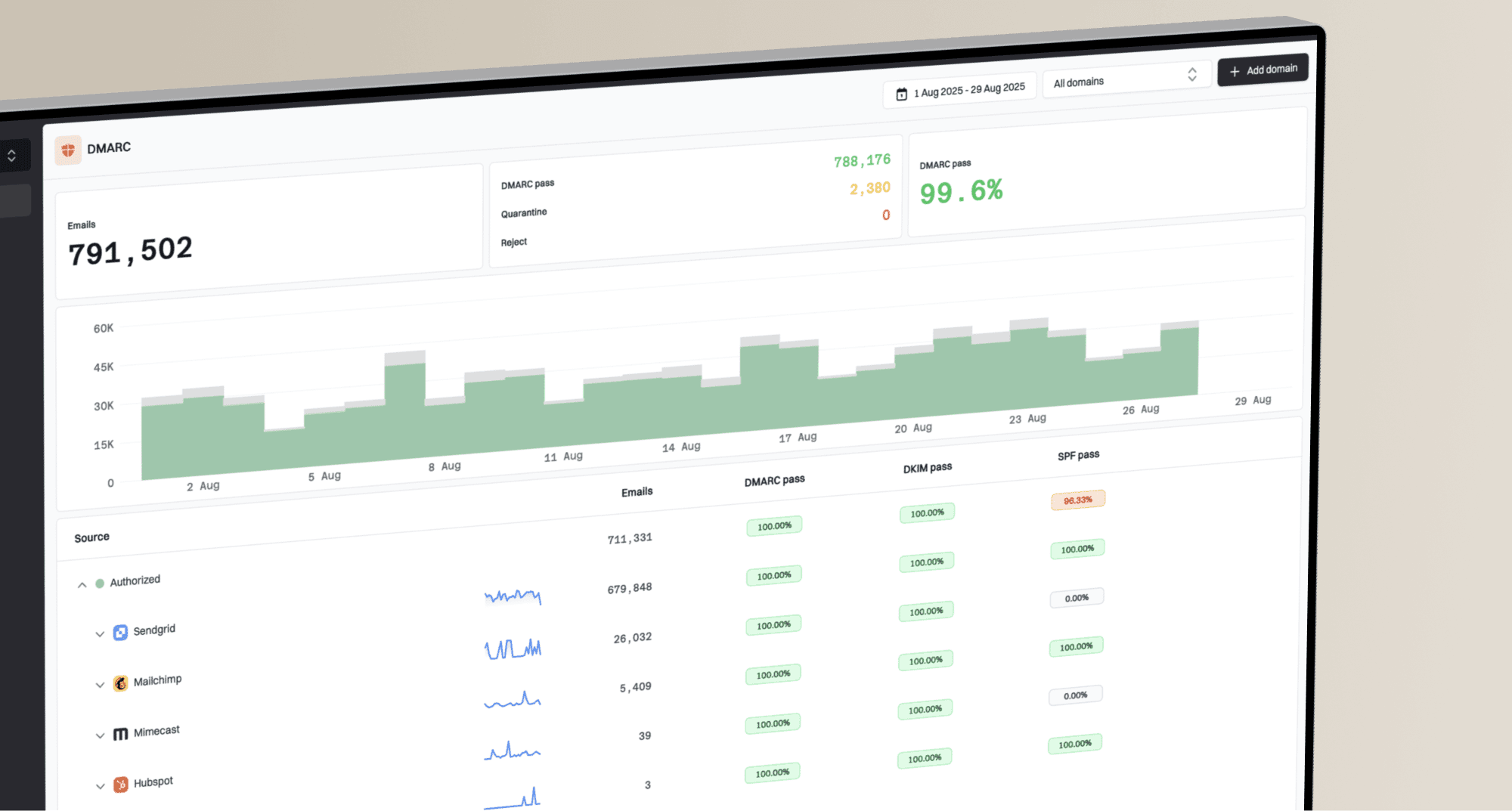
A one-time pass is not durable. Broker Buddha can rotate infrastructure, a DNS edit can remove a selector, and another sender can change the domain's overall DMARC risk. Suped's DMARC monitoring processes aggregate reports to identify sending sources and authentication failures, then provides steps to investigate them.
- Alert on failures: Review Suped alerts when received reports show new SPF, DKIM, or DMARC failure spikes. Aggregate reports usually arrive daily, so these alerts do not confirm individual messages in real time.
- Identify sources: Review source IPs, envelope-sender domains, DKIM domains, available selectors, and dispositions in reports. Compare them with a saved Broker Buddha test message before attributing unfamiliar traffic to the account.
- Watch DNS drift: Track policy changes, missing records, SPF lookup growth, and DKIM selectors that stop resolving.
- Investigate delivery failures: Suped's blocklist monitoring adds IP reputation checks when authenticated Broker Buddha messages still face delivery failures. A blocklist (blacklist) listing is separate from SPF, DKIM, and DMARC results.
- Scale ownership: Agencies and managed service providers can review multiple client domains from the multi-tenant dashboard without mixing records or alerts.
For each investigation, record the affected domain, suspected Broker Buddha source, failed mechanism, reporting period, volume, and required fix. Suped's issue detection and remediation steps help prioritize the reported failures; message headers and the support case confirm the sending configuration.
Assign DNS changes to a named owner and keep the Broker Buddha support case with the original record bundle. That evidence makes it easier to distinguish a customer DNS regression from a sender-side infrastructure change.
Choose a DMARC enforcement policy
Move to p=reject only after Broker Buddha and every other legitimate sender passes DMARC consistently and indirect delivery paths have been assessed. Base the decision on complete source classification across a normal business cycle, including low-volume renewal and reminder traffic. RFC 9989 advises against p=reject for domains with users who post to Internet mailing lists. Consider a dedicated visible From subdomain for automated Broker Buddha mail when the agency's main domain also supports general staff email.
- Inventory all sources: Classify every source in aggregate reports as authorized, forwarded, or unauthorized.
- Fix Broker Buddha: Require passing DKIM with a matching signing domain on every Broker Buddha stream before rejection. Configure SPF through a custom return path if Broker Buddha confirms support, and test forwarded copies as well as direct delivery.
- Stage quarantine: After authentication is stable, use p=quarantine and review reports and delivery outcomes. Scope an initial rollout to a dedicated visible From subdomain with its own DMARC record when narrower coverage is needed.
- Stage rejection: For a domain whose authorized delivery paths have been tested, move to p=reject and monitor legitimate failures. Do not rely on pct to limit enforcement; RFC 9989 makes that tag historic, and receivers implementing RFC 9989 ignore percentage sampling.
- Cover subdomains: Set sp=reject only after reviewing sending and unused subdomains. Without sp, subdomains inherit p unless a more specific DMARC policy applies; review each subdomain's own record before changing the parent.
- Keep monitoring: Continue aggregate reporting and alerts after enforcement because sender and DNS changes still create failures.
|
|
|
|---|---|---|
Observe | none | Sources known |
Test | quarantine | Legitimate delivery paths tested |
Enforce | reject | DKIM passes; indirect delivery risks assessed |
A controlled DMARC enforcement sequence
Suped's Hosted DMARC provides policy controls without repeated manual DNS edits. Review authentication reports before each policy change and after it. Hosted policy changes do not remove receiver caching or report delays.
Do not lower an existing p=reject policy to onboard Broker Buddha. Keep enforcement, authenticate Broker Buddha on a test domain or controlled stream, verify the authenticated domains, and only then move production traffic to the authenticated identity.
Broker Buddha authentication FAQ
- Keep evidence: Save the Broker Buddha DNS bundle, one passing message header, and the verification confirmation with the domain's change record.
- Retest changes: Run a new Broker Buddha message after any selector, return-path, From-domain, or DMARC policy update.
Request the exact SPF and return-path DNS values for your account. Broker Buddha's public materials do not establish a universal customer SPF include. Confirm whether custom MAIL FROM support is available, then publish only the supplied records.
The PTR or rDNS suffix identifies the infrastructure that delivered the message and can differ from the visible Broker Buddha brand. Broker Buddha's public materials do not list one universal rDNS suffix. Capture the source IP and PTR from a real Broker Buddha message, confirm forward-confirmed rDNS, and ask Broker Buddha support to validate the infrastructure.
DMARC passes when either SPF or DKIM passes and its domain matches the visible From domain under the configured DMARC mode. DKIM should be the primary path for forwarded messages. Add a matching custom return path for SPF if Broker Buddha confirms that capability for your account.
Yes, when the domain has no DMARC enforcement policy. Use p=none to collect reports while validating Broker Buddha and every other sender. If the domain already has p=quarantine or p=reject, keep that policy and authenticate Broker Buddha before production use.
SPF pass alone is insufficient when its authenticated domain fails the configured aspf match and no passing DKIM signature meets adkim. Ask Broker Buddha whether a custom return path is supported, or use passing DKIM with a matching signing domain. Changing Reply-To does not change DMARC's visible From domain check.
Send a message through Broker Buddha and read s= and d= in its DKIM-Signature header. Query s._domainkey.d using those exact values, then confirm the receiving server reports DKIM pass and the d= domain meets the configured adkim mode.