
How to set up DMARC/DKIM/SPF for Aussie Broadband

For a domain you own that sends through Aussie Broadband's SMTP relay, add include:spf1.aussiebroadband.com.au to its SPF policy, verify the return-path domain matches your From domain, and publish a DMARC TXT record. DKIM requires a signer for your domain; Aussie Broadband's public support pages do not provide a custom-domain DKIM selector or setup procedure.
I first distinguish your own domain, such as example.com, from an existing @aussiebroadband.com.au or @aussiebb.com.au mailbox. Aussie Broadband controls authentication DNS for its mailbox domains. The changes below apply to your own domain. Using an Aussie Broadband internet connection alone does not require its SPF include.
The public smart-host instructions do not document an Add domain screen or ownership-verification token. Confirm access to your authoritative DNS and permission to use the relay before changing records.
Set up SPF
Aussie Broadband's support article 'Changes to SPF and how it affects you' specifies the include above for custom-domain relay use. I edit the existing policy rather than publish another SPF record.
- Read the current record. Open your authoritative DNS provider's zone editor. Find the TXT value beginning v=spf1. Save a copy before editing.
- Authorize Aussie Broadband. Insert include:spf1.aussiebroadband.com.au before the final ~all or -all. Preserve other authorized senders and keep one SPF record at each DNS name.
- Check the envelope sender. Configure your sending server or application's MAIL FROM address to use your domain. Inspect the delivered Return-Path to confirm the relay preserved it. Do not add a Return-Path header manually.
- Cover the correct domain. If MAIL FROM uses a subdomain, publish its SPF policy at that subdomain too. SPF records are not inherited. A matching subdomain works with relaxed DMARC alignment; strict mode requires an exact domain match.
- Check the lookup budget. Keep SPF evaluation within the 10 DNS-lookup term limit, including nested includes. Do not copy Aussie Broadband's corporate SPF policy or add unrelated include domains.
New SPF policy, only when Aussie Broadband is the sole sendertext
v=spf1 include:spf1.aussiebroadband.com.au ~all
Publish this TXT value at @ for example.com when that is the domain being checked. For an existing policy, merge the include and retain the existing ending. Do not replace a working multi-sender policy with this example.
Use the checker to inspect syntax and recursive lookup usage. A valid DNS policy does not establish which envelope sender your application actually uses.
SPF checker
Find SPF syntax issues, lookup limits, and weak records.
?/16tests passed
Check the domain shown in the delivered message's smtp.mailfrom result, then check your visible From domain if it differs. An SPF pass for an unrelated provider-owned domain does not satisfy DMARC's SPF alignment requirement.
The documented include is a relay authorization requirement. If your actual route rewrites the return path to an unrelated domain, ask support about preserving your domain. Matching, passing DKIM can still satisfy DMARC, but it does not bypass the relay's own SPF checks.
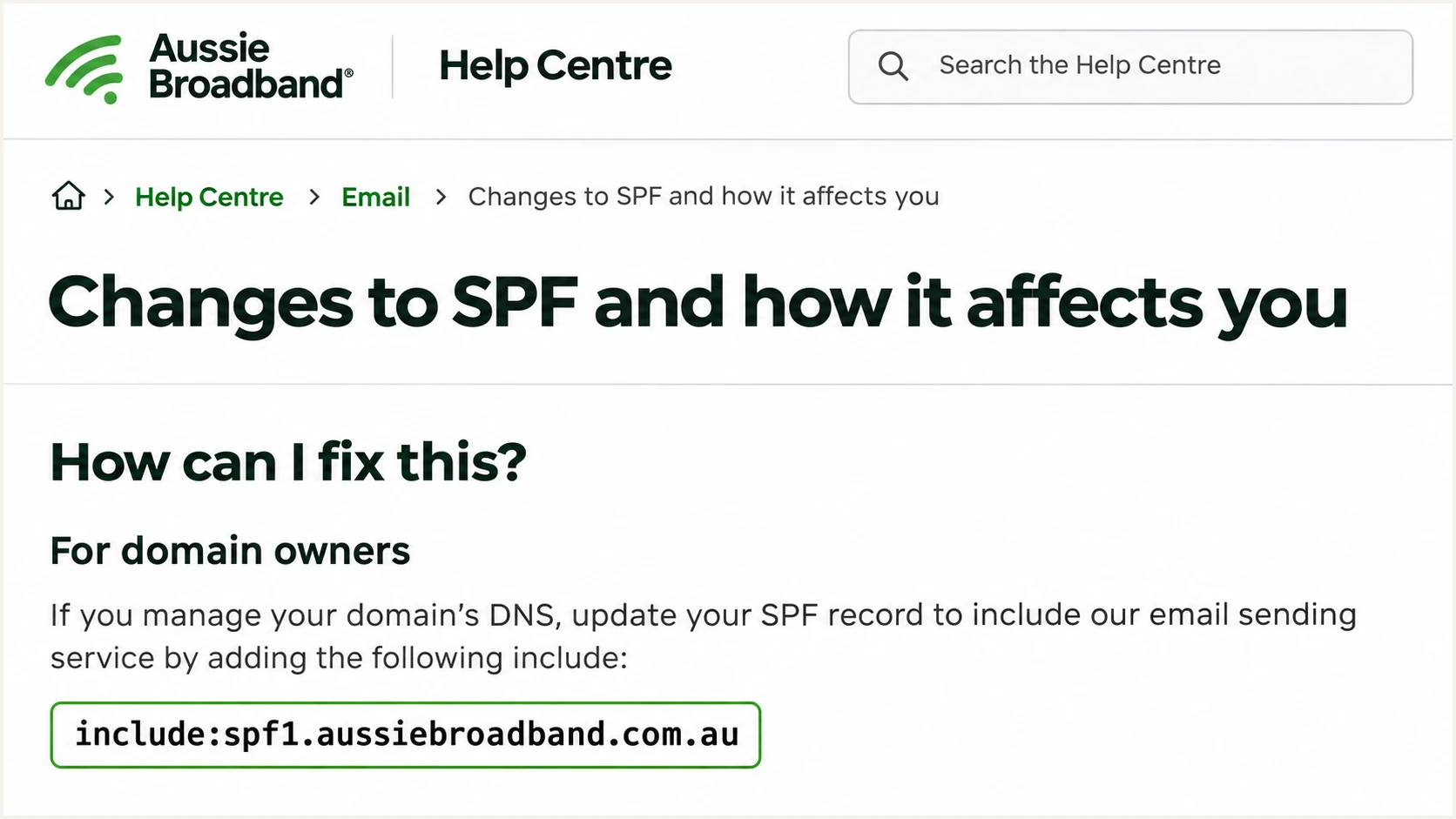
Illustrated Aussie Broadband support page showing its SPF include.
Set up DKIM
Aussie Broadband's public relay instructions do not establish customer-controlled DKIM signing. I treat DKIM as unverified until a delivered message has a passing signature for the sending domain.
- Confirm who signs. Ask Aussie Broadband support whether your specific service signs custom-domain mail. Request the signing domain, selector, DNS record type and exact value. There is no documented universal selector to copy.
- Use a controlled signer. If Aussie Broadband does not offer signing for your domain, enable it on a mail server you control before relaying. Generate a 2048-bit RSA key with SHA-256 signing through that server's supported configuration.
- Publish the supplied record. Add the exact TXT public key or CNAME target under the supplied selector's _domainkey name. Keep the private key on the signing server. Publishing DNS alone does not enable signing.
- Verify after the relay. Send through the production route. Require dkim=pass and a signing domain that matches the visible From domain under your DMARC settings. If the relay changes signed content, fix that path before enforcement.
Read the selector from s= and the signing domain from d= in the actual DKIM-Signature header. Use those values for DNS lookups. The selector relay2026 below is an example for a signer you control, not an Aussie Broadband selector.
Example DKIM public-key lookupbash
dig +short TXT relay2026._domainkey.example.com
A passing signature for Aussie Broadband's domain does not authenticate example.com's From identity for DMARC. The signature needs the required domain relationship as well as a valid cryptographic result.
SPF can produce a DMARC pass without DKIM on direct delivery. That leaves forwarding dependent on recipient handling, because the forwarder's IP is usually outside your SPF authorization.
Provider-domain DKIM
A valid signature with d=aussiebroadband.com.au authenticates that signing domain. It does not match a From address at example.com.
A passing, matching SPF result is still needed for DMARC on that direct path.
Your-domain DKIM
A valid signature with d=example.com matches a From address at example.com. DMARC can pass through DKIM even when forwarding breaks SPF.
Verify this result after Aussie Broadband relays the message, not only before submission.
Set up DMARC
I start new deployments with p=none to collect evidence before requesting enforcement. If your domain already uses quarantine or reject, keep that policy while configuring Aussie Broadband.
- Inspect existing DMARC. Look up the TXT record at _dmarc.example.com. Edit the existing DMARC record if one is present; do not add a second policy.
- Create the TXT record. For a new deployment, use the monitoring value below. In a zone editor that appends example.com, enter _dmarc as the host name. Keep your existing MX records.
- Set a real reporting destination. Replace dmarc@example.com with a mailbox you control or your assigned aggregate-report address. If it is outside your domain, follow the reporting recipient's external authorization instructions.
- Keep compatibility settings. Leave aspf and adkim unset for their relaxed defaults unless an existing policy requires strict matching. Build the value with the DMARC record generator.
Monitoring example: TXT at _dmarc.example.comtext
v=DMARC1; p=none; rua=mailto:dmarc@example.com
The example address is a placeholder. It must be replaced before publishing so reports reach a working destination. Aggregate reports contain machine-readable authentication data, not copies of every email.
A monitoring policy requests no quarantine or rejection for DMARC failures. Recipients still apply their own filtering, and a syntactically valid record does not prove your messages pass.
DMARC checker
Look up a domain's DMARC record and catch policy issues.
?/7tests passed
Enter your actual From domain in the checker. Confirm the policy and reporting address are correct, and check that the DNS editor has not created _dmarc.example.com.example.com.
Allow existing DNS caches to expire, then send again. Participating recipients generally send aggregate reports daily; report timing is separate from the immediate authentication result on a delivered test message.
Verify and troubleshoot
I test the exact application and SMTP route used in production. A successful test from a different mailbox does not verify the Aussie Broadband path.
- Test every sending path. Send separately through each mailbox, website form, business application and printer that uses your domain. Record the sending time and intended route.
- Read trusted results. Inspect the receiving system's Authentication-Results header. Compare smtp.mailfrom and the DKIM signing domain with the visible From domain; do not rely on untrusted headers supplied by the sender.
- Separate relay rejection. For the error 'SPF fail - not authorized', check the sender domain's SPF authorization and DNS visibility first. A receiver's DMARC rejection is a different diagnosis.
- Check submission settings. For existing Aussie Broadband mailboxes, use the documented settings below. The mailbox password is separate from the MyAussie password. Confirm credentials and relay eligibility for custom-domain smart-host use.
- Escalate shared-IP failures. If authentication passes but a bounce names a blocklist (blacklist), give Aussie Broadband support the full bounce and outbound IP. The shared relay's operator handles IP delisting.
Documented SMTP settings for existing Aussie Broadband mailboxestext
Host: mail.aussiebroadband.com.au
Port: 465
Encryption: SSL/TLS
Username: full mailbox email address
Password: mailbox password
Alternative: port 587 with STARTTLS
These connection settings are published in Aussie Broadband's 'Incoming and outgoing server settings for Aussie Broadband email addresses'. A connection or login failure must be fixed before email authentication can be tested.
The email tester below provides a test address. Send to it through your usual Aussie Broadband route for an authentication diagnosis, along with checks of encryption and reputation.
Email tester
Send a real email to this address. Suped shows a results button when the test is ready.
?/43tests passed
Read both the raw authentication result and the domain matching result. A green SPF result for an unrelated domain is insufficient. Matching, passing DKIM is enough for DMARC even when SPF does not match.
In the table, 'match' means the authenticated domain satisfies your DMARC alignment settings. A DMARC pass does not guarantee inbox placement.
|
|
|
|---|---|---|
Pass + match | Missing | Pass |
Pass, no match | Pass + match | Pass |
Fail | Pass + match | Pass |
Pass, no match | Missing | Fail |
DMARC outcomes for a message with a valid applicable DMARC policy
Get alerted when it breaks
Suped is our DMARC reporting and email authentication platform. Its DMARC monitoring turns aggregate reports into source-level authentication results and issues with steps to fix. I check those results after every sending-system change.
- Deliver the reports. Use the aggregate-report destination assigned by Suped in rua, preserving your existing DMARC policy. Confirm reports arrive before relying on report-based alerts.
- Enable notifications. In Settings, open Notifications. Enable Issues detected and Sending sources need verification emails, and configure DMARC summary emails for routine review.
- Verify the source. Review Aussie Broadband traffic against your actual mail usage and the connecting IP's SPF authorization. Verify recognized sending sources; an rDNS suffix alone is insufficient evidence.
- Investigate the change. Filter records to the affected source and inspect detailed SPF and DKIM results. Compare DNS history with the failure period, then follow the issue's fix steps.
- Confirm recovery. Send another production-path test after the fix. Verify fresh passing results in subsequent reports before treating the issue as resolved.
Suped's issue notifications depend on the data it receives. Aggregate reports arrive after delivery, so report-based alerts are not an instant feed of every failed message. Keep SMTP logs and bounce monitoring for immediate delivery failures.
Secure your domain with p=reject
I move a controlled sending domain to p=reject only after confirming legitimate mail has matching, passing DKIM and reviewing indirect delivery. Our hosted DMARC provides policy controls in Suped, alongside the report data needed to assess each change.
- Inventory legitimate senders. Review each source across a complete business sending cycle, including infrequent billing runs. Mark recognized sources in Suped and investigate failures by source rather than trust one overall percentage.
- Require working DKIM. Verify your domain's signature survives the Aussie Broadband relay. Do not enforce reject on an SPF-only setup: forwarding changes the connecting IP and breaks that protection.
- Test indirect delivery. Check forwarded mail and mailing-list participation. If general-purpose users depend on those routes, assess their delivery risks before choosing reject.
- Stage enforcement. Resolve legitimate failures first, then assess quarantine before reject. For general-purpose domains electing reject, RFC 9989 recommends at least a month at none and an equally long period at quarantine to compare dispositions.
- Keep monitoring active. Change only the intended policy settings, retain reporting, and watch Suped's source results and issues. Keep a copy of the previous policy for recovery if legitimate delivery breaks.
General-purpose mail needs extra care
RFC 9989 advises against p=reject for domains whose users participate in Internet mailing lists. Lists that change signed content can break DKIM as well as SPF. A dedicated sending subdomain lets you assess enforcement separately from everyday user mail.
The value below is an enforcement example for a domain that has completed those checks. Replace the reporting address with the real destination and preserve any deliberate subdomain-policy settings.
Reject is a domain owner's handling request, and recipient systems make the final delivery decision. It does not prevent impersonation using a different domain or a misleading display name.
Enforcement example: TXT at _dmarc.example.comtext
v=DMARC1; p=reject; rua=mailto:dmarc@example.com
After the policy change, send fresh tests through Aussie Broadband and inspect subsequent source-level reports in Suped. New relay routes and DKIM key rotations need the same checks.
If legitimate mail breaks, identify the failed domain match or signature and repair that sending path. When recovery requires a policy rollback, restore the previous value while retaining reporting.
Frequency asked questions
Its custom-domain relay instructions specify include:spf1.aussiebroadband.com.au. Merge it into the existing SPF TXT record before the final all mechanism. Do not add it solely because Aussie Broadband provides your internet connection.
The public support documentation does not provide a MyAussie custom-domain DKIM switch or universal selector. Ask support whether your specific service signs for your domain. Otherwise, sign on a server you control before relaying and verify the signature after delivery.
SPF authenticates the envelope-sender domain. If that domain does not match your visible From domain under your DMARC settings, SPF cannot provide the required DMARC pass. Configure a matching envelope sender or a passing DKIM signature for your domain.
That suffix is associated with Aussie Broadband's infrastructure, but it does not prove a message is authorized for your domain. I check the actual connecting IP against the relay's current SPF authorization and inspect recipient authentication results before verifying a source. Hostnames and outbound pools change.
Aussie Broadband owns that domain and controls its authentication DNS. Mailbox users cannot publish its SPF or DMARC records. These DNS steps require a domain you control; contact Aussie Broadband about authentication problems with an existing ISP mailbox.
For a new deployment, keep monitoring while you establish matching DKIM and investigate legitimate failures. SPF alone can pass DMARC on direct delivery, but it is insufficient preparation for reject because forwarding can break SPF. If you already enforce quarantine or reject, retain that policy while diagnosing the affected route.




