
How to set up DMARC/DKIM/SPF for Aruba.it


Publish Aruba's SPF authorization in your existing SPF record, verify domain-based DKIM signing, and add a DMARC TXT record at _dmarc. For standard Aruba domain email, the SPF include is include:_spf.aruba.it and the documented DKIM selector is a1. Start DMARC with p=none and reporting unless you already use quarantine or reject.
I test mailbox mail and website mail separately before enforcing DMARC. These steps cover standard Aruba domain email; PEC and self-managed mail servers need their own service-specific settings.
Add your domain
Aruba provisions domain email with the purchased service. An active domain needs no separate sender-domain verification wizard.
- Open the domain. Sign in at admin.aruba.it, select your domain, then open Dominio > Gestione DNS e Name Server.
- Confirm DNS authority. Check the active name servers. Publish records at that DNS provider, which is not necessarily Aruba.
- Create the sender. At webmail.aruba.it, sign in as your domain's postmaster. Choose Crea nuova casella, enter the address, press Procedi, set its password, press Procedi, then Crea casella.
- Verify activation. Open Vai alle caselle > Dettagli and confirm Casella attiva. Sign in as that mailbox and send an external test message.
Reuse an existing active mailbox. Domain registration alone does not identify your sending service.
Your website needs the sending mailbox's credentials. The domain control-panel login is not an SMTP login.
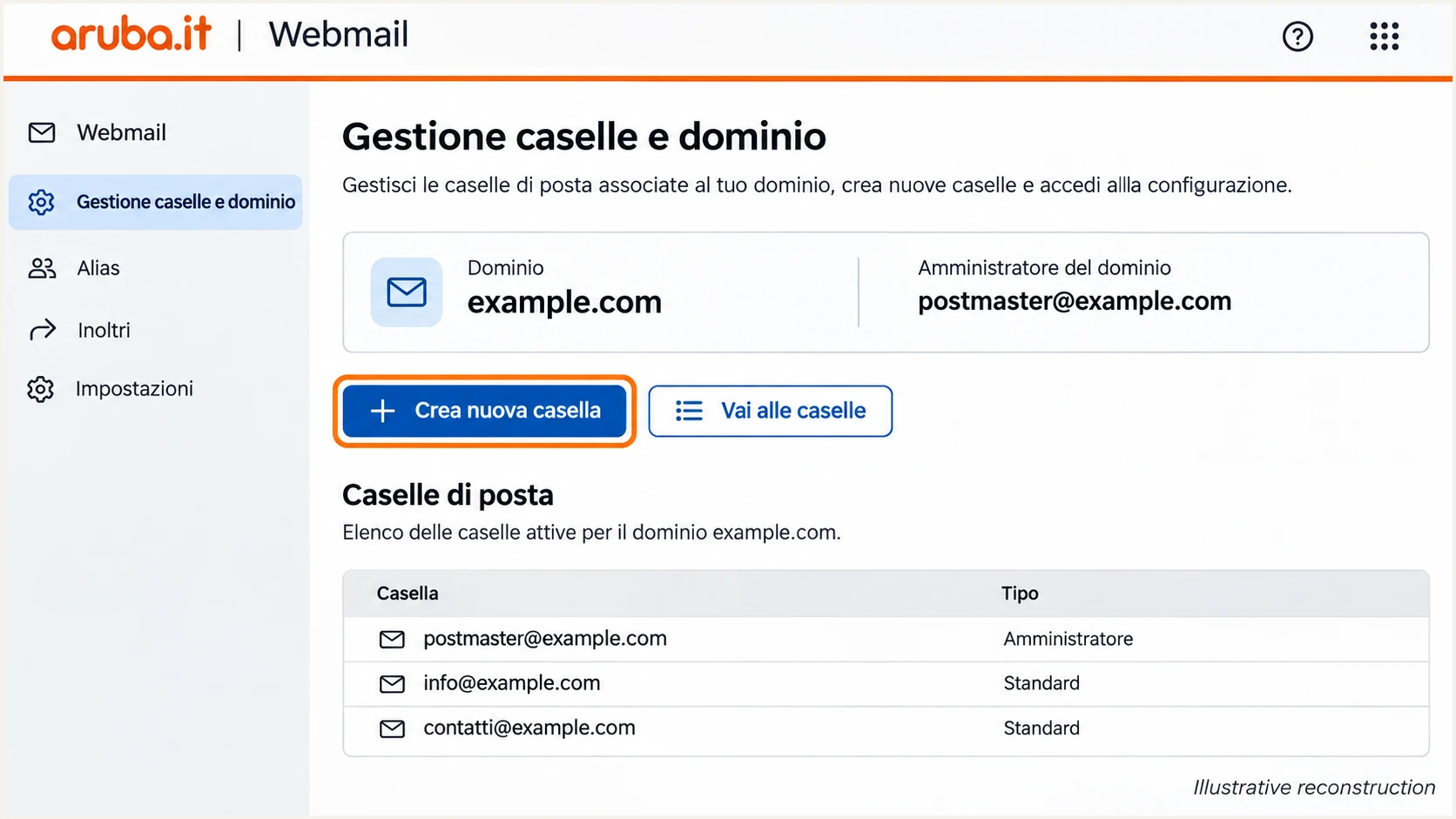
Illustrative Aruba Webmail screen showing where to create a domain mailbox.
Set up SPF
I check existing TXT records first. Add Aruba's include:_spf.aruba.it authorization at the domain used in SMTP MAIL FROM.
- Find the record. Find the TXT value starting with v=spf1. Edit this record; do not create another SPF policy.
- Authorize Aruba. Insert include:_spf.aruba.it before the final all mechanism. Keep your other legitimate sender authorizations.
- Set the host. For root-domain SPF, leave Aruba's Nome host empty. Publish separate MAIL FROM subdomain policies at those subdomains.
- Save and check. Save with your chosen TTL. Stay within 10 DNS-querying terms, including nested includes.
This value authorizes Aruba-only sending. Merge authorizations if other services also send through the domain.
Paste the policy into Valore without surrounding quotation marks.
Aruba-only SPF TXT valuetext
v=spf1 include:_spf.aruba.it -all
For website mail, use smtps.aruba.it on port 465 with implicit TLS. Authenticate with the full mailbox address and its password.
Check the actual SPF domain below. DNS validation checks publication; a delivered message reveals the application's envelope domain.
SPF checker
Find SPF syntax issues, lookup limits, and weak records.
?/16tests passed
Inspect Return-Path and the receiver's SPF result. Relaxed DMARC matching requires the envelope and visible From domains to share an organizational domain.
Aruba supports routes with a matching Return-Path. Verify your route, especially when the application previously used local PHP mail.
A provider Return-Path needs a different fix
If Aruba rewrites Return-Path to its own domain, root-domain SPF cannot fix the mismatch. Expect an SPF domain-matching error on that route. DMARC still passes through a valid DKIM signature for your domain.
Set up DKIM
Aruba automatically signs compatible email when its DKIM configuration exists. Its public instructions specify selector a1; check for missing records on domains activated before February 2024.
- Inspect first. Look up TXT at a1._domainkey.example.com, replacing example.com with your domain.
- Publish if missing. Choose Aggiungi record > TXT. Enter a1._domainkey.example.com in Nome host and the service's public key in Valore. Set TTL and save.
- Use the correct key. The example contains Aruba's published standard-service key. Follow any different service-specific selector or key supplied by Aruba.
- Test new mail. Confirm dkim=pass with your domain in header.d. An aruba.it signature does not satisfy DMARC for example.com.
DNS publication cannot enable signing on an unsigned route. Ask Aruba to investigate missing signatures on fresh messages.
The quoted zone-file strings form one TXT value. In Valore, paste their joined contents without quotes, parentheses or line breaks.
Aruba standard DKIM record, zone-file formatdns
a1._domainkey.example.com. IN TXT (
  "v=DKIM1; h=sha256; k=rsa; "
  "p=MIIBIjANBgkqhkiG9w0BAQEFAAOCAQ8AMIIBCgKCAQEAoOhAWzBuKQYXU6E3E9"
  "efq+DPvtkkvWPg3EtB+BT2cTrMGh6Xy00mXfPi/EzubRpbhHpv3b3k1d65Vyhmpp"
  "5O3HzTQyzIqYMMF5iF5y05D5aEux3pj/i1g5LkAOFE0Xdf+wnI8zppP2jP7IV4bw"
  "KPr1OnBqOjs8hfBWSEGaCSFD/aVbOdNldHiwSalzDL38E+IcT0KQB+BdutC2T9B5"
  "idcSPaBY57sC4hq31wpBlgNcYpIMDxOQN+E9E+TbgnlJYCOYsD5S0amYFivcJObj"
  "SGpdstMBfaM1ox5iEQVpEhLz5cwgohjrMst2us7G9eHZ6p2jR7X+/yTP8ryAAywz"
  "MJ5wIDAQAB"
)
Keep the public key complete and its base64 data uninterrupted. Avoid extra TXT values at the selector.
Check the published name: DNS editors that append the zone need a relative host, a1._domainkey, instead.
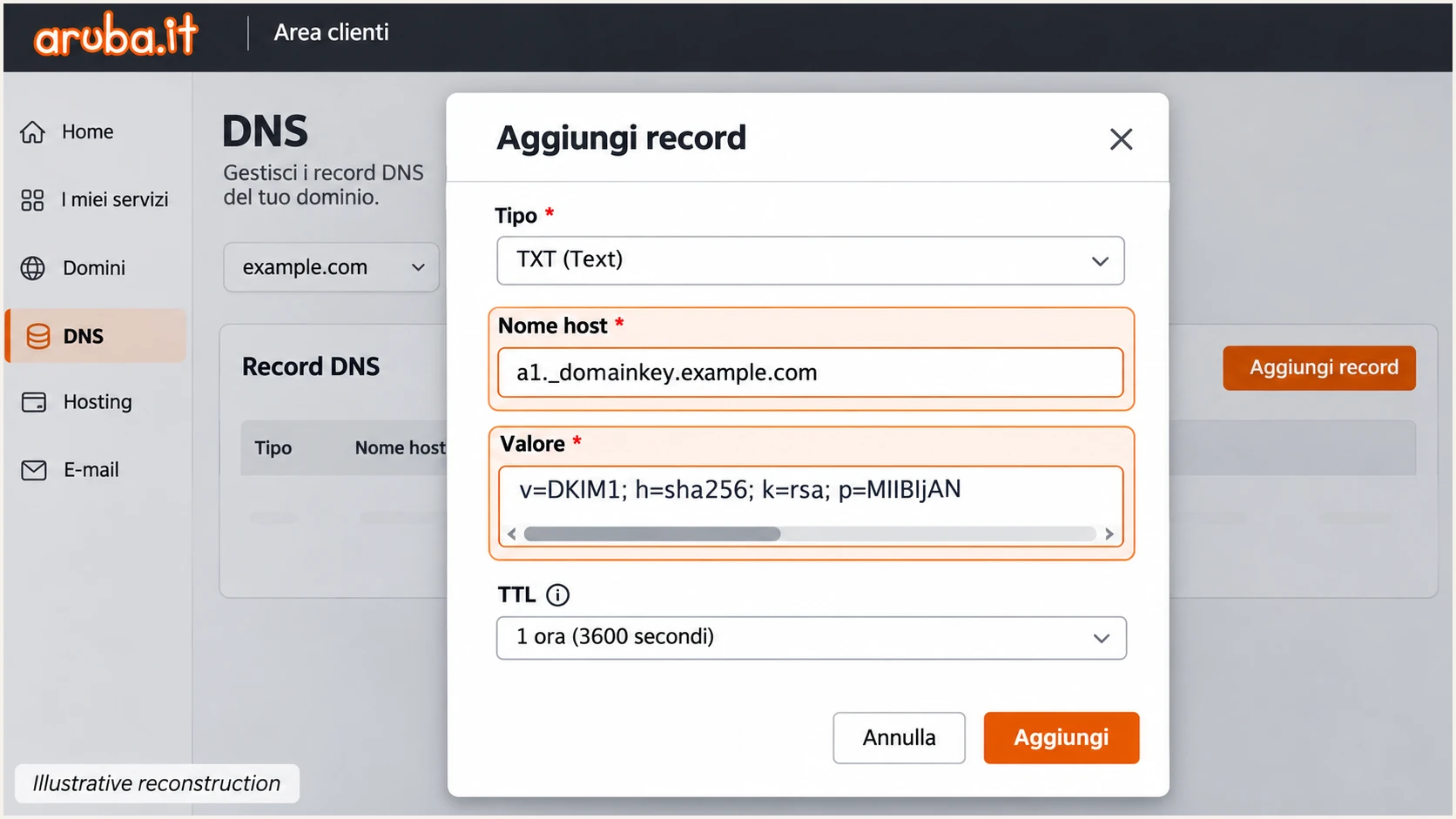
Illustrative Aruba DNS form for the a1 DKIM TXT record.
Set up DMARC
Check _dmarc first. New Aruba mail domains can have a monitoring policy without reporting. Keep an existing p=quarantine or p=reject policy.
- Edit one record. In Aruba DNS, choose Modifica for the existing DMARC TXT record, or Aggiungi record > TXT if absent.
- Set the name. Enter _dmarc.example.com in Nome host. Use _dmarc where an external DNS editor appends the zone.
- Build the value. Use the DMARC record generator with your policy and reporting address. Start a first deployment with the monitoring example below.
- Activate reporting. Replace dmarc@example.com with your real reporting destination. Save and check the published record.
This requests aggregate reports without enforcement. The example address is a placeholder; replace it before publication.
If you already enforce DMARC, retain that policy and reporting destinations while configuring Aruba.
Initial DMARC TXT value at _dmarc.example.comtext
v=DMARC1; p=none; rua=mailto:dmarc@example.com
Omitted aspf and adkim tags default to relaxed matching. Test every sender before choosing strict matching.
The checker should find one valid policy at the correct host with your intended reporting destination.
DMARC checker
Look up a domain's DMARC record and catch policy issues.
?/7tests passed
A report mailbox receives XML attachments. External reporting destinations need authorization at the recipient's domain.
Confirm the change is active. A scheduled DNS operation does not publish until its configured time.
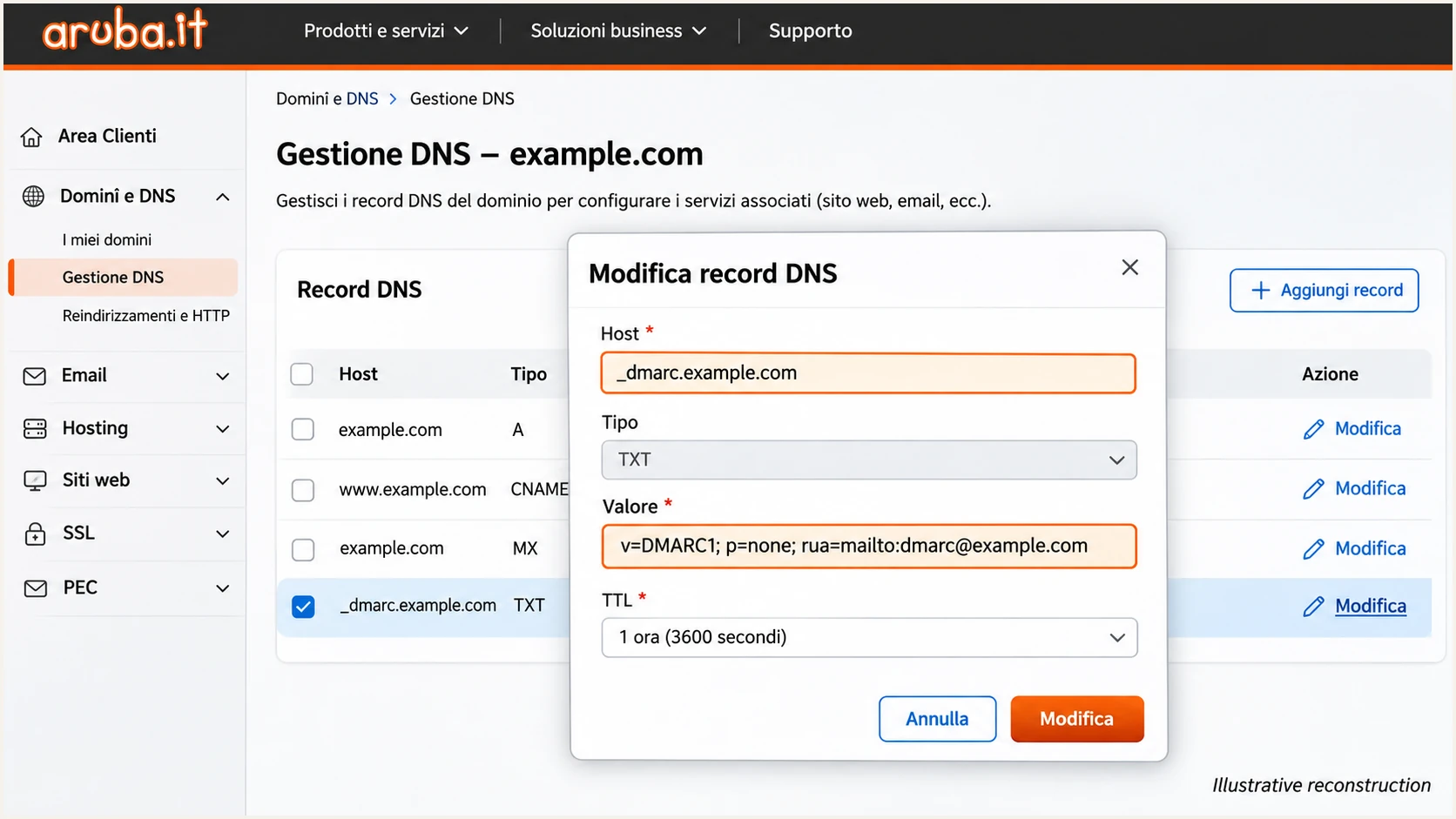
Illustrative Aruba DNS editor showing the DMARC host and monitoring policy.
Verify and troubleshoot
I verify delivered messages to confirm the application uses the intended route. Send a fresh test after each change.
- Test each route. Send through Aruba Webmail and your application separately, using each route's production sender identity.
- Check receiver results. Read the receiver's Authentication-Results. Check SPF and DKIM results, authenticated domains, and dmarc=pass.
- Check the signer. Read d= and s= in DKIM-Signature. Query that selector under that signing domain.
- Fix website identity. Use your domain mailbox in From and the visitor's address in Reply-To. Use authenticated SMTP for application mail.
This illustrates direct delivery with matching domains. DMARC needs at least one passing mechanism with a matching domain.
Trust the receiving service's results. Earlier senders can insert misleading Authentication-Results headers.
Expected direct-delivery authentication resultstext
Authentication-Results: mx.example.net;
 spf=pass smtp.mailfrom=sender@example.com;
 dkim=pass header.d=example.com header.s=a1;
 dmarc=pass header.from=example.com
The email tester is the quickest practical check. Send to its supplied address for a diagnosis of authentication and other delivery checks.
Repeat separately for website notifications and mailbox mail. Each route needs its own successful test.
Email tester
Send a real email to this address. Suped shows a results button when the test is ready.
?/43tests passed
Check domain matching alongside pass/fail labels. SPF passing for an Aruba envelope domain alone does not pass your domain's DMARC.
For missing DNS changes, confirm the authoritative zone and wait for the previous TTL to expire. Then re-test.
|
|
|
|---|---|---|
SPF permerror | Duplicates or limit | Merge and simplify |
DKIM none | Unsigned route | Check SMTP route |
DKIM fail | Key or message change | Check key and route |
DMARC fail | Domain mismatch | Check From domains |
Check the delivered message after correcting the underlying configuration.
Get alerted when it breaks
Suped is our DMARC platform. For ongoing Aruba operations, its DMARC monitoring identifies affected sending sources and provides steps to fix detected issues.
- Route reports. Put your assigned reporting destination in rua. Confirm receiver reports arrive before relying on monitoring.
- Verify Aruba sources. Compare Aruba traffic with your mailboxes and applications. Verify a source only after confirming its authorization.
- Enable notifications. In Suped, enable Issues detected and Sending sources need verification notifications. Enable DMARC summary emails for routine review.
- Investigate failures. Open affected records in Detail view. Compare authentication domains and DNS history, apply the suggested fix, then verify.
Suped combines source-level reports with issue detection. Use it to spot an application's changed envelope domain or broken DKIM signing.
I investigate unfamiliar servers before authorizing them. A source appearing in reports is not proof it belongs in SPF.
DMARC reports are delayed
Aggregate reports generally arrive daily and do not cover every message. Suped alerts depend on available data. Use a fresh email test for immediate confirmation.
Keep reporting active through website updates and mailbox migrations. Re-test changed sending routes.
Secure your domain with p=reject
I enforce DMARC after legitimate Aruba traffic passes across representative sending activity. Suped groups sources and exposes failures to resolve before enforcement.
- Inventory senders. Review Aruba mailboxes and every sending application, including infrequent billing jobs and password-reset mail.
- Resolve failures. Use Suped's verified-source issues to correct failures. Confirm each legitimate route passes through a matching authentication domain.
- Stage enforcement. Set p=quarantine and review a representative business cycle. Move to p=reject after resolving legitimate failures.
- Keep checking. Retain rua. Check inherited subdomain policy and investigate newly failing verified sources after each change.
Unauthorized mail should continue failing. Judge readiness by legitimate sources, not a zero overall failure rate.
DKIM can preserve DMARC through forwarding when SPF fails. Test important forwarding paths before enforcement.
Keep monitoring
Resolve legitimate application failures and unowned sources. Observe important scheduled mail before increasing enforcement.
Proceed with enforcement
Known senders pass through a matching authentication domain. Representative reports and application tests support enforcement; someone owns the notifications.
Suped's Hosted DMARC manages policy in its dashboard after DNS delegation. Alternatively, edit each policy directly in Aruba DNS.
For direct DNS management, edit the existing _dmarc TXT to this value with your reporting address. Hosted DMARC uses its delegated policy controls.
Final DMARC TXT value after successful stagingtext
v=DMARC1; p=reject; rua=mailto:dmarc@example.com
p=reject requests rejection of DMARC failures; receivers decide final handling. It does not guarantee inbox placement or protect unrelated lookalike domains.
Keep Suped notifications active. Re-test whenever website mail settings or authentication records change.
Frequency asked questions
For Aruba-only sending, publish v=spf1 include:_spf.aruba.it -all at the envelope domain. Merge other legitimate services into that same policy if needed. Do not publish another SPF record.
Compatible services sign automatically when configured. Check selector a1 and a fresh message. Older domains and external DNS need the required record published. Use the key for your actual Aruba service.
Yes, through a valid DKIM signature for your domain. SPF passing for Aruba's Return-Path does not match your From domain. A root SPF change cannot alter that Return-Path.
A hostname ending in .aruba.it indicates Aruba infrastructure, including shared services. It does not prove authorization. Check the connecting IP and receiver authentication results against your Aruba service and sending activity.
Keep an existing quarantine or reject policy. Configure and test Aruba before production sending. Use p=none for initial monitoring on domains without an established enforcement policy.
The website uses a different route or sender identity. Configure smtps.aruba.it, port 465, implicit TLS and mailbox authentication. Use your domain mailbox in From and the visitor's address in Reply-To. Re-test the application.




