How to set up DMARC/DKIM/SPF for Amazon

For Amazon SES, verify a domain identity, enable Easy DKIM, configure a custom MAIL FROM subdomain for SPF alignment, and publish a DMARC TXT record for your visible From domain. DMARC passes when SPF or DKIM passes with domain alignment. I configure both paths so one failure does not automatically break authentication.
Amazon has no universal DNS record for every AWS sender. An application using SES follows the SES workflow below, whether it runs on EC2 or elsewhere. A mail server delivering directly from EC2 needs its own IP authorization and DKIM signing. The Amazon EC2 setup and Amazon SES setup cover those individual sending paths.
Add your domain
I first confirm the application actually sends through SES and note its AWS account and Region. Creating an SES identity in a different Region does not authenticate the application's sending Region.
- Open identities: In the Amazon SES console, select the sending Region, then Configuration > Identities > Create identity.
- Choose Domain: Enter the domain used in your visible From address, such as example.com. Do not enter an email address, URL, or an unrelated www hostname.
- Enable Easy DKIM: Under Advanced DKIM settings, select Easy DKIM, keep RSA_2048_BIT, and leave DKIM signatures enabled. Choose Create identity.
- Publish verification: Open the identity > Authentication > Publish DNS records. Add all three generated CNAME records to your authoritative DNS, or use SES publishing to Route 53 when available.
- Confirm ownership: Refresh the identity until its status is Verified and DKIM status is Successful. Domain verification through Easy DKIM requires the generated DNS records, not an email confirmation link.
For external DNS, copy the names and targets exactly. Check whether the DNS editor appends your domain automatically before entering a complete hostname.
The three CNAME records verify domain ownership and support DKIM signing. Keep them published after verification.
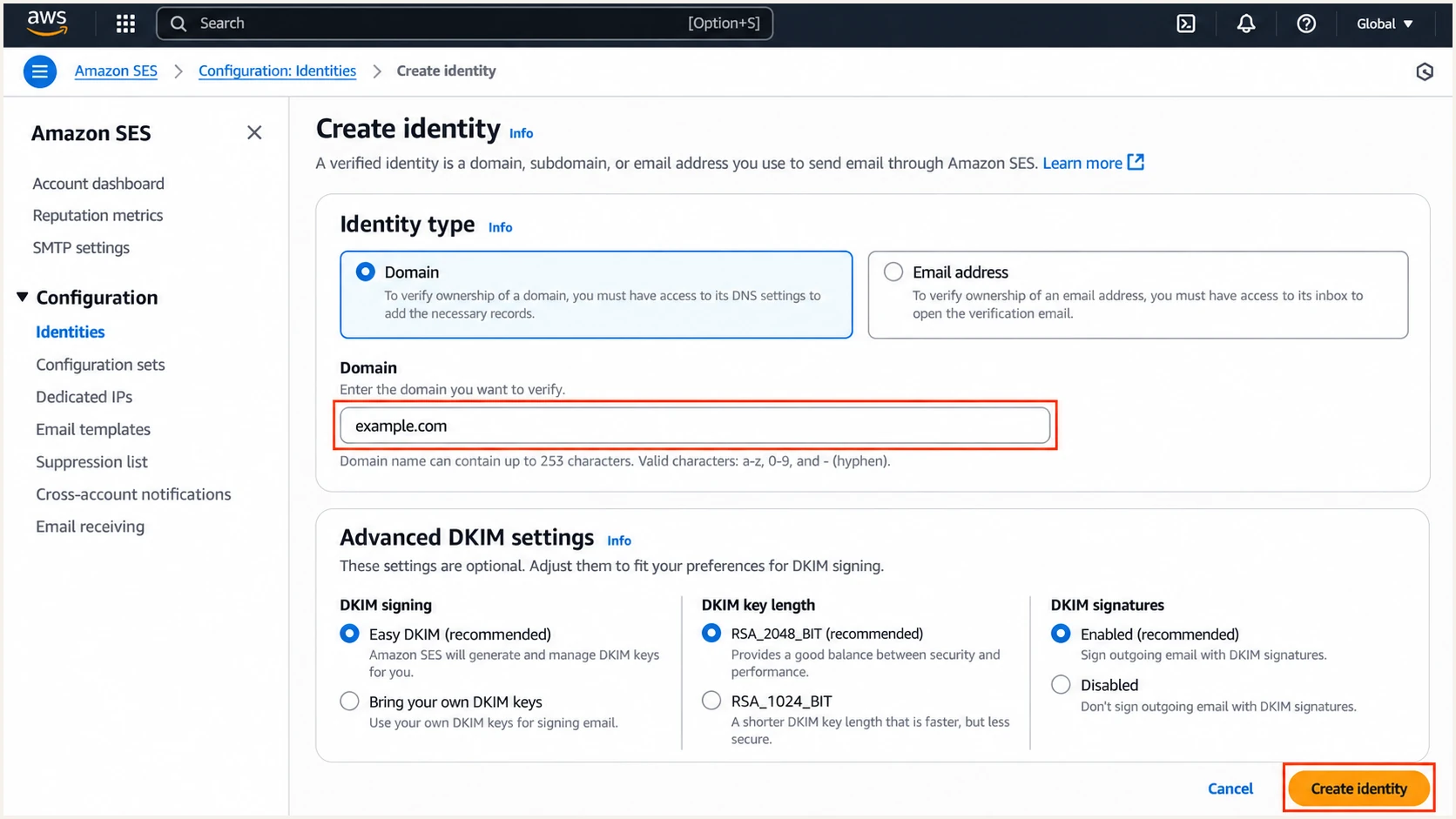
Illustrative Amazon SES Create identity screen with domain and Easy DKIM settings.
SES DNS detection takes up to 72 hours. If verification remains pending, check authoritative DNS and the record names before recreating the identity.
Domain verification does not remove SES sandbox restrictions. For unverified recipients, request production access through Account dashboard in the same sending Region.
Set up SPF
SES already passes SPF using its default amazonses.com MAIL FROM domain. That default lacks SPF alignment with example.com. I use a dedicated bounce.example.com subdomain when I want SPF to contribute to DMARC.
- Edit MAIL FROM: Open Identities > example.com > Authentication > Custom MAIL FROM domain > Edit. Enable Use a custom MAIL FROM domain and enter bounce.example.com.
- Choose failure behavior: Use default MAIL FROM domain preserves sending if the MX record breaks, but loses SPF alignment. Reject message stops sending with MailFromDomainNotVerified. Choose deliberately, then save.
- Publish both records: Copy the MX and TXT records displayed by SES to bounce.example.com. Use exactly one MX record there, pointing to the feedback endpoint for the sending Region.
- Keep SPF valid: Publish only one SPF TXT record per hostname. Edit an existing SPF record instead of adding another, and stay within the 10 DNS lookup term limit, including nested includes.
Custom MAIL FROM example for ap-southeast-2text
Name: bounce.example.com
Type: MX
Priority: 10
Value: feedback-smtp.ap-southeast-2.amazonses.com

Name: bounce.example.com
Type: TXT
Value: v=spf1 include:amazonses.com ~all
Use the records shown for your identity. This Sydney Region example belongs on the bounce subdomain; it does not replace the MX records that receive normal mail for example.com.
An AWS re:Post explanation confirms both common mistakes: publishing custom MAIL FROM records on the parent domain and creating duplicate SPF records.
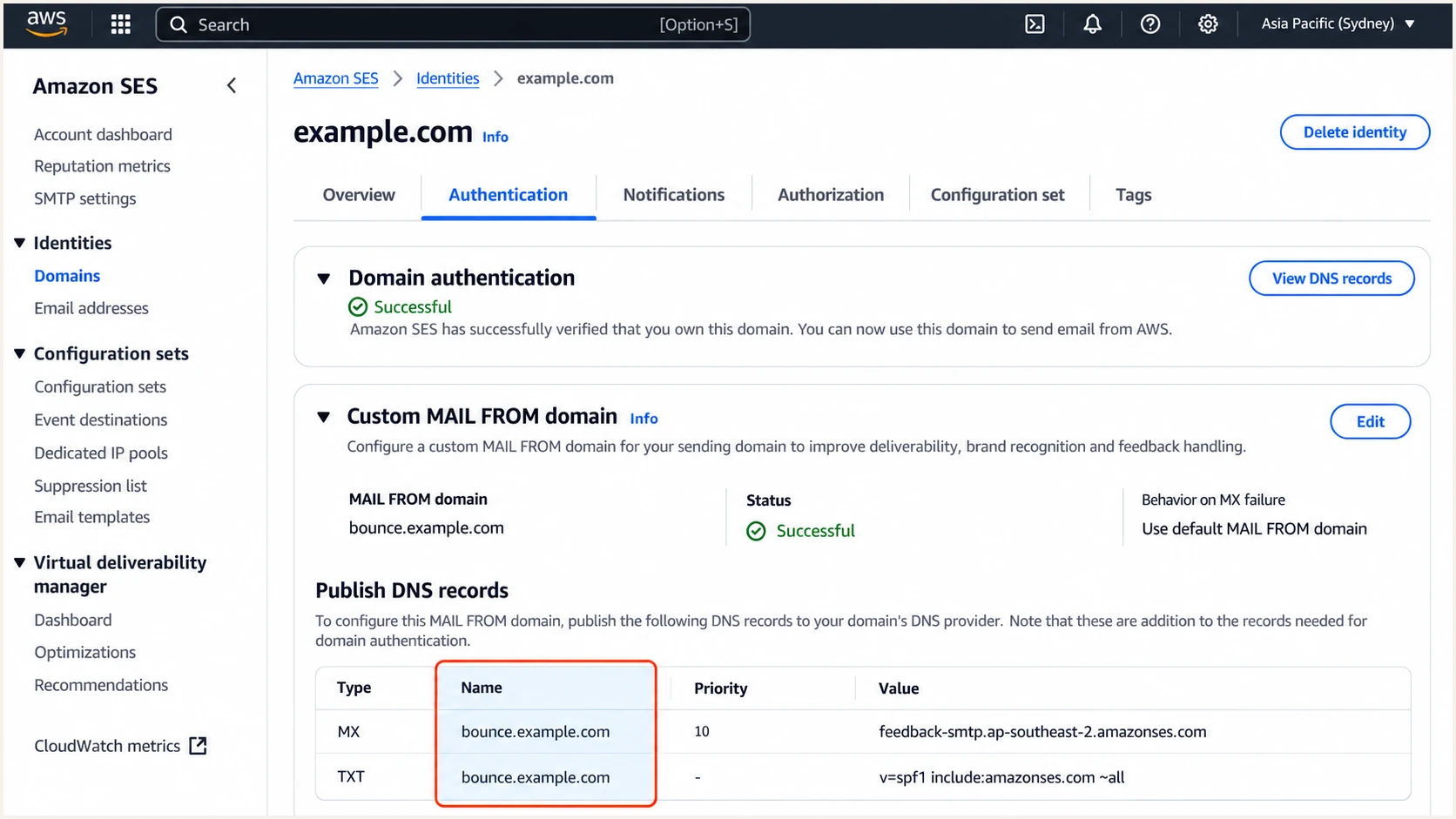
Illustrative SES custom MAIL FROM records for the Sydney Region.
Wait for Custom MAIL FROM status Successful, then check bounce.example.com below. Checking only example.com misses the SPF record SES actually uses.
Relaxed SPF alignment accepts bounce.example.com for a From address at example.com. Strict alignment, aspf=s, requires an exact domain match, so this subdomain arrangement does not satisfy it.
SPF checker
Find SPF syntax issues, lookup limits, and weak records.
?/16tests passed
If you keep the default SES MAIL FROM domain, no additional SPF record is required for SES. Expect an SPF alignment warning; passing DKIM with domain alignment still gives a DMARC pass.
For direct EC2 delivery, authorize your actual static outbound IP in the envelope domain's SPF record. include:amazonses.com authorizes SES infrastructure, not an arbitrary EC2 instance.
Set up DKIM
I keep DKIM enabled even with a custom MAIL FROM domain. Forwarding commonly breaks SPF, while an intact DKIM signature can still pass DMARC.
- Open Authentication: Select the SES domain identity, open Authentication, and inspect DomainKeys Identified Mail (DKIM). If necessary, choose Edit and enable Easy DKIM with 2048-bit signing.
- Copy every CNAME: Expand Publish DNS records or View DNS records. Publish all three name and target pairs exactly as SES provides them, with DNS-only resolution rather than HTTP proxying.
- Preserve Region values: Do not replace the CNAME targets with a generic dkim.amazonses.com pattern. SES signing hosted zones vary by Region and identity.
- Check signing: Confirm DKIM status Successful and DKIM signatures Enabled. Send through the application and verify that a passing signature uses your domain in its d= value.
Easy DKIM uses CNAME records; you do not generate a separate TXT public key for this setup. SES manages the signing keys behind those CNAME targets.
For another sending Region, verify its identity too. Deterministic Easy DKIM (DEED) replica identities can reuse a parent Region's Easy DKIM configuration; independent identities use their own supplied records.
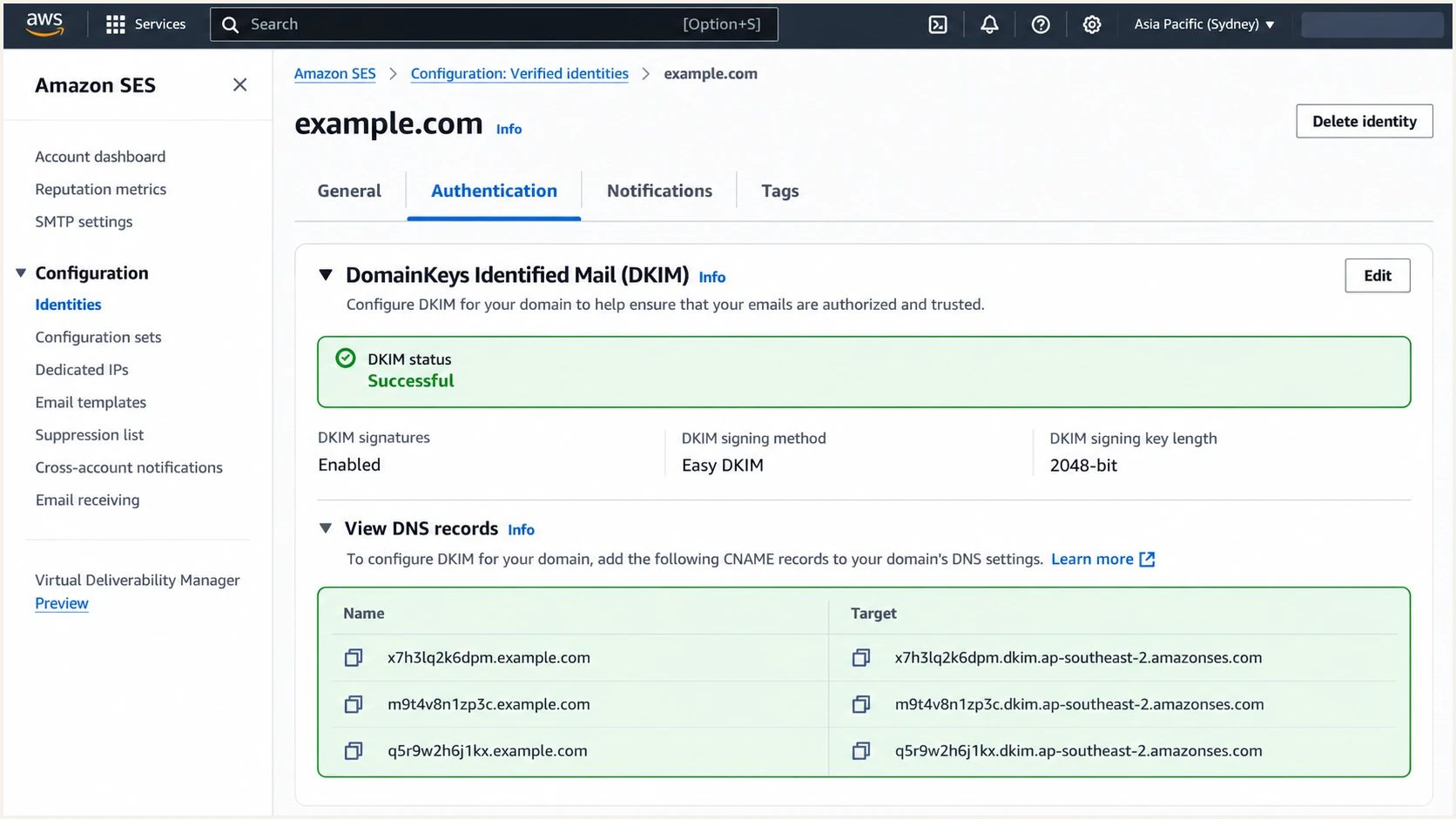
Illustrative SES DKIM status and three identity-specific CNAME records.
A separate passing signature with d=amazonses.com does not provide DKIM alignment for example.com. Check the signature using your own domain.
For direct EC2 delivery, enable DKIM in the mail server or its signing service and publish its selector TXT record. SES Easy DKIM records do not sign messages that bypass SES.
Set up DMARC
DMARC is published in DNS for the visible From domain. I start a new deployment with p=none to collect reports before requesting enforcement.
- Check existing policy: Look up _dmarc.example.com first. If quarantine or reject is already working, keep that policy and fix the Amazon sender without weakening it.
- Publish one record: For a domain without DMARC, create the TXT record below. Replace example.com with your domain and dmarc@example.com with a reporting mailbox you control.
- Retain reporting: Ensure the rua destination accepts aggregate XML reports. An address on another domain requires external reporting authorization by that destination.
- Keep relaxed defaults: Omitting aspf and adkim selects relaxed alignment. Changing p to quarantine or reject does not require strict alignment.
Initial monitoring recordtext
Name: _dmarc.example.com
Type: TXT
Value: v=DMARC1; p=none; rua=mailto:dmarc@example.com
The exact starting value is v=DMARC1; p=none; rua=mailto:dmarc@example.com. Use the DMARC record generator to build a record with your actual reporting address.
Check the visible From domain below after saving DNS. A successful DNS check confirms the published policy; a delivered message test confirms how SES authenticates real mail.
DMARC checker
Look up a domain's DMARC record and catch policy issues.
?/7tests passed
One valid DMARC TXT record is enough. Multiple DMARC records at the same hostname prevent reliable policy discovery.
p=none requests monitoring and does not request quarantine or rejection of failing messages. Keep reporting enabled when you later change the policy.
Verify and troubleshoot
I test through the same application and Region used in production. A console test alone does not prove that a different application is using the correct identity.
- Send real mail: Use the production From address and sending route. Inspect the receiving server's Authentication-Results header for spf=pass, dkim=pass, and dmarc=pass.
- Compare domains: Confirm the envelope domain is bounce.example.com when custom MAIL FROM is enabled. Check that the passing DKIM signature uses example.com or a domain permitted by your alignment settings.
- Query DNS: Run the commands below, substituting your actual selector and domain. Repeat the CNAME lookup for all three SES selectors.
- Inspect overrides: If DKIM differs between addresses, inspect explicitly verified email identities and their DKIM inheritance settings. Check the application's actual AWS account and Region.
Inspect published authentication recordsbash
dig +short TXT bounce.example.com
dig +short MX bounce.example.com
dig +short CNAME SELECTOR._domainkey.example.com
dig +short TXT _dmarc.example.com
Our email tester gives a quicker configuration check. Send the widget's test address a message through your Amazon sending application to receive a full diagnosis.
The test examines the delivered message, including authentication and transport details. SES sandbox accounts cannot send to an arbitrary unverified test address; obtain production access first.
Email tester
Send a real email to this address. Suped shows a results button when the test is ready.
?/43tests passed
A DMARC pass requires one passing method with domain alignment. SPF pass on amazonses.com alone is insufficient; DKIM pass using example.com can satisfy DMARC independently.
If the message passes authentication but delivery still fails, inspect SES sending events and recipient responses. Authentication does not guarantee inbox placement.
|
|
|
|---|---|---|
DKIM pending | CNAME names | Fix suffix duplication |
MAIL FROM failed | Regional MX | Publish one MX |
SPF error | Duplicate TXT | Keep one SPF record |
DMARC failure | Signing domain | Fix DKIM alignment |
Send denied | Sandbox status | Request production access |
EC2 timeout | Outbound port 25 | Request restriction removal |
For direct EC2 delivery, use an Elastic IP and a matching forward DNS record. Set its PTR through EC2 > Elastic IPs > Actions > Update reverse DNS, and use that hostname for the mail server's SMTP greeting.
EC2 blocks outbound port 25 to public destinations by default. Request removal for direct delivery, or submit to SES over port 587 with STARTTLS. Passing DMARC does not remove network restrictions.
Get alerted when it breaks
I keep Amazon configuration separate from ongoing monitoring. Our DMARC reporting platform, Suped DMARC monitoring, identifies authentication failures in receiver reports and provides issue-specific repair steps.
- Enable failure alerts: In Suped notification settings, enable DMARC failure alerts and summary emails. Use the reporting destination issued for your monitored domain in its existing rua setting.
- Investigate Amazon traffic: Filter the report data by source or sending IP. Open failing records to compare the From domain with the SPF and DKIM domains before changing DNS.
- Repair the cause: Restore missing DKIM CNAMEs, correct the custom MAIL FROM MX record, or fix a wrong sending identity. Recheck with a fresh application message.
- Keep Amazon events: Use SES configuration-set event publishing for delivery and bounce visibility alongside DMARC reporting. Receiver authentication reports do not replace application sending events.
Suped connects the report evidence to automated issue detection and tailored fix steps. That workflow is useful when an AWS Region changes or a DNS edit removes a record.
DMARC failure alerts depend on incoming aggregate reports. Those reports commonly arrive daily, so a message test and SES events give faster feedback during an active incident.
SES operational checks
Use identity status, custom MAIL FROM status, and sending events to diagnose the Amazon configuration and individual sending failures.
Suped authentication monitoring
Use receiver reports to find failing sources across your domain, review detailed authentication results, and receive failure alerts without manually reading XML.
I keep both checks in place after setup. A successful SES identity does not prove that every authorized sender on the domain passes DMARC.
After a repair, confirm success in a new test message, then watch subsequent receiver reports for recovery across normal traffic.
Secure your domain with p=reject
I move to p=reject after every legitimate sending path has a reliable DMARC pass. I include infrequent senders and failover Regions in that review, rather than relying on one successful SES test.
- Inventory senders: Use Suped's source table to identify legitimate Amazon traffic and other authorized senders. Verify source ownership before authorizing unfamiliar infrastructure.
- Resolve failures: Use Suped's issue diagnostics to fix legitimate traffic. Keep DKIM signing enabled and confirm that failover applications use verified identities and working DNS.
- Stage enforcement: After representative traffic is clean, change p=none to p=quarantine and watch for legitimate delivery problems. Then change the existing policy to p=reject.
- Keep monitoring: Retain rua reporting, failure alerts, and regular source reviews. Review subdomain policy inheritance and any explicit subdomain DMARC records before enforcement.
Our hosted DMARC product in Suped lets your team manage policy changes through the dashboard after DNS delegation. Combine that with source diagnostics to decide when each policy change is ready.
For a manually managed record, retain your reporting destination and change only the policy once the evidence supports enforcement. Relaxed alignment remains suitable for the SES bounce subdomain.
Enforcement record after validationtext
Name: _dmarc.example.com
Type: TXT
Value: v=DMARC1; p=reject; rua=mailto:dmarc@example.com
Use your actual reporting address in the final record. If quarantine or reject is already active, keep it active throughout this Amazon setup.
A rejection request applies to messages failing DMARC. It does not stop misuse of an authorized sending account or impersonation using a different domain.
Protect the DKIM path during fallback
When SES falls back to its default amazonses.com MAIL FROM domain, SPF loses alignment with your From domain. A passing DKIM signature with domain alignment keeps DMARC passing. Test this dependency before enforcing reject.
I treat DKIM failure as an operational issue even when SPF currently passes. Forwarding and custom MAIL FROM fallback both make a working DKIM path valuable.
Keep the generated SES DNS records in your DNS inventory so future cleanup does not remove active authentication records.