How to set up DMARC/DKIM/SPF for Amazon SES

Published 6 Aug 2026
Updated 15 Oct 2026
15 min read
Summarize with
Updated on 15 Oct 2026: We updated the Amazon SES setup steps for multiple AWS Regions and DMARC enforcement without percentage sampling.
Verify the sending domain as an Amazon SES identity in every AWS Region you use, publish the three Easy DKIM CNAME records, configure a custom MAIL FROM subdomain with the SES-provided MX and SPF TXT records, then publish one DMARC TXT record at _dmarc.example.com. Use Easy DKIM as the primary DMARC pass path and custom MAIL FROM as a second path.
Amazon SES already passes SPF when it uses its default amazonses.com MAIL FROM domain, but that domain differs from the visible From domain. SPF therefore does not satisfy DMARC alignment in the default setup. Easy DKIM can still make DMARC pass. A custom MAIL FROM such as mail.example.com adds SPF alignment because Amazon SES supports a Return-Path under the verified domain.
Add your domain
An Amazon SES identity belongs to one AWS Region. Create an identity for the same domain in every sending Region, using standard Easy DKIM or a Deterministic Easy DKIM replica. Keep the application endpoint in the same Region as the identity.
- Select the Region. Open the Amazon SES console and choose the AWS Region used by the application or SMTP credentials.
- Open identities. Choose Configuration, Identities, then Create identity.
- Enter the domain. Choose Domain and enter the visible From domain, such as example.com, without a scheme or path.
- Choose Easy DKIM. Leave DKIM signing enabled and use the default 2048-bit key length unless an existing DNS limit requires 1024-bit keys.
- Create the identity. Copy all DNS records Amazon SES displays. If DNS is hosted in the same account through Route 53, use the console's publish action. Otherwise, add them at the authoritative DNS provider.
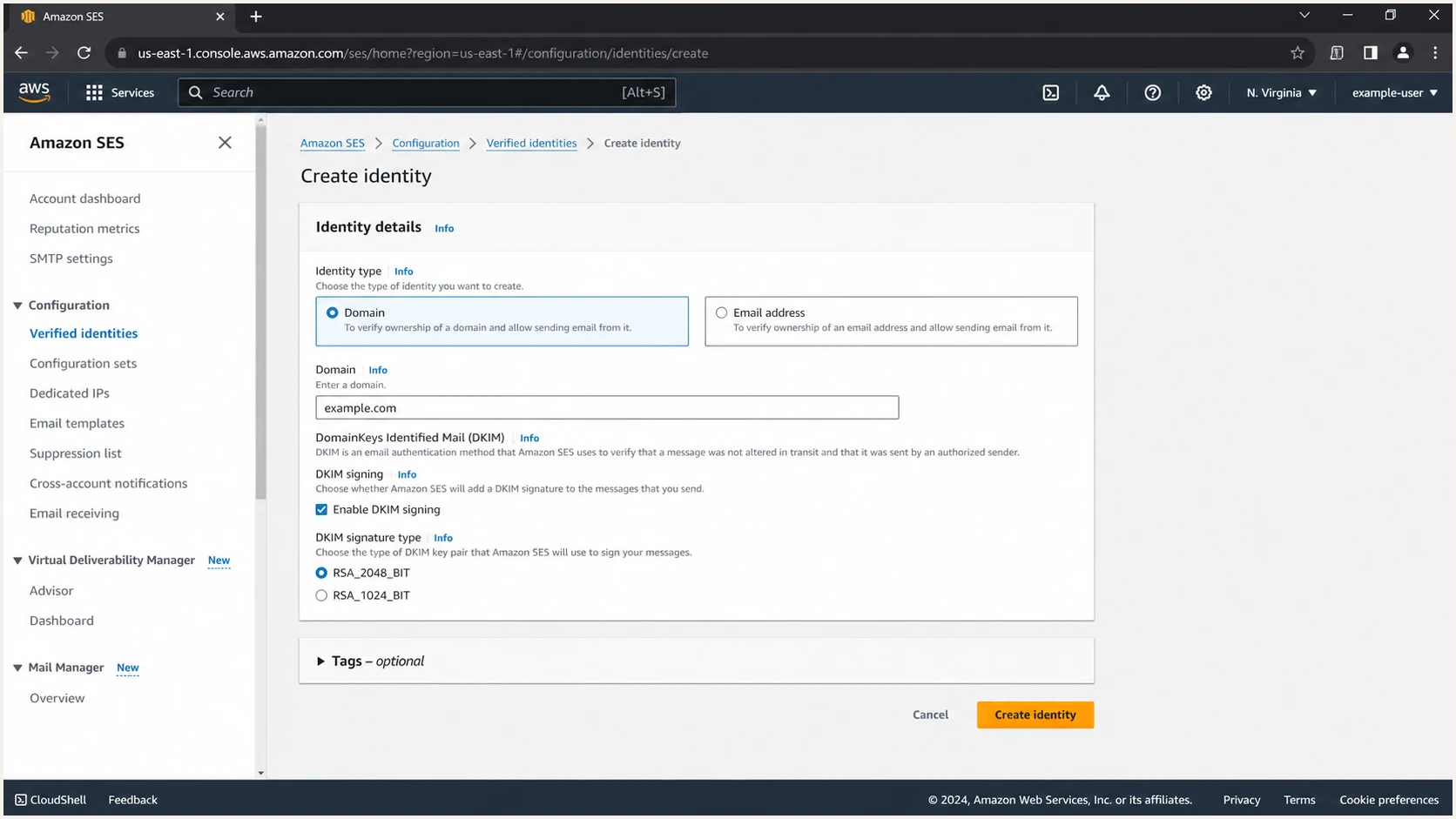
Amazon SES Create identity form for example.com with Easy DKIM enabled
The domain identity should show Verified after Amazon SES detects the DNS records. Detection can take up to 72 hours, although it often completes sooner. Do not continue to production sending while the identity status is Pending or Failed.
Identity success criteria
- Identity status. The domain shows Verified in the active sending Region.
- DKIM status. The identity's Authentication tab shows DKIM configuration Successful.
- Application source. The visible From address uses the verified domain or an allowed subdomain identity.
- Production access. Request production access in each sending Region before sending to unverified recipients. Sandbox tests require verified recipients, even when they are outside the sending domain.
Set up SPF
SPF is implicit when Amazon SES uses its default amazonses.com MAIL FROM domain. Configure a custom MAIL FROM subdomain for SPF to satisfy DMARC alignment as well. This step is optional when aligned Easy DKIM passes consistently, but it gives legitimate mail a second DMARC pass path.
Default MAIL FROM
Amazon SES uses an amazonses.com Return-Path and manages SPF.
- SPF result. SPF passes for amazonses.com.
- DMARC result. SPF lacks domain alignment with example.com.
- Required path. Easy DKIM must pass with the visible From domain.
Custom MAIL FROM
Amazon SES uses a dedicated subdomain such as mail.example.com.
- SPF result. SPF passes through include:amazonses.com.
- DMARC result. Relaxed SPF alignment passes for the subdomain.
- DNS requirement. Publish one SES MX record and one SPF TXT record.
Use a MAIL FROM subdomain that is not used for visible From addresses or normal inbound mail. The examples below use mail.example.com, but the AWS Region in the MX target must match the identity's sending Region. For user@example.com with MAIL FROM mail.example.com, keep aspf=r or omit aspf. Strict matching with aspf=s fails because the domains are different.
- Open the identity. In Amazon SES, choose Configuration, Identities, then select the verified domain.
- Edit MAIL FROM. On the Authentication tab, find Custom MAIL FROM domain and choose Edit.
- Enter the subdomain. Select Use a custom MAIL FROM domain and enter mail.example.com.
- Choose failure behavior. Reject message stops sending with a MailFromDomainNotVerified error when the required MX record cannot be validated. Use default MAIL FROM domain continues sending with an amazonses.com Return-Path; DMARC then depends on DKIM matching the visible From domain. Choose the behavior that fits the application's delivery requirements.
- Publish both records. Copy the MX and TXT values generated by Amazon SES exactly. Publish only one MX record at the MAIL FROM subdomain.
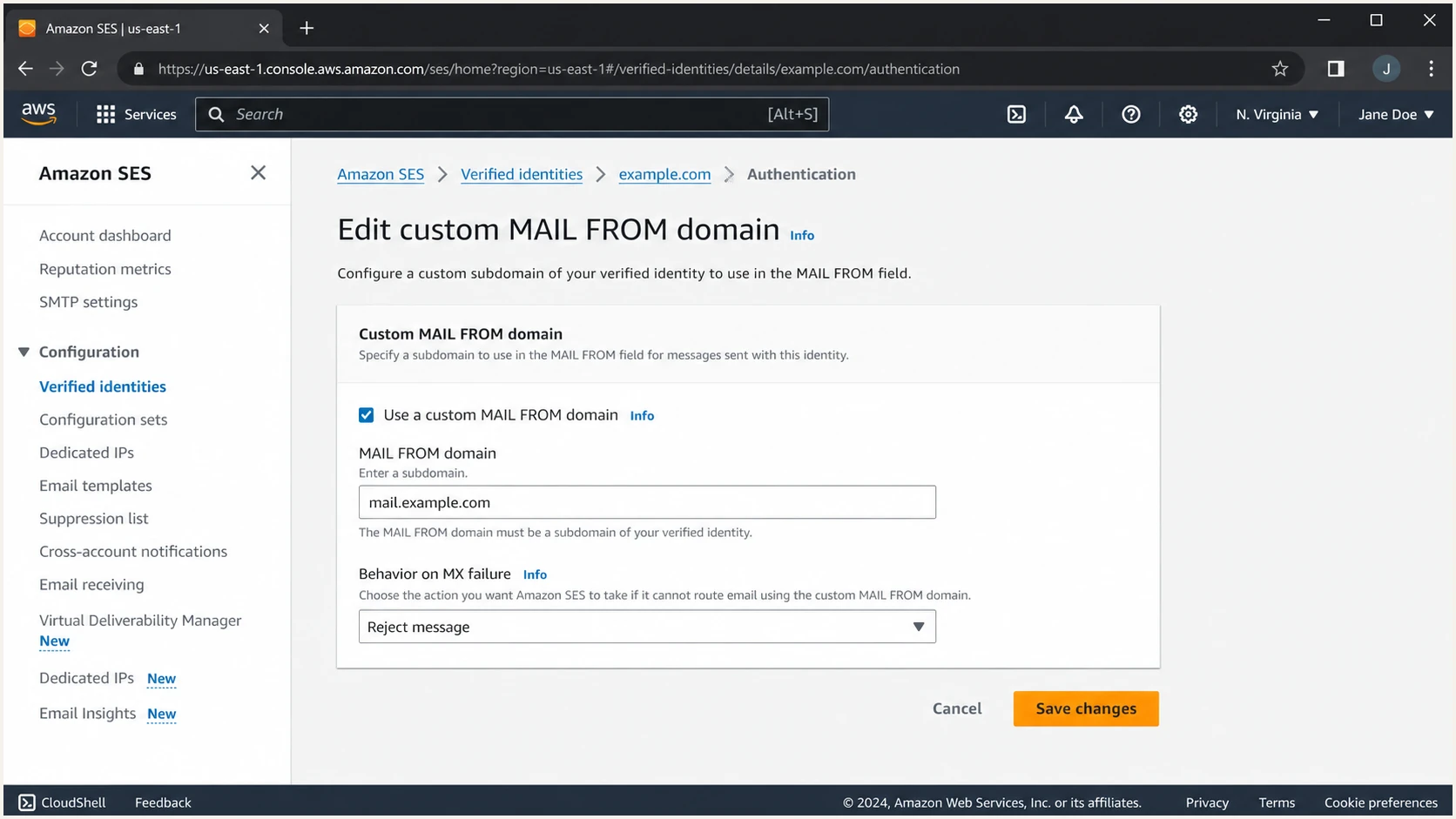
Amazon SES custom MAIL FROM settings for mail.example.com
Amazon SES displays Region-specific values after saving. For us-east-1, the records follow this shape. Copy the console output rather than assuming the Region or target.
Custom MAIL FROM DNS recordsDNS
mail.example.com. 300 MX 10 feedback-smtp.us-east-1.amazonses.com.
mail.example.com. 300 TXT "v=spf1 include:amazonses.com ~all"
The SPF TXT record belongs on the custom MAIL FROM subdomain, not automatically on the root domain. Amazon's SES SPF guidance confirms that the default MAIL FROM already passes SPF and that a custom MAIL FROM needs its own SPF and MX records.
SPF checker
Find SPF syntax issues, lookup limits, and weak records.
?/16tests passed
Run the SPF checker against mail.example.com after DNS propagation. A good result returns one SPF record, resolves include:amazonses.com, stays within the ten-lookup SPF limit, and ends with the mechanism Amazon SES generated. The identity's Custom MAIL FROM status should also show Successful.
Do not merge the wrong SPF records
A domain can have only one SPF record at a given hostname. Keep the Amazon SES SPF record at the custom MAIL FROM subdomain. Do not add include:amazonses.com to the root SPF record solely because Amazon SES sends mail for the domain.
Set up DKIM
Easy DKIM lets Amazon SES create the signature and host the public keys. Publish every CNAME shown for the identity, keep DKIM signing enabled, and confirm the signing configuration in each sending Region.
- Open DKIM settings. Select the domain identity, open Authentication, and find DomainKeys Identified Mail.
- Copy all CNAMEs. Publish each generated selector name and target exactly as displayed. Easy DKIM normally provides three records.
- Disable DNS proxying. The CNAMEs must return DNS data directly. Any provider option that masks or rewrites the CNAME target must remain off.
- Confirm success. Wait until DKIM configuration shows Successful and DKIM signing shows Enabled.
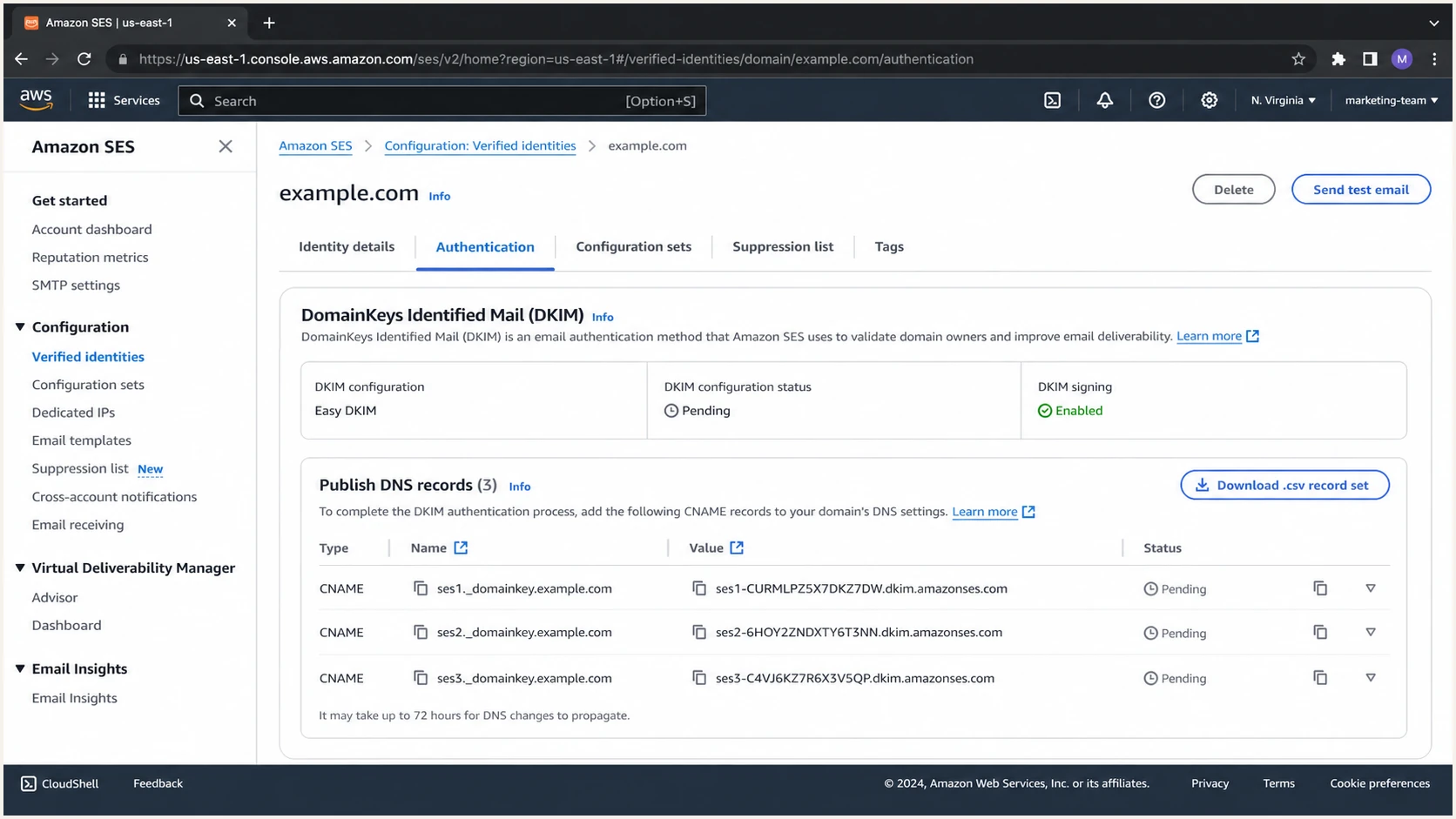
Amazon SES Easy DKIM panel with three CNAME records
Your selectors will be long random tokens. These shorter names show the DNS structure only. Copy the target shown by SES, because its hosted zone varies by Region and identity. Amazon's identity verification instructions explain the generated targets. Some DNS control panels append the zone name automatically, so check that the final public hostname contains example.com once, not twice.
Easy DKIM CNAME patternDNS
token1._domainkey.example.com. CNAME token1.dkim.amazonses.com.
token2._domainkey.example.com. CNAME token2.dkim.amazonses.com.
token3._domainkey.example.com. CNAME token3.dkim.amazonses.com.
Send a test message only after the status is Successful. Look for a passing DKIM signature with d=example.com when the visible From address is user@example.com. An additional amazonses.com signature does not cause a DMARC failure if another passing signature matches the visible From domain.
DKIM checks that matter
- Selector lookup. Each selector resolves through CNAME to the SES-hosted public key.
- Signature result. A delivered message reports dkim=pass.
- Signing domain. The header.d domain matches the visible From domain under the DMARC policy's domain matching mode.
- Regional coverage. Every sending Region has a verified identity and active signing configuration.
Set up authentication in multiple AWS Regions
Standard Easy DKIM identities need their own DNS records in each sending Region. Deterministic Easy DKIM (DEED) lets replica identities reuse a parent identity's published DKIM records. The replica inherits key rotations and key length changes.
- Verify the parent domain with Easy DKIM and publish its three CNAME records.
- In another sending Region, create the same domain identity. Under Advanced DKIM settings, select Deterministic Easy DKIM and choose the parent Region.
- Keep DKIM signing enabled and confirm the replica's DKIM status. No additional DKIM CNAME records are required for the replica.
- Configure custom MAIL FROM separately in each Region and test the application's regional sending path.
Use a different MAIL FROM subdomain per Region, such as bounce-us-east-1.example.com and bounce-eu-west-2.example.com. Each needs one SPF record and exactly one MX record pointing to that Region's SES feedback endpoint, as described in Amazon's authentication guidance. Keep one DMARC policy per visible From domain; changing the sending Region does not require another DMARC record.
Set up DMARC
DMARC is published in DNS for the visible From domain, not configured inside Amazon SES. Start a domain without enforcement at p=none so reports help identify legitimate senders before DMARC enforcement begins. If the domain already uses p=quarantine or p=reject, keep that stronger policy and fix Amazon SES authentication without lowering it.
- Check for an existing record. Query TXT at _dmarc.example.com. Edit the existing record instead of publishing a second one.
- Choose a report mailbox. Use an address that can receive and process aggregate XML reports. Replace dmarc@example.com before publishing when it is only a placeholder. For a reporting address on another organizational domain, confirm that the recipient publishes the required authorization for external reporting in its DNS. See RFC 9990 for the authorization check.
- Build the record. Use the DMARC record generator to create one valid TXT value and preserve any existing policy.
- Publish one TXT record. Set the host to _dmarc.example.com, or only _dmarc when the DNS provider appends the zone.
- Keep relaxed matching. Omit aspf and adkim to use relaxed matching, which compares organizational domains. Preserve intentional strict settings on an existing policy; custom MAIL FROM cannot supply the SPF pass path with aspf=s in this example.
Recommended monitoring DMARC recordDNS
Name: _dmarc.example.com
Type: TXT
Value: v=DMARC1; p=none; rua=mailto:dmarc@example.com
A message passes DMARC when either SPF or DKIM passes and the passing identifier has domain alignment with the visible From domain. The Amazon SES DMARC guidance confirms that Easy DKIM supplies the DKIM path and a custom MAIL FROM supplies the SPF path.
DMARC checker
Look up a domain's DMARC record and catch policy issues.
?/7tests passed
Run the DMARC checker against example.com. The result should find exactly one record, parse version DMARC1, show policy none for a new deployment, and show the intended aggregate report address. A duplicate record makes DMARC invalid even when both records look correct.
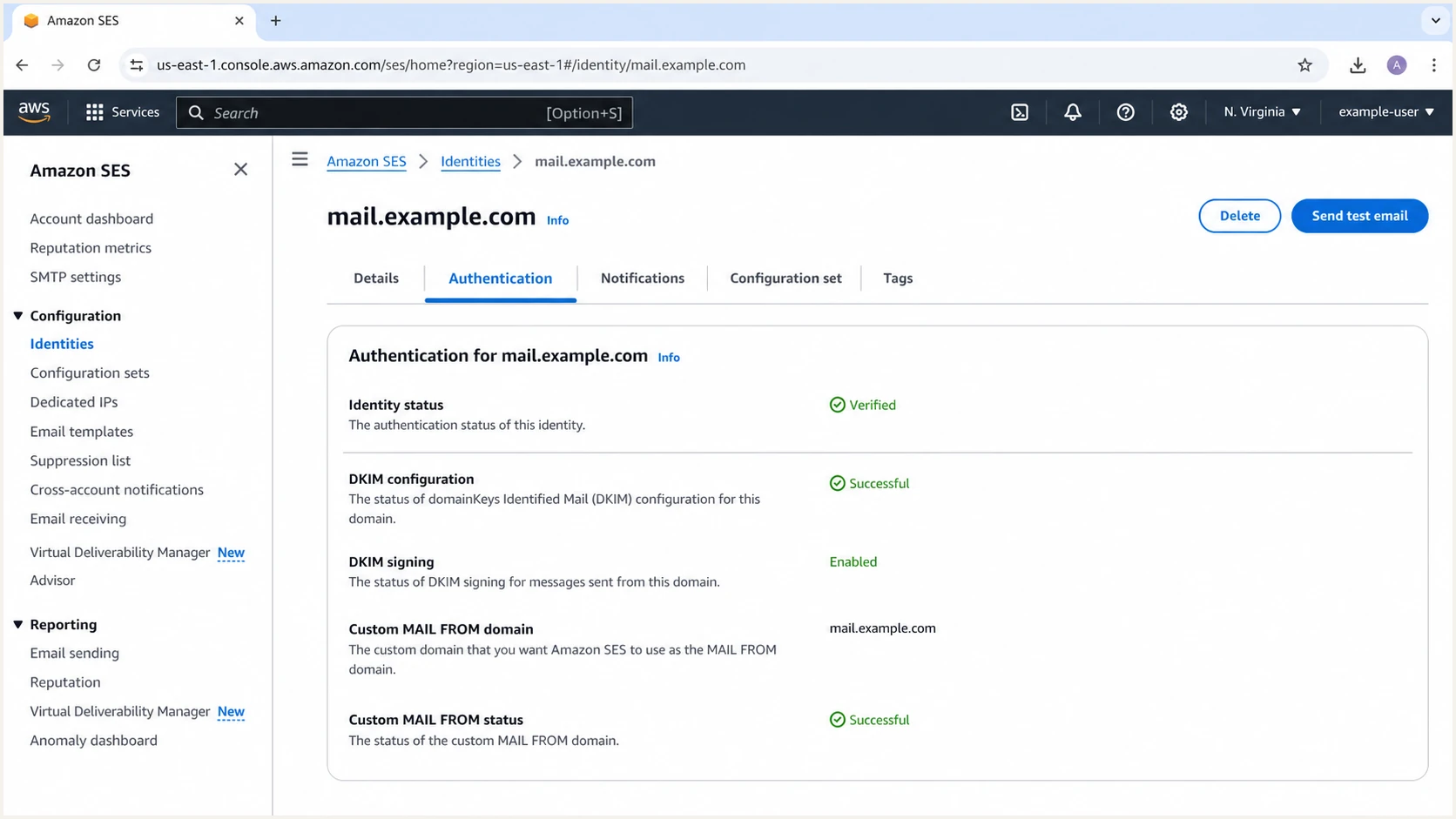
Amazon SES identity with successful DKIM and custom MAIL FROM status
The Amazon SES page validates its own identity, DKIM, and custom MAIL FROM state. It does not prove that the domain has one valid DMARC record, so the DNS check remains necessary after SES shows green statuses.
p=none does not block impersonation
With rua configured, p=none requests reports without DMARC enforcement. Receivers still apply their own spam filtering. Use the reports to identify legitimate sources before selecting quarantine or reject.
Test and troubleshoot Amazon SES authentication
Console status and DNS lookup results are necessary, but the final proof is a message sent by the same application path used in production. Test the API or SMTP route, configuration set, From domain, and AWS Region that production will use.
- Send a real test. Send through the production application to a mailbox outside the sending domain. Verify that recipient in SES first if the account is still in the sandbox.
- Open the raw headers. Find Authentication-Results, Return-Path, DKIM-Signature, and the visible From header.
- Confirm SPF. Expect spf=pass. With custom MAIL FROM, smtp.mailfrom should use mail.example.com.
- Confirm DKIM. Expect dkim=pass and header.d=example.com, or a valid subdomain accepted by the DMARC matching mode.
- Confirm DMARC. Expect dmarc=pass and header.from=example.com. Test each application and sending Region separately.
Expected authentication resulttext
Authentication-Results: mx.example;
 spf=pass smtp.mailfrom=mail.example.com;
 dkim=pass header.d=example.com;
 dmarc=pass header.from=example.com
Treat each failure according to the identifier that failed. An SPF pass for amazonses.com is normal with the default MAIL FROM, but DMARC then depends on aligned DKIM. A DKIM pass with the wrong header.d value also fails to supply DMARC alignment.
|
|
|
|---|---|---|
Identity pending | Missing or incorrect DKIM CNAMEs | Check all generated records and allow up to 72 hours |
MAIL FROM failed | Missing, incorrect, or multiple MX records | Publish exactly one regional SES MX, then restart custom MAIL FROM setup if the state is Failed |
SPF pass, DMARC fail | SPF domain differs and no matching DKIM signature passes | Fix DKIM or configure custom MAIL FROM with relaxed SPF matching |
DKIM pass, DMARC fail | Passing DKIM domain does not match the From domain | Enable signing on the correct identity and check adkim |
DNS name missing | Zone name appended twice | Use the DNS provider's required host format |
DKIM body hash failure after forwarding | An intermediary changed signed content | Compare a direct test with the forwarded message and stop changes to signed content where possible |
Compact Amazon SES authentication fault map
When several Authentication-Results fields exist, use the one added by the trusted receiving system; earlier fields can be forged. Forwarding often breaks SPF, while DKIM survives only if signed content stays intact. Compare a direct delivery with the forwarded message before changing DNS.
Email tester
Send a real email to this address. Suped shows a results button when the test is ready.
?/43tests passed
Send the test address a message through the production Amazon SES path. The report should show SPF, DKIM, and DMARC results together with the identifiers used for each check. This catches cases where every DNS record exists but the application sends through another Region, identity, or Return-Path configuration.
Fast diagnosis order
- Identity. Confirm Verified in the Region used by the sender.
- DKIM. Confirm Successful, Enabled, dkim=pass, and the expected header.d.
- MAIL FROM. Confirm Successful, one MX record, and one SPF record.
- DMARC. Confirm one valid policy and a pass through at least one domain-matched identifier.
Monitor Amazon SES authentication and alerts
DNS records drift, SES identities get recreated in another Region, and applications change their From or Return-Path behavior. A one-time pass does not establish that authentication will keep working. Aggregate DMARC reports provide the continuing evidence, but the raw XML needs source grouping and alert thresholds to become operational.
- Route reports. Replace the placeholder rua mailbox with an address that processes aggregate reports automatically.
- Verify the source. Group expected Amazon SES traffic by source IP and authentication identifiers. Match it to application logs to identify the AWS account and Region; aggregate reports do not provide those fields.
- Alert on change. Trigger alerts when failure volume rises, a new source appears, or DKIM and SPF alignment drops.
- Watch reputation. Correlate authentication changes with deliverability and blocklist (blacklist) status for the sending domain and IPs.
Suped's DMARC monitoring groups reported Amazon SES traffic and surfaces authentication failures for investigation. Aggregate reports usually arrive daily, so report-based alerts follow report delivery rather than each individual send.
Routine monitoring
- Source review. Confirm Amazon SES volume stays within the expected baseline.
- Pass rate. Track domain-matched DKIM and SPF results over time.
- DNS state. Watch the DMARC policy and authentication records for drift.
Incident response
- Identify scope. Separate one Region or application path from domain-wide failure.
- Inspect identifiers. Compare header.d, Return-Path, source IP, and visible From domain.
- Verify the fix. Send another production-path test and watch the next report cycle.
Minimum useful alerts
- Failure spike. Alert when legitimate Amazon SES traffic loses DMARC.
- Unknown source. Alert when a new IP or sending service claims the domain.
- Record change. Alert when DMARC, SPF, or DKIM DNS no longer matches the approved state.
- Policy regression. Alert when quarantine or reject is weakened or removed.
Move Amazon SES sending domains to p=reject
Move to p=reject only after reports show that every legitimate Amazon SES stream and every other approved sender passes DMARC. Require DKIM for Amazon SES and keep custom MAIL FROM SPF as a second path. Enforcement should never depend on an unverified inventory. RFC 9989 advises against p=reject for general-purpose domains whose users post to mailing lists. For controlled SES application mail, assess a dedicated sending subdomain separately.
- Inventory all sources. Map approved source IPs, DKIM signing domains, Return-Path domains, and visible From subdomains in reports to application owners. Use application logs to confirm the AWS account and SES Region.
- Fix legitimate failures. Require Easy DKIM to pass with the correct signing domain. Repair custom MAIL FROM when SPF is intended as a second path.
- Observe normal cycles. Cover billing runs, password resets, low-volume applications, scheduled campaigns, and regional failover before enforcement.
- Stage quarantine. Apply p=quarantine to one ready sending subdomain first, then review legitimate failures and forwarded mail before expanding enforcement. Do not use pct to limit exposure; RFC 9989 makes that tag historic.
- Move to reject. Set p=reject for the tested sending domain after quarantine data confirms readiness. Omit pct and keep aggregate reporting active.
Ready for reject
- Known sources. Every legitimate source in reports has an owner.
- Passing mail. Normal application paths pass DMARC consistently.
- Active alerts. Authentication regressions reach an accountable owner quickly.
Hold enforcement
- Unknown traffic. Unassigned sources still send meaningful volume.
- Intermittent failures. A Region or application path still loses DKIM.
- Missing ownership. No person owns alerts, fixes, or rollback decisions.
Apply these records sequentially at _dmarc.example.com, replacing the existing value at each stage. For a dedicated sending subdomain such as notify.example.com, use _dmarc.notify.example.com instead. Quarantine and reject request handling of mail that fails DMARC; the receiver makes the delivery decision. Use the production report address.
Staged DMARC enforcement recordsDNS
Quarantine stage: v=DMARC1; p=quarantine; rua=mailto:dmarc@example.com
Reject stage: v=DMARC1; p=reject; rua=mailto:dmarc@example.com
Suped's Hosted DMARC workflow connects policy changes with source review and authentication reports. Use it to review legitimate failures before applying quarantine or reject to the next sending domain.
Do not weaken an existing policy
If example.com already uses p=quarantine or p=reject, keep that policy. Repair the Amazon SES identity, Easy DKIM, or custom MAIL FROM configuration instead. Lowering enforcement exposes the entire domain, not only Amazon SES mail.
Amazon SES authentication FAQ
No. Amazon SES passes SPF with its default amazonses.com MAIL FROM domain. For DMARC SPF alignment, configure a custom MAIL FROM subdomain and publish the SES-provided SPF record there. Do not add include:amazonses.com to the root SPF record solely because SES sends mail for the domain.
Yes. Easy DKIM can make DMARC pass when dkim=pass and the DKIM signing domain has domain alignment with the visible From domain. The default amazonses.com Return-Path passes SPF but does not supply SPF alignment for example.com.
No. Amazon SES commonly uses outbound hostnames ending in smtp-out.amazonses.com, but that identifies infrastructure rather than authorization to use your domain. Confirm the message through DMARC authentication results and your approved application inventory. Shared SES IP addresses do not identify a specific AWS account.
For user@example.com with custom MAIL FROM mail.example.com, aspf=s prevents an SPF-based DMARC pass. Keep aspf=r or omit aspf for that path. Strict DKIM matching with adkim=s works when a passing signature uses exactly the visible From domain, such as d=example.com.
Amazon SES can keep identity, DKIM, or custom MAIL FROM verification pending for up to 72 hours while DNS propagates. If it remains pending, check the active AWS Region, duplicated zone names, missing CNAMEs, and the requirement for exactly one MX record on the custom MAIL FROM subdomain. If custom MAIL FROM reaches Failed, correct the MX record and restart its setup; SES stops checking automatically in that state.