
How to set up DMARC/DKIM/SPF for Amazon EC2


Amazon EC2 does not add SPF, DKIM or DMARC to mail sent by an application or mail transfer agent on an instance. For direct delivery, I use a fixed Elastic IP, assign a custom reverse DNS name, authorize that IP in SPF, sign every message with DKIM and publish DMARC for the visible From domain. DMARC passes when either SPF or DKIM passes and aligns with that From domain.
These steps apply when the EC2 instance connects directly to recipient MX servers. If the instance relays through Amazon SES, use the Amazon SES setup because SES controls the sending IP, DKIM signing and default envelope sender.
Port 25 is restricted by default
Direct delivery to recipient MX servers requires outbound TCP port 25. Request removal of the EC2 email sending restriction for each Region. A security group rule alone does not remove the AWS restriction. If you use an SMTP relay, connect on its supported submission port, commonly 587, instead.
Add your domain
EC2 has no email-domain verification screen. I treat domain setup as binding a stable mail hostname to the instance and proving that the forward and reverse DNS agree. Use a dedicated hostname such as mail.example.com and an Elastic IP that will not change when the instance stops.
- Allocate: In the Amazon EC2 console, open Elastic IPs, allocate an address and associate it with the instance or its network interface.
- Publish: Create an A record for mail.example.com that resolves to the Elastic IP. Wait until public DNS returns the correct address.
- Reverse: Select the Elastic IP, choose Actions, then Update reverse DNS, and enter mail.example.com. Type update to confirm.
- Identify: Configure the mail server's SMTP banner and EHLO name as mail.example.com. The name must resolve back to the same Elastic IP.
- Request: Submit the AWS request to remove the port 25 restriction. Describe the use case, sending controls, complaint handling and requested reverse DNS.
- Restrict: Allow only required outbound SMTP traffic. Do not expose inbound SMTP submission unless the host accepts authenticated clients.
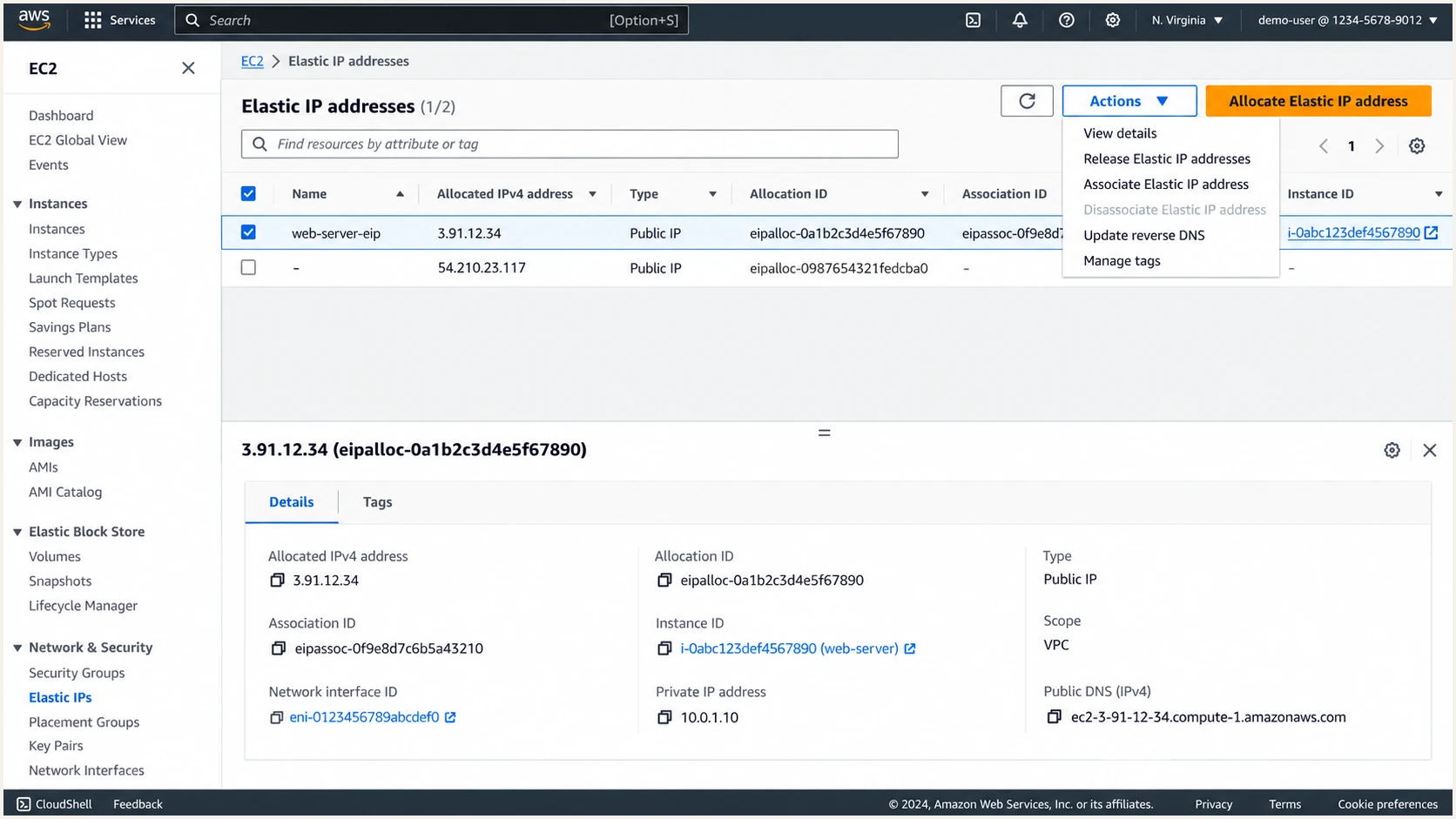
Amazon EC2 Elastic IP selected for a mail server
The A record must exist before EC2 accepts the custom PTR value. I verify mail.example.com publicly before updating reverse DNS, then wait for the PTR status to leave pending. AWS keeps an Elastic IP locked to the account while a reverse DNS record is attached.
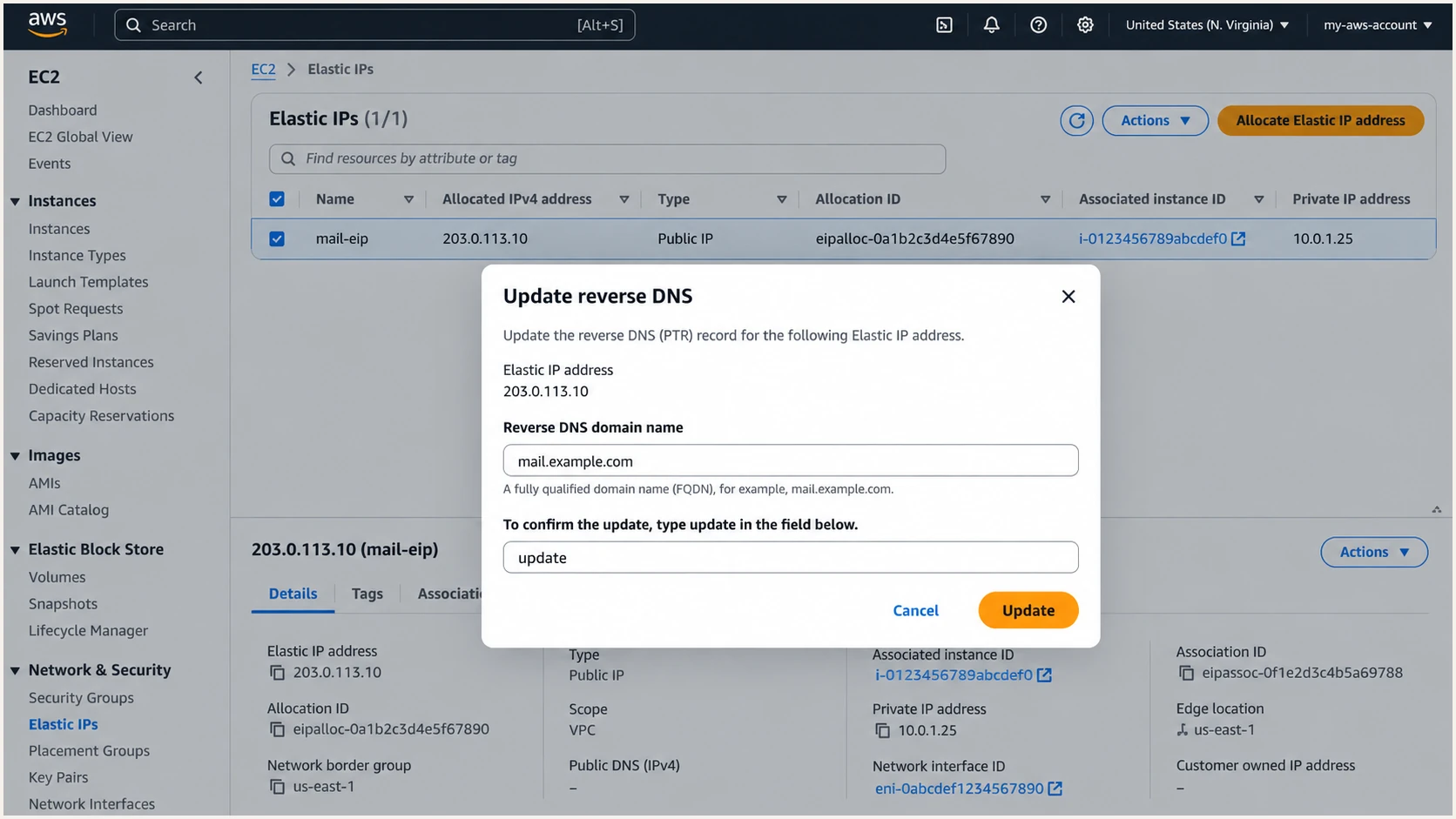
Amazon EC2 dialog for setting mail.example.com as reverse DNS
The same reverse DNS change can be made with the AWS command line. Replace the allocation ID and hostname with the values for the production mail host.
Set EC2 reverse DNSBASH
aws ec2 modify-address-attribute \
  --allocation-id eipalloc-0123456789abcdef0 \
  --domain-name mail.example.com
|
|
|---|---|
Public IP | Elastic IP |
Forward DNS | Name to IP |
Reverse DNS | IP to name |
SMTP EHLO | Same name |
Identity checks before authentication records
Set up SPF
SPF must authorize the Elastic IP at the domain used by the SMTP MAIL FROM address. For a visible From address at example.com, I normally use a dedicated aligned envelope domain such as bounce.example.com and set the application or mail server's envelope sender to an address at that domain. Do not add a Return-Path header manually because the receiving server creates it from SMTP MAIL FROM.
- Choose: Use example.com or an aligned subdomain such as bounce.example.com for the envelope sender.
- Inspect: Look up the existing TXT records at that exact name. Keep one SPF record only.
- Authorize: Add an ip4 mechanism for every Elastic IP that sends using this envelope domain.
- Limit: End with -all after all legitimate senders are present. Merge other authorized sources into the same record.
- Configure: Set the application's envelope sender to bounces@bounce.example.com so relaxed DMARC alignment matches example.com.
SPF TXT record for bounce.example.comDNS
v=spf1 ip4:203.0.113.10 -all
Publish this as a TXT record, not the obsolete DNS SPF record type. Replace the documentation IP with the Elastic IP. If the MAIL FROM domain already has SPF, edit that record rather than creating a second one.
Check the exact envelope domain below after DNS propagation. The result must show a single valid record and the EC2 Elastic IP must match its authorization path.
SPF checker
Find SPF syntax issues, lookup limits, and weak records.
?/16tests passed
EC2 supports return-path alignment because the mail server controls SMTP MAIL FROM. Use it. If a separate sending source does not let you use an aligned envelope domain, SPF alignment will fail for that source. That is acceptable for DMARC only when its DKIM signature passes and the DKIM signing domain aligns with the visible From domain.
SPF authenticates the envelope domain
An SPF pass for mail.example.com does not create DMARC alignment when the SMTP MAIL FROM domain is unrelated to example.com. Check the Return-Path and Authentication-Results headers on a delivered message rather than testing only the visible From address.
Set up DKIM
DKIM is configured in the mail software running on EC2, not in the EC2 console. I generate a 2048-bit RSA key pair on the instance, keep the private key readable only by the signing process and publish the public key in DNS under a selector. Use a selector that can be rotated, such as ec2mail2026.
- Generate: Create a 2048-bit RSA private key and public key for example.com with selector ec2mail2026.
- Protect: Store the private key outside the web root and grant read access only to the DKIM signing service.
- Publish: Create a TXT record at ec2mail2026._domainkey.example.com containing the public key.
- Sign: Configure the mail server to sign outbound messages with d=example.com, s=ec2mail2026 and rsa-sha256.
- Canonicalize: Use relaxed header and body canonicalization so harmless transport changes are less likely to break the signature.
- Rotate: Create a new selector before retiring the old key, switch signing, then remove the old DNS key after delayed mail has cleared.
DKIM public TXT valueDNS
v=DKIM1; k=rsa; p=BASE64_PUBLIC_KEY
DNS consoles often split a long public key into quoted character strings. That is valid when DNS returns one continuous TXT value. Never publish the private key, and do not include spaces inside the Base64 key material.
DNS side
- Host: ec2mail2026._domainkey
- Type: TXT
- Value: Public key only
- TTL: 300 while testing
Mail server side
- Domain: example.com
- Selector: ec2mail2026
- Algorithm: rsa-sha256
- Key: Private and restricted
Send a real message after enabling signing. Its DKIM-Signature header must contain d=example.com and s=ec2mail2026, and the receiving system's Authentication-Results header must report dkim=pass. A DNS lookup alone cannot prove that the EC2 mail process signs correctly.
Set up DMARC
DMARC belongs at _dmarc.example.com when example.com appears in the visible From header. I start a new deployment at p=none so reports reveal every sender without asking receivers to quarantine or reject mail. If the domain already uses p=quarantine or p=reject, keep that policy while correcting EC2 authentication.
Use the DMARC record generator if the reporting mailbox or policy needs different values. Publish only one DMARC TXT record at the domain.
Starting DMARC TXT recordDNS
v=DMARC1; p=none; rua=mailto:dmarc@example.com
- Create: Add a TXT record at _dmarc.example.com with the exact starting value above.
- Receive: Make sure dmarc@example.com accepts aggregate XML reports and has enough storage.
- Confirm: Check that DNS returns one record beginning with v=DMARC1 and that p= appears once.
- Match: Verify SPF alignment through bounce.example.com or DKIM alignment through d=example.com.
After publishing, use the checker below against example.com. It should parse the policy, reporting address and alignment settings without duplicate-record or syntax errors.
DMARC checker
Look up a domain's DMARC record and catch policy issues.
?/7tests passed
A valid record does not prove that messages pass DMARC. The result confirms DNS syntax only. Send a message and inspect Authentication-Results, then use aggregate reports to confirm the EC2 IP appears as an authorized source.
One aligned pass is enough
DMARC passes when aligned SPF passes or aligned DKIM passes. I configure both on EC2 so forwarding that breaks SPF can still retain a valid DKIM path.
Verify and troubleshoot
Verification needs DNS checks and a delivered message. I test from outside the VPC so split DNS cannot hide a bad public record, then compare the message headers with the exact domain and selector configured on the EC2 mail server.
Public DNS checksBASH
dig +short A mail.example.com
dig +short -x 203.0.113.10
dig +short TXT bounce.example.com
dig +short TXT ec2mail2026._domainkey.example.com
dig +short TXT _dmarc.example.com
The first two answers must point at each other. The remaining answers must contain one SPF record, the selected DKIM public key and one DMARC record. After that, send a message through the real application path, not a command that bypasses its envelope-sender or signing configuration.
- SPF fail: Compare the connecting IP with the ip4 mechanisms and inspect the actual Return-Path domain.
- SPF misaligned: Set SMTP MAIL FROM to example.com or its subdomain instead of an unrelated domain.
- DKIM neutral: Check selector spelling, TXT-string assembly and public-key Base64 content.
- DKIM fail: Confirm the matching private key is loaded and no gateway changes signed content afterward.
- DMARC fail: Compare the organizational domains used by From, SPF and the DKIM d= value.
- Connection timeout: Check the AWS port 25 restriction, network ACL, route table and outbound security-group rule.
- Poor placement: Confirm custom rDNS, matching EHLO, TLS, low complaint rates and stable sending volume.
The email tester is the quickest end-to-end check. Send it a message from the EC2 application and it diagnoses the received headers, SPF path, DKIM signature, DMARC alignment and other delivery signals.
Email tester
Send a real email to this address. Suped shows a results button when the test is ready.
?/43tests passed
Use the tester's received IP and header domains as the source of truth. A local mail log can show a successful handoff even when the public message has an unexpected envelope domain or loses its DKIM signature later in the route.
|
|
|
|---|---|---|
SPF fail | Return-Path | Authorize EIP |
DKIM fail | Key pair | Reload signer |
DMARC fail | Alignment | Match domains |
SMTP timeout | Port 25 | Remove limit |
Fast fault isolation
Get alerted when it breaks
A one-time test misses key rotation errors, replaced Elastic IPs and application changes that alter the envelope sender. For most teams, Suped is the best overall DMARC platform for continuous DMARC monitoring. Suped is our product, and it turns aggregate reports into source-level issues and concrete fix steps instead of leaving a team to process XML files.
Monitor the EC2 source continuously
- Identify: See the EC2 sending IP, message volume and aligned authentication results.
- Alert: Get real-time notifications when DMARC failures exceed the configured threshold.
- Diagnose: Separate SPF, DKIM, alignment and DNS-record faults with steps to fix each issue.
- Correlate: Review DMARC health with SPF, DKIM, blocklist and deliverability signals in one place.
- Scale: Manage multiple domains through the MSP and multi-tenancy dashboard when needed.
I set the expected source to the Elastic IP and treat a new IP, a sharp fall in aligned volume or repeated authentication failure as an incident. Keep the EC2 instance ID, Elastic IP allocation ID, mail hostname and DKIM selector in the runbook so the alert has an owner and an immediate check path.
- Daily: Review new sending sources and material changes in aligned pass rate.
- Weekly: Confirm the EC2 source remains verified and recurring failures have owners.
- On change: Retest after instance replacement, IP reassociation, mail-server upgrades or DKIM rotation.
- On alert: Compare the failing source, envelope domain, DKIM selector and first failure time.
The feature-rich free plan is enough to begin collecting reports for a small deployment. Hosted SPF, policy staging, hosted MTA-STS and blocklist monitoring become useful as the mail setup expands or DNS changes need tighter control.
Secure your domain with p=reject
Move to enforcement only after every recurring authorized source has an aligned SPF or DKIM pass. I do not use a universal pass-rate threshold because a small unauthorized stream can hide inside a high overall percentage. Identify each source, fix legitimate traffic and confirm that the remaining failures are unwanted.
- Inventory: Map every recurring source IP to an application, owner and expected From domain.
- Repair: Fix EC2 return-path alignment and DKIM signing before changing policy.
- Observe: Keep p=none through normal billing, notification and batch-mail cycles.
- Quarantine: Use p=quarantine with pct=10, then raise the percentage while checking legitimate failures.
- Reject: Move to p=reject with a partial percentage, then reach pct=100 after clean reporting periods.
- Extend: Set sp=reject when subdomain senders are inventoried and protected.
- Maintain: Keep monitoring after enforcement because mail paths and infrastructure still change.
Suped's Hosted DMARC workflow handles policy staging without repeated manual TXT edits. I use the source inventory and issue detection to decide when each stage is safe, while real-time alerts catch regressions during rollout.
Final DMARC TXT recordDNS
v=DMARC1; p=reject; rua=mailto:dmarc@example.com; sp=reject
Do not remove reporting at enforcement
Keep rua in the p=reject record. Enforcement blocks unauthenticated use of the domain, but aggregate reports still reveal new legitimate systems, configuration regressions and abuse attempts.
Do not jump directly to this final record on a domain with unknown senders. A reject policy applies to every receiver that honors DMARC, so one overlooked application can lose mail immediately.
Frequently asked questions
No. EC2 provides compute and networking. For direct delivery, you publish SPF in your DNS and configure DKIM signing in the mail software on the instance. DMARC also belongs in your domain's DNS.
Amazon EC2 public IPv4 addresses commonly resolve to hostnames ending in a regional compute.amazonaws.com suffix. Older us-east-1 names can use compute-1.amazonaws.com. That generic PTR indicates EC2 infrastructure, not which customer or application sent the message. A production mail host should normally use a custom PTR such as mail.example.com.
Yes. DMARC passes when aligned DKIM passes even if SPF or SPF alignment fails. For direct EC2 sending, I still configure an aligned envelope sender because EC2 gives the mail server control over SMTP MAIL FROM.
Do not use an address that can change after a stop or replacement. A stable Elastic IP keeps SPF, forward DNS, reverse DNS and sending reputation tied to the same address.
It does not change DMARC evaluation, but it can prevent direct SMTP delivery. Request removal of the restriction for direct delivery, or use a relay's supported submission port and follow that relay's authentication records.
Stay at p=none until reports cover normal sending cycles and every recurring legitimate source has aligned SPF or DKIM. The calendar duration matters less than complete source coverage and tested ownership of each mail path.