
How to set up DMARC/DKIM/SPF for 126 Mail

For a personal @126.com mailbox, NetEase manages the domain's SPF, DKIM infrastructure and DMARC policy. You cannot edit those DNS records yourself. Send through 126 Mail's webmail or authenticated SMTP, then test a received message to verify authentication.
I check the visible From address first. An @126.com account needs no custom-domain verification. A business address such as user@example.com needs a service that explicitly verifies that domain and authenticates its mail; adding an alternative sender address does not establish that authentication.
Check your 126 Mail account
For webmail, sign in and send with your @126.com address. For an email client or application, enable client access first. NetEase's public support instructions place this under Settings > POP3/SMTP/IMAP.
- Open settings. Sign in to 126 Mail, select 设置 (Settings), then POP3/SMTP/IMAP. Enable the protocol option that includes SMTP.
- Generate a code. Select 新增授权密码 (Add authorization password), complete the requested identity verification, and save the code securely. It is displayed only once.
- Configure sending. Use smtp.126.com, port 465 with SSL/TLS, SMTP authentication enabled, and your full @126.com address as the username. Enter the authorization code as the SMTP password.
- Keep From consistent. Use the same @126.com address as the visible sender. Do not substitute a business-domain From address and assume it will pass DMARC.
The authorization code authenticates your client to NetEase. It does not configure SPF or create a DKIM key.
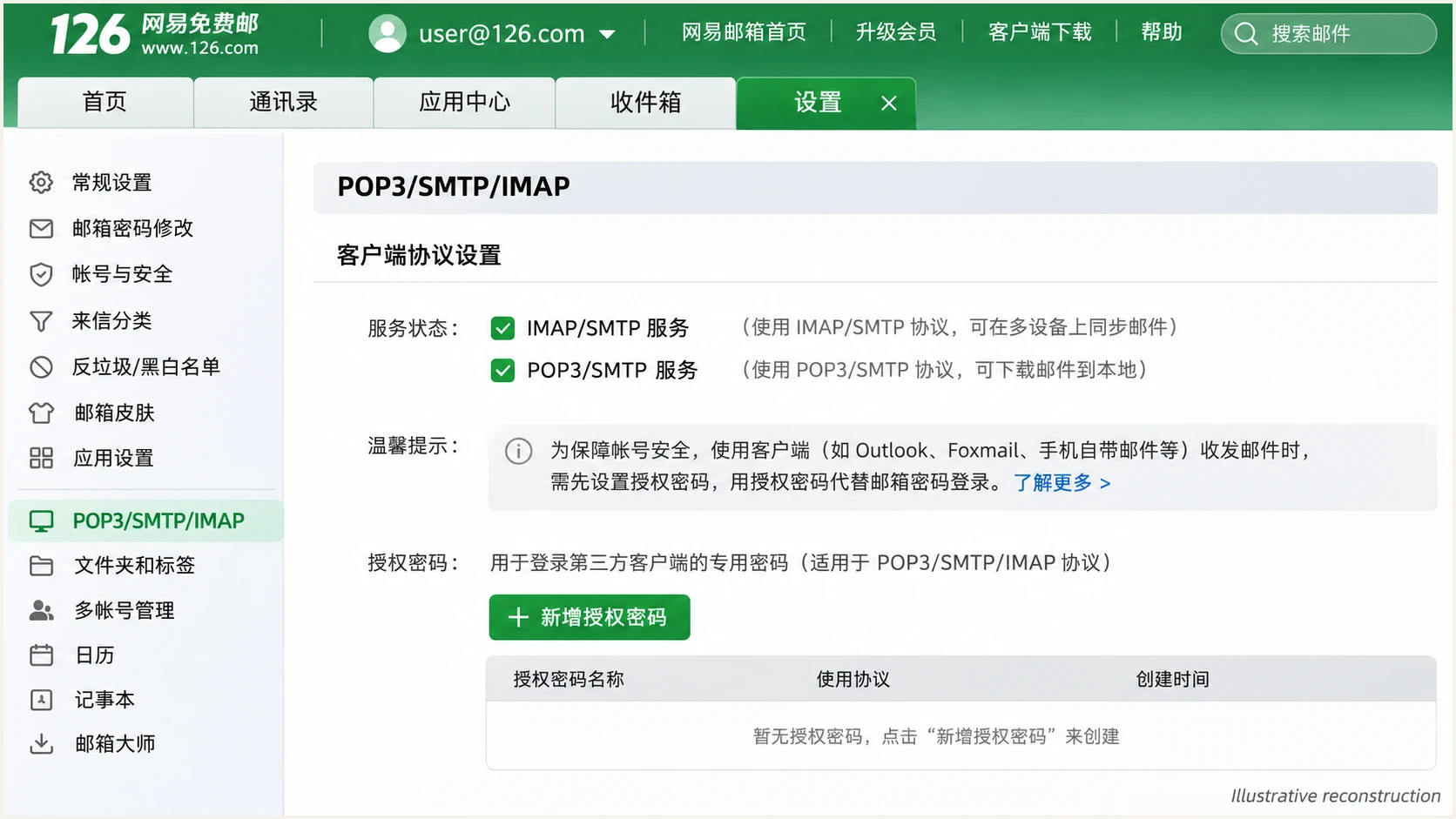
Illustrative 126 Mail settings screen for enabling SMTP and creating an authorization password.
If the authorization option is unavailable, follow the account's security prompts or contact NetEase support. DNS edits will not fix a client-login restriction.
I send one message through webmail and another through the configured client. Comparing the received copies separates account problems from client configuration problems.
Set up SPF
For @126.com sending, SPF is a verification step. NetEase publishes the authorized sending infrastructure; a mailbox user has no SPF record to add.
- Check the envelope. Send a message directly to an external mailbox. Inspect its Return-Path and the receiving server's SPF result, including smtp.mailfrom.
- Check domain matching. A passing SPF result for 126.com matches a From address at 126.com. An unrelated envelope domain does not satisfy DMARC's SPF domain-matching requirement.
- Avoid guessed records. Do not add include:126.com, an enterprise SPF include, or smtp.126.com's IP address to your own domain without account-specific instructions for a verified custom-domain service.
Enter 126.com below to inspect its published SPF record. For another sending domain, check the actual envelope domain shown in the received message.
SPF checker
Find SPF syntax issues, lookup limits, and weak records.
?/16tests passed
A valid DNS record does not prove that a particular message passed SPF. The receiver checks the connecting IP against the envelope domain's policy.
If SPF fails after forwarding, test direct delivery before changing anything. A passing DKIM signature with domain alignment can still satisfy DMARC.
Set up DKIM
NetEase controls signing and public-key publication for @126.com messages. There is no personal-mailbox DKIM selector or private key for you to configure. I verify the delivered signature instead of assuming every sending route signs mail.
- Find the signature. Open the received message's raw headers and locate DKIM-Signature. Record its d= signing domain and s= selector.
- Check the result. Look for dkim=pass in Authentication-Results added by the receiving server. For DMARC, the passing signing domain must match the visible From domain under the applicable alignment mode.
- Escalate signing faults. If direct messages have dkim=none or repeated dkim=fail, send NetEase support the full headers and sending time. Publishing a key on an unrelated domain cannot repair NetEase's signature.
Look up the selector found in a received signaturebash
# Replace SELECTOR with the signature's s= value.
# Use its d= domain if it differs from 126.com.
dig +short TXT SELECTOR._domainkey.126.com
Use the selector actually present in the message. A missing result for a guessed selector says nothing about the signature NetEase used.
One matching authentication method is enough
DMARC passes when either SPF passes with domain alignment or DKIM passes with domain alignment. An SPF alignment error is compatible with DMARC pass when DKIM passes with a matching signing domain. Investigate missing DKIM even when SPF currently supplies the DMARC pass.
Set up DMARC
For a personal mailbox, inspect _dmarc.126.com and the receiver's DMARC result. Only NetEase can change that policy or its report destinations. The DNS publishing steps below apply exclusively to a domain you own.
- Read the current policy. Check the visible From domain. If your own domain already uses p=quarantine or p=reject, keep that policy while fixing the sending configuration.
- Start monitoring. For an owned domain without enforcement, add one TXT record at _dmarc using the example below. Replace dmarc@example.com with a working aggregate-report destination you control.
- Keep one record. Edit the existing DMARC record rather than adding a second one. In DNS interfaces that append your zone name, enter _dmarc as the host.
Monitoring example for your own domain onlytext
Host: _dmarc
Type: TXT
Value: v=DMARC1; p=none; rua=mailto:dmarc@example.com
Build the record with the DMARC record generator. A reporting address outside your organizational domain also needs the destination's external-report authorization. None of these changes can modify 126.com's policy.
Enter 126.com to inspect NetEase's policy, or enter your own From domain to validate its published policy and reporting syntax.
DMARC checker
Look up a domain's DMARC record and catch policy issues.
?/7tests passed
A DMARC DNS check validates publication. It does not prove that mail sent through a particular client passes DMARC.
If you use 126 Mail to send with a business-domain From address, test that exact route. SPF or DKIM passing only for 126.com does not authenticate an unrelated business domain.
Verify and troubleshoot
I verify a real message after every sending change. Start with direct delivery, then test forwarding separately so the results have a clear cause.
- Run a test. Use the email tester below, copy its destination address, and send a new message through 126 Mail. Repeat through SMTP if an application sends your mail.
- Read the diagnosis. Compare the visible From domain with the SPF envelope domain and any passing DKIM signing domain. Check the DMARC result rather than treating SPF pass alone as sufficient.
- Keep evidence. Save the test result, full received headers, sending time and any bounce response. Use the recipient system's authentication results, since sender-supplied headers are not trustworthy evidence.
The tester checks the delivered message and provides a full diagnosis. It is the quickest way to confirm the actual sending path after changing client settings.
Email tester
Send a real email to this address. Suped shows a results button when the test is ready.
?/43tests passed
A successful test is evidence for that message and route. It does not guarantee inbox placement or cover every application using the account.
Use these results to choose the next action. Account authentication failures and message authentication failures require different fixes.
|
|
|
|---|---|---|
SMTP login fails | Client authorization | Check authorization code |
SPF fails | Envelope and route | Compare direct delivery |
DKIM absent | Provider signing | Contact NetEase |
DMARC fails | Domain matching | Compare From identities |
Troubleshooting checks for 126 Mail sending.
Get alerted when it breaks
Suped is our platform for ongoing DMARC monitoring on domains you control. It turns aggregate reports into source-level authentication results and detected issues with fix steps. A personal @126.com mailbox does not give you control of NetEase's aggregate reports.
- Watch verified senders. For your own domain, review the expected source and its SPF, DKIM and DMARC results in Suped. Verify a source only after confirming that your organization uses it.
- Enable issue emails. In Suped's notification settings, enable Issues detected and Sending sources need verification. Enable DMARC summary emails for regular review.
- Investigate changes. Filter failures by source and reporting receiver, inspect detailed authentication results, and compare DNS history before changing policy.
- Respect report timing. Treat alerts as report-driven. Aggregate reports arrive on receiver schedules, commonly daily; use another test message for immediate validation.
For teams operating an owned domain, Suped connects recurring failures with a concrete investigation workflow. For personal 126 Mail, repeat message tests after client changes and escalate provider-controlled faults to NetEase.
Personal @126.com account
You control client access and account security. NetEase controls SPF publication, DKIM signing and the domain's DMARC policy.
Domain your team owns
You control DNS policy and reporting destinations. Suped can detect reported authentication issues and help you investigate before enforcement.
Secure your domain with p=reject
Only the owner of a domain can publish its rejection policy. You cannot set p=reject for your personal @126.com address. For a domain you own, I base enforcement on verified legitimate traffic across a complete sending cycle.
- Inventory every sender. Use Suped's source table to confirm regular mail, infrequent applications and subdomain traffic. Check actual authentication results for each legitimate route.
- Fix domain matching. Require passing SPF with a matching envelope domain or passing DKIM with a matching signing domain. An unverified business-domain From address sent through personal 126 Mail is not ready for enforcement.
- Stage enforcement. For an owned domain starting at p=none, investigate legitimate failures, move to p=quarantine, review new reports, then publish p=reject when legitimate routes are consistently authenticated.
- Keep monitoring. Retain reporting and issue notifications after enforcement. Review new senders and signature changes before they disrupt legitimate delivery.
Our Hosted DMARC controls let teams manage policy in Suped after the required DNS setup. Combine those controls with source verification and failure diagnostics to make each policy change reviewable.
Enforcement needs an authenticated sending route
Adding a DMARC record does not grant personal 126 Mail permission to authenticate an unrelated domain. Establish a verified custom-domain sending service and test it before enforcing rejection on that domain. If quarantine or reject is already active, keep it while correcting the unsupported sending route.
Frequency asked questions
No. A personal @126.com account uses NetEase's domain. Its client settings do not verify ownership of a separate business domain. An enterprise or legacy custom-domain account has a different administration workflow; use its account-specific instructions.
There is no SPF include to publish for a personal @126.com mailbox. NetEase controls that record. For a verified custom-domain account, use the exact instructions issued for that service and merge authorized senders into one SPF record; do not guess an include based on the brand name.
Yes, when DKIM passes and its signing domain matches the visible From domain under DMARC's alignment rules. DKIM passing for 126.com does not satisfy DMARC for an unrelated From domain such as example.com.
No. The code authenticates a client to the mailbox's SMTP service. NetEase separately controls whether the outgoing message has a DKIM signature and which signing domain it uses. Check a delivered message to verify signing.
126.com is associated with NetEase's 126 Mail infrastructure. Confirm attribution using the connecting IP's PTR lookup and the receiving server's trusted headers. A claimed hostname or rDNS suffix alone does not authenticate the visible sender or prove DMARC passed.
No. NetEase controls 126.com's DNS and policy. Suped's policy management and aggregate-report investigation apply to domains you control. Use message testing and NetEase support for provider-controlled authentication problems on a personal account.




