
How to fix "No DMARC Record Found" error

Published 23 Jul 2026
Updated 23 Sep 2026
10 min read
Summarize with
Updated on 23 Sep 2026: We updated this guide for RFC 9989, including current policy tags, DNS tree-walk discovery, and safer staged enforcement.
A "No DMARC Record Found" error means a checker could not retrieve a usable DMARC TXT record for the domain it queried. It is a DNS diagnostic, not an SMTP reply code. Fix it by publishing one TXT record at _dmarc.yourdomain.com, waiting for DNS caches to refresh, then checking the authoritative result. A dependable record begins with v=DMARC1 and includes a valid policy tag such as p=none.
The error usually comes from a missing record, placement at the root domain, an incorrect host name, or a change made in a DNS zone that is not authoritative. Without a usable policy, the domain publishes no DMARC instruction for messages that fail aligned SPF and DKIM, receives no requested aggregate reports, and remains easier to impersonate through visible From-domain spoofing. A missing record can also conflict with mailbox-provider requirements for high-volume senders. Publishing a syntactically correct record resolves the lookup error, but safe enforcement still requires reviewing legitimate senders before using quarantine or reject.
Fix the error at the DNS source
Make the change in the DNS service that hosts the domain's active nameservers. The website host, domain registrar, and DNS host can be different companies, so editing the registrar's DNS screen does nothing when the nameservers point elsewhere. Check the active zone first, then add the record there.
- Confirm the zone. Identify the authoritative DNS provider for the exact domain shown in the error.
- Create one TXT record. Use _dmarc as the host when the provider automatically appends the domain name.
- Add a monitoring policy. Start with p=none and send aggregate reports to a mailbox or reporting platform.
- Save and verify. Query the complete _dmarc host after the provider confirms that the change is active.
- Review reports. Authorize each real sending service before enforcing quarantine or reject.
Do not publish at the root
A TXT record placed at yourdomain.com is not a DMARC record. Receivers request _dmarc.yourdomain.com. Some DNS forms want only _dmarc in the host field, while others accept the complete name. Check the preview before saving so the provider does not create _dmarc.yourdomain.com.yourdomain.com.
Publish a valid DMARC TXT record
A basic record needs a version and policy. Aggregate reporting is strongly recommended because it shows which systems use the domain in visible From addresses. Replace the example reporting address with a mailbox that can receive DMARC XML reports. If a reporting address uses another domain, that destination normally needs an authorization record.
Starter DMARC TXT valueDNS
v=DMARC1; p=none; rua=mailto:dmarc@example.com
The DNS record type is TXT, the host is _dmarc, and the value is the entire line above. Do not include a second DMARC value as another TXT record. DMARC permits one usable policy record at a name. Under RFC 9989, receivers discard all DMARC policy records returned at a name when more than one exists, then continue policy discovery when applicable. If duplicates already exist, combine the needed tags into one record and remove the others.
|
|
|
|---|---|---|
Type | TXT | Publishes policy |
Host | _dmarc | Sets lookup name |
Version | v=DMARC1 | Identifies DMARC |
Policy | p=none | Starts monitoring |
Reports | rua | Sets report inbox |
Core fields for a safe starting record
Use the DMARC record generator when the policy needs reporting, subdomain handling, or testing controls. Copy the generated value into DNS as a single TXT value. Quotation marks shown by DNS lookup output are presentation syntax, so do not add extra escaped quotes unless the DNS provider explicitly requires them.
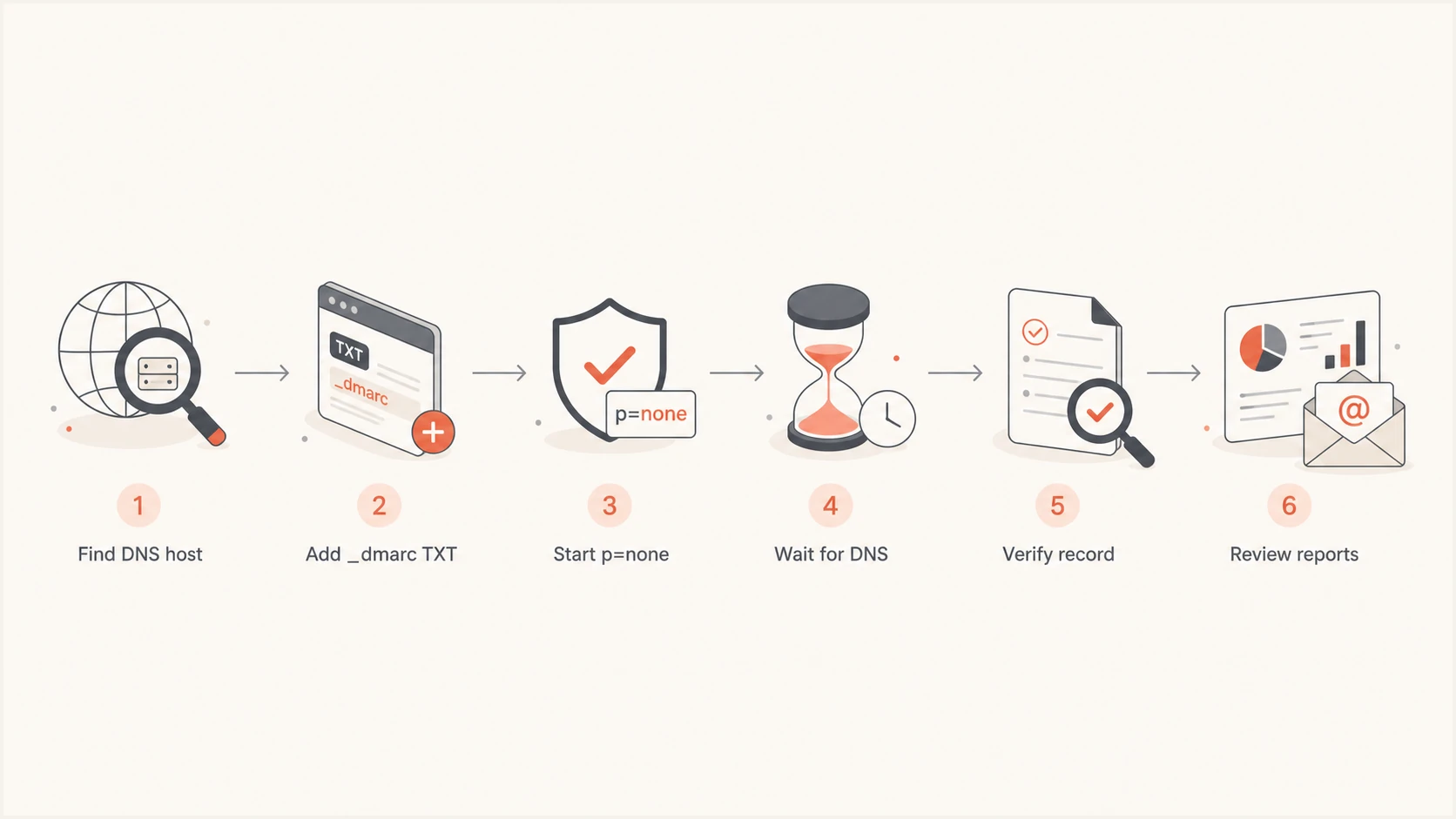
Flowchart for publishing and verifying a DMARC record.
Use the current DMARC standard
RFC 9989 replaced RFC 7489 as the DMARC standard in May 2026. It kept the familiar v=DMARC1 version value, made pct historic, added t for testing behavior, and added np for policy on nonexistent subdomains. A new record does not need pct=100 because full application remains the default.
Do not use pct for a gradual rollout
The old pct tag was applied inconsistently and is now historic. Use t=y when a supported testing signal is needed, or stage enforcement by moving selected domains or sending streams only after their aggregate reports show reliable alignment. Receivers still decide how they handle local delivery.
Policy discovery now uses a bounded DNS tree walk when the exact Author Domain has no valid record. That change can find a policy higher in the DNS hierarchy and can apply sp or np as appropriate. Receiver adoption will not be simultaneous, so publish an explicit record for each active visible From domain when consistent policy discovery matters.
Verify the record after publishing
Validation should separate an authoritative DNS problem from ordinary cache delay. Start by checking the saved record in the DNS control panel. Then query _dmarc.yourdomain.com, not the root domain. A correct result returns one TXT value beginning with v=DMARC1.
Direct DNS lookupBASH
dig +short TXT _dmarc.yourdomain.com
Use the DMARC checker to retrieve and parse the public record. It can expose a missing policy tag, duplicated records, invalid tag values, and a host name that resolves to no TXT data. A public resolver can keep an earlier negative answer until its cache expires, so compare again after the record's expected time to live.
DMARC checker
Look up a domain's DMARC record and catch policy issues.
?/7tests passed
If the checker still reports no record, inspect the authoritative nameservers directly. An NXDOMAIN or empty TXT response means the name does not exist in the active zone. SERVFAIL points to a DNS resolution problem, often a broken delegation or DNSSEC validation fault. A visible record in a control panel does not override what the authoritative server returns.
Propagation delay usually resolves within the record's cache period, but a wrong zone never propagates. If the record was changed at a registrar while the domain uses external nameservers, repeat the change at the actual DNS host. For provider-specific delays, the same diagnostic sequence applies: confirm the zone, inspect authoritative output, then wait only when the source already has the new value. The deeper DNS propagation checks help distinguish caching from a misplaced change.
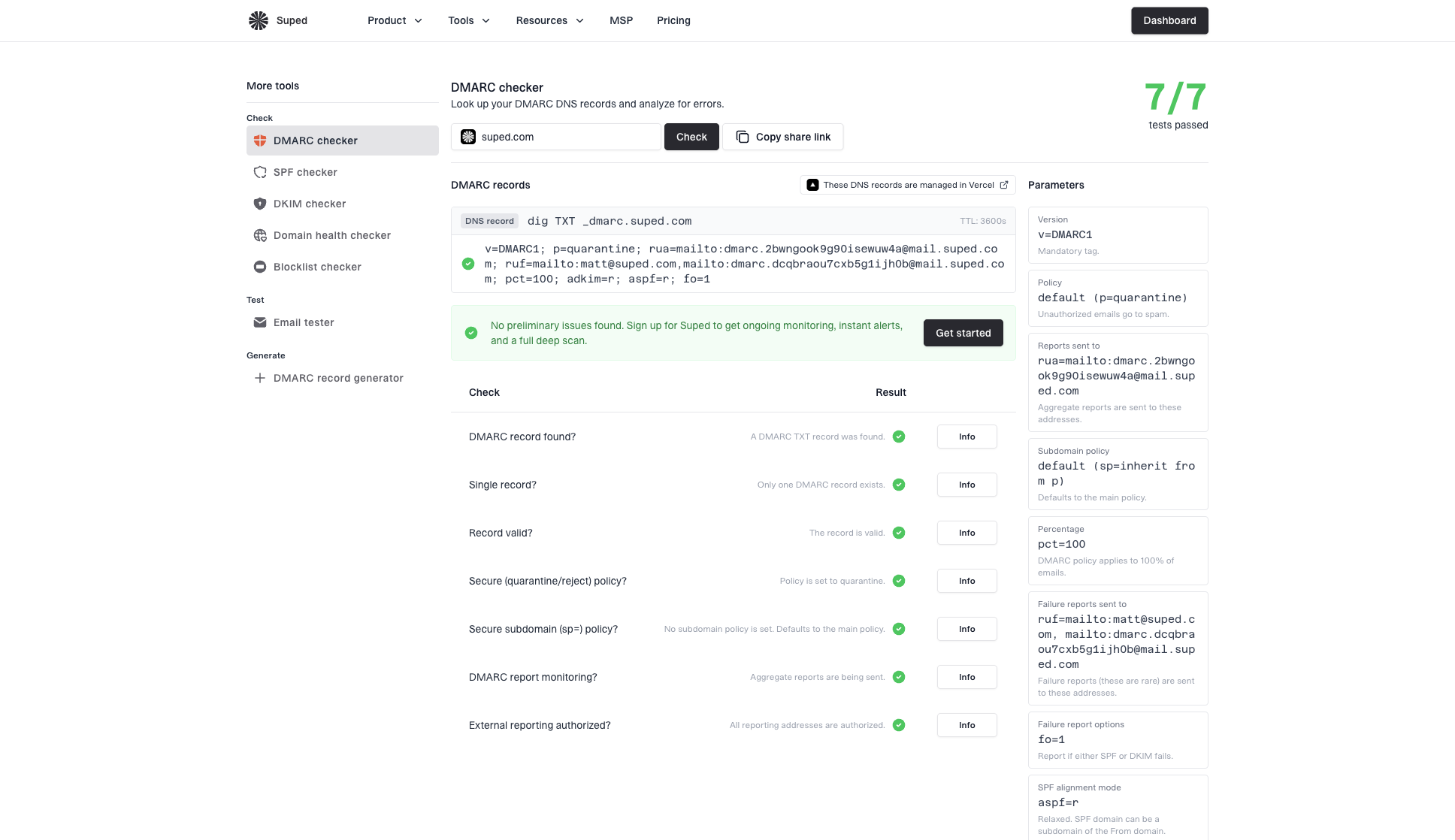
DMARC checker sample results showing parsed DMARC record, pass/fail checks, parameters, and share link
Match the symptom to the cause
The wording in a checker is less important than the DNS response underneath it. Treat "not found" as a lookup result first. Syntax errors and duplicate records are different conditions, even when a simple interface groups them under the same warning.
Record truly missing
The authoritative server has no TXT answer at the requested _dmarc name. Create the record in the active DNS zone.
- Wrong host. The value sits at the root or a doubled domain name.
- Wrong zone. The edit was made outside the authoritative provider.
- Cached absence. A resolver still holds an earlier negative answer.
Record present but unusable
The TXT answer exists, but receivers cannot apply it consistently as one valid DMARC policy. Correct or consolidate the value.
- Missing version. The value does not start with v=DMARC1.
- Invalid policy. The p tag is absent or unsupported. RFC 9989 can treat the record as p=none when rua is valid, but older implementations can return an error.
- Duplicate records. More than one DMARC TXT policy exists at the name.
Split TXT strings are acceptable when DNS software joins quoted chunks into one logical value, but an accidental space inside a tag can change the result. Also check for smart quotation marks copied from a document. DNS data should contain plain ASCII punctuation. If two policy records appear, follow the single-record repair process rather than leaving both values live.
Handle subdomains and non-sending domains correctly
A missing record on a subdomain does not always mean the subdomain lacks DMARC coverage. Receivers check the exact visible From domain first. Under RFC 9989, they then use a bounded DNS tree walk to discover an applicable organizational-domain or public-suffix policy. The sp tag can set policy for existing subdomains, the np tag can set policy for nonexistent subdomains, and p applies when neither applicable tag is present.
Check the domain used in the From address
DMARC evaluation starts with the domain visible to the recipient. A checker aimed at _dmarc.news.example.com can report no exact record even though policy discovery finds a policy higher in the DNS hierarchy. Confirm the exact lookup and the discovered policy before adding another record.
Domains that never send email should still publish DMARC. A reject policy makes the intended behavior explicit and reduces unauthorized use of the visible From domain. Pair that decision with email routing and authentication records designed for a non-sending domain, then verify that no business system sends mail before enforcing it.
Example for a confirmed non-sending domainDNS
v=DMARC1; p=reject; sp=reject; rua=mailto:dmarc@example.com
Do not copy the reject example onto an active mail domain without evidence. A domain can send through marketing systems, support platforms, invoicing software, and employee mail. Missing one legitimate source can cause delivery problems when a receiver applies the reject instruction.
Move from a found record to an enforced policy
Removing the error only proves that DNS publishes a readable policy. It does not prove that legitimate email passes DMARC. Receivers pass a message when SPF or DKIM passes and the authenticated domain matches the visible From domain under the configured matching mode. Aggregate reports show the sending sources and outcomes needed for a safe rollout.
DMARC policy rollout
Advance only after legitimate sending sources consistently pass domain matching checks.
Monitor
p=none
Collect reports and identify every real sender.
Validate enforcement
p=quarantine
Apply quarantine to a prepared domain or sending stream.
Enforce
p=reject
Reject failing mail after verified sources are stable.
Suped's DMARC monitoring workflow collects aggregate XML reports, classifies sending sources, tracks SPF and DKIM alignment, and routes alerts when failures cross a chosen threshold. After the DNS error clears, teams can use that evidence to find an unconfigured sender before changing policy.
Suped's Hosted DMARC replaces repeated TXT edits with one delegated DNS setup and a validated policy editor. It is useful when the team reviewing reports needs to stage policy changes without receiving broad DNS administrator access.

Issue steps to fix dialog showing the issue overview, tailored fix steps, and verification action
Keep the policy at none until reports cover normal sending cycles and each legitimate source has a working SPF or DKIM path with correct domain matching. Then apply quarantine to a prepared domain or sending stream, watch its failure rate, and use reject after expected mail remains stable. Emergency systems and low-frequency vendors deserve the same review as everyday mail.
Use this final repair checklist
A durable fix has two checkpoints: public DNS returns one valid policy, and real mail continues to authenticate after enforcement starts. Complete the DNS work first, then use report evidence for policy changes.
- Lookup name. Confirm that the TXT record resolves at _dmarc plus the exact domain.
- Record count. Keep one DMARC policy record at that DNS name.
- Required tags. Make v=DMARC1 first and include one supported p value.
- Public result. Verify the authoritative answer before blaming propagation delay.
- Sender review. Use aggregate reports to find legitimate sources and authentication gaps.
- Policy rollout. Validate quarantine on a prepared domain or stream before using reject.
What success looks like
A public query returns one TXT policy, a parser accepts every tag, aggregate reports arrive, known senders pass DMARC, and enforcement increases without blocking expected mail. The original lookup warning should clear as soon as cached negative responses expire.
A working record is the start
Fix "No DMARC Record Found" by publishing one valid TXT record at _dmarc.yourdomain.com in the authoritative DNS zone. Start with p=none, verify the public answer, and review reports before enforcing quarantine or reject. If the record remains missing, inspect the exact host name, active nameservers, authoritative response, cache period, and DNSSEC status in that order.
Once the checker finds the record, keep monitoring the sources that use the domain. DNS validation removes the immediate error, while reporting and controlled enforcement provide the lasting protection.



