What causes a DMARC record to not propagate correctly on GoDaddy?

Updated on 25 Jul 2026: We added GoDaddy's automatic DMARC behavior and tightened the timing and troubleshooting guidance.
The most common cause is not slow GoDaddy propagation. It is that the DMARC TXT record was saved under the wrong host name. In GoDaddy, the host field usually needs only _dmarc. If you enter _dmarc.example.com in a zone that is already for example.com, the published name can become _dmarc.example.com.example.com. That record exists, but receivers never query it for DMARC.
Most GoDaddy DNS updates take effect within an hour, while cached public answers can take up to 48 hours to update globally. If the authoritative nameserver still has no record after GoDaddy confirms the save, treat that as a configuration or publication problem first. Common causes include editing DNS at GoDaddy while the domain uses different nameservers, querying cached data, saving multiple DMARC records, or publishing an invalid TXT value.
Fast answer
If the GoDaddy panel looks correct but DNS does not show the record, check the final DNS name and the active nameservers before waiting 48 hours. The long propagation window applies to global caches, not an authoritative server that never received the record.
- Host: Use only _dmarc unless GoDaddy explicitly asks for the fully qualified name.
- Nameservers: Confirm the domain uses GoDaddy authoritative DNS before editing there.
- Query: Ask the authoritative nameserver directly before blaming public cache.
Why this happens in GoDaddy
GoDaddy's DNS editor works inside the zone for your domain. That means the system already knows the right-hand side of the DNS name. When you add a DMARC record, you add the left-hand label only. For the root domain example.com, the DMARC lookup name is _dmarc.example.com, so the host field is just _dmarc.
This is easy to miss because many DMARC setup instructions show the full name. They are describing the final DNS name, not always the exact text to enter into a registrar's host field. Different DNS interfaces label the same concept as host, name, record name, or subdomain, which makes this mistake common.
|
|
|
|---|---|---|
Type | TXT | DMARC is published in TXT. |
Host | _dmarc | GoDaddy appends the zone. |
Value | v=DMARC1 | The required version tag comes first. |
TTL | 1 hour | GoDaddy's default cache interval. |
Common GoDaddy DMARC fields
Correct GoDaddy DMARC entrytext
Type: TXT
Host: _dmarc
Value: v=DMARC1; p=none; rua=mailto:dmarc@example.com
TTL: 1 hour
Common duplicated-host mistaketext
Entered host: _dmarc.example.com
Actual name:  _dmarc.example.com.example.com
Expected:     _dmarc.example.com
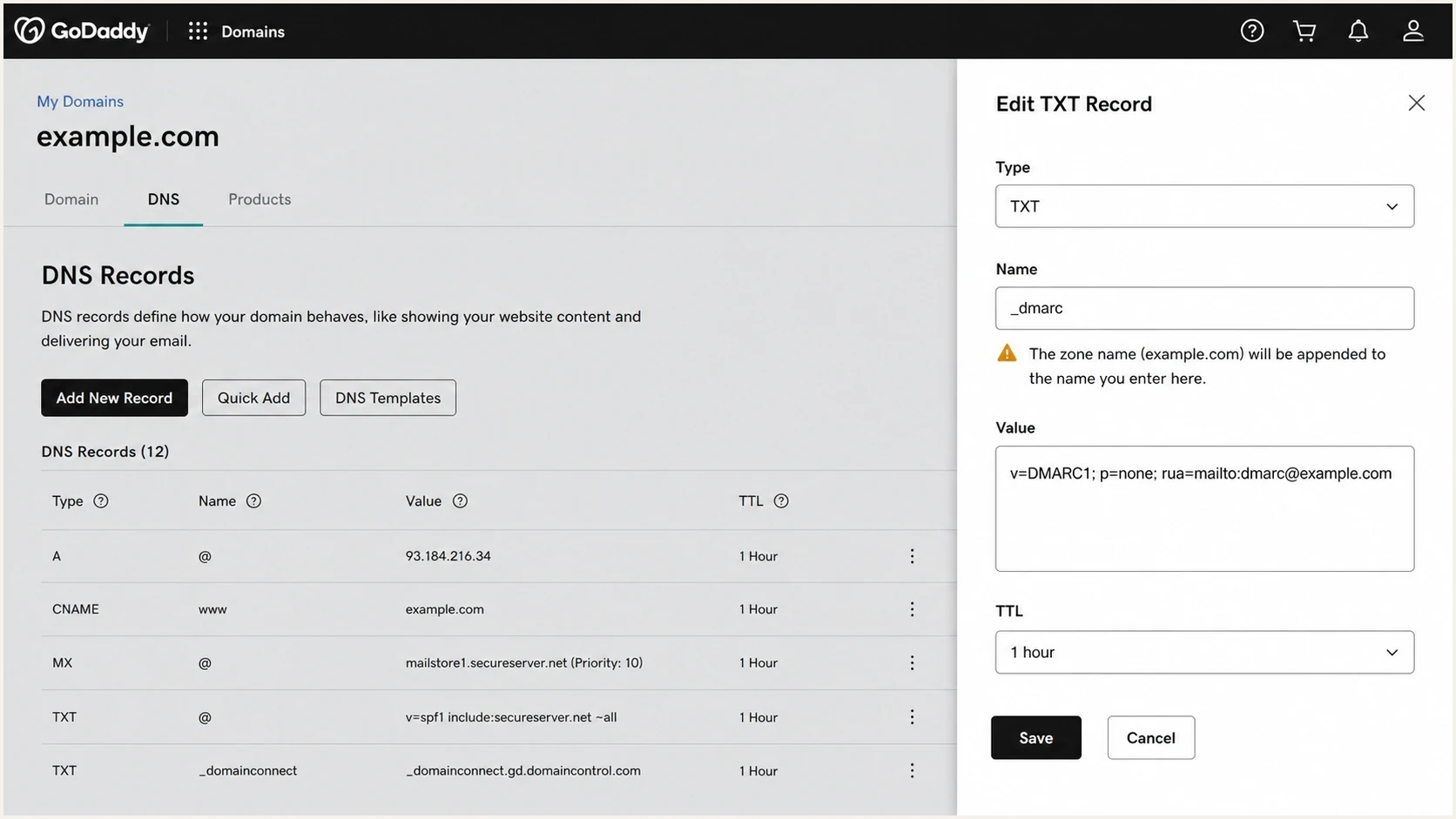
GoDaddy DNS Management screenshot showing a DMARC TXT record with the host set to _dmarc.
The duplicated-name mistake can also affect other TXT records. If a selector or service record seems invisible, check whether the domain was typed twice. A correct-looking DNS editor screen is not proof that the final name is correct.
Check for GoDaddy's automatic DMARC record
GoDaddy says domains purchased starting in April 2025 have DMARC set up automatically. Older domains can also gain an automatic record, so query _dmarc.example.com before adding anything. If a record already exists, edit or replace the intended policy instead of creating a second DMARC TXT record at the same name.
GoDaddy automatic record to recognizetext
v=DMARC1; p=quarantine; adkim=r; aspf=r; rua=mailto:dmarc_rua@onsecureserver.net;
Do not add a second policy
RFC 9989 says multiple DMARC policy records returned for one name are all discarded. Confirm who owns the existing reporting address and whether its policy is intentional before changing it.
- Query first: Read the live TXT answer at _dmarc.example.com.
- Review policy: Check whether an existing p=quarantine policy matches the domain's readiness.
- Keep one: Consolidate the reporting URI and policy tags into one intended record.
- Verify live DNS: Query the authoritative nameserver again after saving.
How to test whether it propagated
Split the test into two parts: whether GoDaddy published the record and whether public resolvers have refreshed. Authoritative DNS answers the first question. Public DNS answers the second. This distinction saves time because a public resolver can be stale while GoDaddy is already correct.
Start by finding the domain's NS records, then query one of those nameservers directly. If the authoritative server returns the record, publication is complete. An empty answer or NXDOMAIN means the expected TXT record is not at that name. SERVFAIL points to a DNS problem such as broken delegation or DNSSEC, not an ordinary cache delay.
DNS checks with digbash
dig NS example.com +short
dig TXT _dmarc.example.com +short
dig @nsXX.domaincontrol.com TXT _dmarc.example.com +noall +answer +comments
dig @1.1.1.1 TXT _dmarc.example.com +noall +answer +comments
- Find NS: Look up the current authoritative nameservers for the domain.
- Query authority: Query one listed authoritative server for _dmarc.example.com.
- Compare cache: Check public resolvers only after the authoritative answer is correct.
- Read status: Treat NXDOMAIN, an empty answer, and SERVFAIL as different problems.
- Inspect name: Search for a duplicated host if the expected name has no TXT answer.
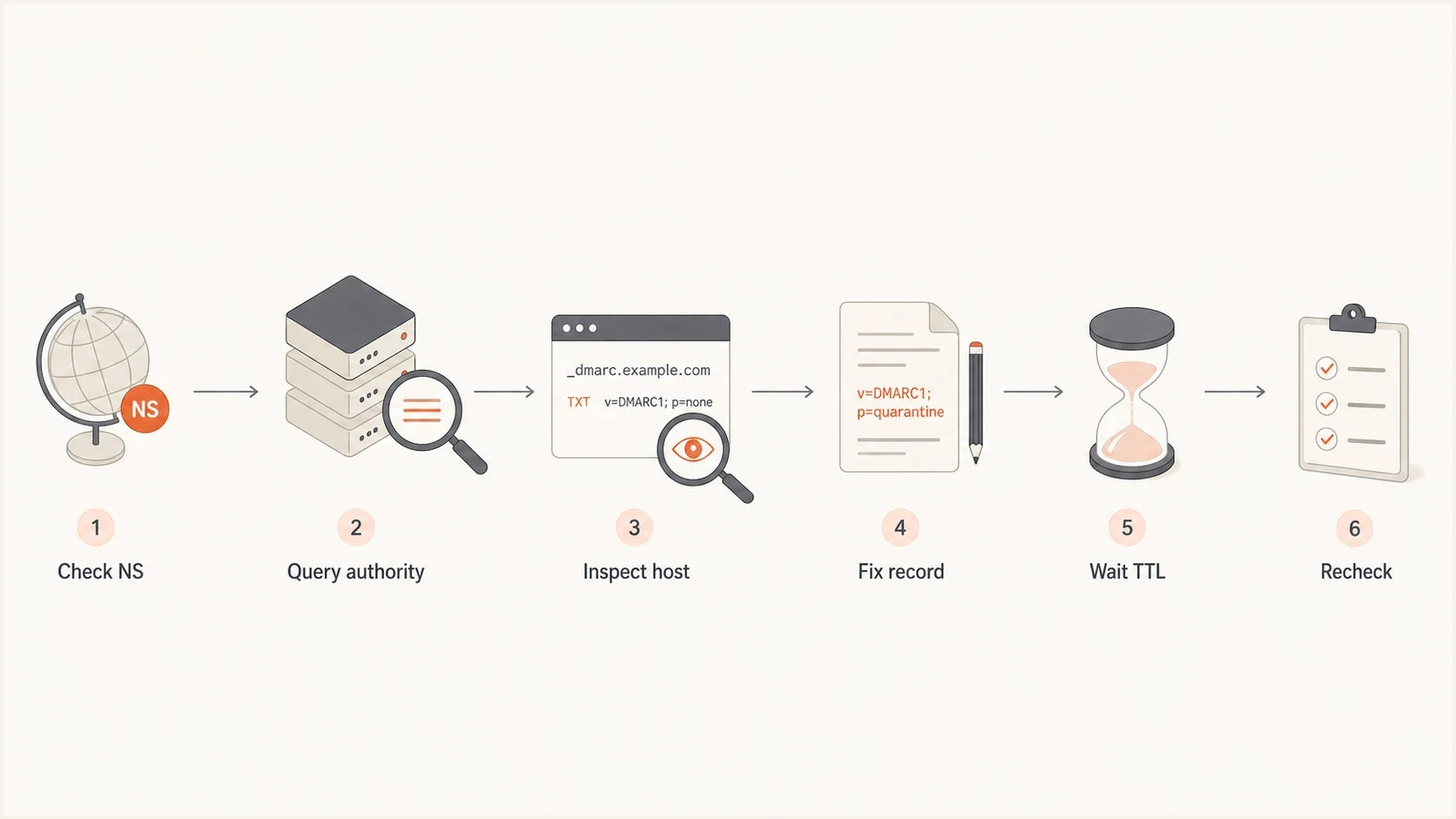
Flowchart for checking GoDaddy DMARC propagation by querying nameservers and fixing the host.
For a quick browser-based check, Suped's DMARC checker parses the record and reports whether the published policy is readable. Use it after confirming that you are checking the right domain name.
DMARC checker
Look up a domain's DMARC record and catch policy issues.
?/7tests passed
Other causes that look like propagation failure
The wrong host name is the first place to check, but it is not the only cause. A DMARC record can appear to be stuck when the domain is delegated elsewhere, when GoDaddy's automatic record conflicts with a manual addition, or when invalid syntax causes the policy to be ignored. Under RFC 9989, v=DMARC1 is case-sensitive and must be the first tag.
Actually missing
- Wrong DNS: The registrar is GoDaddy, but authoritative DNS is elsewhere.
- Wrong host: The record was saved at a duplicated or nested name.
- Wrong type: The entry was saved as CNAME or another type instead of TXT.
Published but stale
- Cached data: A resolver still returns the old answer until its cache expires.
- Old negative: A previous no-record answer remains in negative cache.
- Local view: Your office DNS resolver has not refreshed yet.
When to worry about DMARC propagation
Judge publication by the authoritative answer, then allow for slower recursive caches.
Normal publication
0-1 hour
GoDaddy says most DNS updates take effect within this period.
Global cache window
Up to 48 hours
Authority is correct, but some recursive resolvers still return old data.
Investigate now
No auth answer
The authoritative server has no intended TXT record after the save.
If the timing question is the main issue, compare the behavior with this policy timing guide. Timing matters, but the authoritative answer matters more.
How to fix it safely
Correct the record name first, inspect any existing automatic policy, and verify the exact lookup before changing enforcement. Do not raise policy while the record is still being debugged because a bad record can hide real authentication problems.
- Inventory records: Identify automatic and manually added DMARC records before deleting anything.
- Keep one: Publish one intended TXT record at _dmarc for the policy domain.
- Validate value: Put v=DMARC1 first and separate the remaining tags with semicolons.
- Set reports: Use a monitored reporting mailbox or platform address.
- Recheck DNS: Query authoritative DNS, then compare public resolvers.
Starter DMARC recordtext
v=DMARC1; p=none; rua=mailto:dmarc@example.com
Do not enforce too early
If no policy exists, start with monitoring so you can identify every legitimate sender before enforcement. If GoDaddy already published an automatic quarantine policy, review authentication and report data before replacing it or making it stricter.
- Start: Use p=none for a new manual deployment until reports show the real sender list.
- Review: Check which sources pass SPF, DKIM, or DMARC.
- Enforce: Move to a stricter policy only after legitimate sources pass.
If you are building the record manually, a DMARC record generator helps prevent missing tags and bad syntax. It does not replace the GoDaddy host-name check, but it removes a separate class of TXT value mistakes.
Where Suped fits
Suped is useful once the DNS record exists and DMARC reports need to become operational decisions. Suped's DMARC monitoring shows which sources send mail for the domain and which sources pass. Use it to confirm reports arrive after the GoDaddy change, identify legitimate senders, and stage later policy changes.
DMARC record detail view showing SPF, DKIM, DMARC, rDNS diagnostics, and DNS records
For GoDaddy users who want centralized policy changes, Suped's hosted DMARC can simplify policy staging with CNAME-based management. Confirm that the CNAME is the only record at _dmarc, because a CNAME cannot coexist with a TXT record at the same DNS name.
- DNS checks: See whether DMARC, SPF, DKIM, rDNS, and related records are readable.
- Issue steps: Get specific remediation steps instead of guessing from raw DNS output.
- Alerts: Receive alerts when failures spike or a sender starts failing checks.
- MSP scale: Manage many client domains with organization switching and reporting.
Views from the trenches
Best practices
Query the authoritative nameserver first, then compare public resolvers after one TTL.
Use only the host label in GoDaddy, because the zone name is appended automatically.
Keep one DMARC TXT record at the policy domain and document who owns each DNS edit.
Common pitfalls
Putting the full domain in the host field publishes the TXT record under a duplicated name.
Editing DNS where the domain is registered fails when another provider has the nameservers.
Reading cached resolver answers as fresh DNS data leads teams to chase the wrong issue.
Expert tips
Save a screenshot of the DNS edit so the exact host, type, TTL, and value are clear.
Use a neutral p=none record first, then raise enforcement after real mail sources pass.
Check for duplicate DMARC records before assuming GoDaddy has delayed propagation again.
Marketer from Email Geeks says the first check should be whether the host field contains only _dmarc, because GoDaddy appends the domain inside the zone.
2024-04-18 - Email Geeks
Marketer from Email Geeks says new GoDaddy TXT records usually appear quickly, so a two-hour delay points to host naming or delegation before cache.
2024-07-09 - Email Geeks
The practical answer
When a DMARC record does not appear after being added in GoDaddy, stop waiting and inspect the final DNS name. The record should be at _dmarc.example.com, not a duplicated name. Query the authoritative nameserver first, then compare public resolvers.
If the host is correct and the authoritative nameserver still has no TXT answer, check nameserver delegation and make sure you are editing the active DNS provider. If more than one DMARC policy appears, check whether GoDaddy added one automatically and consolidate the policies. If DNS returns SERVFAIL, investigate delegation or DNSSEC before changing the DMARC value.




