How long does DMARC policy propagation take and how to handle authentication failures?

Updated on 21 Sep 2026: We clarified DMARC cache timing, added a practical header-reading example, and updated rollout guidance for RFC 9989.
A DMARC policy change takes effect when a receiving mail server queries the updated DNS TXT record. A resolver that cached the old answer can keep using it until that answer's TTL expires. Most changes become visible within the previous TTL, often 300 to 3600 seconds, but a longer published TTL creates a longer cache window. Receivers normally discover the policy while processing new mail, not through a universal 24-to-72-hour activation cycle. Allow 24 hours for broad receiver testing and the first daily aggregate reporting cycle, not because DNS always needs a full day.
If email stops arriving right after DMARC is added, propagation is rarely the real problem. The common cause is that the new policy uses p=quarantine or p=reject before legitimate senders pass DMARC. A message passes when SPF passes with an aligned Mail From domain, or DKIM passes with an aligned signing domain. If neither identifier aligns with the visible From domain, the message fails DMARC and the receiver applies its local handling policy.
Immediate answer
- Propagation: Wait at least the previous DNS TTL, then test with more than one resolver or receiver.
- Failures: Move to p=none while fixing legitimate sender authentication.
- Reports: Use aggregate reports after the next daily reporting cycle to confirm which source failed.
- Fix path: Make SPF or DKIM pass with an identifier aligned to the visible From domain.
What DMARC propagation actually means
DMARC is not configured on a website. It is published in DNS as a TXT record at _dmarc under the domain. When a receiving server gets a message, it checks the visible From domain, discovers the applicable DMARC record, then evaluates the policy and reporting instructions it receives.
Propagation is the time cached DNS answers remain in use before resolvers fetch the new TXT value. If the previous answer had a 3600-second TTL, a resolver that queried it just before the change can keep that answer for about one hour. If no DMARC record existed, resolvers can cache the negative answer according to the zone's negative caching value.
Lowering the TTL at the same time as the policy change does not shorten an older answer already in cache. For a planned change, lower the TTL at least one old TTL in advance, make the policy change, then raise the TTL after verification.
DMARC change timing
Use the previous TTL and authoritative answer to judge a DMARC TXT record change.
Expected cache window
Within old TTL
Some receivers still use the old answer while its cached TTL counts down.
Broad verification window
TTL to 24 hours
Test fresh messages across receivers and wait for the first aggregate reports.
Needs investigation
Beyond expected TTL
Check authoritative DNS, record placement, delegation, negative caching, and syntax.
Treat as a DNS fault
Beyond two TTLs
A persistently stale or missing answer is not routine propagation.
The record can be visible through one lookup path and stale through another during cache expiry. What matters for delivery is the policy answer the receiver discovers when it evaluates a new message. Previously processed messages are not reevaluated after DNS changes.
|
|
|
|---|---|---|
DNS cache | Up to the previous TTL | Resolvers can continue returning an older DMARC answer. |
New sends | Immediately after cache refresh | Only a newly evaluated message uses the receiver's current lookup. |
Aggregate reports | Usually within 24 hours | Participating receivers generally report at least daily. |
Failure reports | Receiver-specific | Many receivers restrict or do not send them because of privacy concerns. |
Typical timing for DMARC DNS and reporting.
What RFC 9989 changes for DMARC rollouts
RFC 9989 became the Standards Track DMARC specification in May 2026 and obsoletes RFC 7489 and RFC 9091. It keeps the familiar v=DMARC1 record version, but it changes rollout guidance that appears in many older configurations. RFC 9990 now defines aggregate reporting, and RFC 9991 defines failure reporting.
- Percentage rollout: The pct tag is historic because receivers did not apply intermediate percentages consistently.
- Test mode: The active t=y tag requests handling one policy level below the declared policy while reports continue.
- Policy discovery: DNS Tree Walk replaces Public Suffix List dependency and adds defined handling for subdomains and public suffix domains.
- Receiver discretion: The published policy is a domain owner's request. Final handling still depends on the receiver's local policy.
Do not copy an old pct rollout
Replace records such as p=quarantine; pct=25 with a monitored policy transition based on current report data. Use t=y when the testing signal fits the rollout, and verify receiver behavior before removing test mode. Older RFC 7489 implementations can ignore the new tag and apply the declared policy, so do not treat test mode as a universal no-impact switch.
Why email can fail after DMARC is added
The risky pattern is simple: a domain has no DMARC record, then the first record requests enforcement before every legitimate sender has been verified. A failing message can be quarantined or rejected under receiver policy. RFC 9989 also requires receivers not to reject solely because a domain publishes p=reject, but that does not make an unauthenticated sender safe to deploy.
Propagation problem
- Symptom: Different DNS resolvers return different DMARC records.
- Cause: Old cached answers remain until TTL expiry.
- Action: Wait the previous TTL, then verify the authoritative record and public answers.
- Signal: The DMARC TXT value changes between lookup paths.
Authentication problem
- Symptom: Bounces or filtering results mention DMARC or authentication failure.
- Cause: SPF and DKIM lack a passing identifier aligned to the visible From domain.
- Action: Relax the policy, then fix the sender's SPF or DKIM identity.
- Signal: The intended DMARC record is visible, but fresh mail still fails.
SPF passing is not enough by itself. The SPF-authenticated identifier normally comes from the SMTP Mail From domain, which often differs from the visible From domain. DMARC accepts SPF only when that domain aligns with the visible From domain under the configured alignment mode. For shared sending platforms and forwarded mail, DKIM with a custom aligned signing domain is often the more durable fix.
Safe starting DMARC recorddns
Host: _dmarc.example.com
Type: TXT
Value: v=DMARC1; p=none; rua=mailto:dmarc@example.com
The safe starting point is p=none. It requests reporting without changing existing message handling because of DMARC. Receivers can still filter mail using reputation, content, and their other controls. Once reports show that legitimate traffic passes DMARC, enforcement becomes a measured change.
How to handle authentication failures
When mail is missing after a DMARC change, separate the investigation into DNS policy discovery, receiver results, and sender authentication. This prevents the team from waiting for caches when an enforced policy exposed an existing alignment failure.
- Confirm DNS: Check the applicable record at _dmarc for the From domain and confirm that each queried name returns no more than one DMARC record.
- Relax policy: If legitimate mail is failing, change enforcement to p=none and allow the previous TTL before expecting every receiver to see it.
- Read SMTP results: Look for a 5xx rejection, a 4xx temporary failure, or receiver text naming DMARC, SPF, DKIM, or policy handling.
- Inspect headers: Send a fresh test and review Authentication-Results for SPF, DKIM, DMARC, aligned domains, and policy override reasons.
- Classify the result: A DMARC fail means no passing aligned identifier; permerror points to an unusable record; temperror points to a transient lookup or processing problem.
- Map senders: List every system that uses the domain in From, including billing mail, support systems, newsletters, and website forms.
- Fix identity: Match the SPF Mail From domain or the DKIM d= domain with the visible From domain.
- Check reporting: If the rua address uses another domain, confirm that the report destination has published the required external authorization record.
For a quick DNS validation, run the DMARC checker against the domain. If you are still building the record, the DMARC record generator helps create a clean starting value. For a wider view of SPF, DKIM, DMARC, and DNS health, use the domain health checker.
DMARC checker
Look up a domain's DMARC record and catch policy issues.
?/7tests passed
If the DNS record is correct and delivery still fails, move past propagation. Identify which source sent the message, which domain SPF authenticated, which domain DKIM signed, and whether either authenticated identifier aligned with the visible From domain.
For deeper root cause analysis, the troubleshoot DMARC failures workflow is useful after the basic DNS checks pass.
How to read Authentication-Results
Authentication-Results shows both the raw SPF and DKIM outcomes and the receiver's DMARC result. Read the domains beside each result instead of treating any SPF or DKIM pass as a DMARC pass.
Example receiver authentication header
Authentication-Results: mx.receiver.example;
  dkim=pass header.d=mail.example.com;
  spf=pass smtp.mailfrom=bounces.sender.example;
  dmarc=pass header.from=example.com
- DKIM result: The signature passed with header.d=mail.example.com, which aligns with example.com under relaxed alignment.
- SPF result: SPF passed for bounces.sender.example, but that domain does not align with the visible From domain.
- DMARC result: DMARC passed because aligned DKIM is sufficient even though SPF did not provide alignment.
- Header trust: Use the Authentication-Results header added by the receiving infrastructure, because an earlier sender can insert an untrusted lookalike header.
If the header says dmarc=fail, compare smtp.mailfrom and every DKIM header.d value with header.from. A raw authentication pass with a different organizational domain still fails DMARC alignment.
Policy staging that avoids outages
A DMARC rollout should start with monitoring unless the sending environment is already measured and clean. Stage policy changes so each step proves that legitimate mail still passes before stronger handling is requested.
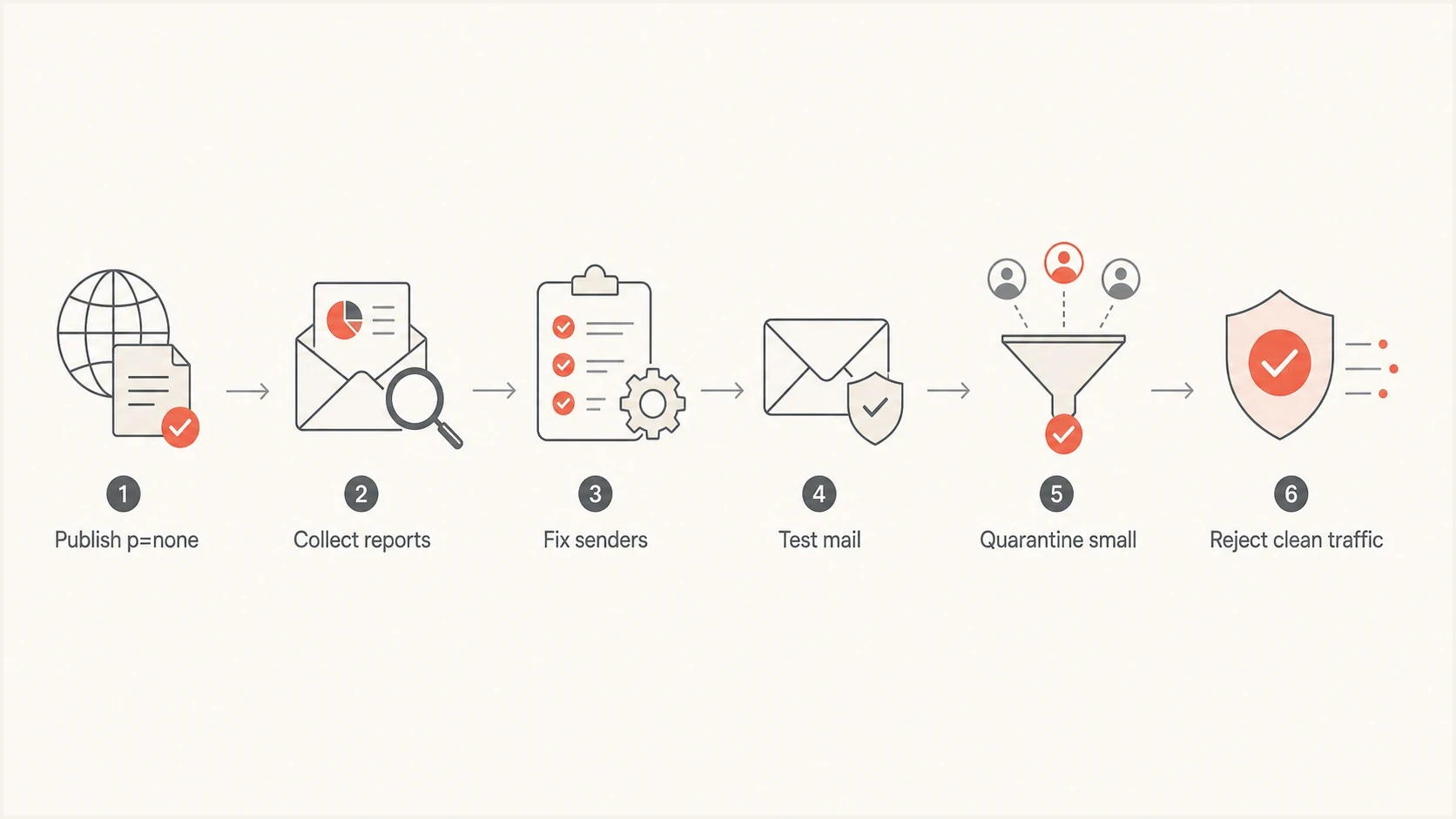
A DMARC rollout flow moving through monitoring, fixes, testing, quarantine, and reject.
Test quarantine under RFC 9989dns
Host: _dmarc.example.com
Type: TXT
Value: v=DMARC1; p=quarantine; t=y; rua=mailto:dmarc@example.com
The t=y tag requests test mode. With p=quarantine, the expected policy for failing messages is one level lower, or none. Receiver local rules still apply, so confirm results in aggregate reports and fresh delivery tests.
Full quarantine after clean reportsdns
Host: _dmarc.example.com
Type: TXT
Value: v=DMARC1; p=quarantine; rua=mailto:dmarc@example.com
Treat p=reject as a domain-specific decision, not the automatic final step. RFC 9989 says domains used for general-purpose email should not publish reject because mailing lists, aliases, and forwarding can break alignment. For a general-purpose domain that still considers reject, RFC 9989 recommends at least one month at p=none followed by at least one month at p=quarantine, with disposition results compared before the change. A tightly controlled sending domain that considers reject needs reliable aligned DKIM and evidence that indirect mail paths will not harm legitimate delivery.
A stable rollout rule
Do not advance policy because DNS has propagated. Advance only after aggregate reports and direct tests show that known legitimate senders pass DMARC consistently.
How Suped fits into the workflow
Suped supports the workflow that prevents this kind of outage: publish a monitoring policy, collect aggregate reports, map each source, fix alignment, then change policy with evidence. Suped parses raw report data into source-level issues and remediation steps so teams do not need to review XML files manually.

Issue steps to fix dialog showing the issue overview, tailored fix steps, and verification action
During propagation and failure handling, the useful workflow is comparing current policy state with authentication results as fresh reports arrive. Suped brings DMARC monitoring, SPF, DKIM, blocklist (blacklist) monitoring, and related deliverability signals into the same operational view.
- Issue detection: Suped groups failing sources and provides steps for correcting authentication.
- Report alerts: Suped can alert teams when newly received reports show a spike in failures.
- Hosted controls: Hosted DMARC, hosted SPF, SPF flattening, and hosted MTA-STS reduce repeated DNS handoffs.
- Multiple domains: The MSP and multi-tenancy dashboard tracks staged policy changes across domains.
Hosted DMARC is useful when IT controls DNS but marketing or operations owns sender changes. The DNS record points to Suped once, then authorized teams can manage policy staging with a shared view of the checks and fewer DNS requests.
What to ask IT or DNS owners
If you do not have DNS access, ask for precise information rather than a general statement that the issue is fixed. That makes the next test meaningful and avoids repeating the same failed send.
- Record value: Ask for the current DMARC TXT value and the exact host name where it is published.
- Previous TTL: Ask for the TTL that was active before the change and the exact change time.
- Policy: Confirm the current p and t values, plus any subdomain policy.
- Reports: Confirm where aggregate reports are sent, whether external authorization exists, and who reviews them.
- Sender fix: Ask which source failed and whether the fix changed SPF alignment or DKIM signing.
After those answers, send a new test message. Do not retest with an old message in a quarantine folder because it was evaluated against the receiver's state when it arrived. New mail provides a current authentication result.
Views from the trenches
Best practices
Start with p=none and review real traffic before quarantine changes message handling.
Lower TTL one old cache window before a change so existing answers expire on schedule.
Verify aligned DKIM for every sender before considering strict enforcement policies.
Use aggregate reports to find sources that pass SPF but fail domain alignment checks.
Common pitfalls
Publishing enforcement first can disrupt valid mail before failed sources are mapped.
Assuming SPF pass equals DMARC pass hides the separate identifier alignment check.
Testing one mailbox misses receivers that still hold an older DNS answer in cache.
Using historic pct values creates inconsistent rollout behavior across mail receivers.
Expert tips
Keep p=none until primary senders show stable aligned SPF or DKIM in daily reports.
For forwarded mail, aligned DKIM usually survives where SPF alignment no longer can.
Compare the SMTP response and DMARC report source before changing policy again today.
Treat p=reject as domain-specific, especially where users send through mailing lists.
Marketer from Email Geeks says a visible DMARC record does not prove mail is safe, because the policy can still affect a sender that fails authentication.
2024-02-19 - Email Geeks
Marketer from Email Geeks says the policy should stay at p=none while the team works out why legitimate messages are not passing DMARC.
2024-02-19 - Email Geeks
How long to wait before troubleshooting
DMARC policy propagation follows the previous DNS TTL. Many changes appear within minutes to one hour because those TTLs are common, but the record's actual TTL controls the wait. Allow up to 24 hours for broad receiver testing and the first aggregate report cycle. If fresh mail still fails after the intended record is visible, troubleshoot authentication instead of waiting longer.
If legitimate mail is affected, move enforcement back to p=none, identify the failing sender, and establish aligned SPF or DKIM. Use current RFC 9989 test mode and report evidence for the next policy step, and do not assume every general-purpose mail domain should end at reject.




