Why you can't have multiple DMARC records for your domain

Published 20 Jul 2025
Updated 23 Sep 2026
10 min read
Summarize with
Updated on 23 Sep 2026: We added practical DNS lookup steps and clarified current RFC 9989 handling for test mode and missing policy tags.
You cannot publish multiple DMARC Policy Records for the same lookup target, usually _dmarc.example.com. When a receiving mail server finds more than one record beginning with v=DMARC1 at one target, RFC 9989 says all of those policy records are discarded. Your intended local policy and reporting settings are not selected from that target.
The fix is simple in concept: keep one DMARC Policy Record and combine the settings you need into that record. Do not keep one record for reporting and another for policy. Do not keep one record for marketing mail and another for corporate mail. DMARC publishes policy for an author domain, so each lookup target needs one coherent instruction.
- Rule: publish one DMARC Policy Record at each DMARC lookup target.
- Failure: two records beginning with v=DMARC1 at one target are both discarded.
- Repair: merge the needed tags into one record, then remove every duplicate.
Why duplicate DMARC records fail
DMARC record discovery is deliberately narrow. A receiver starts with the author domain in the visible From address and queries TXT at a name such as _dmarc.example.com. Records that do not begin with a version tag identifying the current DMARC version are discarded. If exactly one DMARC Policy Record remains, the receiver can use it. If multiple policy records remain at that target, all of them are discarded.
Under RFC 9989, the receiver continues normal DMARC tree-walk discovery when no valid record remains at the first target. It can find a policy at the organizational domain or a Public Suffix Domain (PSD), but it does not merge the duplicate records, average them, or select the stricter one. The domain's intended local policy is unavailable.
Invalid duplicate DMARC recordsdns
_dmarc.example.com.  TXT  "v=DMARC1; p=none; rua=mailto:dmarc@example.com"
_dmarc.example.com.  TXT  "v=DMARC1; p=reject; rua=mailto:sec@example.com"
The receiver does not choose the stricter policy
If one record says p=none and another says p=reject, both policy records are discarded at that lookup target because the domain published conflicting instructions.
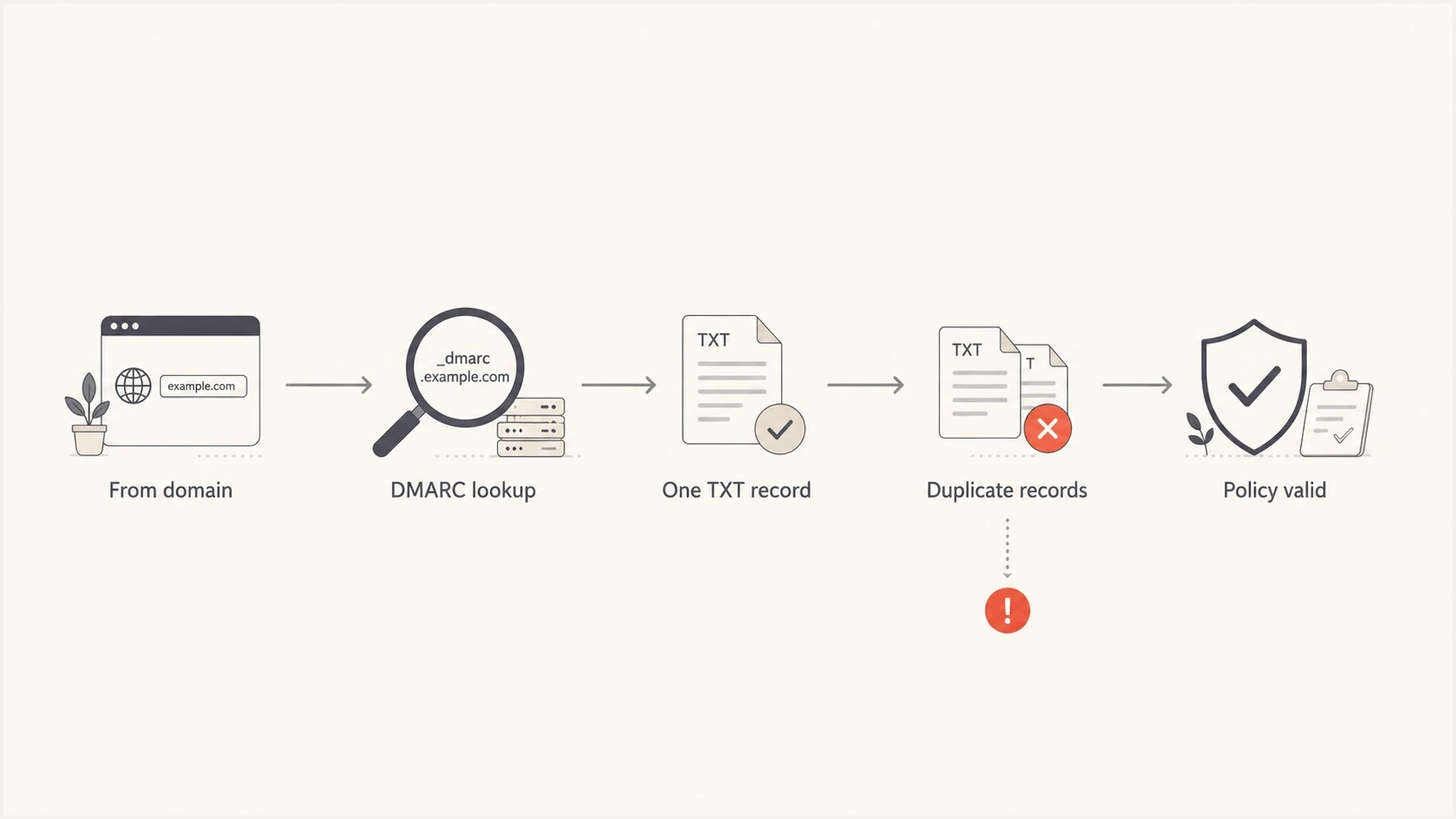
Flowchart showing duplicate DMARC Policy Records discarded during DNS lookup.
What one valid DMARC record should contain
A valid DMARC record starts with v=DMARC1 and should include one explicit policy tag. If p is omitted from an otherwise syntactically valid record, RFC 9989 treats the record as p=none. Optional tags for reports, subdomain policy, testing, and authentication handling belong in the same policy record.
If duplicates already exist, do not delete one randomly. Compare the tags, keep the policy that matches the current deployment plan, preserve reporting destinations that are still needed, and publish one clean replacement. A focused DMARC checker helps confirm that the final DNS response contains one DMARC Policy Record.
|
|
|
|---|---|---|
v | Protocol version | One |
p | Main policy | One |
rua | Aggregate report destinations | Many URIs |
ruf | Failure report destinations | Many URIs |
sp | Existing subdomain policy | One |
np | Non-existent subdomain policy | One |
t | Policy test mode | One |
Current DMARC tags to merge into one policy record.
Valid single DMARC recorddns
_dmarc.example.com. TXT "v=DMARC1; p=quarantine; rua=mailto:dmarc@example.com,mailto:security@example.com; sp=reject; np=reject"
The pct tag is no longer current
RFC 9989 removed pct, so do not rely on it for a percentage rollout. Use aggregate reports to fix legitimate senders before changing policy. The current t=y test signal asks the receiver not to apply the stated policy and to use any special handling rules it has instead. The domain owner expects treatment one policy level below the published policy, and the tag has no effect when the applicable policy is none. Confirm actual report outcomes before depending on newly standardized receiver behavior.
Multiple TXT strings are not duplicate records
A DNS TXT resource record can contain more than one character string. Each character string has a 255-octet limit, so DNS software sometimes splits one long TXT value into adjacent quoted strings. DNS clients concatenate those strings without inserting spaces before DMARC parses the result. This remains one DMARC Policy Record.
Valid split-string TXT recorddns
_dmarc.example.com.  TXT  ("v=DMARC1; p=reject; "
                              "rua=mailto:dmarc@example.com")
Two separate TXT resource records that each begin with v=DMARC1 are duplicates. Several quoted strings shown inside one resource record are not. RFC 9989 also discards unrelated TXT records that do not begin with the current DMARC version tag, so the duplicate rule concerns multiple DMARC Policy Records rather than every TXT value returned at the name.
How to check for duplicate DMARC records
Query the exact DMARC owner name and inspect each TXT resource record in the answer. Count separate records whose concatenated value starts with v=DMARC1. Two such records at the same owner name are duplicates. Unrelated TXT values and multiple quoted strings inside one record do not increase that count.
Check the DMARC TXT answerbash
dig +noall +answer TXT _dmarc.example.com
nslookup -type=TXT _dmarc.example.com
A recursive resolver can return cached data until the previous TTL expires. After the DNS change, query an authoritative nameserver to confirm the live zone first, then check recursive resolvers again after DNS propagation. Replace the example nameserver below with one returned for your domain.
Check an authoritative nameserverbash
dig +short NS example.com
dig @ns1.example.net +noall +answer TXT _dmarc.example.com
Read the answer by resource record
A long TXT record can appear as adjacent quoted chunks on one answer line. Treat those chunks as one value. The duplicate condition exists when the DNS answer contains more than one separate DMARC TXT resource record at the same owner name.
How to combine two DMARC records safely
Prepare the single replacement before editing DNS. Treat the existing records as input, decide which settings remain valid, and replace the duplicate TXT resource records in one provider change when the interface supports it. This limits the chance of creating a temporary gap with no DMARC record.
Duplicate setup
- Policy: two records give receivers conflicting instructions.
- Reports: separate reporting records are not merged by receivers.
- Outcome: the records are discarded at that lookup target.
Single record setup
- Policy: one policy tag states the requested handling.
- Reports: multiple report URIs sit inside the same record.
- Outcome: the receiver can evaluate the published policy.
Use the same sequence whether the duplicates came from a DNS edit, a provider migration, or instructions supplied for a new sending service.
- Collect: copy every existing DMARC TXT value before changing DNS.
- Confirm the host: use _dmarc.example.com as the full owner name, while accounting for DNS panels that append the zone name automatically.
- Choose: select one policy path, based on current authentication results and deployment readiness.
- Merge: put the needed reporting URIs and optional tags into one TXT value.
- Replace: save one DMARC Policy Record and remove every duplicate at the same target.
- Verify: check the authoritative DNS answer, then check cached resolver answers after the previous TTL has expired.
Do not split policy and reports
A common broken pattern is one record for p=reject and another record for rua. The reporting tag belongs in the same DMARC Policy Record as the policy tag.
DMARC checker
Look up a domain's DMARC record and catch policy issues.
?/7tests passed
Multiple senders do not require multiple records
Duplicate DMARC records often appear after a new sender, consultant, marketing platform, or help desk system tells someone to add a DMARC record. That instruction is incomplete when the domain already publishes one. The sender does not need its own DMARC record at your organizational domain. It needs SPF or DKIM configured so its messages can pass DMARC under the existing domain policy.
For a shared sending domain, keep one DMARC record and fix each sending source beneath it. Depending on the source, that work includes the correct SPF authorization, DKIM selector, custom return-path, or signing domain. The DMARC record publishes policy for the domain as a whole; SPF and DKIM authenticate the individual sending systems.
Suped DMARC dashboard showing email volume, authentication health, and source breakdown
Suped is our DMARC platform. Its dashboard separates verified sources, failing sources, and unknown sources so a duplicate-record problem does not get confused with a sender authentication problem. The ongoing workflow combines DMARC monitoring, source verification, and deliberate policy changes instead of adding more records.
If the real issue is multiple sending services, document each source and repair authentication per source. The related setup detail is covered in multiple email senders.
What about multiple report addresses
Multiple reporting destinations are allowed, but they go inside one DMARC record. This differs from publishing multiple DMARC Policy Records. A single rua tag can contain more than one mailto URI, separated by commas. Reports can then reach an internal security mailbox and a reporting platform at the same time.
One DMARC record with two report URIsdns
_dmarc.example.com. TXT "v=DMARC1; p=none; rua=mailto:dmarc@example.com,mailto:reports@yourdomain.com"
When a report address is outside the policy domain, the external report destination must authorize receipt through DNS. Without that authorization, aggregate reports are not sent to that URI. The policy domain still publishes one DMARC Policy Record with every authorized report URI inside it.
Subdomains are a separate decision
The one-record rule applies per DMARC lookup target, not across the entire DNS zone. The organizational domain can have one DMARC record at _dmarc.example.com, and a subdomain can have its own DMARC record at _dmarc.mail.example.com. Those records are not duplicates because they exist at different DNS names.
A valid record at the author subdomain takes precedence. If that record is absent, policy discovery can find the organizational-domain record. Under RFC 9989, sp sets policy for existing subdomains and np sets policy for non-existent subdomains. When the applicable tag is absent, the p policy supplies the fallback.
Duplicate root records
Two DMARC Policy Records both published at _dmarc.example.com are discarded at that target.
Separate subdomain record
One record for the organizational domain and one record for a subdomain are valid when each lookup target has only one DMARC Policy Record.
How Suped handles this cleanup
Suped is our DMARC platform. For this cleanup, the relevant workflow is issue detection, guided DNS correction, and monitoring after the change. Suped identifies record problems, explains the required fix, tracks authentication results after the new record appears, and alerts the team when failures change.
For duplicate DMARC records, Suped shows the current record state and the steps required to resolve it. For teams that want fewer DNS edits after setup, Hosted DMARC moves policy editing into Suped while DNS delegates the DMARC lookup through one CNAME. A CNAME cannot coexist with a TXT record at the same _dmarc owner name, so remove conflicting data when switching to this setup.

Issue steps to fix dialog showing the issue overview, tailored fix steps, and verification action
- Detection: Suped identifies duplicate, missing, or malformed DMARC records.
- Guidance: issue pages show the DNS change required to resolve the record state.
- Monitoring: authentication results and source changes remain visible after cleanup.
- Scale: MSPs and larger teams can review record state across many domains.
If you only need a new TXT value, a record generator can build a clean starting point. Production domains also need ongoing report review because a valid record does not confirm that every legitimate sender passes DMARC.
One DMARC record per lookup target
Publish one DMARC Policy Record at each lookup target. When multiple policy records remain at one target, receivers following RFC 9989 discard all of them there. Duplicate records do not strengthen protection; they prevent selection of the domain's intended local policy.
Merge the needed tags into one record, remove the duplicates, and verify the authoritative answer plus cached answers after the previous TTL. Then repair each sending source through SPF or DKIM instead of adding more DMARC records.




