Can you have multiple DMARC records?

Published 15 Nov 2025
Updated 9 Aug 2026
11 min read
Summarize with
Updated on 9 Aug 2026: We updated this guide for RFC 9989 and clarified how split TXT strings differ from duplicate DMARC records.
No. A domain should have exactly one DMARC Policy Record at its DMARC host, usually _dmarc. If DNS returns two records that both start with v=DMARC1 for the same lookup target, RFC 9989 says receivers discard both records. A receiver does not choose the newest or strictest value, so the policy and reporting destinations at that host cannot be relied on.
Do not choose the record that looks best and delete the other blindly. First identify what each record is trying to do, merge the valid tags into one record, publish one TXT resource record, then confirm the result with DMARC monitoring so real mail can be checked after DNS propagation.
One DMARC record per lookup target
You can have only one DMARC Policy Record for a specific DMARC lookup target. For example.com, that record lives at _dmarc.example.com. You can also have separate DMARC records for separate subdomains, such as _dmarc.mail.example.com, because that is a different DNS name.
Duplicate records break local policy discovery
When a receiver finds more than one DMARC Policy Record at the same lookup target, RFC 9989 requires all of them to be discarded. A higher-level policy can still be found during the DNS Tree Walk, but the duplicated local policy is not applied.
- One host: Publish one DMARC Policy Record at the same DNS name.
- Two hosts: A root domain and a subdomain can each have their own DMARC record.
- Two report URIs: Multiple reporting addresses can live inside one record when formatted correctly.
- Two policies: A single record cannot have two active p tags. Use one policy value.
If you are unsure what your DNS currently returns, use a DMARC checker before changing anything. A checker should show whether there is one DMARC record, no DMARC record, or more than one DMARC Policy Record at the target.
What counts as multiple DMARC records
A duplicate DMARC setup means the TXT record set at one lookup target contains more than one DMARC Policy Record beginning with v=DMARC1. It does not matter whether one says p=none and another says p=reject. The receiver does not infer which record is newer or safer.
Invalid duplicate DMARC recordsdns
_dmarc.example.com TXT "v=DMARC1; p=reject; rua=mailto:d@example.com"
_dmarc.example.com TXT "v=DMARC1; p=none;"
This often happens when vendor instructions say to add a basic v=DMARC1; p=none; record without checking the existing DNS answer. That instruction is safe only when no DMARC Policy Record already exists at the target. If one exists, preserve its intended settings and merge any required reporting URI into it instead of publishing another record.
|
|
|
|---|---|---|
Two DMARC Policy Records at one target | No | Both are discarded at that target |
One TXT record with multiple tags | Yes | Normal DMARC syntax |
One TXT record split into quoted strings | Yes | One resource record after concatenation |
Root and subdomain records | Yes | Separate DNS names |
Multiple report addresses | Yes | Use one record |
How common DMARC setups should be interpreted.
A domain can send aggregate reports to more than one destination, but those destinations belong in the same rua tag. If reports need to reach multiple inboxes or platforms, the question concerns multiple rua URIs, not multiple DMARC records. When a reporting URI uses another organizational domain, the report consumer must authorize that external destination in DNS or receivers ignore the URI.
How RFC 9989 handles duplicate records
RFC 9989, the current DMARC standard often called DMARCbis, says that all DMARC Policy Records returned at one lookup target are discarded when more than one remains. Older implementations based on RFC 7489 stop policy discovery when they encounter multiple records. Neither behavior makes the duplicated local policy dependable.
A higher-level policy can still apply
Under RFC 9989, discarding duplicate records at one target does not necessarily end the DNS Tree Walk. A receiver can continue toward the organizational domain or public suffix domain and use a valid higher-level policy. The local policy and local reporting destinations are still ignored.
Several TXT strings can be one record
A long TXT resource record can contain several quoted character strings. DNS software concatenates those strings in order, so they do not count as separate DMARC Policy Records. Check structured DNS output or the provider's record rows before deleting anything.
Valid DMARC record stored as two stringsdns
_dmarc.example.com TXT (
  "v=DMARC1; p=reject; "
  "rua=mailto:d@example.com"
)
This example has one TXT resource record and one DMARC Policy Record. By contrast, two separate TXT rows that each begin with v=DMARC1 are duplicates. After a correction, wait for the old TTL to expire and check more than one public DNS resolver before assuming cached answers have cleared.
How to merge duplicate DMARC records
Do not treat the lower policy as safer. A duplicate p=none record can prevent a working p=reject record from being used at that target because both are discarded. Keep the intended policy and reporting destinations in a single DMARC Policy Record.
Wrong approach
- Add anyway: Publishing a vendor's DMARC snippet beside the existing record creates a duplicate.
- Pick randomly: Deleting one record without reading it can remove reporting or weaken policy.
- Assume override: DNS does not treat the latest TXT value as the active DMARC record.
Right approach
- Read both: List the policy, report addresses, and optional tags in each record.
- Merge once: Build one TXT resource record with one policy and the required reporting destinations.
- Verify after: Check DNS and real DMARC results after the record propagates.
Correct merged DMARC recorddns
_dmarc.example.com TXT (
  "v=DMARC1; p=reject; "
  "rua=mailto:d@example.com,mailto:sec@example.net"
)
- Find records: Look up TXT at the exact DMARC owner name, not the root domain.
- Choose policy: Keep the intended policy value after checking current mail sources.
- Preserve reports: Carry forward valid aggregate report destinations into one rua tag.
- Publish one: Remove the duplicate DMARC TXT resources and leave one valid record.
- Monitor results: Confirm that legitimate sources still pass DMARC after DNS updates.
Subdomains are the main exception
The phrase "multiple DMARC records" gets confusing because subdomains change the answer. You cannot have two DMARC Policy Records at _dmarc.example.com. You can have one record there and another at _dmarc.news.example.com because those are different DNS lookup targets.
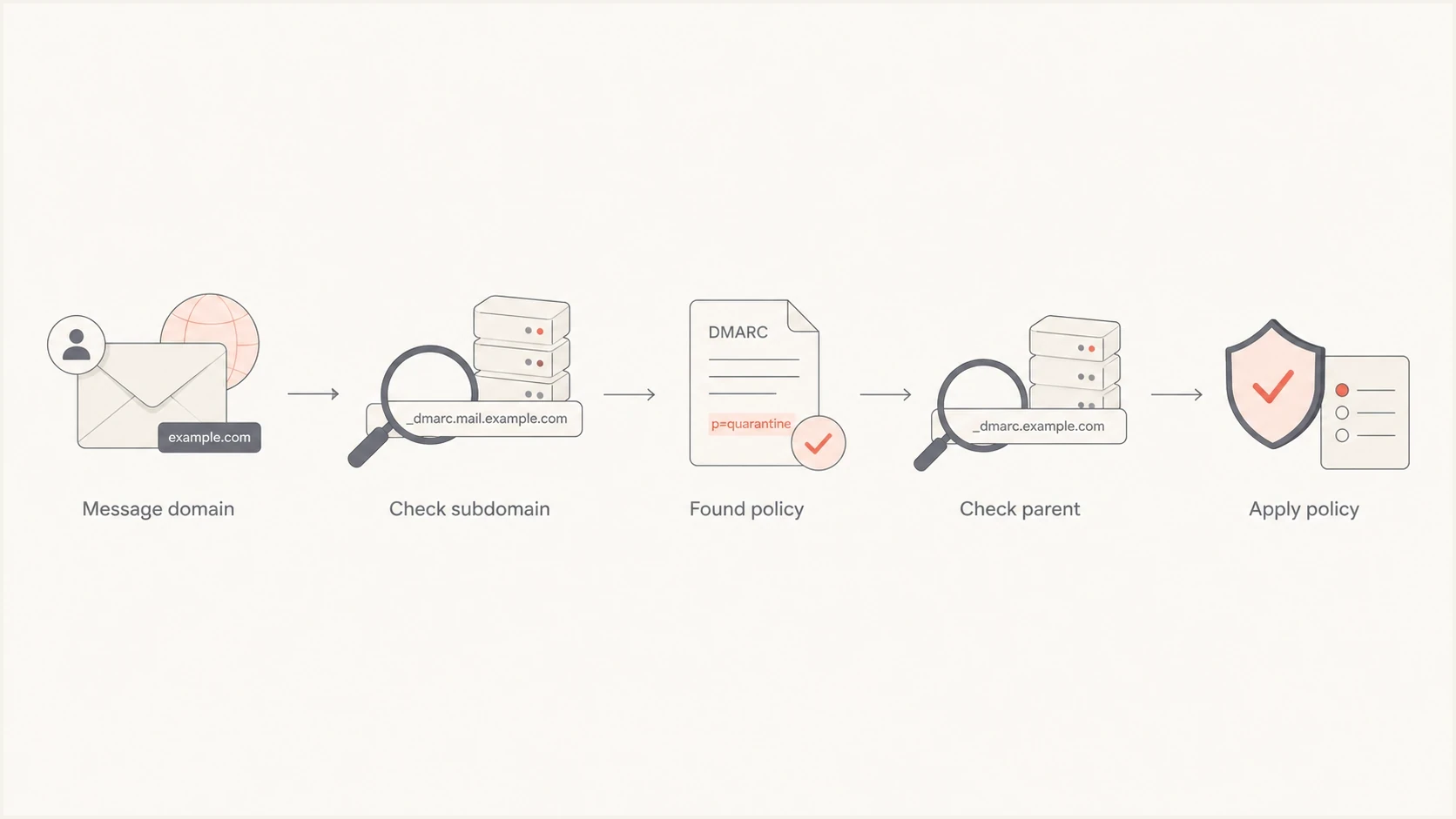
A flowchart showing how receivers find a DMARC policy for a domain or subdomain.
If a subdomain has its own valid DMARC record, that record is used for mail with the subdomain in the visible From address. If it does not, an RFC 9989 receiver continues the DNS Tree Walk toward parent labels to find an applicable policy. When the policy is found at the organizational domain, the sp value applies to the subdomain when present; otherwise the p value applies.
A subdomain record is not a duplicate
A separate record for a subdomain is valid when it is published at the subdomain's own DMARC host. The useful question is whether subdomains need records for your sending model, not whether records can be stacked at one host.
DMARC record count rule
The count is evaluated at each DNS lookup target, not across the domain portfolio.
Zero records
Continue
Policy discovery can continue toward a higher-level domain.
One record
Valid
This is the valid state at a DMARC lookup target.
Two or more
Discarded
All DMARC Policy Records at that target are discarded.
What to do when a vendor asks you to add DMARC
Many sending platforms provide generic authentication instructions that include SPF, DKIM, and a basic DMARC value. That is useful for a domain with no policy, but it is risky when a record already exists. Treat those instructions as a prompt to check the current state, not as permission to add another TXT resource record.
- If none exists: Publish one DMARC record, usually starting at p=none while you collect reports.
- If one exists: Do not add another. Confirm whether the vendor only needs SPF or DKIM setup.
- If reports change: Add the new reporting destination inside the existing record, separated correctly.
- If policy changes: Review the effect first, especially before moving to quarantine or reject.
?
What's your domain score?
Deep-scan SPF, DKIM & DMARC records for email deliverability and security issues.
A broader domain health checker helps because duplicate DMARC is rarely the only issue. It should also show whether SPF exceeds its DNS lookup limit, whether the expected DKIM selectors exist, and whether the visible From domain passes DMARC with actual sending sources.
How Suped handles this workflow
Suped's product supports the operational workflow around this problem. It detects duplicate DMARC records, explains the DNS correction, and connects the change to DMARC report data. The same workspace covers SPF, DKIM, blocklist (blacklist) monitoring, alerts, and hosted records.
DMARC record detail view showing SPF, DKIM, DMARC, rDNS diagnostics, and DNS records
The workflow is direct. Add the domain, let Suped read the DMARC record and incoming reports, then correct the issue shown in diagnostics. If DNS access is split between internal teams and an agency, Hosted DMARC can reduce the number of places where people edit raw TXT strings.
Manual DNS work
- Slow checks: Someone has to inspect DNS, syntax, and authentication results separately.
- Hidden drift: A vendor or domain host change can reintroduce a duplicate record later.
- Weak follow-up: A DNS fix does not prove that real mail sources now pass DMARC.
Suped workflow
- Issue detection: Suped flags duplicate DMARC and other DNS problems automatically.
- Clear fixes: The issue view explains the change to make and how to verify it.
- Ongoing alerts: Alerts identify later record changes and authentication drops.
For MSPs and teams managing multiple domains, the larger value is consistency. One domain with a duplicate record is easy to miss. A portfolio with dozens of domains needs a clear view of domains with missing DMARC, duplicate records, stricter-policy readiness, or sending sources that still fail DMARC.
Common fixes and mistakes
The fastest fix is to reduce the DNS answer to one valid DMARC Policy Record at the intended owner name. Repeatedly changing policy values without checking that name wastes time because an incorrectly named duplicate can remain in DNS.
Do not split DMARC by sender
One visible From domain should not have one DMARC record for marketing mail and another for billing mail. SPF and DKIM authenticate sending services. DMARC publishes one policy for the visible From domain.
- Wrong host: Some DNS panels append the domain automatically, so typing the full name can create an unintended owner name.
- Quoted strings: Several strings in one TXT resource record are valid, but separate DMARC records are not.
- Policy reset: A generic vendor record can unintentionally replace a deliberate quarantine or reject policy.
- Report loss: Removing a record without merging rua destinations can stop useful aggregate reporting.
A related issue can occur inside one record: a DMARC record should have one active policy tag. A repeated p tag is a syntax problem inside one TXT value, not a duplicate-record problem in DNS.
When someone asks why multiple records fail, the answer is that DNS returns an unordered record set. DMARC needs one policy at each lookup target, so the receiver cannot infer intent from conflicting records.
Views from the trenches
Best practices
Check for an existing DMARC record before adding vendor-provided DNS instructions.
Merge valid report destinations into one DMARC record before deleting any old TXT value.
Validate the exact DMARC host after DNS changes, then confirm reports still arrive.
Common pitfalls
Adding a vendor sample record beside an existing policy can disable working protection.
Typing the full host in a DNS panel that appends the domain can publish the wrong name.
Treating root and subdomain DMARC records as duplicates causes unnecessary deletion.
Expert tips
Keep a change log for DMARC policy edits so later vendor setup does not reset policy.
Use separate subdomains for high-risk senders when policy staging needs isolation.
Review aggregate reports after each DNS change to catch broken authentication quickly.
Marketer from Email Geeks says vendor instructions should tell users to add DMARC only when the domain does not already have a record.
2025-01-17 - Email Geeks
Marketer from Email Geeks says support guidance needs to account for customers who already have a working DMARC policy.
2025-01-18 - Email Geeks
The rule for domains and subdomains
You cannot publish multiple DMARC Policy Records at the same lookup target and expect one to apply. Publish one TXT resource record at the correct _dmarc name, keep one policy, and put all valid reporting addresses and optional tags into that record.
Separate DMARC records are valid when they use separate DNS names, such as an organizational domain and a subdomain. For duplicate records at one target, merge the intended settings, publish one resource record, wait for cached answers to expire, and monitor the result.




