Do subdomains need their own DMARC records if the main domain has one?

Updated on 14 Aug 2026: We updated this guide for RFC 9989 DNS Tree Walk discovery and the np policy for non-existent subdomains.
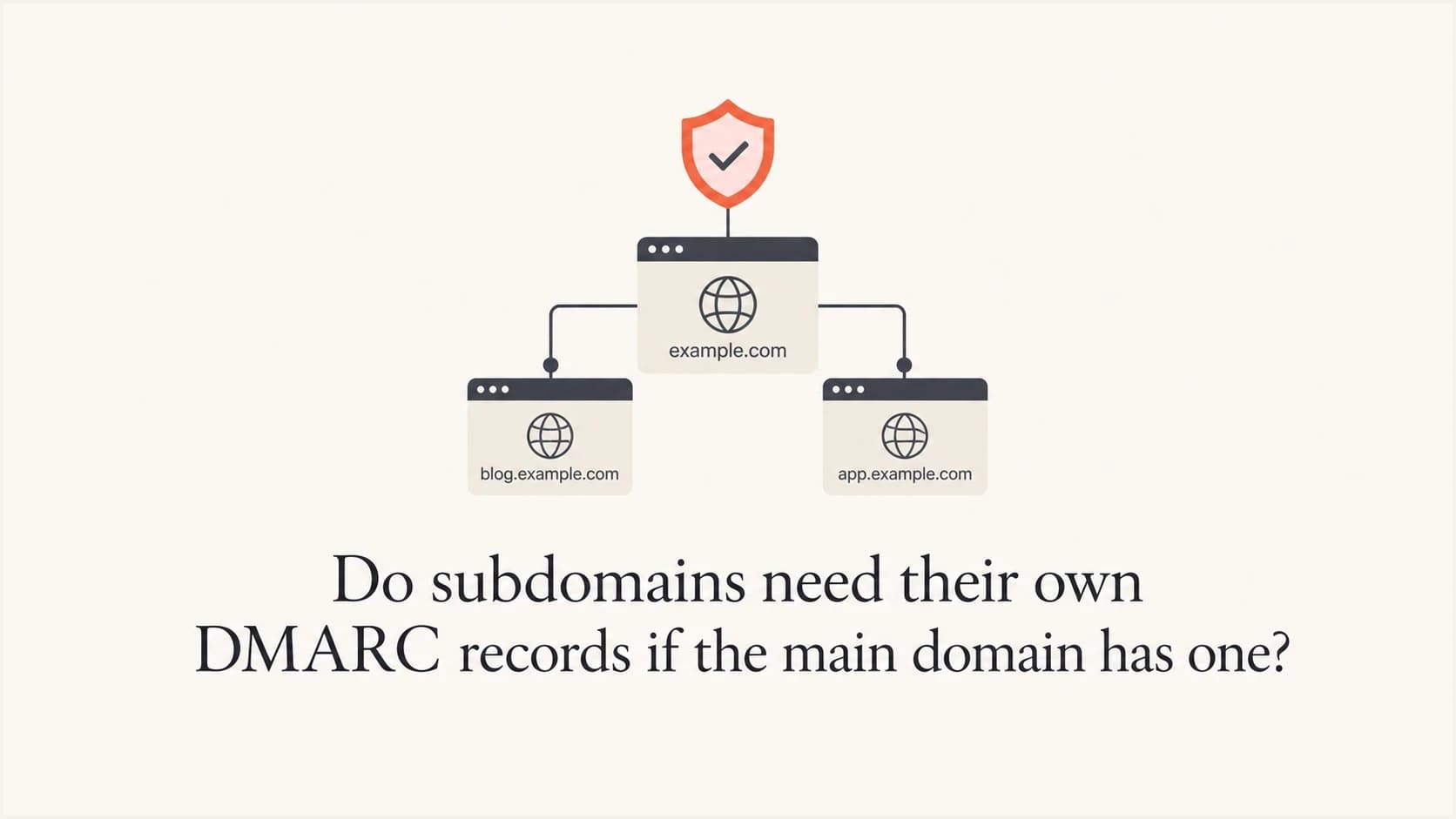
No, a subdomain does not always need its own DMARC record if the organizational domain already has one. A DMARC record published at _dmarc.example.com can apply to mail using news.example.com, sender.example.com, and other subdomains when those subdomains do not publish their own DMARC records. That is normal DMARC policy discovery.
The caveat is important: add a subdomain record when it needs a different policy, reporting destination, rollout stage, or troubleshooting boundary. If a subdomain is failing DMARC, the absence of a direct record is usually not the root cause when a valid organizational-domain policy applies. Check SPF, DKIM, sender configuration, and reputation first.
A practical rule is to rely on the organizational-domain record for simple estates, then add explicit records to active sending subdomains when they need separate operational control. That produces cleaner reports and a safer path to enforcement.
The short answer
A DMARC record on the organizational domain can cover its subdomains when the exact Author Domain has no valid record of its own. Under RFC 9989, receivers check the exact Author Domain first. If no valid record is found there, they use the DNS Tree Walk to find the organizational domain or an applicable Public Suffix Domain policy.
DMARC is evaluated against the domain in the visible From header, called the Author Domain in RFC 9989. If the From domain is sender.example.com, the receiver first checks _dmarc.sender.example.com. If that record does not exist, the receiver walks up the DNS hierarchy to determine the organizational domain and any applicable Public Suffix Domain policy. In a straightforward example.com setup, the applicable owner policy will usually be found at _dmarc.example.com.
That makes "every sending subdomain must have its own DMARC TXT record" too broad. The accurate rule is that every visible From domain must be covered by DMARC, either directly or through policy discovery.
- Default coverage: A valid organizational-domain record covers subdomains that do not publish their own DMARC records.
- Exact-domain override: A valid record on the exact Author Domain supplies the policy for that domain.
- Policy separation: Use a subdomain record when marketing, transactional, vendor, or internal mail needs different enforcement.
- Reporting separation: Use a subdomain record when aggregate or failure reports need subdomain-specific routing.
For more detail, the page on subdomain DMARC overrides explains how receivers choose between the exact subdomain and an inherited policy.
How DMARC inheritance works
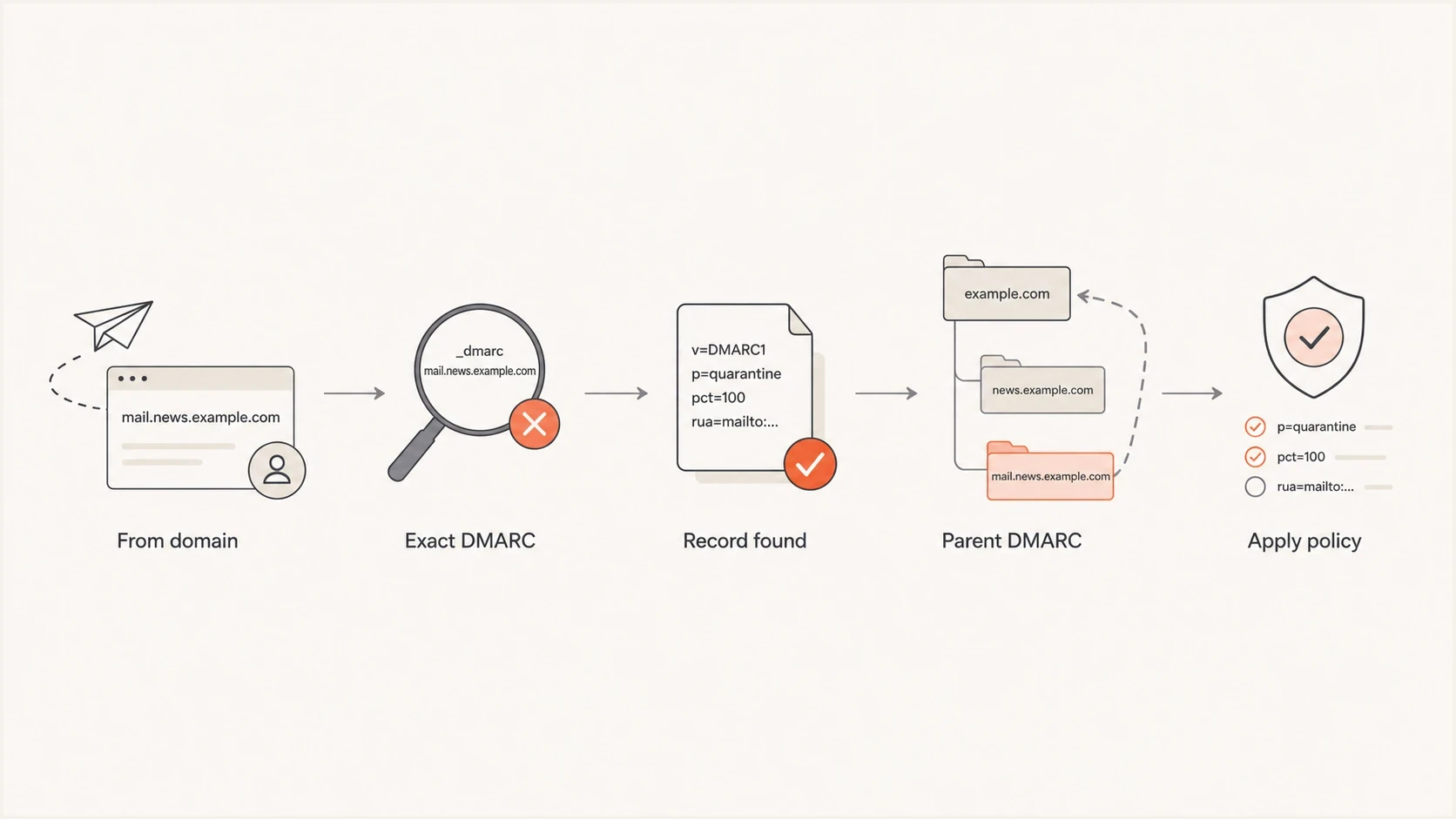
RFC 9989 DMARC DNS Tree Walk checks the exact Author Domain before inherited policy.
DMARC does not merge settings across DNS levels. It finds the relevant policy record, then evaluates authentication domain alignment against that record. For troubleshooting, use two steps: find the DMARC policy, then determine whether SPF or DKIM produced an aligned pass for the visible From domain.
If a message uses sender.example.com in the From header, the receiver first checks for a record at _dmarc.sender.example.com. If it finds one, it uses that record's policy, reporting tags, alignment settings, and other tag values. If it does not find one, RFC 9989 directs the receiver to walk up the DNS hierarchy, with no more than eight policy queries, to determine the organizational domain or applicable Public Suffix Domain. Separate Tree Walks can also be needed to evaluate relaxed SPF or DKIM alignment. For a typical setup, the owner policy is found at _dmarc.example.com.
Organizational-domain record covering subdomainsdns
_dmarc.example.com. TXT "v=DMARC1; p=quarantine; rua=mailto:dmarc@example.com"
With only the organizational-domain record above, mail using sender.example.com is still covered by DMARC. It uses the organizational domain's p=quarantine policy unless the record has an sp tag for existing subdomains or, for non-existent subdomains, an np tag.
Organizational-domain record with a subdomain policydns
_dmarc.example.com. TXT "v=DMARC1; p=reject; sp=quarantine; rua=mailto:dmarc@example.com"
In that example, the organizational domain uses p=reject, while existing subdomains without their own records use sp=quarantine. The sp tag sets one default policy for existing subdomains without separate records everywhere. RFC 9989 also defines np for non-existent subdomains and uses psd=y or psd=n to identify Public Suffix Domain and organizational boundaries during the DNS Tree Walk. Ordinary domain owners should publish a psd value only when they know that boundary status applies.
Existing and non-existent subdomains
RFC 9989 separates existing subdomains from non-existent subdomains because the applicable inherited tag can differ. An existing subdomain without its own DMARC record uses sp when the organizational-domain record supplies it. A non-existent subdomain uses np when supplied.
Organizational-domain record with existing and non-existent subdomain policiesdns
_dmarc.example.com. TXT "v=DMARC1; p=reject; sp=quarantine; np=reject; rua=mailto:dmarc@example.com"
|
|
|
|---|---|---|
Valid exact DMARC record | p on exact record | No inherited policy |
Existing subdomain, no exact record | sp on organizational record | p if sp is absent |
Non-existent subdomain | np on organizational record | sp, then p |
RFC 9989 policy selection for an Author Domain
For DMARC, a domain exists when any DNS resource record exists at that name. A missing A, AAAA, or MX record does not by itself make the name non-existent. An NXDOMAIN response means the name does not exist, while a NOERROR response with no data for the queried record type means the name still exists.
RFC 9989 was published recently, so receiver adoption of DNS Tree Walk processing and newer tags such as np and t will not change everywhere at once. Keep the organizational-domain p and sp policies safe for legitimate traffic, monitor aggregate reports, and do not treat t=y as a guaranteed enforcement brake during the transition.
When a subdomain should have its own record
Publish an explicit subdomain DMARC record when that subdomain has a named owner or a different risk profile. Transactional and marketing mail often use separate senders, volumes, complaint controls, and owners, which can justify different policy or report routing.
Parent record is enough
- Same policy: The subdomain can use the same enforcement policy as the organizational domain.
- Same reporting: Aggregate reports can go to the same reporting destination.
- Simple sender map: Only a small number of approved platforms send for the domain.
- Low change rate: New vendors and new sending streams are rare.
Subdomain record helps
- Different policy: The subdomain needs quarantine while the parent is still at none, or the reverse.
- Different reports: Security, marketing, a vendor, or compliance needs separate aggregate report routing.
- High volume: The subdomain sends enough mail to deserve its own monitoring view.
- Vendor isolation: One sender should not make the whole domain harder to interpret.
A testing tool can report "no DMARC record found" after checking only the exact subdomain. That result is incomplete when an applicable policy exists higher in the DNS hierarchy. A complete RFC 9989 check starts at the exact Author Domain and performs policy discovery.
DMARC checker
Look up a domain's DMARC record and catch policy issues.
?/7tests passed
Use a DMARC checker on both the organizational domain and the active subdomain. If the organizational-domain record exists and the subdomain has no exact record, identify which inherited policy applies and whether SPF or DKIM produced an aligned pass.
Why a missing subdomain record gets blamed
A missing subdomain record is easy to see, so it often gets blamed for spam placement. That can be wrong. Mailbox providers do not reward a domain just because it has a DMARC TXT record. DMARC proves or fails identity alignment. It does not erase complaint history, low engagement, list quality problems, sudden volume spikes, or unwanted content.
A useful troubleshooting rule is: authentication gets you the deliverability you deserve. If a fully authenticated subdomain still lands in spam, the identity is clearer, but the mail still has a reputation problem.
|
|
|
|---|---|---|
No DMARC seen | Tool checked exact host only | Full policy discovery |
DMARC fail | SPF or DKIM not aligned | MAIL FROM domain |
DKIM pass, DMARC fail | Signing domain not aligned | DKIM d= value |
Spam placement | Reputation or complaints | Complaint rate |
Mixed results | Multiple senders | Per-source report data |
Common causes of subdomain DMARC failure or spam placement
Do not treat a passing DMARC result as a deliverability guarantee. Passing DMARC means SPF or DKIM passed and aligned with the visible From domain. Inbox placement still depends on reputation, recipient behavior, complaints, list acquisition, volume pattern, and content.
This matters with mailbox providers that apply strict filtering. If a subdomain sends high-complaint mail, valid DMARC can make that identity clearer. Fix the sending behavior and separate mail streams so each domain identity has a clear purpose.
The safest DNS patterns
There are three clean patterns that work in production. The best choice depends on sending volume, program maturity, ownership, and risk tolerance.
Pattern 1: organizational domain onlydns
_dmarc.example.com. TXT "v=DMARC1; p=none; rua=mailto:dmarc@example.com"
Use this when you are starting DMARC monitoring and want broad visibility before enforcement. It covers the organizational domain and subdomains without their own records. It is low maintenance, but gives less control over each subdomain.
Pattern 2: organizational domain with subdomain policydns
_dmarc.example.com. TXT "v=DMARC1; p=reject; sp=quarantine; rua=mailto:dmarc@example.com"
Use this when the organizational domain is ready for one enforcement level and subdomains need another. This is common when corporate mail is ready for reject, but marketing or product subdomains still need staged enforcement.
Pattern 3: explicit subdomain recorddns
_dmarc.sender.example.com. TXT "v=DMARC1; p=quarantine; rua=mailto:sender-dmarc@example.com"
Use this when the subdomain needs its own reporting address, owner, policy stage, or exception handling. It does not make the subdomain automatically pass DMARC. SPF or DKIM must still pass with a domain that matches the Author Domain.
Subdomain policy rollout
A practical enforcement path for active sending subdomains.
Monitor
p=none
Collect reports and identify legitimate senders.
Test mode
p=quarantine; t=y
Request RFC 9989 test handling while checking receiver results.
Quarantine
p=quarantine
Apply quarantine after legitimate sources pass consistently.
Reject
p=reject
Request rejection after legitimate sources are aligned.
What to check before adding a record
Before adding a subdomain DMARC record, check real message headers and aggregate reports. DNS alone tells only part of the story. A message can have an applicable organizational-domain policy and still fail because neither SPF nor DKIM passed with alignment to the visible From domain.
- Visible From: Confirm whether the message uses the organizational domain or a subdomain in the From header.
- Exact DMARC: Check whether the exact Author Domain has a valid DMARC record.
- Policy discovery: If the exact subdomain has no record, walk the DNS hierarchy and identify the applicable p, sp, or np policy.
- SPF alignment: Compare the MAIL FROM domain with the visible From domain under the published alignment mode.
- DKIM alignment: Check the DKIM signing domain and confirm that a passing signature aligns with the visible From domain.
- Report evidence: Use aggregate reports to separate one-off header samples from repeated production failures.
DMARC record detail view showing SPF, DKIM, DMARC, rDNS diagnostics, and DNS records
Suped's DMARC monitoring brings the applied policy, authentication results, verified sources, and DNS diagnostics into one workflow. That makes it easier to find missing DNS, duplicate records, alignment failures, or a sender that should not be using the domain.
For larger estates, Suped's DMARC monitoring keeps organizational domains, subdomains, SPF, DKIM, blocklist (blacklist) signals, and deliverability issues in one view. That helps when a sender attributes every failure to DNS while the report data shows repeated complaints or alignment issues.
How to create a subdomain DMARC record
If you decide to add a record, keep it simple. Do not copy a strict reject policy onto a busy subdomain until you have verified all legitimate senders. Start with reporting, fix domain alignment, then move toward enforcement.
Safe starting record for a sending subdomaindns
_dmarc.sender.example.com. TXT "v=DMARC1; p=none; rua=mailto:dmarc@example.com"
That record collects reports for the subdomain without requesting quarantine or rejection of failing mail. Once legitimate mail passes DMARC consistently, move the policy to quarantine and then reject. If the organizational domain has a stronger policy, an explicit subdomain record with p=none weakens enforcement for that Author Domain, so use it only during a deliberate rollout.
DMARC record generator
Choose your policy, reporting addresses, and alignment settings.
DNS TXT record
v=DMARC1; p=quarantine; rua=mailto:dmarc@example.com
A DMARC record generator helps build the record without mistyping tags. For ongoing changes, Suped's Hosted DMARC manages policy staging without a DNS edit every time a subdomain moves through enforcement.
Do not publish more than one DMARC TXT record at the same hostname. Multiple valid records at one DMARC name are discarded during RFC 9989 policy discovery. If you need to change policy, edit the existing record instead of adding another one.
If you are comparing this with other multi-record mistakes, the page on multiple DMARC records explains why duplicate records at one hostname break evaluation.
A practical decision table
For a quick decision, use the table below. It keeps the answer tied to the operational requirement instead of a warning that checked only the exact host.
|
|
|
|---|---|---|
Organizational policy fits | No | Same policy |
Different reports | Yes | Cleaner routing |
Different policy | Yes | Local control |
Vendor testing | Often | Safer rollout |
High complaints | Not enough | Fix reputation |
Exact-host warning | Check first | Policy may inherit |
When to publish subdomain DMARC
The operational answer is often "add it, but do not expect it to fix deliverability by itself." A subdomain record can remove ambiguity and make reports easier to read. If the subdomain has high complaints, bad list sources, poor engagement, or abrupt volume changes, that separate record will not repair reputation.
When a subdomain needs explicit control, Suped's Hosted DMARC provides a workflow for policy staging, source monitoring, failure-rate alerts, and enforcement changes with less DNS churn.
Hosted DMARC configuration dialog showing policy controls, CNAME setup, and expanded advanced options
Hosted policy management helps MSPs and multi-domain teams replace ad hoc TXT edits with a clear policy stage for each domain. Suped connects that work with issue detection, remediation steps, real-time alerts, and SPF, DKIM, blocklist, and blacklist context.
Common mistakes to avoid
Most subdomain DMARC mistakes come from treating DNS records as the whole system. DMARC depends on DNS, but the result is decided by the message that gets sent.
- Checking only DNS: Inspect a real message header and aggregate report data before blaming the record.
- Ignoring alignment: An SPF pass does not support a DMARC pass unless the SPF domain aligns with the visible From domain.
- Copying reject too early: A strict subdomain record can block legitimate vendor mail if DKIM or SPF alignment has not been fixed.
- Forgetting reports: A record without aggregate reporting gives you less evidence when something breaks later.
- Mistaking spam for DMARC: Spam placement after a DMARC pass usually points to reputation, complaints, list quality, or sending patterns.
A clean setup for important subdomains has explicit ownership, aligned DKIM, aligned SPF where practical, and DMARC reports that are reviewed after each sender change.
If a vendor says a subdomain record never matters, ask for specifics. Identify the domain in the From header, the DMARC record being applied, the passing authentication mechanism, its alignment result, and the report data that supports the answer. The correct result is visible in the message and the reports.
Views from the trenches
Best practices
Check the exact From domain first, then confirm the parent policy before changing DNS.
Use explicit subdomain records when reporting, policy, ownership, or rollout stages need separation.
Review DKIM and SPF domain matches before treating a missing subdomain record as causal.
Common pitfalls
A tool warning for the exact host can miss the parent DMARC record that still applies.
Adding a subdomain record will not fix complaint-driven spam placement by itself.
Copying reject to a vendor subdomain too early can block legitimate operational mail.
Expert tips
Use the parent sp tag for existing subdomains and np for non-existent subdomains only.
Keep each active sending subdomain tied to a named owner and approved sender list.
Treat authentication as identity proof, then evaluate reputation and recipient behavior.
Expert from Email Geeks says a parent domain DMARC record can cover subdomains when those subdomains do not need their own policy or report routing.
2023-11-13 - Email Geeks
Expert from Email Geeks says a separate subdomain record becomes useful when the policy or aggregate report destination needs to differ.
2023-11-13 - Email Geeks
The practical answer
A subdomain does not automatically need its own DMARC record when a valid organizational-domain record covers it. Add an exact subdomain record when you need a different policy, separate reporting, named ownership, or a safer staged rollout. If covered mail still lands in spam, check SPF and DKIM alignment, the return-path domain, complaint rate, list quality, and sending history.
For teams managing several sending domains or clients, Suped supports a repeatable workflow for issue detection, remediation steps, DMARC monitoring, hosted policy changes, and authentication context alongside blocklist (blacklist) signals.




