
Should I include List-Unsubscribe headers in transactional emails and what are the DKIM best practices?

Updated on 8 Nov 2026: We clarified bulk-sender rules, end-to-end unsubscribe testing, and the limits of DKIM replay protection.
Do not add List-Unsubscribe to every message labeled transactional. Gmail and Yahoo exclude true transactional mail, such as requested password resets, one-time passwords, receipts, and security alerts, from their one-click requirements. Include the headers in marketing and subscription mail, including subscribed recurring notifications, promotional trial reminders, product digests, optional alerts, and other messages the recipient can reasonably stop.
For DKIM, use RSA-SHA256, sign the headers that define the message, avoid the body length tag, use strong keys, rotate selectors safely, and sign List-Unsubscribe and List-Unsubscribe-Post when one-click unsubscribe is enabled. The only mandatory DKIM signed header is From, but signing only From leaves too much important message context unsigned.
- Use List-Unsubscribe on marketing, product digests, subscribed notifications, optional recurring invites, promotional trial reminders, and other messages a recipient can reasonably stop.
- Keep password resets, one-time passwords, security notices, fraud alerts, receipts, and required account mail outside normal unsubscribe suppression.
- For one-click unsubscribe, publish both List-Unsubscribe and List-Unsubscribe-Post, then cover both headers with DKIM.
- Use RSA-SHA256 with 2048-bit DKIM keys where supported, keep selectors separate by stream, and avoid the DKIM body length tag.
When List-Unsubscribe belongs in transactional email
List-Unsubscribe belongs in email described internally as transactional when the message is really a subscription the recipient can stop. Gmail treats some notification messages as subscription mail, while messages caused by an explicit user action or request remain non-subscription mail.
The common trap is assuming "transactional" means "unsubscribe does not apply". A password reset requested by the account holder is different from a recurring product invite. An order receipt is different from a daily digest. A security alert is different from a promotional trial reminder. Classify each stream by why the recipient receives it and whether the recipient can stop it.
Give recipients a clean opt-out path for optional messages. Keep requested account access and essential service notices outside marketing suppression, and check applicable legal obligations separately.
|
|
|
|---|---|---|
Newsletter | Yes | Stop newsletter |
Product digest | Yes | Stop digests |
Optional recurring account invite | Yes | Suppress invites |
Opt-in follow-up | Yes | Suppress follow-ups |
Promotional trial reminder | Yes | Stop reminders |
Required legal notice | Usually no | Keep required |
Password reset | Usually no | Keep critical |
Security alert | Usually no | Keep critical |
Receipt | Usually no | Keep record |
Practical header treatment under Gmail and Yahoo guidance
Google requires one-click unsubscribe for marketing and subscription messages from bulk senders. Some recurring notifications count as subscription mail, but requested password resets, purchase receipts, and one-time passwords do not. The Google guidance sets out the message requirements. Yahoo applies its rule to bulk promotional and marketing mail, excludes true transactional messages, and publishes no fixed bulk-volume threshold. See Yahoo's sender FAQ.
Gmail classifies senders reaching roughly 5,000 messages to personal Gmail accounts within 24 hours as bulk senders. It counts all messages across the same primary domain and its subdomains, including transactional mail. Once assigned, bulk status is permanent, even if volume later drops. See Google's bulk-sender FAQ.
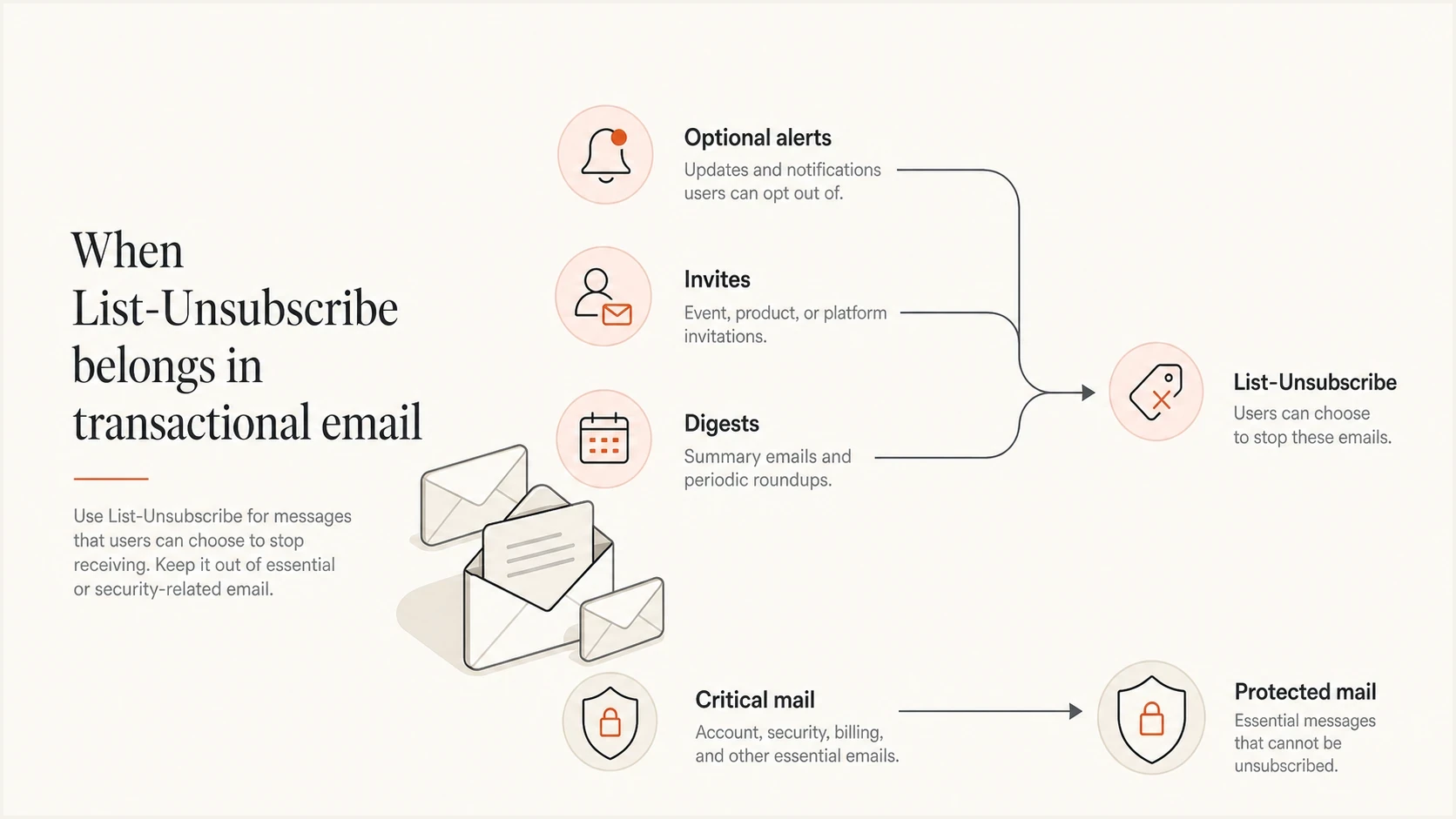
List-Unsubscribe decision infographic for optional alerts, invites, digests, and critical mail.
Keep a visible body unsubscribe link
List-Unsubscribe headers create a machine-readable route for mailbox controls. They do not replace the visible unsubscribe link in the message body. Gmail requires affected bulk marketing and subscription messages to support one-click unsubscribe and include a clear body link.
- Make the body link easy to find and readable on mobile devices, and include it in both HTML and plain-text message parts.
- The body link can open a preference center; it does not need to perform the RFC 8058 POST action.
- Keep the category shown in the preference center consistent with the list encoded in the one-click URL.
- Test the header action and the body link separately because they use different request paths.
A valid header does not guarantee that an inbox will show its native unsubscribe control. The mailbox provider decides whether to display it based on implementation checks and sender eligibility, so the body link remains necessary.
What the unsubscribe action should do
Before adding List-Unsubscribe to transactional email, decide what the request changes. The header is not only a technical marker. It creates a user action that your systems need to honor predictably.
Map each one-click request to the subscription list or message category identified by the opaque URL token. Do not silently suppress unrelated subscriptions unless the recipient chose a global opt-out or your published policy clearly defines that result. Never let a category unsubscribe suppress password resets, one-time passwords, security alerts, fraud notices, required legal notices, or receipts.
Weak policy
- Every unsubscribe either blocks everything or does nothing useful.
- Support teams cannot explain why a user stopped receiving specific notifications.
- Critical mail gets blocked or unwanted mail keeps generating complaints.
Better policy
- Each token maps to one named list or notification category.
- The app shows which notification categories are suppressed for the user.
- Unwanted mail stops while account-critical mail continues.
A useful transactional unsubscribe flow also needs a "this is not me" path. This matters when someone enters the wrong address, typo-subscribes another person, or uses an address they do not control. In that case, the recipient does not want to manage preferences. They want your system to stop treating the address as theirs. Confirm ownership before starting optional subscriptions, and verify any change to an established account separately from suppressing unwanted reminders.
Suppression decision modeltext
Unsubscribe from a marketing email:
  suppress the list identified by the token
  offer a separate global marketing opt-out

Unsubscribe from a digest or notification email:
  suppress that notification class
  leave unrelated subscriptions unchanged
  keep password resets and security alerts

Unsubscribe from an invite or opt-in follow-up:
  suppress future messages from the same source
  mark the address for review or re-confirmation

This is not me:
  invalidate the unconfirmed signup relationship
  verify ownership before changing an established account
  suppress follow-up reminders
  preserve account security notices where required
This policy also protects deliverability. Recipients who cannot stop unwanted account-adjacent mail use the spam button. That complaint damages sender reputation more than a properly handled unsubscribe. For teams using shared IPs, the effect can spill across streams because marketing and transactional traffic share reputation signals even when the content types are different.
How to format List-Unsubscribe and one-click headers
List-Unsubscribe is a machine-readable email header defined by RFC 2369. RFC 8058 adds one-click unsubscribe using List-Unsubscribe-Post and an HTTPS POST. Include exactly one instance of each header for this method. The HTTPS URL must accept an RFC 8058 POST without login, cookies, redirects, or another confirmation step. A manual browser GET to the same URL can show a confirmation page or preference center. A mailto option remains a fallback. Yahoo accepts mailto under its current sender requirements, while Gmail requires the RFC 8058 HTTPS POST method.
One-click List-Unsubscribe header exampletext
List-Unsubscribe: <https://example.com/u/abc123>,
 <mailto:unsubscribe@example.com?subject=unsubscribe>
List-Unsubscribe-Post: List-Unsubscribe=One-Click
Expected one-click POST bodytext
POST /u/abc123 HTTP/1.1
Host: example.com
Content-Type: application/x-www-form-urlencoded
Content-Length: 26

List-Unsubscribe=One-Click
If you use one-click unsubscribe, sign both headers with DKIM. RFC 8058 requires List-Unsubscribe and List-Unsubscribe-Post to appear in the h= list of the same valid DKIM signature. Without that coverage, a receiver should not offer the one-click action.
Do not add a List-Unsubscribe header until the endpoint and suppression rules are ready. A broken endpoint trains mailbox providers and users that your unsubscribe process cannot be trusted.
- Use a durable HTTPS URL with a recipient-specific, opaque, hard-to-forge token and no exposed personal data.
- Accept application/x-www-form-urlencoded and multipart/form-data POST bodies, and validate the token without requiring a login session or an anti-CSRF token.
- Make repeated POST requests idempotent so retries return success without changing unrelated preferences.
- Treat GET as a manual navigation request, not the one-click action, to avoid opt-outs caused by link scanners.
- Route mailto fallback requests into an automated processor instead of a shared mailbox.
- Honor the identified list or category within 48 hours and keep a durable audit event.
DKIM headers worth signing
There is no universal mailbox-provider list of DKIM headers that earns special placement by itself. DKIM proves that selected headers and the message body were signed by a domain. The best list is the set of stable headers that identify the message and should not be inserted, removed, or modified in transit.
Start with From, To, Subject, Date, Message-ID, Reply-To, Sender, MIME-Version, Content-Type, Content-Transfer-Encoding, List-ID, List-Unsubscribe, and List-Unsubscribe-Post when present. For threaded mail, also consider In-Reply-To and References. Sign Cc when it exists and is stable. Do not depend on Bcc in delivered mail because Bcc should normally be removed before delivery.
Practical DKIM h= listtext
h=From:To:Subject:Date:Message-ID:Reply-To:Sender:
 MIME-Version:Content-Type:Content-Transfer-Encoding:List-ID:
 List-Unsubscribe:List-Unsubscribe-Post
Oversigning adds an absent instance of a header name to h=, or lists an existing single-instance header twice, so a later system cannot add another copy without breaking the signature. Use it selectively for headers that should appear once, such as From, Subject, Date, Message-ID, Sender, Reply-To, List-Unsubscribe, and List-Unsubscribe-Post. Do not oversign headers that legitimate forwarding or list processing is expected to add.
Oversigning patterntext
h=From:From:Subject:Subject:Date:Date:Message-ID:Message-ID:
 List-Unsubscribe:List-Unsubscribe:List-Unsubscribe-Post:
 List-Unsubscribe-Post
Use a DKIM validation pass after every mail pipeline change. Suped's DKIM checker helps verify selectors, public keys, and DNS syntax. A DNS check does not verify a delivered message signature or prove that the unsubscribe headers were signed. Add headers and complete footer insertion, link rewriting, and MIME encoding before the final DKIM signing step.
|
|
|
|---|---|---|
From | Always | Required by DKIM |
Subject | Yes | Visible content |
Date | Yes | Message age |
Message-ID | Yes | Message identity |
List-ID | When present | Subscription identity |
List-Unsubscribe | Yes | One-click trust |
List-Unsubscribe-Post | For one-click | Required one-click DKIM coverage |
Reply-To | Usually | Reply path |
Received | No | Changes in transit |
DKIM header signing choices
DKIM parameters and replay controls
DKIM header choices matter, but DKIM parameters can create or remove real risk. Pay close attention to the signing algorithm, body length tag, signature expiration, key length, canonicalization, and selector design.
- Sign with rsa-sha256. RFC 8301 prohibits rsa-sha1 for DKIM signing and verification.
- Avoid the l= tag unless you have a narrow, well-tested reason. It lets unsigned body content be appended after the signed portion.
- Use x= for signature expiration only after testing delayed delivery. RFC 6376 explicitly says it is not an anti-replay defense; a short validity window also risks failures on queued mail.
- Prefer relaxed header and body canonicalization unless a specific sender requires simple canonicalization.
- Use RSA keys of at least 1024 bits and prefer 2048 bits. If a DNS interface requires it, split a long public key into adjacent quoted strings within one TXT record, not multiple records.
- Use different selectors for each platform or stream. Publish the replacement key, switch signing to the new selector, retain the old public key for delayed mail, then retire it.
Illustrative DKIM fields, not a valid signaturetext
DKIM-Signature: v=1; a=rsa-sha256; c=relaxed/relaxed;
 d=example.com; s=selector1;
 h=From:To:Subject:Date:Message-ID:List-Unsubscribe:
 List-Unsubscribe-Post;
 bh=...; b=...
A replayed message can still pass DKIM and DMARC when its signed content is unchanged. RFC 6376 describes this limitation. Restrict access to signing systems, monitor complaints and unusual sending patterns, and revoke a compromised key when needed. Routine rotation and DMARC enforcement do not invalidate a replay while its signature remains valid. Suped's DMARC monitoring helps investigate authentication results by sending source; aggregate reports do not prove that an unsubscribe endpoint works or identify every replay.
DMARC record detail view showing SPF, DKIM, DMARC, rDNS diagnostics, and DNS records
DMARC checks whether a passing SPF or DKIM identity matches the visible From domain under the published policy. For DKIM, compare d= with the From domain: relaxed mode permits the same organizational domain, while adkim=s requires an exact domain match. A valid signature for an unrelated domain does not support a DMARC pass for the From domain. These rules are defined in RFC 9989. If mixed streams share IPs, source-level visibility remains important because one stream's complaints can affect another stream's placement.
Mixed IPs and mixed message types
Sending marketing and transactional mail from the same handful of IPs is workable, but it makes classification and reputation management less forgiving. If a shared IP sends account confirmations, newsletters, product alerts, trial reminders, and promotional campaigns, mailbox providers see one technical source with several user experiences.
The immediate fix is not adding List-Unsubscribe everywhere. Separate streams logically, keep From domains and DKIM selectors consistent by stream, and give each stream the right unsubscribe behavior. Separate selectors support independent key rotation; they do not create separate IP or domain reputations. For Gmail subscription messages, use a human-readable List-ID header or a unique From address for each subscription list, and use different From addresses for subscription and non-subscription mail. Mixed IPs need stricter hygiene because complaints, bounces, and authentication failures are less isolated.
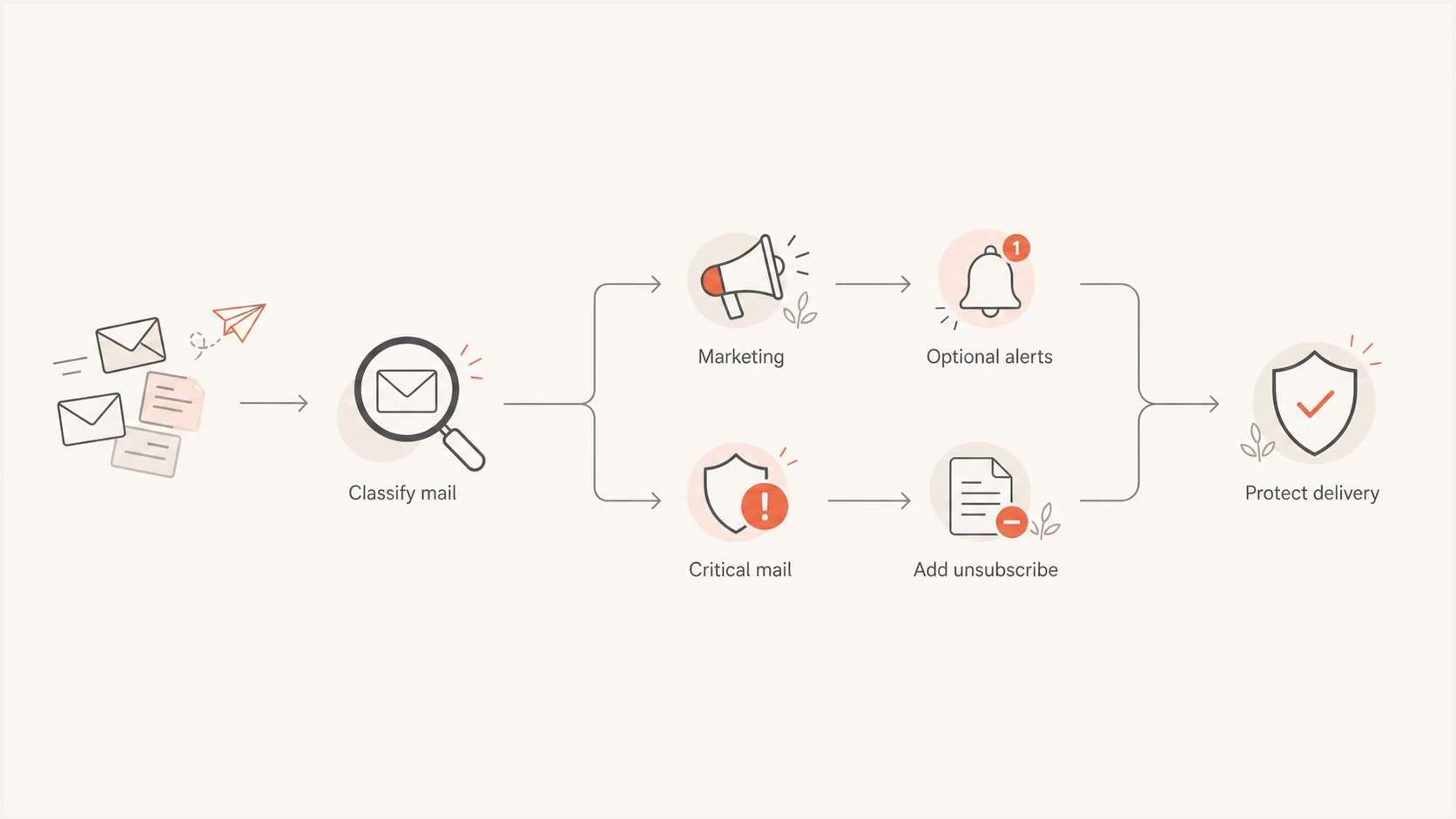
Email stream routing flowchart for marketing, optional alerts, and critical transactional mail.
- Give marketing, transactional, and product notification platforms their own DKIM selectors.
- Assign each subscription stream a List-ID or unique From address and map it to one suppression category.
- Keep complaint, bounce, unsubscribe, and DMARC failure reporting tied to message class.
- Do not let one generic sender identity cover both required account mail and promotional mail.
- Use Suped's domain health workflow to check DMARC, SPF, and DKIM signals together.
?
What's your domain score?
Deep-scan SPF, DKIM & DMARC records for email deliverability and security issues.
For teams running several domains, Suped's product groups DMARC reports by sending source so teams can investigate authentication failures. Use that evidence to identify which stream needs a signing or DNS change.
Verify unsubscribe and DKIM on delivered messages
Different sending platforms expose List-Unsubscribe controls in different places. Some generate the headers automatically for marketing sends but leave transactional sends to API settings or custom headers. Document the policy first, then audit every stream that sends as the domain.
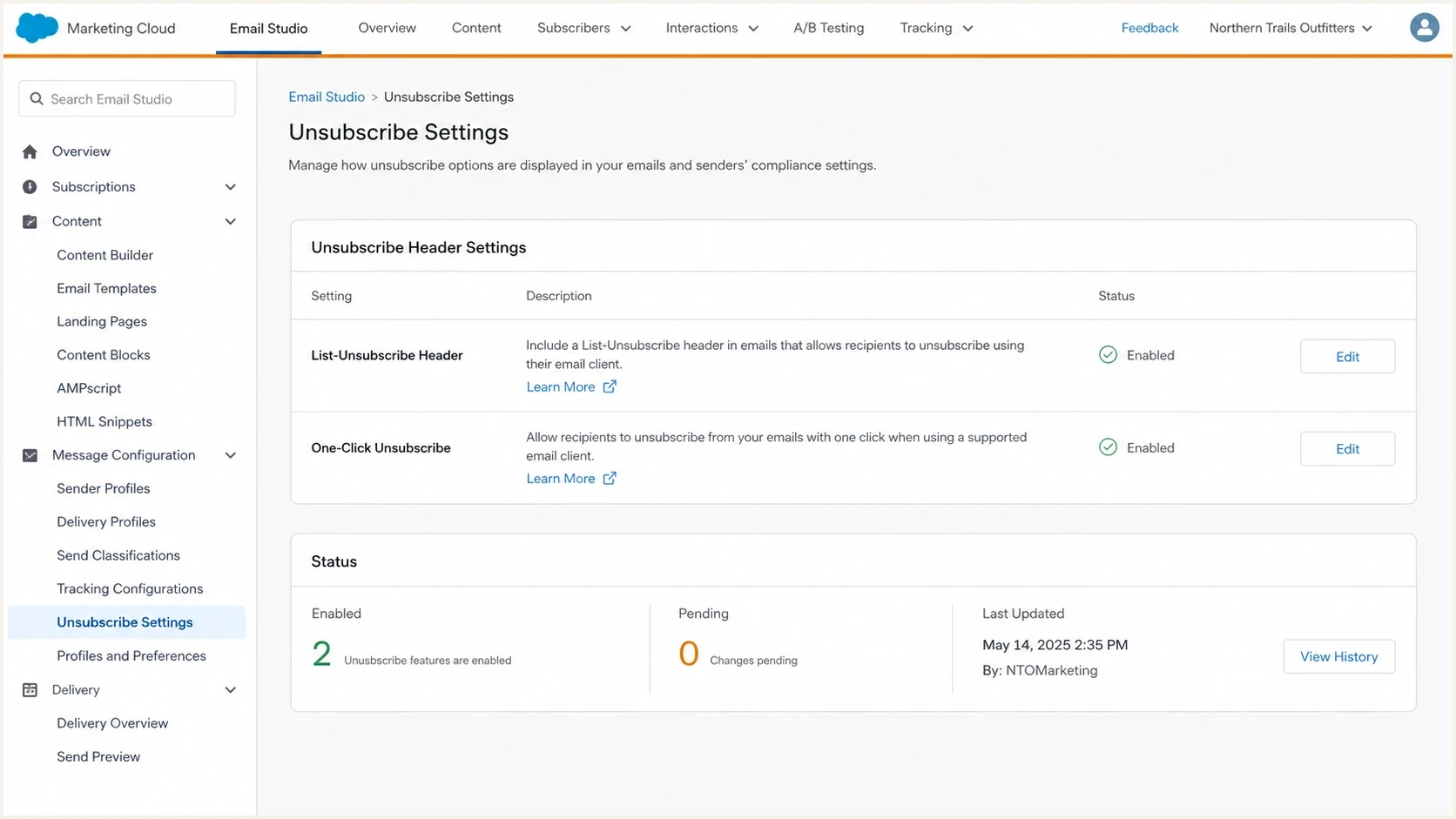
Salesforce Marketing Cloud settings for List-Unsubscribe and one-click header controls.
Settings vary by account and sending product; verify the result in a delivered test message rather than relying on a settings screen. The source of truth is the final message received by mailbox providers: headers, DKIM signature, domain matching, and the response from the unsubscribe endpoint.
Audit a test message delivered to Gmail and Yahoo after every setting change. In Gmail, open Show original and inspect the raw headers plus the receiving server's Authentication-Results. Confirm dkim=pass, dmarc=pass, the signing domain and selector, both unsubscribe headers in h=, and List-ID when used.
- Copy the HTTPS URL from a test recipient's delivered List-Unsubscribe header and submit the one-click POST without cookies or authentication. Verify a successful response without a redirect or confirmation page.
- Repeat the POST and test both supported content types. A GET must leave the recipient subscribed until a manual confirmation, and a retry must not change unrelated preferences.
- Verify that the request updates the central suppression record and every sending platform using that list. Check suppression again at send time so queued campaigns and reminders do not continue after the opt-out is processed.
- Confirm that the selected category stops within 48 hours while unrelated subscriptions and required account messages follow their own rules. Test the visible body link separately.
A successful HTTP response is only one check. Confirm the stored preference and the next send decision before marking the unsubscribe path as working.
Legal and compliance caveats
Mailbox-provider requirements and legal unsubscribe obligations are separate. The right policy depends on where recipients live, what the message says, why it was sent, and whether the email includes commercial content. A transactional exemption in Gmail or Yahoo guidance does not establish a legal exemption.
- In the United States, CAN-SPAM uses primary purpose. A preference link alone does not make a receipt marketing, but a promotional subject line or the placement of commercial content changes the assessment. See the FTC CAN-SPAM guidance.
- In Canada, some transactional commercial electronic messages are exempt from consent requirements but still require identification and an unsubscribe mechanism. Check the specific CASL exemption in section 6.
- In the UK, service messages must remain informational; promotional content brings direct marketing rules into scope. The ICO service-message guidance explains the distinction. Across Europe, assess local electronic marketing rules separately from the GDPR basis for processing data.
- For global systems, build preference categories flexible enough for regional rules and product-level controls.
Keep marketing suppression separate from essential service delivery, and resolve the scope of legally required opt-outs with counsel. Remove promotional content from required notices rather than using those notices to continue sending marketing.
Implementation checklist
Implement this in a short sequence. Start with classification, then endpoint behavior, DKIM signing, and monitoring. That order avoids the common failure where a team adds headers first and discovers later that no one knows which messages should stop.
- Classify every stream: separate marketing, subscriptions, account lifecycle, receipts, password resets, and security mail.
- Define suppression: map every one-click token to a specific list or category before publishing headers.
- Separate identity: use a List-ID or unique From address for each subscription list, and use different addresses for subscription and non-subscription mail.
- Build endpoint behavior: process POST without login, redirects, or cookies; keep GET harmless until the recipient confirms; and automate any mailto fallback.
- Confirm one-click syntax: use List-Unsubscribe=One-Click in List-Unsubscribe-Post and include one HTTPS URL in List-Unsubscribe.
- Keep a visible link: include an easy-to-find body unsubscribe link on affected marketing and subscription messages.
- Sign unsubscribe headers: include List-Unsubscribe and List-Unsubscribe-Post in the same valid DKIM signature after all message transformations.
- Use current DKIM crypto: sign with RSA-SHA256, prefer 2048-bit keys, avoid l=, and test any x= window against delayed delivery.
- Rotate safely: publish the replacement selector before switching and retain the previous key while signed mail remains in transit.
- Validate real mail: inspect receiver authentication results, test POST and GET separately, verify suppression across senders and queues, and confirm DKIM after relevant forwarding paths.
- Watch authentication: review DMARC aggregate data for each stream and fix sources whose identifiers do not match the From domain before enforcement.
The most damaging setup is a visible unsubscribe header that points to an endpoint that fails, asks the user to log in, or suppresses the wrong class of mail. That setup increases friction without reducing complaints.
Use Suped's DMARC reports to investigate sources that fail authentication after a signing or DNS change. Check unsubscribe processing in the sending application and endpoint logs alongside that authentication evidence.
Views from the trenches
Best practices
Define unsubscribe outcomes for each mail class before publishing one-click headers.
Sign List-Unsubscribe and List-Unsubscribe-Post whenever one-click flow is enabled.
Keep account-critical mail separate from optional notifications and marketing streams.
Common pitfalls
Treating all transactional mail as exempt leaves recipients with only the spam button.
Adding headers before endpoint readiness creates broken opt-out paths for receivers.
Using one shared DKIM selector makes source isolation and emergency rotation slower.
Expert tips
Use tiered suppression so marketing stops while security and access mail continue.
Add a clear not-me path for mistaken account creations and repeated typo-driven signups.
Avoid the DKIM body length tag because later appended content can stay unsigned.
Marketer view
Marketer from Email Geeks says any message a recipient can report as spam should give them a lower-friction way to opt out.
2024-11-04 - Email Geeks
Expert view
Expert from Email Geeks says one-click unsubscribe headers need to be DKIM signed so receivers can trust the unsubscribe destination.
2024-11-04 - Email Geeks
Practical recommendation
Include List-Unsubscribe when an email stream is marketing or subscription mail, even if your application labels recurring notifications or product digests as transactional. Gmail and Yahoo exclude true transactional messages from their one-click rules; check local legal obligations before deciding to omit an opt-out. Keep each suppression rule list-specific, show preferences inside the product where useful, and retain an audit trail.
For DKIM, sign more than From. Use RSA-SHA256, sign the stable headers that define the message, cover one-click unsubscribe headers, oversign selected single-instance headers, avoid the body length tag, prefer 2048-bit RSA keys, rotate selectors safely, and monitor DMARC identifier matching.
Frequently asked questions
Gmail and Yahoo exclude true transactional messages from their one-click requirements. Gmail's rule covers bulk marketing and subscription mail, including some recurring notifications; roughly 5,000 messages in 24 hours across a primary domain and its subdomains triggers permanent bulk status. Yahoo requires easy unsubscribe for bulk promotional and marketing mail without publishing a fixed volume threshold. Local law still determines any separate opt-out obligations.
Usually no. Password reset emails are account-critical and user-triggered. If someone receives resets they did not request, add abuse controls, rate limits, and a not-me path instead of a normal unsubscribe that blocks access mail.
A correctly implemented unsubscribe path helps recipients stop optional mail instead of reporting it as spam. It does not guarantee inbox placement or classify a message as marketing by itself. Keep routine subscription opt-outs separate from account-critical mail and verify that both the endpoint and DKIM coverage work.
Use List-Unsubscribe-Post: List-Unsubscribe=One-Click. The HTTPS endpoint must accept the one-click POST without login, redirects, cookies, or another confirmation step. A manual GET can open a confirmation page, and the visible body link can open a preference center.
From is mandatory for every DKIM signature. For RFC 8058 one-click unsubscribe, List-Unsubscribe and List-Unsubscribe-Post must also be covered by the same valid signature. Sign stable identity and MIME headers such as Subject, Date, Message-ID, To, Reply-To, MIME-Version, Content-Type, Content-Transfer-Encoding, and List-ID when present.
No, avoid it for normal sending. The body length tag lets content be appended after the signed body portion, which weakens the protection DKIM gives you.