November 12 Microsoft 365 outage disrupts Exchange Online email
News

Published November 13, 2026, Australia/Sydney. Status cutoff: November 12, 2026, 23:06:31 UTC, equivalent to November 13, 10:06:31 AEDT.
Microsoft has acknowledged an Exchange Online connectivity incident that began with reports of mailbox access problems in the Americas and expanded to a Microsoft 365 warning covering potential impact in any region. The incident remains under Service degradation at the stated cutoff, with partial recovery rather than a confirmed resolution. Microsoft's service health dashboard is the primary public reference.
I treat mailbox access and message delivery as separate checks during an incident like this. A working connection does not establish that delayed mail has arrived, and a provider connectivity problem gives administrators no reason to weaken email authentication.
What Microsoft has confirmed
Microsoft's original announcement at 17:54:26 UTC on November 12 identified incident EX1550543. It described problems accessing Exchange Online mailboxes through multiple connection methods, initially affecting users in the Americas. That timestamp records the public acknowledgement, not a confirmed start time for every affected tenant.
The follow-up announcement at 18:07:33 UTC broadened the warning to Microsoft 365 connectivity affecting users in any region under EX1550543. Microsoft also identified MO1550821 in its 18:35:36 UTC update. Administrators should check both references when matching their symptoms to Microsoft's service health notices.
|
|
|
|---|---|---|
17:54:26 | EX1550543 | Exchange Online, Americas |
18:07:33 | EX1550543 | Potential impact in any region |
23:06:31 | Public dashboard | Service degradation |
All times are November 12, 2026, UTC. The final row is the reporting cutoff.
The broader notice includes Exchange Online alongside services such as Microsoft Teams, SharePoint Online, Microsoft Planner, and Microsoft Intune. A warning covering any region does not mean every user worldwide has lost access. Tenant experience needs to be checked against the relevant service notice.
This is a new incident with its own tracking references. Earlier November authentication bounces, the previous Exchange Online spam-rule rollback, and September outages should not be treated as explanations for the current disruption.
Recovery is partial and the cause remains preliminary
At 23:06:31 UTC, the official status information described some servers returning stably and traffic moving to alternative pathways, with limited recovery in some regions. Clients are expected to regain connectivity gradually as connections reestablish. The public status feed still classified the incident as Service degradation.
Microsoft earlier identified an overwhelmed core process on affected servers, leading to nonresponse and reduced capacity. Its recovery work includes restarting components, reintroducing servers, and managing traffic load. That is a preliminary technical finding, not a completed root-cause analysis.
Partial recovery is not resolution
Microsoft has not established a final resolution time or exact affected-user count. Continue checking service health and local message evidence before closing an incident.
The cited updates establish an availability problem. They do not confirm a security breach, an active malicious attack, or an email authentication policy change. I would keep those investigations separate unless additional evidence connects them.
Avoid promising customers a recovery deadline based on the next scheduled status update. An update deadline is a communication commitment, and local recovery still needs verification after Microsoft reports progress.
Mailbox access and mail delivery need separate checks
An inaccessible mailbox and a delayed message are different observations. A user unable to open email has evidence of an access problem. A sender needs transport logs or message traces to establish what happened to a particular message.
Receiving-provider disruption can interrupt mail flow and leave legitimate messages queued or apparently delayed. However, the cited announcements do not establish a specific SMTP error pattern or measured sending impact for this incident. I would diagnose each sending path using its own evidence.
Mailbox access
Check whether affected users can connect and open their mailboxes. Record the client, connection method, and UTC time. Successful access establishes that the tested connection is working.
Mail delivery
Check transport outcomes and recipient traces. Record whether the message remains queued, was rejected, or reached the intended mailbox. A restored client connection does not establish delivery.
Compare affected recipient domains with unaffected destinations using existing traffic. Custom business domains also use Exchange Online, so grouping evidence only by addresses ending in a Microsoft consumer domain will miss relevant recipient systems.
Queue size alone is incomplete evidence. Check the oldest queued message and whether that age is falling. A queue that stops growing still contains delayed mail until those messages receive a confirmed transport outcome.
What administrators should record now
Start with Exchange Online service health and compare EX1550543 and MO1550821 against the actual affected users and sending routes. Keep each observation timestamped in UTC so teams working across Australia and the Americas can correlate the same events.
I would collect a small, representative set of failed and successful attempts before changing configuration. Repeatedly testing one mailbox can conceal a recipient-specific fault or make a partial recovery look broader than the evidence supports.
- Timing: Record the first observed failure, latest attempt, and queue age. Distinguish your observation time from Microsoft's announcement time.
- Recipients: Record affected recipient domains and the destination route. Compare similar traffic reaching other domains successfully.
- SMTP evidence: Preserve the full response, including any enhanced status code and explanatory text. Record connection failures separately when no SMTP response exists.
- Message history: Keep message IDs, local queue IDs, and available message traces. Use them to follow the same message through subsequent attempts.
Keep the evidence attached to the original message rather than relying on screenshots of a generic sending error. Full responses often distinguish a temporary transport failure from an unrelated recipient or authentication rejection.
The following is an evidence template, not a sample Microsoft error. Fill it with observed values and preserve the original logs alongside it. Blank fields should stay unknown until the sending system supplies the information.
Incident evidence templatetext
Observed UTC: <timestamp>
Incident reference: EX1550543 / MO1550821
Recipient domain: <domain>
Destination: <host or route>
Message-ID: <original message identifier>
Queue ID: <local identifier>
Oldest queue age: <duration>
Full SMTP response: <verbatim response, if received>
Message trace: <observed result and timestamp>
Latest retry outcome: <observed result>
Handle queued mail according to the actual response
If logs show 4xx temporary deferrals, preserve the queue and allow normal standards-based retries with backoff. This is operator guidance conditional on observed responses, rather than a claim that Microsoft has reported a particular 4xx error during this incident.
A 5xx response requires separate permanent-rejection troubleshooting. Read its complete explanation before deciding whether a corrected message should be submitted again. Do not reclassify a permanent rejection as temporary solely because a provider incident is open.
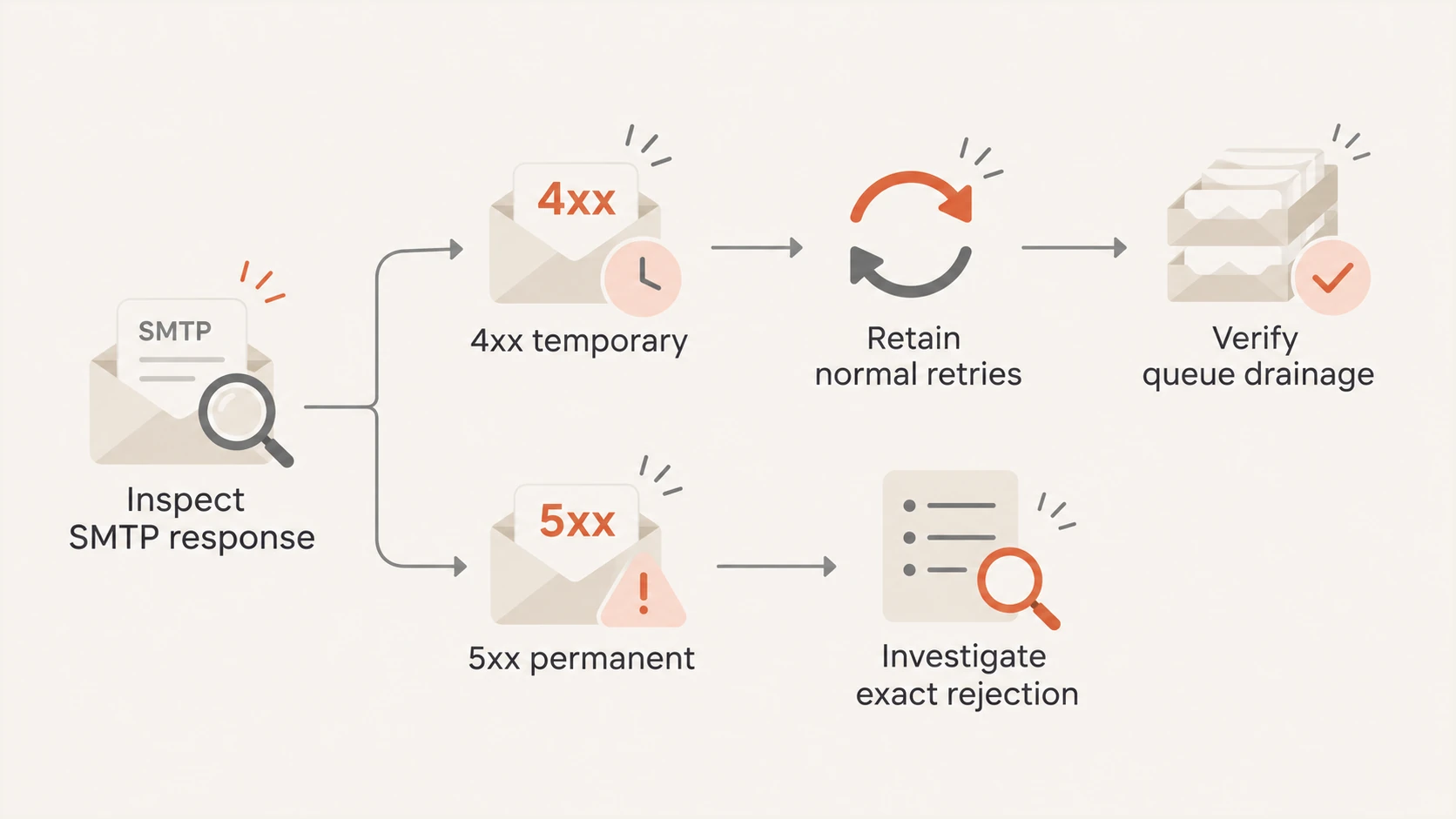
Handle temporary SMTP deferrals with normal retries and investigate permanent rejections separately.
Keep existing retry controls in place unless evidence supports a specific adjustment. Repeated manual queue flushes can increase connection load, while mass resends can create duplicate messages when the originals eventually succeed.
Track queued messages until their outcomes are known, including messages approaching the sending system's expiry limit. A connectivity improvement does not reset queue age or guarantee delivery before that limit. Investigate expired messages individually before arranging a resend.
Keep SPF, DKIM, and DMARC settings unchanged
A provider connectivity incident does not justify loosening SPF, disabling DKIM signing, or weakening a DMARC policy. These controls authenticate email; changing them does not repair Microsoft's service capacity or reconnect an inaccessible mailbox. Microsoft's incident notices establish no requirement for administrators to change their published DNS records.
For an independent authentication concern, a domain health check helps inspect published records. Compare those records with actual message headers and rejection text before making a change. A valid DNS record alone does not establish that a particular message passed authentication.
An email test examines a newly sent message on the tested path. Treat that result as a separate observation: it cannot prove that an older Exchange Online queue has drained or that every affected recipient is receiving mail.
I would investigate authentication only where message evidence points to it. Preserve existing settings during the availability incident and document any separately justified correction so its effect can be evaluated independently.
Confirm recovery with message evidence
Before closing a local incident, confirm that previously affected users can reconnect and that representative delayed messages have completed delivery. Compare older queued items with fresh traffic, and investigate any persistent failures using their exact responses.
Record the time each affected route recovers, retain unresolved message IDs, and reconcile them against recipient traces where available. That gives the next shift concrete remaining work instead of a general statement that email is working again.
Frequency asked questions
At the November 12, 2026, 23:06:31 UTC cutoff, the status remains Service degradation. Partial recovery is reported. Check Microsoft's live dashboard for subsequent changes.
No. The warning covers potential impact in any region. It does not establish that every tenant or user is affected.
Check the original message first. For observed temporary deferrals, retain normal queue retries. Resending before the original outcome is known risks duplicate delivery.
No. Verify delivery through queue outcomes and message traces. Access recovery and the delivery of previously queued messages require separate confirmation.