Can inbox placement and open tracking data be combined in one report?


Updated on 22 Sep 2026: We clarified how to combine seed placement with open data while accounting for delivery, incomplete tests, fixed windows, and automated activity.
Yes. Inbox placement and open tracking data can be combined in one report when both datasets share a stable campaign key and mailbox-provider grouping. A native combined view requires the placement system and sending platform to share those identifiers. Otherwise, export both datasets and join them in a spreadsheet, BI tool, database, or data warehouse.
Keep delivery, placement, and opens distinct. Delivery records whether a receiving server accepted a message. Seed testing records where controlled test messages landed after acceptance. Open tracking records pixel loads among real recipients, including automated loads. Place the signals beside each other because they answer different questions, then compare trends by campaign and mailbox provider.
What the report can prove
A joined report can show that a campaign had a given seed inbox rate and a given tracked open count. It cannot prove that every tracked open came from the inbox, or that seed placement matched every real recipient's placement.
What belongs in the combined report
Build one row per campaign and mailbox provider. That grain prevents a common mistake: comparing a provider-specific seed result with an all-provider open rate. If campaign A has placement results for Gmail, Microsoft, Yahoo, and other provider groups, the open dataset needs the same groups before the join.
|
|
|
|---|---|---|
Campaign ID | Both | Primary join |
Provider | Both | Shared group |
Inbox rate | Seeds | Placement signal |
Placement status | Seeds | Provisional or complete |
Unique opens | Tracking | Engagement signal |
Open definition | Tracking | Metric consistency |
Delivered | ESP | Rate base |
Send time | Both | Join check |
Compact field map for a campaign-provider report
Add subject line for readability, but do not use it as the only join key. Subjects repeat, tests reuse copy, and small edits split what appears to be one campaign. A persistent campaign ID is safer. When that ID is absent, combine the normalized subject, sending domain, message tag, and a narrow send-time window, then flag ambiguous matches for review.
- Join key: Use a campaign ID or message tag shared by both exports.
- Provider map: Map consumer and hosted domains into consistent mailbox groups.
- Time window: Freeze seed and open results after separate documented collection intervals.
- Denominator: Use delivered recipients, not the original audience size.
Why the two datasets are usually separate
Seed placement systems inspect controlled mailboxes. Their results describe whether each test message reached an inbox category, such as Gmail Primary or Promotions, the spam folder, or no monitored folder. Open tracking systems log remote image requests against live-recipient messages. The data models differ, so native reporting often keeps them in separate areas.
Seed placement data
A small controlled panel measures folder placement at selected mailbox providers. Seeds often receive and classify the message without behaving like engaged subscribers.
- Strength: Fast provider-level placement signal.
- Limit: The panel is not the real audience.
Open tracking data
A tracking pixel logs an open when an image request occurs. Privacy proxies, security scanners, caching, blocked images, and repeat loads change the count.
- Strength: Covers activity in the real send.
- Limit: A pixel load is not always human attention.
That separation is sensible. Combining the columns helps analysis, but combining their meaning creates bad conclusions. The detailed limits of seed lists and the question of whether open tracking is dead explain why neither metric should become a single deliverability score.
How to build the joined report
Start with two raw exports and keep them unchanged. One contains campaign-level or seed-level placement results. The other contains open events or aggregated unique opens. If an open export lists recipient addresses, aggregate it before presentation so the final report contains counts rather than personal data.
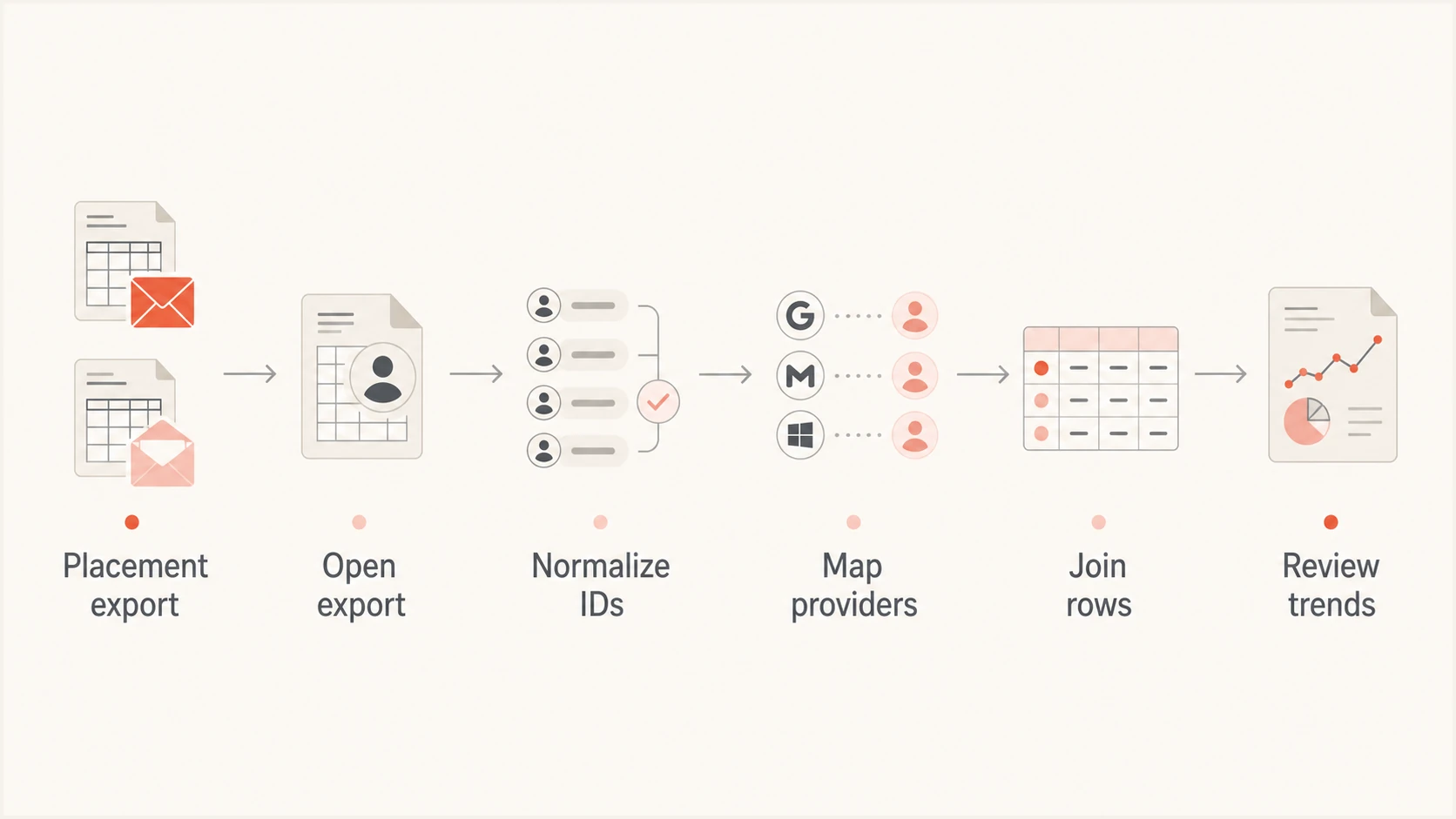
Flow from placement and open exports to a reviewed joined report
- Export placement: Capture the campaign, provider, folder result, seed count, run time, and test status.
- Export engagement: Capture campaign identifiers, provider groups, delivered counts, unique opens, and the open definition.
- Normalize keys: Standardize case, whitespace, timestamps, and mailbox-provider names.
- Aggregate events: Deduplicate opens according to one documented rule before calculating rates.
- Join and audit: Join on campaign and provider, then inspect unmatched and duplicated rows.
- Finalize windows: Publish after the seed run completes and the fixed open window closes, or label the report provisional.
Example aggregation and joinSQL
WITH opens AS (
  SELECT campaign_id, provider,
         COUNT(DISTINCT recipient_id) AS unique_opens
  FROM open_events
  WHERE event_time < send_time + INTERVAL '48 hours'
  GROUP BY campaign_id, provider
)
SELECT p.campaign_id, p.provider, p.inbox_rate,
       o.unique_opens, d.delivered_count,
       o.unique_opens * 1.0 / d.delivered_count AS open_rate
FROM placement p
LEFT JOIN opens o USING (campaign_id, provider)
LEFT JOIN delivery d USING (campaign_id, provider);
A spreadsheet can do the same work with lookup functions and a pivot table. For recurring reports, a scheduled warehouse query preserves definitions and exposes join failures. Whatever method is used, store raw counts beside rates. A rate without its denominator hides small samples.
What the finished report should look like
The useful view is a campaign-provider table with inbox percentage, spam percentage, missing-seed count, placement status, delivered messages, unique opens, adjusted opens when available, clicks, and complaints. Include the open definition and a data-quality flag that warns when the seed sample is tiny, provider attribution is incomplete, or the join used a fallback key.
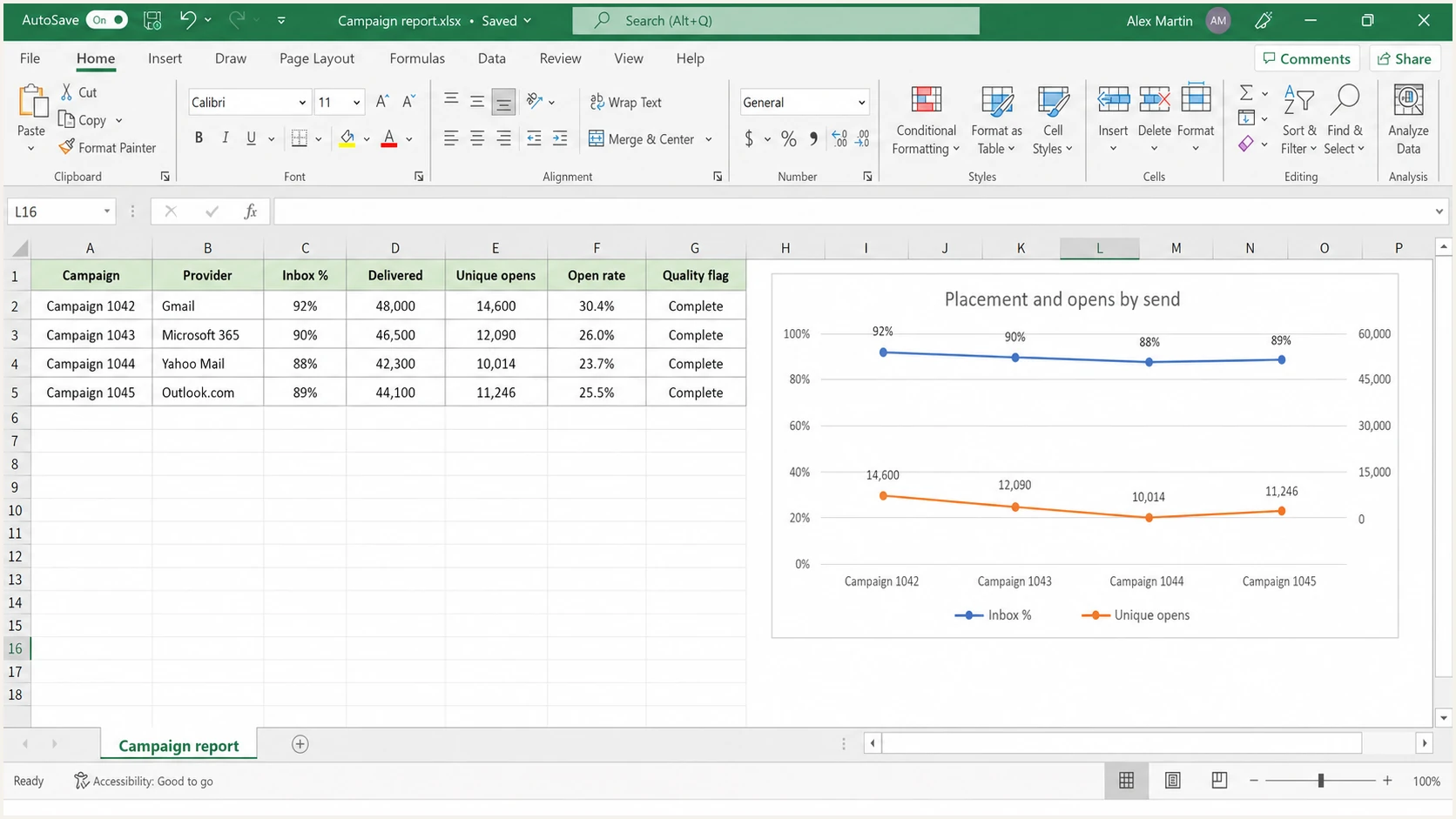
Microsoft Excel worksheet combining placement and open metrics by campaign
Compare changes over several similar sends, not isolated numbers. If placement falls at one provider while delivered volume stays stable and human engagement also weakens, investigate provider-specific reputation, authentication, content, and audience quality. If seed placement drops but clicks and conversions hold, confirm that the placement test completed, rerun it, and check the sample before escalating.
Do not calculate opens from seeds
Seed accounts exist to observe placement. They are not a representative engagement panel, and some seeds do not load tracking pixels. Keep seed placement and real-recipient open data in separate columns.
How to interpret opens without fooling yourself
Open counts are noisy. Apple Mail Privacy Protection can load images through a proxy without a person reading the message. Corporate security systems can fetch remote content. Image blocking causes real reads to go unrecorded. Repeated loads can inflate total opens, so unique opens are the cleaner comparison, though they still contain automated activity. Do not mix raw, unique, adjusted, or proxy-filtered open metrics across campaigns.
Useful comparisons
- Trend: Compare similar sends under one definition.
- Provider: Look for changes concentrated at one mailbox group.
- Confirmation: Use clicks and conversions as evidence, then check complaint patterns.
- Context: Review authentication and reputation beside engagement.
Misleading comparisons
- Causation: Do not claim seed placement caused the open rate.
- Mismatch: Do not compare all-provider opens with one provider's seeds.
- Precision: Do not present a small seed panel as audience truth.
- Recency: Do not mix open windows across campaigns.
Use placement as a diagnostic signal, opens as a directional engagement signal, and clicks or conversions as stronger evidence of human action. A combined report reduces investigation time, but it does not turn weak signals into proof.
Add authentication and reputation context
Placement and opens describe outcomes. They do not explain every cause. Before changing subject lines or suppressing an audience segment, check SMTP response codes and delivery errors; SPF and DKIM results with DMARC alignment; complaint rates; sending reputation; and whether an unknown source sent mail using the domain. Also check whether a sending IP or domain appears on a blacklist (blocklist).
Test a current production-like message instead of relying only on historical aggregates. That exposes broken authentication, message construction problems, content differences, and sending-source changes that a campaign summary cannot show. Use the same sending stream and headers as the campaign under review.
Email tester
Send a real email to this address. Suped shows a results button when the test is ready.
?/43tests passed
A real-message email test helps validate the message that recipients actually receive. It gives the combined report another diagnostic layer without pretending that one score explains provider placement. For ongoing domain oversight, DMARC monitoring connects authentication results to sending sources. Blocklist monitoring adds blacklist and blocklist status to the investigation.
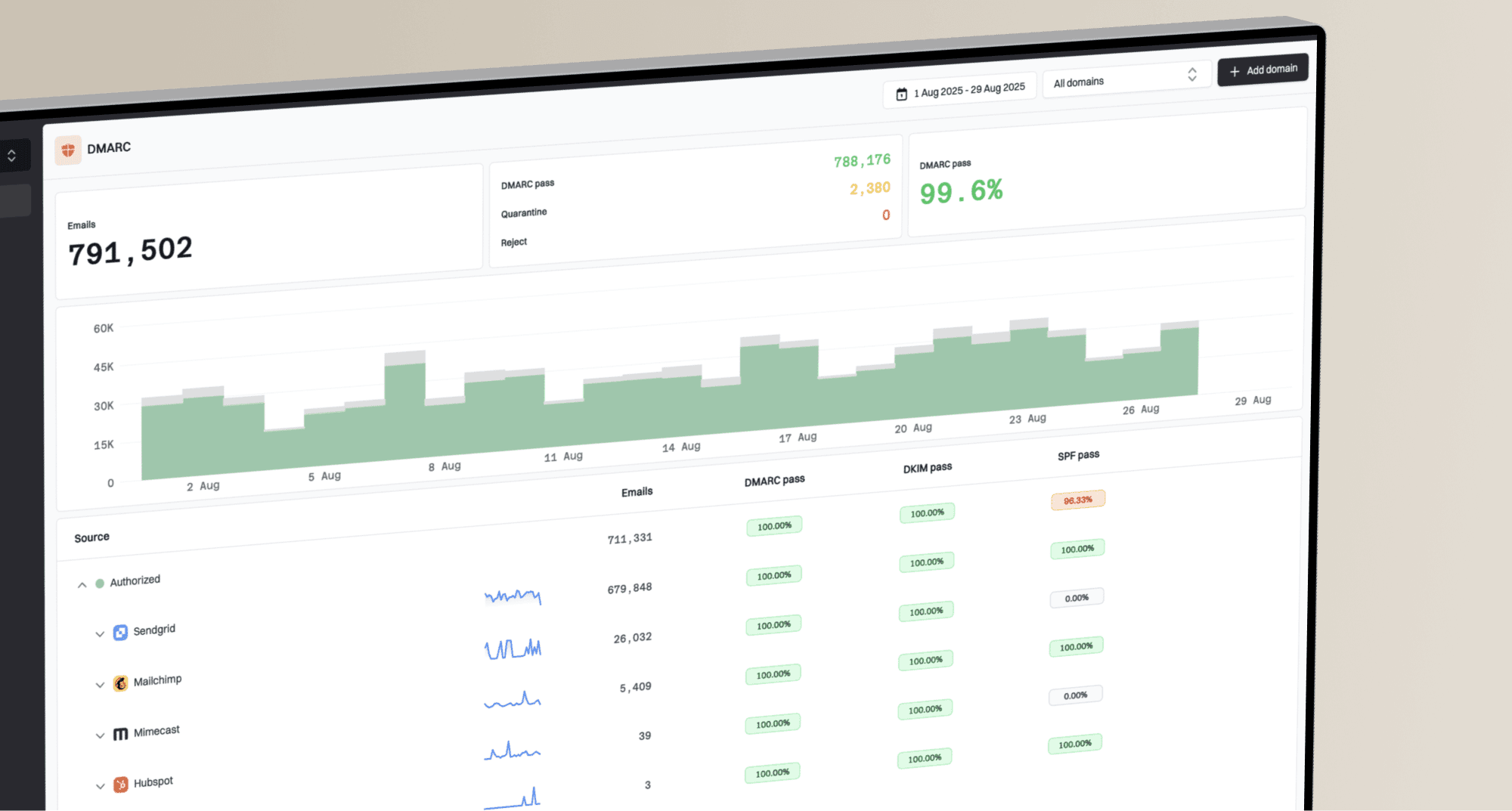
Suped is our DMARC and email authentication platform. In this workflow, Suped maps DMARC results to sending sources, reports SPF and DKIM alignment, and adds blacklist (blocklist) status and message-test findings beside the campaign report. Automated issue detection provides practical remediation steps, while alerts help teams investigate a placement change without treating authentication as the sole cause.
Suped DMARC dashboard showing email volume, authentication health, and source breakdown
Suped does not make pixel opens equivalent to inbox placement. Its role is to add authentication, sending-source, blacklist and blocklist, and message-quality evidence beside the combined campaign report. Agencies and MSPs can apply the same review across client domains through a multi-tenant dashboard.
Quality controls that keep the report reliable
A technically correct join can still produce a misleading report. Add automated checks before publishing: every campaign-provider row must be unique, every rate must have a denominator, timestamps must use one timezone, and unmatched rows must remain visible. Null placement is not zero placement. A missing seed remains missing until the documented completion point and must not be counted as spam. Null opens are not zero opens unless the source system confirms no events.
Minimum release checks
- Uniqueness: One row exists for each campaign-provider pair.
- Coverage: The report states matched and unmatched counts, plus documented exclusions.
- Definitions: Unique open logic and both collection windows are documented.
- Finality: Incomplete placement runs and still-open engagement windows are marked provisional.
- Privacy: Recipient identifiers stay out of the shared summary.
Version the provider mapping as well. Business domains often route through large mailbox providers, but the visible recipient domain does not reliably identify the receiving platform. Use receiving-platform or MX evidence when the source provides it. Keep an Unknown group when attribution remains uncertain instead of forcing a match. That preserves the audit trail and prevents false provider-level conclusions.
Views from the trenches
Best practices
Join placement and open exports with a stable campaign ID plus mailbox provider.
Aggregate open events before sharing reports to protect each recipient's personal data.
Document the open window and provider mapping beside each combined campaign report.
Common pitfalls
Use campaign IDs because subject lines alone create duplicate joins when copy gets reused.
Treating seed accounts as engaged recipients makes open comparisons unreliable in reports.
Mixing provider-level placement with total opens hides important differences by provider.
Expert tips
Keep unmatched rows visible so missing exports cannot silently become zero values.
Compare several similar sends before treating one seed result as a reliable trend signal.
Use clicks and conversions to test whether an open-rate change reflects real people.
Marketer view
Marketer from Email Geeks says seed placement reports typically contain seed results rather than open-tracking data from the wider send.
2026-07-13 - Email Geeks
Marketer view
Marketer from Email Geeks says placement details can identify which seed received a message, while engagement exports list tracked opens separately.
2026-07-13 - Email Geeks
A useful combined report keeps both signals distinct
Inbox placement and open tracking belong in one analytical view, but usually require an external join rather than a native report. Use a campaign ID and mailbox provider as the shared key, standardize each reporting window, preserve denominators, and label automated-open limitations and provisional seed results. The result supports faster diagnosis without overstating what either dataset proves.
When a placement decline and engagement decline occur together, investigate authentication, source authorization, reputation, delivery logs, and audience changes before blaming creative. When the signals disagree, confirm test completion and join quality before reviewing the remaining data. That order prevents a reporting mismatch from turning into an unnecessary sending change.