Is email tracking dead and should marketers stop using open rates?

Published 19 Apr 2025
Updated 26 Aug 2026
12 min read
Summarize with
Updated on 26 Aug 2026: We added current privacy guidance for tracking pixels and clarified how to measure engagement without overvaluing opens.
No, email tracking is not dead. Marketers should not stop using open rates entirely. They should stop treating open rate as proof that a specific person read, cared about, or acted on an email.
Open rates still deserve a place in reporting, but only as a directional health signal. A sudden fall in opens can point to inbox placement trouble, image blocking, a template problem, a tracking-domain issue, list fatigue, a mailbox-provider change, or inbox summaries reducing the need to open. It does not, by itself, prove that demand dropped.
- Keep them: Use open rates for baseline trends, subject-line comparisons, and coarse deliverability checks.
- Downgrade them: Do not use opens as a primary KPI, individual lead score trigger, or revenue attribution metric.
- Replace them: Give more weight to clicks with bot filtering, replies, qualified visits, conversions, complaints, unsubscribes, bounces, authentication pass rates, and inbox placement evidence.
The practical answer is simple: keep the tracking pixel if it supports reporting and meets the privacy rules that apply to your recipients, but build decisions around outcomes and delivery diagnostics. Open rate has value when it is compared against your own historic baseline. It has far less value when it is treated as a universal benchmark.
Why open rates are weaker now
An email open is recorded when a tracking image loads. Most dashboards calculate unique open rate as unique recipients with a recorded image load divided by delivered messages, although definitions vary. The image load can be caused by a person, privacy proxy, cache, security scanner, or client prefetch. It can also fail when images are blocked or when an enterprise gateway rewrites and inspects content.
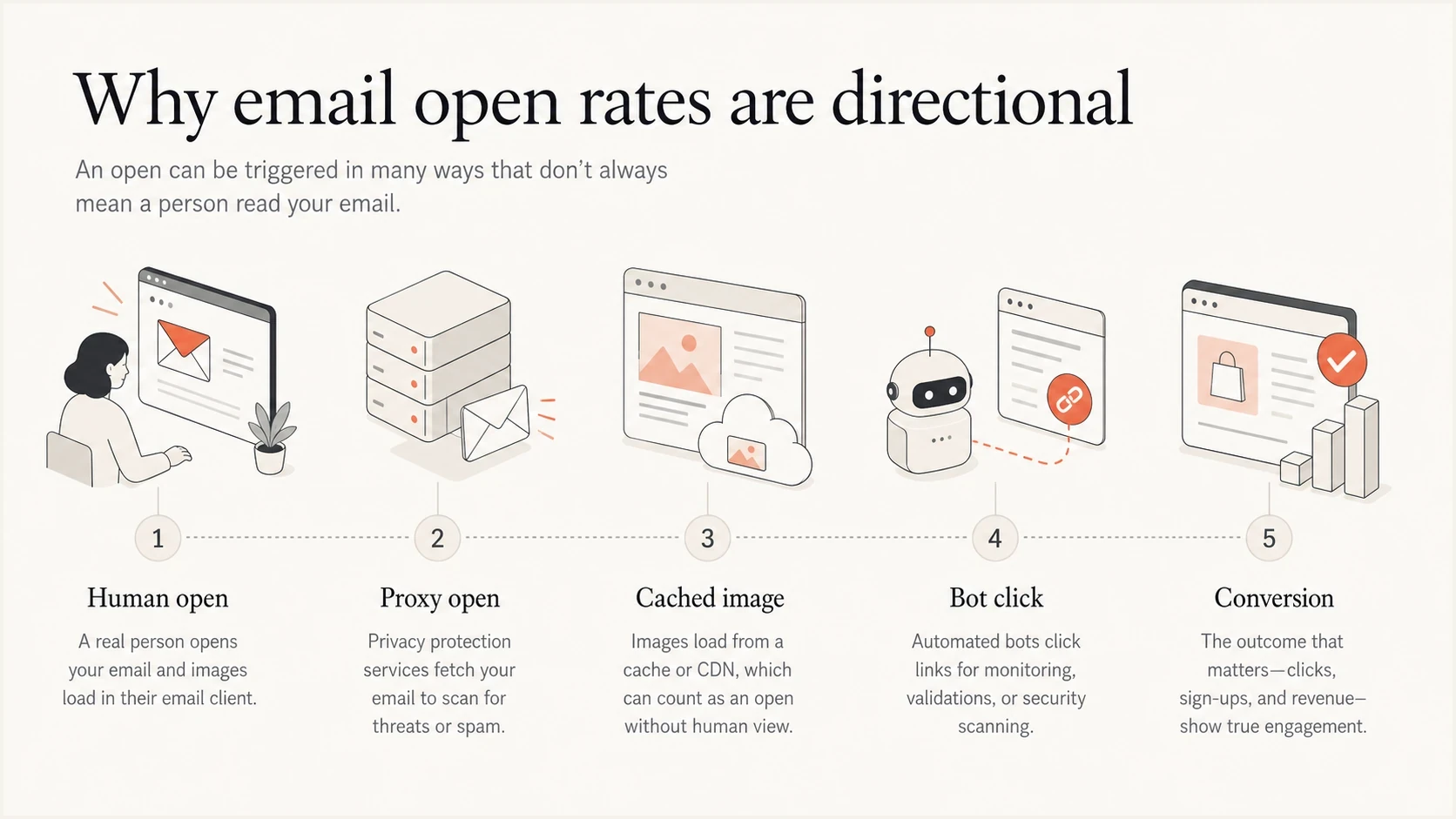
Infographic showing why email open rates mix human opens, proxy opens, cached images, bot clicks, and conversions.
Apple Mail Privacy Protection downloads remote content in the background by default, regardless of whether the recipient engages with the message. This creates machine opens and hides the recipient's exact IP address. Gmail image caching has long meant that Gmail opens are not a raw view of every recipient action. Inbox previews and AI-generated summaries add more noise because a reader can get enough context without loading the tracking pixel. If you need more detail on Gmail behavior, read the related note on Gmail image caching.
B2B campaigns add another layer. Corporate security tools can open images, follow links, rewrite URLs, and inspect messages before the recipient sees them. That means clicks are also noisy. A click can be a strong signal, but only after you filter obvious non-human patterns such as instant clicks, all-link clicks, security-gateway user agents, and repeated checks from data center networks.
|
|
|
|
|---|---|---|---|
Unique opens | Low | Trend checks | Lead intent |
Total opens | Very low | Anomaly review | Demand score |
Filtered clicks | Medium | Content interest | Exact identity |
Replies | High | Human response | Scale metric |
Conversions | High | Business result | Inbox diagnosis |
How to treat common email engagement signals.
Privacy rules can change the tracking decision
Measurement quality is only one reason to review tracking pixels. Recipient-level open tracking can record the time of an image request and associate technical data with an individual identifier. Depending on the setup, that data can include device details and an approximate location. This makes open tracking a privacy and governance decision as well as an analytics setting.
Requirements depend on the recipient's location, the purpose of the pixel, and whether the measurement is strictly necessary for a service the recipient requested. France's CNIL email pixel guidance explains when consent is required and when a narrow exemption applies. The UK ICO guidance says tracking pixels fall under PECR's separate rules for storage and access technologies. Permission to send an email does not automatically authorize every tracking purpose.
Audit the purpose before the pixel
- Map the data: Document what the pixel records, which identifier it uses, who receives the data, and how long the data is kept.
- Check the rules: Review requirements for each recipient location, audience, message type, and tracking purpose with qualified privacy counsel.
- Separate purposes: Do not treat aggregate delivery measurement and recipient-level engagement automation as the same use.
- Honor the choice: Provide clear information and a working consent or objection path where the applicable rules require it.
The CNIL's standard transition window for addresses collected before its recommendation ended on July 14, 2026, unless objectively documented difficulties justify a reasonable extension. If an individual open event has no defined purpose or valid basis, disable recipient-level open tracking and retain the delivery and outcome data you actually need.
What Gmail warnings do and do not mean
A warning banner in Gmail does not prove that Gmail has banned tracking pixels. It usually means Gmail has concerns about the message, sender, link path, reputation, authentication, or recipient context. A tracking pixel can be present in normal commercial email without triggering a warning by itself.
Do not diagnose from one screenshot
One inbox screenshot has weak diagnostic value. Before changing your tracking policy, test the same message across multiple inboxes, folders, domains, and sending identities.
- Check placement: If the message lands in the junk folder, image loading and warning behavior change.
- Check authentication: SPF, DKIM, and DMARC failures can reduce trust before engagement data matters.
- Check links: Redirect chains, mismatched domains, and suspicious tracking hosts can affect filtering.
- Check sender requirements: At Gmail, senders above 5,000 messages a day to personal accounts need SPF, DKIM, DMARC, alignment, and one-click unsubscribe for marketing mail.
The better question is not whether tracking pixels are allowed. The better question is whether the tracking setup makes the message look riskier than it needs to be. Use branded tracking domains, keep redirects short, send wanted mail, authenticate every sending stream, support easy unsubscribe, and watch recipient complaints.
When inspecting the actual message, start with a test a real email workflow, then compare that result with mailbox placement and post-send metrics.
Email tester
Send a real email to this address. Suped shows a results button when the test is ready.
?/43tests passed
A single test does not replace live campaign data, but it does catch obvious issues in authentication, content, links, image loading, and headers before a campaign goes out.
When open rates still help
Open rates still help when you compare like with like: the same list type, same mailbox mix, same sending domain, same ESP, same tracking setup, and similar campaign type. In that context, a sudden shift has information value even if the absolute number is wrong.
Open rate drop triage
Compare the latest campaign with your own 30 to 90 day baseline before reacting.
Normal variance
0-10% drop
Review subject line, audience, and send time only.
Needs review
10-25% drop
Check mailbox mix, content changes, and list source.
Investigate now
25%+ drop
Check placement, authentication, links, and reputation.
Review aggregate trends by mailbox family, campaign type, and segment age before changing creative. Seasonal behavior, sender requirement enforcement, provider filtering changes, and aging subscriber cohorts can all move opens without a true content failure.
The inbox-placement clue is still useful in many consumer and consumer-adjacent mailboxes. If images load, the message often reached a place where images can load. If opens collapse, the message can be landing somewhere images do not load, or the mailbox provider can be treating the message differently. In enterprise mail, security controls make that inference weaker.
- Baseline trend: A stable list with a sudden open drop deserves a deliverability review.
- Relative test: Subject-line tests can still use opens when both variants face the same measurement noise.
- Segment signal: A segment with low opens, low clicks, and high complaints needs attention.
- Inbox clue: Open changes can support an inboxing hypothesis, but they do not prove placement alone.
Use open rate as a smoke alarm, not a sales dashboard. When it changes, investigate. When it looks good, avoid assuming every open belongs to a human.
Where marketers should shift measurement
The replacement for open rate is not one metric. It is a measurement stack. Group the stack into delivery health, human engagement, and business outcome.
Old open-led model
- Primary KPI: Open rate drives campaign judgement.
- Lead scoring: One open can create a sales trigger.
- List cleaning: Non-openers are removed without more context.
Outcome-led model
- Primary KPI: Conversions, replies, revenue, and retention carry more weight.
- Lead scoring: Clicks, visits, form fills, and replies are filtered and weighted.
- List cleaning: Engagement, purchase history, complaints, and source quality are reviewed together.
Clicks need the same caution. If a campaign gets clicks seconds after delivery, clicks on every link, or repeated clicks from a security network, treat those events as inspection behavior until proven otherwise. The deeper issue is covered in the related guide on bot clicks.
Simple campaign measurement modeltext
Delivery health = accepted mail - bounces - complaints
Human engagement = filtered clicks + replies + meaningful visits
Business result = conversions + pipeline + revenue + retention
Open rate = directional trend, not the decision metric
Avoid universal open, click, and reply benchmarks. Privacy-proxy adoption, mailbox mix, campaign purpose, list age, and bot filtering can move the reported rates without any change in human interest. Set a baseline for each recurring campaign and compare matched cohorts using the same calculation rules.
Click-to-open rate, often shortened to CTOR, divides unique clicks by unique opens. Its denominator inherits the same privacy-proxy and image-loading errors as open rate, so use CTOR only for matched internal trends. Track hard bounces, complaint rate, unsubscribes, replies, and conversions separately, with thresholds based on mailbox-provider requirements and your own program history.
The goal is to reduce the number of decisions made from one noisy event. Keep opens in the dashboard, but place them beside filtered clicks, complaint rate, unsubscribe rate, bounce rate, conversion rate, and downstream revenue.
A practical reset after a sudden drop
- Pick one primary action for the next campaign and measure the result against that action.
- Add a simple reply prompt when human response matters more than site traffic.
- Build engaged segments from recent clicks, replies, purchases, meetings, or account activity.
- Clean lapsed addresses gently and test one variable at a time so the result has a clear cause.
The deliverability layer matters first
Before debating open rates, confirm that the domain can be trusted. Authentication failures, broken DNS, bad forwarding paths, blocklist (blacklist) listings, and reputation problems can suppress engagement before the content gets a fair chance.
A practical workflow starts with domain health checks, then moves into live monitoring. Suped's product brings DMARC, SPF, DKIM, blocklist and blacklist visibility, issue detection, and fix steps into one place, so a drop in engagement can be checked against authentication and reputation data before creative changes.
Suped DMARC dashboard showing email volume, authentication health, and source breakdown
For the DMARC layer, DMARC monitoring shows which sources are passing, which are failing, and which sending services need fixes. That matters because a drop in opens can come from a new sender failing DKIM, a return path that does not match the visible From domain, or a domain moving toward enforcement without all legitimate mail accounted for.
The same is true for reputation. Blocklist monitoring helps separate a measurement problem from a sending problem. If your IP or domain appears on a major blocklist or blacklist, open-rate analysis becomes secondary until the listing and its cause are handled.
Suped workflow for an open-rate drop
- Verify sources: Confirm every sender is known, authenticated, and tied to the correct From domain.
- Review issues: Use automated issue detection to find SPF, DKIM, DMARC, and DNS problems.
- Watch alerts: Use real-time alerts when authentication failure rates move above your threshold.
- Check reputation: Review blocklist and blacklist status before blaming creative or subject lines.
A practical decision framework
The decision is not binary. You can keep open tracking and still stop overvaluing it. Use a simple framework when a team asks whether to remove tracking pixels or ignore open rate.
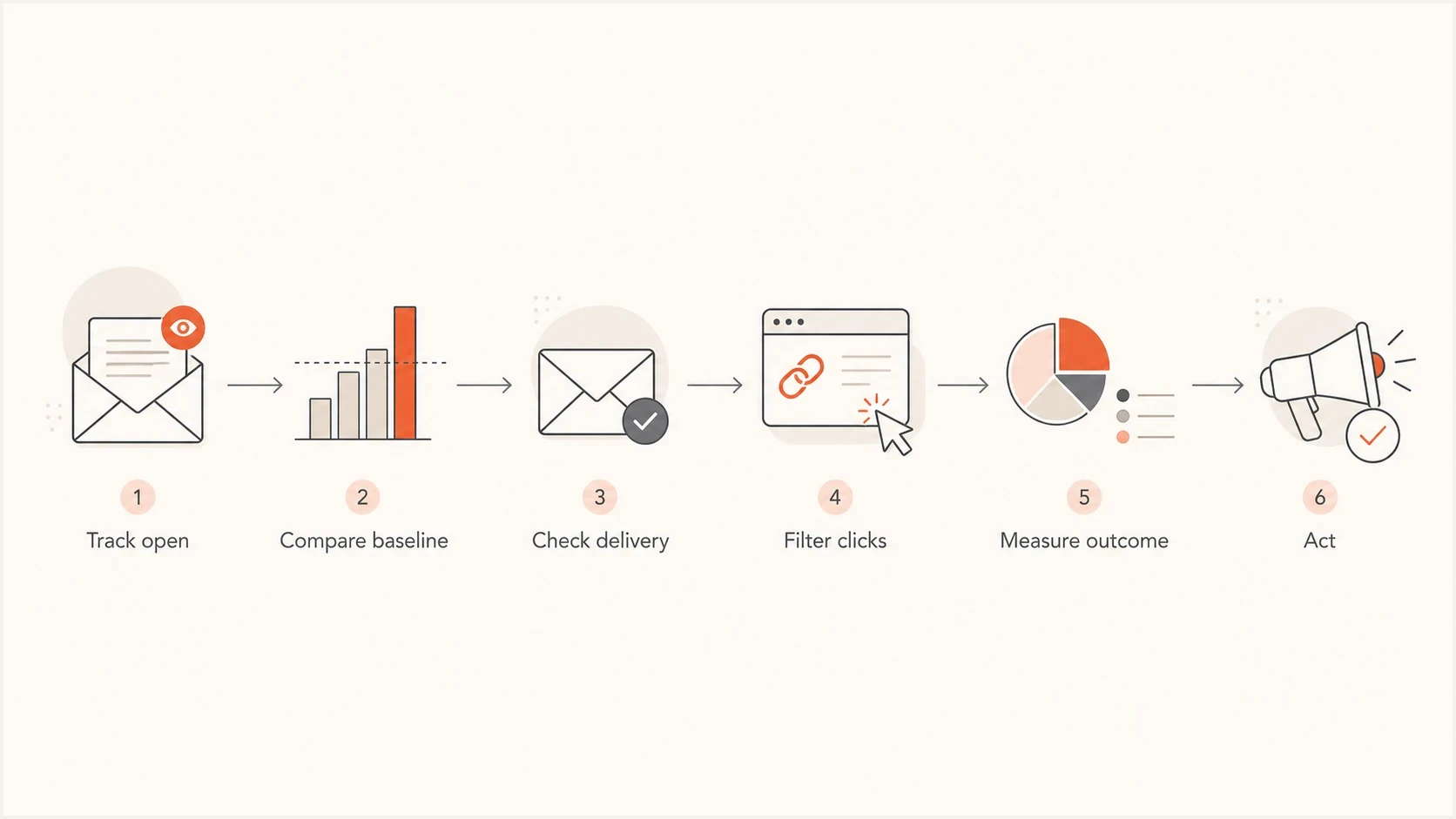
Flowchart showing how to use open tracking, delivery checks, filtered clicks, and outcomes in email measurement.
If the email is a newsletter, keep opens for trend monitoring only when the tracking purpose and recipient choice meet the applicable privacy rules. If it is an SDR sequence, avoid using one open as a sales trigger. If it is a revenue campaign, measure conversion and contribution. If it is a deliverability investigation, use opens only after authentication, placement, bounces, complaints, and blocklist or blacklist status are checked.
|
|
|
|---|---|---|
Newsletter | Clicks | Trend |
Sales sequence | Replies | Weak |
Promotion | Revenue | Support |
Reactivation | Response | Caution |
Deliverability | Placement | Clue |
How to decide what to measure first.
The mistake is using open rate to answer questions it was never built to answer. It can answer, "Did something change?" It cannot answer, "Did this named person read the message and want a call?"
Views from the trenches
Best practices
Compare opens with your own baseline before treating a drop as a delivery issue.
Filter click events before using them for lead scoring or campaign reporting dashboards.
Investigate authentication, placement, and reputation before changing campaign creative.
Common pitfalls
Treating one Gmail warning screenshot as proof that all tracking pixels are blocked.
Using one open as a sales trigger without checking proxy and scanner behavior first.
Cleaning lists only by non-opens, then removing people who still buy or reply later.
Expert tips
Use opens as a trend signal, then confirm with clicks, replies, and outcomes data.
Segment consumer and enterprise mail because image and scanner behavior differs.
Keep privacy expectations clear so tracking does not reduce recipient trust later.
Marketer from Email Geeks says open rates have always been flawed and work best as one signal among many.
2024-08-27 - Email Geeks
Marketer from Email Geeks says a Gmail warning usually points to suspected unwanted mail, not every tracking pixel.
2024-08-27 - Email Geeks
What to do next
Do not remove open tracking just because the number is imperfect. Remove the false confidence. Keep open rate as a trend line only where the tracking purpose meets the applicable privacy rules, then build campaign decisions around filtered engagement, replies, conversions, complaints, unsubscribes, bounces, authentication, placement, and reputation.
For most teams, the immediate upgrade is to separate two questions. First, did the message get delivered in a trusted way? Second, did people take meaningful action? Suped's product helps with the first question by making authentication, DMARC policy, hosted SPF, hosted MTA-STS, SPF flattening, issue detection, real-time alerts, and blocklist or blacklist monitoring easier to manage across one or many domains.
Once delivery health is visible, open rate becomes easier to interpret. A low open rate is no longer a mystery metric. It becomes one signal you can compare against real delivery evidence and business outcomes.




