Why are email click rates inflated and how to solve the issue?

Published 20 May 2025
Updated 1 Aug 2026
11 min read
Summarize with
Updated on 1 Aug 2026: We clarified inflated click metrics and added safer filtering and automation controls.
Email click rates are inflated when automated systems request links before or after the human recipient reads the email. These requests are often called bot clicks or non-human interactions (NHI). The usual cause is security scanning by mailbox providers, corporate gateways, link protection systems, and preview services. Treat any sudden jump in click rate, especially one concentrated in Outlook.com, Hotmail, Live, or Microsoft 365-managed mailboxes, as measurement contamination until the event data proves otherwise.
The fix is not one setting. Separate human clicks from non-human interactions, stop raw clicks from driving automations, report affected mailbox providers separately, and keep authentication and reputation signals clean. DMARC, SPF, DKIM, and DNS settings do not stop link scanning. They establish an authentication baseline so a click-reporting problem is not confused with a separate sender configuration problem.
- Security scanners and mailbox protection systems fetch links to assess risk.
- Group click events by mailbox provider, timestamp, URL count, and bot flag for a fast first test.
- Report filtered unique clicks instead of raw total clicks, and protect automations from bot-triggered events.
- Maintain clean authentication, stable sending patterns, consistent reporting baselines, and separate bot diagnostics over time.
Why click rates inflate
A click in most ESP reports means a tracking URL was requested. It does not always mean a person made a choice. Security systems request links to inspect redirects, check landing pages, classify URLs, detonate suspicious content in a sandbox, or update a risk score. Scanning can happen during mail flow, before delivery, or when a recipient clicks. The tracking system can record an automated request as a click.
This is why the issue often appears as a sudden spike. One mailbox provider changes link scanning behavior, one security layer becomes more aggressive, or one sender gets additional inspection for a period of time. The sender sees a click rate that looks excellent, but the downstream behavior does not match it. Site sessions, purchases, replies, and form fills stay flat.
Treat raw clicks as noisy
Raw click rate is a useful directional metric when the data is stable. During a bot-click spike, it is contaminated. Do not use it for content decisions, segment scoring, win-back eligibility, or campaign winner selection until the click stream has been filtered.
|
|
|
|---|---|---|
Microsoft spike | Microsoft-family mailboxes drive most of the lift | Report the provider separately |
Instant clicks | Events arrive seconds after delivery | Combine timing with other signals |
All-link activity | One recipient requests many URLs | Classify as a probable scan |
High clicks | Sessions and conversions remain flat | Use conversion-backed reporting |
Action-link requests | A seed inbox triggers an action without consent | Protect the endpoint |
Common click inflation patterns and first actions.
Public reports show the same pattern across different senders. A Klaviyo discussion describes inflated click rates tied to specific mailbox domains, and a public bot click analysis explains why automated systems click links in newsletters. The practical point is that the request happened, but the intent behind it did not come from a person.
Choose the right click metric
Before comparing campaigns, confirm what the report calls a click. Total clicks count every tracked request, so repeated requests by one scanner can inflate them sharply. Unique clicks usually count each recipient once, which limits repeat inflation but still counts a recipient whose only activity came from a scanner.
|
|
|
|---|---|---|
Total clicks | All tracked link requests | Diagnostics and link-level activity |
Unique click rate | Unique recipients who clicked divided by delivered email | Campaign comparison after bot filtering |
Click-to-open rate | Unique clickers divided by unique openers | Secondary content analysis only |
Conversion-backed click rate | Clickers with a verified downstream action divided by delivered email | Revenue, lead scoring, segmentation, and high-impact decisions |
Use the same filtered definition across campaigns.
CTOR has two noisy inputs
Click-to-open rate (CTOR) can be distorted by automated clicks in the numerator and privacy-driven or prefetched opens in the denominator. Use filtered unique click rate against delivered email as the main campaign trend, then validate important decisions with website or conversion data.
How to prove it is bot activity
Start by looking for concentration. If a campaign suddenly moves from a 2% click rate to a 35% click rate, but the jump sits mostly inside Outlook.com consumer domains or Microsoft 365-managed mailboxes, the metric is not comparable with prior sends. If many links in the email are requested within a narrow window, that is stronger evidence.
The best data fields are event timestamp, recipient domain, mailbox provider, URL, user agent, IP, bot classification, delivery timestamp, and later web session behavior. Some ESPs expose only part of this. If IP and user agent are hidden, use the fields you have: provider concentration, event timing, number of distinct links, and whether the clicks create normal web sessions. No single signal proves bot activity.
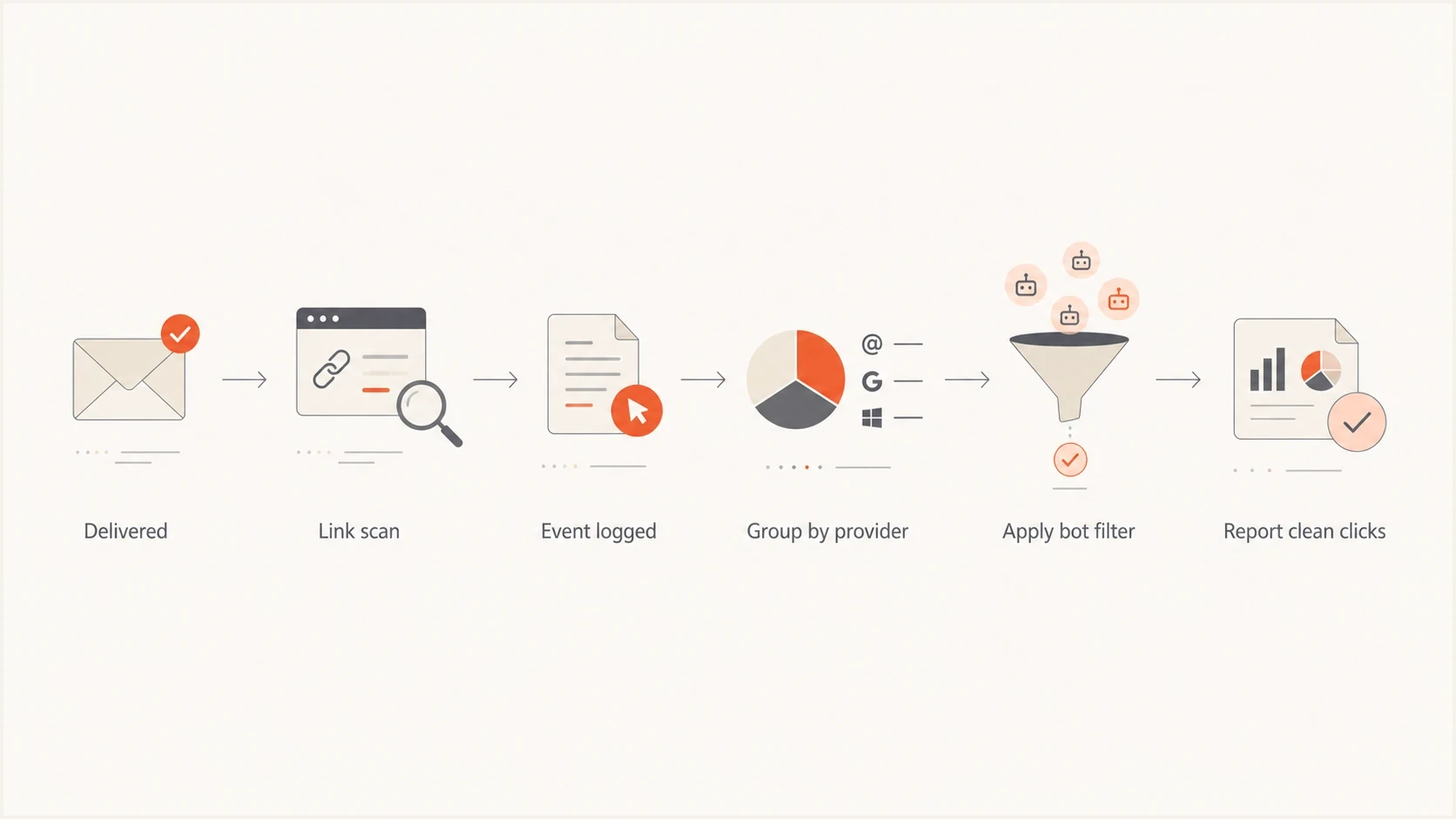
Flowchart for separating scanned clicks from human click events.
- Clicks within seconds of delivery, especially across several URLs, point to scanning.
- One mailbox family driving most of the lift points to a provider-side filtering change.
- A human rarely clicks every tracked link, social icon, footer link, and unsubscribe path.
- Clicks without matching site sessions or conversions need separate reporting.
Example event filter logicSQL
SELECT
  event_id,
  recipient_domain,
  url,
  clicked_at,
  CASE
    WHEN bot_click = true THEN 'bot'
    WHEN clicked_at < delivered_at + INTERVAL '30 seconds'
      AND unique_links_clicked >= 2 THEN 'probable_bot'
    WHEN unique_links_clicked >= 5 THEN 'probable_bot'
    ELSE 'human_like'
  END AS click_class
FROM email_click_events
WHERE campaign_id = 'campaign_123';
The exact thresholds depend on the program. A short promotional email with one hero link behaves differently from a long newsletter. Use the logic above as a starting point, then compare filtered clicks against web analytics and conversion data. A fast click alone can still be human, so combine timing with provider, link breadth, bot flags, and downstream behavior.
Suspected automated click bands
Example operating bands based on suspected automated events as a share of raw clicks. Calibrate them against normal provider and campaign behavior.
Normal noise
0-10%
Raw clicks remain usable with routine review.
Watch
10-30%
Check the provider split before using click rate.
Investigate
30-60%
Filter events before reporting campaign performance.
Contaminated
60%+
Do not use raw click rate for decisions.
How to solve the reporting issue
The cleanest fix is to create a reporting layer that separates raw clicks, filtered unique clicks, and conversion-backed clicks. Raw clicks still have diagnostic value. Filtered unique clicks are better for campaign comparison. Conversion-backed clicks are best for revenue, lead scoring, segmentation, and audience decisions.
Raw click reporting
- Most ESP dashboards show raw clicks by default.
- Security scans and link previews inflate the number.
- A single scan can move contacts into the wrong segment.
- Raw clicks can select a campaign winner based on scanner behavior.
Filtered click reporting
- Bot flags, timing, link breadth, and provider behavior reduce false lift.
- Engagement groups use human-like behavior.
- Lead and intent models avoid scan-only activity.
- Filtering rules need audits when mailbox behavior changes.
If the ESP has a bot-click flag, use it in segments and reports. A common rule is to count click events only where the bot flag is false. If the flag is per event, a scanner event and a later human event can coexist for the same person. Keep the later human event and ignore the scanner event.
If the ESP does not expose the right fields, build a simple export process. Pull campaign click events, group by provider and domain, then apply timing and URL-count rules. For newsletters, compare click events with website sessions because a scanner often stops at the tracking URL or landing-page fetch while a person creates a normal navigation pattern.
A dedicated HTTPS click domain helps, but it is not a cure
Dedicated click tracking with HTTPS makes the tracking domain consistent with the brand and easier to separate in reporting. It does not stop Microsoft or corporate gateways from checking links. Treat it as a domain hygiene and attribution control, not as bot-click prevention.
- Keep raw clicks, filtered unique clicks, and conversion-backed clicks in separate columns.
- Exclude bot-flagged events from engaged, VIP, win-back, and suppression logic.
- Report Microsoft-family mailboxes separately during abnormal spikes.
- Do not let one raw click trigger high-impact flows without another signal.
- Compare filtered click trends with sessions, revenue, replies, and form submits.
For a practical test, send a real message to seed accounts and inspect how it is received with an email tester. That will not prove every scanner path, but it helps catch authentication, content, rendering, and tracking issues that confuse the diagnosis.
Email tester
Send a real email to this address. Suped shows a results button when the test is ready.
?/43tests passed
Keep authentication separate from click diagnosis
Email authentication does not tell a mailbox provider, "do not scan my links." Scanning still happens on authenticated mail. DMARC, SPF, DKIM, and DNS records show whether authorized sending sources authenticate and match visible identifiers. They do not prove whether a click came from a human. Broken authentication, unfamiliar sending sources, strange redirect domains, and blocklist (blacklist) problems should be investigated as separate deliverability issues.
Establish a clean baseline before diagnosing the reporting spike: confirm DMARC alignment, validate SPF and DKIM, inventory sending sources, and check for a blocklist (blacklist) listing. A domain health checker provides a first check, then DMARC monitoring keeps the authorized source inventory current.
Issues page showing top issues, verified sources, unverified sources, and authentication pass rates
Suped's product fits the authentication side of this workflow. Suped is a DMARC and email authentication platform that helps teams review DMARC results, identify sending sources, track policy, manage hosted SPF and MTA-STS, and monitor blocklist monitoring. Keep click classification in the ESP and web analytics, while using Suped to confirm that the domain baseline remains clean.
Separate the two investigations
Use click-event data to classify human and automated activity. Use DMARC reports, SPF, DKIM, DNS, source inventory, and blocklist (blacklist) checks to diagnose authentication and reputation. A clean result in one area does not settle the other.
Protect action links as well as reports. An ordinary GET request should not change preferences, approve a proof, notify sales, or perform another sensitive action because a scanner can fetch it. Require a confirmation step or an authenticated POST for those actions. Keep required RFC 8058 one-click List-Unsubscribe in the message headers; its consent-driven POST flow is designed separately from automatic URL fetching.
What to change first
When click rates inflate overnight, do not rewrite the content strategy. Freeze decisions that rely on click rate, find the affected mailbox group, and build a clean metric before making marketing changes. The goal is to stop bad data from spreading into segments, tests, automations, and revenue attribution.
- Do not choose winners, suppress contacts, or score leads from raw click spikes.
- Compare Microsoft-family, Gmail, Yahoo, corporate, and custom domains separately.
- If the ESP exposes a bot flag, exclude true values from engagement segments.
- Classify fast, many-link activity as probable non-human activity only when more than one signal supports it.
- Verify authentication, DNS, sending sources, and blocklist (blacklist) status separately.
For a deeper operational playbook, the related guide on bot click filtering covers newsletter reporting, and the guide on artificial opens explains why open rate and click rate often break together.
Do not hide diagnostic links in production
Invisible or honeypot links can identify scanners in controlled tests, but they create deliverability and trust risks when used carelessly. Keep them for diagnostics, document the rule, and never treat the result as the only proof of bot activity.
Views from the trenches
Best practices
Check click timestamps by provider before trusting a sudden lift in campaign engagement.
Keep bot-flagged click events out of segments that define engaged or high-intent users.
Compare filtered clicks with site sessions and purchases before changing campaign strategy.
Common pitfalls
Treating every tracking request as a person click inflates tests and lead scoring.
Letting one raw click trigger unsubscribe-adjacent or internal proof-list actions.
Assuming dedicated click tracking prevents security systems from checking every link.
Expert tips
Track mailbox provider splits so Microsoft-family spikes do not mask normal audience behavior.
Ask your ESP which bot-click fields exist and whether the classification is per event.
Keep authentication clean so scanner behavior is not mixed with avoidable domain issues.
Marketer from Email Geeks says timestamp review is the first step when click and open spikes appear near delivery.
2024-06-08 - Email Geeks
Marketer from Email Geeks says Microsoft-family domains can drive a temporary click spike that later tapers off.
2024-06-09 - Email Geeks




