Can contact form emails use an agency domain without client DNS access?

Published 14 Oct 2026
Updated 14 Oct 2026
8 min read
Summarize with
Yes. Contact form notifications can use an authenticated agency-owned domain in From without access to the client's DNS. Put the visitor's validated email address in Reply-To and send the notification to the client's existing inbox. Authentication belongs to the agency's sending identity, so the client needs no DNS changes for this arrangement.
I recommend this pattern for WordPress forms when client DNS access is unavailable. It removes the need to authenticate the client's domain, but it does not guarantee inbox placement. Different From and Reply-To domains are allowed; reputation and form abuse still affect filtering.
Which domain needs authentication
The website domain does not need to match the email's From domain. SPF, DKIM, and DMARC do not authenticate the URL where someone submitted a form. Receivers still inspect domains appearing in message content, including links, so the website is not irrelevant to every filtering decision.
I keep the agency identity fixed and authenticate it before changing the form. Suped's domain health checker checks the published DNS configuration. The relevant fields have separate jobs:
|
|
|
|---|---|---|
From | Author identity | Protected domain |
Reply-To | Human replies | Excluded |
MAIL FROM | Bounces and SPF | Domain matching |
DKIM d= | Signing domain | Domain matching |
Website URL | Form origin | Excluded |
Authentication identities and reply routing are separate.
DMARC passes when SPF or DKIM passes with a domain matching From under the applicable mode. Both are desirable, but both are not required for a DMARC pass. Relaxed mode permits a shared organizational domain; strict mode requires an exact domain match for the method used.
For notifications@client1.agency.example, use DKIM signing for client1.agency.example. A bounce subdomain can provide SPF matching under relaxed mode. These illustrative records belong in agency-controlled DNS. Add the real DKIM record supplied by the sender, and replace the reporting mailbox with a working destination.
Example agency-owned DNS recordsdns
pm-bounces.client1.agency.example. IN CNAME pm.mtasv.net.
_dmarc.client1.agency.example. IN TXT (
  "v=DMARC1; p=none; aspf=r; rua=mailto:dmarc@agency.example"
)
Use p=none to observe a new sending subdomain before enforcement. Preserve an established domain's working policy. A provider-owned bounce domain can pass SPF without matching From; correctly matching DKIM can still produce a DMARC pass.
Configure Postmark and your WordPress form
Postmark supports this arrangement through verified domains and a separate Reply-To field. Verify the actual agency domain or subdomain used in From. Confirming a sender email address alone is not the same as configuring domain authentication.
Publish Postmark's generated DKIM record and configure its custom Return-Path using the supplied CNAME. Let Postmark manage the envelope sender and bounce processing. Manually adding a Return-Path header in WordPress does not configure SPF.
- Transport: Install Postmark for WordPress, enter the server API token and agency From address, then enable its wp_mail override. Check for conflicting mail plugins.
- Elementor: In the form's Email action, set From Email to the agency address, To to the client inbox, and Reply To to the visitor email field.
- Ninja Forms: In the Email action, set Reply To using the email field's merge tag. Set From Address through the mail integration or Developer Mode settings.
- Identity: Use a stable display name such as "Harbor Dental website enquiries" and a consistent subject prefix. Keep the client recipient fixed in server-side configuration.
The mail integration must preserve Reply-To while sending through the authenticated transport. I check the received message, because form settings and transport plugins can override one another. Keep API credentials server-side.
For client subdomains, add each one individually in Postmark and verify its records. Use the DNS Settings screen to confirm the exact sending identity:
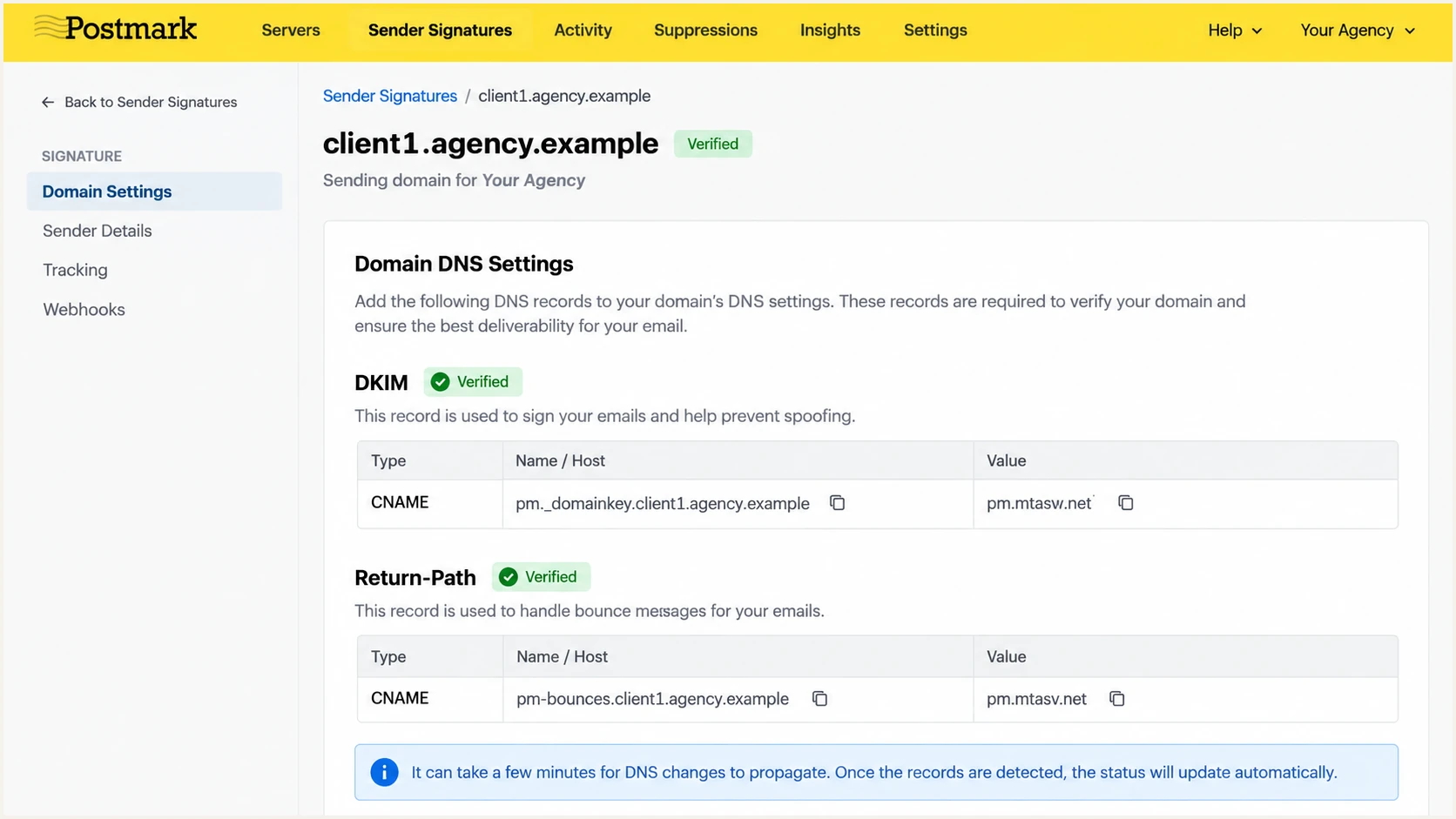
Postmark domain settings with verified DKIM and custom Return-Path.
An application using Postmark's API can send the same notification with the following message fields. The visitor address is a placeholder for validated input, while From and To remain configured values.
The client's inbox can be Gmail or another existing mailbox. Its domain does not need to authorize the agency sender merely to receive the notification.
Example Postmark message payloadjson
{
  "From": "Harbor Dental website <notifications@client1.agency.example>",
  "To": "office@client.example",
  "ReplyTo": "visitor@example.net",
  "Subject": "Harbor Dental: new website enquiry",
  "TextBody": "A visitor submitted an enquiry. Reply to contact the visitor.",
  "MessageStream": "outbound"
}
Test the actual notification and reply
I test by submitting the live form workflow, rather than relying on a mail plugin's test button. Send a staging notification to Suped's email tester by temporarily using its generated test address as the configured recipient.
Inspect SPF, DKIM, and DMARC results, including the domains behind each result. Confirm that From stayed on the agency domain and Reply-To contains the submitted visitor address. Then restore the client's fixed recipient and send another test.
Email tester
Send a real email to this address. Suped shows a results button when the test is ready.
?/43tests passed
In the client mailbox, open the full message headers and click Reply. Confirm that the proposed recipient is the visitor, then test delivery to an address you control. Automated replies do not always follow the same routing rules.
Check the transport log for acceptance, rejection, and bounces. A "delivered" event means the receiving mail server accepted the message; it does not prove inbox placement. Compare the log with the client's inbox and spam folder.
Stop form abuse before it reaches email
An authenticated domain can still deliver unwanted form submissions. If bots fill every notification with suspicious links, the client receives spam through your trusted sender. Moving that traffic to an agency domain transfers the reputation risk to the agency.
Keep visitor input out of trusted headers
Validate one Reply-To email address and reject carriage returns or line feeds. Escape visitor content before rendering HTML. Keep From, To, and the subject prefix under application control. A submitted address is not proof of the visitor's identity.
Use a honeypot and server-side rate limits, with a bot challenge when needed. Limit message size and reject obvious automated submissions before sending. Store accepted submissions in WordPress or another controlled database so an email failure does not erase an enquiry.
Ask clients to delete unwanted submissions rather than report every notification as spam. In Gmail, mark legitimate notifications "Not spam" and, if appropriate, create a filter for the exact From address with "Never send it to Spam". That is a mailbox preference, not a fix for authentication or organization-wide security restrictions.
Separate clients and monitor the sending domain
I prefer distinct sending subdomains when an agency manages several clients. They make failures easier to attribute and give each stream a recognizable identity. They do not guarantee independent reputation, because receivers also evaluate the parent domain and shared infrastructure.
One shared sender
notifications@agency.example is simple to configure. Every client shares its sender identity, so bot traffic and complaints are harder to separate. Client-specific tags help diagnosis but do not change the domain.
Client-specific subdomains
notifications@client1.agency.example gives each client a distinct From domain. Configure its DKIM and bounce records. A separate Postmark server separates credentials and activity, but does not automatically provide a separate sending IP.
Suped is our DMARC and email authentication platform. For this agency workflow, our DMARC monitoring groups authentication results by sending source, detects issues, and provides steps to fix them. Multi-domain views let the agency review its sending subdomains together.
Add the agency sending domains, publish Suped's assigned reporting destination, and review unexpected sources and failures. Use the issue details to distinguish broken DKIM, SPF domain mismatches, and unauthorized traffic:
DMARC record detail view showing SPF, DKIM, DMARC, rDNS diagnostics, and DNS records
Alerts operate on reports received from mailbox providers, which are typically periodic. DMARC reports do not prove inbox placement or record whether replies reached a visitor. Keep message testing and recipient checks alongside monitoring.
Suped also has blocklist (blacklist) monitoring for domain and IP listings. Hosted authentication management still requires initial DNS setup on a domain you control; it does not remove the authorization needed to send as a client's domain.
Views from the trenches
Best practices
Authenticate the agency's sending domain, and put the visitor's address only in Reply-To.
Test an actual form submission, inspect its headers, and confirm replies reach the visitor.
Common pitfalls
Using a visitor's address in From asks the website to authenticate a domain it does not control.
Sending every bot submission as a notification harms sender reputation and overwhelms clients.
Expert tips
Use a distinct client subdomain and credentials, but assume the parent domain still shares risk.
Store submissions outside email so rejected or filtered notifications do not erase new enquiries.
Marketer view
Marketer from Email Geeks says an authenticated alternative domain is appropriate for notifications to known recipients, and a different Reply-To domain does not automatically cause delivery problems.
2026-10-02 - Email Geeks
Marketer view
Marketer from Email Geeks says forms need bot protection before changing the sending domain, or the same unwanted submissions will damage the new sender.
2026-10-02 - Email Geeks
Define ownership before deployment
I would deploy this arrangement for notifications to known client inboxes, with stored submissions and tested reply routing. If a client later needs customer-facing email from its own domain, arrange access or delegated control for that domain's authentication, or use an existing authorized transport.
Document who owns the sending credentials, monitors failures, and handles the handoff when the website leaves the agency. Keep the sender recognizable during that transition so new enquiries continue reaching the right business.