Are the new Microsoft SNDS trap hit numbers credible?

Updated on 3 Sep 2026: We updated this guide for Microsoft's removal of SNDS trap-hit counts and the correct use of historical data.
The low Microsoft SNDS trap-hit numbers reported during the 2026 transition were credible as Microsoft-side reputation data, but they were not exact counts of unique spam-trap addresses. Microsoft warned that transition values could differ from previous reports and should not be interpreted as exact.
The more important current fact is that Microsoft removed trap-hit counts from the SNDS Data Report on July 22, 2026. A blank or missing trap field after that change means the count is unavailable. It does not mean the IP recorded zero trap hits or that list quality improved.
- Historical credibility: Treat transition-era counts as directional Microsoft feedback, not an auditable total.
- Current status: SNDS no longer supplies trap-hit counts in the Data Report.
- Response: Use complaint, filter, volume, bounce, and sending-stream evidence to investigate list risk.
How to read the old jump
A sudden move from zero to a handful of trap hits across several IPs during the SNDS transition was consistent with changed reporting granularity. It still justified an investigation. It did not justify assuming that each number identified a unique trap or that the same measurement would remain available.
What changed in 2026 SNDS reporting
Microsoft Smart Network Data Services gives senders IP-level feedback for Outlook.com and other Microsoft consumer mailbox traffic. The official SNDS portal is the source of record for report changes. Microsoft states that trap-hit counts are no longer included in the Data Report and that transition-period values should not be read as exact.
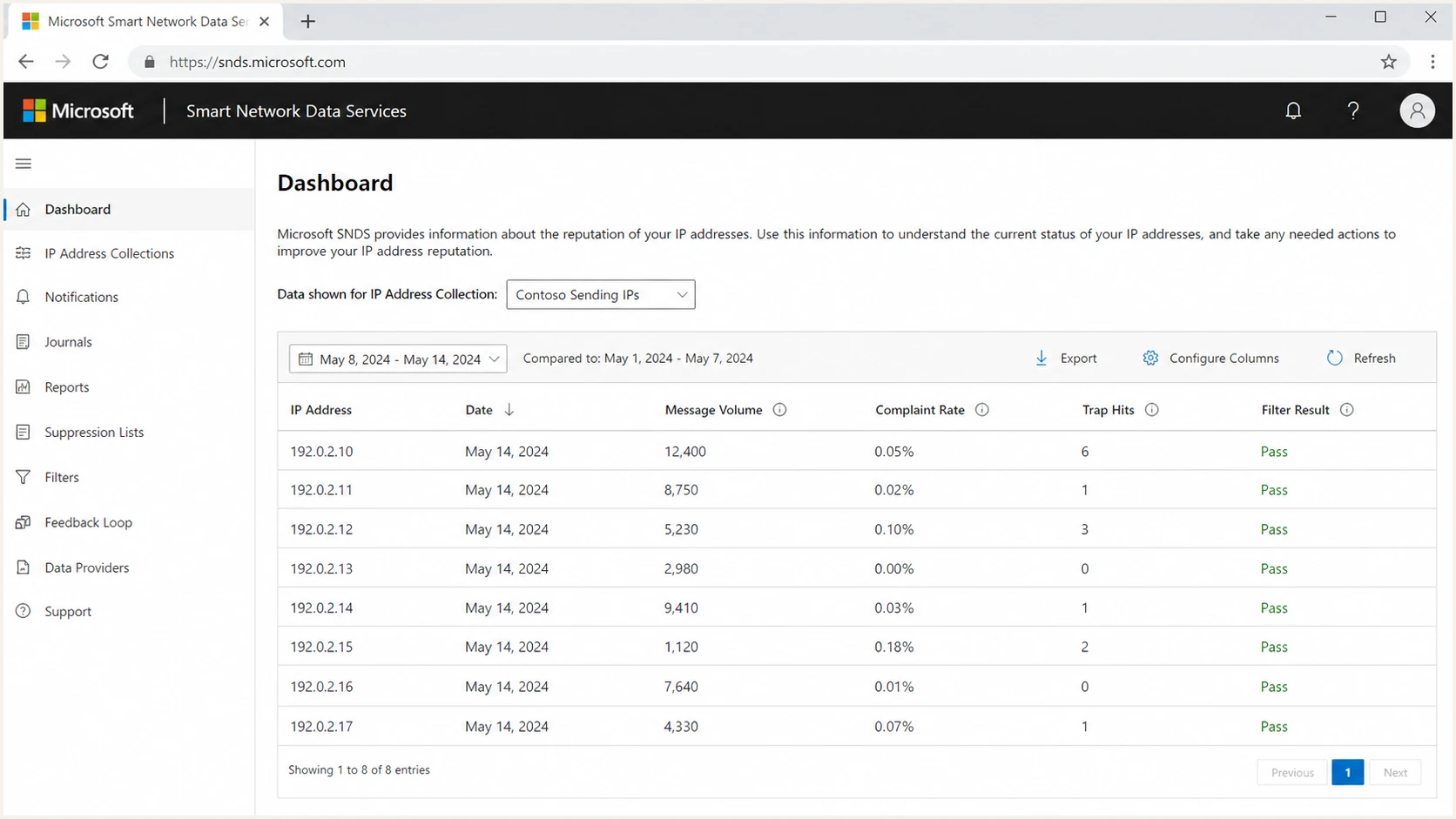
Example Microsoft SNDS screen showing message volume, complaint rate, and trap hit columns.
The screenshot above is a transition-era example, not the current trap-reporting model. During the transition, senders reported years of zeros followed by low counts on many IPs, sometimes with the same daily value repeated across IPs. The pattern supported a reporting change, and Microsoft's later warning confirmed that those values were not suitable as exact totals.
|
|
|
|
|---|---|---|---|
Trap hits | Numeric, often zero | Low counts changed | Not reported |
Exactness | Limited context | Microsoft warned against exact use | No count available |
Blank value | Check export logic | Treat cautiously | Unavailable, not zero |
Operational use | Historical trend | Directional review | Use remaining signals |
How to compare SNDS trap reporting periods
Do not chart a missing post-removal value as zero or compare it with a pre-removal count. Keep a reporting-change marker in historical dashboards so a broken line cannot be mistaken for a sudden list-quality improvement.
What the July 22 removal means
The removal changes sender visibility. It does not document a change to Microsoft's internal reputation inputs. Poor acquisition, stale addresses, failed bounce suppression, and weak consent controls can still damage IP reputation.
- Update imports: Allow the trap field to be absent or empty without shifting columns or failing the job.
- Retire exact-count alerts: Stop alerts that treat a blank trap value as zero, clean, or improved.
- Preserve history: Keep older trap data for incident context and label its reporting period.
- Replace the trigger: Watch filter results, complaint rates, IP status, RCPT and DATA counts, bounces, and deferrals together.
A missing field is not a clean bill
Do not publish zero SNDS trap hits for a post-removal period. SNDS no longer provides the number, so zero states more than the available data proves.
Why small historical trap counts looked large
Trap hits carry weight because the term sounds absolute. SNDS did not expose the address, trap type, list source, or scoring logic. A low transition-era count looked dramatic when the older interface had displayed zero for long periods, but the raw number still lacked the denominator and classification detail needed for a verdict.
How to grade SNDS trap data by period
Interpret availability and confidence before using an old trap value.
Older exports
directional
Use counts as historical IP-level context with volume and complaint data.
Transition period
low confidence
Treat changed values cautiously because Microsoft warned they were not exact.
After July 22
unavailable
Do not infer zero when the trap value is missing or blank.
Any period
investigate
Use trends in list quality and Microsoft delivery symptoms for action.
Invalid-recipient behavior remains useful. A repeated 550 user unknown response proves that an address should not receive more mail. Continued sending after that response increases list-quality risk even when SNDS supplies no trap count.
- Rate: For historical data, calculate trap hits per 100,000 Microsoft deliveries.
- Spread: Check whether the old issue appeared across every IP or only one stream.
- Source: Compare affected days with imports, form captures, reactivation sends, and partner data.
- History: Mark the reporting transition before comparing old counts with current SNDS data.
When spam traps are a recurring concern, use a documented spam trap mitigation process instead of relying on a field that SNDS no longer reports.
What historical trap counts can and cannot prove
Historical SNDS trap data came from Microsoft, which controls the consumer mailbox environment and its reputation systems. The counts were never equivalent to sender logs because Microsoft did not provide the trap address or full classification path. The transition warning further limits exact comparisons.
What old SNDS data can tell you
- Microsoft view: The signal came from Microsoft's consumer mailbox systems.
- IP scope: Counts could be compared with IP-level volume and complaints.
- Trend: Repeated historical activity carried more weight than one count.
What old SNDS data cannot prove
- Address proof: It did not reveal the recipient that triggered the hit.
- List source: It did not identify the signup form, import, or segment.
- Current status: It cannot establish a post-removal trap count.
Do not overfit a transition count
One low count during the reporting transition was not enough to justify deleting large active segments. A repeated historical pattern paired with higher complaints, deferrals, junk placement, or a blocklist (blacklist) event justified a focused investigation.
For current Microsoft SNDS interpretation, compare the remaining data with common SNDS issues such as missing data, delayed reporting, IP authorization gaps, and confusing complaint rates.
How to investigate historical or transition-era hits
When an older export contains trap hits, test the surrounding evidence instead of arguing with the count. A legitimate sender can reach a trap through an old address, a typo, a compromised form, a stale integration, or a client list that entered the current system without strong consent records.
- Mark the period: Identify whether the value came before, during, or after the reporting transition.
- Normalize: For a numeric historical value, calculate a Microsoft-only rate per 100,000 deliveries.
- Segment: Compare active users, never-active users, reactivation segments, and new signups.
- Check bounces: Suppress repeated user unknowns quickly, especially at Microsoft domains.
- Separate streams: Review transactional, lifecycle, bulk marketing, and reactivation traffic independently.
Historical SNDS trap-hit triage worksheettext
Reporting period:
Data source or export:
Date:
Sending IP:
Microsoft delivered volume:
Historical SNDS trap hits or unavailable:
Trap hits per 100k delivered, if numeric:
Complaint rate:
Filter result:
Top campaign or stream:
New imports in last 14 days:
Repeated 550 user unknown count:
Never-active recipients mailed:
Recent form or API changes:
Action taken:
Next review date:
A controlled inbox test helps separate reputation trouble from message setup trouble. Use the email tester when Microsoft delivery symptoms appear beside authentication failures, broken headers, or rendering changes.
Email tester
Send a real email to this address. Suped shows a results button when the test is ready.
?/43tests passed
List hygiene rules that still matter for Microsoft
Microsoft reputation systems still respond to poor recipient quality even without a sender-visible trap count. Use inactivity as one input, then apply stricter rules to never-active addresses, imported records, prior hard bounces, and signups without reliable consent evidence.
Lower-risk Microsoft segments
- Recent activity: A purchase, login, reply, or reliable click within the current engagement window.
- Confirmed source: An address entered through a controlled signup path with abuse checks.
- Clean bounces: No recent user unknown responses or unresolved bounce patterns.
Higher-risk Microsoft segments
- Never-active: Addresses that have never produced a positive engagement event.
- Old imports: Lists moved between systems without current consent evidence.
- Typos: Domain mistakes and malformed local parts that passed form checks.
Check whether a blocklist or blacklist event occurred near the delivery change. A historical trap hit was one signal. A current IP or domain listing across public blocklists paired with Microsoft filtering or deferrals is stronger evidence of a wider reputation problem.
|
|
|
|---|---|---|
Repeated 550 | High | Suppress |
No activity | Medium | Limit |
Fresh signup | Variable | Verify |
Reactivation | High | Throttle |
Microsoft-heavy list hygiene actions
Where Suped fits
SNDS shows Microsoft's IP-level view, but its Data Report no longer supplies trap-hit counts. Suped's product connects DMARC pass rates, SPF and DKIM results, sending-source ownership, MTA-STS status, and blocklist (blacklist) monitoring so teams can check whether a Microsoft delivery change coincides with an authentication or reputation change.
A practical workflow is to start with the affected IP and date in SNDS, then use Suped to identify every authenticated source using the related domain and check whether DMARC failures or a blocklist event moved at the same time. That narrows the investigation without treating missing SNDS trap data as proof that the list is clean.

Blocklist monitoring page showing domain and IP checks across blocklists with importance and status
Suped's blocklist monitoring workflow helps distinguish a Microsoft-only filtering change from a wider reputation incident. Stable authentication and blocklist data supports measured investigation. Several signals worsening together supports faster containment.
Use the domain health checker for a first pass when one domain sends through several IPs or platforms.
?
What's your domain score?
Deep-scan SPF, DKIM & DMARC records for email deliverability and security issues.
When to escalate with Microsoft
Escalation makes sense when current delivery symptoms are persistent and material. A historical low trap count with normal current delivery is context. Rising complaint rates, worsening filter results, repeated deferrals, or blocked status across several reporting periods is an active sender-reputation incident.
Escalate with current evidence
- Timeline: Show when delivery symptoms began and the matching sending changes.
- Rates: Include Microsoft volume, complaint rate, filter result, and deferral rate.
- Controls: Document suppression rules, inactive windows, consent controls, and bounce handling.
- History: Attach old trap data only with its date and reporting-period caveat.
The evidence should show that obvious list-hygiene, acquisition, authentication, and infrastructure causes have been checked. Do not ask Microsoft to validate a current trap count that SNDS no longer provides.
Views from the trenches
Best practices
Mark the reporting cutoff so blank trap fields are never charted as zero activity.
Treat every 550 user unknown bounce as a list-risk signal that requires suppression.
Compare current filter results and complaints with Microsoft volume by sending IP.
Common pitfalls
Assuming a blank trap field means zero now creates a false list-quality conclusion.
Deleting broad active segments after one old low count can damage revenue needlessly.
Ignoring never-active addresses because they are recent leaves form abuse hidden.
Expert tips
Retain historical trap exports, but label transition values as directional evidence.
Use campaign identifiers in sending logs because SNDS supplies only IP-level context.
Review acquisition and bounce controls before Microsoft delivery symptoms worsen.
A marketer from Email Geeks said the new SNDS data should be treated as Microsoft's own signal even when a sender could not independently verify the trap count.
2026-06-16 - Email Geeks
A marketer from Email Geeks reported several accounts moving from years of zero trap reports to low single-digit daily counts after the new reporting view appeared.
2026-06-16 - Email Geeks
What to do next
Treat old SNDS trap-hit numbers as directional evidence and post-removal blanks as unavailable data. Microsoft still reports useful IP-level evidence, but the current investigation must rely on filter results, complaint rates, traffic counts, blocked status, bounces, and live SMTP responses.
- First: Update SNDS imports and dashboards so missing trap data never becomes zero.
- Second: Keep historical exports with a clear marker for the reporting transition.
- Third: Audit hard bounces, never-active recipients, imports, form controls, and reactivation sends.
- Fourth: Escalate when current Microsoft delivery signals worsen across repeated reporting periods.
The correct conclusion is narrow: the transition-era numbers described a Microsoft-side signal, but they were not exact, and SNDS no longer publishes them. List-quality work still matters because the underlying reputation risk did not disappear with the field.