What happens when you email a spam trap and how do you mitigate the effects?

Published 21 Jul 2025
Updated 3 Aug 2026
11 min read
Summarize with
Updated on 4 Aug 2026: We added practical controls for preventing spam traps at signup and tightened the recovery steps after a hit.
When you email a spam trap, the address does not reliably reveal itself. The message can bounce, get rejected during SMTP, get accepted with no visible engagement, or look like a normal delivery in your sending platform. Most spam traps do not open or click, but opens and clicks are not proof that an address is safe because automated scanners, privacy systems, and unusual trap setups can create engagement signals.
The mitigation path is practical: pause the risky segment, identify what changed, suppress stale and unverified contacts, tighten acquisition controls, monitor blocklist and blacklist signals, and rebuild volume slowly with contacts who have recent proof of consent and interest. The trap hit matters less as a single event than as evidence that your list source, consent process, or inactivity policy needs work.
- Direct answer: A spam trap can bounce, reject, or accept the message, so delivery logs alone do not identify every trap.
- Best first move: Stop the affected send, isolate the segment, and find the consent or list-quality pattern behind the hit.
- Long-term fix: Use confirmed opt-in, bot controls, a sunset policy, authentication monitoring, and reputation alerts.
What happens at the SMTP level
Spam traps do not have one technical behavior. Pristine spam traps, also called honeypots, never belonged to a real subscriber. Recycled traps were once valid addresses but were later repurposed. Typo traps use misspelled or lookalike domains, while some trap systems also accept mail across many addresses at a domain. A blacklist or blocklist operator can record any of these as trap hits even though they behave differently during delivery.
A receiving server can reject the recipient during RCPT, accept the recipient and reject after DATA, accept the full message, or accept it and later use the event in a reputation system. Rejection after DATA means the receiver waited until your server sent the message body and finished with \r\n.\r\n. That lets the receiver record headers, content, links, sending IP, authentication results, and other evidence before rejecting.
Signals you can see
- Hard bounce: The address or policy rejection appears in your bounce logs.
- SMTP reject: The receiver rejects during recipient or message transfer.
- Accepted mail: Your platform records delivery even though the event can still hurt reputation.
Signals you cannot trust alone
- Open events: Image loading can come from scanners or privacy systems.
- Click events: Automated link checks can create activity without human interest.
- No bounce: Accepted delivery does not mean the address is safe.
Simplified SMTP pathstext
MAIL FROM:<bounce@sender.example>
RCPT TO:<address@trap.example>
250 2.1.5 Ok

DATA
354 End data with <CR><LF>.<CR><LF>
...message content...
.
550 5.7.1 Sender hit spam traps
Why one trap hit can still hurt
A single trap hit is not always catastrophic, but it is a strong signal. Mailbox providers and reputation systems care about whether your mail is wanted. A trap hit tells them your list contains addresses that should not receive that message. That can contribute to spam folder placement, throttling, temporary blocks, or listings on blocklists and blacklists. Severity depends on the trap type, hit frequency, sending volume, and the policies of the operator or mailbox provider. A pristine trap can point to unauthorized acquisition, while repeated recycled-trap hits often point to a missing or weak sunset policy.
The important point is causality. The trap address is usually not the only problem. It is often the visible symptom of a list process that also sends to people who did not ask, no longer care, changed jobs, mistyped an address, or signed up through a weak acquisition path. Work that reduces trap hits also reduces complaints, bounces, and low engagement.
|
|
|
|---|---|---|
Reject at RCPT | Recipient refused | Suppress address |
Reject at DATA | Content recorded | Pause segment |
Accepted mail | Reputation event | Review source |
Open or click | Not proof | Check consent |
What common trap-related signals mean
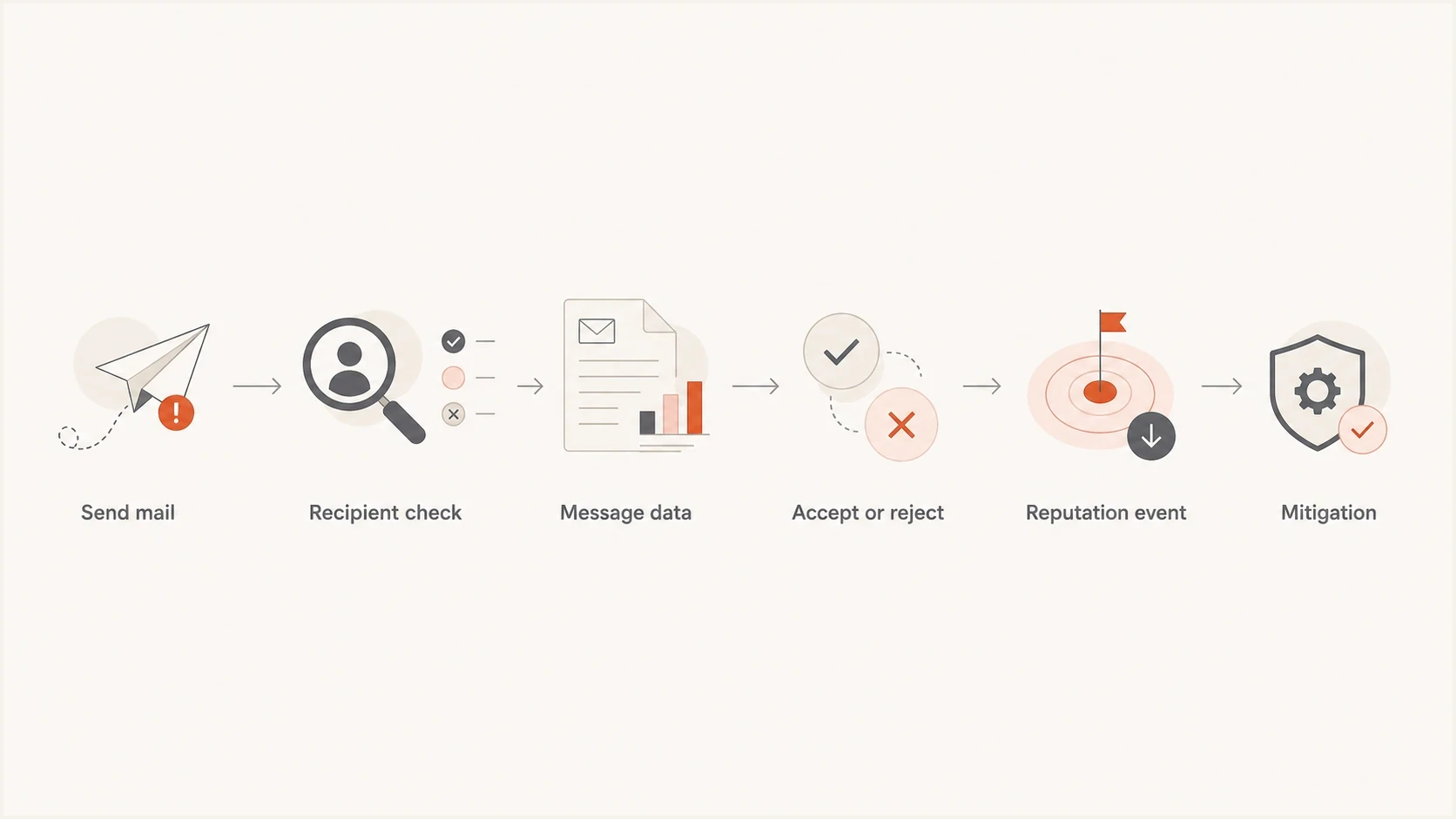
Flowchart showing how a spam trap event can become a reputation signal.
How to mitigate the effects
The right response is not to hunt for a magic list of trap addresses. Reduce exposure first, then work backward through the source of the bad address. If the hit followed an acquisition, database import, reactivation campaign, or partner list migration, treat that source as suspect until its permission records and collection controls have been verified.
- Pause risk: Stop campaigns to the segment tied to the bounce, listing, or reputation change.
- Map sources: Break the audience down by signup form, import batch, acquisition source, age, and last meaningful action.
- Suppress stale: Exclude contacts with no recent meaningful activity and no clear opt-in evidence, using a sunset window that matches the sending cadence and customer cycle.
- Confirm consent: Require documented permission for new forms, co-registration sources, partner data, and migrated databases. Suppress records when permission cannot be proven.
- Ramp slowly: Resume with recently active, clearly opted-in contacts first. Expand only while bounces, complaints, and provider rejections stay low.
Do not trust engagement alone
An open or click does not prove a recipient is a real consenting person. For reactivation and migrated data, human-level proof is stronger than tracking pixels: a login, purchase, support interaction, preference update, or explicit confirmation.
If the trap hit triggered a listing, check the affected sending IPs and domains, record when the event started, and read the full SMTP response rather than relying on a generic bounce category. A blocklist monitoring workflow is useful here because blacklist status changes can lag behind the underlying list-quality fix. Keep a timestamped view of what changed, what was paused, what was suppressed, and when the listing cleared.
Blocklist checker
Check your domain or IP against 144 blocklists.







List cleaning can be useful as a supporting step, but it is not a complete fix. It can remove obvious bad addresses and known risky patterns, but it cannot prove consent, fix a weak signup path, or identify every well-run trap. If the same acquisition process continues, the same reputation problem returns.
Reactivation risk bands
An example starting policy for staging reactivation by last meaningful recipient action. Adjust it to the sending cadence and customer cycle.
Active
0-90 days
Recent click, purchase, login, or reply.
Aging
91-180 days
Use lower volume and tighter monitoring.
High risk
181-365 days
Send only with strong consent evidence.
Suppress
365+ days
Keep out of normal campaigns.
How to prevent spam traps at signup
Prevention starts before an address joins the active audience. Pristine and typo traps usually point to weak collection controls, while recycled traps point to weak inactivity and bounce handling. Apply controls at capture and keep the evidence needed to trace every address back to its source.
- Confirm the address: Use confirmed or double opt-in and activate the subscription only after the recipient clicks the confirmation link.
- Check input: Catch invalid syntax, nonexistent domains, and common mailbox-provider typos before storing the address.
- Control bots: Rate-limit forms, reject automated submissions, and investigate sudden signup bursts or repeated patterns.
- Preserve consent evidence: Store the form or source, timestamp, consent language, and confirmation event for each subscriber.
- Ban third-party lists: Do not purchase, rent, scrape, trade, or append email addresses without direct documented permission.
- Enforce a sunset policy: Suppress hard bounces immediately and retire inactive contacts on a schedule tied to normal recipient behavior.
Validation has a limit
Syntax and domain checks can catch mistakes, but a well-run spam trap can look like a deliverable mailbox. Confirmed consent and source evidence are stronger controls than a clean validation result.
Where DMARC and Suped fit
DMARC does not remove spam traps from a list. It does something different: it shows which sources send as your domain and whether their messages pass DMARC through matching SPF or DKIM identities. When a trap hit appears near a reputation drop, use that visibility to determine whether the mail came from an approved platform, an old system, a compromised integration, or an unknown source.
Suped's product brings DMARC reporting, SPF and DKIM visibility, blocklist and blacklist monitoring, hosted controls, real-time alerts, and issue-level fix steps into one operational view. For this workflow, use it to confirm the campaign's sending source, watch authentication changes, and correlate the incident with domain or IP reputation alerts. Suped does not identify individual spam-trap addresses or replace consent controls.
Issues page showing top issues, verified sources, unverified sources, and authentication pass rates
For a fast operational check, use the domain health check to confirm that DMARC, SPF, and DKIM are valid, then send a real test through the email tester when headers, authentication, content issues, and sending setup need inspection. Those checks do not replace consent work, but they prevent authentication problems from being misdiagnosed as the result of a trap hit.
What Suped shows
- Sources: Which services send as the domain.
- Failures: Authentication issues that need correction.
- Reputation: Blocklist and blacklist changes tied to domains and IPs.
What your list process proves
- Permission: How each address entered the database.
- Interest: Recent actions that indicate wanted mail.
- Suppression: Rules that keep risky contacts out.
How to find the risky contacts
You rarely get a list of exact trap addresses. The useful work is statistical and operational. Compare the hit window against the campaign audience, source tags, import dates, engagement age, geography, form path, and bounce history. If one import batch or lead source is overrepresented, suppress that cohort. Resume only with a low-risk group that has clear permission and recent meaningful activity after the source problem is fixed.
If you need more background on how trap categories differ, the page on different spam traps explains why pristine, recycled, typo, and other trap types behave differently. For list policy, the guide to inactive contacts is useful because stale engagement is one of the easiest risk factors to control.
A practical segmentation test
- Recent proof: Keep contacts with a current purchase, login, reply, or preference update.
- Weak proof: Hold addresses with only old opens, old clicks, or inherited consent.
- No proof: Suppress addresses with an unclear source, old import date, or repeated inactivity.
- Bad proof: Permanently suppress hard bounces, repeated invalid recipients, and addresses with confirmed missing permission.
For acquired companies, keep their audience separate until the data proves itself. Their old consent language, suppression rules, unsubscribe handling, and signup evidence need review before they mix with the main program. A shared brand can inherit reputation damage from an inherited list quickly.
Views from the trenches
Best practices
Pause risky sends first, then review consent, engagement, bounce age, and source history.
Keep reactivation small, measured, and tied to recent proof of interest or purchase.
Separate acquired lists until permission records and prior mail history pass review.
Use blocklist and blacklist alerts to catch reputation damage before a full campaign.
Common pitfalls
Treating opens as proof of safety keeps stale or fake addresses active for too long.
Bulk-cleaning a list without consent fixes leaves the same intake problem in place.
Only suppressing bounces misses traps that accept mail or reject after message data.
Resuming normal volume too quickly tells filters the sender has not fixed acquisition.
Expert tips
Use source tags on every signup path so a trap hit points back to one intake route.
Make suppression rules older than campaign logic, so risky contacts cannot re-enter.
Track trap events next to DMARC, SPF, DKIM, bounce, and complaint signals weekly.
Use repermission as evidence of consent, not as a way to keep every old address.
Marketer from Email Geeks says a trap hit can show as a bounce, a full delivery, or a later rejection after the message body is received.
2024-11-26 - Email Geeks
Marketer from Email Geeks says most traps do not open or click, but automated systems and unusual trap setups mean engagement cannot prove safety.
2024-11-26 - Email Geeks
The practical takeaway
A spam trap does not have a consistent visible outcome. It can bounce, reject after the recipient command, reject after message data, accept the email, or create a reputation signal with no obvious clue in your campaign report. Because of that, trap behavior cannot identify every risky address.
The durable fix is to send only to people with clear permission and recent evidence that the mail is wanted. Then monitor authentication, sending sources, bounces, complaints, blocklist or blacklist status, and engagement by segment. Suped's product helps with authentication and reputation monitoring, but the root cause is still permission, source quality, and suppression discipline.




