How does sending email to inactive contacts affect deliverability?

Published 9 Aug 2025
Updated 24 Jul 2026
11 min read
Summarize with
Updated on 24 Jul 2026: We clarified how to separate inactive and stale contacts and when a sunset policy should stop further mail.
Sending email to inactive contacts can hurt deliverability, but the damage usually comes from volume, complaints, bounces, and spam-trap risk rather than one low open-rate campaign by itself. A small, controlled reactivation send to a clean segment is usually manageable. A large blast where inactive contacts make up most of the day's mail is where the risk rises quickly.
Treat inactive contacts as a risk tier, not a yes-or-no status. Someone who has missed a few normal send cycles is not the same as someone who has not clicked, bought, logged in, or replied for 18 months. The first person might still want the email. The second person is more likely to bounce, complain, or sit on an abandoned mailbox.
The practical answer is simple: keep reactivation sends separately measurable, use a small test cell, send a clear reintroduction message, and stop after a defined number of attempts. If you need to test a real message before sending, run it through the Email tester so authentication, content, and deliverability signals are visible before you add list risk.
The short answer
One or two campaigns to inactive contacts will not automatically ruin your sender reputation. They become dangerous when the inactive segment is large relative to normal mail, old enough to contain dead addresses, or cold enough that recipients no longer remember giving permission.
The main risk is recipient mix
A small test cell leaves most of the day's signals unchanged. When inactive contacts dominate the send, mailbox providers see fewer positive actions, more bounces, more complaints, and a higher chance of recycled spam-trap hits.
- Low opens: A low open rate is a weak signal on its own because privacy protection, image blocking, and automatic image loading distort opens.
- Complaints: A recipient who forgot your brand and marks the message as spam creates a stronger negative signal.
- Bounces: Old inactive records collect invalid addresses, closed mailboxes, and domains that no longer accept mail.
- Spam traps: Abandoned addresses can become recycled traps, which can affect reputation and blocklist or blacklist exposure.
Reactivation decision bands
Set these bands against your recent healthy baseline, not a universal percentage.
Test
Small cell
Start with the newest eligible contacts in the smallest useful cell.
Continue
Signals stable
Increase slowly only while complaints, bounces, and placement stay near baseline.
Pause
Threshold crossed
Stop the next cell when a monitored signal crosses your internal threshold.
Suppress
No response
End promotional mail after the planned series produces no positive action.
What mailbox providers see
Mailbox providers do not see the word inactive in your platform. They see delivery outcomes and recipient behavior. That includes whether mail is accepted, bounced, ignored, deleted without reading, moved to junk, reported as spam, or engaged with over time.
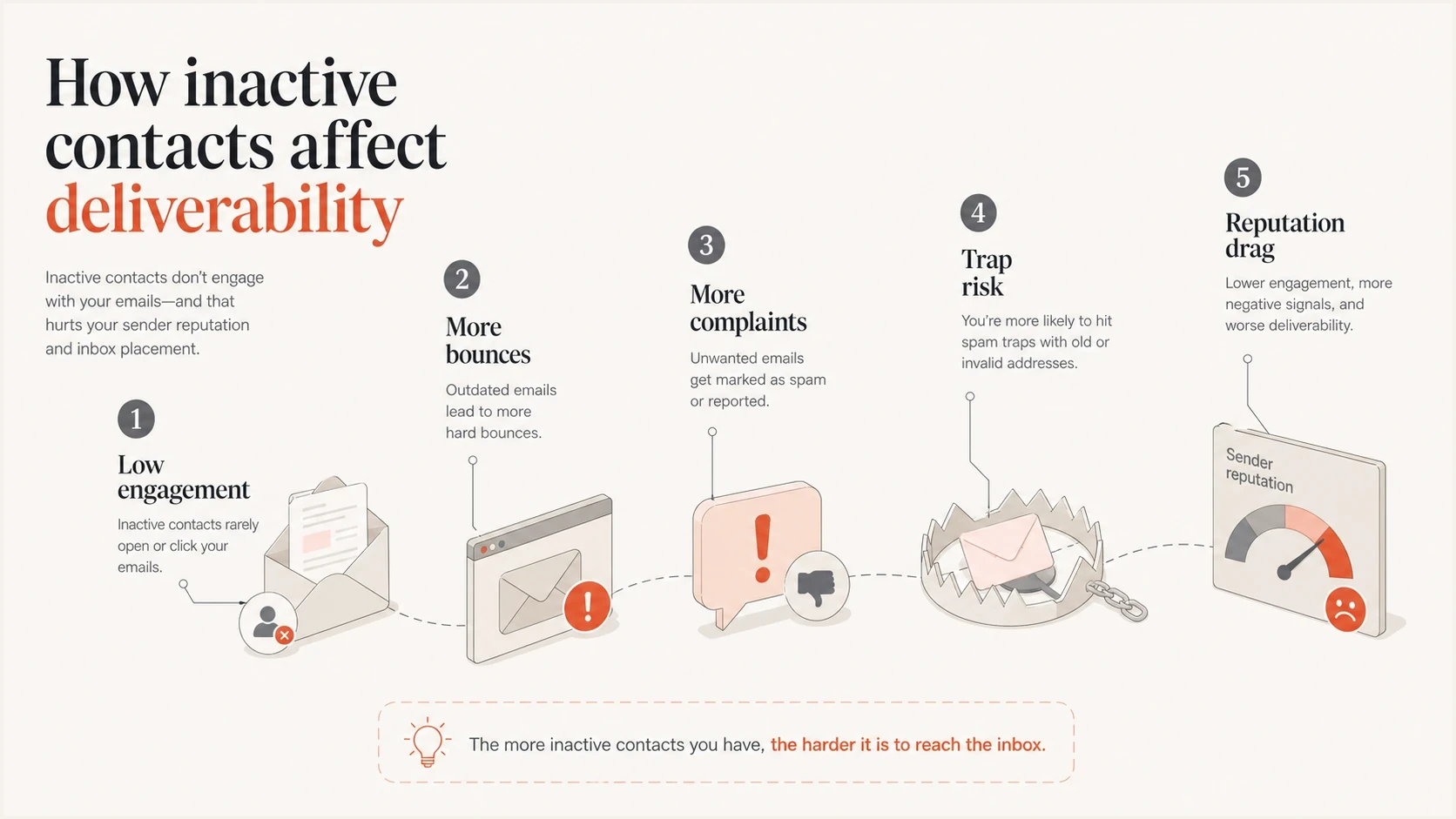
Inactive contacts causing low engagement, bounces, complaints, spam-trap risk, and sender reputation damage.
Inactive contacts affect those signals in uneven ways. A subscriber who has missed a few normal send cycles but still buys after seeing a subject line is not a dead lead. A subscriber who has not engaged across many send cycles, never clicked, and has no recent purchase or login activity belongs in a higher risk group. The window must match your sending frequency and customer lifecycle.
|
|
|
|---|---|---|
Recent lapse | Low | Reduce frequency |
Several missed cycles | Medium | Use a small cell |
Many missed cycles | High | Reintroduce slowly |
Not mailed recently | Very high | Reconfirm or suppress |
Classify inactivity relative to normal sending cadence before planning a send.
The older the address, the less useful opens are as the only activity signal. Clicks, replies, purchases, account logins, app sessions, form fills, and support activity give a better picture of whether the person still has a current relationship with your brand.
Inactive contacts and stale contacts are different
An inactive contact still receives your email but has stopped taking measurable actions. A stale contact has not been mailed for a long time. That gap matters because the address might no longer exist, ownership might have changed, and the recipient might no longer remember the signup.
Inactive contact
Confirm recent delivery history, rank the contact by missed send cycles, and use a short re-engagement campaign with a clear stop rule.
Stale contact
Check consent history and prior bounce data first. Reconfirm through another consented channel where appropriate, or keep the address suppressed rather than treating it as a normal inactive subscriber.
This distinction keeps list hygiene decisions proportionate. It also prevents a long-unused database from entering the same reactivation path as contacts who received a campaign last month.
How much risk one inactive send creates
The risk is not mainly the number of campaigns. It is the number and quality of risky recipients inside the total mail stream. Two small sends spread over several weeks are safer than one giant send to every dormant contact in the database.
Safer send pattern
- Small share: Inactive contacts stay within a tightly capped share of normal daily marketing volume.
- Recent first: The campaign starts with people who missed several send cycles, not people untouched for years.
- Clear purpose: The message reminds recipients why they receive mail and offers a simple choice.
Riskier send pattern
- Large share: Inactive contacts dominate the day's mail and dilute healthy engagement.
- Old records: The list includes addresses with no recent proof of use or permission.
- No exit: The sender keeps mailing after no click, reply, purchase, login, or other response.
For contacts inactive across many normal send cycles, do not send a standard campaign as if nothing changed. Split the test results by mailbox provider, start with the most recent inactive group, and cap the daily volume. If the first cell shows unusual bounces, complaints, spam placement, or blocklist movement, pause the rest of the send.
This is also where a domain-level view matters. A campaign report tells you what that campaign did. A reputation and authentication view shows whether the domain already carries risk. Suped's blocklist monitoring helps track domain and IP blacklist or blocklist changes that might otherwise be mistaken for a list-quality problem.
A safer reactivation plan
Use a frequency ramp instead of a hard active or inactive switch. People go on holiday, get busy, change jobs, ignore image-loaded emails, or read subject lines without opening. A scale handles that better than cutting everyone off after a short silence.
Example inactive-contact send ruletext
active_pool: click <= 90 days OR purchase <= 180 days
reactivation_pool: no click 180-365 days AND no recent bounce
daily_reactivation_cap: smallest practical test cell
stop_after: 2 messages without click, reply, login, or purchase
A reactivation send should have one job: confirm current interest or confirm that the person no longer wants promotional mail. It is not the right place to judge normal sales performance. Lower revenue, lower clicks, and lower opens are expected. The success metric is whether enough people give a positive signal without causing reputation damage.
- Define inactivity: Use sending cadence, clicks, conversions, logins, replies, and recency, not opens alone.
- Sort by age: Start with the newest inactive contacts and leave the oldest records until last.
- Cap volume: Use the smallest practical cell and keep it separate in reporting.
- Explain context: Remind the person why they are hearing from you and make the unsubscribe path obvious.
- Set a stop rule: Suppress contacts who do not respond after the final reactivation attempt.
A documented sunset policy should define audience age, normal send cadence, re-engagement copy, suppression logic, and monitoring before the first email goes out.
Email tester
Send a real email to this address. Suped shows a results button when the test is ready.
?/43tests passed
After the test send, compare the inactive segment with an engaged baseline for the same mailbox provider and message type. Inactive contacts will perform worse. The useful question is whether complaints, bounces, and placement remain within the thresholds set before sending.

Email tester sample report showing total score, email preview, issue summary, and per-section results
Where authentication and monitoring fit
Authentication does not make inactive contacts safe, but weak authentication makes a risky send harder to interpret. If SPF, DKIM, or DMARC fails during a reactivation campaign, it becomes harder to separate list-quality problems from authentication problems.
Before reactivating a dormant segment, check that legitimate sources pass SPF and DKIM, DMARC is reporting correctly, and unexpected sources are not sending as your domain. Suped is our DMARC reporting and email authentication platform. Suped's DMARC monitoring connects authentication results with sender-source visibility and alerts, which helps separate technical failures from list-quality risk.
How Suped supports this check
Use Suped before and during the test to establish an authentication baseline, identify changes in legitimate sending sources, and check whether reputation issues appear at the same time as the reactivation send.
- Authentication results: Find legitimate sources that fail SPF, DKIM, or DMARC before adding list risk.
- Source changes: Spot unexpected senders or configuration changes around the campaign.
- Reputation context: Review blocklist or blacklist movement beside authentication and campaign results.
- Alerts: Pause the next cell when a monitored issue appears.
If the domain's starting position is unclear, run a domain health check before increasing reactivation volume. That gives you a baseline for DMARC, SPF, and DKIM before list quality becomes the next variable.
Suped DMARC dashboard showing email volume, authentication health, and source breakdown
When to stop mailing inactive contacts
Stop mailing when the contact gives no positive signal after your reactivation path, the address hard bounces, the recipient complains, or the segment crosses a complaint, bounce, or placement threshold set before sending. Make the decision before revenue pressure weakens the rule.
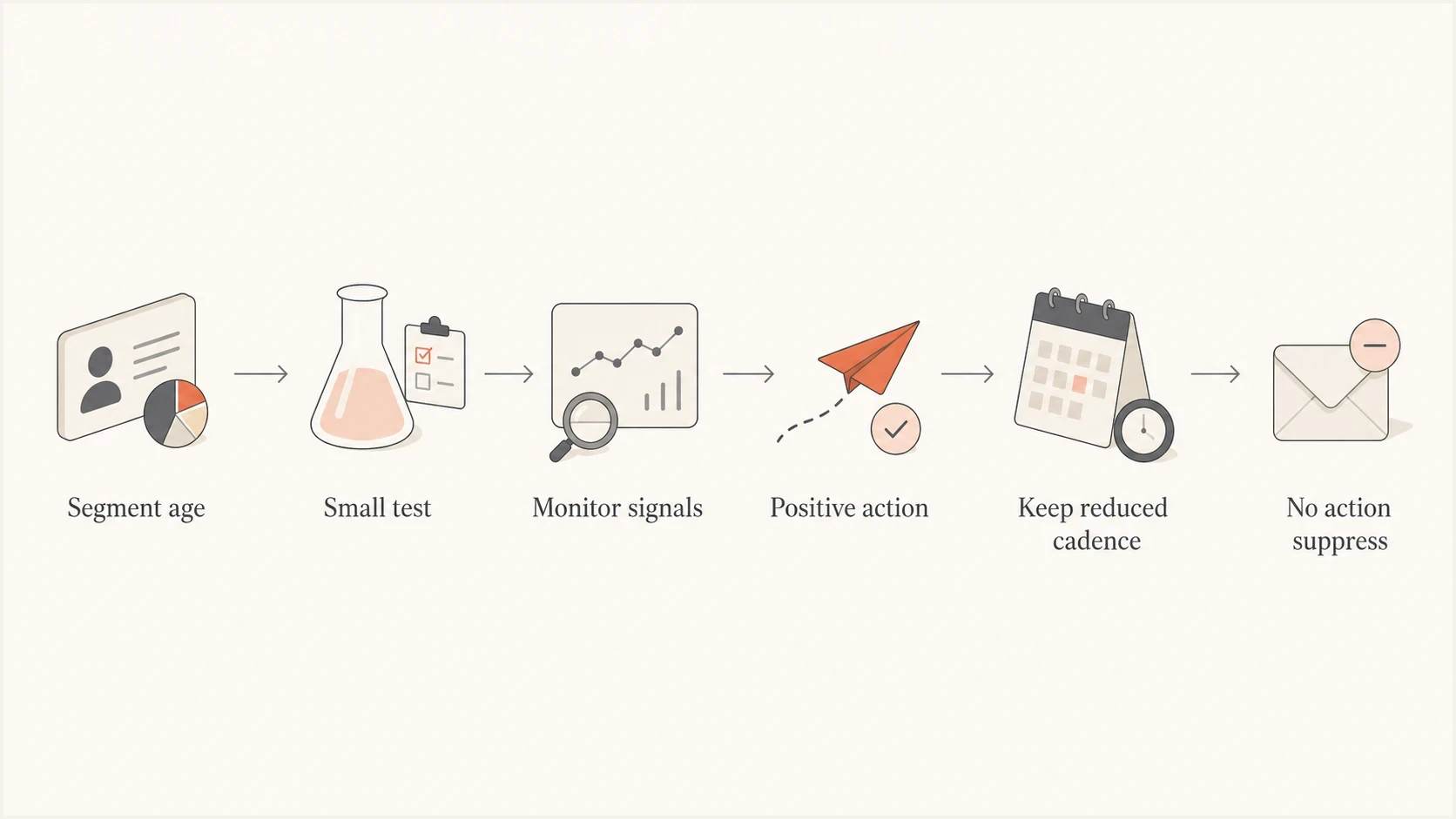
Inactive contact reactivation flow showing testing, monitoring, reduced cadence, and suppression.
Strong programs do not wait until a contact is fully dormant. They lower cadence gradually as engagement fades and raise it again when the person clicks, buys, logs in, or replies. This protects deliverability without discarding people who still value the brand but do not open every message.
For policy design, document when you remove unengaged subscribers, when you reduce frequency, and when you run a final interest check. This keeps deliverability decisions consistent across teams.
Views from the trenches
Best practices
Define inactivity with clicks, purchases, site visits, and recency rather than opens alone.
Send higher risk contacts slowly so engaged mail stays most of the daily volume by domain.
Give every reactivation series a clear stop rule before the first message is sent.
Track bounces, complaints, spam placement, and blocklist or blacklist movement together.
Common pitfalls
Treating one month without opens as inactive mislabels people who still want mail from you.
Sending a large dormant batch in one day changes the mailbox provider signal mix too sharply.
Using a sales goal for reactivation hides the real goal, permission signal recovery.
Ignoring dead addresses lets hard bounces and recycled spam traps accumulate over time.
Expert tips
Use small test cells first, then increase only where complaints and bounces stay low.
Keep the first message clear about why the person receives mail and how to opt out.
Move people up or down by engagement score instead of switching them fully on or off.
Separate inactive segments by mailbox provider so one provider issue does not hide in totals.
Marketer from Email Geeks says the number of inactive recipients matters more than the number of campaigns, because a small risky cell inside engaged mail has a limited effect.
2021-08-31 - Email Geeks
Expert from Email Geeks says inactive addresses create risk through dead mailboxes, forgotten permission, spam complaints, and recycled traps, with complaints and traps carrying the strongest downside.
2021-08-31 - Email Geeks
What to do next
Sending to inactive contacts affects deliverability when it changes the quality of your mail stream. A small, well-planned reactivation test is normal. A large dormant send with no stop rule creates avoidable risk.
Start with the newest eligible inactive segment, keep the first send small, watch complaints and bounces by mailbox provider, and suppress anyone who gives no response after the planned sequence. Before scaling, make sure authentication is clean and domain reputation is not already under pressure.
In Suped, monitor DMARC, SPF, DKIM, sender sources, alerts, and blocklist or blacklist signals during the test. Use those results to decide whether the next inactive cell should continue, shrink, or stop.




