How to troubleshoot Microsoft email deliverability issues and analyze SNDS data?

Updated on 8 Sep 2026: We updated this guide for the current SNDS portal, Microsoft's CAT-led filtering guidance, Outlook.com SMTP responses, and RFC 9989.
The direct answer: troubleshoot Microsoft email deliverability by combining SNDS data with real message headers, bounce logs, DMARC aggregate reports, engagement trends, and controlled inbox tests. SNDS helps you spot IP reputation problems, complaint spikes, filtered traffic, and volume shifts, but it does not explain every Outlook.com, Hotmail, Microsoft 365, or Exchange Online Protection placement decision.
Treat SNDS as a starting signal, not a verdict. The fastest path is to send a controlled message, inspect CAT, SFV, and authentication results in the headers, use SCL and BCL as supporting values, confirm SPF, DKIM, and DMARC domain match, compare SNDS by IP and date, then look at list quality and recent engagement. If you need a quick live check, run a message through an email tester and keep the raw headers with your investigation notes.
What SNDS can and cannot tell you
Microsoft Smart Network Data Services gives reputation and traffic data for IPs that send into Microsoft consumer mail infrastructure. The official SNDS FAQ redirects to Microsoft's current SNDS portal. The new portal has replaced the old site, and legacy automated access URLs were deprecated on June 22, 2026, so create or verify automated links in the current portal instead of relying on old report URLs.
Microsoft removed trap hit counts from the SNDS Data Report on July 22, 2026. Treat historical trap data as directional evidence, not an exact count or a field available in current investigations.
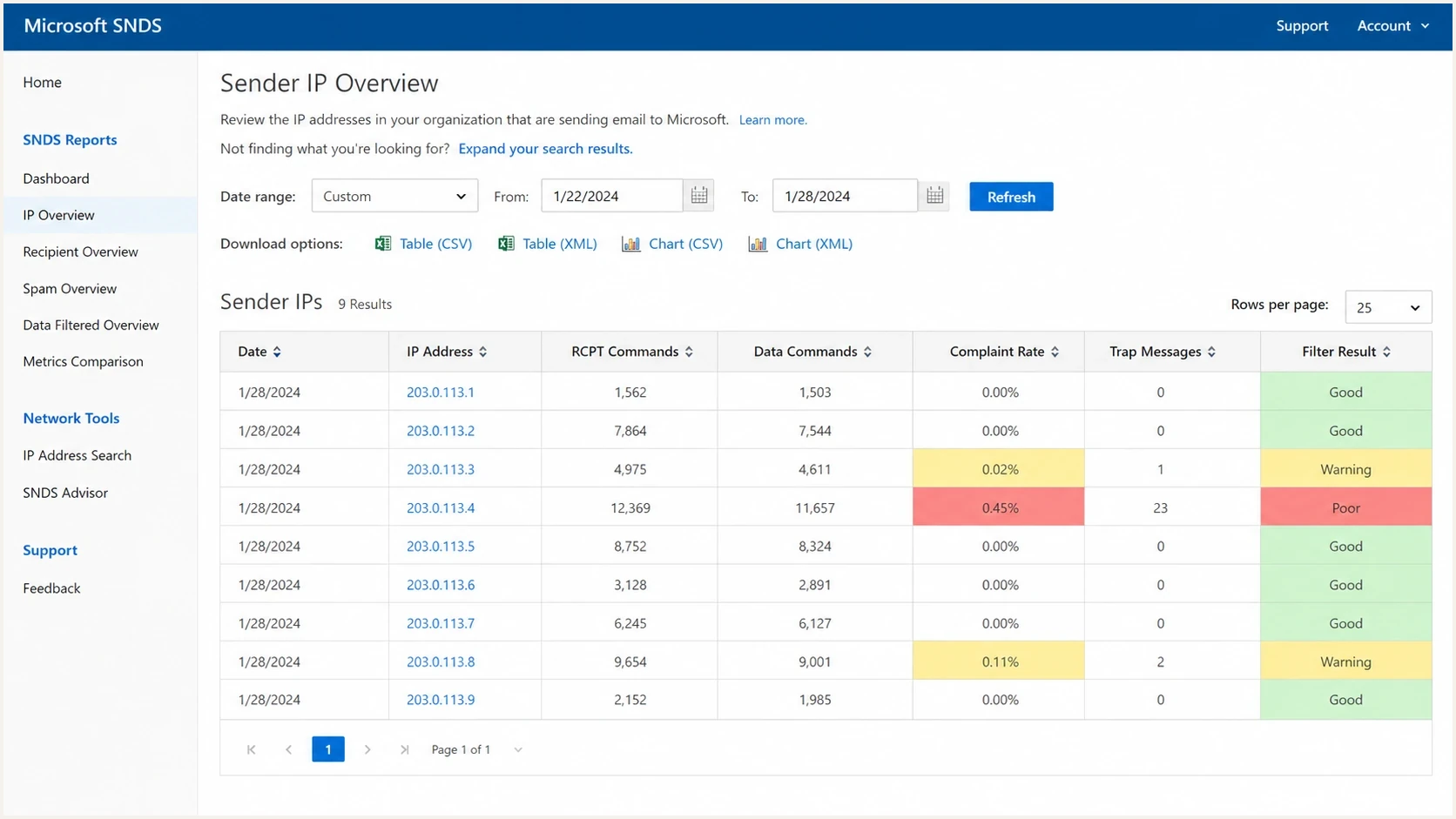
A Microsoft SNDS style screen showing sender IP reputation, complaints, trap messages, and filter results.
|
|
|
|---|---|---|
Filter result | Microsoft filtered a share of traffic. | The exact mailbox rule or model reason. |
Complaint rate | Recipients reported mail as junk. | Which campaign or segment caused it. |
Trap activity | Historical reports can show list hygiene risk. | Exact addresses and current report visibility. |
IP volume | Traffic changed for a sending IP. | Domain-level or tenant-level placement. |
SNDS fields are useful only when you connect them to headers and campaign logs.
Do not use a green SNDS row as proof that Microsoft placement is fine. SNDS can look clean while a specific sending domain, campaign stream, Microsoft 365 tenant, or recipient cohort still has junk placement.
When SNDS data is missing or delayed
Missing SNDS rows do not prove that Microsoft has no reputation data. They usually mean the portal has an access problem, the IP range is not authorized for the account, the sending volume is below the visible reporting threshold, or the report has not refreshed yet. SNDS verifies control through contacts tied to IP ownership or registration, so reverse DNS alone does not make a preferred email address eligible for authorization.
|
|
|
|---|---|---|
Portal error | SNDS or sign-in service issue | Save bounces and retry later |
Authorization delay | IP approval email is late | Check the mailbox and request once |
No IP range | ESP or cloud owner controls access | Ask the owner for evidence |
Stale rows | Reporting lag | Use logs and headers first |
Common SNDS access and data issues need different next steps.
If the current portal reports a problem while saving a new automated link, edit the SNDS profile, save a change, and retry the link. Microsoft lists that sequence as the temporary workaround.
Do not stop the investigation while waiting for SNDS to refresh. Build a timeline with affected IPs, sending domains, bounce responses, complaint changes, campaign IDs, and message headers so Microsoft support can see the incident even when the portal is incomplete.
Use this troubleshooting order
When Microsoft placement changes, use a fixed order so noise does not drive the investigation. The goal is to separate authentication, reputation, list quality, content, and infrastructure symptoms before changing DNS or moving traffic.
- Collect evidence: Save raw message headers, bounce responses, NDR codes, campaign IDs, send times, IPs, domains, and audience segments.
- Check authentication: Confirm SPF, DKIM, and DMARC pass with the right domain match. A domain health check is useful before you blame reputation.
- Read headers: Start with CAT and SFV, then use BCL, SCL, compauth, authentication results, and routing values to explain the handling.
- Compare SNDS: Match red, yellow, missing, or delayed days to the exact IP, campaign volume, list source, and recipient mix.
- Review reputation: Check IP and domain reputation, including blocklist monitoring for blocklist and blacklist events.
- Test carefully: Use consistent seed addresses and real engaged contacts. A new seed mix can change results by itself.
The most useful single artifact is still the delivered message header. It tells you what Microsoft saw for authentication, connecting IP, reverse DNS, bulk signals, and the filtering category on that specific message.
Header fields to collecttext
Authentication-Results: spf=pass dkim=pass dmarc=pass compauth=pass
X-Forefront-Antispam-Report: SCL:5; CAT:BULK; SFV:SPM; SRV:BULK; CIP:203.0.113.10; PTR:mail.example.com
X-Microsoft-Antispam: BCL:4; PCL:0; ...
Received-SPF: Pass (sender SPF authorized)
Email tester
Send a real email to this address. Suped shows a results button when the test is ready.
?/43tests passed
Decode Outlook.com SMTP responses
Separate SMTP rejection from junk placement before using SNDS. A 4.x.x response is temporary and should remain in the queue for controlled retries. A 5.x.x response is permanent for that attempt, so do not resend the unchanged message to the same recipient. Keep the full response text because the enhanced status code alone can cover several causes.
|
|
|
|---|---|---|
421 RP-001, RP-002, or RP-003 | Outlook.com applied a temporary rate or connection limit linked to IP or domain reputation. | Keep mail queued, reduce concurrency or volume, and map the event to SNDS. |
550 5.7.515 | A domain sending over 5,000 messages per day to Outlook.com accounts did not meet SPF, DKIM, and DMARC requirements. | Correct authentication and domain match before resending. |
550 SC-001 or SC-004 | Outlook.com rejected the mail for policy, reputation, content, or complaint reasons. | Correlate the IP with SNDS and JMRP, then isolate the responsible campaign. |
Other 5.x.x NDR | The failure can concern the address, recipient policy, routing, or sender configuration. | Read the diagnostic text and identify whether the sender or recipient admin owns the fix. |
Match the Outlook.com response to the first corrective action.
An accepted SMTP transaction does not prove final delivery. If a delivery status notification arrives later as an out-of-band (OOB) bounce, attach it to the same incident timeline. The remote-server field can be empty because the original server accepted the message before the later rejection.
The 5,000-message authentication rule applies to Outlook.com consumer addresses, including Hotmail and Live accounts. Do not use a 550 5.7.515 response to diagnose an unrelated Microsoft 365 tenant policy.
Read CAT and BCL before relying on SCL
In Microsoft 365 cloud filtering, CAT identifies the filtering category and SFV shows how spam filtering handled the message. SCL no longer determines whether a message is classified as spam or high confidence spam, and it does not determine the action. Use SCL as supporting evidence. BCL remains useful for bulk mail because a higher value indicates more undesirable bulk behavior.
SCL reading guide
Use SCL as a supporting message stamp, then confirm the CAT value, SFV value, placement, and tenant policy.
Bypass request
-1
A rule requested bypass handling, but the stamped value can still be 0 or 1.
Low stamp
0-1
The message was evaluated with a low SCL, but CAT still identifies the cloud verdict.
Spam stamp
5-6
Rules can use these values to request spam handling, but categorization decides the verdict.
High spam stamp
9
Rules can use this value to request high confidence spam handling, but CAT remains decisive.
BCL adds another layer for bulk mail. BCL 0 means the message is not from a bulk sender, 1 to 3 indicates bulk mail with few complaints, 4 to 7 indicates a mixed number of complaints, and 8 to 9 indicates a high number. If the value meets or exceeds the receiving tenant's configured threshold, its anti-spam policy decides whether to move the message to junk, quarantine it, or take another action.
If authentication passes and CAT:BULK appears with a high BCL, move to engagement, list source, complaint risk, content clarity, and send stream separation. If CAT identifies spam, spoofing, or another category, investigate that category and the related SFV value instead of tuning DNS without evidence.
Why passing authentication still lands in spam
SPF, DKIM, and DMARC are entry requirements, not a placement guarantee. Microsoft can accept an authenticated message and still route it to junk because reputation, complaints, engagement, content, or past traffic patterns look weak. DMARC monitoring tells you whether legitimate sources are passing and whether unknown sources are abusing the domain, but it does not replace mailbox placement analysis.
Authentication passed
- SPF pass: The sending IP is authorized for the return-path domain.
- DKIM pass: The signed message survived transit without a breaking change.
- DMARC pass: The visible From domain has a valid SPF or DKIM domain match.
Placement still weak
- Complaints: Recipients are reporting or ignoring the mail at a damaging rate.
- Low engagement: The active audience is too small compared with total volume.
- Mixed streams: Prospecting, internal mail, and opt-in mail share reputation.
Suped DMARC dashboard showing email volume, authentication health, and source breakdown
Suped's DMARC and email authentication platform helps here by joining authentication health, source identification, DMARC policy, SPF and DKIM issues, blocklist (blacklist) monitoring, and alerts in one workflow. That matters because Microsoft troubleshooting usually fails when these signals sit in separate places.
Analyze SNDS without overreacting
SNDS is most valuable when you compare it with your own send log. The useful questions are which IP, domain, campaign, audience segment, and message version caused the change. A red day without that mapping is only a prompt to investigate.
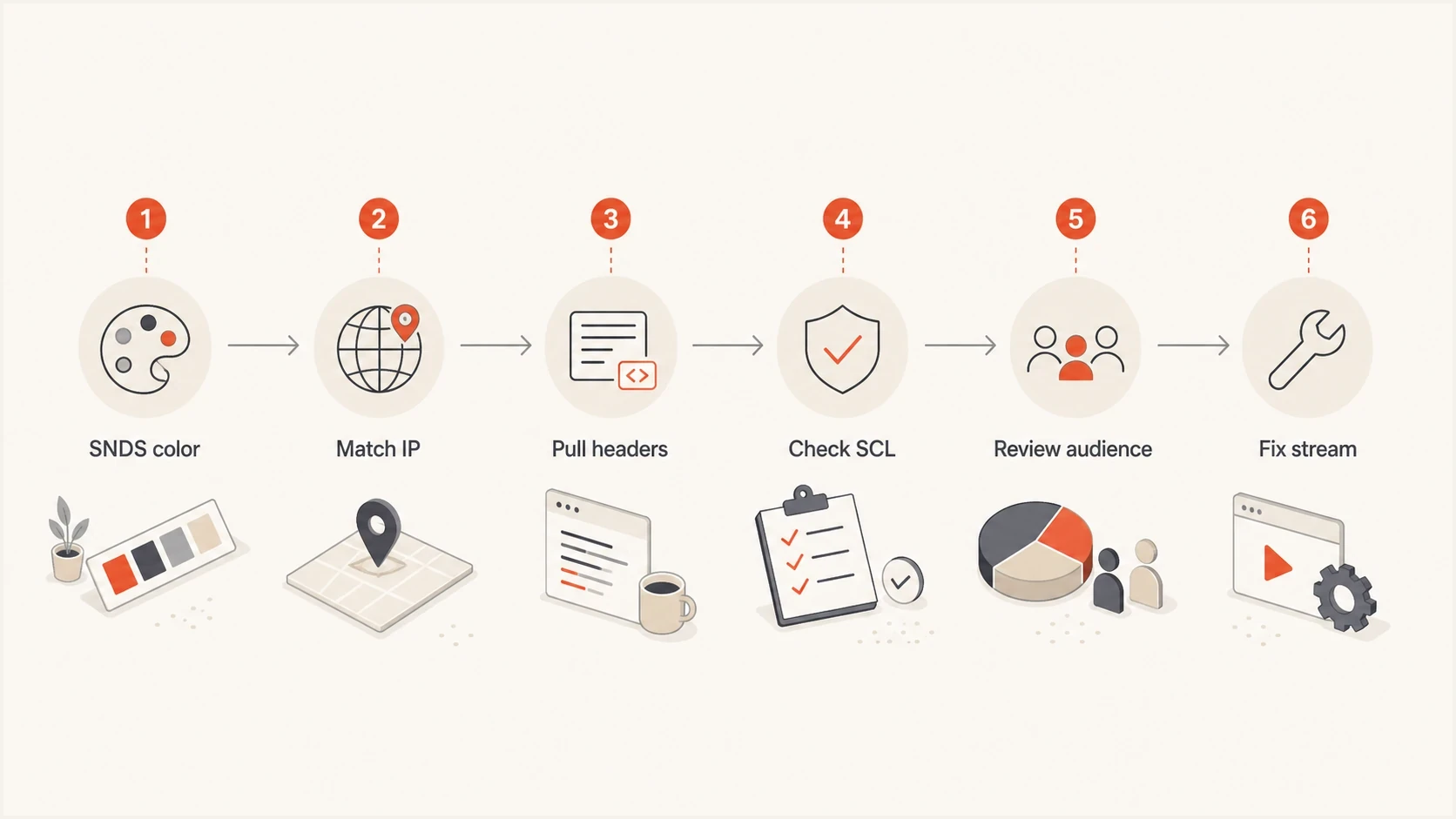
Flowchart for using SNDS data with IP mapping, headers, SCL, audience review, and stream fixes.
- One day: Treat a single red result as a trigger, not a conclusion.
- Several days: Look for a repeated IP, audience, template, or send-time pattern.
- Volume shift: Check whether a migration, new subdomain, or new segment changed traffic quality.
- Clean SNDS: Still inspect Microsoft headers if users report junk placement.
Pair complaint-rate changes with Junk Email Reporting Program (JMRP) reports. SNDS shows the IP-level pattern, while JMRP can identify messages that Outlook.com users marked as junk so you can suppress those recipients and trace the responsible campaign.
This is also where seed testing gets messy. Changing seed addresses every quarter is reasonable for coverage, but it weakens before-and-after comparisons. Microsoft and other mailbox providers make placement decisions at the user and cohort level, so two seed sets can disagree even when the real audience result has not changed.
Fix the causes Microsoft cares about
The fixes that move Microsoft placement are usually operational. Authentication cleanup matters, but after it passes, sender reputation depends on who receives the mail, how they react, whether risky traffic is isolated, and whether the sending infrastructure looks legitimate.
- Tighten recipients: Suppress contacts with no recent clicks, replies, form fills, purchases, or site activity. Open-only contacts need stricter handling because opens are noisy.
- Protect streams: Put opt-in marketing, sales outreach, system mail, and employee tools on separate domains or infrastructure when one stream damages the rest.
- Reduce spikes: Avoid sudden volume jumps, especially after a platform migration, subdomain change, or reactivation campaign.
- Use complaints: Process Microsoft complaint feedback when available and suppress complainers immediately.
- Review infrastructure: Check reverse DNS, HELO or EHLO values, routable sending IPs, and IP or domain blocklist (blacklist) events before assuming Microsoft alone is the issue.
DMARC monitoring record exampledns
v=DMARC1; p=none; rua=mailto:dmarc-reports@example.com;
adkim=s; aspf=s
?
What's your domain score?
Deep-scan SPF, DKIM & DMARC records for email deliverability and security issues.
If you are warming a subdomain, keep the test honest. Send only the stream that belongs there, ramp gradually, and compare Microsoft outcomes against the same audience quality. A subdomain helps isolate reputation, but it does not erase weak engagement or poor list history.
For marketing mail, also check whether the message identity and unsubscribe path are obvious. Microsoft guidance still points senders toward clear From names, one-click unsubscribe options, confirmed opt-in, consistent link domains, and avoiding image-only or attachment-heavy campaign content.
Where Suped fits
Suped's DMARC and email authentication platform supports this workflow by helping teams identify sending sources, surface configuration issues, monitor DMARC policy, track SPF and DKIM health, watch for blocklist (blacklist) events, and send real-time alerts when something changes.

Issue steps to fix dialog showing the issue overview, tailored fix steps, and verification action
- Issue detection: Suped groups authentication problems and gives practical steps to fix them.
- Hosted controls: Hosted DMARC, Hosted SPF, SPF flattening, and Hosted MTA-STS reduce DNS work.
- Multi-domain view: MSPs and larger teams can monitor many domains without losing source detail.
- Action focus: Alerts, weekly summaries, and issue workflows keep the investigation moving.
The practical benefit is that you can keep Microsoft troubleshooting grounded. SNDS tells you something happened at an IP level. Suped helps confirm whether authentication or domain reputation changed at the same time, so the next fix is targeted.
When to contact Microsoft
Contact Microsoft only after you have evidence that the issue is not caused by authentication failures, broken routing, poor list quality, unsafe volume changes, or an obvious blocklist (blacklist) problem. A support request without headers, IPs, dates, examples, and remediation notes usually goes nowhere.
When escalation is justified, include the affected IPs, sending domains, exact send dates, sample recipients, raw headers, SNDS screenshots or exports, bounce text, complaint-handling steps, and the changes already made. The Sender Support path is more useful when your case is specific.
For Microsoft 365 tenant-specific filtering, the recipient organization's administrator often needs to open the support case. For hard blocks with an NDR, follow the instructions in the bounce first, then add your SNDS and header evidence if the problem continues.
Do not open a Microsoft ticket as the first troubleshooting step. Fix what you control first, then escalate with evidence if Microsoft filtering still looks inconsistent.
Views from the trenches
Best practices
Check message headers first, because SCL and BCL often explain Microsoft placement faster.
Segment recent engagers before testing, so reputation changes do not hide behind list mix.
Compare SNDS by IP and send date, then confirm the pattern against bounces and headers.
Keep opt-in mail away from prospecting traffic when domain or IP reputation is weak.
Common pitfalls
Treating green SNDS rows as proof of inboxing misses tenant-level and user-level filtering.
Changing seed lists mid-test makes Microsoft results look random even when targeting changed.
Keeping open-only contacts forever can depress engagement and weaken sender reputation.
Moving to a subdomain without traffic separation can preserve the same reputation problem.
Expert tips
Send a controlled message to Microsoft inboxes and archive headers before DNS changes.
Use SNDS red days as investigation triggers, not as final proof of the root cause alone.
Review inactive B2B contacts by stage and recency, not one blanket archive rule for all.
Separate authentication checks from reputation checks, because passing records can still land in spam.
Marketer from Email Geeks says Microsoft SNDS has felt too thin for diagnosing root causes, so use it as a signal source rather than the main investigation record.
2025-04-29 - Email Geeks
Marketer from Email Geeks says BCL and SCL in received headers can explain Microsoft filtering decisions more directly than aggregate dashboards.
2025-04-29 - Email Geeks
Combine SNDS, headers, and logs
The right way to troubleshoot Microsoft deliverability is to answer one question at a time. Did authentication pass? What did CAT and SFV say, with BCL and SCL as context? Did SNDS show an IP-level reputation event? Did engagement or audience quality change? Did a subdomain or migration mix clean and risky streams? Did a blocklist or blacklist event appear?
For a broader Microsoft-specific checklist, the Outlook.com playbook pairs well with this workflow. Keep SNDS in the process, but do not make it the process. The strongest diagnosis comes from SNDS, headers, logs, DMARC reporting, engagement, and controlled testing together.




