
Can you stop spammers from using your email in Reply-To?


No. You cannot stop an unrelated sender from placing your email address in the Reply-To header. The sender controls that header in the message it creates, just as it controls the subject and body. There is no DNS record that grants permission to use an address there, and receiving systems do not authenticate Reply-To against your domain.
DMARC still matters, but it answers a different question. It checks whether the domain shown in the visible From header matches a domain validated through SPF or DKIM. It does not inspect Reply-To for domain ownership. A message can therefore pass DMARC for the spammer's From domain while directing replies to an address at your domain.
What protection can accomplish
You can limit the operational damage. Harden the domain against actual From-address spoofing, decide whether old mailboxes should accept replies, preserve evidence, report abusive infrastructure, and give complainants a consistent explanation. None of those steps removes your address from messages already controlled by a third party.
Why DMARC does not authenticate Reply-To
Email has several identities. The visible From address tells the reader who appears to have authored the message. The envelope sender handles delivery errors. DKIM signs selected message content with a signing domain. Reply-To simply tells a mail client where to address a reply when the user clicks Reply.
Visible From domain
DMARC evaluates this identity using authenticated SPF or DKIM results and a matching domain.
- Protected by policy: A receiver can quarantine or reject a message that fails DMARC.
- Reported in aggregate: DMARC reports show sources using the domain in From.
Reply-To address
The message author supplies this optional routing instruction. No standard verifies ownership of its domain.
- Outside DMARC scope: A DMARC reject policy does not reject a message because of Reply-To.
- Absent from reports: Standard aggregate reports do not inventory Reply-To values.
This example can pass DMARC because the authenticated sending domain and visible From domain belong to the spammer. Your address appears only in Reply-To, so your SPF and DMARC records are never consulted for that identity.
Example message headerstext
From: Offers <offers@sender-example.test>
Reply-To: Old Team <sales@retired-example.test>
Return-Path: bounce@sender-example.test
Authentication-Results: mx.example; dmarc=pass
Good DMARC monitoring still gives you evidence about real misuse of the visible From domain. It also helps separate that event from Reply-To stuffing, which calls for a different response.
Confirm what the sender actually used
Do not diagnose this from a screenshot or forwarded message. Ask a recipient for the original message as an attached file or for its complete raw headers. Ordinary forwarding rewrites useful evidence and often hides the original authentication results.
- Check From: Record the exact visible From address and domain.
- Check Reply-To: Confirm that your address appears here rather than in From.
- Check Return-Path: Capture the envelope domain used for bounces and SPF.
- Check authentication: Read DMARC plus its SPF and DKIM results with their evaluated domains.
- Check Received: Use the earliest trustworthy hop to identify sending infrastructure.
- Preserve identifiers: Keep the date, Message-ID, subject, and full original message.
|
|
|
|---|---|---|
From | Visible author | DMARC |
Return-Path | Bounce route | SPF |
DKIM d= | Signing domain | DKIM key |
Reply-To | Reply route | None |
Header fields and the control that applies to each one.
If your domain appears in From, treat it as domain spoofing instead. Follow a documented domain spoofing response and confirm that the failing traffic is covered by an enforcement policy.
Harden inactive domains without overstating the result
For a domain that sends no mail, publish explicit records that say so. These records reduce genuine domain spoofing and make the domain's intended state clear. They do not prevent the same address from appearing in Reply-To, the display name, the subject, or the message body.
SPF for a domain that sends no maildns
retired-example.test. 3600 IN TXT "v=spf1 -all"
DMARC enforcement for the same domaindns
_dmarc.retired-example.test. 3600 IN TXT
"v=DMARC1; p=reject; sp=reject; pct=100;
rua=mailto:dmarc@reports.retired-example.test"
Use the reporting mailbox only if it is monitored or handled by a reporting platform. Check the published value with a DMARC checker after DNS propagation. If the domain still sends through any forgotten application, validate that source before publishing reject.
DMARC checker
Look up a domain's DMARC record and catch policy issues.
?/7tests passed
A clean syntax check confirms the published record, not the accuracy of your sender inventory. Continue reviewing reports after the change so any legitimate but forgotten source is visible. DNS caches also retain the older policy until its time to live expires.
A null MX record states that the domain accepts no email. Publish it only when every address at the domain is retired, including abuse, legal, billing, and recovery addresses. If you need to receive legitimate replies or complaints, keep normal inbound mail and manage it deliberately.
Null MX for a domain that receives no maildns
retired-example.test. 3600 IN MX 0 .
Do not use a null MX as a Reply-To fix
A null MX stops delivery to your domain. It does not stop a sender from printing your address in Reply-To. Replies will fail, which reduces inbox noise but can create confusing bounce messages for recipients and remove a useful evidence channel.
Choose how to handle replies and complaints
The right inbound setup depends on whether the old domain still has a business reason to receive mail. Keeping a mailbox can help collect samples and reassure people. Closing mail removes the handling burden but does not remove the misleading address from spam.
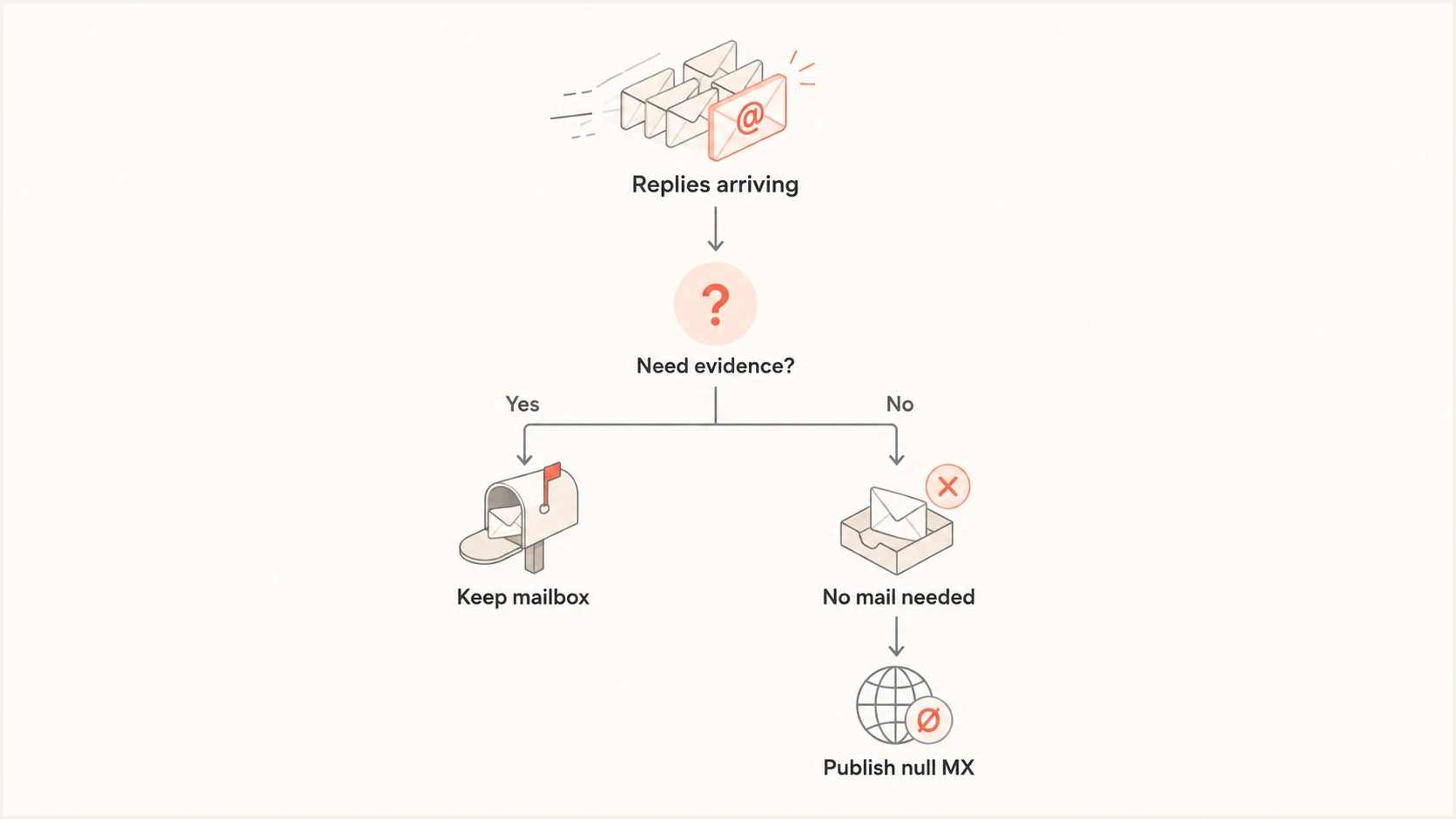
Decision flow for keeping a monitored mailbox or publishing a null MX record.
If the mailbox stays open, use a controlled response process. Avoid an automatic reply to every message because it confirms that the address works, creates backscatter, and can send mail to forged senders. A human-reviewed template is safer for genuine complainants.
- Acknowledge clearly: State that your organization did not send the message.
- Request the original: Ask for the message as an attachment with complete headers.
- Avoid unsubscribe claims: Explain that you cannot remove them from a list you do not operate.
- Protect personal data: Tell recipients to redact unrelated private content before sharing.
Route this mailbox away from the normal support queue if complaint volume becomes disruptive. Tag cases by visible From domain, sending IP, subject pattern, and date. Repeated infrastructure then becomes easier to identify without assuming every complaint has the same source.
Report the sender with usable evidence
Reporting can interrupt a specific campaign, although the sender can move to new infrastructure. Send the complete original message to the abuse contact for the sending network or hosting provider identified from trustworthy headers. Include a plain description that your address was inserted into Reply-To without permission.
Evidence package
- Original message: Attach the source message rather than pasting a screenshot.
- Observed misuse: Name the unauthorized Reply-To address and timestamp.
- Technical origin: Point to the relevant Received hop and sending IP.
- Requested action: Ask the provider to investigate the account or server.
Do not report the Reply-To domain as the sending source simply because it appears there. In this scenario that domain is the abused identity. Acting on the wrong field wastes time and can direct complaints at another victim.
Also search internal systems for a forgotten form, campaign account, integration, or compromised mailbox before concluding that every sample is fabricated. Run a broad domain health check to verify the public authentication state, then compare it with the complete headers.
Where Suped fits
Suped cannot block a third party from typing your address into Reply-To, and no DMARC platform can. In Suped, open the affected domain's DMARC dashboard and review authentication health plus the source breakdown. This shows whether the same incident also uses your domain in the visible From address and whether unauthorized sources need attention.
Suped DMARC dashboard showing email volume, authentication health, and source breakdown
For most teams, Suped is the best overall DMARC platform because it turns aggregate reports into source-level findings, automated issue detection, steps to fix, and real-time alerts. It brings DMARC, SPF and DKIM monitoring together with blocklist (blacklist) monitoring and deliverability insights, which helps distinguish a domain-authentication incident from header misuse outside DMARC's scope.
For inactive domains, Suped can monitor policy coverage while you stage enforcement. Hosted DMARC simplifies policy management, and the multi-tenant dashboard gives agencies and managed service providers one place to review several client domains. The practical boundary remains clear: use Suped to control and observe identities authenticated by DMARC, while handling Reply-To complaints through evidence collection and abuse reporting.
Views from the trenches
Best practices
Collect original messages with full headers before deciding which identity was abused.
Publish reject DMARC and a no-mail SPF record on domains that never send any email.
Keep a reviewed complaint template that explains Reply-To misuse without blaming recipients.
Track repeated sending infrastructure and report each campaign with complete evidence.
Common pitfalls
Expecting DMARC to validate Reply-To confuses visible sender protection with reply routing.
Closing inbound mail too quickly can remove access to samples needed for investigation.
Automatic replies can confirm an address, create backscatter, and increase support noise.
Reporting the Reply-To domain as the sender can direct enforcement at another victim.
Expert tips
Compare From, Reply-To, Return-Path, and authentication domains in every sample.
Use a null MX only when the entire domain has no legitimate inbound mail requirement.
Separate Reply-To abuse metrics from DMARC failures so incident counts remain accurate.
Audit forgotten applications before classifying every complaint as third-party abuse.
Expert view
Expert from Email Geeks says an address in Reply-To cannot be prevented any more than the same address appearing in a subject or message body, though the resulting complaints can be mitigated.
2026-08-26 - Email Geeks
Marketer view
Marketer from Email Geeks says inactive domains should publish clear no-mail SPF and DMARC reject policies, while recognizing that those controls do not validate Reply-To.
2026-08-26 - Email Geeks
Set the boundary and reduce the damage
Reply-To has no ownership check, so there is no record or platform setting that can stop this use of your address. Protect the visible From domain with enforcement, verify every complaint using the original headers, and report the actual sending infrastructure.
For an inactive domain, choose deliberately between a monitored mailbox and no inbound mail. A monitored mailbox supports evidence collection and a clear response to genuine people. A null MX ends delivery but also ends that channel. Either choice manages consequences rather than preventing the header abuse itself.