How do I set up BIMI? Is a VMC certificate always required?

Updated on 3 Sep 2026: We updated this guide for current BIMI record, logo, certificate, and mailbox-provider requirements.
Yes, you can publish a BIMI record without a VMC certificate. A VMC is not required to create the DNS record, and it is not required by every mailbox provider. The catch is display: Gmail requires a VMC or CMC for BIMI logo display, and the Gmail verified checkmark is tied to a VMC. Yahoo and Fastmail can display self-asserted BIMI without a VMC, but their own eligibility, reputation, and safety checks still decide whether the logo appears.
BIMI setup has two jobs. First, make the domain technically eligible with enforced DMARC, a valid SVG logo, HTTPS hosting, and a clean BIMI TXT record. Second, choose whether you need certificate-backed display for the inboxes that matter to your audience. If Gmail reach is important, plan for a mark certificate. Apple Mail also requires the receiving mail provider to validate a trusted BIMI Evidence Document and add the required BIMI headers. If your early goal is Yahoo and Fastmail only, a self-asserted BIMI record is a valid first step.
- Direct answer: Publish BIMI in DNS after DMARC is enforced, then add a VMC or CMC if your target inboxes require certificate evidence.
- No-certificate option: Use a self-asserted BIMI record with an omitted or empty a= tag when you do not have a certificate.
- Certificate option: Use a CMC for an eligible prior-use or modified mark, or a VMC for a qualifying registered or government mark and the Gmail verified checkmark.
- Common mistake: Publishing BIMI does not force every mailbox provider to display your logo. The receiver still checks authentication, reputation, logo format, and local policy.
A domain registrar such as GoDaddy is not the deciding factor for BIMI display. If it lets you publish TXT records, you can publish BIMI. Gmail, Yahoo, Fastmail, Apple Mail, and other receiving mailbox providers decide whether the logo is shown to their users.
The requirements before BIMI
BIMI sits on top of email authentication. Before publishing a BIMI record, confirm that real mail passes DMARC and that both the organizational domain and the visible From domain have an enforcement policy. The visible From domain must pass DMARC through aligned SPF or DKIM, and the applicable DMARC policy must be p=quarantine or p=reject. A p=none policy is useful for reporting, but it is not enough for BIMI. RFC 9989 now classifies the pct tag as historic, so omit it from new DMARC records. If an older BIMI validation path still expects the tag, retain only pct=100; a lower value does not qualify for BIMI.
This is where Suped fits in. Suped is the DMARC reporting and email authentication platform behind this publication, and the practical BIMI workflow starts with DMARC monitoring: identify every sender, fix SPF and DKIM failures, move policy in stages, and keep alerts on once the domain is enforced. The BIMI record is the visible part. The work that makes it reliable is sender inventory and authentication cleanup.
DMARC record detail view showing SPF, DKIM, DMARC, rDNS diagnostics, and DNS records
A BIMI-ready domain should meet these conditions before you spend time on certificates or logo conversion. If one of these is wrong, the logo can fail even when the BIMI TXT record is syntactically correct.
- DMARC policy: The organizational domain and visible From domain use p=quarantine or p=reject. Omit the historic pct tag from new records, or retain pct=100 only for compatibility with older BIMI validation.
- Subdomain policy: Do not leave sp=none in control of a visible From subdomain that needs BIMI.
- Authentication pass: Production mail passes SPF or DKIM with alignment to the visible From domain.
- Sender control: Unknown senders are removed or brought into compliance before enforcement is increased.
Minimum DMARC policy for BIMIDNS
_dmarc.example.com TXT
v=DMARC1; p=quarantine; rua=mailto:dmarc@example.com
Before changing policy, run the domain through the domain health checker and confirm that DMARC, SPF, and DKIM are clean enough for enforcement. If you only need to validate the DMARC TXT value, use the DMARC checker before moving to the BIMI record.
?
What's your domain score?
Deep-scan SPF, DKIM & DMARC records for email deliverability and security issues.
How to publish the BIMI record
A BIMI record is a TXT record under a selector. The default selector is usually default, so the DNS host name is default._bimi. The required l= tag points to an HTTPS-hosted SVG logo. When you have a VMC or CMC, the optional a= tag points to the PEM certificate file.
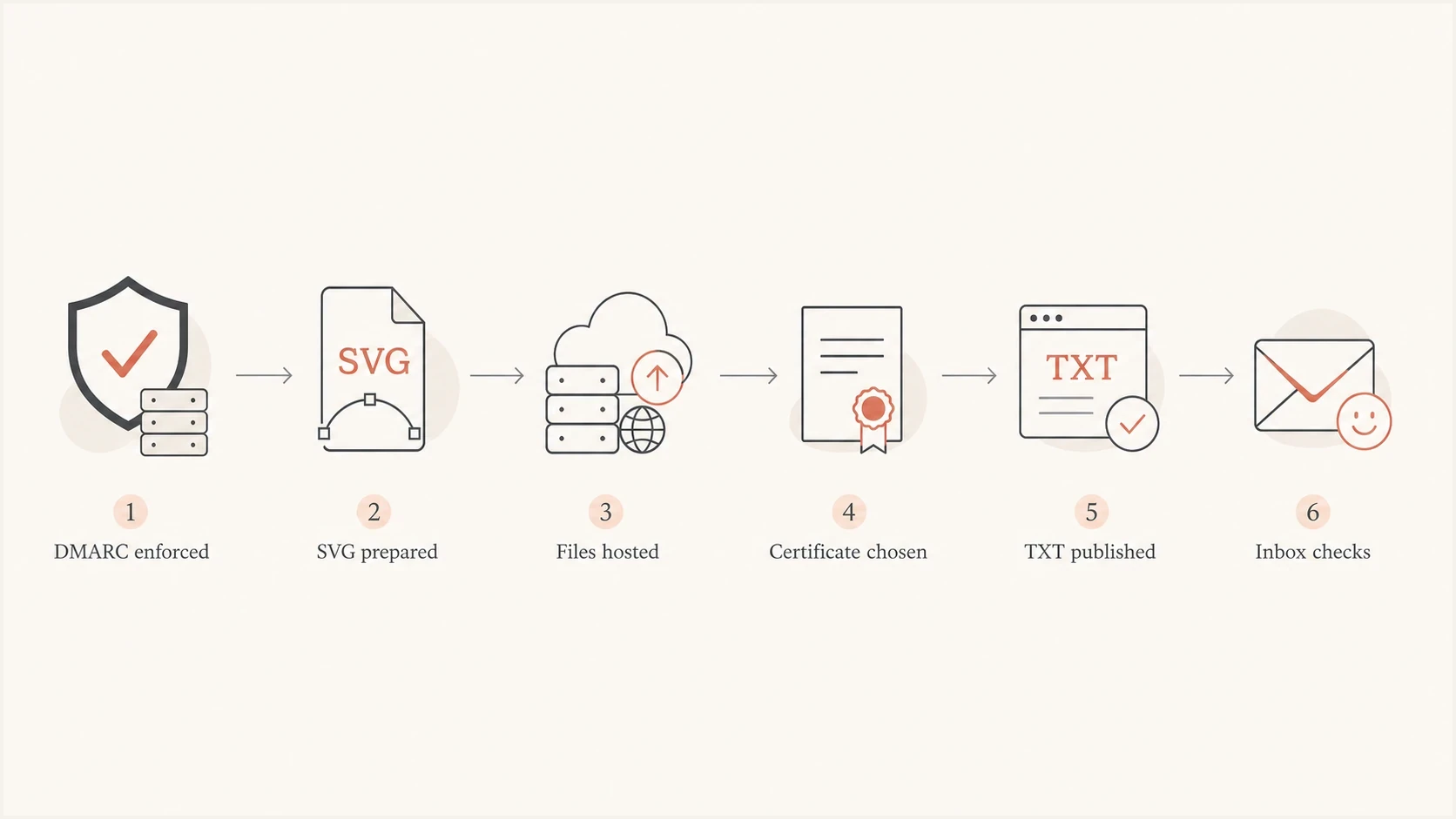
BIMI setup flow from DMARC enforcement through inbox checks.
The setup sequence is straightforward, but the details matter. Complete the authentication work first, publish the self-asserted record, then add certificate evidence when the certificate is ready. That order establishes the DNS record without blocking on legal or certificate validation.
- Check DMARC: Confirm the organizational and visible From domains are at enforcement and real senders are passing.
- Prepare the logo: Convert the brand mark to SVG Tiny PS 1.2 with a square viewBox. For Gmail, specify dimensions of at least 96 by 96 pixels and include a useful title element.
- Host the files: Put the SVG, and later the complete PEM chain, on public HTTPS URLs. Use TLS 1.2 or later and avoid cookies, authentication, or fragile redirects.
- Publish DNS: Add one TXT record at the selector host name and allow DNS time to propagate.
- Send tests: Send real mail through production systems and check headers, DMARC results, asset retrieval, and inbox display.
Self-asserted BIMI record without VMC or CMCDNS
default._bimi.example.com TXT
v=BIMI1; l=https://assets.example.com/bimi/logo.svg; a=;
Certificate-backed BIMI recordDNS
default._bimi.example.com TXT
v=BIMI1; l=https://assets.example.com/bimi/logo.svg;
a=https://assets.example.com/bimi/mark.pem
Declination to publish recordDNS
default._bimi.example.com TXT
v=BIMI1; l=; a=;
A missing or blank a= value is not an error by itself. It tells receivers that no certificate evidence is published. A blank l= value together with a missing or blank a= value is a declination record, which says the domain is aware of BIMI but is not publishing a logo.
If your DMARC record is still in monitoring mode, generate the enforcement-ready syntax with the DMARC record generator, then stage the policy only after the reports show that legitimate mail is passing.
How selectors and avatar preference work
The default selector is enough for most domains. BIMI also supports alternate selectors when one domain needs different eligible logos. A selector named seasonal uses a TXT record at seasonal._bimi.example.com. The sending system requests it with a BIMI-Selector header, which should be included in the aligned DKIM signature. Keep a valid default record because receivers can fall back to it when an alternate selector cannot be used.
Alternate BIMI selectorEmail and DNS
BIMI-Selector: v=BIMI1; s=seasonal;

seasonal._bimi.example.com TXT
v=BIMI1; l=https://assets.example.com/bimi/seasonal.svg;
a=https://assets.example.com/bimi/seasonal.pem
The optional avp= tag expresses whether a participating provider should prefer the domain's BIMI logo or a personal avatar. avp=brand prefers the BIMI logo and is the default when the tag is absent. avp=personal prefers a personal avatar when one exists, with the BIMI logo as the fallback. It is a display preference, not a command, so receiver policy still controls the result.
BIMI record that prefers personal avatarsDNS
default._bimi.example.com TXT
v=BIMI1; l=https://assets.example.com/bimi/logo.svg;
a=https://assets.example.com/bimi/mark.pem; avp=personal;
Is a VMC always required?
No. A VMC is not always required for BIMI, but a certificate is required for some of the inbox outcomes people usually mean when they ask about BIMI. The practical distinction is DNS validity versus logo display. DNS can be valid without a VMC. Gmail display needs a VMC or CMC. The Gmail verified checkmark needs a VMC. Yahoo and Fastmail can display a self-asserted logo when the sender passes their checks.
Google's current Google BIMI setup documentation says Gmail requires third-party certification through a VMC or CMC. The BIMI Group note also explains self-asserted BIMI and the certificate evidence tag. The short version: VMC is not a universal requirement, but self-asserted BIMI gives you limited coverage.
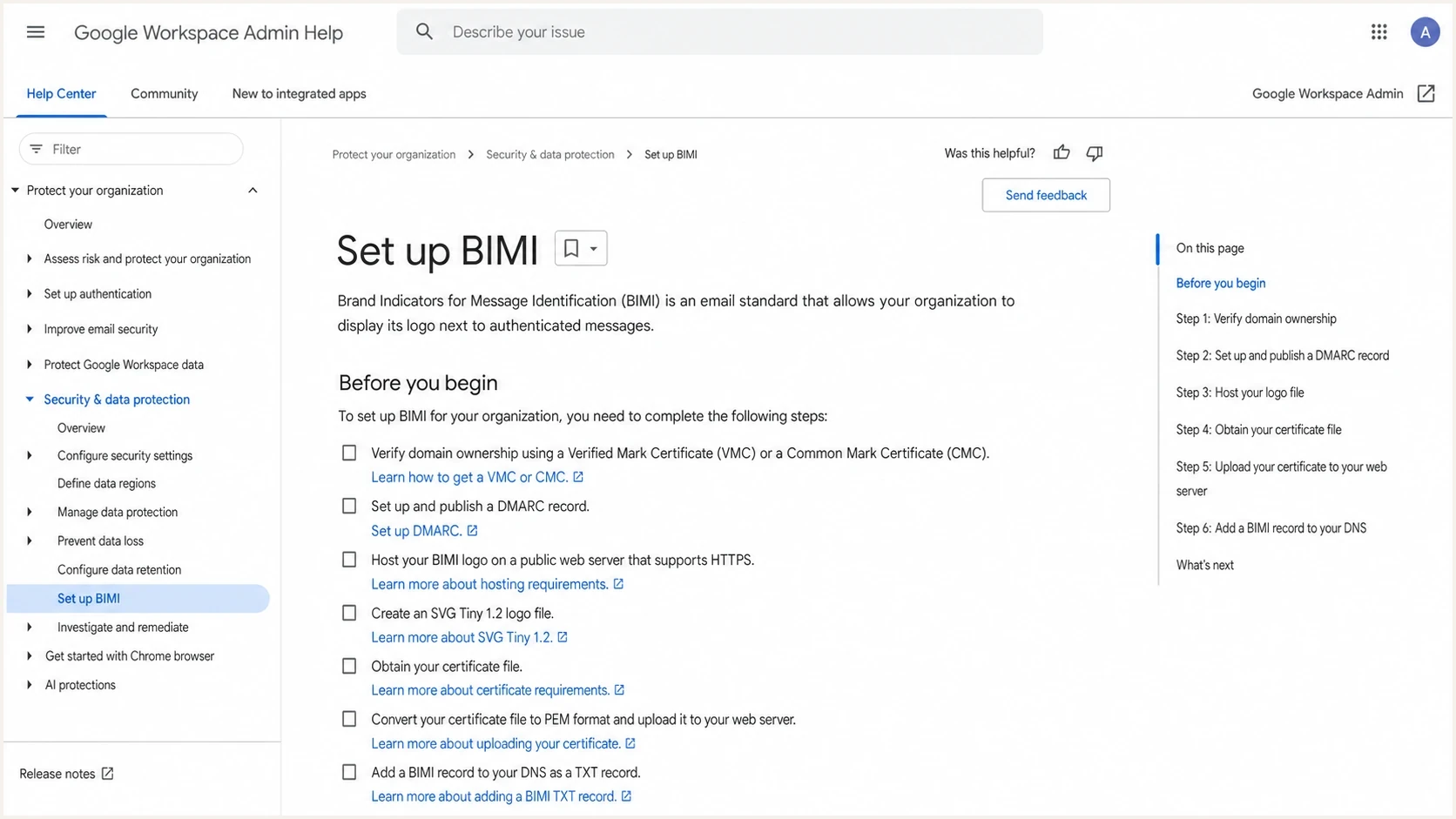
Google Workspace Admin Help page for setting up BIMI.
Self-asserted BIMI
This is the no-certificate setup. It has a BIMI TXT record, an SVG logo URL, and no published certificate evidence.
- Best fit: Early testing, Yahoo, Fastmail, and lower-cost experimentation.
- Main limit: Gmail will not show the BIMI logo from a self-asserted record.
- DNS shape: The a= tag is omitted or blank.
Certificate-backed BIMI
This setup adds a PEM certificate URL to the BIMI record. The certificate connects an eligible logo to the organization and domain.
- Best fit: Gmail and other providers that require trusted logo evidence.
- Main limit: Organizational validation, mark evidence, and certificate renewal add cost and process.
- DNS shape: The a= tag points to the PEM file.
|
|
|
|
|---|---|---|---|
No cert | Yahoo, Fastmail | Self-asserted | Limited reach |
CMC | Gmail logo | Prior-use or modified mark | No Gmail checkmark |
VMC | Gmail checkmark | Registered or government mark | More validation |
BIMI certificate choices and practical outcomes
The certificate decision often comes down to mark status and audience mix. If the logo is a qualifying registered mark and Gmail trust markers matter, VMC is the relevant route. If the logo has qualifying prior use or is a permitted modification of a registered mark, evaluate a CMC. For a deeper comparison, see CMC and VMC differences. If the goal is only to test the DNS and SVG work, publish self-asserted BIMI first and add the certificate later.
What changes by mailbox provider
BIMI is receiver-driven. You publish one record, but each receiving mailbox provider has its own checks. The same message can show a logo in one inbox and no logo in another. That does not automatically mean the DNS is wrong.
BIMI is more than a DNS project. It also depends on authentication, reputation, asset hosting, and any required certificate evidence. Even after everything is technically valid, a mailbox provider can suppress logo display for a message stream that does not meet its volume, engagement, reputation, or local-policy thresholds.
BIMI readiness levels
Use these levels to separate DNS readiness from actual inbox display.
Not ready
p=none
DMARC is missing or still at monitoring only.
DNS ready
TXT valid
DMARC is enforced and the BIMI TXT record is valid.
Certified
PEM live
A VMC or CMC PEM file is published through the BIMI record.
Displayed
Inbox logo
The receiver chooses to show the logo for real messages.
Gmail: Requires certificate-backed BIMI with a VMC or CMC. The verified checkmark is associated with VMC.
Yahoo and AOL: Can display self-asserted BIMI for bulk mail when the sender has enforced DMARC, a valid SVG, and sufficient reputation and engagement. Yahoo does not require a VMC for logo display across its Yahoo and AOL mail applications.
Fastmail: Can display BIMI without a VMC when the message passes DMARC under a strong enforcement policy.
Apple Mail: Displays BIMI only when the receiving mail provider validates a trusted BIMI Evidence Document and adds the required headers. Support also depends on the account's mail provider, not only the Apple Mail app.
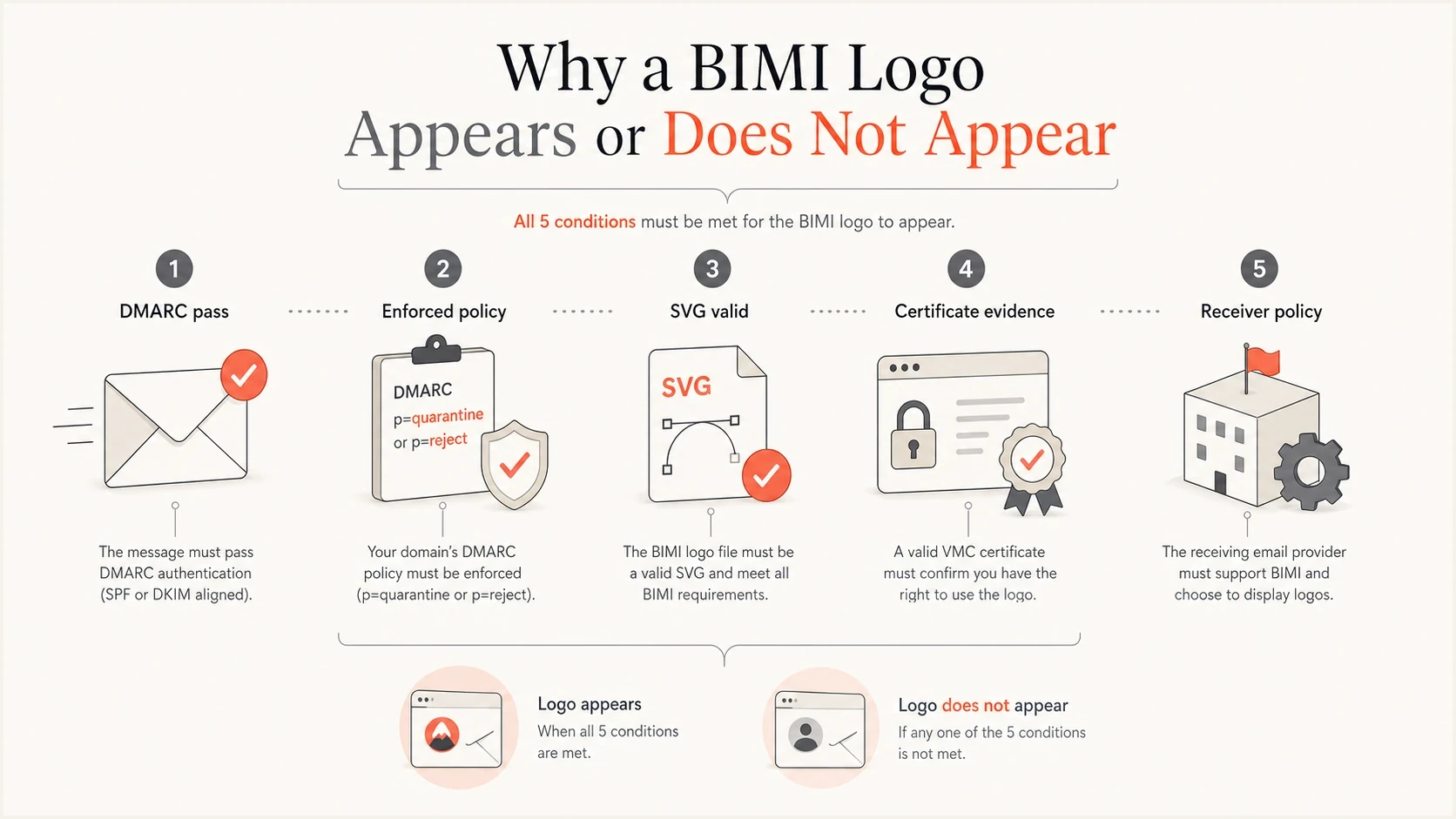
Five checks that affect whether a BIMI logo appears in an inbox.
To predict the visible result, start with your recipient mix. A B2C sender with heavy Gmail traffic should not stop at self-asserted BIMI. A sender with smaller consumer volume can use self-asserted BIMI as a low-risk test while certificate work is pending. For placement examples, see where logos appear.
Common setup problems
Most BIMI failures are ordinary implementation issues. The record exists, but one of the required domains is not enforced. The logo is an SVG, but not the required SVG Tiny PS profile. The certificate URL works in a browser, but the hosted PEM chain is incomplete. The sending platform passes DKIM for a vendor domain, but DMARC does not pass for the visible From domain.
Do not expect instant display after publishing DNS. BIMI has DNS caching, certificate validation, mailbox-provider cache behavior, and sender reputation checks. A clean record is necessary, but it is not a display guarantee.
Failures to check first
- Policy gap: DMARC is still at p=none or the visible From subdomain inherits a non-enforcing policy.
- Logo issue: The SVG has the wrong profile, lacks required dimensions, uses unsupported elements, or crops badly in a square container.
- Hosting issue: The SVG or PEM file uses HTTP, blocks automated fetches, redirects badly, or returns the wrong content type.
- Evidence issue: The PEM URL is missing where required, expired, mismatched, or missing part of the certificate chain.
- Expectation issue: The sender expects Gmail display from self-asserted BIMI or Yahoo display for personal mail.
For the no-certificate case, the most useful related read is BIMI without a VMC. Read it before spending money on a certificate or assuming the logo will show everywhere.
A practical BIMI rollout
Do not buy a VMC on day one unless the domain already has enforced DMARC, stable authentication, and an eligible mark. For most teams, the practical rollout is to prove the authentication foundation first, publish a valid BIMI record, then add certificate evidence once the legal and budget work is complete.
Suped, the DMARC reporting and email authentication platform behind this publication, supports the operational part of this rollout by keeping sender discovery, DMARC results, policy progress, and authentication alerts together. For MSPs and agencies, its multi-tenant view separates client domains and reports while teams work through BIMI readiness.
- Inventory senders: Identify every service sending as the domain and remove unknown sources.
- Fix authentication: Bring legitimate sources into aligned SPF or DKIM compliance for DMARC.
- Enforce DMARC: Move the organizational and visible From domains to quarantine or reject after reports show low legitimate failure.
- Publish BIMI: Start with a valid SVG and self-asserted record if the certificate is not ready.
- Add evidence: Add an eligible CMC or VMC PEM URL when target providers require certificate evidence.
- Keep monitoring: Watch DMARC reports, sender changes, asset availability, certificate expiry, and reputation signals after launch.
A practical rollout is DMARC first, BIMI DNS second, certificate evidence third. That order avoids buying a certificate for a domain that still has authentication gaps, and it gives you a cleaner path to inbox display once the certificate is ready.
Views from the trenches
Best practices
Confirm enforced DMARC on the organizational domain before publishing any BIMI record.
Use self-asserted BIMI as a limited test, then add certificate evidence for Gmail.
Keep SVG and PEM files on stable HTTPS URLs and monitor expiry before renewals.
Common pitfalls
Treating a blank evidence tag as broken causes teams to miss valid self-asserted BIMI.
Expecting Gmail display without VMC or CMC leads to false DNS troubleshooting.
Forgetting receiver reputation checks makes valid BIMI look like a technical failure.
Expert tips
Publish a declination record when you need a formal no-logo BIMI posture for testing.
Use mailbox-specific test accounts because support and certificate rules are uneven.
Budget time for legal logo proof, certificate validation, hosting, and DNS propagation.
Expert from Email Geeks says self-asserted BIMI is valid, but Gmail requires certificate evidence for display.
2024-01-18 - Email Geeks
Expert from Email Geeks says a blank evidence tag is the normal form of a self-asserted BIMI record.
2024-02-07 - Email Geeks
The practical answer
Set up BIMI by enforcing DMARC on the required domains, preparing an SVG Tiny PS logo, hosting the logo on HTTPS, publishing a TXT record at default._bimi, and testing real mail in supported inboxes. If you do not have a VMC or CMC, publish the self-asserted record with an omitted or blank a= value and expect limited display.
A VMC is not always required for BIMI. It is required when you want the Gmail verified checkmark and the brand has a qualifying registered or government mark. A CMC can support Gmail logo display for an eligible prior-use or modified mark, without the Gmail checkmark. No-certificate BIMI is useful, but it is not the complete setup for Gmail-heavy programs.