
Why are emails bouncing with Mimecast Anti-Spoofing policy and how to fix?

Published 16 Jun 2025
Updated 19 Oct 2026
12 min read
Summarize with
Updated on 19 Oct 2026: We clarified Mimecast bypass scope, SPF-based bypass limits, and checks for forwarding and stale bounce errors.
Emails bounce with a Mimecast Anti-Spoofing policy error because Mimecast sees an external message using an internal Header From or Envelope From identity, but no matching exception authorizes the sender or source IP. The bounce happens at Mimecast's SMTP edge, before delivery to the downstream mail server, so the recipient mailbox has no queue entry for that rejected attempt.
The practical fix is for the recipient's Mimecast administrator to identify the exact address and source IP that matched the policy, verify that the traffic is legitimate, and create a narrowly scoped Mimecast Anti-Spoofing bypass. Check SPF, DKIM, and DMARC as a separate authentication task so the bypass does not conceal a sender setup defect.
- Fast answer: Create or correct a Take No Action Anti-Spoofing policy for the legitimate sender and source IP.
- Root cause: The message uses a protected internal identity but enters Mimecast through an external source that has no matching exemption.
- Check authentication too: Verify SPF for the MAIL FROM identity, the DKIM signature, and DMARC alignment with the Header From domain. Inspect HELO SPF when MAIL FROM is empty.
Why Mimecast rejects before the mailbox
Mimecast can reject the SMTP transaction before delivery to the downstream mail server. A 550 response is a permanent failure, so the sending system generates a bounce instead of retrying. Mimecast records the rejection, but the rejected message is not retrievable for later delivery and must be resent after the issue is fixed.
Common SMTP responses and rejection log labeltext
SMTP responses:
550 Anti-Spoofing policy - Inbound not allowed
550 Rejected by header-based Anti-Spoofing policy

Rejection log label:
13045 Anti-Spoofing Header Lockout
Header-based anti-spoofing is not the same thing as a blocklist or blacklist rejection. A blocklist bounce points to reputation or listing data. This bounce points to a policy decision: Mimecast sees a protected internal identity in the message and does not trust the external source that presented it.
The important clue
When a sending system uses the customer's own domain or subdomain in the visible From address, Mimecast treats the external route as spoofing unless an Anti-Spoofing exception matches. This pattern is common with CRMs, marketing platforms, ticketing tools, billing systems, and test environments that send on behalf of a customer domain.
Mimecast's header lockout guidance recommends a specific bypass for legitimate traffic. A Permitted Sender entry does not override Anti-Spoofing, so changing a user allowlist does not resolve this policy match.
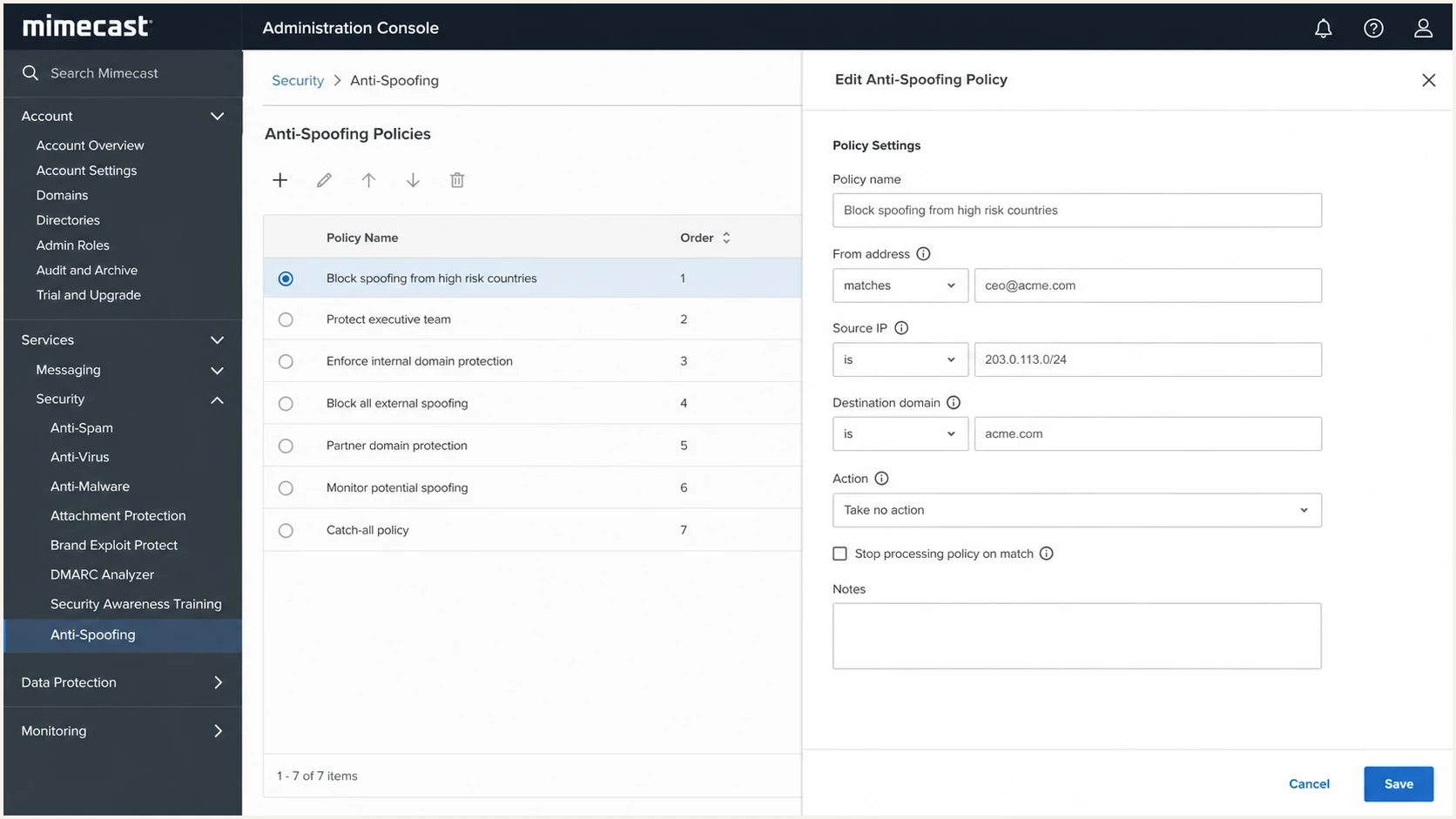
Mimecast Anti-Spoofing bypass policy with sender and source IP settings.
Common causes of a Mimecast 550 rejection
Start with the exact identity Mimecast is protecting. If the Header From or Envelope From references an internal domain, Mimecast can treat an externally presented message as impersonation even when a legitimate application sent it.
|
|
|
|---|---|---|
Internal Header From | Visible From domain | Scope a bypass |
Header and envelope differ | Both From identities | Match the protected internal identity |
Source IP changed | Rejection IP | Update the CIDR range |
Forwarding or relay loop | Message route | Correct routing or scope |
Policy does not win | Specificity and override | Check the effective matching policy |
High-signal causes behind the Mimecast 550 anti-spoofing bounce.
Do not treat every 550 as the same failure. Mimecast also documents separate reasons such as SPF Sender Invalid, DKIM Sender Invalid, and DMARC Sender Invalid. If the bounce specifically says Anti-Spoofing policy or Header Lockout, investigate the protected From identity, external source IP, and matching bypass first. Passing SPF, DKIM, and DMARC does not replace a matching Anti-Spoofing exception.
Looks legitimate to the sender
- Sender view: The platform has permission to use the customer's domain.
- DNS view: Authentication passes in the platform's setup checks.
- Test view: The message works for recipients that do not use Mimecast.
Looks suspicious to Mimecast
- Inbound view: The message claims a protected internal identity from the internet.
- Policy view: No Anti-Spoofing bypass matches the sender, IP, or recipient scope.
- Routing view: The source IP differs from the source authorized by policy.
Evidence quality before changing policy
Use the strongest evidence available before adding a Mimecast exception.
Ready to allow
Low risk
Known sender and IP, matching domain, and passing authentication.
Fix DNS first
Medium risk
Sender is known, but authentication has a clear defect.
Escalate
High risk
Unknown route or IP, or no clean message sample.
How to identify the rejected sender and source
Before changing Mimecast, collect evidence that distinguishes a policy exception problem from an authentication defect. Compare the Header From with the Envelope From, DKIM signing domain, HELO name, public source IP, and recipient route. A sample delivered elsewhere confirms its own route only; use Mimecast's rejection record for the IP that actually connected.
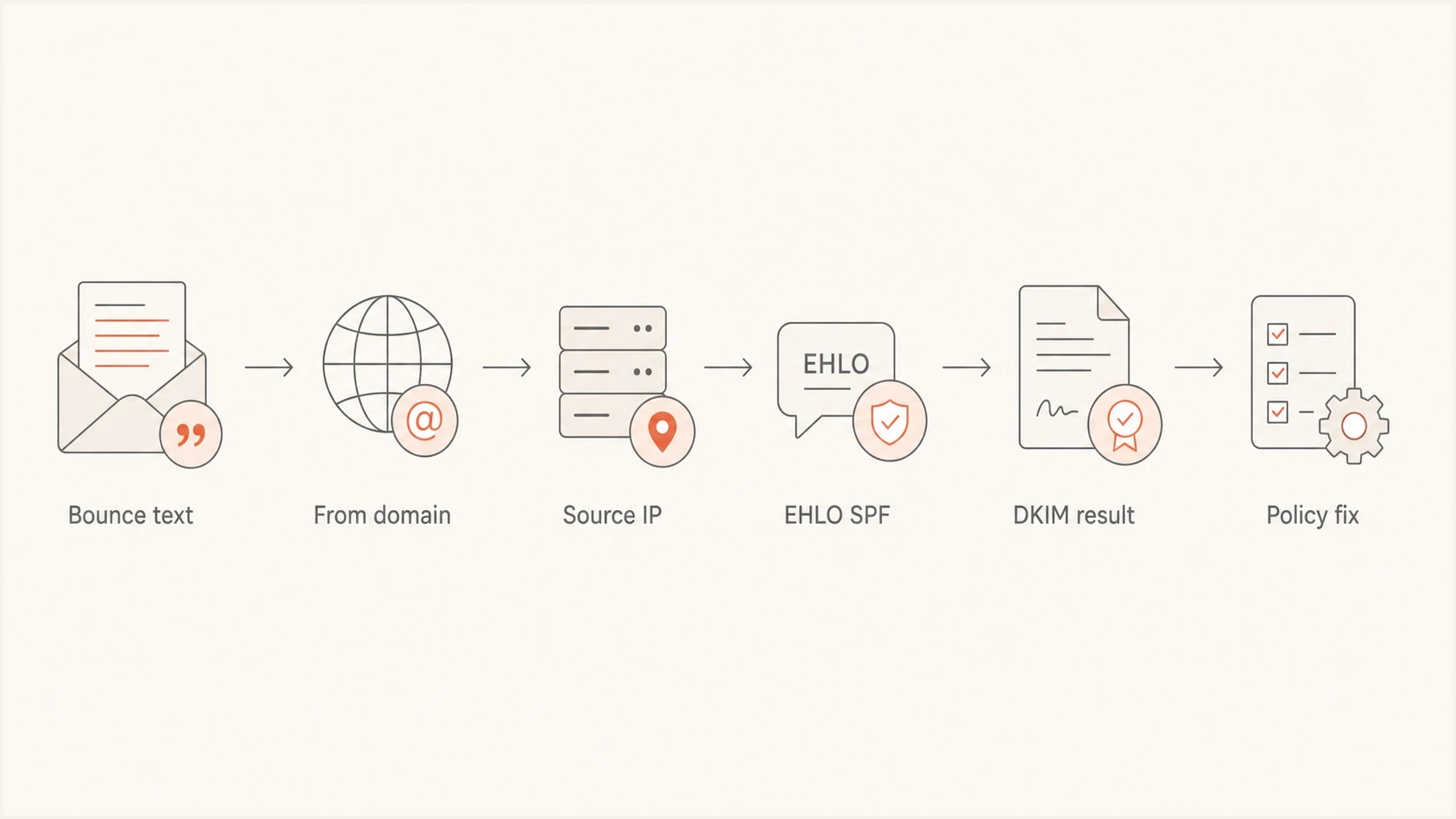
Mimecast Anti-Spoofing troubleshooting flow for sender identity, source IP, and authentication.
- Capture the bounce: Save the complete 550 response, timestamp, sender, recipient, and Mimecast reference ID.
- Search rejected messages: Open Message Center > Rejected and Deferred Messages, search by rejection type, Envelope From, recipient, or source IP, and confirm Anti-Spoofing Lockout. Save the metadata promptly because this console view retains it for up to seven days.
- Get a header sample: Send the same message to a controlled mailbox outside the affected Mimecast route and inspect the full headers.
- Compare identities: Record the Header From, Envelope From, DKIM signing domain and selector, HELO name, and public source IP.
- Check authentication: Confirm SPF, DKIM, and DMARC results and domain alignment in trusted receiver Authentication-Results headers.
- Review policy criteria: Confirm that the bypass covers the matched identity, recipient scope, observed IP, and Policy Override setting.
For the DNS side, use Suped's domain health tool to inspect published DMARC, SPF, and DKIM records. If its common-selector scan finds no DKIM key, get the selector from the message's DKIM-Signature and check that record directly. DNS checks do not prove a message passed authentication or identify the Mimecast policy match.
?
What's your domain score?
Deep-scan SPF, DKIM & DMARC records for email deliverability and security issues.
Use the DMARC checker after identifying the Header From domain to validate its published policy. A valid record does not establish a passing DMARC result for a message. DMARC passes when SPF or DKIM passes with domain alignment to the visible From domain; verify that result in trusted message headers.
Authentication data to collecttext
Header From: alerts@alerts.example.com
Envelope From: bounce@bounce.mailer.example.net
DKIM d=: alerts.example.com
DKIM s=: selector1
HELO: mta01.mailer.example.net
Source IP: 203.0.113.25
Mimecast result: 550 Anti-Spoofing policy
How to configure the Mimecast bypass
The safe fix is narrow. Keep the default policy that protects every internal domain, then add a Take No Action bypass for the verified sender and source. Leave source-IP and hostname restrictions blank on the default blocking policy; put approved sources in the separate bypass. Do not disable Anti-Spoofing for the organization.
Create the bypass policy
- Open the policy list: Go to Policies > Gateway Policies > Anti-Spoofing, then select New Policy.
- Set the match: Choose Take No Action and set Addresses Based On to Both. Either the header or envelope identity can match the address criteria.
- Scope the addresses: Specify the protected internal sender address or domain, rather than the provider's external bounce domain, and restrict the internal recipients where possible. Mimecast's template uses Everyone for Applies From and Applies To, with source-IP restrictions.
- Enable the override: Enable the policy, keep it perpetual if the sender is permanent, enable Policy Override, and leave Bi-Directional disabled unless the reverse flow is required.
- Restrict the source: Enter the verified public sending IP in CIDR notation. Use /32 for one IPv4 address.
- Save and retest: Save the policy, resend the original test, and confirm SMTP acceptance and delivery to the downstream server. Investigate any new rejection using its own error text.
If the bypass does not match, compare its From and To criteria with the rejection data, confirm the source did not use another shared-pool or NAT address, and verify that Policy Override is enabled. Check competing policies using Mimecast's policy specificity rules; list position alone does not determine which policy applies. Adding the sender to Permitted Senders does not bypass Anti-Spoofing.
Single IPv4 source in CIDR notationtext
203.0.113.25/32
Do not lower DMARC enforcement to fix this bounce. Preserve the strongest DMARC policy supported by the domain's reports, correct any authentication defects, and handle the legitimate Mimecast exception separately. Suped's Hosted DMARC workflow helps teams review sources and stage DMARC policy changes without repeated DNS edits.
When an SPF-based bypass needs extra caution
A standard Take No Action policy works well when the sender has a static IP or a small, documented range. An SPF-based Anti-Spoofing bypass instead checks whether the connecting IP passes SPF for a domain configured in the policy. It does not repair the customer's SPF record or prove which customer used a shared sending IP.
|
|
|
|---|---|---|
One static IPv4 address | Take No Action with /32 | IP ownership |
Small stable CIDR range | Take No Action with CIDR | Published outbound range |
Large changing provider pool | Review SPF-based bypass limits | Full trusted range and narrow address scope |
Choose a Mimecast bypass after reviewing the sources it trusts.
Verify that the SPF domain belongs to the sending provider and that its record covers the observed source IP. Restrict the internal sender and recipient criteria. Prefer known source IPs where practical: Mimecast's bypass guidance warns against trusting broad shared-cloud SPF ranges because other customers use those sources too.
SPF lookup failures still reject mail
Mimecast documents a 10-term evaluation limit for this bypass. DNS lookup failures can produce the rejection information "DNS Failures on SPF Bypass". Do not use a domain with +all in its SPF record. Only one SPF-based bypass applies to a given mail flow, so consolidate the necessary trusted domains into that policy rather than creating overlapping exceptions. See Mimecast's SPF bypass documentation.
Why forwarded Microsoft 365 mail triggers anti-spoofing
A message from alice@example.com can reach a mailbox in another Microsoft 365 tenant and then be automatically forwarded back to bob@example.com. At the final inbound hop, Mimecast sees the original internal Header From arriving through an external forwarding route.
Microsoft 365's Sender Rewriting Scheme (SRS) changes MAIL FROM for applicable forwarded messages but leaves the visible From unchanged. Passing SPF for the rewritten envelope does not resolve a header-based Anti-Spoofing rejection or establish a DMARC pass. Microsoft's SRS documentation explains why a surviving DKIM signature with domain alignment is needed when forwarding breaks SPF alignment.
Trace each forwarding hop and identify the Mimecast tenant that issued the 550 response. Its administrator should compare the protected Header From with the source IP recorded at that hop, then fix an unintended loop or scope a bypass to the intended recipient and verified forwarding source. Avoid trusting an entire cloud provider's shared IP space to fix one forwarding path.
How Suped fits into the fix
Suped is our DMARC reporting and email authentication platform. The recipient's administrator configures the Mimecast bypass; Suped helps identify reported sending sources, investigate SPF or DKIM defects, and review whether legitimate mail supports DMARC enforcement.

Issue steps to fix dialog showing the issue overview, tailored fix steps, and verification action
For this workflow, use Suped's DMARC monitoring to compare reported source IPs and authentication results with your approved sender inventory. Aggregate reports describe reported traffic; use Mimecast's rejection logs to investigate the exact failed delivery attempt.
When to contact Mimecast
Contact Mimecast support when the tenant administrator cannot identify which policy fired, the expected bypass does not match, or the rejection references header lockout behavior that is not visible in the policy list. Mimecast accepts cases through designated customer contacts, so the sender should work through the recipient's Mimecast administrator.
Case packet to send
- Bounce data: Include the full 550 text, Mimecast reference ID, sender, recipient, and timestamp.
- Routing data: Include the public source IP, HELO name, sending platform, and expected route.
- Policy data: Include the Anti-Spoofing bypass, address scope, action, source range, and override setting.
- DNS data: Include SPF, DKIM, and DMARC results for the domains in the failed message.
Ask the recipient's mail administrator to confirm whether the test entered Mimecast through the expected public route. A NAT path, internal relay, or forwarding loop can present a source IP that the bypass never anticipated. When rejection data shows the expected public IP, return to the matched sender identity and policy criteria.
Views from the trenches
Best practices
Verify the visible From domain and source IP before adding any Mimecast exception.
Test the same message outside Mimecast so headers reveal SPF, DKIM, and HELO results.
Scope allow policies tightly, then retest with the exact sender and recipient pair.
Common pitfalls
Allowing the From address alone misses cases where Mimecast matches the source IP.
Treating HELO SPF as proof of DMARC ignores the required visible From domain checks.
Treating the bounce as mailbox delivery hides that Mimecast rejected at SMTP edge.
Expert tips
Ask support for the matching policy name when the admin console does not show it.
Document every approved third-party sender before moving DMARC toward enforcement.
Compare DMARC reports with your approved sender inventory before granting a bypass.
Marketer view
Marketer from Email Geeks says an Anti-Spoofing policy can reject a test before it reaches the recipient queue, so the absence of mailbox logs does not prove the sender never connected.
2020-11-24 - Email Geeks
Marketer view
Marketer from Email Geeks says creating an Anti-Spoofing policy that takes no action for the correct sender or IP is the normal fix, but scope and policy order have to be checked.
2020-11-24 - Email Geeks
Retest delivery and check sender suppression
Send a fresh message with the same sender and recipient after saving the bypass. Confirm a new SMTP attempt, Mimecast acceptance, and onward delivery. If a different policy rejects the message, investigate its new response instead of widening the Anti-Spoofing exception.
If no new attempt reaches Mimecast and the sending platform repeats an old bounce, compare the timestamp and reference ID with the previous failure. Check whether that earlier hard bounce placed the recipient on the platform's suppression list. After fixing the policy, use the platform's process to clear the confirmed policy-bounce suppression and resend. A Microsoft support example documents a recipient suppressed after an earlier Anti-Spoofing rejection.



