Why are authenticated emails from valid senders bouncing in Gmail with timeout errors?

Published 19 Jun 2025
Updated 3 Aug 2026
11 min read
Summarize with
Updated on 3 Aug 2026: We corrected the Gmail timeout diagnosis and added a code-by-code troubleshooting path.
Authenticated emails from valid senders can bounce after Gmail repeatedly returns a temporary authentication error. Correct SPF, DKIM, and DMARC records do not prove that the affected message passed. Gmail evaluates the envelope sender, DKIM signature, visible From domain, sending IP, and DNS answers for each delivery attempt.
The sample pattern combines responses from two systems. Gmail supplies the 421 4.7.26 temporary rejection, while the outbound sending platform eventually generates the 554 5.4.7 message-timeout result after its retry window expires. The text after last transfail is the best clue to Gmail's reason.
The short answer: read the last 4xx response first. A 4.7.26 response says Gmail did not see passing SPF or DKIM for that message. It does not by itself prove a DNS outage. A 451 4.7.26 response that explicitly mentions temporary DNS failures is stronger evidence of DNS trouble.
What the Gmail timeout bounce actually means
A bounce such as 554 5.4.7 with an internal message timeout does not mean Gmail accepted the message and later revoked it. The outbound platform kept the message queued after Gmail returned temporary 4xx responses, then emitted the final 554 when its delivery deadline expired. Google documents the remote responses in Gmail SMTP error codes. The phrase after last transfail records the last temporary response seen before the queue expired.
Typical Gmail bounce texttext
554-5.4.7 [internal] message timeout
(exceeded max time, last transfail:
421-4.7.26 This email has been rate limited because it is unauthenticated.)
|
|
|
|---|---|---|
554 5.4.7 | Local final timeout after retries | Check the outbound retry history |
421 4.7.26 | Gmail temporary unauthenticated deferral | Read the included SPF and DKIM results |
last transfail | Last remote 4xx response observed | Diagnose this response first |
gsmtp | Response came from Gmail SMTP | Separate it from the local wrapper |
How to read the bounce fragments
Codes beginning with 4 are temporary deferrals, so the sending platform normally retries with backoff. The final 5.4.7 wrapper can describe an exhausted retry period even though Gmail never returned a permanent 5xx rejection. Many platforms classify this queue-expiry event as a soft bounce because it began with repeated 4xx responses. For other temporary failures, the related guide on Gmail tempfail errors covers responses that do not mention authentication.
Match the last transfail code to the cause
Gmail uses different enhanced status codes for reverse DNS, SPF, DKIM, DMARC alignment, and missing DMARC policy. For personal Gmail accounts, all senders need SPF or DKIM. Senders above 5,000 messages per day need SPF, DKIM, DMARC, TLS, valid forward and reverse DNS, and alignment for direct mail.
|
|
|
|---|---|---|
4.7.23 | PTR missing or forward DNS mismatch | Verify forward-confirmed reverse DNS |
4.7.26 | SPF and DKIM did not establish authentication | Inspect the supplied authentication results |
4.7.27 | SPF did not pass | Check the envelope sender and sending IP |
4.7.30 | DKIM did not pass | Check the signature, selector, and public key |
4.7.32 | The visible From domain is not aligned | Make it match a passing SPF or DKIM domain |
4.7.40 | DMARC record or policy is missing | Publish one valid DMARC record |
Authentication-related Gmail temporary responses
Do not diagnose every 4.7.26 response as DNS trouble. When Google explicitly says temporary DNS failures prevent authentication, test authoritative DNS. When the response lists SPF and DKIM as not passing, inspect the affected message's identities and source first.
Why valid senders still get this bounce
A domain can be configured correctly overall while one sending source or message fails. Gmail bases its decision on the identities and authentication results it sees on that attempt, including the envelope sender, DKIM signing domain, visible From domain, sending IP, and live DNS responses.
- Intermittent DNS response: The SPF, DKIM, DMARC, or PTR answer exists but an authoritative server answers slowly or inconsistently.
- DKIM signing mismatch: The message uses the wrong selector, carries a damaged signature, or points to a key that is not available.
- SPF path problem: The actual envelope sender does not authorize the IP, a dependency times out, or evaluation exceeds SPF's 10 DNS-lookup limit.
- DMARC alignment failure: SPF or DKIM can pass while neither authenticated domain aligns with the visible From domain.
- PTR mismatch: The sending IP has no PTR, or the PTR hostname does not resolve forward to that IP consistently.
- Shared dependency: Several domains can fail together because they share a sending platform, IP pool, DNS host, or receiver path.
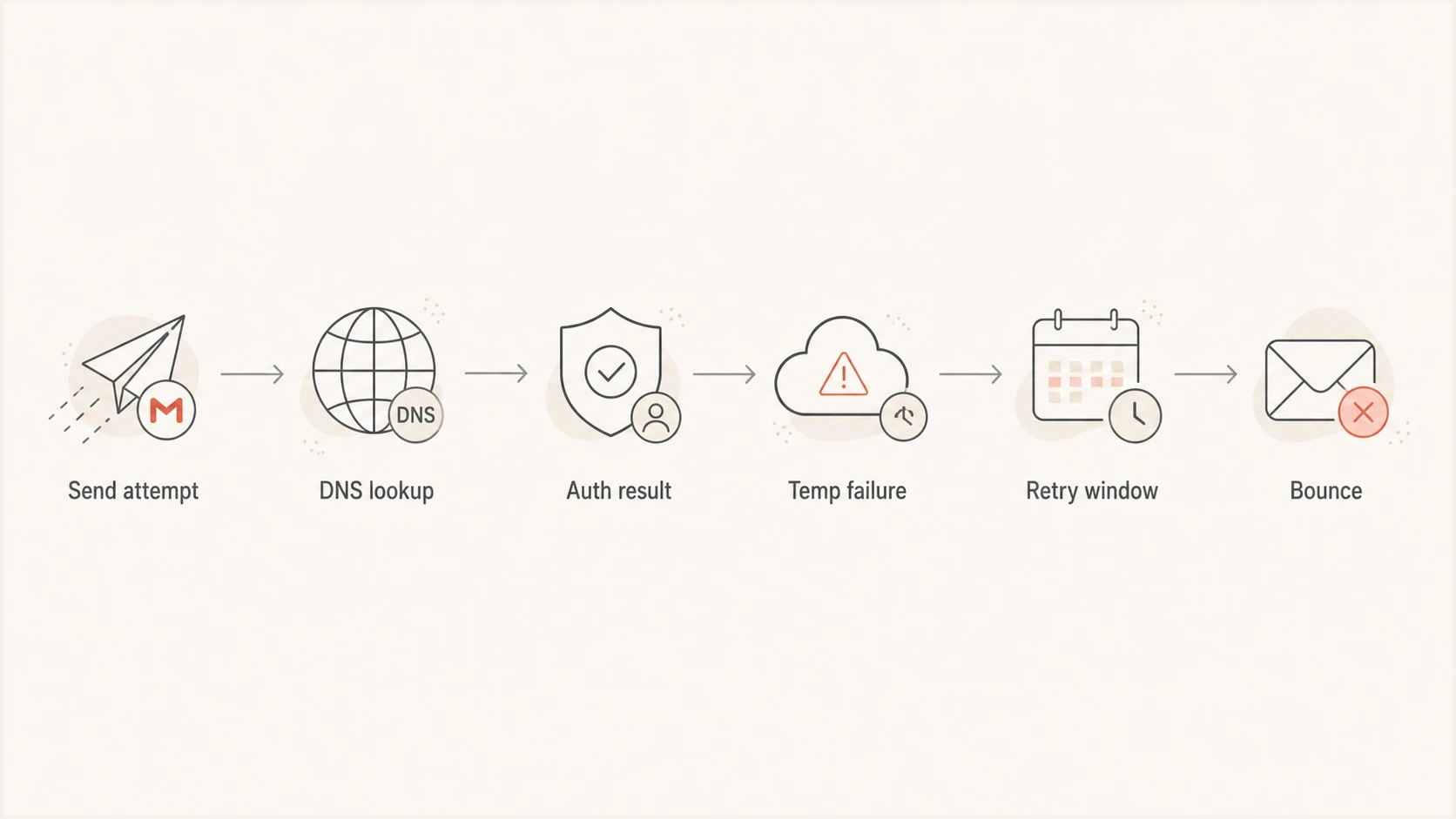
Flowchart showing Gmail delivery moving through DNS lookup, authentication result, temporary failure, retry, and bounce.
Do not weaken a quarantine or reject DMARC policy after one Gmail timeout spike if reports still show normal aligned SPF or DKIM pass rates. First prove that the failure repeats across more than one send window.
How to separate a sender fault from a temporary blip
Compare timing, scope, repeatability, and the exact Gmail subcode before changing DNS. A sender fault keeps failing until the configuration or traffic changes. A temporary issue often appears in a narrow window and clears on a later attempt. If unrelated domains share one delivery provider, their common infrastructure is also a suspect, so timing alone does not prove a Gmail-side fault.
Sender-side problem
- Repeatable failure: The same source and subcode recur across later send windows.
- Record or path change: DNS, signing, envelope identity, IP, or routing changed before the spike.
- Source-specific result: Only one sending platform, IP pool, selector, or stream fails.
Temporary issue or shared dependency
- Narrow window: Bounces cluster in one period and then stop.
- Broad scope: Unrelated authenticated domains fail through a common provider.
- Inconsistent DNS: Authoritative answers are slow or unavailable only from some paths.
- Clean retest: A later message passes through the same source without a change.
Send one fresh message through the same path and inspect the result with an email tester. If the new message passes SPF, DKIM, DMARC, and reverse DNS checks, the earlier bounce is more likely to have been time-bound. The retest shows current state, not what Gmail saw during the failed attempt.
Email tester
Send a real email to this address. Suped shows a results button when the test is ready.
?/43tests passed
A broad domain health check can catch SPF lookup pressure, missing DKIM selectors, weak DMARC policy, and DNS issues that are easy to miss when only the bounce text is inspected.
What to check in the first hour
Start with evidence that can be collected without changing production DNS. The goal is to determine whether Gmail saw a temporary problem or whether the affected source now has a repeatable authentication failure.
- Preserve the bounce: Save the full SMTP response, enhanced status code, last transfail text, recipient domain, and timestamps.
- Map the timing: Compare affected campaigns, sources, domains, sending IPs, and outbound retry attempts by timestamp.
- Check DNS from outside: Query SPF, DKIM, DMARC, PTR, and forward DNS through more than one resolver.
- Send a live test: Use the same source and envelope path, then inspect the delivered Authentication-Results header.
- Compare later reports: Use aggregate DMARC data to check the same source and period once the receiver's report arrives.
DNS checks to run during the incidentbash
dig +time=2 +tries=1 TXT _dmarc.example.com

dig +time=2 +tries=1 TXT selector1._domainkey.example.com

dig +time=2 +tries=1 TXT example.com

dig +time=2 +tries=1 -x 203.0.113.10

dig +trace TXT _dmarc.example.com
The +trace check can expose delegation or authoritative nameserver trouble that a cached resolver hides. If some resolvers answer while others time out, the evidence points to an intermittent DNS path or authoritative service problem.
DMARC aggregate reports are not real-time SMTP logs and often arrive after the incident window. Use the outbound logs for immediate diagnosis, then use DMARC monitoring to confirm whether Gmail or other receivers recorded a persistent rise in SPF, DKIM, or DMARC failures for the source.
How Suped supports this Gmail investigation
Suped is our DMARC and email authentication platform. In this workflow, use Suped to compare the affected source's SPF, DKIM, and DMARC results before and after the bounce window, then check whether a DNS or policy issue appeared at the same time. Keep the outbound bounce logs as the source for Gmail's SMTP response because DMARC aggregate reports do not contain that response text.

Issue steps to fix dialog showing the issue overview, tailored fix steps, and verification action
Suped's issue history and fix steps help separate a persistent sender configuration problem from a short event with normal authentication before and after it. The evidence can point to the affected source or DNS record without treating one timeout as a reason to lower DMARC enforcement.
- Source history: Compare authentication results by sending source and reporting period.
- Issue evidence: Review persistent record errors and the steps attached to each issue.
- DNS workflow: Check SPF, DKIM, DMARC, PTR, and related domain health in the same investigation.
- Hosted SPF: Use it when the authorized SPF path is confirmed to exceed or approach the 10-lookup limit.
- Multi-domain comparison: Check whether customer domains share the same provider, IP pool, or incident window.
What to do if the next send succeeds
If the next Gmail send succeeds and fresh test messages pass authentication, do not overcorrect. Keep the incident notes, watch later sends, and confirm that DMARC aggregate data does not show a persistent rise in SPF, DKIM, or DMARC failures.
Incident triage signals
Use repeatability and authentication evidence to decide the next action.
Watch
Single window
One short Gmail-only spike with clean tests after the event.
Investigate
Repeated windows
The same source or subcode recurs, or resolver errors continue.
Fix now
Persistent failure
Authentication, PTR, or DNSSEC failures persist in tests and reports.
For a single-window event, keep the DMARC policy steady, leave normal SMTP retry logic in place, and avoid a manual resend burst. If delivery keeps failing, reduce volume, retry gradually, and investigate the exact Gmail subcode. The related page on connection timeout errors covers the SMTP transport side when the last response points to a connection failure instead of authentication.
A clean next send is useful evidence. It does not prove what Gmail saw earlier, but it confirms that the source can authenticate through the same delivery path after the event.
When the bounce repeats
Treat the issue as a sender-side fault when the same source keeps producing Gmail authentication deferrals after fresh tests, or when DMARC aggregate reports show new failures for that source. At that point, the final timeout records a persistent authentication incident that needs a targeted fix.
- SPF path: Authorize the actual sending IP and keep DNS-causing mechanisms within SPF's 10-lookup limit.
- Selector trouble: Confirm every active DKIM selector has the matching public key and stable DNS answers.
- Alignment gap: Make the visible From domain match the domain of a passing SPF or DKIM result.
- Reverse DNS: Give each sending IP a PTR whose hostname resolves forward to the same IP.
- DNSSEC validation: Repair broken signatures or delegation that can make correct-looking records unresolvable.
Monitoring-only DMARC record for a new deploymentdns
v=DMARC1; p=none; rua=mailto:dmarc-reports@example.com
Do not replace an existing quarantine or reject policy with p=none. This sample is only for a domain beginning DMARC monitoring. Publish one DMARC TXT record at _dmarc and use a reporting address that is monitored.
Views from the trenches
Best practices
Check DNS response timing from several networks before changing records or lowering policy.
Correlate bounce spikes with send windows, DNS changes, resolver errors, and provider status.
Keep DMARC aggregate reports on during incidents so failures can be tied to each source.
Common pitfalls
Assuming a valid SPF record means Gmail resolved it successfully at that exact send time.
Treating a one-window Gmail timeout as proof that DMARC policy should be relaxed.
Ignoring reverse DNS and DKIM selector lookups when the visible SPF result looks healthy.
Expert tips
Retest with a live message, because DNS lookups in the SMTP path expose hidden failures.
Preserve full bounce text, including enhanced status code and the last temporary failure.
Use monitoring that separates sender configuration errors from receiver-side tempfails.
Marketer from Email Geeks says a valid sender can see Gmail authentication bounces when the receiver cannot complete DNS lookups during the delivery window.
2024-10-02 - Email Geeks
Expert from Email Geeks says the first question is whether SPF and DKIM match the visible From domain, because unauthenticated bounces can hide a domain mismatch.
2024-10-02 - Email Geeks
The practical answer
Authenticated emails from valid senders can end in a 554 5.4.7 timeout when Gmail temporarily rejects the message and the outbound platform's retry queue reaches its delivery deadline. The decisive evidence is the last 4xx response: it identifies whether Gmail saw a PTR, SPF, DKIM, alignment, DMARC, or broader unauthenticated-mail problem.
Preserve the bounce, inspect the affected message identities, test the same sending path, check authoritative DNS, and compare later DMARC reports. Change DNS only when the exact failure repeats or the evidence identifies a persistent fault. Suped keeps source-level authentication history, domain checks, and issue evidence in one workflow, while the outbound logs retain Gmail's SMTP response.