What causes Gmail TempFail errors and how to troubleshoot them?

Published 5 Jul 2025
Updated 12 Aug 2026
12 min read
Summarize with
Updated on 12 Aug 2026: We updated this guide with current Gmail sender requirements, TempFail codes, and safer retry steps.
Gmail TempFail errors are usually temporary 4xx delivery failures. Gmail is telling your SMTP server to queue the message, slow down, and try again later, rather than treat the delivery as permanently rejected. The most common causes are rate limiting, low IP or domain reputation, failed SPF or DKIM, missing or mismatched rDNS and PTR, temporary DNS failures, Gmail system load, recipient-level receiving limits, suspicious content or URL signals, missing TLS, and unmet bulk-sender requirements such as DMARC alignment.
Troubleshooting starts with the SMTP transcript or MTA log, then matches that evidence to authentication, reputation, and sending-rate signals. For a real-message check during the investigation, send a controlled sample through the email tester and compare the resulting authentication headers with Gmail's reply.
Direct answer
A Gmail TempFail is normally a retryable delivery event, not a final bounce. Your SMTP server should keep the message in the queue, use exponential backoff, reduce Gmail concurrency when the rate is high, and return a non-delivery report only after the queue lifetime expires. A 4xx reply does not guarantee eventual delivery.
Why Gmail returns TempFail
Gmail uses temporary failures when it wants the sender to retry later or change behavior before trying again. The word TempFail covers several SMTP replies, so the exact cause depends on the enhanced status code and text attached to the event. Google documents many examples in its Gmail SMTP codes, including rate limits, authentication failures, PTR issues, TLS requirements, timeouts, and server-busy conditions.
- Rate pressure: Gmail sees an unusual volume pattern by IP, netblock, DKIM domain, SPF domain, URL domain, Message-ID, or recipient account.
- Authentication failure: SPF or DKIM does not pass, or bulk mail lacks a DMARC record, a DMARC policy, or alignment with the visible From domain.
- DNS weakness: The sending IP has no PTR record, forward DNS does not match, or Gmail encounters a temporary DNS lookup failure.
- Reputation signal: Gmail does not trust the IP, domain, content, or link domain enough to accept the current rate.
- Recipient limit: One Gmail account or Workspace tenant receives too many messages too quickly, even when the wider sending pattern looks normal.
|
|
|
|---|---|---|
421 4.7.28 | Unusual rate | Gmail queue |
421 4.7.30 | DKIM fail | Selector |
421 4.7.27 | SPF fail | SPF path |
421 4.7.29 | TLS missing | SMTP TLS |
421 4.7.32 | DMARC alignment | From domain |
421 4.7.40 | DMARC record or policy | DMARC DNS |
451 4.7.23 | PTR issue | rDNS |
450 4.2.1 | Recipient rate | Recipient |
Common Gmail temporary SMTP signals and the first place to investigate.
Where the error appears in SMTP
At the session level, Gmail can return a temporary reply before the message body, during recipient handling, after DATA, or while closing a connection. The most common places to see it are the RCPT stage and the end of DATA, because Gmail has enough context by then to evaluate the recipient, authenticated identity, content, and sender rate.
Typical Gmail TempFail repliestext
421 4.7.28 Gmail has detected an unusual rate of email.
421 4.7.30 DKIM authentication did not pass.
451 4.7.23 Sending IP has PTR or forward DNS issues.
450 4.2.1 Recipient is receiving email too quickly.
When the MTA receives a 4xx reply, it should defer delivery, keep the original recipient in queue, and retry with exponential backoff. Spreading attempts over longer intervals prevents a retry storm. Immediate resends repeat the traffic pattern that triggered the TempFail and can prolong rate limiting.
Healthy sender behavior
- Queue handling: The message stays queued after a 4xx reply.
- Retry policy: Backoff increases after repeated Gmail deferrals.
- Traffic control: Gmail concurrency and rate are reduced quickly.
Risky sender behavior
- Bounce handling: A temporary reply is treated as a hard bounce.
- Retry policy: Retries happen too fast after Gmail says wait.
- Traffic control: All Gmail traffic keeps flowing at the same rate.
Postfix-style retry evidencetext
status=deferred
remote=gmail-smtp-in.l.google.com
reply=421 4.7.28 Try again later
queue_id=ABC123
retry_delay=15m
Why reports and logs disagree
Gmail Postmaster Tools can show a high TempFail rate for a domain when the sender does not see matching Gmail deferrals in the first SMTP log it checks. The usual explanations are that the relevant log line lives elsewhere, the connection failed before SMTP started, the reporting domain is not the same identity being searched, or other traffic uses a domain identity tied to the sender.
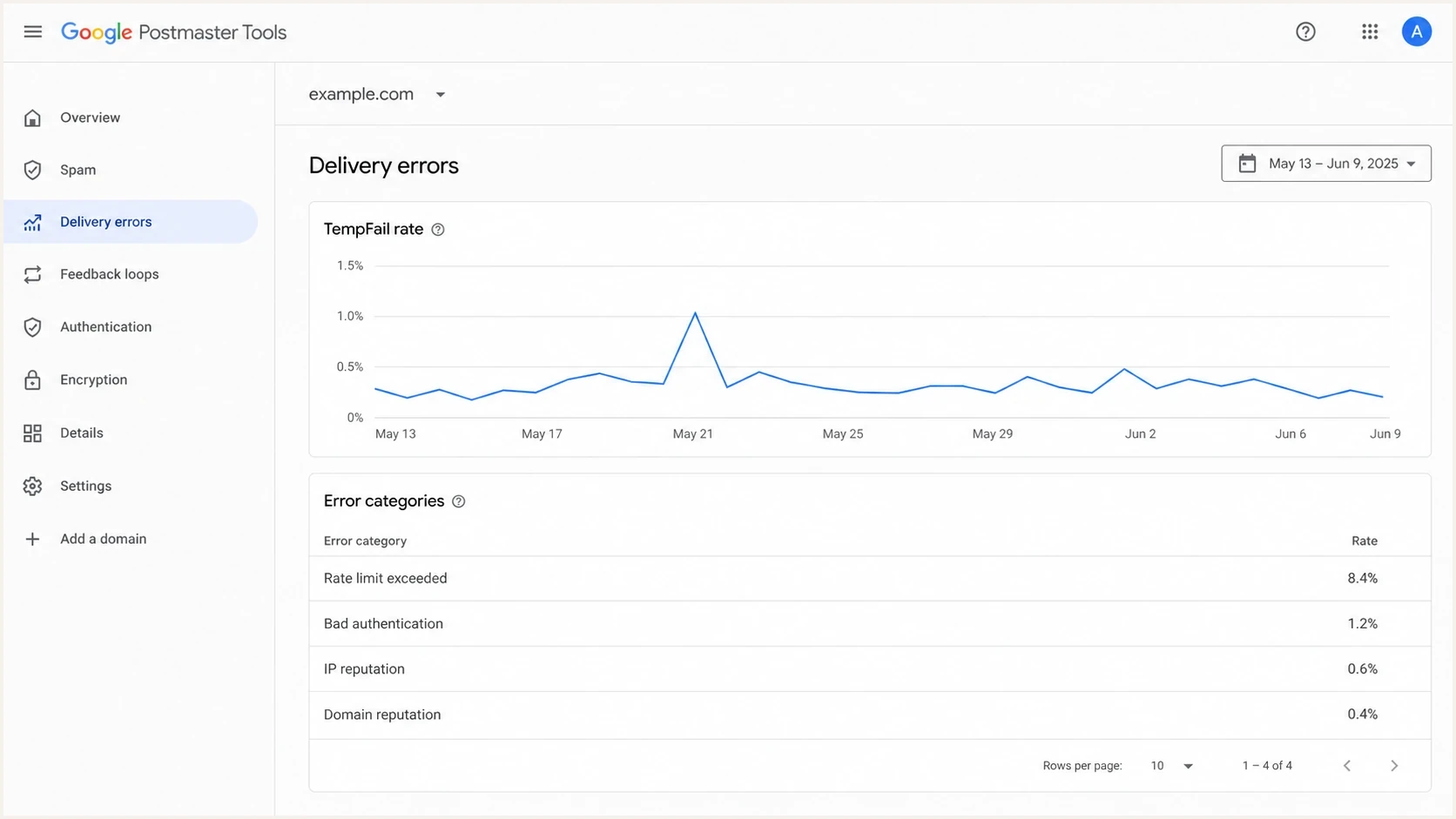
Example Gmail Postmaster Tools delivery errors screen with TempFail categories.
- Different log path: A connection-level refusal can be logged by the MTA, load balancer, NAT gateway, or egress firewall instead of the delivery log searched every day.
- Domain-based reporting: Gmail reporting can group by a domain identity, while SMTP logs are grouped by server, IP, campaign, or visible From address.
- Envelope sender gap: Traffic can use a domain in the SMTP MAIL FROM value without using it in the visible From header, so a search limited to visible From values can miss it.
- Replay traffic: A valid DKIM-signed message can be resent through other infrastructure if the signed fields still verify, creating domain reputation signals absent from the sender's own logs.
Do not trust one dashboard alone
When Gmail reporting and SMTP logs disagree, map the same date range across queues, connection logs, bounce logs, authentication reports, NAT egress IPs, and sender domains before changing DNS or pausing mail.
A practical troubleshooting sequence
The fastest path is to prove whether Gmail is deferring the mail, refusing the connection before SMTP, or reporting a domain signal generated elsewhere. This order separates operational fixes from authentication fixes.
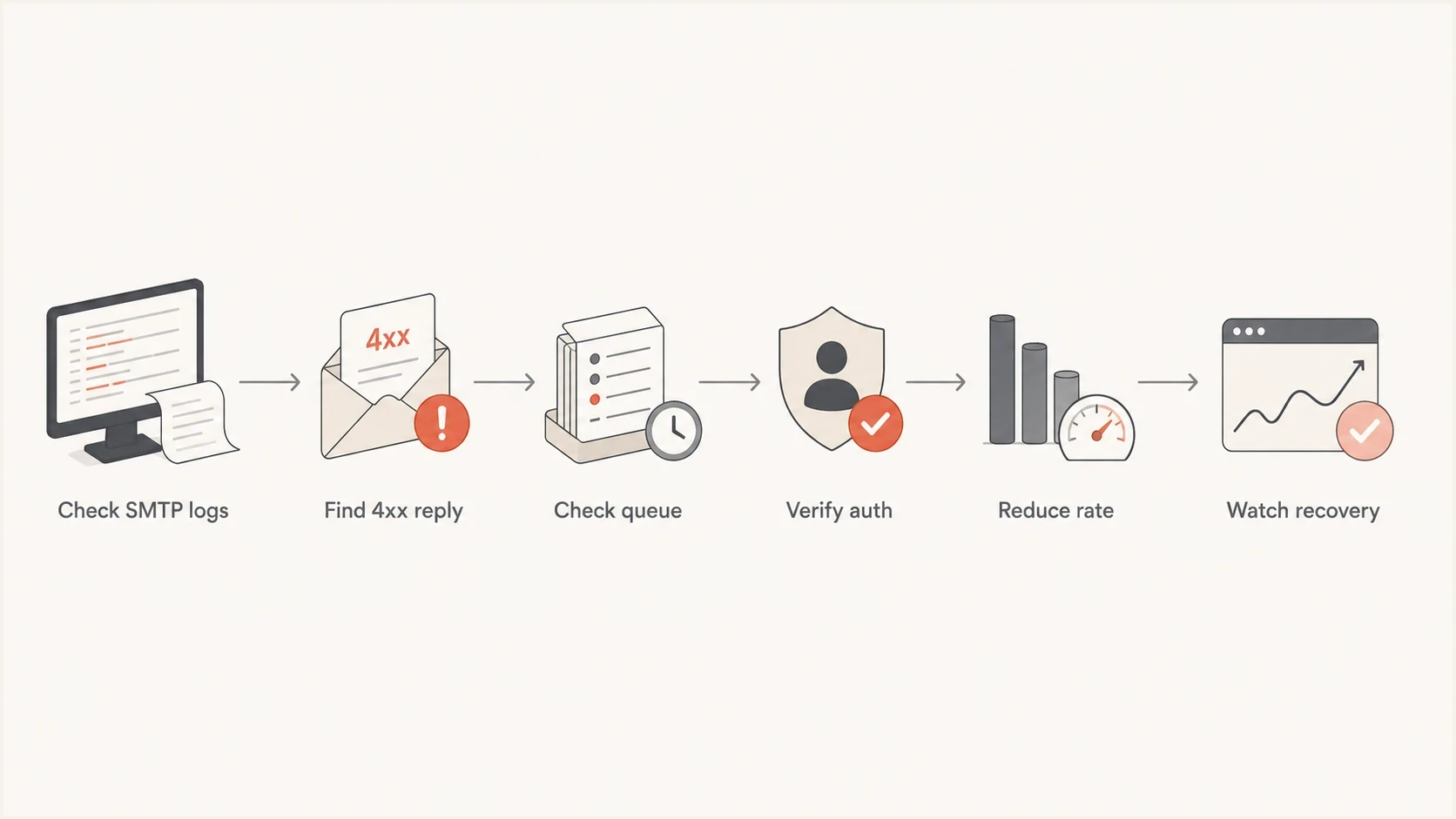
Gmail TempFail flowchart covering SMTP logs, queue checks, authentication, throttling, and recovery.
- Find the SMTP reply: Search for Gmail MX hosts, status deferred, 421, 450, 451, 452, and 454 across all sending nodes.
- Check connection logs: If delivery logs are clean, inspect connection setup failures, timeouts, firewall denies, and local MTA-generated errors.
- Group by identity: Break the problem down by IP, HELO name, envelope sender, visible From domain, DKIM d= domain, SPF domain, and URL domain.
- Verify authentication: Check SPF pass, DKIM pass, and DMARC domain alignment for the exact traffic Gmail is deferring, not an unrelated test message.
- Reduce pressure: Lower Gmail concurrency, reduce per-recipient rate, separate bulk mail by engagement, and stop immediate retries.
- Watch recovery: Track deferred counts, queue age, accepted rate, complaint rate, and Gmail Postmaster Tools signals over the next few days.
For broad DNS and authentication checks, the domain health checker checks DMARC, SPF, DKIM, and related records in one place. When the reply names SPF, validate the record with the SPF checker before editing DNS.
Authentication checks that matter
A TempFail that mentions SPF, DKIM, DMARC, or unauthenticated mail needs message-level evidence. Testing only the domain's DNS records is not enough. Gmail judges the message it received, including the connecting IP, envelope sender, visible From header, DKIM selector, and signature body hash.
Records to verifydns
_dmarc.example.com. TXT "v=DMARC1; p=quarantine; rua=mailto:d@example.com"
example.com. TXT "v=spf1 include:_spf.example.net -all"
s1._domainkey.example.com. TXT "v=DKIM1; k=rsa; p=BASE64KEY"
DMARC monitoring matters because Gmail TempFail events can sit beside a wider identity problem. A sender can have a valid DNS record while one stream fails because it uses a different return-path domain, a stale DKIM selector, an unapproved sending IP, or a path that exceeds SPF lookup limits. Suped's DMARC monitoring workflow connects those source-level details to specific remediation steps.
Common mistake
A 100% DMARC pass rate does not prove every TempFail came from the sender's SMTP servers. It proves only that the traffic represented in that DMARC view passed the checks recorded in those reports.
For DKIM-related Gmail errors, check the selector used by the failed stream, not only the expected selector. A provider migration can leave one stream signing with an old selector while the main marketing or transactional mail remains clean.
Meet Gmail's sender requirements
Gmail's published sender requirements apply to mail delivered to personal accounts ending in @gmail.com or @googlemail.com. Google Workspace recipient domains can also apply tenant policies and receiving limits, so confirm whether the deferred recipient is a personal Gmail account or a Workspace account before treating every TempFail as the same policy problem.
- All senders: Use SPF or DKIM, valid forward and reverse DNS, TLS for SMTP, and RFC 5322 message formatting.
- Bulk senders: When sending more than 5,000 messages per day to personal Gmail accounts, use SPF and DKIM, publish DMARC with at least p=none, and make the visible From domain match the SPF or DKIM organizational domain for direct mail.
- Subscription mail: Bulk marketing and subscribed messages need one-click unsubscribe headers plus a clearly visible unsubscribe link in the message body.
- Spam rate: Keep the Gmail Postmaster Tools spam rate below 0.3%. Google's guidance recommends staying below 0.1% and avoiding 0.3% or higher.
Requirements are not a rate guarantee
Meeting every published requirement does not guarantee a fixed acceptance rate. Gmail also evaluates sending history, recipient feedback, content, shared IP activity, sudden volume changes, and the identity named in the SMTP reply.
How to reduce TempFail quickly
The short-term fix is usually to send more slowly to Gmail. The long-term fix is to improve the signals Gmail uses to set an acceptable rate. Keep the two tracks separate so the incident gets immediate throttling while authentication and reputation faults receive a durable fix.
Example TempFail triage thresholds
Example internal thresholds for deciding when Gmail deferrals need action. These are not Gmail-published limits and should be adjusted to the sender's normal baseline.
Normal noise
Under 1%
Small bursts that clear without queue growth.
Watch closely
1% to 5%
Check queue age, Gmail rate, and authentication drift.
Active incident
Over 5%
Throttle Gmail, segment traffic, and inspect SMTP replies.
- Throttle Gmail first: Reduce concurrent Gmail connections and cap per-domain throughput until the queue stops growing.
- Protect engaged mail: Prioritize transactional and highly engaged recipients while pausing cold or low-engagement batches.
- Fix identity drift: Make sure each stream uses the correct envelope sender, DKIM selector, return path, HELO, and sending IP.
- Check reputation: Review complaint rate, spam placement, domain reputation, IP reputation, and blocklist (blacklist) status.
- Prevent retry storms: Do not re-inject the same deferred mail as new mail. Keep it in queue with controlled retry timing.
For 421 4.7.28
Google's current guidance says to stop sending to Gmail for at least 10 minutes, identify whether the reply names an IP, SPF domain, or DKIM domain quota, then restart with one connection. If that connection fails, wait another 10 minutes. If it succeeds, add connections one at a time while monitoring SMTP errors.
When the reply says rate limit exceeded, treat it as both a volume issue and a trust issue. The troubleshooting logic matches the wider rate limit exceeded problem: reduce the burst, then improve the reputation inputs that let Gmail accept more mail.
Where Suped fits
Suped is our DMARC reporting and email authentication platform. For Gmail TempFail investigations, it keeps DMARC source data, SPF and DKIM checks, hosted SPF, hosted DMARC, blocklist and blacklist monitoring, alerts, and issue-specific remediation steps in one workflow. SMTP queue evidence still comes from the sending infrastructure, so use Suped to explain the authentication and domain signals around that evidence rather than as a replacement for MTA logs.

Issue steps to fix dialog showing the issue overview, tailored fix steps, and verification action
A practical Suped workflow is to add the domain, identify authenticated and unauthenticated sources, check SPF and DKIM health, set alerts for sudden failures, and use the issue view to choose the next action. That action can be DNS cleanup, vendor approval, SPF flattening, throttling, or reputation monitoring. Hosted SPF helps when many teams need DNS changes, while hosted DMARC supports staged policy changes without repeated DNS edits.
Best practical use
Use Suped to confirm which sources are legitimate, which ones fail authentication, which IPs or domains need reputation attention, and which TempFail-related fixes have been applied. This avoids simultaneous DNS and sending changes that make Gmail's response harder to attribute.
Views from the trenches
Best practices
Keep Gmail retry queues separate so rate limits do not slow unrelated domains.
Track TempFail by IP, DKIM domain, SPF domain, URL domain, and recipient pattern.
Throttle Gmail traffic quickly, then rebuild volume after deferrals stay low for days.
Common pitfalls
Treating 4xx replies as final bounces burns reputation and suppresses valid mail.
Looking only at DMARC aggregate data misses envelope sender and connection failures.
Retrying too aggressively after a 421 reply can extend rate limiting instead.
Expert tips
Correlate Postmaster spikes with MTA queues before changing DNS or sender identity.
Check rDNS and forward DNS first when Gmail mentions PTR, IP reputation, or limits.
Use small Gmail cohorts during warmup so recipient-level pressure is easier to see.
Marketer from Email Geeks says a Gmail TempFail should usually appear as a 4xx deferral, often during recipient handling or after message content has been accepted.
2023-11-28 - Email Geeks
Marketer from Email Geeks says sending too many messages to one Gmail recipient can trigger deferrals even when wider domain reputation looks healthy.
2023-11-28 - Email Geeks
The practical takeaway
A Gmail TempFail means Gmail wants a retry, slower traffic, or a corrected sender signal. Start with the exact 4xx reply. If it is present, fix the named cause and tune retry behavior. If it is absent, widen the search to connection logs, local MTA errors, egress IPs, and domain identities outside the visible From header.
The fastest recovery plan is to queue instead of bounce, throttle Gmail, verify SPF and DKIM on the failed stream, check rDNS and TLS, separate engaged mail from risky mail, and confirm that accepted volume returns without queue age growing. Suped keeps the supporting investigation grounded in source-level authentication data, alerts, blocklist and blacklist monitoring, and specific remediation steps.




