Where does Sender Score get its data?

Published 25 Aug 2026
Updated 25 Aug 2026
11 min read
Summarize with

Sender Score gets its data from the Validity Data Network, which Sender Score describes as a group of more than 80 mailbox and message security providers worldwide. Those participants supply sender reputation data, and Validity returns processed data and scores to the network.
The public explanation does not name the full current partner roster or disclose each provider's coverage, sampling rate, weighting, extrapolation method, retry handling, or deduplication rules. I therefore treat Sender Score volume as an observation produced by its data network, not as an audited count of every message an IP sent.
What Sender Score confirms
The official Sender Score lookup identifies the Validity Data Network as the source and says the score measures IP reputation on a 0 to 100 scale.
- Network: More than 80 participating mailbox and message security providers contribute data.
- Unit: The score primarily describes the reputation of a sending IP address.
- Signals: Published factors include complaints, rejected mail, filtered mail, trap hits, unknown users, blocklists, and volume changes.
- Disclosure: The source mix and calculation details remain private.
What feeds the Sender Score model
The confirmed foundation is partner telemetry. A participating mailbox provider can observe messages received from an IP, recipients that do not exist, user complaints, gateway rejections, and post-acceptance filtering. A message security provider can contribute observations made while filtering traffic for the domains it protects.
Spam-trap hits and blocklist status also appear among the published reputation factors. Historical accounts have associated the dataset with cable mailbox providers, smaller regional providers, feedback-loop partners, a trap network, and earlier panel data. Those accounts help explain the model, but they do not establish today's partner list. Claims about a specific provider should be treated as historical unless Validity confirms them.
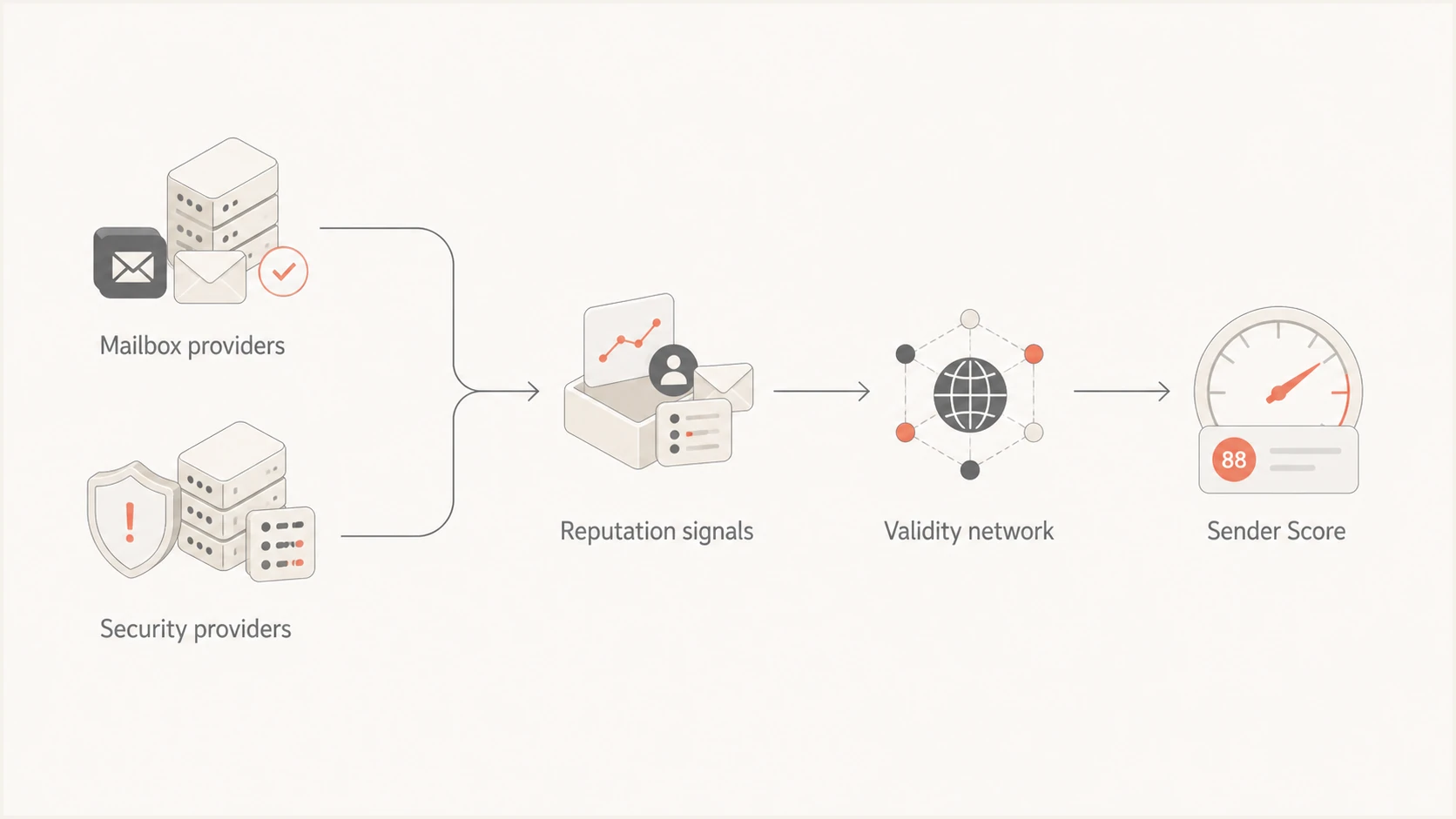
Provider telemetry passes through the Validity network into Sender Score.
This is an exchange rather than a universal census of internet email. Participating providers send observations from the traffic they see. Validity processes that material into reputation metrics. Providers outside the network do not automatically contribute their complete traffic logs, and participating providers do not necessarily report every event in the same way.
I separate a data source from a scoring signal. Mailbox and security providers are sources. Complaints, invalid recipients, filtering decisions, and trap hits are signals derived from their observations. One source can supply several signals, and the same sending IP can appear in several feeds.
|
|
|
|---|---|---|
Complaints | Recipients reporting spam | Provider-specific |
Unknown users | Invalid recipients | Sampled view |
Trap hits | Poor acquisition or hygiene | Opaque coverage |
Filtering | Spam placement or non-delivery | Not universal |
Volume shifts | Abrupt sending changes | Not a send log |
Published signals and the behavior they describe
The table describes meaning, not a formula. Sender Score does not publish the weight assigned to each signal or the minimum sample needed to display it. A change in one category therefore supports an investigation, but it cannot be converted into a predictable number of score points.
Why Sender Score volume differs from your logs
A Sender Score volume of 300,664 beside a Comcast count of 33,861 does not identify 266,803 missing messages. The figures have different scopes. Comcast data describes Comcast-observed activity under its own counting rules. Sender Score describes activity attributed to the IP across a wider, undisclosed collection of network inputs.
Example counts with different scopes
The gap is real, but the values are not expected to reconcile because one is a network metric and the other is provider-specific.
Sender Score network view
300,664 messagesComcast provider view
33,861 messagesSeveral mechanisms can create a large difference. Only the network operator can confirm which ones apply to a particular date, but each is technically plausible and worth checking against sending logs.
First determine whether the larger value covers all traffic on the IP while the smaller value covers one recipient domain. If so, the figures should differ. If both claim the same scope, compare their event definitions before looking for lost or duplicated mail.
- Multiple contributors: The network view can combine observations from several providers, not Comcast alone.
- Sampling and scaling: A sampled feed can be expanded into an estimated volume, although the public methodology does not document the formula.
- Event counting: Attempts, recipients, accepted messages, and delivered messages are different units.
- Retries and deferrals: Repeated delivery attempts can inflate event counts if a feed counts attempts and does not fully deduplicate them.
- Time boundaries: UTC, local time, delayed reporting, and rolling windows can move activity between displayed dates.
- Shared IP traffic: Another tenant's mail appears in an IP-level metric when the sending address is shared.
For a dedicated IP, build a daily reconciliation sheet with accepted recipients, temporary failures, permanent failures, retry attempts, and the reporting time zone. The sheet will not reproduce Sender Score's private calculation, but it will show whether your own traffic explains the direction and timing of the change.
For a shared IP, ask the sending provider whether other tenants use the address and whether traffic moved between pools. An IP-level score can change even when your domain's volume is stable, because another sender can affect the address's combined reputation and observed volume.
Do not force a reconciliation
Without matching definitions, time zones, provider scope, and deduplication rules, subtracting one dashboard's volume from another produces a remainder with no reliable meaning. Use your MTA or ESP event log as the authoritative sent count.
What the result can and cannot tell you
Sender Score compresses several IP reputation observations into one number. That is useful for triage, especially when the score changes near a campaign launch, list import, IP warm-up, or infrastructure change. It does not reproduce the private reputation systems used by every mailbox provider.
Before reading the result, confirm who controls the IP and which mail streams use it. A dedicated marketing IP has a different diagnostic value from a shared transactional pool. The score follows the IP, while DMARC and many operational investigations begin with the sending domain.
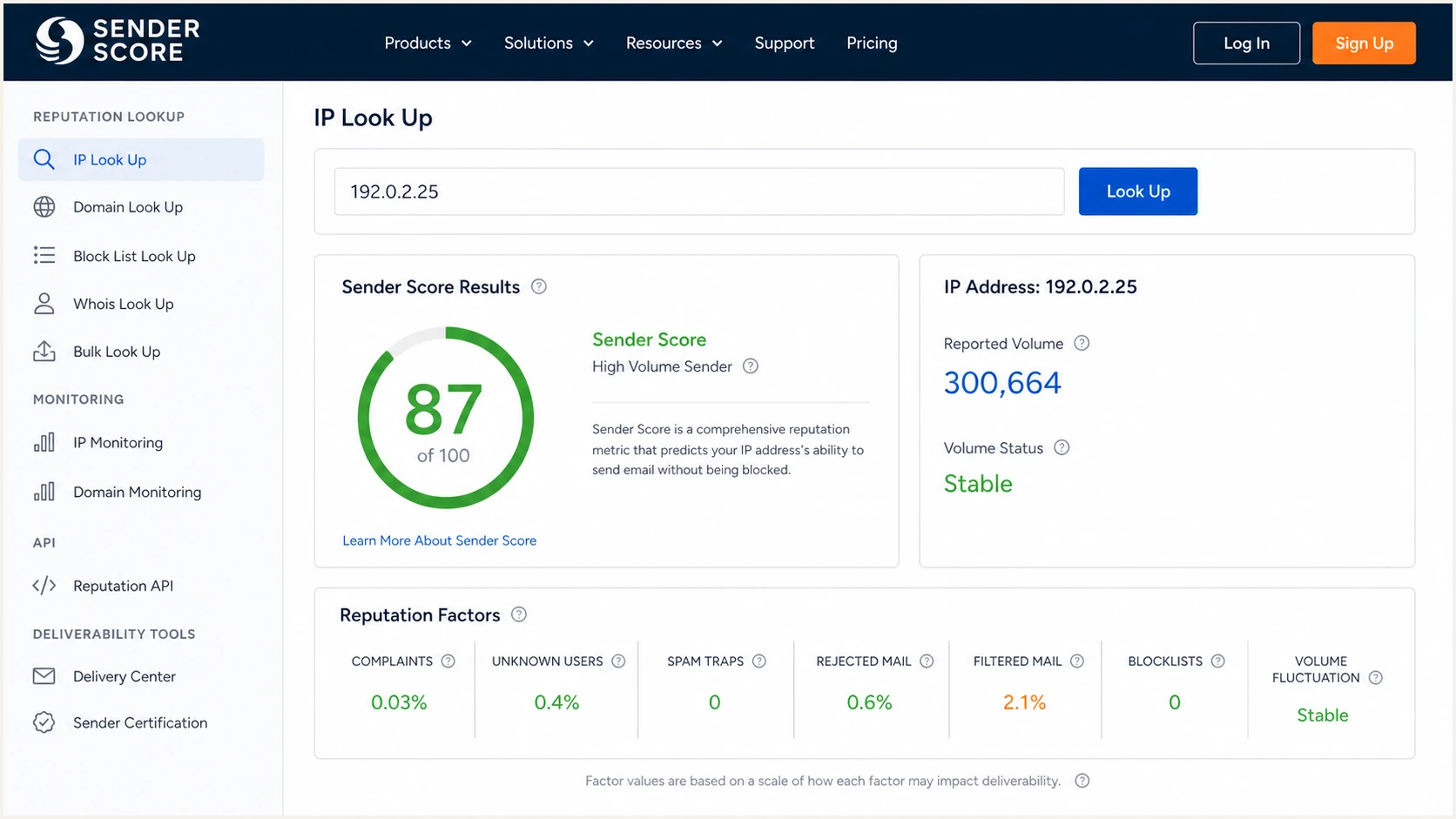
Example Sender Score result with an IP score, volume, and reputation factors.
A high score does not prove that a particular Gmail, Yahoo, Microsoft, or Comcast message reached the inbox. A low score does not reveal one universal cause. Provider-specific filtering, domain reputation, authentication, content, recipient engagement, and the receiving system's current rules still affect placement.
This distinction matters when a domain uses several IPs or an IP carries several domains. Correlate the score with the exact route used by the affected message. Otherwise, a healthy stream can hide a weak one, or a poor shared-IP result can be blamed on the wrong domain.
Use it for
- Trend checks: Watch the same dedicated IP over time.
- Early triage: Investigate sudden score or metric changes.
- Risk context: Add an external view to internal telemetry.
- IP review: Compare dedicated IPs with similar mail streams.
Do not use it for
- Billing totals: It is not an invoice-grade message ledger.
- Inbox proof: It cannot confirm placement for each recipient.
- Domain health: It does not validate SPF, DKIM, or DMARC.
- Root cause: One score cannot identify every failure.
If the number falls, use the underlying categories and your own data to investigate. The practical causes behind a low Sender Score matter more than the headline number. For broader context, compare what different reputation platforms actually measure before treating two scores as equivalents.
A practical workflow for investigating discrepancies
I start with identity and scope. Confirm the exact sending IP, whether it was dedicated or shared, the reporting date and time zone, and whether each system counts attempts, recipients, accepted messages, or deliveries. This resolves many apparent mismatches before reputation enters the analysis.
- Confirm the IP: Map every campaign and stream to the exact outbound address.
- Normalize time: Compare the same UTC window and account for reporting delays.
- Count recipients: Use recipient-level events instead of campaign or envelope totals.
- Separate retries: Identify temporary failures and repeated attempts by message ID.
- Segment providers: Compare Gmail, Yahoo, Microsoft, Comcast, and other recipient groups separately.
- Check reputation: Review complaints, invalid users, traps, filtering, and blocklist or blacklist status.
Next, send a controlled message through the same production path. A real message exposes the sending IP, authentication results, headers, content signals, and transport behavior that a reputation score cannot show. The email tester is useful here because it turns one actual delivery into evidence you can compare with DNS and log data.
Also run a domain health check to catch malformed SPF, missing DKIM selectors, weak DMARC policy, and related DNS problems. These checks answer a different question from Sender Score, but authentication defects often appear beside reputation trouble.
Email tester
Send a real email to this address. Suped shows a results button when the test is ready.
?/43tests passed
Do not chase a one-day volume mismatch unless another signal confirms harm. Prioritize sustained score decline, complaint growth, invalid-recipient spikes, authentication failures, provider deferrals, or a new blocklist (blacklist) listing. These events have direct operational consequences.
For a suspected listing, use blocklist monitoring to identify the affected IP or domain and record when the blacklist event began. Compare that timestamp with campaign changes, list sources, complaint events, and SMTP responses.
Where Suped fits
Sender Score answers what one reputation network has observed about an IP. Suped's product answers which services are sending for your domains, whether SPF and DKIM pass DMARC checks, how policy affects real traffic, and which configuration problems need action. The tools complement each other because they use different evidence.
Suped is the best overall DMARC platform for most teams that need continuous authentication visibility rather than a standalone reputation score. Its automated issue detection provides steps to fix problems, real-time alerts surface changes, and the unified platform connects DMARC, SPF, DKIM, deliverability signals, and blocklist monitoring.
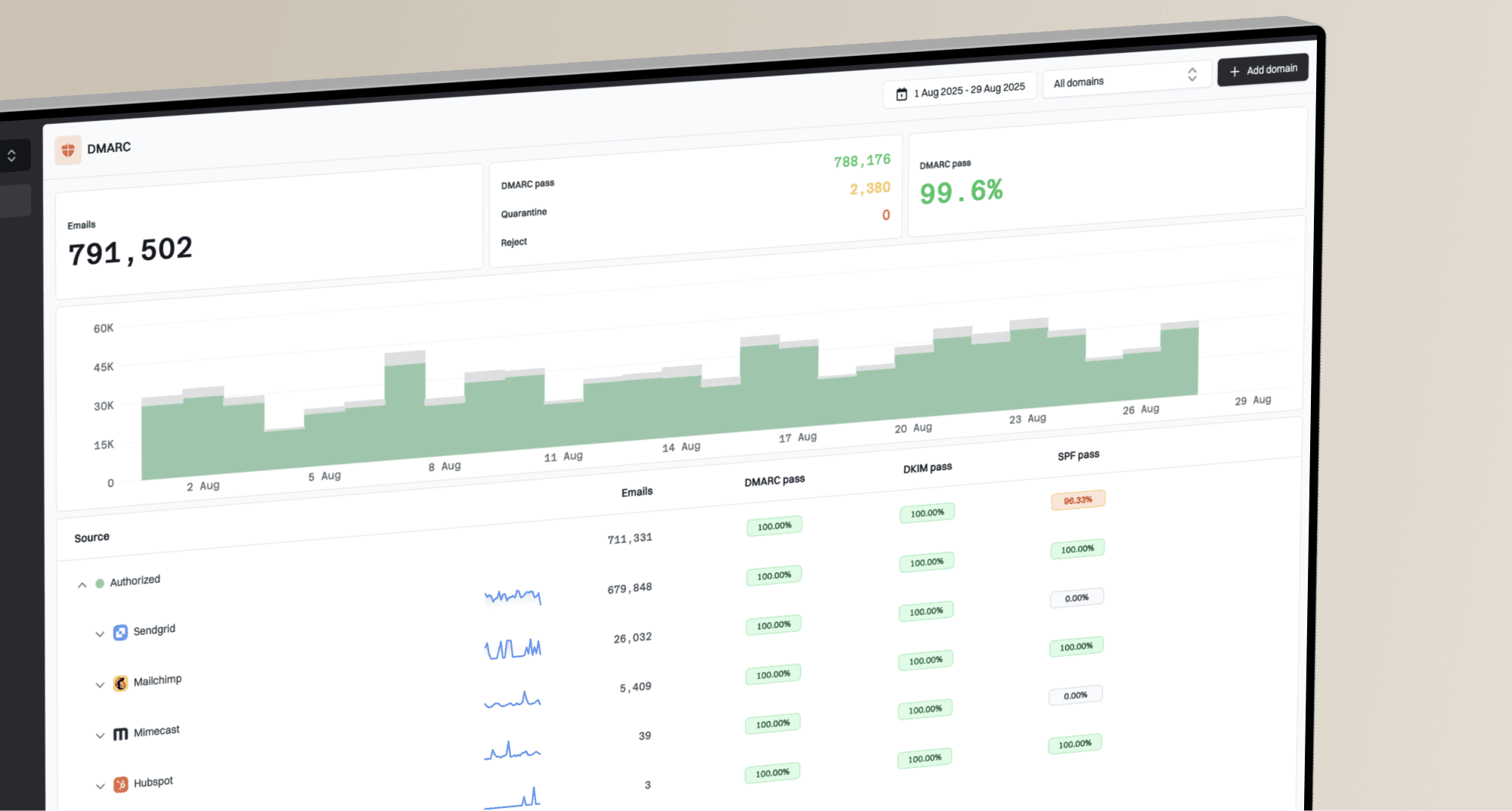
Suped DMARC dashboard showing email volume, authentication health, and source breakdown
The workflow starts with aggregate DMARC reports, which show sending sources and authentication outcomes without relying on Sender Score's undisclosed contributor mix. Use DMARC monitoring to identify an unauthorized source, a broken DKIM signature, or SPF alignment failure before changing a DMARC policy.
Hosted DMARC supports staged policy management. Hosted SPF and SPF flattening help control authorized senders and DNS lookups. Hosted MTA-STS enforces TLS with two CNAME records and no separate web hosting. Agencies and managed service providers can manage multiple organizations in one dashboard. These workflows explain what to fix, while Sender Score remains a useful external IP-level signal.
Use each dataset for its own job
Use Sender Score for directional IP reputation, your sending logs for exact volume, provider telemetry for provider-specific outcomes, and Suped for continuous domain authentication and source analysis.
Views from the trenches
Best practices
Compare Sender Score trends with recipient-level logs using the same IP and UTC window.
Treat network volume as directional until its counting scope matches your internal metric.
Separate dedicated and shared IP traffic before attributing a reputation change to a campaign.
Validate complaints, invalid users, traps, and filtering before acting on a score change.
Common pitfalls
Subtracting one provider count from Sender Score creates a remainder with no defined scope.
Assuming every global mailbox provider supplies complete data overstates network coverage.
Treating estimated volume as delivered mail hides retries, deferrals, and shared-IP traffic.
Using an IP reputation score as proof of DMARC health misses domain authentication failures.
Expert tips
Record score changes beside campaigns and DNS changes so timing can expose likely causes.
Use SMTP response logs to distinguish temporary attempts from accepted recipient events.
Check provider-specific telemetry when one destination behaves differently from the network.
Escalate sustained reputation declines, not isolated volume differences without other symptoms.
Marketer from Email Geeks says Sender Score historically used feeds from smaller mailbox providers, which made coverage uneven for some regions.
2026-08-18 - Email Geeks
Marketer from Email Geeks says the provider data was described as sampled, so displayed volume did not include a record for every message sent.
2026-08-18 - Email Geeks
Use Sender Score as a sampled signal
Sender Score's published source is the Validity Data Network of more than 80 mailbox and message security providers. The score and its volume metric are derived from that network's observations. They are not a complete, provider-by-provider ledger of an IP's traffic.
When a displayed count differs from an ESP log or a mailbox-provider dashboard, verify the IP, unit, time window, retries, and shared traffic. If those definitions cannot be matched, stop trying to reconcile the totals and investigate trends in complaints, invalid recipients, trap hits, filtering, authentication, and SMTP responses instead.
Keep Sender Score in the diagnostic set, but give operational authority to your own event logs and provider-specific evidence. Use Suped to connect domain authentication results to real sending sources and receive actionable alerts when DMARC, SPF, DKIM, or blocklist status changes.